The Development of a  Self-Instructional Module Penny Pereboom May 5, 2008 Web 2.0  Tools for Teachers
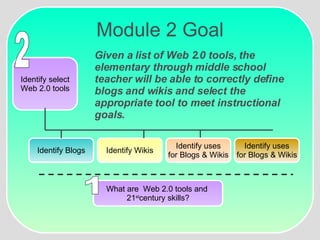
Module 2 Goal Given a list of Web 2.0 tools, the elementary through middle school teacher will be able to correctly define blogs and wikis and select the appropriate tool to meet instructional goals. Identify Blogs Identify Wikis Identify uses for Blogs & Wikis Identify uses for Blogs & Wikis Identify select Web 2.0 tools 2 What are  Web 2.0 tools and  21 st century skills? 1
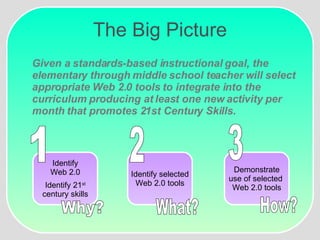
The Big Picture Given a standards-based instructional goal, the elementary through middle school teacher will select appropriate Web 2.0 tools to integrate into the curriculum producing at least one new activity per month that promotes 21st Century Skills. Why? What? How? Identify Web 2.0 Identify 21 st century skills 1 Demonstrate use of selected  Web 2.0 tools 3 Identify selected Web 2.0 tools 2
Module Overview Gain and Maintain Attention Web 2.0 Tools You Can Use
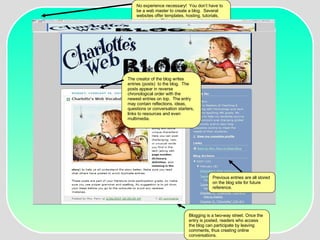
The creator of the blog writes entries (posts)  to the blog.  The posts appear in reverse chronological order with the newest entries on top.  The entry may contain reflections, ideas, questions or conversation starters, links to resources and even multimedia.  Blogging is a two-way street. Once the entry is posted, readers who access the blog can participate by leaving comments, thus creating online conversations.  Previous entries are all stored on the blog site for future reference. No experience necessary!  You don’t have to be a web master to create a blog.  Several websites offer templates, hosting, tutorials, and advice.  This site was created at www.blogger.com
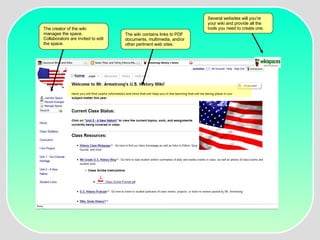
The creator of the wiki manages the space.  Collaborators are invited to edit the space. The wiki contains links to PDF documents, multimedia, and/or other pertinent web sites.  Several websites will you’re your wiki and provide all the tools you need to create one.
Module Overview Gain and Maintain Attention Stimulate Recall Web 2.0 Tools You Can Use
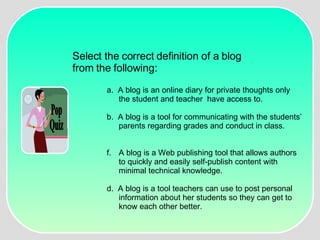
Pop Quiz Select the correct definition of a blog  from the following: a.  A blog is an online diary for private thoughts only the student and teacher  have access to. b.  A blog is a tool for communicating with the students’ parents regarding grades and conduct in class. A blog is a Web publishing tool that allows authors to quickly and easily self-publish content with minimal technical knowledge. d.  A blog is a tool teachers can use to post personal information about her students so they can get to know each other better.
Module Overview Gain and Maintain Attention Stimulate Recall Inform Learner of Objectives Web 2.0 Tools You Can Use
Module Overview Gain and Maintain Attention Stimulate Recall Inform Learner of Objectives Present Stimulus Web 2.0 Tools You Can Use
Module Overview Gain and Maintain Attention Stimulate Recall Inform Learner of Objectives Present Stimulus Provide Guidance Web 2.0 Tools You Can Use
Module Sneak Peak Gain and Maintain Attention Stimulate Recall Inform Learner of Objectives Present Stimulus Provide Guidance Elicit Performance Web 2.0 Tools You Can Use
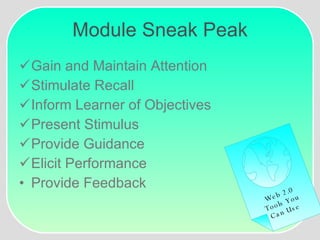
Module Sneak Peak Gain and Maintain Attention Stimulate Recall Inform Learner of Objectives Present Stimulus Provide Guidance Elicit Performance Provide Feedback Web 2.0 Tools You Can Use
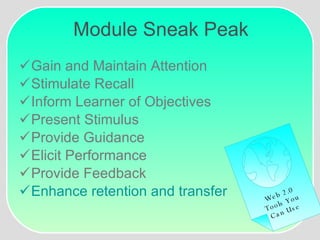
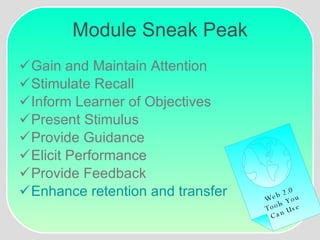
Module Sneak Peak Gain and Maintain Attention Stimulate Recall Inform Learner of Objectives Present Stimulus Provide Guidance Elicit Performance Provide Feedback Enhance retention and transfer Web 2.0 Tools You Can Use
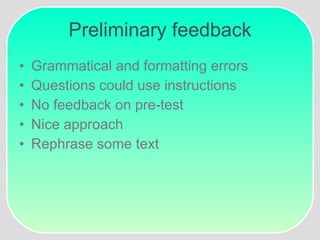
Preliminary feedback Grammatical and formatting errors Questions could use instructions No feedback on pre-test  Nice approach Rephrase some text
Preliminary Revisions Took out WebQuests Grammatical and formatting Removed feedback from pre-test Added and revised content
Rejected Revisions Add non-examples Take out Charlotte’s web blog
Evaluator #1 Middle School Spanish teacher and co-worker  Reluctant to integrate internet technology No previous experience with Web 2.0 tools “ So this is where I can put podcasts in Espanol?” “ Take out Google Docs.” “ I love the graphics!”
Evaluator #2 First Grade Teacher Anxious to incorporate more technology into her curriculum No previous experience with Web 2.0 tools “ Is this hard to create? How time consuming is creating a blog or a wiki?”   “ Why not include info on where you can create blogs and wikis for those of us that want to get started?”
Evaluator #3 Sixth grade teacher Anxious to incorporate more technology into her curriculum Has started using blogs in her classroom “ I’m glad this is going to be self-instructional because I already know all this and I can finish it up pretty quickly rather than sitting in a 45 minute class.  It’s a great reference though and I’d like to use it with the students as well.”
One-on-one setting After school in the computer lab. Teachers individually went through the module as I observed and took notes. Facial expressions Time (30 minutes) Comments
Feedback Examples were great and module should include more. Additional non-verbal comments Chose teachers that are honest and constructively critical Great benefit towards the project Dispelled assumptions
Additional Revisions Took out Google Docs Included information on where to go next Added a couple of more examples
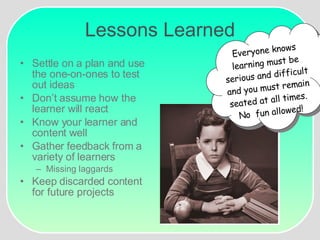
Lessons Learned Settle on a plan and use the one-on-ones to test out ideas Don’t assume how the learner will react Know your learner and content well Gather feedback from a variety of learners Missing laggards Keep discarded content for future projects ??? Everyone knows learning must be serious and difficult and you must remain seated at all times.  No  fun allowed!
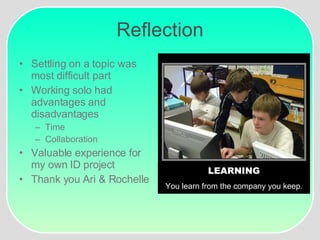
Reflection Settling on a topic was most difficult part Working solo had advantages and disadvantages Time Collaboration Valuable experience for my own ID project Thank you Ari & Rochelle LEARNING You learn from the company you keep.
Implications for Further Study A self-instructional  module on downloading  a life after getting your  ETEC masters
Implications for Further Study Using Wikis to Support Professional Development Coming soon!  (keep your  fingers crossed!)

Id Presentation

  • 1.
    The Development ofa Self-Instructional Module Penny Pereboom May 5, 2008 Web 2.0 Tools for Teachers
  • 2.
    Module 2 GoalGiven a list of Web 2.0 tools, the elementary through middle school teacher will be able to correctly define blogs and wikis and select the appropriate tool to meet instructional goals. Identify Blogs Identify Wikis Identify uses for Blogs & Wikis Identify uses for Blogs & Wikis Identify select Web 2.0 tools 2 What are Web 2.0 tools and 21 st century skills? 1
  • 3.
    The Big PictureGiven a standards-based instructional goal, the elementary through middle school teacher will select appropriate Web 2.0 tools to integrate into the curriculum producing at least one new activity per month that promotes 21st Century Skills. Why? What? How? Identify Web 2.0 Identify 21 st century skills 1 Demonstrate use of selected Web 2.0 tools 3 Identify selected Web 2.0 tools 2
  • 4.
    Module Overview Gainand Maintain Attention Web 2.0 Tools You Can Use
  • 5.
    The creator ofthe blog writes entries (posts) to the blog. The posts appear in reverse chronological order with the newest entries on top. The entry may contain reflections, ideas, questions or conversation starters, links to resources and even multimedia. Blogging is a two-way street. Once the entry is posted, readers who access the blog can participate by leaving comments, thus creating online conversations. Previous entries are all stored on the blog site for future reference. No experience necessary! You don’t have to be a web master to create a blog. Several websites offer templates, hosting, tutorials, and advice. This site was created at www.blogger.com
  • 6.
    The creator ofthe wiki manages the space. Collaborators are invited to edit the space. The wiki contains links to PDF documents, multimedia, and/or other pertinent web sites. Several websites will you’re your wiki and provide all the tools you need to create one.
  • 7.
    Module Overview Gainand Maintain Attention Stimulate Recall Web 2.0 Tools You Can Use
  • 8.
    Pop Quiz Selectthe correct definition of a blog from the following: a. A blog is an online diary for private thoughts only the student and teacher have access to. b. A blog is a tool for communicating with the students’ parents regarding grades and conduct in class. A blog is a Web publishing tool that allows authors to quickly and easily self-publish content with minimal technical knowledge. d. A blog is a tool teachers can use to post personal information about her students so they can get to know each other better.
  • 9.
    Module Overview Gainand Maintain Attention Stimulate Recall Inform Learner of Objectives Web 2.0 Tools You Can Use
  • 10.
    Module Overview Gainand Maintain Attention Stimulate Recall Inform Learner of Objectives Present Stimulus Web 2.0 Tools You Can Use
  • 11.
    Module Overview Gainand Maintain Attention Stimulate Recall Inform Learner of Objectives Present Stimulus Provide Guidance Web 2.0 Tools You Can Use
  • 12.
    Module Sneak PeakGain and Maintain Attention Stimulate Recall Inform Learner of Objectives Present Stimulus Provide Guidance Elicit Performance Web 2.0 Tools You Can Use
  • 13.
    Module Sneak PeakGain and Maintain Attention Stimulate Recall Inform Learner of Objectives Present Stimulus Provide Guidance Elicit Performance Provide Feedback Web 2.0 Tools You Can Use
  • 14.
    Module Sneak PeakGain and Maintain Attention Stimulate Recall Inform Learner of Objectives Present Stimulus Provide Guidance Elicit Performance Provide Feedback Enhance retention and transfer Web 2.0 Tools You Can Use
  • 15.
    Module Sneak PeakGain and Maintain Attention Stimulate Recall Inform Learner of Objectives Present Stimulus Provide Guidance Elicit Performance Provide Feedback Enhance retention and transfer Web 2.0 Tools You Can Use
  • 16.
    Preliminary feedback Grammaticaland formatting errors Questions could use instructions No feedback on pre-test Nice approach Rephrase some text
  • 17.
    Preliminary Revisions Tookout WebQuests Grammatical and formatting Removed feedback from pre-test Added and revised content
  • 18.
    Rejected Revisions Addnon-examples Take out Charlotte’s web blog
  • 19.
    Evaluator #1 MiddleSchool Spanish teacher and co-worker Reluctant to integrate internet technology No previous experience with Web 2.0 tools “ So this is where I can put podcasts in Espanol?” “ Take out Google Docs.” “ I love the graphics!”
  • 20.
    Evaluator #2 FirstGrade Teacher Anxious to incorporate more technology into her curriculum No previous experience with Web 2.0 tools “ Is this hard to create? How time consuming is creating a blog or a wiki?” “ Why not include info on where you can create blogs and wikis for those of us that want to get started?”
  • 21.
    Evaluator #3 Sixthgrade teacher Anxious to incorporate more technology into her curriculum Has started using blogs in her classroom “ I’m glad this is going to be self-instructional because I already know all this and I can finish it up pretty quickly rather than sitting in a 45 minute class. It’s a great reference though and I’d like to use it with the students as well.”
  • 22.
    One-on-one setting Afterschool in the computer lab. Teachers individually went through the module as I observed and took notes. Facial expressions Time (30 minutes) Comments
  • 23.
    Feedback Examples weregreat and module should include more. Additional non-verbal comments Chose teachers that are honest and constructively critical Great benefit towards the project Dispelled assumptions
  • 24.
    Additional Revisions Tookout Google Docs Included information on where to go next Added a couple of more examples
  • 25.
    Lessons Learned Settleon a plan and use the one-on-ones to test out ideas Don’t assume how the learner will react Know your learner and content well Gather feedback from a variety of learners Missing laggards Keep discarded content for future projects ??? Everyone knows learning must be serious and difficult and you must remain seated at all times. No fun allowed!
  • 26.
    Reflection Settling ona topic was most difficult part Working solo had advantages and disadvantages Time Collaboration Valuable experience for my own ID project Thank you Ari & Rochelle LEARNING You learn from the company you keep.
  • 27.
    Implications for FurtherStudy A self-instructional module on downloading a life after getting your ETEC masters
  • 28.
    Implications for FurtherStudy Using Wikis to Support Professional Development Coming soon! (keep your fingers crossed!)