VB.NET:- Decision Statements
BCA -501
2
Content
 Introduction
 If-Then Statement
 If-Then Else Statement
 If-Then ElseIf Statement
 Select Case Statement
 Nested Select Case Statements
3
What is Decision Statement?
 Decision making structures require that the programmer specify one or more
conditions to be evaluated or tested by the program, along with a statement or
statements to be executed if the condition is determined to be true, and optionally,
other statements to be executed if the condition is determined to be false.
 It is also known as Control Statements
 It is useful for determining whether a condition is true or not. If the condition is true,
a single or block of statement is executed.
 In the control statement, we will use if- Then, if Then Else, if Then ElseIf and
the Select case statement.
4
What is Decision Statement?
 Whenever an action has to be taken based on the outcome of a condition, decision
construct comes into picture.
 VB.NET supports decision constructs in the form of:
1. If..End If statements
2. If..Else…Endif Statements
3. Nested If Statements
4. Select Case … End Case statement
5. Nested Select Case
5
If-Statement
The If-Then Statement is a control
statement that defines one or more
conditions, and if the particular condition
is satisfied, it executes a piece of
information or statements.
If condition Then
[Statement or block of Statement]
End If
The Then keyword is optional.
6
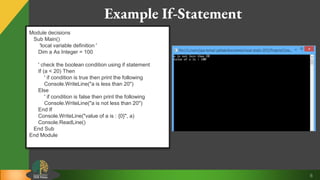
Example If-Statement
Module decisions
Sub Main()
'local variable definition '
Dim a As Integer = 100
' check the boolean condition using if statement
If (a < 20) Then
' if condition is true then print the following
Console.WriteLine("a is less than 20")
Else
' if condition is false then print the following
Console.WriteLine("a is not less than 20")
End If
Console.WriteLine("value of a is : {0}", a)
Console.ReadLine()
End Sub
End Module
7
If…Eles If-Statement
 An If statement can be followed by an optional Else if...Else statement, which is very useful
to test various conditions using single If...Else If statement.
 When using If... Else If... Else statements, there are few points to keep in mind.
1. An If can have zero or one Else's and it must come after an Else If's.
2. An If can have zero to many Else If's and they must come before the Else.
3. Once an Else if succeeds, none of the remaining Else If's or Else's will be tested.
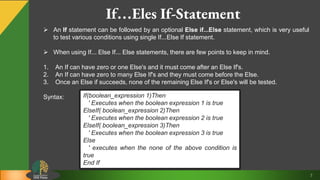
Syntax: If(boolean_expression 1)Then
' Executes when the boolean expression 1 is true
ElseIf( boolean_expression 2)Then
' Executes when the boolean expression 2 is true
ElseIf( boolean_expression 3)Then
' Executes when the boolean expression 3 is true
Else
' executes when the none of the above condition is
true
End If
8
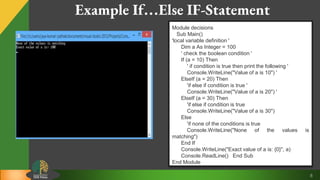
Example If…Else IF-Statement
Module decisions
Sub Main()
'local variable definition '
Dim a As Integer = 100
' check the boolean condition '
If (a = 10) Then
' if condition is true then print the following '
Console.WriteLine("Value of a is 10") '
ElseIf (a = 20) Then
'if else if condition is true '
Console.WriteLine("Value of a is 20") '
ElseIf (a = 30) Then
'if else if condition is true
Console.WriteLine("Value of a is 30")
Else
'if none of the conditions is true
Console.WriteLine("None of the values is
matching")
End If
Console.WriteLine("Exact value of a is: {0}", a)
Console.ReadLine() End Sub
End Module
9
Nested- If-Statement
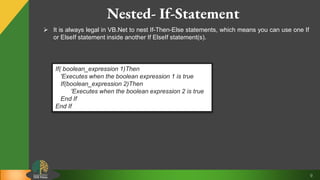
 It is always legal in VB.Net to nest If-Then-Else statements, which means you can use one If
or ElseIf statement inside another If ElseIf statement(s).
If( boolean_expression 1)Then
'Executes when the boolean expression 1 is true
If(boolean_expression 2)Then
'Executes when the boolean expression 2 is true
End If
End If
10
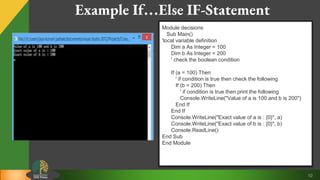
Example If…Else IF-Statement
Module decisions
Sub Main()
'local variable definition
Dim a As Integer = 100
Dim b As Integer = 200
' check the boolean condition
If (a = 100) Then
' if condition is true then check the following
If (b = 200) Then
' if condition is true then print the following
Console.WriteLine("Value of a is 100 and b is 200")
End If
End If
Console.WriteLine("Exact value of a is : {0}", a)
Console.WriteLine("Exact value of b is : {0}", b)
Console.ReadLine()
End Sub
End Module
11
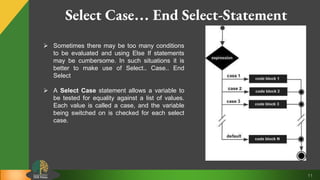
Select Case… End Select-Statement
 Sometimes there may be too many conditions
to be evaluated and using Else If statements
may be cumbersome. In such situations it is
better to make use of Select.. Case.. End
Select
 A Select Case statement allows a variable to
be tested for equality against a list of values.
Each value is called a case, and the variable
being switched on is checked for each select
case.
12
Select Case… End Select-Statement
Select [ Case ] expression
[ Case expressionlist
[ statements ] ]
[ Case Else
[ elsestatements ] ]
End Select
Where,
•expression − is an expression that must evaluate to
any of the elementary data type in VB.Net, i.e.,
Boolean, Byte, Char, Date, Double, Decimal, Integer,
Long, Object, SByte, Short, Single, String, UInteger,
ULong, and UShort.
•expressionlist − List of expression clauses
representing match values for expression. Multiple
expression clauses are separated by commas.
•statements − statements following Case that run if the
select expression matches any clause in expressionlist.
•elsestatements − statements following Case Else that
run if the select expression does not match any clause
in the expressionlist of any of the Case statements
13
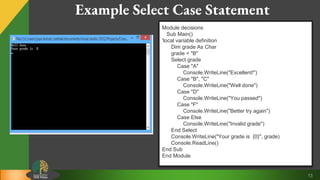
Example Select Case Statement
Module decisions
Sub Main()
'local variable definition
Dim grade As Char
grade = "B"
Select grade
Case "A"
Console.WriteLine("Excellent!")
Case "B", "C"
Console.WriteLine("Well done")
Case "D"
Console.WriteLine("You passed")
Case "F"
Console.WriteLine("Better try again")
Case Else
Console.WriteLine("Invalid grade")
End Select
Console.WriteLine("Your grade is {0}", grade)
Console.ReadLine()
End Sub
End Module
14
Nested Select Case… End Select-Statement
 It is possible to have a select statement
as part of the statement sequence of an
outer select statement.
 Even if the case constants of the inner
and outer select contain common values,
no conflicts will arise
Module decisions
Sub Main()
'local variable definition
Dim a As Integer = 100
Dim b As Integer = 200
Select a ‘outer select case
Case 100
Console.WriteLine("This is part of outer case ")
Select Case b ‘inner select case
Case 200
Console.WriteLine("This is part of inner case
")
End Select
End Select
Console.WriteLine("Exact value of a is : {0}", a)
Console.WriteLine("Exact value of b is : {0}", b)
Console.ReadLine()
End Sub
End Module
15
Short-Circuited If Statements
 Given an If statement with two conditions, if the outcome can be determined without
evaluating each of the If conditions separately, it is called sjortcircuiting.
If x >y OR x > z
 Since an OR operator combines the two conditions, only one of the two conditions needs
to be True for the resultant outcome to be True. Hence it is not essential that the second
condition is evaluated once the First Conditions evaluated to True.
 Shortcircuiting if statements save time as there is no need to check both conditions.

Decision statements

  • 1.
  • 2.
    2 Content  Introduction  If-ThenStatement  If-Then Else Statement  If-Then ElseIf Statement  Select Case Statement  Nested Select Case Statements
  • 3.
    3 What is DecisionStatement?  Decision making structures require that the programmer specify one or more conditions to be evaluated or tested by the program, along with a statement or statements to be executed if the condition is determined to be true, and optionally, other statements to be executed if the condition is determined to be false.  It is also known as Control Statements  It is useful for determining whether a condition is true or not. If the condition is true, a single or block of statement is executed.  In the control statement, we will use if- Then, if Then Else, if Then ElseIf and the Select case statement.
  • 4.
    4 What is DecisionStatement?  Whenever an action has to be taken based on the outcome of a condition, decision construct comes into picture.  VB.NET supports decision constructs in the form of: 1. If..End If statements 2. If..Else…Endif Statements 3. Nested If Statements 4. Select Case … End Case statement 5. Nested Select Case
  • 5.
    5 If-Statement The If-Then Statementis a control statement that defines one or more conditions, and if the particular condition is satisfied, it executes a piece of information or statements. If condition Then [Statement or block of Statement] End If The Then keyword is optional.
  • 6.
    6 Example If-Statement Module decisions SubMain() 'local variable definition ' Dim a As Integer = 100 ' check the boolean condition using if statement If (a < 20) Then ' if condition is true then print the following Console.WriteLine("a is less than 20") Else ' if condition is false then print the following Console.WriteLine("a is not less than 20") End If Console.WriteLine("value of a is : {0}", a) Console.ReadLine() End Sub End Module
  • 7.
    7 If…Eles If-Statement  AnIf statement can be followed by an optional Else if...Else statement, which is very useful to test various conditions using single If...Else If statement.  When using If... Else If... Else statements, there are few points to keep in mind. 1. An If can have zero or one Else's and it must come after an Else If's. 2. An If can have zero to many Else If's and they must come before the Else. 3. Once an Else if succeeds, none of the remaining Else If's or Else's will be tested. Syntax: If(boolean_expression 1)Then ' Executes when the boolean expression 1 is true ElseIf( boolean_expression 2)Then ' Executes when the boolean expression 2 is true ElseIf( boolean_expression 3)Then ' Executes when the boolean expression 3 is true Else ' executes when the none of the above condition is true End If
  • 8.
    8 Example If…Else IF-Statement Moduledecisions Sub Main() 'local variable definition ' Dim a As Integer = 100 ' check the boolean condition ' If (a = 10) Then ' if condition is true then print the following ' Console.WriteLine("Value of a is 10") ' ElseIf (a = 20) Then 'if else if condition is true ' Console.WriteLine("Value of a is 20") ' ElseIf (a = 30) Then 'if else if condition is true Console.WriteLine("Value of a is 30") Else 'if none of the conditions is true Console.WriteLine("None of the values is matching") End If Console.WriteLine("Exact value of a is: {0}", a) Console.ReadLine() End Sub End Module
  • 9.
    9 Nested- If-Statement  Itis always legal in VB.Net to nest If-Then-Else statements, which means you can use one If or ElseIf statement inside another If ElseIf statement(s). If( boolean_expression 1)Then 'Executes when the boolean expression 1 is true If(boolean_expression 2)Then 'Executes when the boolean expression 2 is true End If End If
  • 10.
    10 Example If…Else IF-Statement Moduledecisions Sub Main() 'local variable definition Dim a As Integer = 100 Dim b As Integer = 200 ' check the boolean condition If (a = 100) Then ' if condition is true then check the following If (b = 200) Then ' if condition is true then print the following Console.WriteLine("Value of a is 100 and b is 200") End If End If Console.WriteLine("Exact value of a is : {0}", a) Console.WriteLine("Exact value of b is : {0}", b) Console.ReadLine() End Sub End Module
  • 11.
    11 Select Case… EndSelect-Statement  Sometimes there may be too many conditions to be evaluated and using Else If statements may be cumbersome. In such situations it is better to make use of Select.. Case.. End Select  A Select Case statement allows a variable to be tested for equality against a list of values. Each value is called a case, and the variable being switched on is checked for each select case.
  • 12.
    12 Select Case… EndSelect-Statement Select [ Case ] expression [ Case expressionlist [ statements ] ] [ Case Else [ elsestatements ] ] End Select Where, •expression − is an expression that must evaluate to any of the elementary data type in VB.Net, i.e., Boolean, Byte, Char, Date, Double, Decimal, Integer, Long, Object, SByte, Short, Single, String, UInteger, ULong, and UShort. •expressionlist − List of expression clauses representing match values for expression. Multiple expression clauses are separated by commas. •statements − statements following Case that run if the select expression matches any clause in expressionlist. •elsestatements − statements following Case Else that run if the select expression does not match any clause in the expressionlist of any of the Case statements
  • 13.
    13 Example Select CaseStatement Module decisions Sub Main() 'local variable definition Dim grade As Char grade = "B" Select grade Case "A" Console.WriteLine("Excellent!") Case "B", "C" Console.WriteLine("Well done") Case "D" Console.WriteLine("You passed") Case "F" Console.WriteLine("Better try again") Case Else Console.WriteLine("Invalid grade") End Select Console.WriteLine("Your grade is {0}", grade) Console.ReadLine() End Sub End Module
  • 14.
    14 Nested Select Case…End Select-Statement  It is possible to have a select statement as part of the statement sequence of an outer select statement.  Even if the case constants of the inner and outer select contain common values, no conflicts will arise Module decisions Sub Main() 'local variable definition Dim a As Integer = 100 Dim b As Integer = 200 Select a ‘outer select case Case 100 Console.WriteLine("This is part of outer case ") Select Case b ‘inner select case Case 200 Console.WriteLine("This is part of inner case ") End Select End Select Console.WriteLine("Exact value of a is : {0}", a) Console.WriteLine("Exact value of b is : {0}", b) Console.ReadLine() End Sub End Module
  • 15.
    15 Short-Circuited If Statements Given an If statement with two conditions, if the outcome can be determined without evaluating each of the If conditions separately, it is called sjortcircuiting. If x >y OR x > z  Since an OR operator combines the two conditions, only one of the two conditions needs to be True for the resultant outcome to be True. Hence it is not essential that the second condition is evaluated once the First Conditions evaluated to True.  Shortcircuiting if statements save time as there is no need to check both conditions.