VB.NET:- Loop Control Statements
BCA -501
2
Content
 Introduction
 Exit statement
 Continue Statement
 Goto Statement
3
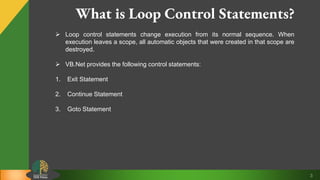
What is Loop Control Statements?
 Loop control statements change execution from its normal sequence. When
execution leaves a scope, all automatic objects that were created in that scope are
destroyed.
 VB.Net provides the following control statements:
1. Exit Statement
2. Continue Statement
3. Goto Statement
4
Exit Statements
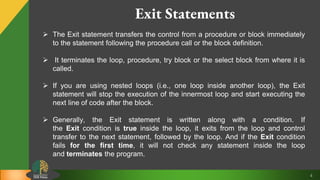
 The Exit statement transfers the control from a procedure or block immediately
to the statement following the procedure call or the block definition.
 It terminates the loop, procedure, try block or the select block from where it is
called.
 If you are using nested loops (i.e., one loop inside another loop), the Exit
statement will stop the execution of the innermost loop and start executing the
next line of code after the block.
 Generally, the Exit statement is written along with a condition. If
the Exit condition is true inside the loop, it exits from the loop and control
transfer to the next statement, followed by the loop. And if the Exit condition
fails for the first time, it will not check any statement inside the loop
and terminates the program.
5
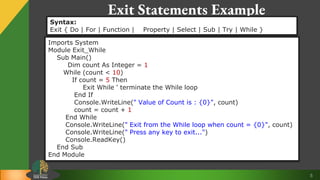
Exit Statements Example
Syntax:
Exit { Do | For | Function | Property | Select | Sub | Try | While }
Imports System
Module Exit_While
Sub Main()
Dim count As Integer = 1
While (count < 10)
If count = 5 Then
Exit While ' terminate the While loop
End If
Console.WriteLine(" Value of Count is : {0}", count)
count = count + 1
End While
Console.WriteLine(" Exit from the While loop when count = {0}", count)
Console.WriteLine(" Press any key to exit...")
Console.ReadKey()
End Sub
End Module
6
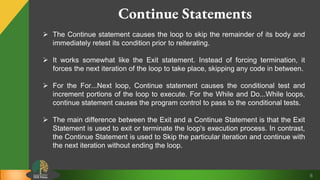
Continue Statements
 The Continue statement causes the loop to skip the remainder of its body and
immediately retest its condition prior to reiterating.
 It works somewhat like the Exit statement. Instead of forcing termination, it
forces the next iteration of the loop to take place, skipping any code in between.
 For the For...Next loop, Continue statement causes the conditional test and
increment portions of the loop to execute. For the While and Do...While loops,
continue statement causes the program control to pass to the conditional tests.
 The main difference between the Exit and a Continue Statement is that the Exit
Statement is used to exit or terminate the loop's execution process. In contrast,
the Continue Statement is used to Skip the particular iteration and continue with
the next iteration without ending the loop.
7
Continue Statements Example
Syntax:
Continue { Do | For | While }
Imports System
Module Continue_While
Sub Main()
Dim i As Integer = 10
While i < 20
If i = 14 Then
Console.WriteLine(" Skipped number is {0}", i)
i += 1 ' skip the define iteration
Continue While
End If
Console.WriteLine(" Value of i is {0}", i)
i += 1 ' Update the variable i by 1
End While
Console.WriteLine(" Press any key to exit...")
Console.ReadKey()
End Sub
End Module
8
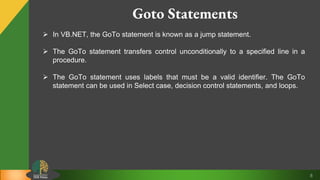
Goto Statements
 In VB.NET, the GoTo statement is known as a jump statement.
 The GoTo statement transfers control unconditionally to a specified line in a
procedure.
 The GoTo statement uses labels that must be a valid identifier. The GoTo
statement can be used in Select case, decision control statements, and loops.
9
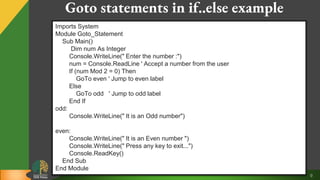
Goto statements in if..else example
Imports System
Module Goto_Statement
Sub Main()
Dim num As Integer
Console.WriteLine(" Enter the number :")
num = Console.ReadLine ' Accept a number from the user
If (num Mod 2 = 0) Then
GoTo even ' Jump to even label
Else
GoTo odd ' Jump to odd label
End If
odd:
Console.WriteLine(" It is an Odd number")
even:
Console.WriteLine(" It is an Even number ")
Console.WriteLine(" Press any key to exit...")
Console.ReadKey()
End Sub
End Module
10
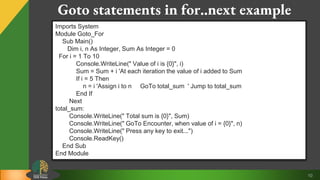
Goto statements in for..next example
Imports System
Module Goto_For
Sub Main()
Dim i, n As Integer, Sum As Integer = 0
For i = 1 To 10
Console.WriteLine(" Value of i is {0}", i)
Sum = Sum + i 'At each iteration the value of i added to Sum
If i = 5 Then
n = i 'Assign i to n GoTo total_sum ' Jump to total_sum
End If
Next
total_sum:
Console.WriteLine(" Total sum is {0}", Sum)
Console.WriteLine(" GoTo Encounter, when value of i = {0}", n)
Console.WriteLine(" Press any key to exit...")
Console.ReadKey()
End Sub
End Module

Loop control statements

  • 1.
    VB.NET:- Loop ControlStatements BCA -501
  • 2.
    2 Content  Introduction  Exitstatement  Continue Statement  Goto Statement
  • 3.
    3 What is LoopControl Statements?  Loop control statements change execution from its normal sequence. When execution leaves a scope, all automatic objects that were created in that scope are destroyed.  VB.Net provides the following control statements: 1. Exit Statement 2. Continue Statement 3. Goto Statement
  • 4.
    4 Exit Statements  TheExit statement transfers the control from a procedure or block immediately to the statement following the procedure call or the block definition.  It terminates the loop, procedure, try block or the select block from where it is called.  If you are using nested loops (i.e., one loop inside another loop), the Exit statement will stop the execution of the innermost loop and start executing the next line of code after the block.  Generally, the Exit statement is written along with a condition. If the Exit condition is true inside the loop, it exits from the loop and control transfer to the next statement, followed by the loop. And if the Exit condition fails for the first time, it will not check any statement inside the loop and terminates the program.
  • 5.
    5 Exit Statements Example Syntax: Exit{ Do | For | Function | Property | Select | Sub | Try | While } Imports System Module Exit_While Sub Main() Dim count As Integer = 1 While (count < 10) If count = 5 Then Exit While ' terminate the While loop End If Console.WriteLine(" Value of Count is : {0}", count) count = count + 1 End While Console.WriteLine(" Exit from the While loop when count = {0}", count) Console.WriteLine(" Press any key to exit...") Console.ReadKey() End Sub End Module
  • 6.
    6 Continue Statements  TheContinue statement causes the loop to skip the remainder of its body and immediately retest its condition prior to reiterating.  It works somewhat like the Exit statement. Instead of forcing termination, it forces the next iteration of the loop to take place, skipping any code in between.  For the For...Next loop, Continue statement causes the conditional test and increment portions of the loop to execute. For the While and Do...While loops, continue statement causes the program control to pass to the conditional tests.  The main difference between the Exit and a Continue Statement is that the Exit Statement is used to exit or terminate the loop's execution process. In contrast, the Continue Statement is used to Skip the particular iteration and continue with the next iteration without ending the loop.
  • 7.
    7 Continue Statements Example Syntax: Continue{ Do | For | While } Imports System Module Continue_While Sub Main() Dim i As Integer = 10 While i < 20 If i = 14 Then Console.WriteLine(" Skipped number is {0}", i) i += 1 ' skip the define iteration Continue While End If Console.WriteLine(" Value of i is {0}", i) i += 1 ' Update the variable i by 1 End While Console.WriteLine(" Press any key to exit...") Console.ReadKey() End Sub End Module
  • 8.
    8 Goto Statements  InVB.NET, the GoTo statement is known as a jump statement.  The GoTo statement transfers control unconditionally to a specified line in a procedure.  The GoTo statement uses labels that must be a valid identifier. The GoTo statement can be used in Select case, decision control statements, and loops.
  • 9.
    9 Goto statements inif..else example Imports System Module Goto_Statement Sub Main() Dim num As Integer Console.WriteLine(" Enter the number :") num = Console.ReadLine ' Accept a number from the user If (num Mod 2 = 0) Then GoTo even ' Jump to even label Else GoTo odd ' Jump to odd label End If odd: Console.WriteLine(" It is an Odd number") even: Console.WriteLine(" It is an Even number ") Console.WriteLine(" Press any key to exit...") Console.ReadKey() End Sub End Module
  • 10.
    10 Goto statements infor..next example Imports System Module Goto_For Sub Main() Dim i, n As Integer, Sum As Integer = 0 For i = 1 To 10 Console.WriteLine(" Value of i is {0}", i) Sum = Sum + i 'At each iteration the value of i added to Sum If i = 5 Then n = i 'Assign i to n GoTo total_sum ' Jump to total_sum End If Next total_sum: Console.WriteLine(" Total sum is {0}", Sum) Console.WriteLine(" GoTo Encounter, when value of i = {0}", n) Console.WriteLine(" Press any key to exit...") Console.ReadKey() End Sub End Module