




Android Academy TLV
4/12/2016
Britt Barak
WIFI: pUp3EkaP
Content Providing
#5
First,
Britt Barak
Britt Barak
Figure 8
Android Academy
Women Techmakers
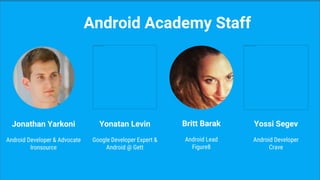
Jonathan Yarkoni
Android Developer & Advocate
Ironsource
Android Academy Staff
Yonatan Levin
Google Developer Expert &
Android @ Gett
Britt Barak
Android Lead
Figure8
Yossi Segev
Android Developer
Crave
Largest Android Community
Android Academy - TLV
TLV - Android Academy
~ 2000 members Join Us:
What Do We Do?
●Android Fundamentals
●Android UI / UX
●Community Hackathon
●Android Performance
●Mentors Program
Community Mentors
Erez Pickman
Data In Apps
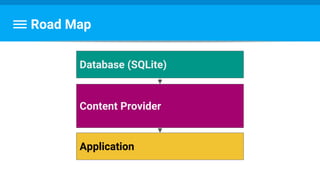
Application
Content Provider
Database (SQLite)
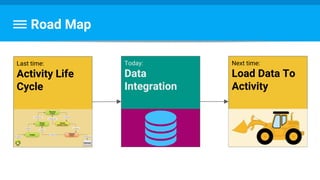
Road Map
Road Map
Last time:
Activity Life
Cycle
Today:
Data
Integration
Next time:
Load Data To
Activity
Database
Database
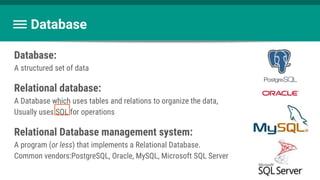
Database:
A structured set of data
Relational database:
A Database which uses tables and relations to organize the data,
Usually uses SQL for operations
Relational Database management system:
A program (or less) that implements a Relational Database.
Common vendors:PostgreSQL, Oracle, MySQL, Microsoft SQL Server
When to use a Database
- Large datasets
- Structured data
- Cache / Preload data
Better loading times, Better battery utilization
Our Database
SQLite is a mini-RDBMS.
Unlike most:
- Serverless (Runs in your process, not on its own)
- Zero-Configuration
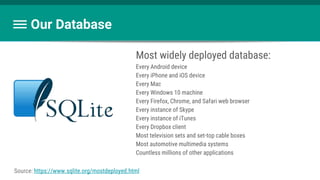
- Most widely deployed database
Get to know it better: https://www.sqlite.org/
Our Database
Most widely deployed database:
Every Android device
Every iPhone and iOS device
Every Mac
Every Windows 10 machine
Every Firefox, Chrome, and Safari web browser
Every instance of Skype
Every instance of iTunes
Every Dropbox client
Most television sets and set-top cable boxes
Most automotive multimedia systems
Countless millions of other applications
Source: https://www.sqlite.org/mostdeployed.html
SQL - Structured Query Language
the language to
communicate with database.
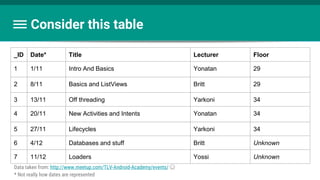
Consider this table
Data taken from: http://www.meetup.com/TLV-Android-Academy/events/ ☺
* Not really how dates are represented
_ID Date* Title Lecturer Floor
1 1/11 Intro And Basics Yonatan 29
2 8/11 Basics and ListViews Britt 29
3 13/11 Off threading Yarkoni 34
4 20/11 New Activities and Intents Yonatan 34
5 27/11 Lifecycles Yarkoni 34
6 4/12 Databases and stuff Britt Unknown
7 11/12 Loaders Yossi Unknown
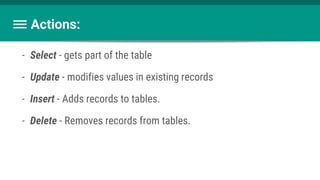
Actions:
- Select - gets part of the table
- Update - modifies values in existing records
- Insert - Adds records to tables.
- Delete - Removes records from tables.
Select - gets part of the table
SELECT ( * | [column, column])
FROM (table)
WHERE (condition)
ORDER BY (column) (ASC | DESC)
This is uber-simplified. Read more: https://www.sqlite.org/lang_select.html
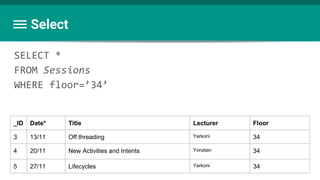
Select
SELECT *
FROM Sessions
WHERE floor=’34’
_ID Date* Title Lecturer Floor
3 13/11 Off threading Yarkoni 34
4 20/11 New Activities and Intents Yonatan 34
5 27/11 Lifecycles Yarkoni 34
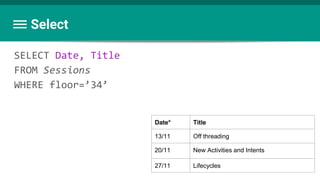
Select
SELECT Date, Title
FROM Sessions
WHERE floor=’34’
Date* Title
13/11 Off threading
20/11 New Activities and Intents
27/11 Lifecycles
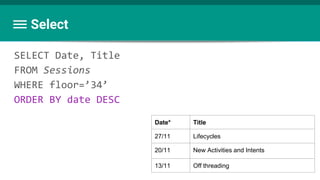
Select
SELECT Date, Title
FROM Sessions
WHERE floor=’34’
ORDER BY date DESC
Date* Title
27/11 Lifecycles
20/11 New Activities and Intents
13/11 Off threading
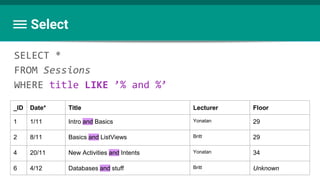
Select
SELECT *
FROM Sessions
WHERE title LIKE ’% and %’
_ID Date* Title Lecturer Floor
1 1/11 Intro and Basics Yonatan 29
2 8/11 Basics and ListViews Britt 29
4 20/11 New Activities and Intents Yonatan 34
6 4/12 Databases and stuff Britt Unknown
Select
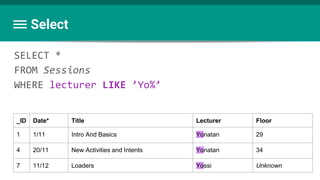
SELECT *
FROM Sessions
WHERE lecturer LIKE ’Yo%’
_ID Date* Title Lecturer Floor
1 1/11 Intro And Basics Yonatan 29
4 20/11 New Activities and Intents Yonatan 34
7 11/12 Loaders Yossi Unknown
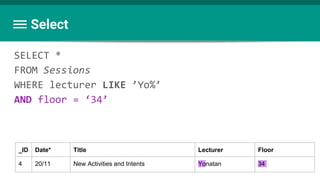
Select
SELECT *
FROM Sessions
WHERE lecturer LIKE ’Yo%’
AND floor = ‘34’
_ID Date* Title Lecturer Floor
4 20/11 New Activities and Intents Yonatan 34
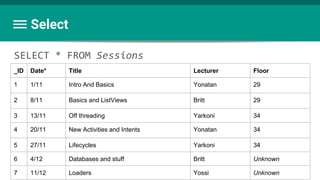
Select
SELECT * FROM Sessions
_ID Date* Title Lecturer Floor
1 1/11 Intro And Basics Yonatan 29
2 8/11 Basics and ListViews Britt 29
3 13/11 Off threading Yarkoni 34
4 20/11 New Activities and Intents Yonatan 34
5 27/11 Lifecycles Yarkoni 34
6 4/12 Databases and stuff Britt Unknown
7 11/12 Loaders Yossi Unknown
UPDATE (table)
SET (column)=(expr) [, (column)=(expr) [,...]
WHERE (condition)
Update - Modifies values in existing records.
Again, Super simplified. Read more: https://www.sqlite.org/lang_update.html
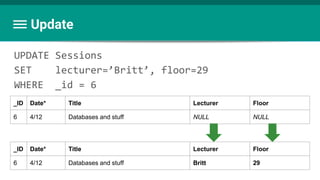
UPDATE Sessions
SET lecturer=’Britt’, floor=29
WHERE _id = 6
Update
_ID Date* Title Lecturer Floor
6 4/12 Databases and stuff NULL NULL
_ID Date* Title Lecturer Floor
6 4/12 Databases and stuff Britt 29
INSERT INTO (table)
((column) [, (column) [,...]])
VALUES
( expr [, expr [,...]])
Insert - Adds records to tables
Read more: https://www.sqlite.org/lang_insert.html
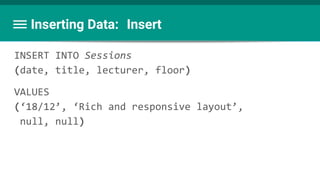
INSERT INTO Sessions
(date, title, lecturer, floor)
VALUES
(‘18/12’, ‘Rich and responsive layout’,
null, null)
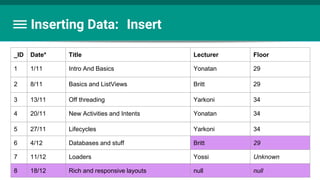
Inserting Data: Insert
_ID Date* Title Lecturer Floor
1 1/11 Intro And Basics Yonatan 29
2 8/11 Basics and ListViews Britt 29
3 13/11 Off threading Yarkoni 34
4 20/11 New Activities and Intents Yonatan 34
5 27/11 Lifecycles Yarkoni 34
6 4/12 Databases and stuff Britt 29
7 11/12 Loaders Yossi Unknown
8 18/12 Rich and responsive layouts null null
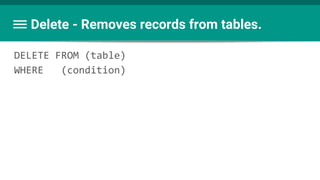
Delete - Removes records from tables.
DELETE FROM (table)
WHERE (condition)
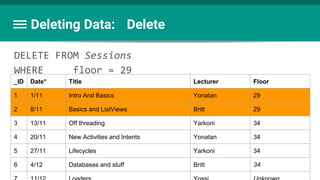
Deleting Data: Delete
DELETE FROM Sessions
WHERE floor = 29
_ID Date* Title Lecturer Floor
1 1/11 Intro And Basics Yonatan 29
2 8/11 Basics and ListViews Britt 29
3 13/11 Off threading Yarkoni 34
4 20/11 New Activities and Intents Yonatan 34
5 27/11 Lifecycles Yarkoni 34
6 4/12 Databases and stuff Britt 34
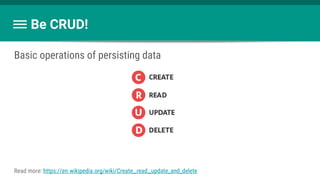
Be CRUD!
Basic operations of persisting data
Read more: https://en.wikipedia.org/wiki/Create,_read,_update_and_delete
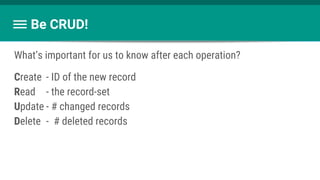
Be CRUD!
What’s important for us to know after each operation?
Create - ID of the new record
Read - the record-set
Update - # changed records
Delete - # deleted records
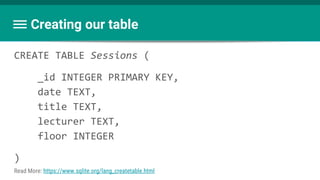
Creating our table
CREATE TABLE Sessions (
_id INTEGER PRIMARY KEY,
date TEXT,
title TEXT,
lecturer TEXT,
floor INTEGER
)
Read More: https://www.sqlite.org/lang_createtable.html
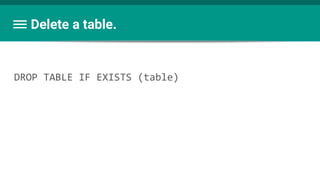
Delete a table.
DROP TABLE IF EXISTS (table)
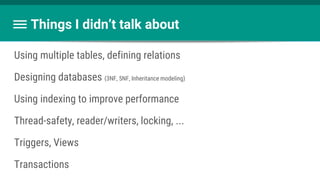
Things I didn’t talk about
Using multiple tables, defining relations
Designing databases (3NF, 5NF, Inheritance modeling)
Using indexing to improve performance
Thread-safety, reader/writers, locking, ...
Triggers, Views
Transactions
Major Challenges (For us)
Avoid SQL Injection
Upgrade when needed
Being up-to-date
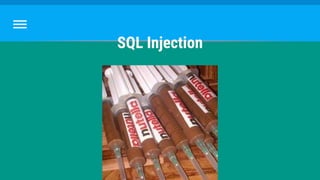
SQL Injection
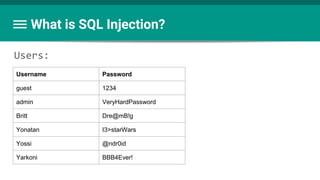
What is SQL Injection?
Users:
Username Password
guest 1234
admin VeryHardPassword
Britt Dre@mB!g
Yonatan I3>starWars
Yossi @ndr0id
Yarkoni BBB4Ever!
How to log in?
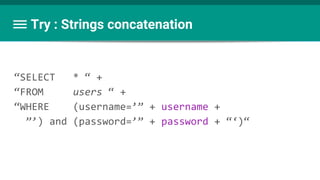
Try : Strings concatenation
“SELECT * “ +
“FROM users “ +
“WHERE (username=’” + username +
”’) and (password=’” + password + “‘)“
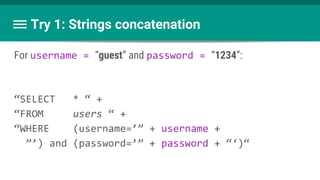
Try 1: Strings concatenation
For username = “guest” and password = “1234”:
“SELECT * “ +
“FROM users “ +
“WHERE (username=’” + username +
”’) and (password=’” + password + “‘)“
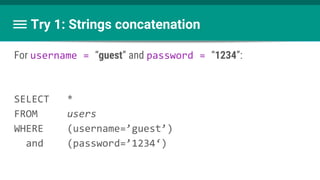
Try 1: Strings concatenation
For username = “guest” and password = “1234”:
SELECT *
FROM users
WHERE (username=’guest’)
and (password=’1234‘)
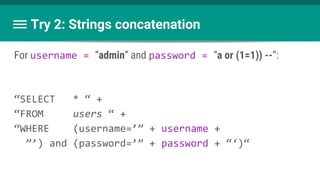
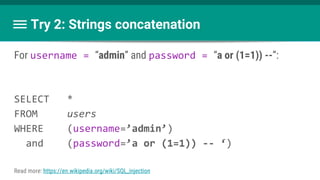
Try 2: Strings concatenation
For username = “admin” and password = “a or (1=1)) --”:
“SELECT * “ +
“FROM users “ +
“WHERE (username=’” + username +
”’) and (password=’” + password + “‘)“
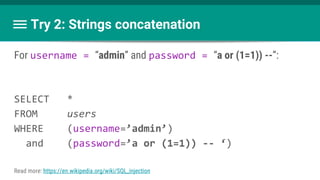
Try 2: Strings concatenation
For username = “admin” and password = “a or (1=1)) --”:
SELECT *
FROM users
WHERE (username=’admin’)
and (password=’a or (1=1)) -- ‘)
Read more: https://en.wikipedia.org/wiki/SQL_injection
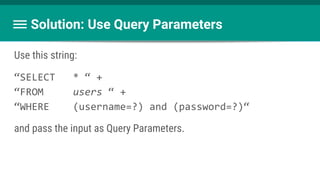
Solution: Use Query Parameters
Use this string:
“SELECT * “ +
“FROM users “ +
“WHERE (username=?) and (password=?)“
and pass the input as Query Parameters.
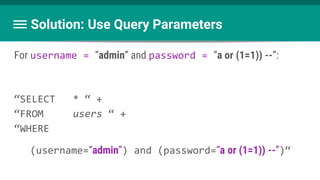
Solution: Use Query Parameters
For username = “admin” and password = “a or (1=1)) --”:
“SELECT * “ +
“FROM users “ +
“WHERE
(username=“admin”) and (password=“a or (1=1)) --”)“
Try 2: Strings concatenation
For username = “admin” and password = “a or (1=1)) --”:
SELECT *
FROM users
WHERE (username=’admin’)
and (password=’a or (1=1)) -- ‘)
Read more: https://en.wikipedia.org/wiki/SQL_injection
Questions?
Upgrade
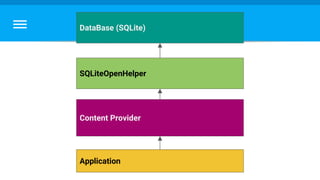
Application
Content Provider
DataBase (SQLite)
SQLiteOpenHelper
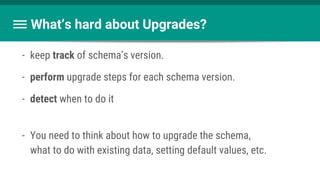
What’s hard about Upgrades?
- keep track of schema’s version.
- perform upgrade steps for each schema version.
- detect when to do it
- You need to think about how to upgrade the schema,
what to do with existing data, setting default values, etc.
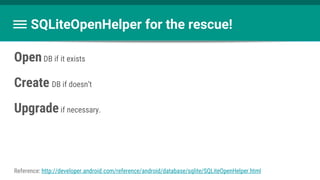
OpenDB if it exists
Create DB if doesn’t
Upgradeif necessary.
SQLiteOpenHelper for the rescue!
Reference: http://developer.android.com/reference/android/database/sqlite/SQLiteOpenHelper.html
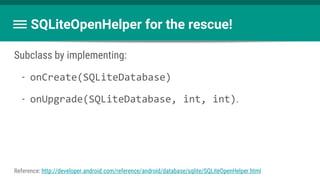
Subclass by implementing:
- onCreate(SQLiteDatabase)
- onUpgrade(SQLiteDatabase, int, int).
SQLiteOpenHelper for the rescue!
Reference: http://developer.android.com/reference/android/database/sqlite/SQLiteOpenHelper.html
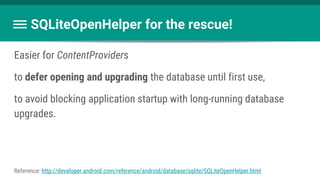
Easier for ContentProviders
to defer opening and upgrading the database until first use,
to avoid blocking application startup with long-running database
upgrades.
SQLiteOpenHelper for the rescue!
Reference: http://developer.android.com/reference/android/database/sqlite/SQLiteOpenHelper.html
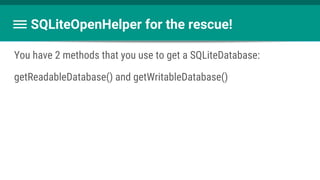
You have 2 methods that you use to get a SQLiteDatabase:
getReadableDatabase() and getWritableDatabase()
SQLiteOpenHelper for the rescue!
Cursor query(String table,
String[] columns,
String selection,
String[] selectionArgs,
String groupBy,
String having,
String orderBy)
long insert(String table,
String nullColumnHack,
ContentValues values)
What To Do With SQLiteDatabase ?
int update(String table,
ContentValues values,
String whereClause,
String[] whereArgs)
int delete(String table,
Don’t hard-code Strings
- Most Strings will be reused.
- Access same resource from different objects
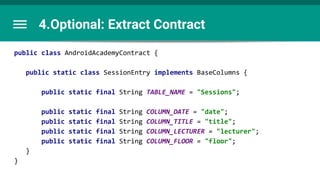
Good practice: extract them into a single Contract class.
Don’t hard-code Strings
The contract class contains:
- Table and column names
- URI Related stuff, such as
- Content Authorities
- Build methods
- Parse methods
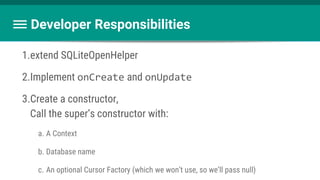
Developer Responsibilities
1.extend SQLiteOpenHelper
2.Implement onCreate and onUpdate
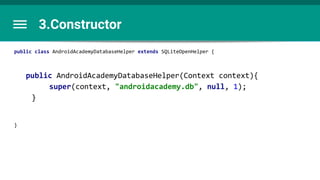
3.Create a constructor,
Call the super’s constructor with:
a. A Context
b. Database name
c. An optional Cursor Factory (which we won’t use, so we’ll pass null)
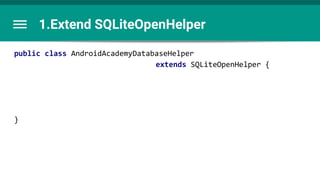
1.Extend SQLiteOpenHelper
public class AndroidAcademyDatabaseHelper
extends SQLiteOpenHelper {
}
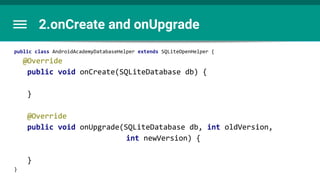
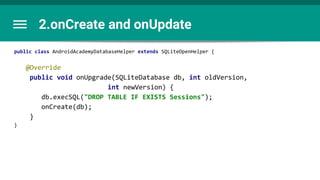
2.onCreate and onUpgrade
public class AndroidAcademyDatabaseHelper extends SQLiteOpenHelper {
@Override
public void onCreate(SQLiteDatabase db) {
}
@Override
public void onUpgrade(SQLiteDatabase db, int oldVersion,
int newVersion) {
}
}
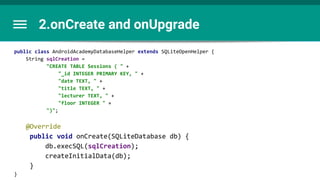
2.onCreate and onUpgrade
public class AndroidAcademyDatabaseHelper extends SQLiteOpenHelper {
String sqlCreation =
"CREATE TABLE Sessions ( " +
"_id INTEGER PRIMARY KEY, " +
"date TEXT, " +
"title TEXT, " +
"lecturer TEXT, " +
"floor INTEGER " +
")";
@Override
public void onCreate(SQLiteDatabase db) {
db.execSQL(sqlCreation);
createInitialData(db);
}
}
2.onCreate and onUpdate
public class AndroidAcademyDatabaseHelper extends SQLiteOpenHelper {
@Override
public void onUpgrade(SQLiteDatabase db, int oldVersion,
int newVersion) {
db.execSQL("DROP TABLE IF EXISTS Sessions");
onCreate(db);
}
}
3.Constructor
public class AndroidAcademyDatabaseHelper extends SQLiteOpenHelper {
public AndroidAcademyDatabaseHelper(Context context){
super(context, "androidacademy.db", null, 1);
}
}
4.Optional: Extract Contract
public class AndroidAcademyContract {
public static class SessionEntry implements BaseColumns {
public static final String TABLE_NAME = "Sessions";
public static final String COLUMN_DATE = "date";
public static final String COLUMN_TITLE = "title";
public static final String COLUMN_LECTURER = "lecturer";
public static final String COLUMN_FLOOR = "floor";
}
}
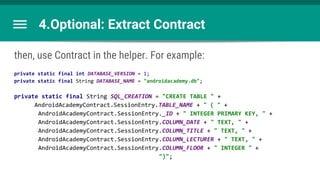
4.Optional: Extract Contract
then, use Contract in the helper. For example:
private static final int DATABASE_VERSION = 1;
private static final String DATABASE_NAME = "androidacademy.db";
private static final String SQL_CREATION = "CREATE TABLE " +
AndroidAcademyContract.SessionEntry.TABLE_NAME + " ( " +
AndroidAcademyContract.SessionEntry._ID + " INTEGER PRIMARY KEY, " +
AndroidAcademyContract.SessionEntry.COLUMN_DATE + " TEXT, " +
AndroidAcademyContract.SessionEntry.COLUMN_TITLE + " TEXT, " +
AndroidAcademyContract.SessionEntry.COLUMN_LECTURER + " TEXT, " +
AndroidAcademyContract.SessionEntry.COLUMN_FLOOR + " INTEGER " +
")";
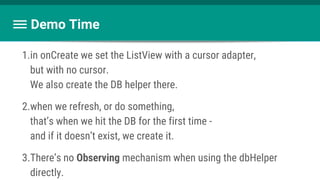
Demo Time
1.in onCreate we set the ListView with a cursor adapter,
but with no cursor.
We also create the DB helper there.
2.when we refresh, or do something,
that’s when we hit the DB for the first time -
and if it doesn’t exist, we create it.
3.There’s no Observing mechanism when using the dbHelper
directly.
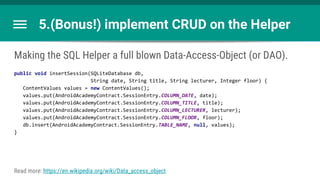
5.(Bonus!) implement CRUD on the Helper
Making the SQL Helper a full blown Data-Access-Object (or DAO).
public void insertSession(SQLiteDatabase db,
String date, String title, String lecturer, Integer floor) {
ContentValues values = new ContentValues();
values.put(AndroidAcademyContract.SessionEntry.COLUMN_DATE, date);
values.put(AndroidAcademyContract.SessionEntry.COLUMN_TITLE, title);
values.put(AndroidAcademyContract.SessionEntry.COLUMN_LECTURER, lecturer);
values.put(AndroidAcademyContract.SessionEntry.COLUMN_FLOOR, floor);
db.insert(AndroidAcademyContract.SessionEntry.TABLE_NAME, null, values);
}
Read more: https://en.wikipedia.org/wiki/Data_access_object
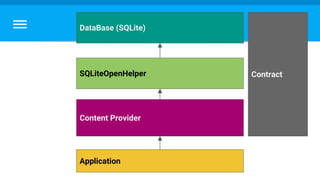
Application
Content Provider
DataBase (SQLite)
SQLiteOpenHelper Contract
Any questions?
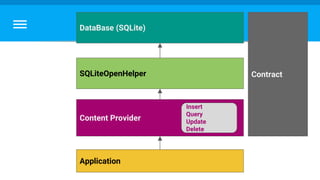
The Relationship Between Apps And Data
Application
Content Provider
DataBase (SQLite)
SQLiteOpenHelper
Insert
Query
Update
Delete
Contract
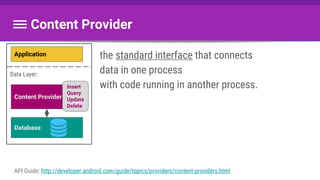
the standard interface that connects
data in one process
with code running in another process.
Content Provider
API Guide: http://developer.android.com/guide/topics/providers/content-providers.html
Application
Content Provider
Database
Insert
Query
Update
Delete
Data Layer:
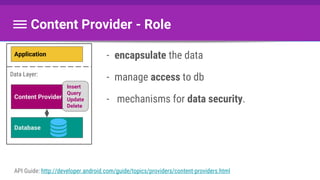
- encapsulate the data
- manage access to db
- mechanisms for data security.
Content Provider - Role
API Guide: http://developer.android.com/guide/topics/providers/content-providers.html
Application
Content Provider
Database
Insert
Query
Update
Delete
Data Layer:
When to use it?
- Share data between apps:
- offer complex data or files to other applications
- allow users to copy complex data from your app into other apps
- use android dbs: contacts, calendar, sms...
- Android Framework:
- widgets, search, sync adapter, cursor loader
- Abstraction
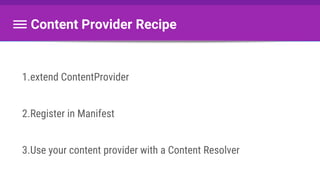
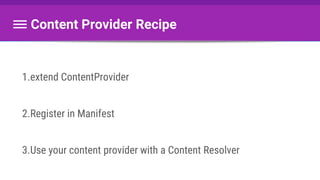
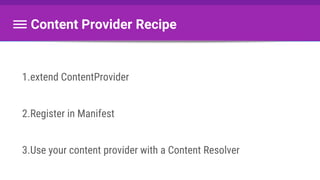
1.extend ContentProvider
2.Register in Manifest
3.Use your content provider with a Content Resolver
Content Provider Recipe
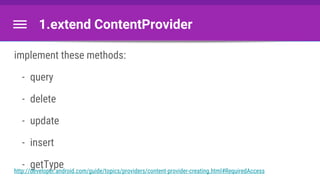
1.extend ContentProvider
implement these methods:
- query
- delete
- update
- insert
- getTypehttp://developer.android.com/guide/topics/providers/content-provider-creating.html#RequiredAccess
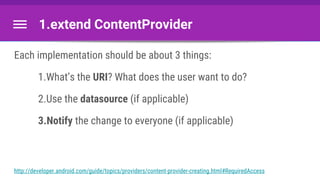
1.extend ContentProvider
Each implementation should be about 3 things:
1.What’s the URI? What does the user want to do?
2.Use the datasource (if applicable)
3.Notify the change to everyone (if applicable)
http://developer.android.com/guide/topics/providers/content-provider-creating.html#RequiredAccess
query()
public Cursor query(Uri uri,
String[] projection,
String selection,
String[] selectionArgs,
String sortOrder)
This is super-easy to implement with the SQLiteOpenHelper.
Also: cursor.setNotificationUri(getContext().getContentResolver(), uri);
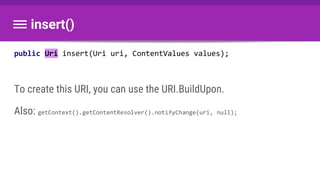
public Uri insert(Uri uri, ContentValues values);
To create this URI, you can use the URI.BuildUpon.
Also: getContext().getContentResolver().notifyChange(uri, null);
insert()
update()
public int update(Uri uri,
ContentValues values,
String selection,
String[] selectionArgs)
Also: getContext().getContentResolver().notifyChange(uri, null);
delete()
public int delete(Uri uri, String selection,
String[] selectionArgs)
Also: getContext().getContentResolver().notifyChange(uri, null);
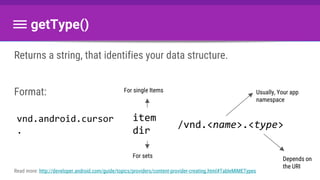
Returns a string, that identifies your data structure.
Format:
getType()
Read more: http://developer.android.com/guide/topics/providers/content-provider-creating.html#TableMIMETypes
item
dir
/vnd.<name>.<type>
For single Items
For sets
Usually, Your app
namespace
Depends on
the URI
vnd.android.cursor
.
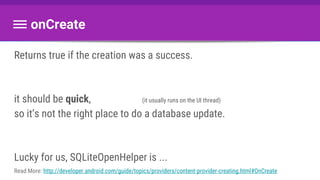
onCreate
Returns true if the creation was a success.
it should be quick, (it usually runs on the UI thread)
so it’s not the right place to do a database update.
Lucky for us, SQLiteOpenHelper is ...
Read More: http://developer.android.com/guide/topics/providers/content-provider-creating.html#OnCreate
1.extend ContentProvider
2.Register in Manifest
3.Use your content provider with a Content Resolver
Content Provider Recipe
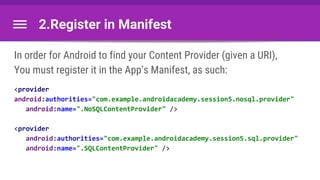
2.Register in Manifest
In order for Android to find your Content Provider (given a URI),
You must register it in the App’s Manifest, as such:
<provider
android:authorities="com.example.androidacademy.session5.nosql.provider"
android:name=".NoSQLContentProvider" />
<provider
android:authorities="com.example.androidacademy.session5.sql.provider"
android:name=".SQLContentProvider" />
1.extend ContentProvider
2.Register in Manifest
3.Use your content provider with a Content Resolver
Content Provider Recipe
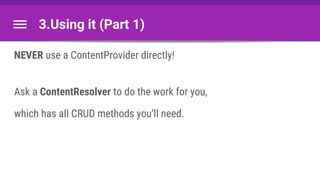
3.Using it (Part 1)
NEVER use a ContentProvider directly!
Ask a ContentResolver to do the work for you,
which has all CRUD methods you’ll need.
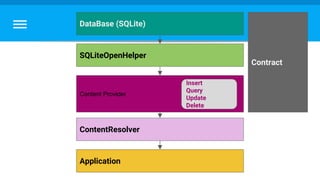
Application
ContentResolver
Content Provider
DataBase (SQLite)
SQLiteOpenHelper
Insert
Query
Update
Delete
Contract
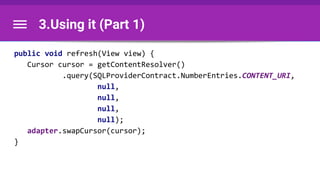
3.Using it (Part 1)
public void refresh(View view) {
Cursor cursor = getContentResolver()
.query(SQLProviderContract.NumberEntries.CONTENT_URI,
null,
null,
null,
null);
adapter.swapCursor(cursor);
}
3.Using it (Part 1)
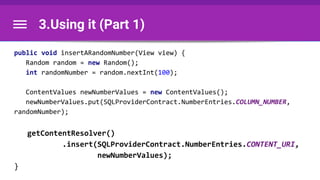
public void insertARandomNumber(View view) {
Random random = new Random();
int randomNumber = random.nextInt(100);
ContentValues newNumberValues = new ContentValues();
newNumberValues.put(SQLProviderContract.NumberEntries.COLUMN_NUMBER,
randomNumber);
getContentResolver()
.insert(SQLProviderContract.NumberEntries.CONTENT_URI,
newNumberValues);
}
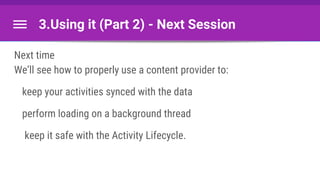
3.Using it (Part 2) - Next Session
Next time
We’ll see how to properly use a content provider to:
keep your activities synced with the data
perform loading on a background thread
keep it safe with the Activity Lifecycle.
Any questions?
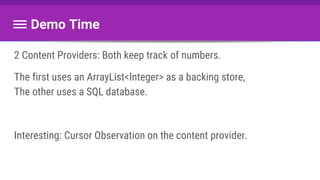
Demo Time
2 Content Providers: Both keep track of numbers.
The first uses an ArrayList<Integer> as a backing store,
The other uses a SQL database.
Interesting: Cursor Observation on the content provider.
So why UDACITY’s code
is so complicated?
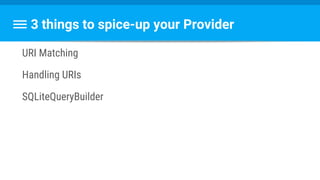
3 things to spice-up your Provider
URI Matching
Handling URIs
SQLiteQueryBuilder
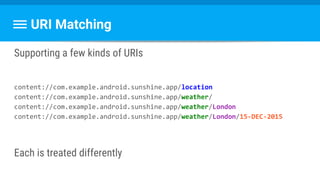
URI Matching
Supporting a few kinds of URIs
content://com.example.android.sunshine.app/location
content://com.example.android.sunshine.app/weather/
content://com.example.android.sunshine.app/weather/London
content://com.example.android.sunshine.app/weather/London/15-DEC-2015
Each is treated differently
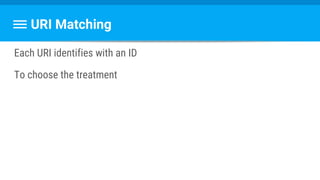
URI Matching
Each URI identifies with an ID
To choose the treatment
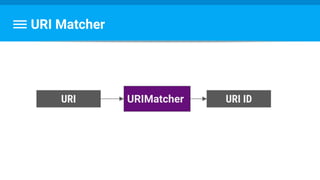
URI Matcher
URI URI IDURIMatcher
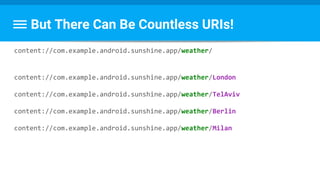
But There Can Be Countless URIs!
content://com.example.android.sunshine.app/weather/
content://com.example.android.sunshine.app/weather/London
content://com.example.android.sunshine.app/weather/TelAviv
content://com.example.android.sunshine.app/weather/Berlin
content://com.example.android.sunshine.app/weather/Milan
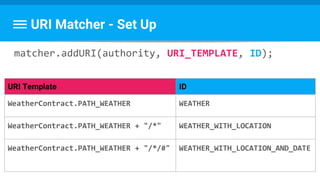
URI Matcher - Set Up
matcher.addURI(authority, URI_TEMPLATE, ID);
URI Template ID
WeatherContract.PATH_WEATHER WEATHER
WeatherContract.PATH_WEATHER + "/*" WEATHER_WITH_LOCATION
WeatherContract.PATH_WEATHER + "/*/#" WEATHER_WITH_LOCATION_AND_DATE
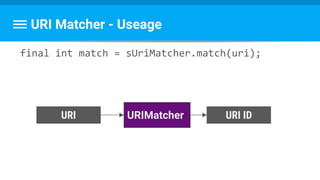
URI Matcher - Useage
final int match = sUriMatcher.match(uri);
URI URI IDURIMatcher
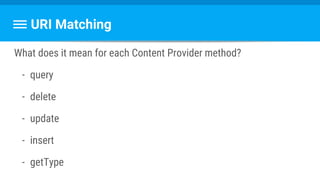
URI Matching
What does it mean for each Content Provider method?
- query
- delete
- update
- insert
- getType
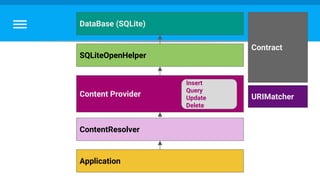
Application
ContentResolver
Content Provider
DataBase (SQLite)
SQLiteOpenHelper
Contract
URIMatcher
Insert
Query
Update
Delete
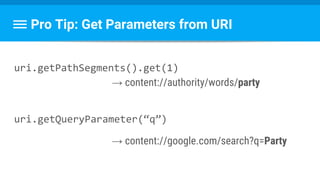
Pro Tip: Get Parameters from URI
uri.getPathSegments().get(1)
→ content://authority/words/party
uri.getQueryParameter(“q”)
→ content://google.com/search?q=Party
Any questions?
Thank you!!

Session #5 content providers

  • 1.
    Android Academy TLV 4/12/2016 BrittBarak WIFI: pUp3EkaP Content Providing #5
  • 2.
  • 3.
    Britt Barak Britt Barak Figure8 Android Academy Women Techmakers
  • 4.
    Jonathan Yarkoni Android Developer& Advocate Ironsource Android Academy Staff Yonatan Levin Google Developer Expert & Android @ Gett Britt Barak Android Lead Figure8 Yossi Segev Android Developer Crave
  • 5.
    Largest Android Community AndroidAcademy - TLV TLV - Android Academy ~ 2000 members Join Us:
  • 6.
    What Do WeDo? ●Android Fundamentals ●Android UI / UX ●Community Hackathon ●Android Performance ●Mentors Program
  • 7.
  • 8.
  • 10.
  • 11.
    Road Map Last time: ActivityLife Cycle Today: Data Integration Next time: Load Data To Activity
  • 12.
  • 13.
    Database Database: A structured setof data Relational database: A Database which uses tables and relations to organize the data, Usually uses SQL for operations Relational Database management system: A program (or less) that implements a Relational Database. Common vendors:PostgreSQL, Oracle, MySQL, Microsoft SQL Server
  • 14.
    When to usea Database - Large datasets - Structured data - Cache / Preload data Better loading times, Better battery utilization
  • 15.
    Our Database SQLite isa mini-RDBMS. Unlike most: - Serverless (Runs in your process, not on its own) - Zero-Configuration - Most widely deployed database Get to know it better: https://www.sqlite.org/
  • 16.
    Our Database Most widelydeployed database: Every Android device Every iPhone and iOS device Every Mac Every Windows 10 machine Every Firefox, Chrome, and Safari web browser Every instance of Skype Every instance of iTunes Every Dropbox client Most television sets and set-top cable boxes Most automotive multimedia systems Countless millions of other applications Source: https://www.sqlite.org/mostdeployed.html
  • 17.
    SQL - StructuredQuery Language the language to communicate with database.
  • 18.
    Consider this table Datataken from: http://www.meetup.com/TLV-Android-Academy/events/ ☺ * Not really how dates are represented _ID Date* Title Lecturer Floor 1 1/11 Intro And Basics Yonatan 29 2 8/11 Basics and ListViews Britt 29 3 13/11 Off threading Yarkoni 34 4 20/11 New Activities and Intents Yonatan 34 5 27/11 Lifecycles Yarkoni 34 6 4/12 Databases and stuff Britt Unknown 7 11/12 Loaders Yossi Unknown
  • 19.
    Actions: - Select -gets part of the table - Update - modifies values in existing records - Insert - Adds records to tables. - Delete - Removes records from tables.
  • 20.
    Select - getspart of the table SELECT ( * | [column, column]) FROM (table) WHERE (condition) ORDER BY (column) (ASC | DESC) This is uber-simplified. Read more: https://www.sqlite.org/lang_select.html
  • 21.
    Select SELECT * FROM Sessions WHEREfloor=’34’ _ID Date* Title Lecturer Floor 3 13/11 Off threading Yarkoni 34 4 20/11 New Activities and Intents Yonatan 34 5 27/11 Lifecycles Yarkoni 34
  • 22.
    Select SELECT Date, Title FROMSessions WHERE floor=’34’ Date* Title 13/11 Off threading 20/11 New Activities and Intents 27/11 Lifecycles
  • 23.
    Select SELECT Date, Title FROMSessions WHERE floor=’34’ ORDER BY date DESC Date* Title 27/11 Lifecycles 20/11 New Activities and Intents 13/11 Off threading
  • 24.
    Select SELECT * FROM Sessions WHEREtitle LIKE ’% and %’ _ID Date* Title Lecturer Floor 1 1/11 Intro and Basics Yonatan 29 2 8/11 Basics and ListViews Britt 29 4 20/11 New Activities and Intents Yonatan 34 6 4/12 Databases and stuff Britt Unknown
  • 25.
    Select SELECT * FROM Sessions WHERElecturer LIKE ’Yo%’ _ID Date* Title Lecturer Floor 1 1/11 Intro And Basics Yonatan 29 4 20/11 New Activities and Intents Yonatan 34 7 11/12 Loaders Yossi Unknown
  • 26.
    Select SELECT * FROM Sessions WHERElecturer LIKE ’Yo%’ AND floor = ‘34’ _ID Date* Title Lecturer Floor 4 20/11 New Activities and Intents Yonatan 34
  • 27.
    Select SELECT * FROMSessions _ID Date* Title Lecturer Floor 1 1/11 Intro And Basics Yonatan 29 2 8/11 Basics and ListViews Britt 29 3 13/11 Off threading Yarkoni 34 4 20/11 New Activities and Intents Yonatan 34 5 27/11 Lifecycles Yarkoni 34 6 4/12 Databases and stuff Britt Unknown 7 11/12 Loaders Yossi Unknown
  • 28.
    UPDATE (table) SET (column)=(expr)[, (column)=(expr) [,...] WHERE (condition) Update - Modifies values in existing records. Again, Super simplified. Read more: https://www.sqlite.org/lang_update.html
  • 29.
    UPDATE Sessions SET lecturer=’Britt’,floor=29 WHERE _id = 6 Update _ID Date* Title Lecturer Floor 6 4/12 Databases and stuff NULL NULL _ID Date* Title Lecturer Floor 6 4/12 Databases and stuff Britt 29
  • 30.
    INSERT INTO (table) ((column)[, (column) [,...]]) VALUES ( expr [, expr [,...]]) Insert - Adds records to tables Read more: https://www.sqlite.org/lang_insert.html
  • 31.
    INSERT INTO Sessions (date,title, lecturer, floor) VALUES (‘18/12’, ‘Rich and responsive layout’, null, null) Inserting Data: Insert
  • 32.
    Inserting Data: Insert _IDDate* Title Lecturer Floor 1 1/11 Intro And Basics Yonatan 29 2 8/11 Basics and ListViews Britt 29 3 13/11 Off threading Yarkoni 34 4 20/11 New Activities and Intents Yonatan 34 5 27/11 Lifecycles Yarkoni 34 6 4/12 Databases and stuff Britt 29 7 11/12 Loaders Yossi Unknown 8 18/12 Rich and responsive layouts null null
  • 33.
    Delete - Removesrecords from tables. DELETE FROM (table) WHERE (condition)
  • 34.
    Deleting Data: Delete DELETEFROM Sessions WHERE floor = 29 _ID Date* Title Lecturer Floor 1 1/11 Intro And Basics Yonatan 29 2 8/11 Basics and ListViews Britt 29 3 13/11 Off threading Yarkoni 34 4 20/11 New Activities and Intents Yonatan 34 5 27/11 Lifecycles Yarkoni 34 6 4/12 Databases and stuff Britt 34
  • 35.
    Be CRUD! Basic operationsof persisting data Read more: https://en.wikipedia.org/wiki/Create,_read,_update_and_delete
  • 36.
    Be CRUD! What’s importantfor us to know after each operation? Create - ID of the new record Read - the record-set Update - # changed records Delete - # deleted records
  • 37.
    Creating our table CREATETABLE Sessions ( _id INTEGER PRIMARY KEY, date TEXT, title TEXT, lecturer TEXT, floor INTEGER ) Read More: https://www.sqlite.org/lang_createtable.html
  • 38.
    Delete a table. DROPTABLE IF EXISTS (table)
  • 39.
    Things I didn’ttalk about Using multiple tables, defining relations Designing databases (3NF, 5NF, Inheritance modeling) Using indexing to improve performance Thread-safety, reader/writers, locking, ... Triggers, Views Transactions
  • 40.
    Major Challenges (Forus) Avoid SQL Injection Upgrade when needed Being up-to-date
  • 41.
  • 42.
    What is SQLInjection? Users: Username Password guest 1234 admin VeryHardPassword Britt Dre@mB!g Yonatan I3>starWars Yossi @ndr0id Yarkoni BBB4Ever!
  • 43.
  • 44.
    Try : Stringsconcatenation “SELECT * “ + “FROM users “ + “WHERE (username=’” + username + ”’) and (password=’” + password + “‘)“
  • 45.
    Try 1: Stringsconcatenation For username = “guest” and password = “1234”: “SELECT * “ + “FROM users “ + “WHERE (username=’” + username + ”’) and (password=’” + password + “‘)“
  • 46.
    Try 1: Stringsconcatenation For username = “guest” and password = “1234”: SELECT * FROM users WHERE (username=’guest’) and (password=’1234‘)
  • 47.
    Try 2: Stringsconcatenation For username = “admin” and password = “a or (1=1)) --”: “SELECT * “ + “FROM users “ + “WHERE (username=’” + username + ”’) and (password=’” + password + “‘)“
  • 48.
    Try 2: Stringsconcatenation For username = “admin” and password = “a or (1=1)) --”: SELECT * FROM users WHERE (username=’admin’) and (password=’a or (1=1)) -- ‘) Read more: https://en.wikipedia.org/wiki/SQL_injection
  • 49.
    Solution: Use QueryParameters Use this string: “SELECT * “ + “FROM users “ + “WHERE (username=?) and (password=?)“ and pass the input as Query Parameters.
  • 50.
    Solution: Use QueryParameters For username = “admin” and password = “a or (1=1)) --”: “SELECT * “ + “FROM users “ + “WHERE (username=“admin”) and (password=“a or (1=1)) --”)“
  • 51.
    Try 2: Stringsconcatenation For username = “admin” and password = “a or (1=1)) --”: SELECT * FROM users WHERE (username=’admin’) and (password=’a or (1=1)) -- ‘) Read more: https://en.wikipedia.org/wiki/SQL_injection
  • 52.
  • 53.
  • 54.
  • 55.
    What’s hard aboutUpgrades? - keep track of schema’s version. - perform upgrade steps for each schema version. - detect when to do it - You need to think about how to upgrade the schema, what to do with existing data, setting default values, etc.
  • 56.
    OpenDB if itexists Create DB if doesn’t Upgradeif necessary. SQLiteOpenHelper for the rescue! Reference: http://developer.android.com/reference/android/database/sqlite/SQLiteOpenHelper.html
  • 57.
    Subclass by implementing: -onCreate(SQLiteDatabase) - onUpgrade(SQLiteDatabase, int, int). SQLiteOpenHelper for the rescue! Reference: http://developer.android.com/reference/android/database/sqlite/SQLiteOpenHelper.html
  • 58.
    Easier for ContentProviders todefer opening and upgrading the database until first use, to avoid blocking application startup with long-running database upgrades. SQLiteOpenHelper for the rescue! Reference: http://developer.android.com/reference/android/database/sqlite/SQLiteOpenHelper.html
  • 59.
    You have 2methods that you use to get a SQLiteDatabase: getReadableDatabase() and getWritableDatabase() SQLiteOpenHelper for the rescue!
  • 60.
    Cursor query(String table, String[]columns, String selection, String[] selectionArgs, String groupBy, String having, String orderBy) long insert(String table, String nullColumnHack, ContentValues values) What To Do With SQLiteDatabase ? int update(String table, ContentValues values, String whereClause, String[] whereArgs) int delete(String table,
  • 61.
  • 62.
    Don’t hard-code Strings -Most Strings will be reused. - Access same resource from different objects Good practice: extract them into a single Contract class.
  • 63.
    Don’t hard-code Strings Thecontract class contains: - Table and column names - URI Related stuff, such as - Content Authorities - Build methods - Parse methods
  • 64.
  • 65.
    Developer Responsibilities 1.extend SQLiteOpenHelper 2.ImplementonCreate and onUpdate 3.Create a constructor, Call the super’s constructor with: a. A Context b. Database name c. An optional Cursor Factory (which we won’t use, so we’ll pass null)
  • 66.
    1.Extend SQLiteOpenHelper public classAndroidAcademyDatabaseHelper extends SQLiteOpenHelper { }
  • 67.
    2.onCreate and onUpgrade publicclass AndroidAcademyDatabaseHelper extends SQLiteOpenHelper { @Override public void onCreate(SQLiteDatabase db) { } @Override public void onUpgrade(SQLiteDatabase db, int oldVersion, int newVersion) { } }
  • 68.
    2.onCreate and onUpgrade publicclass AndroidAcademyDatabaseHelper extends SQLiteOpenHelper { String sqlCreation = "CREATE TABLE Sessions ( " + "_id INTEGER PRIMARY KEY, " + "date TEXT, " + "title TEXT, " + "lecturer TEXT, " + "floor INTEGER " + ")"; @Override public void onCreate(SQLiteDatabase db) { db.execSQL(sqlCreation); createInitialData(db); } }
  • 69.
    2.onCreate and onUpdate publicclass AndroidAcademyDatabaseHelper extends SQLiteOpenHelper { @Override public void onUpgrade(SQLiteDatabase db, int oldVersion, int newVersion) { db.execSQL("DROP TABLE IF EXISTS Sessions"); onCreate(db); } }
  • 70.
    3.Constructor public class AndroidAcademyDatabaseHelperextends SQLiteOpenHelper { public AndroidAcademyDatabaseHelper(Context context){ super(context, "androidacademy.db", null, 1); } }
  • 71.
    4.Optional: Extract Contract publicclass AndroidAcademyContract { public static class SessionEntry implements BaseColumns { public static final String TABLE_NAME = "Sessions"; public static final String COLUMN_DATE = "date"; public static final String COLUMN_TITLE = "title"; public static final String COLUMN_LECTURER = "lecturer"; public static final String COLUMN_FLOOR = "floor"; } }
  • 72.
    4.Optional: Extract Contract then,use Contract in the helper. For example: private static final int DATABASE_VERSION = 1; private static final String DATABASE_NAME = "androidacademy.db"; private static final String SQL_CREATION = "CREATE TABLE " + AndroidAcademyContract.SessionEntry.TABLE_NAME + " ( " + AndroidAcademyContract.SessionEntry._ID + " INTEGER PRIMARY KEY, " + AndroidAcademyContract.SessionEntry.COLUMN_DATE + " TEXT, " + AndroidAcademyContract.SessionEntry.COLUMN_TITLE + " TEXT, " + AndroidAcademyContract.SessionEntry.COLUMN_LECTURER + " TEXT, " + AndroidAcademyContract.SessionEntry.COLUMN_FLOOR + " INTEGER " + ")";
  • 73.
    Demo Time 1.in onCreatewe set the ListView with a cursor adapter, but with no cursor. We also create the DB helper there. 2.when we refresh, or do something, that’s when we hit the DB for the first time - and if it doesn’t exist, we create it. 3.There’s no Observing mechanism when using the dbHelper directly.
  • 74.
    5.(Bonus!) implement CRUDon the Helper Making the SQL Helper a full blown Data-Access-Object (or DAO). public void insertSession(SQLiteDatabase db, String date, String title, String lecturer, Integer floor) { ContentValues values = new ContentValues(); values.put(AndroidAcademyContract.SessionEntry.COLUMN_DATE, date); values.put(AndroidAcademyContract.SessionEntry.COLUMN_TITLE, title); values.put(AndroidAcademyContract.SessionEntry.COLUMN_LECTURER, lecturer); values.put(AndroidAcademyContract.SessionEntry.COLUMN_FLOOR, floor); db.insert(AndroidAcademyContract.SessionEntry.TABLE_NAME, null, values); } Read more: https://en.wikipedia.org/wiki/Data_access_object
  • 75.
  • 76.
  • 77.
  • 78.
  • 79.
    the standard interfacethat connects data in one process with code running in another process. Content Provider API Guide: http://developer.android.com/guide/topics/providers/content-providers.html Application Content Provider Database Insert Query Update Delete Data Layer:
  • 80.
    - encapsulate thedata - manage access to db - mechanisms for data security. Content Provider - Role API Guide: http://developer.android.com/guide/topics/providers/content-providers.html Application Content Provider Database Insert Query Update Delete Data Layer:
  • 81.
    When to useit? - Share data between apps: - offer complex data or files to other applications - allow users to copy complex data from your app into other apps - use android dbs: contacts, calendar, sms... - Android Framework: - widgets, search, sync adapter, cursor loader - Abstraction
  • 82.
    1.extend ContentProvider 2.Register inManifest 3.Use your content provider with a Content Resolver Content Provider Recipe
  • 83.
    1.extend ContentProvider implement thesemethods: - query - delete - update - insert - getTypehttp://developer.android.com/guide/topics/providers/content-provider-creating.html#RequiredAccess
  • 84.
    1.extend ContentProvider Each implementationshould be about 3 things: 1.What’s the URI? What does the user want to do? 2.Use the datasource (if applicable) 3.Notify the change to everyone (if applicable) http://developer.android.com/guide/topics/providers/content-provider-creating.html#RequiredAccess
  • 85.
    query() public Cursor query(Uriuri, String[] projection, String selection, String[] selectionArgs, String sortOrder) This is super-easy to implement with the SQLiteOpenHelper. Also: cursor.setNotificationUri(getContext().getContentResolver(), uri);
  • 86.
    public Uri insert(Uriuri, ContentValues values); To create this URI, you can use the URI.BuildUpon. Also: getContext().getContentResolver().notifyChange(uri, null); insert()
  • 87.
    update() public int update(Uriuri, ContentValues values, String selection, String[] selectionArgs) Also: getContext().getContentResolver().notifyChange(uri, null);
  • 88.
    delete() public int delete(Uriuri, String selection, String[] selectionArgs) Also: getContext().getContentResolver().notifyChange(uri, null);
  • 89.
    Returns a string,that identifies your data structure. Format: getType() Read more: http://developer.android.com/guide/topics/providers/content-provider-creating.html#TableMIMETypes item dir /vnd.<name>.<type> For single Items For sets Usually, Your app namespace Depends on the URI vnd.android.cursor .
  • 90.
    onCreate Returns true ifthe creation was a success. it should be quick, (it usually runs on the UI thread) so it’s not the right place to do a database update. Lucky for us, SQLiteOpenHelper is ... Read More: http://developer.android.com/guide/topics/providers/content-provider-creating.html#OnCreate
  • 91.
    1.extend ContentProvider 2.Register inManifest 3.Use your content provider with a Content Resolver Content Provider Recipe
  • 92.
    2.Register in Manifest Inorder for Android to find your Content Provider (given a URI), You must register it in the App’s Manifest, as such: <provider android:authorities="com.example.androidacademy.session5.nosql.provider" android:name=".NoSQLContentProvider" /> <provider android:authorities="com.example.androidacademy.session5.sql.provider" android:name=".SQLContentProvider" />
  • 93.
    1.extend ContentProvider 2.Register inManifest 3.Use your content provider with a Content Resolver Content Provider Recipe
  • 94.
    3.Using it (Part1) NEVER use a ContentProvider directly! Ask a ContentResolver to do the work for you, which has all CRUD methods you’ll need.
  • 95.
  • 96.
    3.Using it (Part1) public void refresh(View view) { Cursor cursor = getContentResolver() .query(SQLProviderContract.NumberEntries.CONTENT_URI, null, null, null, null); adapter.swapCursor(cursor); }
  • 97.
    3.Using it (Part1) public void insertARandomNumber(View view) { Random random = new Random(); int randomNumber = random.nextInt(100); ContentValues newNumberValues = new ContentValues(); newNumberValues.put(SQLProviderContract.NumberEntries.COLUMN_NUMBER, randomNumber); getContentResolver() .insert(SQLProviderContract.NumberEntries.CONTENT_URI, newNumberValues); }
  • 98.
    3.Using it (Part2) - Next Session Next time We’ll see how to properly use a content provider to: keep your activities synced with the data perform loading on a background thread keep it safe with the Activity Lifecycle.
  • 99.
  • 100.
    Demo Time 2 ContentProviders: Both keep track of numbers. The first uses an ArrayList<Integer> as a backing store, The other uses a SQL database. Interesting: Cursor Observation on the content provider.
  • 101.
    So why UDACITY’scode is so complicated?
  • 102.
    3 things tospice-up your Provider URI Matching Handling URIs SQLiteQueryBuilder
  • 103.
    URI Matching Supporting afew kinds of URIs content://com.example.android.sunshine.app/location content://com.example.android.sunshine.app/weather/ content://com.example.android.sunshine.app/weather/London content://com.example.android.sunshine.app/weather/London/15-DEC-2015 Each is treated differently
  • 104.
    URI Matching Each URIidentifies with an ID To choose the treatment
  • 105.
    URI Matcher URI URIIDURIMatcher
  • 106.
    But There CanBe Countless URIs! content://com.example.android.sunshine.app/weather/ content://com.example.android.sunshine.app/weather/London content://com.example.android.sunshine.app/weather/TelAviv content://com.example.android.sunshine.app/weather/Berlin content://com.example.android.sunshine.app/weather/Milan
  • 107.
    URI Matcher -Set Up matcher.addURI(authority, URI_TEMPLATE, ID); URI Template ID WeatherContract.PATH_WEATHER WEATHER WeatherContract.PATH_WEATHER + "/*" WEATHER_WITH_LOCATION WeatherContract.PATH_WEATHER + "/*/#" WEATHER_WITH_LOCATION_AND_DATE
  • 108.
    URI Matcher -Useage final int match = sUriMatcher.match(uri); URI URI IDURIMatcher
  • 109.
    URI Matching What doesit mean for each Content Provider method? - query - delete - update - insert - getType
  • 110.
  • 111.
    Pro Tip: GetParameters from URI uri.getPathSegments().get(1) → content://authority/words/party uri.getQueryParameter(“q”) → content://google.com/search?q=Party
  • 112.
  • 113.

Editor's Notes

  • #60 Both return the same object
  • #78 https://www.udacity.com/course/how-to-use-a-content-provider--ud258