Core Java Training
Examples of File IO &
Introduction to JDBC
Page 1Classification: Restricted
Agenda
• File IO Continued
• Intro to JDBC (Java Database Connectivity)
Java File IO Examples
Contd…
Page 3Classification: Restricted
FileReader Example
import java.io.*;
public class FileRead {
public static void main(String args[])throws IOException {
File file = new File("Hello1.txt");
// creates the file
file.createNewFile();
// creates a FileWriter Object
FileWriter writer = new FileWriter(file);
// Writes the content to the file
writer.write("Thisn isn ann examplen");
writer.flush();
writer.close();
// Creates a FileReader Object
FileReader fr = new FileReader(file);
char [] a = new char[50];
fr.read(a); // reads the content to the array
for(char c : a)
System.out.print(c); // prints the characters one by one
fr.close();
}
}
Page 4Classification: Restricted
FileWriter Example
import java.io.*;
public class FileRead {
public static void main(String args[])throws IOException {
File file = new File("Hello1.txt");
// creates the file
file.createNewFile();
// creates a FileWriter Object
FileWriter writer = new FileWriter(file);
// Writes the content to the file
writer.write("Thisn isn ann examplen");
writer.flush();
writer.close();
// Creates a FileReader Object
FileReader fr = new FileReader(file);
char [] a = new char[50];
fr.read(a); // reads the content to the array
for(char c : a)
System.out.print(c); // prints the characters one by one
fr.close();
}
}
Page 5Classification: Restricted
File Example: Creating Directories
import java.io.File;
public class CreateDir {
public static void main(String args[]) {
String dirname = "/tmp/user/java/bin";
File d = new File(dirname);
// Create directory now.
d.mkdirs(); //Question: What does mkdirs do?
}
}
Page 6Classification: Restricted
File Example: Listing Directories
import java.io.File;
public class ReadDir {
public static void main(String[] args) {
File file = null;
String[] paths;
try {
// create new file object
file = new File("/tmp");
// array of files and directory
paths = file.list();
// for each name in the path array
for(String path:paths) {
// prints filename and directory name
System.out.println(path);
}
}catch(Exception e) {
// if any error occurs
e.printStackTrace();
}
}
}
Page 7Classification: Restricted
File Example: Create a file
import java.io.File;
import java.io.IOException;
public class CreateFileDemo
{
public static void main( String[] args )
{
try {
File file = new File("C:newfile.txt");
/*If file gets created then the createNewFile()
* method would return true or if the file is
* already present it would return false
*/
boolean fvar = file.createNewFile();
if (fvar){
System.out.println("File has been created successfully");
}
else{
System.out.println("File already present at the specified location");
}
} catch (IOException e) {
System.out.println("Exception Occurred:");
e.printStackTrace();
}
}
}
Page 8Classification: Restricted
How to read file in Java – BufferedInputStream
import java.io.*;
public class ReadFileDemo {
public static void main(String[] args) {
//Specify the path of the file here
File file = new File("C://myfile.txt");
BufferedInputStream bis = null;
FileInputStream fis= null;
try
{
//FileInputStream to read the file
fis = new FileInputStream(file);
/*Passed the FileInputStream to BufferedInputStream
*For Fast read using the buffer array.*/
bis = new BufferedInputStream(fis);
/*available() method of BufferedInputStream
* returns 0 when there are no more bytes
* present in the file to be read*/
while( bis.available() > 0 ){
System.out.print((char)bis.read());
}
}
catch(FileNotFoundException fnfe)
{
System.out.println("The specified file not found" + fnfe);
}
catch(IOException ioe)
{
System.out.println("I/O Exception: " + ioe);
}
finally
{
try{
if(bis != null && fis!=null)
{
fis.close();
bis.close();
}
}catch(IOException ioe)
{
System.out.println("Error in InputStream close(): " + ioe);
}
}
}
}
Page 9Classification: Restricted
How to read file in Java using BufferedReader
import java.io.BufferedReader;
import java.io.FileReader;
import java.io.IOException;
public class ReadFileDemo {
public static void main(String[] args) {
BufferedReader br = null;
BufferedReader br2 = null;
try{
br = new BufferedReader(new FileReader("B:myfile.txt"));
//One way of reading the file
System.out.println("Reading the file using readLine() method:");
String contentLine = br.readLine();
while (contentLine != null) {
System.out.println(contentLine);
contentLine = br.readLine();
}
br2 = new BufferedReader(new FileReader("B:myfile2.txt"));
//Second way of reading the file
System.out.println("Reading the file using read() method:");
int num=0;
char ch;
while((num=br2.read()) != -1)
{
ch=(char)num;
System.out.print(ch);
}
}
catch (IOException ioe)
{
ioe.printStackTrace();
}
finally
{
try {
if (br != null)
br.close();
if (br2 != null)
br2.close();
}
catch (IOException ioe)
{
System.out.println("Error in closing
the BufferedReader");
}
}
}
}
Page 10Classification: Restricted
How to write to file in Java using BufferedWriter
import java.io.BufferedWriter;
import java.io.File;
import java.io.FileWriter;
import java.io.IOException;
public class WriteFileDemo {
public static void main(String[] args) {
BufferedWriter bw = null;
try {
String mycontent = "This String would be written"
+
" to the specified File";
//Specify the file name and path here
File file = new File("C:/myfile.txt");
/* This logic will make sure that the file
* gets created if it is not present at the
* specified location*/
if (!file.exists()) {
file.createNewFile();
}
FileWriter fw = new FileWriter(file);
bw = new BufferedWriter(fw);
bw.write(mycontent);
System.out.println("File written Successfully");
} catch (IOException ioe) {
ioe.printStackTrace();
}
finally
{
try{
if(bw!=null)
bw.close();
}catch(Exception ex){
System.out.println("Error in closing the
BufferedWriter"+ex);
}
}
}
}
Page 11Classification: Restricted
Append content to File using FileWriter and BufferedWriter
import java.io.File;
import java.io.FileWriter;
import java.io.BufferedWriter;
import java.io.IOException;
class AppendFileDemo
{
public static void main( String[] args )
{
try{
String content = "This is my content which would
be appended " +
"at the end of the specified file";
//Specify the file name and path here
File file =new File("C://myfile.txt");
/* This logic is to create the file if the
* file is not already present
*/
if(!file.exists()){
file.createNewFile();
}
//Here true is to append the content to file
FileWriter fw = new FileWriter(file,true);
//BufferedWriter writer give better
performance
BufferedWriter bw = new BufferedWriter(fw);
bw.write(content);
//Closing BufferedWriter Stream
bw.close();
System.out.println("Data successfully
appended at the end of file");
}catch(IOException ioe){
System.out.println("Exception occurred:");
ioe.printStackTrace();
}
}
}
Page 12Classification: Restricted
Append content to File using PrintWriter
import java.io.File;
import java.io.FileWriter;
import java.io.PrintWriter;
import java.io.BufferedWriter;
import java.io.IOException;
class AppendFileDemo2
{
public static void main( String[] args )
{
try{
File file =new File("C://myfile.txt");
if(!file.exists()){
file.createNewFile();
}
FileWriter fw = new FileWriter(file,true);
BufferedWriter bw = new
BufferedWriter(fw);
PrintWriter pw = new PrintWriter(bw);
//This will add a new line to the file content
pw.println("");
/* Below three statements would add three
* mentioned Strings to the file in new lines.
*/
pw.println("This is first line");
pw.println("This is the second line");
pw.println("This is third line");
pw.close();
System.out.println("Data successfully
appended at the end of file");
}catch(IOException ioe){
System.out.println("Exception
occurred:");
ioe.printStackTrace();
}
}
}
Page 13Classification: Restricted
How to delete file in Java – delete() Method
import java.io.File;
public class DeleteFileJavaDemo
{
public static void main(String[] args)
{
try{
//Specify the file name and path
File file = new File("C:myfile.txt");
/*the delete() method returns true if the file is
* deleted successfully else it returns false
*/
if(file.delete()){
System.out.println(file.getName() + " is deleted!");
}else{
System.out.println("Delete failed: File didn't delete");
}
}catch(Exception e){
System.out.println("Exception occurred");
e.printStackTrace();
}
}
}
Page 14Classification: Restricted
How to rename file in Java – renameTo() method
import java.io.File;
public class RenameFileJavaDemo
{
public static void main(String[] args)
{
//Old File
File oldfile =new File("C:myfile.txt");
//New File
File newfile =new File("C:mynewfile.txt");
/*renameTo() return boolean value
* It return true if rename operation is
* successful
*/
boolean flag = oldfile.renameTo(newfile);
if(flag){
System.out.println("File renamed successfully");
}else{
System.out.println("Rename operation failed");
}
}
}
Page 15Classification: Restricted
How to Compress a File in GZIP Format
import java.io.FileInputStream;
import java.io.FileOutputStream;
import java.io.IOException;
import java.util.zip.GZIPOutputStream;
public class GZipExample
{
public static void main( String[] args )
{
GZipExample zipObj = new GZipExample();
zipObj.gzipMyFile();
}
public void gzipMyFile(){
byte[] buffer = new byte[1024];
try{
//Specify Name and Path of Output GZip file here
GZIPOutputStream gos =
new GZIPOutputStream(new FileOutputStream("B://Java/Myfile.gz"));
//Specify location of Input file here
FileInputStream fis =
new FileInputStream("B://Java/Myfile.txt");
//Reading from input file and writing to output GZip file
int length;
while ((length = fis.read(buffer)) > 0) {
/* public void write(byte[] buf, int off, int len):
* Writes array of bytes to the compressed output stream.
* This method will block until all the bytes are written.
* Parameters:
* buf - the data to be written
* off - the start offset of the data
* len - the length of the data
*/
gos.write(buffer, 0, length);
}
fis.close();
/* public void finish(): Finishes writing compressed
* data to the output stream without closing the
* underlying stream.
*/
gos.finish();
gos.close();
System.out.println("File Compressed!!");
}catch(IOException ioe){
ioe.printStackTrace();
}
}
}
Page 16Classification: Restricted
How to Copy a File to another File in Java
import java.io.File;
import java.io.FileInputStream;
import java.io.FileOutputStream;
import java.io.IOException;
public class CopyExample
{
public static void main(String[] args)
{
FileInputStream instream = null;
FileOutputStream outstream = null;
try{
File infile =new File("C:MyInputFile.txt");
File outfile =new File("C:MyOutputFile.txt");
instream = new FileInputStream(infile);
outstream = new FileOutputStream(outfile);
byte[] buffer = new byte[1024];
int length;
/*copying the contents from input stream to
* output stream using read and write methods
*/
while ((length = instream.read(buffer)) > 0){
outstream.write(buffer, 0, length);
}
//Closing the input/output file streams
instream.close();
outstream.close();
System.out.println("File copied successfully!!");
}catch(IOException ioe){
ioe.printStackTrace();
}
}
}
Page 17Classification: Restricted
How to make a File Read Only in Java
import java.io.File;
import java.io.IOException;
public class ReadOnlyChangeExample
{
public static void main(String[] args) throws IOException
{
File myfile = new File("C://Myfile.txt");
//making the file read only
boolean flag = myfile.setReadOnly();
if (flag==true)
{
System.out.println("File successfully converted to Read only mode!!");
}
else
{
System.out.println("Unsuccessful Operation!!");
}
}
}
Page 18Classification: Restricted
How to check if a File is hidden in Java
import java.io.File;
import java.io.IOException;
public class HiddenPropertyCheck
{
public static void main(String[] args) throws IOException, SecurityException
{
// Provide the complete file path here
File file = new File("c:/myfile.txt");
if(file.isHidden()){
System.out.println("The specified file is hidden");
}else{
System.out.println("The specified file is not hidden");
}
}
}
Java & JEE Training
JDBC – Java Database Connectivity
Page 20Classification: Restricted
Introduction
• Data stored in variables and arrays is temporary
• It’s lost when a local variable goes out of scope or when the program
terminates
• For long-term retention of data, computers use files.
• Computers store files on secondary storage devices
• hard disks, optical disks, flash drives and magnetic tapes.
• Data maintained in files is persistent data because it exists beyond the
duration of program execution.
Page 21Classification: Restricted
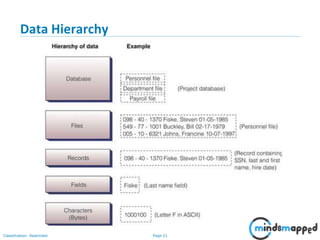
Data Hierarchy
Page 22Classification: Restricted
Databases
• There are many ways to organize records in a file. The most common is
called a sequential file, in which records are stored in order by the record-
key field.
• A group of related files is called a database.
• A collection of programs designed to create and manage databases is called
a database management system (DBMS).
Page 23Classification: Restricted
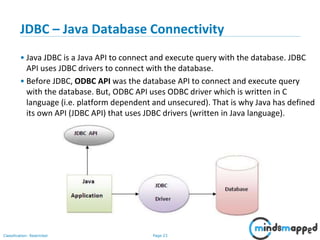
JDBC – Java Database Connectivity
• Java JDBC is a Java API to connect and execute query with the database. JDBC
API uses JDBC drivers to connect with the database.
• Before JDBC, ODBC API was the database API to connect and execute query
with the database. But, ODBC API uses ODBC driver which is written in C
language (i.e. platform dependent and unsecured). That is why Java has defined
its own API (JDBC API) that uses JDBC drivers (written in Java language).
Page 24Classification: Restricted
JDBC Driver
• JDBC Driver is a software component that enables java application to
interact with the database.
Page 25Classification: Restricted
5 Steps to connect to the database in java
1. Register the driver class
2. Creating connection
3. Creating statement
4. Executing queries
5. Closing connection
Page 26Classification: Restricted
5 Steps to connect to the database in java
1. Register the driver class
Class.forName("oracle.jdbc.driver.OracleDriver")
(throws ClassNotFoundException)
2. Creating connection –
Connection con=DriverManager.getConnection(
"jdbc:oracle:thin:@localhost:1521:xe","system","password");
Connection con=DriverManager.getConnection(
"jdbc:oracle:thin:@localhost:1521:xe");
(throws SQLException)
3. Creating statement:
Statement stmt=con.createStatement();
(throws SQLException)
4. Executing queries
ResultSet rs=stmt.executeQuery("select * from emp");
while(rs.next()){
System.out.println(rs.getInt(1)+" "+rs.getString(2));
}
(throws SQLException)
5. Closing connection
con.close(); // (throws SQLException)
Page 27Classification: Restricted
Working with Databases… Instruction.
• In our class, we will work with Oracle 11g XE (Express Edition).
• It is available for download for free from Oracle site:
http://www.oracle.com/technetwork/database/database-technologies/express-
edition/downloads/index.html
• Download the zip file, extract it, and run the setup file for installing Oracle database.
• Oracle database will get installed and use default port 1521.
• Then follow instructions here to complete the initial setup.
https://docs.oracle.com/cd/E17781_01/admin.112/e18585/toc.htm
• We will be working with the HR user/schema in all our examples.
o Unlock HR schema: ALTER USER HR ACCOUNT UNLOCK
o Specify a password for HR: ALTER USER HR IDENTIFIED BY <PASSWORD>
Page 28Classification: Restricted
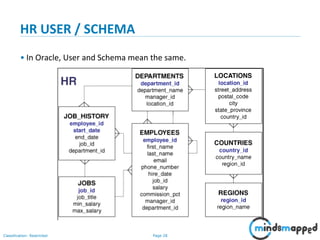
HR USER / SCHEMA
• In Oracle, User and Schema mean the same.
Page 29Classification: Restricted
Demo of HR Schema
• Let us look at the Employees and Departments Tables.
• Basic CRUD operations syntax reference for SQL:
http://www.orafaq.com/wiki/CRUD
Page 30Classification: Restricted
Ojdbc6.jar
• Copy ojdbc6.jar from
C:oraclexeapporacleproduct11.2.0serverjdbclib
to your JRElibext folder.
• This has the JDBC driver you will need.
• Other way of doing is by adding the path to the jar file to your classpath
oTemporarily: Set classpath in commandline.
oPermanent: Add path of jar file to classpath environment variable.
Page 31Classification: Restricted
JDBC Example… Connecting to the database.
import java.sql.*;
class OracleCon{
public static void main(String args[]){
try{
//step1 load the driver class
Class.forName("oracle.jdbc.driver.OracleDriver");
//step2 create the connection object
Connection con=DriverManager.getConnection(
"jdbc:oracle:thin:@localhost:1521:xe","system","oracle");
//step3 create the statement object
Statement stmt=con.createStatement();
//step4 execute query
ResultSet rs=stmt.executeQuery("select * from emp");
while(rs.next())
System.out.println(rs.getInt(1)+" "+rs.getString(2)+" "+rs.getString(3));
//step5 close the connection object
con.close();
}catch(Exception e){ System.out.println(e);}
}
}
Page 32Classification: Restricted
public static Connection getConnection(String url):
is used to establish the connection with the
specified url.
public static Connection getConnection(String
url,String userName,String password):
is used to establish the connection with the
specified url, username and password.
DriverManager class
• The DriverManager class acts as an interface between user and drivers. It
keeps track of the drivers that are available and handles establishing a
connection between a database and the appropriate driver. The
DriverManager class maintains a list of Driver classes that have registered
themselves by calling the method DriverManager.registerDriver().
Page 33Classification: Restricted
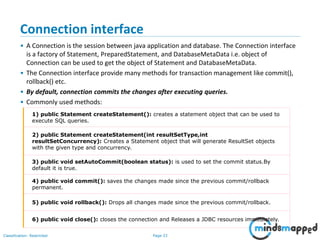
Connection interface
• A Connection is the session between java application and database. The Connection interface
is a factory of Statement, PreparedStatement, and DatabaseMetaData i.e. object of
Connection can be used to get the object of Statement and DatabaseMetaData.
• The Connection interface provide many methods for transaction management like commit(),
rollback() etc.
• By default, connection commits the changes after executing queries.
• Commonly used methods:
1) public Statement createStatement(): creates a statement object that can be used to
execute SQL queries.
2) public Statement createStatement(int resultSetType,int
resultSetConcurrency): Creates a Statement object that will generate ResultSet objects
with the given type and concurrency.
3) public void setAutoCommit(boolean status): is used to set the commit status.By
default it is true.
4) public void commit(): saves the changes made since the previous commit/rollback
permanent.
5) public void rollback(): Drops all changes made since the previous commit/rollback.
6) public void close(): closes the connection and Releases a JDBC resources immediately.
Page 34Classification: Restricted
Statement interface
The Statement interface provides methods to execute queries with the
database. The statement interface is a factory of ResultSet i.e. it provides
factory method to get the object of ResultSet.
1) public ResultSet executeQuery(String sql): is used to execute SELECT query. It
returns the object of ResultSet.
2) public int executeUpdate(String sql): is used to execute specified query, it may
be create, drop, insert, update, delete etc.
3) public boolean execute(String sql): is used to execute queries that may return
multiple results.
4) public int[] executeBatch(): is used to execute batch of commands.
Page 35Classification: Restricted
Example: Insert, Update and Delete using Statement.
import java.sql.*;
class FetchRecord{
public static void main(String args[])throws Exception{
Class.forName("oracle.jdbc.driver.OracleDriver");
Connection
con=DriverManager.getConnection("jdbc:oracle:thin:@localhost:1521:xe","syste
m","oracle");
Statement stmt=con.createStatement();
//stmt.executeUpdate("insert into emp765 values(33,'Irfan',50000)");
//int result=stmt.executeUpdate("update emp765 set name='Vimal',salary=10000
where id=33");
int result=stmt.executeUpdate("delete from emp765 where id=33");
System.out.println(result+" records affected");
con.close();
}}
Page 36Classification: Restricted
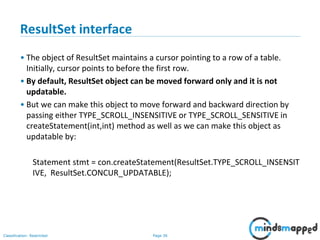
ResultSet interface
• The object of ResultSet maintains a cursor pointing to a row of a table.
Initially, cursor points to before the first row.
• By default, ResultSet object can be moved forward only and it is not
updatable.
• But we can make this object to move forward and backward direction by
passing either TYPE_SCROLL_INSENSITIVE or TYPE_SCROLL_SENSITIVE in
createStatement(int,int) method as well as we can make this object as
updatable by:
Statement stmt = con.createStatement(ResultSet.TYPE_SCROLL_INSENSIT
IVE, ResultSet.CONCUR_UPDATABLE);
Page 37Classification: Restricted
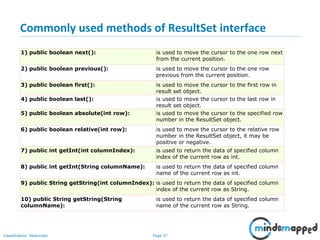
Commonly used methods of ResultSet interface
1) public boolean next(): is used to move the cursor to the one row next
from the current position.
2) public boolean previous(): is used to move the cursor to the one row
previous from the current position.
3) public boolean first(): is used to move the cursor to the first row in
result set object.
4) public boolean last(): is used to move the cursor to the last row in
result set object.
5) public boolean absolute(int row): is used to move the cursor to the specified row
number in the ResultSet object.
6) public boolean relative(int row): is used to move the cursor to the relative row
number in the ResultSet object, it may be
positive or negative.
7) public int getInt(int columnIndex): is used to return the data of specified column
index of the current row as int.
8) public int getInt(String columnName): is used to return the data of specified column
name of the current row as int.
9) public String getString(int columnIndex): is used to return the data of specified column
index of the current row as String.
10) public String getString(String
columnName):
is used to return the data of specified column
name of the current row as String.
Page 38Classification: Restricted
Example of Scrollable ResultSet (retrieve data of 3rd row)
import java.sql.*;
class FetchRecord{
public static void main(String args[])throws Exception{
Class.forName("oracle.jdbc.driver.OracleDriver");
Connection
con=DriverManager.getConnection("jdbc:oracle:thin:@localhost:1521:xe","system","oracle");
Statement
stmt=con.createStatement(ResultSet.TYPE_SCROLL_SENSITIVE,ResultSet.CONCUR_UPDATABLE);
ResultSet rs=stmt.executeQuery("select * from emp765");
//getting the record of 3rd row
rs.absolute(3);
System.out.println(rs.getString(1)+" "+rs.getString(2)+" "+rs.getString(3));
con.close();
}}
Page 39Classification: Restricted
Topics to be covered in next session
• JDBC Continued
• Introduction to Java Enterprise Edition (Java EE)
Page 40Classification: Restricted
Thank you!

JDBC

  • 1.
    Core Java Training Examplesof File IO & Introduction to JDBC
  • 2.
    Page 1Classification: Restricted Agenda •File IO Continued • Intro to JDBC (Java Database Connectivity)
  • 3.
    Java File IOExamples Contd…
  • 4.
    Page 3Classification: Restricted FileReaderExample import java.io.*; public class FileRead { public static void main(String args[])throws IOException { File file = new File("Hello1.txt"); // creates the file file.createNewFile(); // creates a FileWriter Object FileWriter writer = new FileWriter(file); // Writes the content to the file writer.write("Thisn isn ann examplen"); writer.flush(); writer.close(); // Creates a FileReader Object FileReader fr = new FileReader(file); char [] a = new char[50]; fr.read(a); // reads the content to the array for(char c : a) System.out.print(c); // prints the characters one by one fr.close(); } }
  • 5.
    Page 4Classification: Restricted FileWriterExample import java.io.*; public class FileRead { public static void main(String args[])throws IOException { File file = new File("Hello1.txt"); // creates the file file.createNewFile(); // creates a FileWriter Object FileWriter writer = new FileWriter(file); // Writes the content to the file writer.write("Thisn isn ann examplen"); writer.flush(); writer.close(); // Creates a FileReader Object FileReader fr = new FileReader(file); char [] a = new char[50]; fr.read(a); // reads the content to the array for(char c : a) System.out.print(c); // prints the characters one by one fr.close(); } }
  • 6.
    Page 5Classification: Restricted FileExample: Creating Directories import java.io.File; public class CreateDir { public static void main(String args[]) { String dirname = "/tmp/user/java/bin"; File d = new File(dirname); // Create directory now. d.mkdirs(); //Question: What does mkdirs do? } }
  • 7.
    Page 6Classification: Restricted FileExample: Listing Directories import java.io.File; public class ReadDir { public static void main(String[] args) { File file = null; String[] paths; try { // create new file object file = new File("/tmp"); // array of files and directory paths = file.list(); // for each name in the path array for(String path:paths) { // prints filename and directory name System.out.println(path); } }catch(Exception e) { // if any error occurs e.printStackTrace(); } } }
  • 8.
    Page 7Classification: Restricted FileExample: Create a file import java.io.File; import java.io.IOException; public class CreateFileDemo { public static void main( String[] args ) { try { File file = new File("C:newfile.txt"); /*If file gets created then the createNewFile() * method would return true or if the file is * already present it would return false */ boolean fvar = file.createNewFile(); if (fvar){ System.out.println("File has been created successfully"); } else{ System.out.println("File already present at the specified location"); } } catch (IOException e) { System.out.println("Exception Occurred:"); e.printStackTrace(); } } }
  • 9.
    Page 8Classification: Restricted Howto read file in Java – BufferedInputStream import java.io.*; public class ReadFileDemo { public static void main(String[] args) { //Specify the path of the file here File file = new File("C://myfile.txt"); BufferedInputStream bis = null; FileInputStream fis= null; try { //FileInputStream to read the file fis = new FileInputStream(file); /*Passed the FileInputStream to BufferedInputStream *For Fast read using the buffer array.*/ bis = new BufferedInputStream(fis); /*available() method of BufferedInputStream * returns 0 when there are no more bytes * present in the file to be read*/ while( bis.available() > 0 ){ System.out.print((char)bis.read()); } } catch(FileNotFoundException fnfe) { System.out.println("The specified file not found" + fnfe); } catch(IOException ioe) { System.out.println("I/O Exception: " + ioe); } finally { try{ if(bis != null && fis!=null) { fis.close(); bis.close(); } }catch(IOException ioe) { System.out.println("Error in InputStream close(): " + ioe); } } } }
  • 10.
    Page 9Classification: Restricted Howto read file in Java using BufferedReader import java.io.BufferedReader; import java.io.FileReader; import java.io.IOException; public class ReadFileDemo { public static void main(String[] args) { BufferedReader br = null; BufferedReader br2 = null; try{ br = new BufferedReader(new FileReader("B:myfile.txt")); //One way of reading the file System.out.println("Reading the file using readLine() method:"); String contentLine = br.readLine(); while (contentLine != null) { System.out.println(contentLine); contentLine = br.readLine(); } br2 = new BufferedReader(new FileReader("B:myfile2.txt")); //Second way of reading the file System.out.println("Reading the file using read() method:"); int num=0; char ch; while((num=br2.read()) != -1) { ch=(char)num; System.out.print(ch); } } catch (IOException ioe) { ioe.printStackTrace(); } finally { try { if (br != null) br.close(); if (br2 != null) br2.close(); } catch (IOException ioe) { System.out.println("Error in closing the BufferedReader"); } } } }
  • 11.
    Page 10Classification: Restricted Howto write to file in Java using BufferedWriter import java.io.BufferedWriter; import java.io.File; import java.io.FileWriter; import java.io.IOException; public class WriteFileDemo { public static void main(String[] args) { BufferedWriter bw = null; try { String mycontent = "This String would be written" + " to the specified File"; //Specify the file name and path here File file = new File("C:/myfile.txt"); /* This logic will make sure that the file * gets created if it is not present at the * specified location*/ if (!file.exists()) { file.createNewFile(); } FileWriter fw = new FileWriter(file); bw = new BufferedWriter(fw); bw.write(mycontent); System.out.println("File written Successfully"); } catch (IOException ioe) { ioe.printStackTrace(); } finally { try{ if(bw!=null) bw.close(); }catch(Exception ex){ System.out.println("Error in closing the BufferedWriter"+ex); } } } }
  • 12.
    Page 11Classification: Restricted Appendcontent to File using FileWriter and BufferedWriter import java.io.File; import java.io.FileWriter; import java.io.BufferedWriter; import java.io.IOException; class AppendFileDemo { public static void main( String[] args ) { try{ String content = "This is my content which would be appended " + "at the end of the specified file"; //Specify the file name and path here File file =new File("C://myfile.txt"); /* This logic is to create the file if the * file is not already present */ if(!file.exists()){ file.createNewFile(); } //Here true is to append the content to file FileWriter fw = new FileWriter(file,true); //BufferedWriter writer give better performance BufferedWriter bw = new BufferedWriter(fw); bw.write(content); //Closing BufferedWriter Stream bw.close(); System.out.println("Data successfully appended at the end of file"); }catch(IOException ioe){ System.out.println("Exception occurred:"); ioe.printStackTrace(); } } }
  • 13.
    Page 12Classification: Restricted Appendcontent to File using PrintWriter import java.io.File; import java.io.FileWriter; import java.io.PrintWriter; import java.io.BufferedWriter; import java.io.IOException; class AppendFileDemo2 { public static void main( String[] args ) { try{ File file =new File("C://myfile.txt"); if(!file.exists()){ file.createNewFile(); } FileWriter fw = new FileWriter(file,true); BufferedWriter bw = new BufferedWriter(fw); PrintWriter pw = new PrintWriter(bw); //This will add a new line to the file content pw.println(""); /* Below three statements would add three * mentioned Strings to the file in new lines. */ pw.println("This is first line"); pw.println("This is the second line"); pw.println("This is third line"); pw.close(); System.out.println("Data successfully appended at the end of file"); }catch(IOException ioe){ System.out.println("Exception occurred:"); ioe.printStackTrace(); } } }
  • 14.
    Page 13Classification: Restricted Howto delete file in Java – delete() Method import java.io.File; public class DeleteFileJavaDemo { public static void main(String[] args) { try{ //Specify the file name and path File file = new File("C:myfile.txt"); /*the delete() method returns true if the file is * deleted successfully else it returns false */ if(file.delete()){ System.out.println(file.getName() + " is deleted!"); }else{ System.out.println("Delete failed: File didn't delete"); } }catch(Exception e){ System.out.println("Exception occurred"); e.printStackTrace(); } } }
  • 15.
    Page 14Classification: Restricted Howto rename file in Java – renameTo() method import java.io.File; public class RenameFileJavaDemo { public static void main(String[] args) { //Old File File oldfile =new File("C:myfile.txt"); //New File File newfile =new File("C:mynewfile.txt"); /*renameTo() return boolean value * It return true if rename operation is * successful */ boolean flag = oldfile.renameTo(newfile); if(flag){ System.out.println("File renamed successfully"); }else{ System.out.println("Rename operation failed"); } } }
  • 16.
    Page 15Classification: Restricted Howto Compress a File in GZIP Format import java.io.FileInputStream; import java.io.FileOutputStream; import java.io.IOException; import java.util.zip.GZIPOutputStream; public class GZipExample { public static void main( String[] args ) { GZipExample zipObj = new GZipExample(); zipObj.gzipMyFile(); } public void gzipMyFile(){ byte[] buffer = new byte[1024]; try{ //Specify Name and Path of Output GZip file here GZIPOutputStream gos = new GZIPOutputStream(new FileOutputStream("B://Java/Myfile.gz")); //Specify location of Input file here FileInputStream fis = new FileInputStream("B://Java/Myfile.txt"); //Reading from input file and writing to output GZip file int length; while ((length = fis.read(buffer)) > 0) { /* public void write(byte[] buf, int off, int len): * Writes array of bytes to the compressed output stream. * This method will block until all the bytes are written. * Parameters: * buf - the data to be written * off - the start offset of the data * len - the length of the data */ gos.write(buffer, 0, length); } fis.close(); /* public void finish(): Finishes writing compressed * data to the output stream without closing the * underlying stream. */ gos.finish(); gos.close(); System.out.println("File Compressed!!"); }catch(IOException ioe){ ioe.printStackTrace(); } } }
  • 17.
    Page 16Classification: Restricted Howto Copy a File to another File in Java import java.io.File; import java.io.FileInputStream; import java.io.FileOutputStream; import java.io.IOException; public class CopyExample { public static void main(String[] args) { FileInputStream instream = null; FileOutputStream outstream = null; try{ File infile =new File("C:MyInputFile.txt"); File outfile =new File("C:MyOutputFile.txt"); instream = new FileInputStream(infile); outstream = new FileOutputStream(outfile); byte[] buffer = new byte[1024]; int length; /*copying the contents from input stream to * output stream using read and write methods */ while ((length = instream.read(buffer)) > 0){ outstream.write(buffer, 0, length); } //Closing the input/output file streams instream.close(); outstream.close(); System.out.println("File copied successfully!!"); }catch(IOException ioe){ ioe.printStackTrace(); } } }
  • 18.
    Page 17Classification: Restricted Howto make a File Read Only in Java import java.io.File; import java.io.IOException; public class ReadOnlyChangeExample { public static void main(String[] args) throws IOException { File myfile = new File("C://Myfile.txt"); //making the file read only boolean flag = myfile.setReadOnly(); if (flag==true) { System.out.println("File successfully converted to Read only mode!!"); } else { System.out.println("Unsuccessful Operation!!"); } } }
  • 19.
    Page 18Classification: Restricted Howto check if a File is hidden in Java import java.io.File; import java.io.IOException; public class HiddenPropertyCheck { public static void main(String[] args) throws IOException, SecurityException { // Provide the complete file path here File file = new File("c:/myfile.txt"); if(file.isHidden()){ System.out.println("The specified file is hidden"); }else{ System.out.println("The specified file is not hidden"); } } }
  • 20.
    Java & JEETraining JDBC – Java Database Connectivity
  • 21.
    Page 20Classification: Restricted Introduction •Data stored in variables and arrays is temporary • It’s lost when a local variable goes out of scope or when the program terminates • For long-term retention of data, computers use files. • Computers store files on secondary storage devices • hard disks, optical disks, flash drives and magnetic tapes. • Data maintained in files is persistent data because it exists beyond the duration of program execution.
  • 22.
  • 23.
    Page 22Classification: Restricted Databases •There are many ways to organize records in a file. The most common is called a sequential file, in which records are stored in order by the record- key field. • A group of related files is called a database. • A collection of programs designed to create and manage databases is called a database management system (DBMS).
  • 24.
    Page 23Classification: Restricted JDBC– Java Database Connectivity • Java JDBC is a Java API to connect and execute query with the database. JDBC API uses JDBC drivers to connect with the database. • Before JDBC, ODBC API was the database API to connect and execute query with the database. But, ODBC API uses ODBC driver which is written in C language (i.e. platform dependent and unsecured). That is why Java has defined its own API (JDBC API) that uses JDBC drivers (written in Java language).
  • 25.
    Page 24Classification: Restricted JDBCDriver • JDBC Driver is a software component that enables java application to interact with the database.
  • 26.
    Page 25Classification: Restricted 5Steps to connect to the database in java 1. Register the driver class 2. Creating connection 3. Creating statement 4. Executing queries 5. Closing connection
  • 27.
    Page 26Classification: Restricted 5Steps to connect to the database in java 1. Register the driver class Class.forName("oracle.jdbc.driver.OracleDriver") (throws ClassNotFoundException) 2. Creating connection – Connection con=DriverManager.getConnection( "jdbc:oracle:thin:@localhost:1521:xe","system","password"); Connection con=DriverManager.getConnection( "jdbc:oracle:thin:@localhost:1521:xe"); (throws SQLException) 3. Creating statement: Statement stmt=con.createStatement(); (throws SQLException) 4. Executing queries ResultSet rs=stmt.executeQuery("select * from emp"); while(rs.next()){ System.out.println(rs.getInt(1)+" "+rs.getString(2)); } (throws SQLException) 5. Closing connection con.close(); // (throws SQLException)
  • 28.
    Page 27Classification: Restricted Workingwith Databases… Instruction. • In our class, we will work with Oracle 11g XE (Express Edition). • It is available for download for free from Oracle site: http://www.oracle.com/technetwork/database/database-technologies/express- edition/downloads/index.html • Download the zip file, extract it, and run the setup file for installing Oracle database. • Oracle database will get installed and use default port 1521. • Then follow instructions here to complete the initial setup. https://docs.oracle.com/cd/E17781_01/admin.112/e18585/toc.htm • We will be working with the HR user/schema in all our examples. o Unlock HR schema: ALTER USER HR ACCOUNT UNLOCK o Specify a password for HR: ALTER USER HR IDENTIFIED BY <PASSWORD>
  • 29.
    Page 28Classification: Restricted HRUSER / SCHEMA • In Oracle, User and Schema mean the same.
  • 30.
    Page 29Classification: Restricted Demoof HR Schema • Let us look at the Employees and Departments Tables. • Basic CRUD operations syntax reference for SQL: http://www.orafaq.com/wiki/CRUD
  • 31.
    Page 30Classification: Restricted Ojdbc6.jar •Copy ojdbc6.jar from C:oraclexeapporacleproduct11.2.0serverjdbclib to your JRElibext folder. • This has the JDBC driver you will need. • Other way of doing is by adding the path to the jar file to your classpath oTemporarily: Set classpath in commandline. oPermanent: Add path of jar file to classpath environment variable.
  • 32.
    Page 31Classification: Restricted JDBCExample… Connecting to the database. import java.sql.*; class OracleCon{ public static void main(String args[]){ try{ //step1 load the driver class Class.forName("oracle.jdbc.driver.OracleDriver"); //step2 create the connection object Connection con=DriverManager.getConnection( "jdbc:oracle:thin:@localhost:1521:xe","system","oracle"); //step3 create the statement object Statement stmt=con.createStatement(); //step4 execute query ResultSet rs=stmt.executeQuery("select * from emp"); while(rs.next()) System.out.println(rs.getInt(1)+" "+rs.getString(2)+" "+rs.getString(3)); //step5 close the connection object con.close(); }catch(Exception e){ System.out.println(e);} } }
  • 33.
    Page 32Classification: Restricted publicstatic Connection getConnection(String url): is used to establish the connection with the specified url. public static Connection getConnection(String url,String userName,String password): is used to establish the connection with the specified url, username and password. DriverManager class • The DriverManager class acts as an interface between user and drivers. It keeps track of the drivers that are available and handles establishing a connection between a database and the appropriate driver. The DriverManager class maintains a list of Driver classes that have registered themselves by calling the method DriverManager.registerDriver().
  • 34.
    Page 33Classification: Restricted Connectioninterface • A Connection is the session between java application and database. The Connection interface is a factory of Statement, PreparedStatement, and DatabaseMetaData i.e. object of Connection can be used to get the object of Statement and DatabaseMetaData. • The Connection interface provide many methods for transaction management like commit(), rollback() etc. • By default, connection commits the changes after executing queries. • Commonly used methods: 1) public Statement createStatement(): creates a statement object that can be used to execute SQL queries. 2) public Statement createStatement(int resultSetType,int resultSetConcurrency): Creates a Statement object that will generate ResultSet objects with the given type and concurrency. 3) public void setAutoCommit(boolean status): is used to set the commit status.By default it is true. 4) public void commit(): saves the changes made since the previous commit/rollback permanent. 5) public void rollback(): Drops all changes made since the previous commit/rollback. 6) public void close(): closes the connection and Releases a JDBC resources immediately.
  • 35.
    Page 34Classification: Restricted Statementinterface The Statement interface provides methods to execute queries with the database. The statement interface is a factory of ResultSet i.e. it provides factory method to get the object of ResultSet. 1) public ResultSet executeQuery(String sql): is used to execute SELECT query. It returns the object of ResultSet. 2) public int executeUpdate(String sql): is used to execute specified query, it may be create, drop, insert, update, delete etc. 3) public boolean execute(String sql): is used to execute queries that may return multiple results. 4) public int[] executeBatch(): is used to execute batch of commands.
  • 36.
    Page 35Classification: Restricted Example:Insert, Update and Delete using Statement. import java.sql.*; class FetchRecord{ public static void main(String args[])throws Exception{ Class.forName("oracle.jdbc.driver.OracleDriver"); Connection con=DriverManager.getConnection("jdbc:oracle:thin:@localhost:1521:xe","syste m","oracle"); Statement stmt=con.createStatement(); //stmt.executeUpdate("insert into emp765 values(33,'Irfan',50000)"); //int result=stmt.executeUpdate("update emp765 set name='Vimal',salary=10000 where id=33"); int result=stmt.executeUpdate("delete from emp765 where id=33"); System.out.println(result+" records affected"); con.close(); }}
  • 37.
    Page 36Classification: Restricted ResultSetinterface • The object of ResultSet maintains a cursor pointing to a row of a table. Initially, cursor points to before the first row. • By default, ResultSet object can be moved forward only and it is not updatable. • But we can make this object to move forward and backward direction by passing either TYPE_SCROLL_INSENSITIVE or TYPE_SCROLL_SENSITIVE in createStatement(int,int) method as well as we can make this object as updatable by: Statement stmt = con.createStatement(ResultSet.TYPE_SCROLL_INSENSIT IVE, ResultSet.CONCUR_UPDATABLE);
  • 38.
    Page 37Classification: Restricted Commonlyused methods of ResultSet interface 1) public boolean next(): is used to move the cursor to the one row next from the current position. 2) public boolean previous(): is used to move the cursor to the one row previous from the current position. 3) public boolean first(): is used to move the cursor to the first row in result set object. 4) public boolean last(): is used to move the cursor to the last row in result set object. 5) public boolean absolute(int row): is used to move the cursor to the specified row number in the ResultSet object. 6) public boolean relative(int row): is used to move the cursor to the relative row number in the ResultSet object, it may be positive or negative. 7) public int getInt(int columnIndex): is used to return the data of specified column index of the current row as int. 8) public int getInt(String columnName): is used to return the data of specified column name of the current row as int. 9) public String getString(int columnIndex): is used to return the data of specified column index of the current row as String. 10) public String getString(String columnName): is used to return the data of specified column name of the current row as String.
  • 39.
    Page 38Classification: Restricted Exampleof Scrollable ResultSet (retrieve data of 3rd row) import java.sql.*; class FetchRecord{ public static void main(String args[])throws Exception{ Class.forName("oracle.jdbc.driver.OracleDriver"); Connection con=DriverManager.getConnection("jdbc:oracle:thin:@localhost:1521:xe","system","oracle"); Statement stmt=con.createStatement(ResultSet.TYPE_SCROLL_SENSITIVE,ResultSet.CONCUR_UPDATABLE); ResultSet rs=stmt.executeQuery("select * from emp765"); //getting the record of 3rd row rs.absolute(3); System.out.println(rs.getString(1)+" "+rs.getString(2)+" "+rs.getString(3)); con.close(); }}
  • 40.
    Page 39Classification: Restricted Topicsto be covered in next session • JDBC Continued • Introduction to Java Enterprise Edition (Java EE)
  • 41.