View To Pixel
Britt Barak
26/6/2017
Wifi: GoogleGuestPSK
pass: pUp3EkaP
3
Jonathan
Yarkoni
Android Developer &
Advocate
Ironsource
Android Academy Staff
Yonatan Levin
Android
Google Developer
Expert
Yossi Segev
Android Developer
Colu
Shahar
Avigezer
Android Developer
Hello Heart
Britt Barak
Android Lead
Figure8
Britt Barak
Britt Barak
Adventures
Android Academy
Women Techmakers
The Largest
Android Community
Android Academy - TLV
TLV - Android Academy
Join Us:Fundamentals
Advanced
With designers
Hackathons
Mentors
Has this ever happened to you?
Why do we love apps?
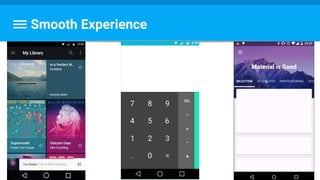
Smooth Experience
How Is Motion Perceived?
Smooth
Motion
60
No
Difference
60+
Flip Book
12
Movies
Frames Per Second
Fluid Motion
24
+effects
We Have A Winner!
Smooth
Motion
60
No
Difference
60+
Flip Book
12
Movies
Frames Per Second
Fluid Motion
24
+effects
Smooth
Motion
60
Colt McAnlis: https://youtu.be/CaMTIgxCSqU
60 FPS
60 Frames / Second =
Frame / 16.666 Millisecond
But First Thing First
Today’s Story
How Did My Code Become Pixels?
CPU
new
View()
Rasterization
From a high level object
into pixels on screen (or in texture).
https://en.wikipedia.org/wiki/Rasterisation
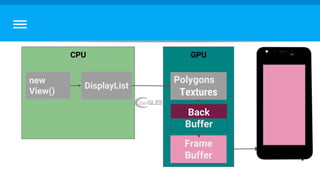
GPU - For The Rescue !
GPU - For The Rescue!
CPU
new
View()
GPU
GPU - For The Rescue!
CPU
new
View()
GPU
Polygons
Textures
GPU - For The Rescue!
CPU
new
View()
GPU
Polygons
Textures
DisplayList
GPU - For The Rescue!
CPU
new
View()
GPU
Polygons
Textures
DisplayList
What do we need to do in these 16ms?
Measure
CPU
new
View()
GPU
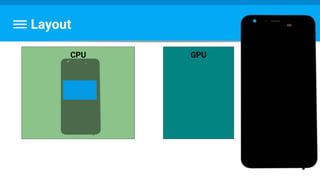
Layout
CPU GPU
Draw
CPU GPU
new
View()
DisplayList
Sync & Upload
CPU
new
View()
GPU
Polygons
Textures
DisplayList
Execute
CPU
new
View()
GPU
Polygons
Textures
DisplayList
Execute
CPU
new
View()
GPU
Polygons
Textures
DisplayList
Frame
Buffer
What happens if
What happens if
CPU GPU
What happens if
CPU GPU
What happens if
CPU GPU
What do we do?
Double buffer
CPU
new
View()
GPU
Polygons
Textures
DisplayList
Back
Buffer
Frame
Buffer
CPU
new
View()
GPU
Polygons
Textures
DisplayList
Back
Buffer
Frame
Buffer
CPU
new
View()
GPU
Polygons
Textures
DisplayList
Back
Buffer
Frame
Buffer
CPU
new
View()
GPU
Polygons
Textures
DisplayList
Back
Buffer
Frame
Buffer
vsync
So What Does That Mean?
Measure/ Layout
Draw
Sync & Upload
Execute
Swap Buffers
VSync/Misc
actually...
input
animation
Invalidation
requestLayout
When Things Change...
E.g. text, color, size, padding, margin...
A view notifies the system, by calling:
Invalidate - which will call the onDraw again, or
requestLayout - which will call the entire process again.
When Is Request Layout Called?
View1 View2
When Is Request Layout Called?
View2View1
When Is Request Layout Called?
View2View1
●Adds a flag
●Recreate displaylist in next frame
invalidate()
requestLayout()
Bubble up to the root view.
Heavy for deep view hierarchy.
Called once a frame.
cheographer
The all-mighty LogCat
I/Choreographer(1378): Skipped 55 frames! The application may be doing too much work
on its main thread.
Order Is Guaranteed
VSync/Misc
Input
Animation
Measure/ Layout
Draw
Sync & Upload
Command Issue
Swap Buffers
So What Does That Mean?
Questions?
Reminder
Measure Layout Draw!
Step 1: Measure
Goal: obtain view size,
including its descendants size,
agreed by its parent.
REF: http://developer.android.com/reference/android/view/View.html#onMeasure(int, int)
ViewGroup.LayoutParams
How big the View wants to be
For each dimension, it can specify one of:
an exact number
MATCH_PARENT
WRAP_CONTENT
*Might be subclassed, like in RelativeLayout
MeasureSpec
Parent requirement for child
UNSPECIFIED: as child wants
EXACTLY: exact size
AT MOST: maximum size
Multiple measure() Calls
measure() may be called more than once
For example:
- Call once with UNSPECIFIED
- If size too big/small- evaluate
- Call with exact size
View.getWidth() == 0…
What’s up with that?!
Step 1: Measure - What’s View SIZE?
- width & height (aka: drawing width & drawing height) -
- Actual size on screen, at drawing time and after layout.
REF: http://developer.android.com/reference/android/view/View.html#onMeasure(int, int)
Step 1: Measure - What’s View SIZE?
- width & height (aka: drawing width & drawing height) -
- Actual size on screen, at drawing time and after layout.
- measured width & measured height
- how big a view wants to be within its parent
REF: http://developer.android.com/reference/android/view/View.html#onMeasure(int, int)
What if we want the
size during an animation?
ViewTreeObserver
●Provided by the view hierarchy
●Use to register listeners to view tree global changes
○ For example: layout of the whole tree, beginning of the drawing, touch mode
change....
●Use with getViewTreeObserver()
https://developer.android.com/reference/android/view/ViewTreeObserver.html
onPreDrawListener
Any Questions?
The Steps
Measure Layout Draw!
Step 2: Layout
Goal : set position for view
and all its children,
respect parent’s constraints.
REF: http://developer.android.com/reference/android/view/View.html#onLayout(boolean, int, int, int, int)
How many layout passes are there?
Root View : RelativeLayout
2 passes per change:
1)By views’ requests
a)Then relativeLayout calculates by relations & weights
2)Determine the final positions for rendering.
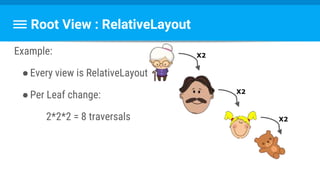
Root View : RelativeLayout
Example:
●Every view is RelativeLayout
●Per Leaf change:
2*2*2 = 8 traversals
X2
X2
X2
Root View : LinearLayout
●measureWithLargestChild(true)
○ Children with weights will have minimum size of largest child
●Nested weights
Root View : GridLayout
Allows relative positioning,
while preprocessing the child view relationships.
Root View : GridLayout
Generally issues 1 layout request
Unless:
●Layout_gravity: fill*
●Wrong weights
This is called
Double Layout Taxation
It Usually Works Fine… But...
●Root elements
●Deep view hierarchy
●Too many (i.e. list)
Can hurt.
What can we do?
●Flatten hierarchy :
Removing unneeded views
Merge on include
flatter layout
Beware double layout taxation
Minimize layout requests
Cool Tool
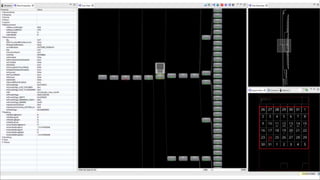
Hierarchy Viewer
Hierarchy Viewer
Tools→ Android → Android Device Monitor → Hierarchy Viewer
Display complete view hierarchy
Access to all the views’ properties
Get performance stats
Hierarchy Viewer
Hierarchy Viewer
- Green dot : in the faster 50%
of all the View objects
- Yellow : in the slower than 50%
- Red: the slowest
- requestLayout:
Any Questions?
Ok ok ,
but which layout should I choose??
Simple VS Complex Layouts
●Simple : LinearLayout, FrameLayout, TableLayout
●Complex : RelativeLayout , GridLayout
Simple VS Complex Layouts
●Simple : LinearLayout, FrameLayout, TableLayout
○ → Nesting → Performance Problems
●Complex : RelativeLayout , GridLayout
○ → hard to use & maintain
○ → shouldn’t be @ top hierarchy
Isn’t there anything
smarter we can do??
Constraint Layout
Constraint Layout
●Api 9+
●Performance oriented:
○ Reduce nesting
○ Improve measure/layout
○ Best practice : top level, without nesting layouts
User friendly:
Expressive
New Layout Editor
Designed for
ConstraintLayout -
but not only!
Concept
Similar to RelativeLayout :
Position a view relative to other layout elements.
Yet more expressive & powerful
Getting Started
Design Mode Blueprint Mode
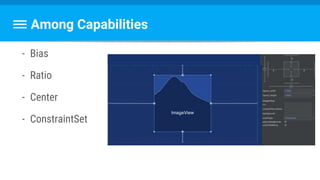
Among Capabilities
- Bias
- Ratio
- Center
- ConstraintSet
Possible Attributes
layout_constraintX_toYOf 
X and Y can be replaced with:
a. Top
b. Bottom
c. Left
d. Right
e. Start
f. End
g. Baseline
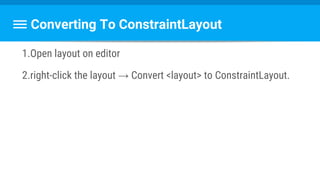
Converting To ConstraintLayout
1.Open layout on editor
2.right-click the layout → Convert <layout> to ConstraintLayout.
Well, that’s about it!
Not officially released, but quite stable.
Give it a try :)
https://codelabs.developers.google.com/codelabs/constraint-layout/index.html
Any Questions?
The Steps
Measure Layout Draw!
- View draws itself with size and position from previous steps.
- onDraw(Canvas) is called
- Canvas object generates (or Updates) a list of OpenGL-ES
commands (displayList) to send to the GPU.
Step 3: Draw (AKA Update)
REF: http://developer.android.com/reference/android/view/View.html#onDraw(android.graphics.Canvas)
Guide: http://developer.android.com/training/custom-views/custom-drawing.html
What Can Go Wrong?
Allocating objects (new XXX()) might cause a GC (blocking)
So you might drop a frame.
Allocations in onDraw()
But it goes much deeper. See Ian Ni-Lewis: https://youtu.be/HAK5acHQ53E
B
The number of files that a given pixel is
drawn in a frame.
Overdraw
Colt McAnlis: https://youtu.be/T52v50r-JfE
Detecting Overdraw
Detecting Overdraw
https://developer.android.com/studio/profile/dev-options-
Codelab: https://io2015codelabs.appspot.com/codelabs/android-
Fixing Overdraw
There are 2 common reasons for overdraw:
- Redundant backgrounds / Redundant transparency
- Wasteful onDraw
- Things that aren’t visible at all gets drawn (not using quickReject)
- Things that will be overdrawn gets drawn (not using clipRect)
Colt McAnlis: https://youtu.be/vkTn3Ule4Ps
QuickReject
A method to tell if something can be not drawn at all.
Call quickReject to see if you can skip drawing of things that will be
off screen.
REF: https://developer.android.com/reference/android/graphics/Canvas.html
ClipRect
ClipRect is a way to avoid OverDraw,
By keeping your GPU from drawing pixels that you know that will be
obscured by other stuff,
you refrain from overdraw.
Step 1:
quickReject
Step 2:
clipRect
ClipRect vs. QuickReject
Method return type: Detects... Helps to...
QuickReject boolean Fully invisible stuff Avoid redundant
calls to drawXXX(),
Keeping the
drawlist short.
ClipRect void Fully and Partially
invisible stuff
Avoid drawing
pixels,
but still executing
the draw-list!
boolean
But is usually used
as void
Any Questions?
Profiling tools
VSync/Misc
Input
Animation
Measure/ Layout
Draw
Sync & Upload
Command Issue
Swap Buffers
So What Does That Mean?
GPU Profiling Tool
GPU Profiling
● A graph per visible app
● A bar per frame
● Render time corresponds height
● 16 millis benchmark (green)
● Crossing = skipping frame
https://developer.android.com/studio/profile/dev-options-rendering.html
16ms line
Dropped
Frames :(
14
accented
if >16ms
Shiney
colors!
GPU Monitor (Android Studio)
systrace
Vitals dashboard
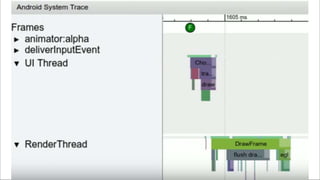
Frame Metrics
On Android N+
- Per Frame data:
- Windos.OnFrameMetricsAvailableListener()
- Aggregated
- FrameMetricsAggregator (Support lib v26)
https://developer.android.com/reference/android/view/FrameMet
VSync/Misc
Input
Animation
Measure/ Layout
Draw
Sync & Upload
Command Issue
Swap Buffers
So What Does That Mean?
Vsync / Misc Time
Misc = (vsync timestamp) - (timestamp when received)
→ work on the UI thread between two consecutive frames
● Choreographer log : “Missed vsync by XX ms skipping XX frames”
High? move work off UI Thread
VSync/
Misc
Input
Animation
Measure/
Layout
Draw
Sync &
Upload
Command
Issue
Swap
Buffers
Input Handling
App code inside an input event callback.
High? optimize/offload processing input
VSync/
Misc
Input
Animation
Measure/
Layout
Draw
Sync &
Upload
Command
Issue
Swap
Buffers
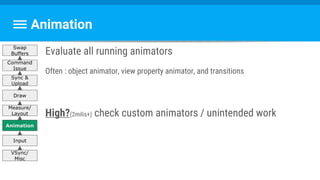
Animation
Evaluate all running animators
Often : object animator, view property animator, and transitions
High?(2milis+) check custom animators / unintended work
VSync/
Misc
Input
Animation
Measure/
Layout
Draw
Sync &
Upload
Command
Issue
Swap
Buffers
Measure / Layout
Executing layout and measure callbacks for needed view.
More on that in a few slides :)
VSync/
Misc
Input
Animation
Measure/
Layout
Draw
Sync &
Upload
Command
Issue
Swap
Buffers
Draw
update (/creates) all display lists
+ cache.
High?
complex onDraw() logic
many views invalidated
VSync/
Misc
Input
Animation
Measure/
Layout
Draw
Sync &
Upload
Command
Issue
Swap
Buffers
Sync & Upload
Upload bitmap to the GPU.
High?
Too many images
Too big of an image
VSync/
Misc
Input
Animation
Measure/
Layout
Draw
Sync &
Upload
Command
Issue
Swap
Buffers
Command Issue
Execution: Android's 2D renderer issuing commands to OpenGL to draw and
redraw all display lists
High?
●Complex view (custom?)
●Many views redrawing:
○ Invalidation
○ animationVSync/
Misc
Input
Animation
Measure/
Layout
Draw
Sync &
Upload
Command
Issue
Swap
Buffers
Swap Buffers
CPU done rendering and wait for GPU ack.
High?
A lot of GPU work
VSync/
Misc
Input
Animation
Measure/
Layout
Draw
Sync &
Upload
Command
Issue
Swap
Buffers
Any Questions?
What Happened Here Today?

How Does A View Display On Screen?
ScreenGPU
Polygons
Textures
CPU
new
Button()
DisplayList
tools
- Hierarchy viewer
- Gpu overdraw
- Gpu profiler
- Systrace
- Vitals dashboard
Any Questions?
Thank You !
Community announcements

Advanced #2 - ui perf

Editor's Notes

  • #17 https://en.wikipedia.org/wiki/Rasterisation
  • #118 https://developer.android.com/studio/profile/dev-options-rendering.html || Colt McAnlis https://youtu.be/VzYkVL1n4M8
  • #120 https://developer.android.com/studio/profile/am-gpu.html
  • #121 Systrace has traces on method android team added. If they had added alot of traces - it would slow the app.
  • #136  upload bitmap information to the GPU. The UI thread passes all the resources to the RenderThread. RenderThread (added in L) is a thread helping the busy UI thread with the conversion of display lists to OpenGL commands, and sends them to the GPU. During which, the UI thread can start processing next frame.