The Trusted Technology Partner in
   Business Innovation


  August 2010                       August 2010                     July 2010                         June 2010
  Ranked as one of the top          Ranked as one of the top        Named Microsoft Partner of        CRN Magazine's list of the
  technology solution providers     technology solution providers   the Year Finalist in 2 separate   largest solution providers in
  in America by CRN Magazine        in America by CRN Magazine      categories                        North America
  for the past 4 years.             for the past 4 years.


  2009 2010     2007 2008


The Trusted Technology Partner in Business Innovation
Products | Consulting Services | Managed Services
Server vs Client in real life and
             in programming world


                                     Manoj Kumar
                                     Senior Consultant III
                                     manoj.kumar@neudesic.com   14 June, 2012


The Trusted Technology Partner in Business Innovation
Products | Consulting Services | Managed Services
Client ???


                       Clients are PCs or workstations on which
                       users run applications.

                       Clients rely on servers for resources, such
                       as files, devices, and even processing power.


The Trusted Technology Partner in Business Innovation
Products | Consulting Services | Managed Services
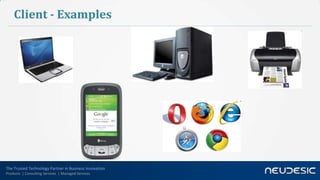
Client - Examples


The Trusted Technology Partner in Business Innovation
Products | Consulting Services | Managed Services
Server ???


                             Servers are powerful computers or processes
                             dedicated to managing disk drives (file servers),
                             printers (print servers), or network traffic
                             (network servers ).


The Trusted Technology Partner in Business Innovation
Products | Consulting Services | Managed Services
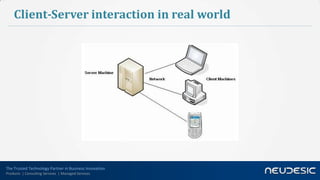
Client-Server interaction in real world


The Trusted Technology Partner in Business Innovation
Products | Consulting Services | Managed Services
Client-Server interaction in programming world


                The Client/Server computing is an environment that satisfies the
                business need by appropriately allocating the application
                processing between the client and the server processors.

                The client/server computing is fundamentally platform
                independent.


The Trusted Technology Partner in Business Innovation
Products | Consulting Services | Managed Services
Characteristics of the Client and the Server
                                                    1. Service: Server is provider of services. The client is a consumer of
                                                       services.
                                                    2. Shared Resources
                                                    3. Asymmetrical protocols
                                                    4. Transparency of location
                                                    5. Mix-and-match: Independent of hardware or operating system
                                                       software platforms


                                                    6.   Message-based exchanges: Loosely coupled systems
                                                    7.   Encapsulation of services
                                                    8.   Scalability: Can be scaled horizontally or vertically
                                                    9.   Integrity
The Trusted Technology Partner in Business Innovation
Products | Consulting Services | Managed Services
Merits of the Client Server

               1.     Enhanced Data Sharing
               2.     Integrated Services
               3.     Sharing Resources among Diverse Platforms
               4.     Data Interchangeability and Interoperability
               5.     Location Independence of Data and Processing
               6.     Greater ease of maintenance
               7.     Far greater security controls
               8.     Easy availability of proven technology


The Trusted Technology Partner in Business Innovation
Products | Consulting Services | Managed Services
Demerits of the Client Server


                           1. Traffic congestion on the network
                           2. Lacks the robustness of a good P2P network


                   Under client-server, should a critical server fail, clients’ requests cannot
                                                  be fulfilled.

The Trusted Technology Partner in Business Innovation
Products | Consulting Services | Managed Services
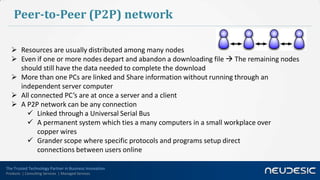
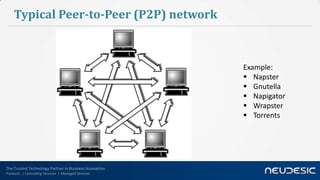
Peer-to-Peer (P2P) network

    Resources are usually distributed among many nodes
    Even if one or more nodes depart and abandon a downloading file  The remaining nodes
     should still have the data needed to complete the download
    More than one PCs are linked and Share information without running through an
     independent server computer
    All connected PC’s are at once a server and a client
    A P2P network can be any connection
        Linked through a Universal Serial Bus
        A permanent system which ties a many computers in a small workplace over
           copper wires
        Grander scope where specific protocols and programs setup direct
           connections between users online

The Trusted Technology Partner in Business Innovation
Products | Consulting Services | Managed Services
Typical Peer-to-Peer (P2P) network


                                                        Example:
                                                         Napster
                                                         Gnutella
                                                         Napigator
                                                         Wrapster
                                                         Torrents


The Trusted Technology Partner in Business Innovation
Products | Consulting Services | Managed Services
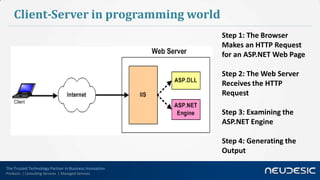
Client-Server in programming world
                                                        Step 1: The Browser
                                                        Makes an HTTP Request
                                                        for an ASP.NET Web Page

                                                        Step 2: The Web Server
                                                        Receives the HTTP
                                                        Request

                                                        Step 3: Examining the
                                                        ASP.NET Engine

                                                        Step 4: Generating the
                                                        Output

The Trusted Technology Partner in Business Innovation
Products | Consulting Services | Managed Services
Demo – IIS (Internet Information Services)


The Trusted Technology Partner in Business Innovation
Products | Consulting Services | Managed Services
Desktop Database Systems


The Trusted Technology Partner in Business Innovation
Products | Consulting Services | Managed Services
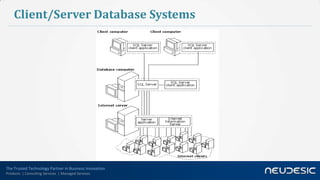
Client/Server Database Systems


The Trusted Technology Partner in Business Innovation
Products | Consulting Services | Managed Services
Decision points for a client-server architecture:


The Trusted Technology Partner in Business Innovation
Products | Consulting Services | Managed Services
Browser as a Client
                                       Download page contents
                                       Display HTML – Process HTML, Validate
                                        HTML
                                       Render dynamic HTML from Javascript
                                       Apply styling (CSS)
                                       Show images
                                       Handle events
                                       Manage state (Cookies)
                                       Local data (Temporary files)
                                       Manage plugins
                                       Manage security
                                       Etc…..100s more things….

The Trusted Technology Partner in Business Innovation
Products | Consulting Services | Managed Services
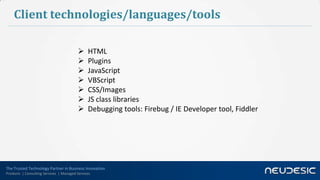
Client technologies/languages/tools

                                              HTML
                                              Plugins
                                              JavaScript
                                              VBScript
                                              CSS/Images
                                              JS class libraries
                                              Debugging tools: Firebug / IE Developer tool, Fiddler


The Trusted Technology Partner in Business Innovation
Products | Consulting Services | Managed Services
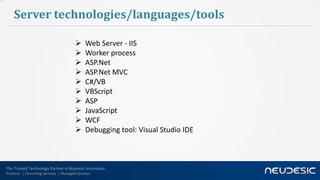
Server technologies/languages/tools

                                             Web Server - IIS
                                             Worker process
                                             ASP.Net
                                             ASP.Net MVC
                                             C#/VB
                                             VBScript
                                             ASP
                                             JavaScript
                                             WCF
                                             Debugging tool: Visual Studio IDE


The Trusted Technology Partner in Business Innovation
Products | Consulting Services | Managed Services
Q&A


The Trusted Technology Partner in Business Innovation
Products | Consulting Services | Managed Services
Test
      1. Which of the following items are not necessary for client/server?
      A.       Assure that tools will connect with middleware.
      B.       Understand the requirements.
      C.       Determine network bandwidth capabilities.
      D.       Include the use of a file server.

      2. A server cannot serve on which of the following levels?
      A. Client Layer
      B.      Business Layer
      C.      Database Layer
      D. All of the above.


The Trusted Technology Partner in Business Innovation
Products | Consulting Services | Managed Services
Test
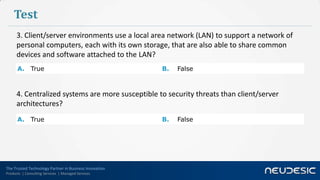
      3. Client/server environments use a local area network (LAN) to support a network of
      personal computers, each with its own storage, that are also able to share common
      devices and software attached to the LAN?
      A. True                                           B.   False


      4. Centralized systems are more susceptible to security threats than client/server
      architectures?
      A. True                                           B.   False


The Trusted Technology Partner in Business Innovation
Products | Consulting Services | Managed Services
Test
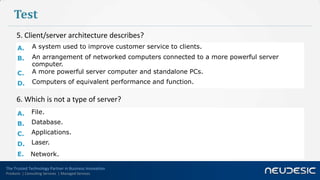
      5. Client/server architecture describes?
      A.       A system used to improve customer service to clients.
      B.       An arrangement of networked computers connected to a more powerful server
               computer.
      C.       A more powerful server computer and standalone PCs.
      D.       Computers of equivalent performance and function.

      6. Which is not a type of server?
      A.      File.
      B.      Database.
      C.      Applications.
      D.      Laser.
      E.      Network.

The Trusted Technology Partner in Business Innovation
Products | Consulting Services | Managed Services
Answers for Test:

    1.       D
    2.       A
    3.       True
    4.       False
    5.       B
    6.       D


The Trusted Technology Partner in Business Innovation
Products | Consulting Services | Managed Services
Thank You
                                                         Manoj Kumar
                                                         manoj.kumar@neudesic.com


The Trusted Technology Partner in Business Innovation
Products | Consulting Services | Managed Services

Server vs Client in real life and in programming world

  • 1.
    The Trusted TechnologyPartner in Business Innovation August 2010 August 2010 July 2010 June 2010 Ranked as one of the top Ranked as one of the top Named Microsoft Partner of CRN Magazine's list of the technology solution providers technology solution providers the Year Finalist in 2 separate largest solution providers in in America by CRN Magazine in America by CRN Magazine categories North America for the past 4 years. for the past 4 years. 2009 2010 2007 2008 The Trusted Technology Partner in Business Innovation Products | Consulting Services | Managed Services
  • 2.
    Server vs Clientin real life and in programming world Manoj Kumar Senior Consultant III manoj.kumar@neudesic.com 14 June, 2012 The Trusted Technology Partner in Business Innovation Products | Consulting Services | Managed Services
  • 3.
    Client ??? Clients are PCs or workstations on which users run applications. Clients rely on servers for resources, such as files, devices, and even processing power. The Trusted Technology Partner in Business Innovation Products | Consulting Services | Managed Services
  • 4.
    Client - Examples TheTrusted Technology Partner in Business Innovation Products | Consulting Services | Managed Services
  • 5.
    Server ??? Servers are powerful computers or processes dedicated to managing disk drives (file servers), printers (print servers), or network traffic (network servers ). The Trusted Technology Partner in Business Innovation Products | Consulting Services | Managed Services
  • 6.
    Client-Server interaction inreal world The Trusted Technology Partner in Business Innovation Products | Consulting Services | Managed Services
  • 7.
    Client-Server interaction inprogramming world The Client/Server computing is an environment that satisfies the business need by appropriately allocating the application processing between the client and the server processors. The client/server computing is fundamentally platform independent. The Trusted Technology Partner in Business Innovation Products | Consulting Services | Managed Services
  • 8.
    Characteristics of theClient and the Server 1. Service: Server is provider of services. The client is a consumer of services. 2. Shared Resources 3. Asymmetrical protocols 4. Transparency of location 5. Mix-and-match: Independent of hardware or operating system software platforms 6. Message-based exchanges: Loosely coupled systems 7. Encapsulation of services 8. Scalability: Can be scaled horizontally or vertically 9. Integrity The Trusted Technology Partner in Business Innovation Products | Consulting Services | Managed Services
  • 9.
    Merits of theClient Server 1. Enhanced Data Sharing 2. Integrated Services 3. Sharing Resources among Diverse Platforms 4. Data Interchangeability and Interoperability 5. Location Independence of Data and Processing 6. Greater ease of maintenance 7. Far greater security controls 8. Easy availability of proven technology The Trusted Technology Partner in Business Innovation Products | Consulting Services | Managed Services
  • 10.
    Demerits of theClient Server 1. Traffic congestion on the network 2. Lacks the robustness of a good P2P network Under client-server, should a critical server fail, clients’ requests cannot be fulfilled. The Trusted Technology Partner in Business Innovation Products | Consulting Services | Managed Services
  • 11.
    Peer-to-Peer (P2P) network  Resources are usually distributed among many nodes  Even if one or more nodes depart and abandon a downloading file  The remaining nodes should still have the data needed to complete the download  More than one PCs are linked and Share information without running through an independent server computer  All connected PC’s are at once a server and a client  A P2P network can be any connection  Linked through a Universal Serial Bus  A permanent system which ties a many computers in a small workplace over copper wires  Grander scope where specific protocols and programs setup direct connections between users online The Trusted Technology Partner in Business Innovation Products | Consulting Services | Managed Services
  • 12.
    Typical Peer-to-Peer (P2P)network Example:  Napster  Gnutella  Napigator  Wrapster  Torrents The Trusted Technology Partner in Business Innovation Products | Consulting Services | Managed Services
  • 13.
    Client-Server in programmingworld Step 1: The Browser Makes an HTTP Request for an ASP.NET Web Page Step 2: The Web Server Receives the HTTP Request Step 3: Examining the ASP.NET Engine Step 4: Generating the Output The Trusted Technology Partner in Business Innovation Products | Consulting Services | Managed Services
  • 14.
    Demo – IIS(Internet Information Services) The Trusted Technology Partner in Business Innovation Products | Consulting Services | Managed Services
  • 15.
    Desktop Database Systems TheTrusted Technology Partner in Business Innovation Products | Consulting Services | Managed Services
  • 16.
    Client/Server Database Systems TheTrusted Technology Partner in Business Innovation Products | Consulting Services | Managed Services
  • 17.
    Decision points fora client-server architecture: The Trusted Technology Partner in Business Innovation Products | Consulting Services | Managed Services
  • 18.
    Browser as aClient  Download page contents  Display HTML – Process HTML, Validate HTML  Render dynamic HTML from Javascript  Apply styling (CSS)  Show images  Handle events  Manage state (Cookies)  Local data (Temporary files)  Manage plugins  Manage security  Etc…..100s more things…. The Trusted Technology Partner in Business Innovation Products | Consulting Services | Managed Services
  • 19.
    Client technologies/languages/tools  HTML  Plugins  JavaScript  VBScript  CSS/Images  JS class libraries  Debugging tools: Firebug / IE Developer tool, Fiddler The Trusted Technology Partner in Business Innovation Products | Consulting Services | Managed Services
  • 20.
    Server technologies/languages/tools  Web Server - IIS  Worker process  ASP.Net  ASP.Net MVC  C#/VB  VBScript  ASP  JavaScript  WCF  Debugging tool: Visual Studio IDE The Trusted Technology Partner in Business Innovation Products | Consulting Services | Managed Services
  • 21.
    Q&A The Trusted TechnologyPartner in Business Innovation Products | Consulting Services | Managed Services
  • 22.
    Test 1. Which of the following items are not necessary for client/server? A. Assure that tools will connect with middleware. B. Understand the requirements. C. Determine network bandwidth capabilities. D. Include the use of a file server. 2. A server cannot serve on which of the following levels? A. Client Layer B. Business Layer C. Database Layer D. All of the above. The Trusted Technology Partner in Business Innovation Products | Consulting Services | Managed Services
  • 23.
    Test 3. Client/server environments use a local area network (LAN) to support a network of personal computers, each with its own storage, that are also able to share common devices and software attached to the LAN? A. True B. False 4. Centralized systems are more susceptible to security threats than client/server architectures? A. True B. False The Trusted Technology Partner in Business Innovation Products | Consulting Services | Managed Services
  • 24.
    Test 5. Client/server architecture describes? A. A system used to improve customer service to clients. B. An arrangement of networked computers connected to a more powerful server computer. C. A more powerful server computer and standalone PCs. D. Computers of equivalent performance and function. 6. Which is not a type of server? A. File. B. Database. C. Applications. D. Laser. E. Network. The Trusted Technology Partner in Business Innovation Products | Consulting Services | Managed Services
  • 25.
    Answers for Test: 1. D 2. A 3. True 4. False 5. B 6. D The Trusted Technology Partner in Business Innovation Products | Consulting Services | Managed Services
  • 26.
    Thank You Manoj Kumar manoj.kumar@neudesic.com The Trusted Technology Partner in Business Innovation Products | Consulting Services | Managed Services

Editor's Notes

  • #22 Remember the last note talk about embracing UX team and working closely with them