IB 304
E-Commerce
UNIT I
INTRODUCTION TO ELECTRONIC COMMERCE
Content
 Introduction
 Channels of E-Commerce
 Business Application of E-Commerce
Introduction
 The term commerce is define as trading of good & services
 When ‘e‘ for ‘electronic‘ is added to commerce, it
becomes e-Commerce
 The definition of e – commerce is defined as trading of
goods, services, information or anything else of value
between two entities over the internet.
Characteristics of E – Commerce
 Establishment of B to B relationship.
 Electronic payment.
 E – distribution of products & services.
 Exchange of information.
 Pre and post – sales support.
 Customer relationship management
Advantages of E - Commerce
 Facilitates the globalization of business
 Provides increased purchasing opportunities for the buyer
 Lowering staffing cost
 Market based expansion
 Increased profits
 Increased customer service & loyalty
 Increase speed & accuracy
 Reduction of paper storage
 Increased response times
Limitation of E - Commerce
 Security
 High Start up cost
 Legal issues
 Lack of skilled personnel
 Loss of contact with customers
 Uncertainty and Lack of information
 Some business process may never be available to e – commerce.
Channels of E - Commerce
 Email Marketing
 Pay – Per – Click (PPC)
 Search Engine Operation (SEO)
 Content Marketing
 Social Media Marketing
 Re – targeting
Business Applications of E - Commerce
 Retail and Wholesale
 Marketing
 Finance
 Manufacturing
 Auction
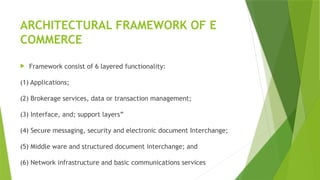
ARCHITECTURAL FRAMEWORK OF E
COMMERCE
 Framework consist of 6 layered functionality:
(1) Applications;
(2) Brokerage services, data or transaction management;
(3) Interface, and; support layers”
(4) Secure messaging, security and electronic document Interchange;
(5) Middle ware and structured document interchange; and
(6) Network infrastructure and basic communications services
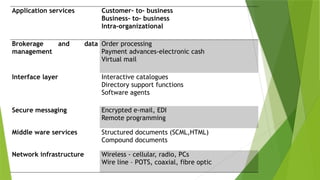
Application services Customer- to- business
Business- to- business
Intra-organizational
Brokerage and data
management
Order processing
Payment advances-electronic cash
Virtual mail
Interface layer Interactive catalogues
Directory support functions
Software agents
Secure messaging Encrypted e-mail, EDI
Remote programming
Middle ware services Structured documents (SCML,HTML)
Compound documents
Network infrastructure Wireless - cellular, radio, PCs
Wire line – POTS, coaxial, fibre optic
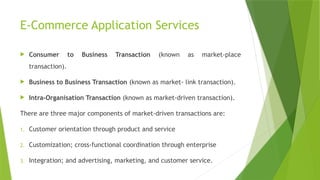
E-Commerce Application Services
 Consumer to Business Transaction (known as market-place
transaction).
 Business to Business Transaction (known as market- link transaction).
 Intra-Organisation Transaction (known as market-driven transaction).
There are three major components of market-driven transactions are:
1. Customer orientation through product and service
2. Customization; cross-functional coordination through enterprise
3. Integration; and advertising, marketing, and customer service.
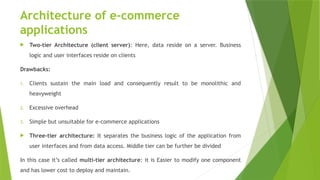
Architecture of e-commerce
applications
 Two-tier Architecture (client server): Here, data reside on a server. Business
logic and user interfaces reside on clients
Drawbacks:
1. Clients sustain the main load and consequently result to be monolithic and
heavyweight
2. Excessive overhead
3. Simple but unsuitable for e-commerce applications
 Three-tier architecture: It separates the business logic of the application from
user interfaces and from data access. Middle tier can be further be divided
In this case it’s called multi-tier architecture: it is Easier to modify one component
and has lower cost to deploy and maintain.
Application server of Three-tier
environment
 Microsoft Commerce Server 2000
 Sun I Planet
 IBM Web Sphere Application Server
Parts of Architectural Framework:
 Hypertext Publishing
 Uniform Resource Locator (URLs)
 Hypertext Transfer Protocols (HTTPs)
 WWW based security schemes.
 Client Servers
Hypertext Publishing
 Hypertext publishing promotes the idea of seamless information world in
which all online information can be accessed and retrieved.
 In a constant and simple way hypertext publishing is a primary application of
web interest in hypermedia.
 Hypertext is an approach information management in which data are shared
in the network of document connect by links (this link represents relationship
between nodes).
 A hypermedia system is made up of nodes (documents) and links (pointers). A
node generally represents a simple concept and idea. Nodes can contain
texts, graphics, audio, video images etc. nodes are connected to other nodes
by links.
Benefits of Hypermedia
 Hypermedia documents are much more flexible than conventional
documents.
 Hypermedia documents offer video sequences animation and even
compute programs.
 Its power and appeal increases when it is implemented in computing
environments that include network , micro computers , work stations
etc.
 It provides dynamic organization.
 Hypermedia systems provides non-linear innovative way of accessing and
restricting network documents.
Technology behind the web
 Web servers are composed of two major parts.
1. The hypertext transfer protocol (HTTP) for transmitting documents
between servers and clients.
2. HTML format for documents.
 The link between HTML files & HTTP server is provided by Uniform
Resource Locator (URL).
UNIFORM RESOURCE LOCATOR (URLs)
 The browser allows us to deal with the pointer in a transparent way that is
select the pointer we are presented with a text to which it points. This
pointer is implemented by using a concept which is central to web browser
known as URL.
 URL’s are streams used as address of objects (documents, images etc) on
the web. URL marks the unique location on the internet so that a file or a
service can be found.
 URL’s follow a consistent pattern that the first part describes the type of
the resources, second part gives the name of the server posting the
resources and the third part gives the full name of resources. e.g :
FTP://server.address / complete file.name URL are central to web
architecture.
HYPERTEXT TRANSFER PROTOCOL
(HTTP)
 It is the simple request response protocol that is currently run over
TCP and is the basis of WWW.
 HTTP is a protocol for transferring information efficiently between
the requesting client and server.
 The data transferred may be plain text, hypertext images or anything
else.
 When a user browses the web objects are retrieved in rapid
succession from often widely dispersed servers.
HTTPD Servers (Hypertext transfer
protocol domain)
 The server that are used to publish information via WWW servers are called
HTTPD servers.
 While choosing a web server flexibility, ease of administrator, security
features, familiarity and performance are considered.
 It is important to evaluate the tasks for which the web server is used.
 A server used for internet based marketing & technical support task will need
more powerful server than the web server used internally within a firewall for
distributing memos and bulletins.
 HTTPD servers are ideal for companies that want to provide multitude of
services ranging from product information to technical support.
WWW based security schemes
 SHTTP (Secured Hypertext Transfer Protocol): will enable the
incorporation of various cryptographic messages, formats.
 SSL (Security Socket Layer): SSL uses RSA security to wrap security
information around TCP/IP based protocols.
 SHEN: It is the security scheme for the web sponsored by www.
SHEN Security scheme for the web
SHEN provides for three separate security – related mechanisms:
 Weak authentication with low maintenance overhead and without
patent or export restrictions.
 Strong authentication via public key exchange.
 Strong encryption of message content.
Messaging Security Issues
 Confidentiality
 Integrity
 Authentication
 No – Repudiation
 Access Control
Client / Server Model
 The client/server model is a computing model that acts as a
distributed application which partitions tasks or workloads between
the providers of a resource or service, called servers, and service
requesters, called clients.
 Client/server describes the relationship between two computer
programs in which one program, the client, makes a service request
from another program, the server, which fulfills the request. Although
the client/ server idea can be used by programs within a single
computer, it is a more important idea in a network.
What are Clients and Servers
 A client is a computer that allows a user or users to log on to the
network and take advantage of the resources available on the
network. A client computer will make a client operating system. The
purpose of the client is to get user onto the network.
 A server, on the other hand, is typically a much more powerful
computer that runs a network operating system. The server provides
centralized administration of the network and serves up the resources
that are available on the network, such as printers and files.
Characteristics of Client Server
Architecture
 Service
 Shared Resources
 Asymmetrical Protocol
 Transparency of Location
 Mix and Match
 Message Based Exchange
 Encapsulation of Services
 Scalability
 Integrity
Advantages of Client Server Model
 Superior Data Sharing
 Integrated Services
 Sharing Resources among Diverse Platform
 Data Interchangeability
 Location Independence of Data and Processing.
Disadvantages of Client Server Model
 Expensive
 Dependence
 Congestion
 Maintenance
 Lack of Robustness
End of the UNIT I
Introduction to E - Commerce

Unit I - Introduction to E-Commerce.pptx

  • 1.
  • 2.
    Content  Introduction  Channelsof E-Commerce  Business Application of E-Commerce
  • 3.
    Introduction  The termcommerce is define as trading of good & services  When ‘e‘ for ‘electronic‘ is added to commerce, it becomes e-Commerce  The definition of e – commerce is defined as trading of goods, services, information or anything else of value between two entities over the internet.
  • 4.
    Characteristics of E– Commerce  Establishment of B to B relationship.  Electronic payment.  E – distribution of products & services.  Exchange of information.  Pre and post – sales support.  Customer relationship management
  • 5.
    Advantages of E- Commerce  Facilitates the globalization of business  Provides increased purchasing opportunities for the buyer  Lowering staffing cost  Market based expansion  Increased profits  Increased customer service & loyalty  Increase speed & accuracy  Reduction of paper storage  Increased response times
  • 6.
    Limitation of E- Commerce  Security  High Start up cost  Legal issues  Lack of skilled personnel  Loss of contact with customers  Uncertainty and Lack of information  Some business process may never be available to e – commerce.
  • 7.
    Channels of E- Commerce  Email Marketing  Pay – Per – Click (PPC)  Search Engine Operation (SEO)  Content Marketing  Social Media Marketing  Re – targeting
  • 8.
    Business Applications ofE - Commerce  Retail and Wholesale  Marketing  Finance  Manufacturing  Auction
  • 9.
    ARCHITECTURAL FRAMEWORK OFE COMMERCE  Framework consist of 6 layered functionality: (1) Applications; (2) Brokerage services, data or transaction management; (3) Interface, and; support layers” (4) Secure messaging, security and electronic document Interchange; (5) Middle ware and structured document interchange; and (6) Network infrastructure and basic communications services
  • 10.
    Application services Customer-to- business Business- to- business Intra-organizational Brokerage and data management Order processing Payment advances-electronic cash Virtual mail Interface layer Interactive catalogues Directory support functions Software agents Secure messaging Encrypted e-mail, EDI Remote programming Middle ware services Structured documents (SCML,HTML) Compound documents Network infrastructure Wireless - cellular, radio, PCs Wire line – POTS, coaxial, fibre optic
  • 11.
    E-Commerce Application Services Consumer to Business Transaction (known as market-place transaction).  Business to Business Transaction (known as market- link transaction).  Intra-Organisation Transaction (known as market-driven transaction). There are three major components of market-driven transactions are: 1. Customer orientation through product and service 2. Customization; cross-functional coordination through enterprise 3. Integration; and advertising, marketing, and customer service.
  • 12.
    Architecture of e-commerce applications Two-tier Architecture (client server): Here, data reside on a server. Business logic and user interfaces reside on clients Drawbacks: 1. Clients sustain the main load and consequently result to be monolithic and heavyweight 2. Excessive overhead 3. Simple but unsuitable for e-commerce applications  Three-tier architecture: It separates the business logic of the application from user interfaces and from data access. Middle tier can be further be divided In this case it’s called multi-tier architecture: it is Easier to modify one component and has lower cost to deploy and maintain.
  • 13.
    Application server ofThree-tier environment  Microsoft Commerce Server 2000  Sun I Planet  IBM Web Sphere Application Server
  • 14.
    Parts of ArchitecturalFramework:  Hypertext Publishing  Uniform Resource Locator (URLs)  Hypertext Transfer Protocols (HTTPs)  WWW based security schemes.  Client Servers
  • 15.
    Hypertext Publishing  Hypertextpublishing promotes the idea of seamless information world in which all online information can be accessed and retrieved.  In a constant and simple way hypertext publishing is a primary application of web interest in hypermedia.  Hypertext is an approach information management in which data are shared in the network of document connect by links (this link represents relationship between nodes).  A hypermedia system is made up of nodes (documents) and links (pointers). A node generally represents a simple concept and idea. Nodes can contain texts, graphics, audio, video images etc. nodes are connected to other nodes by links.
  • 16.
    Benefits of Hypermedia Hypermedia documents are much more flexible than conventional documents.  Hypermedia documents offer video sequences animation and even compute programs.  Its power and appeal increases when it is implemented in computing environments that include network , micro computers , work stations etc.  It provides dynamic organization.  Hypermedia systems provides non-linear innovative way of accessing and restricting network documents.
  • 17.
    Technology behind theweb  Web servers are composed of two major parts. 1. The hypertext transfer protocol (HTTP) for transmitting documents between servers and clients. 2. HTML format for documents.  The link between HTML files & HTTP server is provided by Uniform Resource Locator (URL).
  • 18.
    UNIFORM RESOURCE LOCATOR(URLs)  The browser allows us to deal with the pointer in a transparent way that is select the pointer we are presented with a text to which it points. This pointer is implemented by using a concept which is central to web browser known as URL.  URL’s are streams used as address of objects (documents, images etc) on the web. URL marks the unique location on the internet so that a file or a service can be found.  URL’s follow a consistent pattern that the first part describes the type of the resources, second part gives the name of the server posting the resources and the third part gives the full name of resources. e.g : FTP://server.address / complete file.name URL are central to web architecture.
  • 19.
    HYPERTEXT TRANSFER PROTOCOL (HTTP) It is the simple request response protocol that is currently run over TCP and is the basis of WWW.  HTTP is a protocol for transferring information efficiently between the requesting client and server.  The data transferred may be plain text, hypertext images or anything else.  When a user browses the web objects are retrieved in rapid succession from often widely dispersed servers.
  • 20.
    HTTPD Servers (Hypertexttransfer protocol domain)  The server that are used to publish information via WWW servers are called HTTPD servers.  While choosing a web server flexibility, ease of administrator, security features, familiarity and performance are considered.  It is important to evaluate the tasks for which the web server is used.  A server used for internet based marketing & technical support task will need more powerful server than the web server used internally within a firewall for distributing memos and bulletins.  HTTPD servers are ideal for companies that want to provide multitude of services ranging from product information to technical support.
  • 21.
    WWW based securityschemes  SHTTP (Secured Hypertext Transfer Protocol): will enable the incorporation of various cryptographic messages, formats.  SSL (Security Socket Layer): SSL uses RSA security to wrap security information around TCP/IP based protocols.  SHEN: It is the security scheme for the web sponsored by www.
  • 22.
    SHEN Security schemefor the web SHEN provides for three separate security – related mechanisms:  Weak authentication with low maintenance overhead and without patent or export restrictions.  Strong authentication via public key exchange.  Strong encryption of message content.
  • 23.
    Messaging Security Issues Confidentiality  Integrity  Authentication  No – Repudiation  Access Control
  • 24.
    Client / ServerModel  The client/server model is a computing model that acts as a distributed application which partitions tasks or workloads between the providers of a resource or service, called servers, and service requesters, called clients.  Client/server describes the relationship between two computer programs in which one program, the client, makes a service request from another program, the server, which fulfills the request. Although the client/ server idea can be used by programs within a single computer, it is a more important idea in a network.
  • 25.
    What are Clientsand Servers  A client is a computer that allows a user or users to log on to the network and take advantage of the resources available on the network. A client computer will make a client operating system. The purpose of the client is to get user onto the network.  A server, on the other hand, is typically a much more powerful computer that runs a network operating system. The server provides centralized administration of the network and serves up the resources that are available on the network, such as printers and files.
  • 26.
    Characteristics of ClientServer Architecture  Service  Shared Resources  Asymmetrical Protocol  Transparency of Location  Mix and Match  Message Based Exchange  Encapsulation of Services  Scalability  Integrity
  • 27.
    Advantages of ClientServer Model  Superior Data Sharing  Integrated Services  Sharing Resources among Diverse Platform  Data Interchangeability  Location Independence of Data and Processing.
  • 28.
    Disadvantages of ClientServer Model  Expensive  Dependence  Congestion  Maintenance  Lack of Robustness
  • 29.
    End of theUNIT I Introduction to E - Commerce