




















The State of Server
KESHAV PUTTASWAMY | HEAD OF PRODUCT MANAGEMENT, SERVER | ATLASSIAN
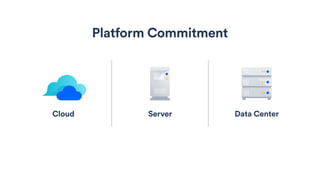
Server
Platform Commitment
Data CenterCloud
Increased
Server focus
on
ecosystem
30%
Server add-on units growth
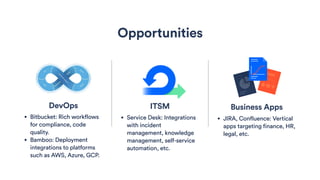
Business Apps
• JIRA, Confluence: Vertical
apps targeting finance, HR,
legal, etc.
Opportunities
ITSM
• Service Desk: Integrations
with incident
management, knowledge
management, self-service
automation, etc.
DevOps
• Bitbucket: Rich workflows
for compliance, code
quality.
• Bamboo: Deployment
integrations to platforms
such as AWS, Azure, GCP.
175%+
growth in Data Center customers
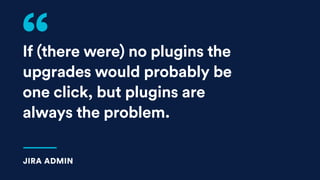
If (there were) no plugins the
upgrades would probably be
one click, but plugins are
always the problem.
JIRA ADMIN
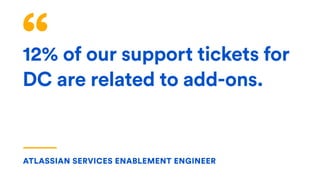
12% of our support tickets for
DC are related to add-ons.
ATLASSIAN SERVICES ENABLEMENT ENGINEER
We believe behind every great human achievement, there is a team.
Our mission is to unleash the potential in every team.
OUR MISSION
Server add-ons for
front-end developers
CHRIS “DAZ” DARROCH | SENIOR DEVELOPER | ATLASSIAN
How long have you
been writing 

front-end code?
When did you
write your first
Atlassian add-on?
Learning how to
build a Server
add-on can be
intimidating.
THE DILEMMA
We want to use empowering
technologies, not just the ones
browsers understand.
THE FRONT-ENDER’S DILEMMA
We want to develop our add-ons in
the way we want to work, not how
Server add-ons expect us to.
THE FRONT-ENDER’S SERVER ADD-ON DILEMMA
Teams were feeling
the pain of a slow
development loop.
THE DILEMMA
So, they decided
to change how
they built for the
front-end.
THE DILEMMA
We believe behind every great
human achievement, there is a team. 

Our mission is to unleash the
potential in every team.
OUR MISSION
If we learn how
it works, we
can work with
it better.
SERVER ADD-ONS FOR FRONT-ENDERS
Agenda
Learn how a Server add-on works
Use a modern front-end language
Leverage P2 at runtime
Leverage modular front-end code
Your questions
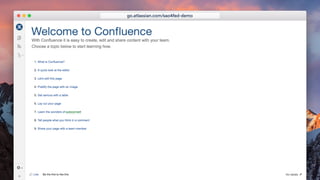
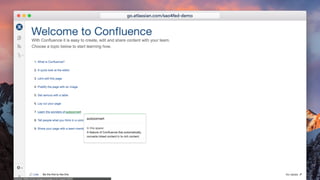
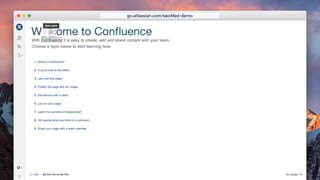
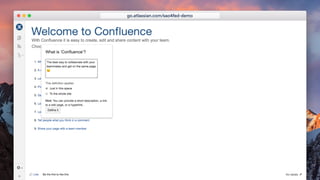
Our demo plugin today
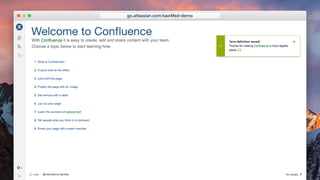
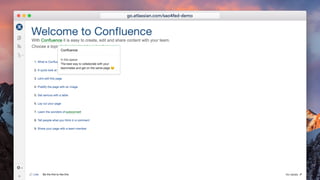
go.atlassian.com/sao4fed-demo
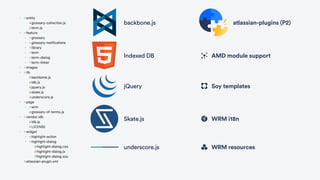
backbone.js
Indexed DB
jQuery
Skate.js
underscore.js
atlassian-plugins (P2)
AMD module support
WRM i18n
WRM resources
Soy templates
We know our front-end tech.
but…
PROBLEM #1
What is a Server add-on?
How does “it” work?
PROBLEM #1
Agenda
Learn how a Server add-on works
Use a modern front-end language
Leverage P2 at runtime
Leverage modular front-end code
Your questions
How a Server add-on works
…well, just the front-end-y bits.
go.atlassian.com/sao4fed-how-it-works
Nothing in life is to be feared, it is
only to be understood. Now is the
time to understand more, so that
we may fear less.
MARIE CURIE
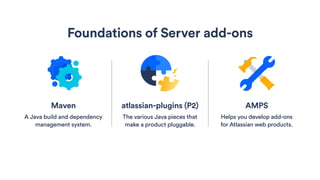
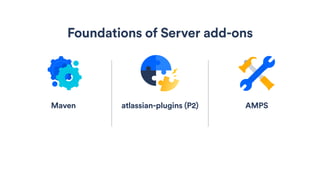
atlassian-plugins (P2)
The various Java pieces that
make a product pluggable.
Foundations of Server add-ons
AMPS
Helps you develop add-ons
for Atlassian web products.
Maven
A Java build and dependency
management system.
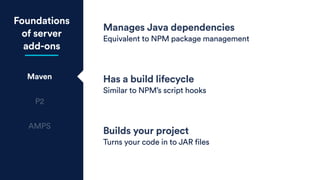
Foundations
of server
add-ons
Maven
P2
AMPS
Manages Java dependencies
Equivalent to NPM package management
Has a build lifecycle
Similar to NPM’s script hooks
Builds your project
Turns your code in to JAR files
(ZIP)
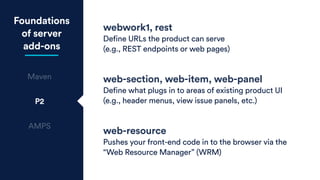
Foundations
of server
add-ons
Maven
P2
AMPS
webwork1, rest
Define URLs the product can serve
(e.g., REST endpoints or web pages)
web-section, web-item, web-panel
Define what plugs in to areas of existing product UI
(e.g., header menus, view issue panels, etc.)
web-resource
Pushes your front-end code in to the browser via the
“Web Resource Manager” (WRM)
Foundations
of server
add-ons
Maven
P2
AMPS
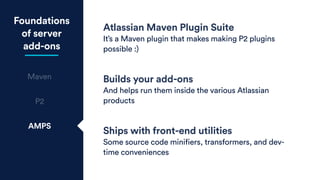
Atlassian Maven Plugin Suite
It’s a Maven plugin that makes making P2 plugins
possible :)
Builds your add-ons
And helps run them inside the various Atlassian
products
Ships with front-end utilities
Some source code minifiers, transformers, and dev-
time conveniences
Check out Mel's talk!
Creating your own server add-on
atlassian-plugins (P2)
Foundations of Server add-ons
AMPSMaven
atlassian-plugins (P2) AMPSMaven
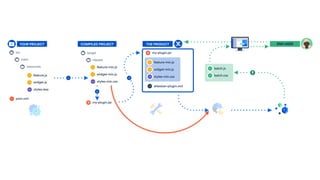
YOUR PROJECT
main
src
resources
feature.js
widget.js
styles.less
pom.xml
AMPSMaven
main
src
resources
feature.js
widget.js
styles.less
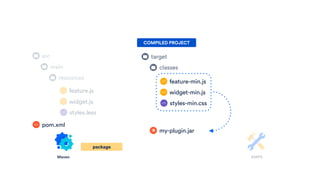
classes
target
COMPILED PROJECT
feature-min.js
widget-min.js
styles-min.css
process-resources
pom.xml
AMPSMaven
main
src
resources
feature.js
widget.js
styles.less
classes
target
COMPILED PROJECT
feature-min.js
widget-min.js
styles-min.css
my-plugin.jar
package
pom.xml
classes
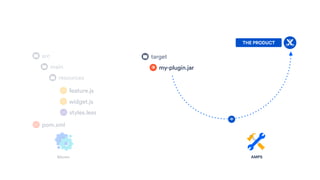
AMPSMaven
my-plugin.jar
THE PRODUCT
main
src
resources
feature.js
widget.js
styles.less
target
pom.xml
AMPSMaven
THE PRODUCT
classes
target
feature-min.js
widget-min.js
styles-min.css
my-plugin.jar
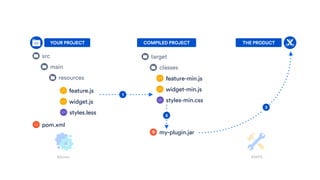
YOUR PROJECT
main
src
resources
feature.js
widget.js
styles.less
COMPILED PROJECT
1
3
2
pom.xml
We know how a Server
add-on gets built now.
PROBLEM #1
We want to use modern
front-end technologies,
like ES6.
PROBLEM #2
How do we convince P2 to
use a compiled front-end?
CHALLENGE #2
Agenda
Learn how a Server add-on works
Use a modern front-end language
Leverage P2 at runtime
Leverage modular front-end code
Your questions
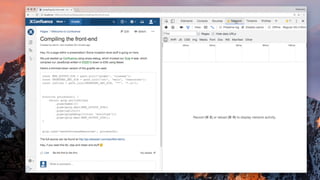
Compiling our front-end
go.atlassian.com/sao4fed-compile-the-ui
We have two main
integration points between
Maven and Node…
CHALLENGE #2
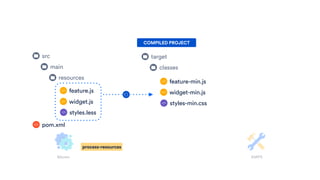
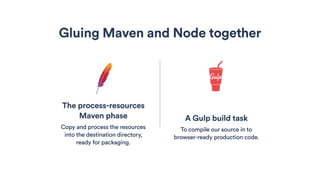
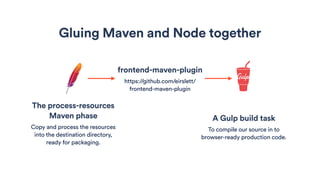
The process-resources
Maven phase
Copy and process the resources
into the destination directory,
ready for packaging.
A Gulp build task
To compile our source in to
browser-ready production code.
Gluing Maven and Node together
The process-resources
Maven phase
Copy and process the resources
into the destination directory,
ready for packaging.
A Gulp build task
To compile our source in to
browser-ready production code.
Gluing Maven and Node together
frontend-maven-plugin
https://github.com/eirslett/
frontend-maven-plugin
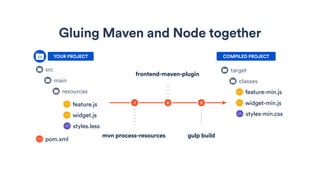
Gluing Maven and Node together
classes
target
feature-min.js
widget-min.js
styles-min.css
YOUR PROJECT
main
src
resources
feature.js
widget.js
styles.less
COMPILED PROJECT
1
mvn process-resources
2
frontend-maven-plugin
3
gulp build
pom.xml
define('conf-glossary/entity/glossary-collection', [

'conf-glossary/entity/term',

'conf-glossary/lib/backbone',

'conf-glossary/lib/underscore',

'jquery'

], function(Term, Backbone, _, $) {


return Backbone.Collection.extend({

model: Term,


persist: function() {

var self = this;

var promises = this.chain()

.filter(function(model) {

return model.isNew() || model.hasChanged();

}).each(function(model) {

return model.save();

}).value();

$.when.apply($, promises).then(function(r) {

self.trigger('persisted', r);

});

}

});

});
Compile our
front-end
glossary.js
pom.xml
gulpfile.js
define('conf-glossary/entity/glossary-collection', [

'conf-glossary/entity/term',

'conf-glossary/lib/backbone',

'conf-glossary/lib/underscore',

'jquery'

], function(Term, Backbone, _, $) {


return Backbone.Collection.extend({

model: Term,


persist() {

const promises = this.chain()

.filter(model => model.isNew() || model.hasChanged())

.each(model => model.save())

.value();

$.when.apply($, promises).then(r => {

this.trigger('persisted', r);

});

}

});

});
Compile our
front-end
glossary.js
pom.xml
gulpfile.js
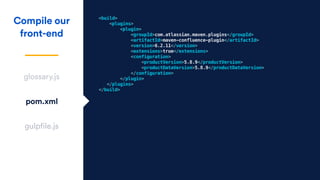
<build>

<plugins>

<plugin>

<groupId>com.atlassian.maven.plugins</groupId>

<artifactId>maven-confluence-plugin</artifactId>

<version>6.2.11</version>

<extensions>true</extensions>

<configuration>

<productVersion>5.8.9</productVersion>

<productDataVersion>5.8.9</productDataVersion>

</configuration>

</plugin>

</plugins>

</build>
Compile our
front-end
glossary.js
pom.xml
gulpfile.js
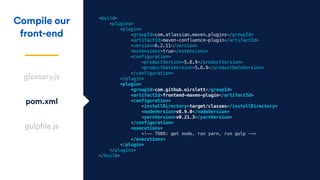
<build>

<plugins>

<plugin>

<groupId>com.atlassian.maven.plugins</groupId>

<artifactId>maven-confluence-plugin</artifactId>

<version>6.2.11</version>

<extensions>true</extensions>

<configuration>

<productVersion>5.8.9</productVersion>

<productDataVersion>5.8.9</productDataVersion>

</configuration>

</plugin>

<plugin>

<groupId>com.github.eirslett</groupId>

<artifactId>frontend-maven-plugin</artifactId>

<configuration>

<installDirectory>target/classes</installDirectory>

<nodeVersion>v6.9.0</nodeVersion>

<yarnVersion>v0.21.3</yarnVersion>

</configuration>

<executions>

<!-- TODO: get node, run yarn, run gulp -->
</executions>

</plugin>

</plugins>

</build>
Compile our
front-end
glossary.js
pom.xml
gulpfile.js
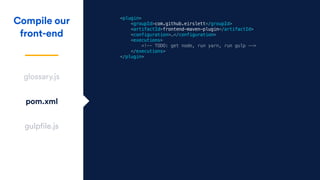
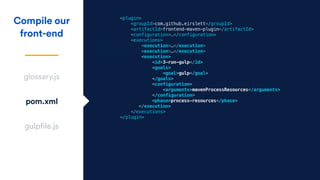
<plugin>

<groupId>com.github.eirslett</groupId>

<artifactId>frontend-maven-plugin</artifactId>

<configuration>…</configuration>

<executions>

<!-- TODO: get node, run yarn, run gulp -->
</executions>

</plugin>
Compile our
front-end
glossary.js
pom.xml
gulpfile.js
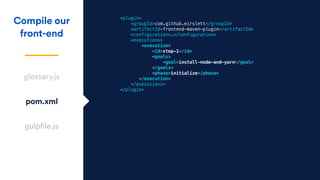
<plugin>

<groupId>com.github.eirslett</groupId>

<artifactId>frontend-maven-plugin</artifactId>

<configuration>…</configuration>
<executions>

<execution>

<id>step-1</id>

<goals>

<goal>install-node-and-yarn</goal>

</goals>

<phase>initialize</phase>

</execution>

</executions>

</plugin>

Compile our
front-end
glossary.js
pom.xml
gulpfile.js
<plugin>

<groupId>com.github.eirslett</groupId>

<artifactId>frontend-maven-plugin</artifactId>

<configuration>…</configuration>
<executions>
<execution>…</execution>
<execution>

<id>2-yarn-install</id>

<goals>

<goal>yarn</goal>

</goals>

<configuration>

<arguments>install</arguments>

</configuration>

<phase>initialize</phase>

</execution>

</executions>

</plugin>
Compile our
front-end
glossary.js
pom.xml
gulpfile.js
<plugin>

<groupId>com.github.eirslett</groupId>

<artifactId>frontend-maven-plugin</artifactId>

<configuration>…</configuration>
<executions>
<execution>…</execution>
<execution>

<id>3-run-gulp</id>

<goals>

<goal>gulp</goal>

</goals>

<configuration>

<arguments>mavenProcessResources</arguments>

</configuration>

<phase>process-resources</phase>
</execution>

</executions>

</plugin>
Compile our
front-end
glossary.js
pom.xml
gulpfile.js
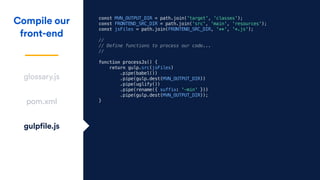
const MVN_OUTPUT_DIR = path.join('target', 'classes');

const FRONTEND_SRC_DIR = path.join('src', 'main', 'resources');

const jsFiles = path.join(FRONTEND_SRC_DIR, '**', '*.js');

//

// Define functions to process our code...

//


function processJs() {

return gulp.src(jsFiles)

.pipe(babel())

.pipe(gulp.dest(MVN_OUTPUT_DIR))

.pipe(uglify())

.pipe(rename({ suffix: '-min' }))

.pipe(gulp.dest(MVN_OUTPUT_DIR));

}
Compile our
front-end
glossary.js
pom.xml
gulpfile.js
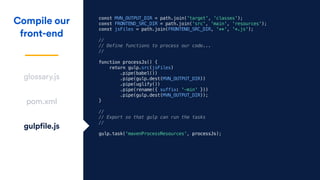
const MVN_OUTPUT_DIR = path.join('target', 'classes');

const FRONTEND_SRC_DIR = path.join('src', 'main', 'resources');

const jsFiles = path.join(FRONTEND_SRC_DIR, '**', '*.js');

//

// Define functions to process our code...

//


function processJs() {

return gulp.src(jsFiles)

.pipe(babel())

.pipe(gulp.dest(MVN_OUTPUT_DIR))

.pipe(uglify())

.pipe(rename({ suffix: '-min' }))

.pipe(gulp.dest(MVN_OUTPUT_DIR));

}


//

// Export so that gulp can run the tasks

//

gulp.task('mavenProcessResources', processJs);
Compile our
front-end
glossary.js
pom.xml
gulpfile.js
What just happened?
CHALLENGE #2
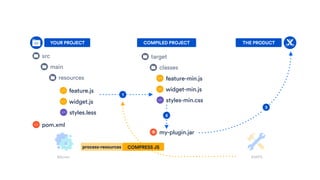
AMPS
AMPSMaven
THE PRODUCT
classes
target
feature-min.js
widget-min.js
styles-min.css
my-plugin.jar
YOUR PROJECT
main
src
resources
feature.js
widget.js
styles.less
COMPILED PROJECT
1
3
2
COMPRESS JS
pom.xml
process-resources
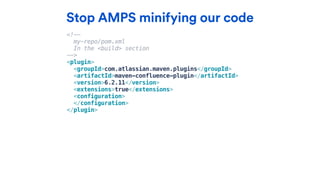
Stop AMPS minifying our code
<!--
my-repo/pom.xml
In the <build> section
-->
<plugin>

<groupId>com.atlassian.maven.plugins</groupId>

<artifactId>maven-confluence-plugin</artifactId>

<version>6.2.11</version>

<extensions>true</extensions>

<configuration>
</configuration>

</plugin>
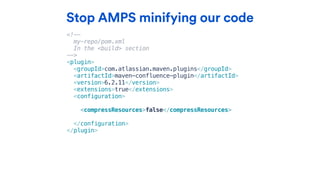
Stop AMPS minifying our code
<!--
my-repo/pom.xml
In the <build> section
-->
<plugin>

<groupId>com.atlassian.maven.plugins</groupId>

<artifactId>maven-confluence-plugin</artifactId>

<version>6.2.11</version>

<extensions>true</extensions>

<configuration>
<compressResources>false</compressResources>

</configuration>

</plugin>
We can compile our
front-end now!
CHALLENGE #2
but…
CHALLENGE #3
Will it blend
save-and-reload
at runtime?
Agenda
Learn how a Server add-on works
Use a modern front-end language
Leverage P2 at runtime
Leverage modular front-end code
Your questions
To get the most out of our
app in dev and production,
we need to learn about…
CHALLENGE #3
The Web Resource Manager
What’s the WRM ever done for us?!
Monty Python’s Life of Brian (1979)
The WRM
gave us…
https://www.hyperlingo.com/blog/cat-tools-the-definitive-guide/
Loading resources
Lazy loading resources
Translation injection
Seed data injection
Aqueducts?
go.atlassian.com/sao4fed-wrm-gave-us
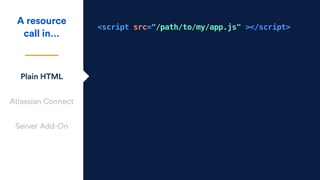
What is a “resource” in a
Server Add-on?
WAIT A MINUTE…
<script src="/path/to/my/app.js" ></script>
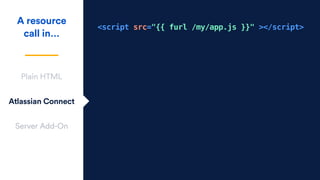
A resource
call in…
Plain HTML
Atlassian Connect
Server Add-On
<script src="{{ furl /my/app.js }}" ></script>
A resource
call in…
Plain HTML
Atlassian Connect
Server Add-On
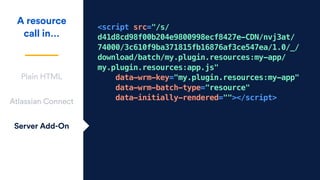
<script src="/s/
d41d8cd98f00b204e9800998ecf8427e-CDN/nvj3at/
74000/3c610f9ba371815fb16876af3ce547ea/1.0/_/
download/batch/my.plugin.resources:my-app/
my.plugin.resources:app.js" 

data-wrm-key="my.plugin.resources:my-app" 

data-wrm-batch-type="resource"

data-initially-rendered=""></script>
A resource
call in…
Plain HTML
Atlassian Connect
Server Add-On
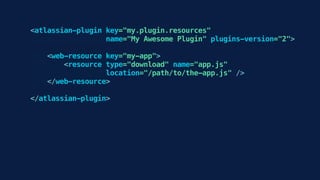
app.js
my.plugin.resources my-app
<atlassian-plugin key="my.plugin.resources"

name="My Awesome Plugin" plugins-version="2">


<web-resource key="my-app">

<resource type="download" name="app.js"

location="/path/to/the-app.js" />

</web-resource>


</atlassian-plugin>
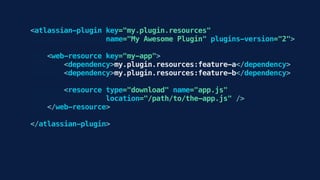
<atlassian-plugin key="my.plugin.resources"

name="My Awesome Plugin" plugins-version="2">


<web-resource key="my-app">

<dependency>my.plugin.resources:feature-a</dependency>

<dependency>my.plugin.resources:feature-b</dependency>


<resource type="download" name="app.js"

location="/path/to/the-app.js" />

</web-resource>


</atlassian-plugin>
The WRM
gave us…
Loading resources
Lazy loading resources
Translation injection
Seed data injection
https://www.theodysseyonline.com/20-signs-youre-absolute-laziest
Sanitation?
go.atlassian.com/sao4fed-wrm-gave-us
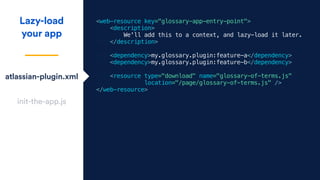
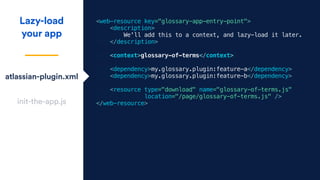
Lazy-load
your app
atlassian-plugin.xml
init-the-app.js
<web-resource key="glossary-app-entry-point">

<description>

We'll add this to a context, and lazy-load it later.

</description>


<dependency>my.glossary.plugin:feature-a</dependency>

<dependency>my.glossary.plugin:feature-b</dependency>


<resource type="download" name="glossary-of-terms.js" 

location="/page/glossary-of-terms.js" />

</web-resource>
Lazy-load
your app
atlassian-plugin.xml
init-the-app.js
<web-resource key="glossary-app-entry-point">

<description>

We'll add this to a context, and lazy-load it later.

</description>

<context>glossary-of-terms</context>
<dependency>my.glossary.plugin:feature-a</dependency>

<dependency>my.glossary.plugin:feature-b</dependency>


<resource type="download" name="glossary-of-terms.js" 

location="/page/glossary-of-terms.js" />

</web-resource>
Lazy-load
your app
atlassian-plugin.xml
init-the-app.js
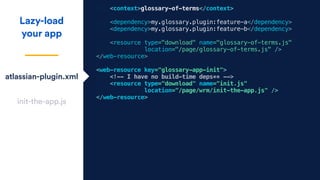
<context>glossary-of-terms</context>
<dependency>my.glossary.plugin:feature-a</dependency>

<dependency>my.glossary.plugin:feature-b</dependency>


<resource type="download" name="glossary-of-terms.js" 

location="/page/glossary-of-terms.js" />

</web-resource>
<web-resource key="glossary-app-init">

<!-- I have no build-time deps** -->

<resource type="download" name="init.js"

location="/page/wrm/init-the-app.js" />

</web-resource>
Lazy-load
your app
atlassian-plugin.xml
init-the-app.js
WRM.require(['wrc!glossary-of-terms'], function() {

// Our modules are now loaded on to the page.

// Thanks, WRM!

});
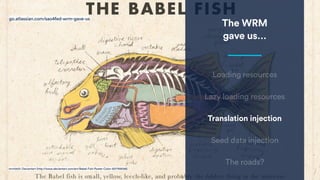
The WRM
gave us…
mrrtist21; Deviantart (http://www.deviantart.com/art/Babel-Fish-Poster-Color-507759058)
Loading resources
Lazy loading resources
Translation injection
Seed data injection
The roads?
go.atlassian.com/sao4fed-wrm-gave-us
Translate
your app
notifications.js
i18n.properties
define('conf-glossary/feature/glossary-notifications/glossary-notifications', [

'conf-glossary/feature/glossary/glossary',

'aui/flag',

], function(glossary, flag) {

glossary.on('persisted', function(response) {

let term = response.data.term;

let f = flag({

type: 'success',

title: 'Term definition saved!',

persistent: false,

body: `Thanks for defining <conf-term>${term}</conf-term>. 

You made Confluence a more legible place! &#x1f64c;`

});

setTimeout(f.close, 5000);

});

});
atlassian-plugin.xml
Translate
your app
notifications.js
i18n.properties
define('conf-glossary/feature/glossary-notifications/glossary-notifications', [

'conf-glossary/feature/glossary/glossary',

'util/formatter',

'aui/flag',

], function(glossary, formatter, flag) {


glossary.on('persisted', function(response) {

let term = response.data.term;

let f = flag({

type: 'success',

title: formatter.I18n.getText('save.msg.title'),

persistent: false,

body: formatter.I18n.getText('save.msg.bodyContent', term);

});

setTimeout(f.close, 5000);

});

});
atlassian-plugin.xml
Translate
your app
notifications.js
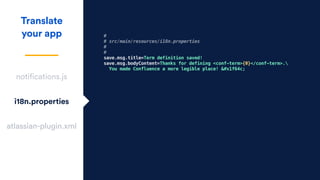
i18n.properties
#
# src/main/resources/i18n.properties
#
#
save.msg.title=Term definition saved!
save.msg.bodyContent=Thanks for defining <conf-term>{0}</conf-term>.
You made Confluence a more legible place! &#x1f64c;
atlassian-plugin.xml
Translate
your app
notifications.js
i18n.properties
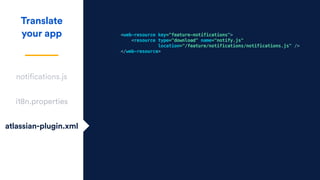
atlassian-plugin.xml
<web-resource key="feature-notifications">

<resource type="download" name="notify.js"

location="/feature/notifications/notifications.js" />

</web-resource>
Translate
your app
notifications.js
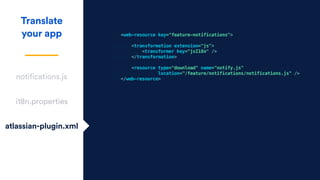
i18n.properties
<web-resource key="feature-notifications">

<transformation extension="js">
<transformer key="jsI18n" />
</transformation>

<resource type="download" name="notify.js"

location="/feature/notifications/notifications.js" />

</web-resource>
atlassian-plugin.xml
The WRM
gave us…
Loading resources
Lazy loading resources
Translation injection
Seed data injection
Georgina Smith, Neil Palmer; Crop Trust (https://www.croptrust.org/our-work/svalbard-global-seed-vault/)
Brought peace?
go.atlassian.com/sao4fed-wrm-gave-us
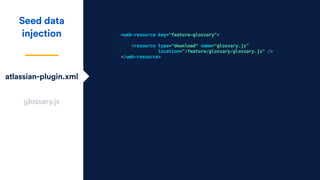
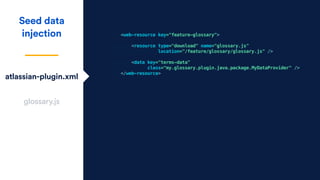
atlassian-plugin.xml
Seed data
injection
glossary.js
<web-resource key="feature-glossary">
<resource type="download" name="glossary.js"

location="/feature/glossary/glossary.js" />

</web-resource>
atlassian-plugin.xml
Seed data
injection
glossary.js
<web-resource key="feature-glossary">
<resource type="download" name="glossary.js"

location="/feature/glossary/glossary.js" />

<data key="terms-data"
class="my.glossary.plugin.java.package.MyDataProvider" />

</web-resource>
atlassian-plugin.xml
Seed data
injection
glossary.js
define('conf-glossary/feature/glossary', [

'conf-glossary/entity/glossary-collection',

'wrm/data',

'jquery'

], function(GlossaryCollection, wrmData, $) {

const seedTerms = wrmData.claim(
'my.glossary.plugin:feature-glossary.terms-data'
);

const ourGlossary = new GlossaryCollection(seedTerms);

// ...
Monty Python’s Life of Brian (1979)
back to our challenge…
We want save-and-reload
for our compiled code.
CHALLENGE #3
We need to change where
P2 looks for files, so it
loads our compiled code.
CHALLENGE #3
Runtime save and reload
For our compiled front-end code
go.atlassian.com/sao4fed-save-reload
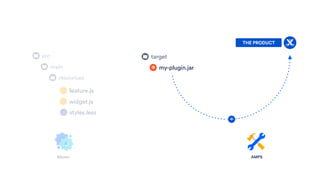
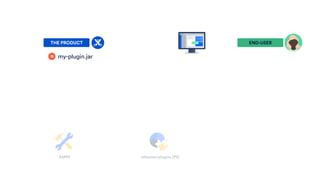
AMPSMaven
my-plugin.jar
THE PRODUCT
main
src
resources
feature.js
widget.js
styles.less
target
AMPS
my-plugin.jar
THE PRODUCT
atlassian-plugins (P2)
END-USER
feature-min.js
widget-min.js
styles-min.css
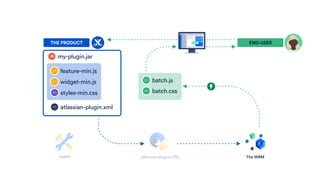
AMPS
my-plugin.jar
THE PRODUCT
atlassian-plugins (P2)
END-USER
atlassian-plugin.xml
batch.js
batch.css
The WRM
classes
target
feature-min.js
widget-min.js
styles-min.css
my-plugin.jar
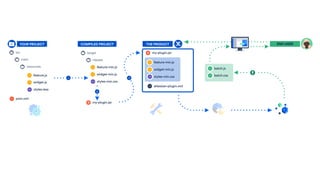
YOUR PROJECT
main
src
resources
feature.js
widget.js
styles.less
COMPILED PROJECT
1
2
3
feature-min.js
widget-min.js
styles-min.css
my-plugin.jar
THE PRODUCT END-USER
atlassian-plugin.xml
batch.js
batch.css
pom.xml
We need to tell the
running app where our
compiled code lives.
CHALLENGE #3
classes
target
feature-min.js
widget-min.js
styles-min.css
my-plugin.jar
YOUR PROJECT
main
src
resources
feature.js
widget.js
styles.less
COMPILED PROJECT
1
2
3
feature-min.js
widget-min.js
styles-min.css
my-plugin.jar
THE PRODUCT END-USER
atlassian-plugin.xml
batch.js
batch.css
pom.xml
The QuickReload plugin
https://bitbucket.org/atlassianlabs/quickreload
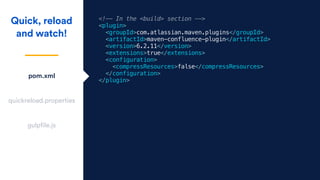
<!-- In the <build> section -->

<plugin>

<groupId>com.atlassian.maven.plugins</groupId>

<artifactId>maven-confluence-plugin</artifactId>

<version>6.2.11</version>

<extensions>true</extensions>

<configuration>

<compressResources>false</compressResources>

</configuration>

</plugin>
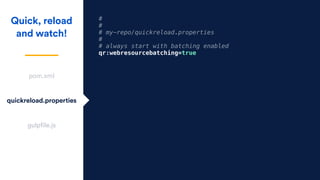
Quick, reload
and watch!
pom.xml
quickreload.properties
gulpfile.js
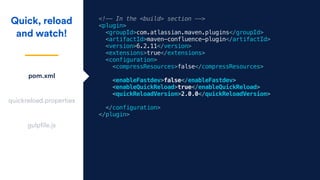
<!-- In the <build> section -->

<plugin>

<groupId>com.atlassian.maven.plugins</groupId>

<artifactId>maven-confluence-plugin</artifactId>

<version>6.2.11</version>

<extensions>true</extensions>

<configuration>

<compressResources>false</compressResources>

<enableFastdev>false</enableFastdev>

<enableQuickReload>true</enableQuickReload>

<quickReloadVersion>2.0.0</quickReloadVersion>

</configuration>

</plugin>
Quick, reload
and watch!
pom.xml
quickreload.properties
gulpfile.js
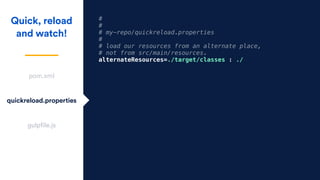
#
#
# my-repo/quickreload.properties
#
# load our resources from an alternate place,
# not from src/main/resources.
alternateResources=./target/classes : ./
Quick, reload
and watch!
pom.xml
quickreload.properties
gulpfile.js
We need to watch our
source and re-compile
when it changes.
CHALLENGE #3
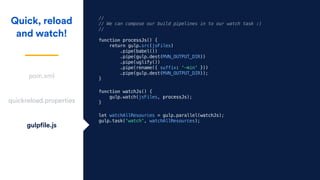
//

// We can compose our build pipelines in to our watch task :)

//


function processJs() {

return gulp.src(jsFiles)

.pipe(babel())

.pipe(gulp.dest(MVN_OUTPUT_DIR))

.pipe(uglify())

.pipe(rename({ suffix: '-min' }))

.pipe(gulp.dest(MVN_OUTPUT_DIR));

}
Quick, reload
and watch!
pom.xml
quickreload.properties
gulpfile.js
function watchJs() {

gulp.watch(jsFiles, processJs);

}
let watchAllResources = gulp.parallel(watchJs);

gulp.task('watch', watchAllResources);
How can we quickly test
our production code?
CHALLENGE #3
#
#
# my-repo/quickreload.properties
#
# always start with batching enabled
qr:webresourcebatching=true
Quick, reload
and watch!
pom.xml
quickreload.properties
gulpfile.js
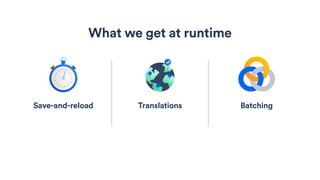
Translations
What we get at runtime
BatchingSave-and-reload
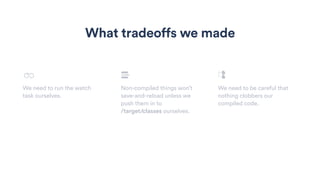
We need to run the watch
task ourselves.
Non-compiled things won’t
save-and-reload unless we
push them in to
/target/classes ourselves.
We need to be careful that
nothing clobbers our
compiled code.
What tradeoffs we made
[INFO]
[INFO] Quick Reload v2.0.0 - A watched plugin never boils!
[INFO]
[INFO] Tracking the following directories for changes :
[INFO]
[INFO] ~/hi-atlascamp/glossary-of-terms-plugin/target
[INFO]
[INFO] The system property 'plugin.resource.directories' is as follows :
[INFO]
[INFO] ~/hi-atlascamp/glossary-of-terms-plugin/target/classes
[INFO] ~/hi-atlascamp/glossary-of-terms-plugin/src/main/resources
[INFO] ~/actually/my-frontend/is-symlinked/from/conf-glossary
[INFO]
We’ve achieved 

save-and-reload 

for our compiled code!
CHALLENGE #3
but…
We still have to write
<web-resource> xml…
(╯°□°)╯︵ ┻━┻
PROBLEM #4
</web-resource>


<web-resource key="feature-term-linker" name="Feature - Term Linker">

<dependency>com.atlassian.plugins.jquery:jquery</dependency>

<dependency>com.atlassian.confluence.plugins.glossary-of-terms:feature-glossary</dependency>

<resource type="download" name="term-element.js" location="/feature/term-linker/term-linker.js"/>

</web-resource>


<web-resource key="contextual-glossary-of-terms" name="Page - Glossary of Terms">

<context>glossary-of-terms</context>

<dependency>com.atlassian.confluence.plugins.glossary-of-terms:widget-highlight-dialog</dependency>

<dependency>com.atlassian.confluence.plugins.glossary-of-terms:widget-highlight-action</dependency>

<dependency>com.atlassian.confluence.plugins.glossary-of-terms:feature-term-element</dependency>

<dependency>com.atlassian.confluence.plugins.glossary-of-terms:feature-term-linker</dependency>

<dependency>com.atlassian.confluence.plugins.glossary-of-terms:feature-glossary-notifications</dependency>

<resource type="download" name="glossary-of-terms.js" location="/page/glossary-of-terms.js"/>

</web-resource>


<web-resource key="page-glossary-of-terms">

<dependency>com.atlassian.plugins.atlassian-plugins-webresource-rest:web-resource-manager</dependency>

<context>page</context>

<context>blogpost</context>

<resource type="download" name="glossary-of-terms.js" location="/page/wrm/glossary-of-terms.js" />

</web-resource>
define('conf-glossary/glossary-of-terms', [

'conf-glossary/widget/highlight-dialog',

'conf-glossary/widget/highlight-action',

'conf-glossary/feature/term-linker/term-linker',

'conf-glossary/feature/term-dialog/term-dialog',

'conf-glossary/feature/glossary/glossary',

'jquery',

'conf-glossary/feature/glossary-notifications/glossary-notifications'

], function(HighlightDialog, HighlightAction, TermLinker, TermDialog, glossary, $) {


// Hook the term-linker up to our Glossary

// so it'll define words as we learn of them.


glossary.on('add', function(term) {

console.log('glossary was changed', arguments);

TermLinker.addTermsToPage([term]);

});


glossary.fetch();

// Initialise when DOM Content Loaded has happened.

// This could also be fired on other events, like when

Agenda
Learn how a Server add-on works
Use a modern front-end language
Leverage P2 at runtime
Leverage modular front-end code
Your questions
Bundle the front-end
go.atlassian.com/sao4fed-bundle-the-ui
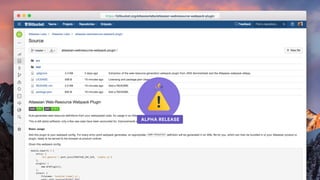
ALPHA RELEASE
https://bitbucket.org/atlassianlabs/atlassian-webresource-webpack-plugin
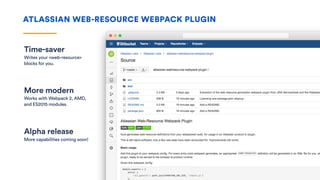
Time-saver
Writes your <web-resource>
blocks for you.
ATLASSIAN WEB-RESOURCE WEBPACK PLUGIN
More modern
Works with Webpack 2, AMD,
and ES2015 modules.
Alpha release
More capabilities coming soon!
Demo time!
ATLASSIAN WEB-RESOURCE WEBPACK PLUGIN
Agenda
Learn how a Server add-on works
Use a modern front-end language
Leverage P2 at runtime
Leverage modular front-end code
Your questions
Developer Docs
https://
developer.atlassian.com
Community Forums
https://
developer.atlassian.com/
community
More Learning Resources
Q&A
What makes front-end development hard?
What would make it better?
Thank You
CHRIS “DAZ” DARROCH | BUILDING FRONT-END IS FUN | HEY, WE MADE IT!

Server Add-ons for Front-end Developers