
Automate Database 
Deployments in Your Continuous 
Delivery Pipeline with Serena 
and Datical 
September 18, 2014 
SERENA SOFTWARE INC.
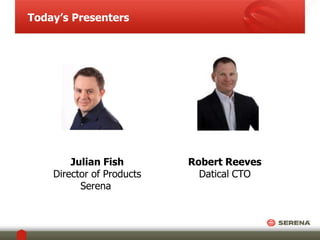
Today’s Presenters 
Julian Fish 
Director of Products 
Serena 
Robert Reeves 
Datical CTO
Introduction to Serena 
• Founded 1980 
• Headquartered in San Mateo, CA 
• >$200M revenue 
• 200+ R&D Engineers 
• HGGC Portfolio Company 
• Follow the sun Support 
• Serena Deployment Automation 
• Increase Deployment Velocity 
• Quality, Predictability, Repeatability 
• Visual Process Definition 
• Helping Global 2000 enterprises build 
and release better software 
3 SERENA SOFTWARE INC.
Introduction to Datical 
• Founded 2012 
• Headquarters in Austin, Texas 
• Datical DB – Application Schema 
Management 
• Manage 
• Control 
• Accelerate 
• Datical DB and Serena 
Deployment Automation: 
• Plugin: www.datical.com/serena 
• Community Edition
Eat, Sleep, Deploy, Repeat… 
A Continuous Delivery Process is a deployment process 
that is simple, repeatable and predictable. 
The same process should be used regardless of your 
development and testing tools. 
The lighter the process, the easier to understand, use and 
gain ROI 
Deployment Software should augment your process; not define it… 
5 SERENA SOFTWARE INC.
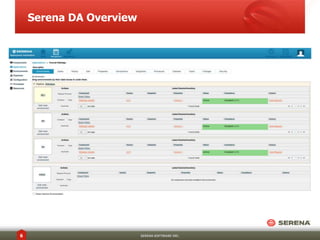
Serena DA Overview 
6 SERENA SOFTWARE INC.
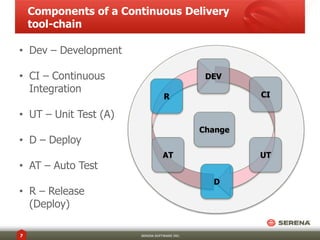
Components of a Continuous Delivery 
tool-chain 
7 SERENA SOFTWARE INC. 
DEV 
CI 
UT 
D 
R 
Change 
• Dev – Development 
• CI – Continuous 
Integration 
• UT – Unit Test (A) 
• D – Deploy 
• AT – Auto Test 
• R – Release 
(Deploy) 
AT
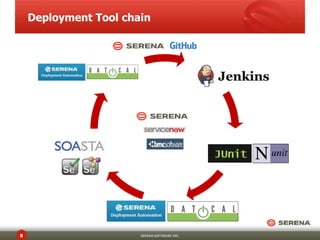
Deployment Tool chain 
8 SERENA SOFTWARE INC.
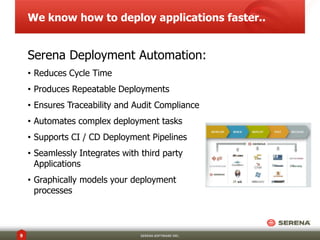
We know how to deploy applications faster.. 
Serena Deployment Automation: 
• Reduces Cycle Time 
• Produces Repeatable Deployments 
• Ensures Traceability and Audit Compliance 
• Automates complex deployment tasks 
• Supports CI / CD Deployment Pipelines 
• Seamlessly Integrates with third party 
Applications 
• Graphically models your deployment 
processes 
9 SERENA SOFTWARE INC.
How do we manage Database 
Complexity..? 
• Application of changes 
• Rollback of changes 
• Tracking and monitoring of Schema Changes 
• Application of DDL / DML 
10 SERENA SOFTWARE INC.
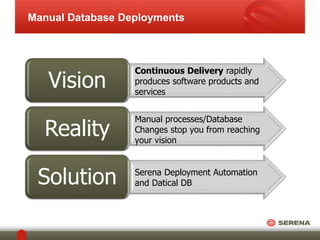
Manual Database Deployments 
Vision 
Reality 
Solution 
Continuous Delivery rapidly 
produces software products and 
services 
Manual processes/Database 
Changes stop you from reaching 
your vision 
Serena Deployment Automation 
and Datical DB
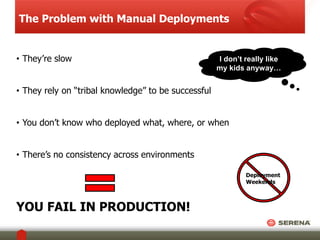
The Problem with Manual Deployments 
• They’re slow 
• They rely on “tribal knowledge” to be successful 
I don’t really like 
my kids anyway… 
• You don’t know who deployed what, where, or when 
• There’s no consistency across environments 
YOU FAIL IN PRODUCTION! 
Deployment 
Weekends
You Can’t Do That!!! 
• “Rail travel at high speed is not possible because passengers, 
unable to breathe, would die of asphyxia.” 
- Dr Dionysys Larder (1793-1859) 
• “Heavier-than-air flying machines are impossible.” 
- Lord Kelvin, 1895 
• “A rocket will never be able to leave the Earth’s 
atmosphere.” 
- New York Times, 1936 
• "I think there is a world market for maybe five 
computers.” 
- Thomas Watson, chairman of IBM, 1943 
• “There’s no chance that the iPhone is going to get 
any significant market share. No chance.” 
- Steve Ballmer, CEO of Microsoft, 2007
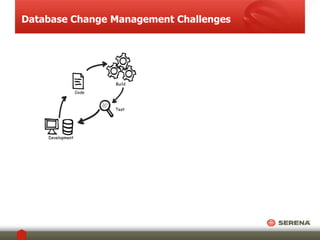
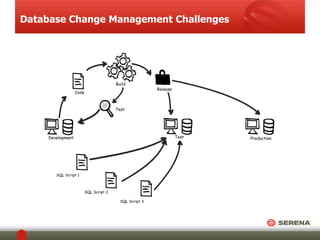
Database Change Management Challenges 
Test 
Development 
Build 
Code
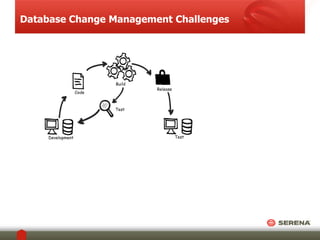
Database Change Management Challenges 
Test 
Release 
Test 
Development 
Build 
Code
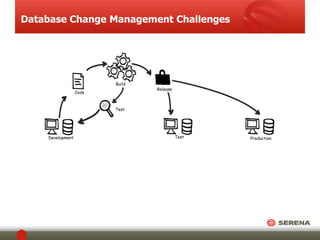
Database Change Management Challenges 
Test Production 
Release 
Test 
Development 
Build 
Code
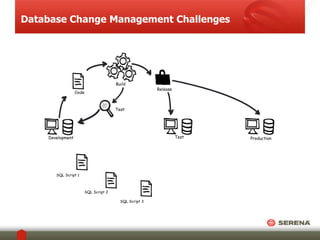
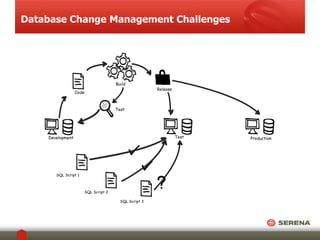
Database Change Management Challenges 
Production 
SQL Script 1 
SQL Script 3 
SQL Script 2 
Test 
Release 
Test 
Development 
Build 
Code
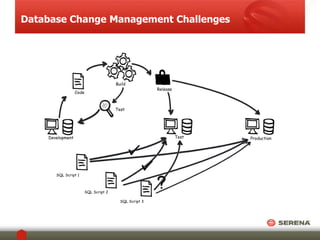
Database Change Management Challenges 
Test Production 
Release 
Test 
Development 
Build 
Code 
SQL Script 1 
SQL Script 3 
SQL Script 2
Database Change Management Challenges 
Test Production 
Release 
Test 
Development 
Build 
Code 
SQL Script 1 
SQL Script 3 
SQL Script 2
Database Change Management Challenges 
Test Production 
Release 
Test 
Development 
Build 
Code 
SQL Script 1 
SQL Script 3 
SQL Script 2
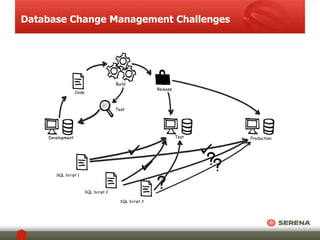
Database Change Management Challenges 
Test Production 
Release 
Test 
Development 
Build 
Code 
SQL Script 1 
SQL Script 3 
SQL Script 2
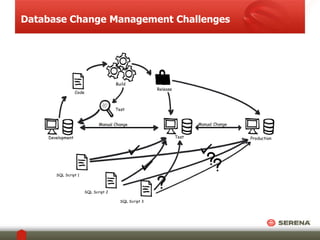
Database Change Management Challenges 
Production 
Manual Change Manual Change 
Test 
Release 
Test 
Development 
Build 
Code 
SQL Script 1 
SQL Script 3 
SQL Script 2
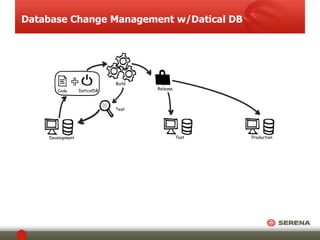
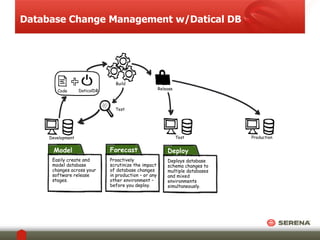
Database Change Management w/Datical DB 
Test 
Development 
Build 
Test Production 
Release 
Code Code DaticalDB
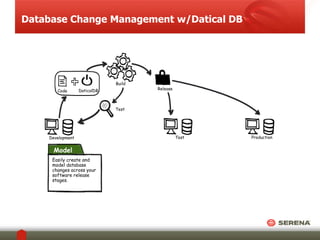
Database Change Management w/Datical DB 
Test 
Development 
Build 
Test Production 
Release 
Code Code DaticalDB 
Model 
Easily create and 
model database 
changes across your 
software release 
stages.
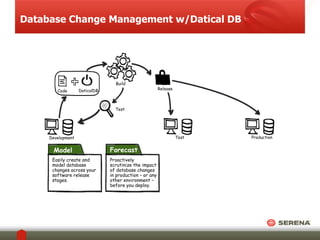
Database Change Management w/Datical DB 
Test 
Development 
Build 
Test Production 
Release 
Code Code DaticalDB 
Model 
Easily create and 
model database 
changes across your 
software release 
stages. 
Forecast 
Proactively 
scrutinize the impact 
of database changes 
in production – or any 
other environment – 
before you deploy.
Database Change Management w/Datical DB 
Test 
Development 
Build 
Test Production 
Release 
Code Code DaticalDB 
Model 
Easily create and 
model database 
changes across your 
software release 
stages. 
Forecast 
Proactively 
scrutinize the impact 
of database changes 
in production – or any 
other environment – 
before you deploy. 
Deploy 
Deploys database 
schema changes to 
multiple databases 
and mixed 
environments 
simultaneously.
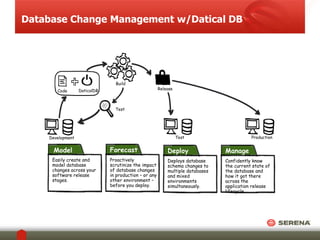
Database Change Management w/Datical DB 
Test 
Development 
Build 
Test Production 
Release 
Code Code DaticalDB 
Model 
Easily create and 
model database 
changes across your 
software release 
stages. 
Forecast 
Proactively 
scrutinize the impact 
of database changes 
in production – or any 
other environment – 
before you deploy. 
Deploy 
Deploys database 
schema changes to 
multiple databases 
and mixed 
environments 
simultaneously. 
Manage 
Confidently know 
the current state of 
the database and 
how it got there 
across the 
application release 
lifecycle.
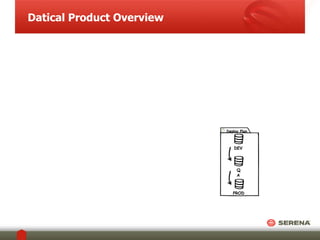
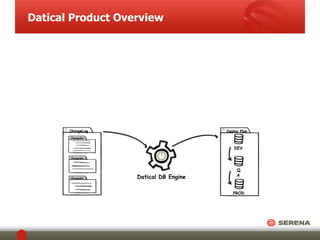
Datical Product Overview 
Deploy Plan 
DEV 
Q 
A 
PROD
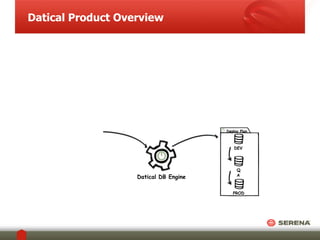
Datical Product Overview 
Deploy Plan 
DEV 
Q 
A 
PROD 
Datical DB Engine
Datical Product Overview 
Deploy Plan 
DEV 
Q 
A 
PROD 
ChangeLog 
ChangeSet 1 
ChangeSet 2 
ChangeSet 3 
Datical DB Engine
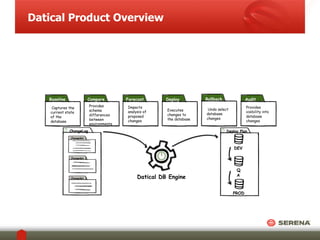
Datical Product Overview 
Baseline 
Captures the 
current state 
of the 
database 
Compare 
Provides 
schema 
differences 
between 
environments 
Forecast 
Impacts 
analysis of 
proposed 
changes 
Deploy 
Executes 
changes to 
the database 
Rollback 
Undo select 
database 
changes 
Audit 
Provides 
visibility into 
database 
changes 
Deploy Plan 
DEV 
Q 
A 
PROD 
ChangeLog 
ChangeSet 1 
ChangeSet 2 
ChangeSet 3 
Datical DB Engine
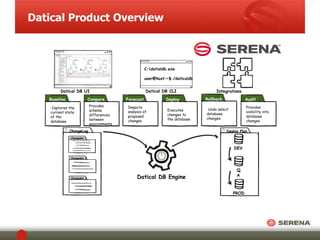
Datical Product Overview 
Baseline 
Captures the 
current state 
of the 
database 
Compare 
Provides 
schema 
differences 
between 
environments 
Forecast 
Impacts 
analysis of 
proposed 
changes 
Deploy 
Executes 
changes to 
the database 
Rollback 
Undo select 
database 
changes 
Audit 
Provides 
visibility into 
database 
changes 
C:datialdb.exe 
user@host:~$./daticaldb 
Datical DB UI Datical DB CLI Integrations 
Deploy Plan 
DEV 
Q 
A 
PROD 
ChangeLog 
ChangeSet 1 
ChangeSet 2 
ChangeSet 3 
Datical DB Engine
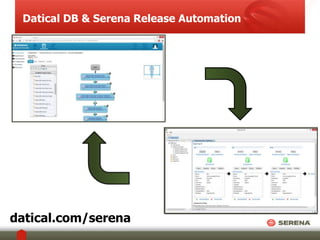
Datical DB & Serena Release Automation 
datical.com/serena
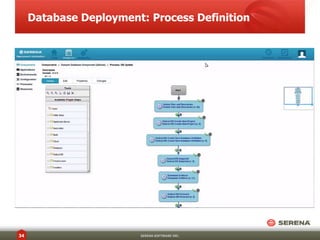
Database Deployment: Process Definition 
34 SERENA SOFTWARE INC.
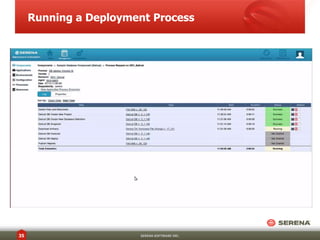
Running a Deployment Process 
35 SERENA SOFTWARE INC.
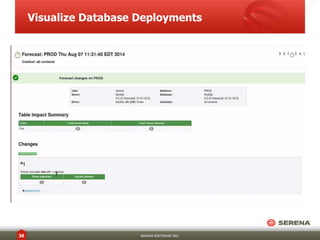
Visualize Database Deployments 
36 SERENA SOFTWARE INC.
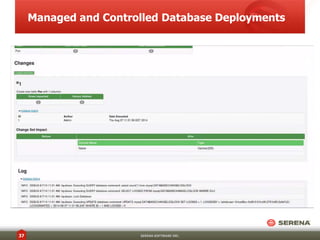
Managed and Controlled Database Deployments 
37 SERENA SOFTWARE INC.
Questions? 
Please use the Q&A panel to submit your questions. 
38 SERENA SOFTWARE INC. 
Weekly Deployment 
Automation Demo 
Free 
Deployment Automation 
Friday 1 pm ET/ 10 am PT 
Upcoming DevOps Drive-In 
October 30th! 
We’ll send you an invite 
for the next DevOps 
Drive-In!
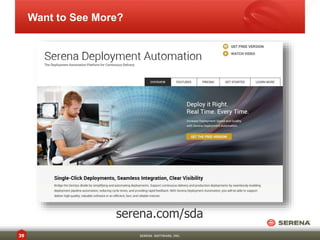
Want to See More? 
serena.com/sda 
39 SERENA SOFTWARE, INC.
More Information 
• Serena Deployment Automation Community Edition 
• serena.com/sda 
• DaticalDB4SerenaDA 
• datical.com/serena 
• Bring Agile Development to the Database 
• datical.com/agile 
• Contact info@datical.com 
(949) DATICAL (328-4225) 
@datical 
fb.com/datical

DevOps Drive-In: Automate Database Deployments in Your Continuous Delivery Pipeline with Serena and Datical.

  • 1.
    Automate Database Deploymentsin Your Continuous Delivery Pipeline with Serena and Datical September 18, 2014 SERENA SOFTWARE INC.
  • 2.
    Today’s Presenters JulianFish Director of Products Serena Robert Reeves Datical CTO
  • 3.
    Introduction to Serena • Founded 1980 • Headquartered in San Mateo, CA • >$200M revenue • 200+ R&D Engineers • HGGC Portfolio Company • Follow the sun Support • Serena Deployment Automation • Increase Deployment Velocity • Quality, Predictability, Repeatability • Visual Process Definition • Helping Global 2000 enterprises build and release better software 3 SERENA SOFTWARE INC.
  • 4.
    Introduction to Datical • Founded 2012 • Headquarters in Austin, Texas • Datical DB – Application Schema Management • Manage • Control • Accelerate • Datical DB and Serena Deployment Automation: • Plugin: www.datical.com/serena • Community Edition
  • 5.
    Eat, Sleep, Deploy,Repeat… A Continuous Delivery Process is a deployment process that is simple, repeatable and predictable. The same process should be used regardless of your development and testing tools. The lighter the process, the easier to understand, use and gain ROI Deployment Software should augment your process; not define it… 5 SERENA SOFTWARE INC.
  • 6.
    Serena DA Overview 6 SERENA SOFTWARE INC.
  • 7.
    Components of aContinuous Delivery tool-chain 7 SERENA SOFTWARE INC. DEV CI UT D R Change • Dev – Development • CI – Continuous Integration • UT – Unit Test (A) • D – Deploy • AT – Auto Test • R – Release (Deploy) AT
  • 8.
    Deployment Tool chain 8 SERENA SOFTWARE INC.
  • 9.
    We know howto deploy applications faster.. Serena Deployment Automation: • Reduces Cycle Time • Produces Repeatable Deployments • Ensures Traceability and Audit Compliance • Automates complex deployment tasks • Supports CI / CD Deployment Pipelines • Seamlessly Integrates with third party Applications • Graphically models your deployment processes 9 SERENA SOFTWARE INC.
  • 10.
    How do wemanage Database Complexity..? • Application of changes • Rollback of changes • Tracking and monitoring of Schema Changes • Application of DDL / DML 10 SERENA SOFTWARE INC.
  • 11.
    Manual Database Deployments Vision Reality Solution Continuous Delivery rapidly produces software products and services Manual processes/Database Changes stop you from reaching your vision Serena Deployment Automation and Datical DB
  • 12.
    The Problem withManual Deployments • They’re slow • They rely on “tribal knowledge” to be successful I don’t really like my kids anyway… • You don’t know who deployed what, where, or when • There’s no consistency across environments YOU FAIL IN PRODUCTION! Deployment Weekends
  • 13.
    You Can’t DoThat!!! • “Rail travel at high speed is not possible because passengers, unable to breathe, would die of asphyxia.” - Dr Dionysys Larder (1793-1859) • “Heavier-than-air flying machines are impossible.” - Lord Kelvin, 1895 • “A rocket will never be able to leave the Earth’s atmosphere.” - New York Times, 1936 • "I think there is a world market for maybe five computers.” - Thomas Watson, chairman of IBM, 1943 • “There’s no chance that the iPhone is going to get any significant market share. No chance.” - Steve Ballmer, CEO of Microsoft, 2007
  • 14.
    Database Change ManagementChallenges Test Development Build Code
  • 15.
    Database Change ManagementChallenges Test Release Test Development Build Code
  • 16.
    Database Change ManagementChallenges Test Production Release Test Development Build Code
  • 17.
    Database Change ManagementChallenges Production SQL Script 1 SQL Script 3 SQL Script 2 Test Release Test Development Build Code
  • 18.
    Database Change ManagementChallenges Test Production Release Test Development Build Code SQL Script 1 SQL Script 3 SQL Script 2
  • 19.
    Database Change ManagementChallenges Test Production Release Test Development Build Code SQL Script 1 SQL Script 3 SQL Script 2
  • 20.
    Database Change ManagementChallenges Test Production Release Test Development Build Code SQL Script 1 SQL Script 3 SQL Script 2
  • 21.
    Database Change ManagementChallenges Test Production Release Test Development Build Code SQL Script 1 SQL Script 3 SQL Script 2
  • 22.
    Database Change ManagementChallenges Production Manual Change Manual Change Test Release Test Development Build Code SQL Script 1 SQL Script 3 SQL Script 2
  • 23.
    Database Change Managementw/Datical DB Test Development Build Test Production Release Code Code DaticalDB
  • 24.
    Database Change Managementw/Datical DB Test Development Build Test Production Release Code Code DaticalDB Model Easily create and model database changes across your software release stages.
  • 25.
    Database Change Managementw/Datical DB Test Development Build Test Production Release Code Code DaticalDB Model Easily create and model database changes across your software release stages. Forecast Proactively scrutinize the impact of database changes in production – or any other environment – before you deploy.
  • 26.
    Database Change Managementw/Datical DB Test Development Build Test Production Release Code Code DaticalDB Model Easily create and model database changes across your software release stages. Forecast Proactively scrutinize the impact of database changes in production – or any other environment – before you deploy. Deploy Deploys database schema changes to multiple databases and mixed environments simultaneously.
  • 27.
    Database Change Managementw/Datical DB Test Development Build Test Production Release Code Code DaticalDB Model Easily create and model database changes across your software release stages. Forecast Proactively scrutinize the impact of database changes in production – or any other environment – before you deploy. Deploy Deploys database schema changes to multiple databases and mixed environments simultaneously. Manage Confidently know the current state of the database and how it got there across the application release lifecycle.
  • 28.
    Datical Product Overview Deploy Plan DEV Q A PROD
  • 29.
    Datical Product Overview Deploy Plan DEV Q A PROD Datical DB Engine
  • 30.
    Datical Product Overview Deploy Plan DEV Q A PROD ChangeLog ChangeSet 1 ChangeSet 2 ChangeSet 3 Datical DB Engine
  • 31.
    Datical Product Overview Baseline Captures the current state of the database Compare Provides schema differences between environments Forecast Impacts analysis of proposed changes Deploy Executes changes to the database Rollback Undo select database changes Audit Provides visibility into database changes Deploy Plan DEV Q A PROD ChangeLog ChangeSet 1 ChangeSet 2 ChangeSet 3 Datical DB Engine
  • 32.
    Datical Product Overview Baseline Captures the current state of the database Compare Provides schema differences between environments Forecast Impacts analysis of proposed changes Deploy Executes changes to the database Rollback Undo select database changes Audit Provides visibility into database changes C:datialdb.exe user@host:~$./daticaldb Datical DB UI Datical DB CLI Integrations Deploy Plan DEV Q A PROD ChangeLog ChangeSet 1 ChangeSet 2 ChangeSet 3 Datical DB Engine
  • 33.
    Datical DB &Serena Release Automation datical.com/serena
  • 34.
    Database Deployment: ProcessDefinition 34 SERENA SOFTWARE INC.
  • 35.
    Running a DeploymentProcess 35 SERENA SOFTWARE INC.
  • 36.
    Visualize Database Deployments 36 SERENA SOFTWARE INC.
  • 37.
    Managed and ControlledDatabase Deployments 37 SERENA SOFTWARE INC.
  • 38.
    Questions? Please usethe Q&A panel to submit your questions. 38 SERENA SOFTWARE INC. Weekly Deployment Automation Demo Free Deployment Automation Friday 1 pm ET/ 10 am PT Upcoming DevOps Drive-In October 30th! We’ll send you an invite for the next DevOps Drive-In!
  • 39.
    Want to SeeMore? serena.com/sda 39 SERENA SOFTWARE, INC.
  • 40.
    More Information •Serena Deployment Automation Community Edition • serena.com/sda • DaticalDB4SerenaDA • datical.com/serena • Bring Agile Development to the Database • datical.com/agile • Contact info@datical.com (949) DATICAL (328-4225) @datical fb.com/datical

Editor's Notes

  • #5 4
  • #24 Model - The first step is to generate a baseline schema – the starting data model for defining and versioning your database. Establishing a baseline with database neutral modeling makes it possible to compare multiple databases, compare databases of different types, and transform your applications automatically. Wizards make generating baseline schema easy. The baseline data model enables Datical DB to compare initial schema with future versions and provide a history of change as your database evolves over time. Forecast - Proactively forecast the impact of database changes in production – or any other environment – before you deploy. No more scrambling to troubleshoot errors at deploy time. No downtime or lost data. Just assurance that changes will not cause unexpected problems in production. No delays. No surprises. Deploy - Datical deploys database schema changes to multiple databases and mixed environments simultaneously — Oracle, DB2, MySQL, SQL Server, Postgres, and more. Datical DB plugs into your existing processes and it works with your existing tools: source control, build systems, testing suites, automated frameworks and more. Datical DB works with IBM Rational, BMC BladeLogic, Jenkins, Puppet, Chef, Team Foundation Server, and more. Manage – Datical DB displays the current state of the database as you deploy changes across different environments, multiple databases and mixed environments. By always knowing the current state of the database, you’ll see at a glance which changes have been deployed, in real time. Datical also provides an automatic audit trail of database schema changes that have been applied over time in each environment. It’s about reducing your risk. Prevent data loss and unauthorized data access by knowing who made changes, when they made them, and why they were made. Built-in historical tracking and reporting make it easy to quickly look back after a change is made to understand the evolution of the data model at a glance.
  • #25 Model - The first step is to generate a baseline schema – the starting data model for defining and versioning your database. Establishing a baseline with database neutral modeling makes it possible to compare multiple databases, compare databases of different types, and transform your applications automatically. Wizards make generating baseline schema easy. The baseline data model enables Datical DB to compare initial schema with future versions and provide a history of change as your database evolves over time. Forecast - Proactively forecast the impact of database changes in production – or any other environment – before you deploy. No more scrambling to troubleshoot errors at deploy time. No downtime or lost data. Just assurance that changes will not cause unexpected problems in production. No delays. No surprises. Deploy - Datical deploys database schema changes to multiple databases and mixed environments simultaneously — Oracle, DB2, MySQL, SQL Server, Postgres, and more. Datical DB plugs into your existing processes and it works with your existing tools: source control, build systems, testing suites, automated frameworks and more. Datical DB works with IBM Rational, BMC BladeLogic, Jenkins, Puppet, Chef, Team Foundation Server, and more. Manage – Datical DB displays the current state of the database as you deploy changes across different environments, multiple databases and mixed environments. By always knowing the current state of the database, you’ll see at a glance which changes have been deployed, in real time. Datical also provides an automatic audit trail of database schema changes that have been applied over time in each environment. It’s about reducing your risk. Prevent data loss and unauthorized data access by knowing who made changes, when they made them, and why they were made. Built-in historical tracking and reporting make it easy to quickly look back after a change is made to understand the evolution of the data model at a glance.
  • #26 Model - The first step is to generate a baseline schema – the starting data model for defining and versioning your database. Establishing a baseline with database neutral modeling makes it possible to compare multiple databases, compare databases of different types, and transform your applications automatically. Wizards make generating baseline schema easy. The baseline data model enables Datical DB to compare initial schema with future versions and provide a history of change as your database evolves over time. Forecast - Proactively forecast the impact of database changes in production – or any other environment – before you deploy. No more scrambling to troubleshoot errors at deploy time. No downtime or lost data. Just assurance that changes will not cause unexpected problems in production. No delays. No surprises. Deploy - Datical deploys database schema changes to multiple databases and mixed environments simultaneously — Oracle, DB2, MySQL, SQL Server, Postgres, and more. Datical DB plugs into your existing processes and it works with your existing tools: source control, build systems, testing suites, automated frameworks and more. Datical DB works with IBM Rational, BMC BladeLogic, Jenkins, Puppet, Chef, Team Foundation Server, and more. Manage – Datical DB displays the current state of the database as you deploy changes across different environments, multiple databases and mixed environments. By always knowing the current state of the database, you’ll see at a glance which changes have been deployed, in real time. Datical also provides an automatic audit trail of database schema changes that have been applied over time in each environment. It’s about reducing your risk. Prevent data loss and unauthorized data access by knowing who made changes, when they made them, and why they were made. Built-in historical tracking and reporting make it easy to quickly look back after a change is made to understand the evolution of the data model at a glance.
  • #27 Model - The first step is to generate a baseline schema – the starting data model for defining and versioning your database. Establishing a baseline with database neutral modeling makes it possible to compare multiple databases, compare databases of different types, and transform your applications automatically. Wizards make generating baseline schema easy. The baseline data model enables Datical DB to compare initial schema with future versions and provide a history of change as your database evolves over time. Forecast - Proactively forecast the impact of database changes in production – or any other environment – before you deploy. No more scrambling to troubleshoot errors at deploy time. No downtime or lost data. Just assurance that changes will not cause unexpected problems in production. No delays. No surprises. Deploy - Datical deploys database schema changes to multiple databases and mixed environments simultaneously — Oracle, DB2, MySQL, SQL Server, Postgres, and more. Datical DB plugs into your existing processes and it works with your existing tools: source control, build systems, testing suites, automated frameworks and more. Datical DB works with IBM Rational, BMC BladeLogic, Jenkins, Puppet, Chef, Team Foundation Server, and more. Manage – Datical DB displays the current state of the database as you deploy changes across different environments, multiple databases and mixed environments. By always knowing the current state of the database, you’ll see at a glance which changes have been deployed, in real time. Datical also provides an automatic audit trail of database schema changes that have been applied over time in each environment. It’s about reducing your risk. Prevent data loss and unauthorized data access by knowing who made changes, when they made them, and why they were made. Built-in historical tracking and reporting make it easy to quickly look back after a change is made to understand the evolution of the data model at a glance.
  • #28 Model - The first step is to generate a baseline schema – the starting data model for defining and versioning your database. Establishing a baseline with database neutral modeling makes it possible to compare multiple databases, compare databases of different types, and transform your applications automatically. Wizards make generating baseline schema easy. The baseline data model enables Datical DB to compare initial schema with future versions and provide a history of change as your database evolves over time. Forecast - Proactively forecast the impact of database changes in production – or any other environment – before you deploy. No more scrambling to troubleshoot errors at deploy time. No downtime or lost data. Just assurance that changes will not cause unexpected problems in production. No delays. No surprises. Deploy - Datical deploys database schema changes to multiple databases and mixed environments simultaneously — Oracle, DB2, MySQL, SQL Server, Postgres, and more. Datical DB plugs into your existing processes and it works with your existing tools: source control, build systems, testing suites, automated frameworks and more. Datical DB works with IBM Rational, BMC BladeLogic, Jenkins, Puppet, Chef, Team Foundation Server, and more. Manage – Datical DB displays the current state of the database as you deploy changes across different environments, multiple databases and mixed environments. By always knowing the current state of the database, you’ll see at a glance which changes have been deployed, in real time. Datical also provides an automatic audit trail of database schema changes that have been applied over time in each environment. It’s about reducing your risk. Prevent data loss and unauthorized data access by knowing who made changes, when they made them, and why they were made. Built-in historical tracking and reporting make it easy to quickly look back after a change is made to understand the evolution of the data model at a glance.
  • #29 How it works: Datical DB creates a Deployment Plan that defines “where” your database is logically located, such as the Development, QA or Production environment. A Change Set defines “what” changes need to be made to the database for it to work with your application.  Datical can automatically generate a Change Set for you from an existing database. The heart of Datical is the changeSet. Each changeSet contains operations that are to be executed against the target relational database. Each changeSet is equivalent to one or more SQL statements, and so a grouping of changeSets is equivalent to a SQL script. While SQL can be used in a changeSet, the maintainability that Datical offers will be partly forsaken if one takes this route. In addition to decreased maintainability, software developer involvement in the process might be decreased, since many software developers are simply more accustomed to the object world. Database agnostic. Perhaps a more important aspect of the <insert> tag is that it is database agnostic. What this means is that regardless of which of the relational database products to which Datical might be pointed, the same syntax can be used. While the INSERT statement might already be standardized SQL, we will see with other types of SQL statements that this quality will provide considerable benefit to the software developer. Create a Snapshot of your Database providing a schema baseline and current state.  Snapshots are recorded, organized, and archived when Change Sets are installed, updated and managed – either automatically or manually. Snapshots are Compared providing visibility into schema differences between environments such as different data types, columns, missing tables, foreign keys, etc.   Datical DB can automatically Deploy multiple databases across complex environments based on your specific deployment process. Datical DB Forecasts the impact of database changes, before they are made.  The system provides intelligence by analyzing the database and creating a database model in memory.  You know how changes will affect your application, in advance, without actually making changes to the database.  If you have a large number of changes, you don’t need to worry about performance issues or downtime caused change transaction failures.  You get visibility into change outcomes such as rows affected and estimated time for completion. Rich Reporting provides visibility into database changes and their effects across the application lifecycle. You’re can be audit-ready with detailed reporting and built-in traceability to reach your compliance goals. Rollback enables you to undo select database changes or revert back to the previous version automatically or manually via custom rollback SQL. Features: Database Support – Oracle, MS SQL Server, MySQL, DB2 and more. Works with Existing Tools – Development, Version Control, Build Management, Testing Suites and more. Rich User Interface – Simple yet powerful, providing complete visibility into database operations. Script Authoring – Generates scripts which can be executed automatically or reviewed prior to execution. Rollback – Undo select changes or revert back to the previous version automatically or via custom rollback SQL. Forecast – Provides analysis during preview reporting the impact of change, rows affected, estimated time to completion, etc. Compare two databases and have a patch file generated to make the one equal to the other Database Diff – Track database changes by adding change sets during development or perform database diffs. Reporting – Generates HTML reports providing visibility into changes and their effects across the application lifecycle. Supports multiple Change Logs. Refactoring Structural — Columns, Tables, Views, Stored Procedures Data Quality – Lookup Tables, Constraints, Sequences, Defaults Referential Integrity – Foreign Keys, Primary Keys Transformations – Insert, Update, Delete, Tag, Stop Architectural – Indexes Custom – Custom SQL, Modify SQL, Execution
  • #30 How it works: Datical DB creates a Deployment Plan that defines “where” your database is logically located, such as the Development, QA or Production environment. A Change Set defines “what” changes need to be made to the database for it to work with your application.  Datical can automatically generate a Change Set for you from an existing database. The heart of Datical is the changeSet. Each changeSet contains operations that are to be executed against the target relational database. Each changeSet is equivalent to one or more SQL statements, and so a grouping of changeSets is equivalent to a SQL script. While SQL can be used in a changeSet, the maintainability that Datical offers will be partly forsaken if one takes this route. In addition to decreased maintainability, software developer involvement in the process might be decreased, since many software developers are simply more accustomed to the object world. Database agnostic. Perhaps a more important aspect of the <insert> tag is that it is database agnostic. What this means is that regardless of which of the relational database products to which Datical might be pointed, the same syntax can be used. While the INSERT statement might already be standardized SQL, we will see with other types of SQL statements that this quality will provide considerable benefit to the software developer. Create a Snapshot of your Database providing a schema baseline and current state.  Snapshots are recorded, organized, and archived when Change Sets are installed, updated and managed – either automatically or manually. Snapshots are Compared providing visibility into schema differences between environments such as different data types, columns, missing tables, foreign keys, etc.   Datical DB can automatically Deploy multiple databases across complex environments based on your specific deployment process. Datical DB Forecasts the impact of database changes, before they are made.  The system provides intelligence by analyzing the database and creating a database model in memory.  You know how changes will affect your application, in advance, without actually making changes to the database.  If you have a large number of changes, you don’t need to worry about performance issues or downtime caused change transaction failures.  You get visibility into change outcomes such as rows affected and estimated time for completion. Rich Reporting provides visibility into database changes and their effects across the application lifecycle. You’re can be audit-ready with detailed reporting and built-in traceability to reach your compliance goals. Rollback enables you to undo select database changes or revert back to the previous version automatically or manually via custom rollback SQL. Features: Database Support – Oracle, MS SQL Server, MySQL, DB2 and more. Works with Existing Tools – Development, Version Control, Build Management, Testing Suites and more. Rich User Interface – Simple yet powerful, providing complete visibility into database operations. Script Authoring – Generates scripts which can be executed automatically or reviewed prior to execution. Rollback – Undo select changes or revert back to the previous version automatically or via custom rollback SQL. Forecast – Provides analysis during preview reporting the impact of change, rows affected, estimated time to completion, etc. Compare two databases and have a patch file generated to make the one equal to the other Database Diff – Track database changes by adding change sets during development or perform database diffs. Reporting – Generates HTML reports providing visibility into changes and their effects across the application lifecycle. Supports multiple Change Logs. Refactoring Structural — Columns, Tables, Views, Stored Procedures Data Quality – Lookup Tables, Constraints, Sequences, Defaults Referential Integrity – Foreign Keys, Primary Keys Transformations – Insert, Update, Delete, Tag, Stop Architectural – Indexes Custom – Custom SQL, Modify SQL, Execution
  • #31 How it works: Datical DB creates a Deployment Plan that defines “where” your database is logically located, such as the Development, QA or Production environment. A Change Set defines “what” changes need to be made to the database for it to work with your application.  Datical can automatically generate a Change Set for you from an existing database. The heart of Datical is the changeSet. Each changeSet contains operations that are to be executed against the target relational database. Each changeSet is equivalent to one or more SQL statements, and so a grouping of changeSets is equivalent to a SQL script. While SQL can be used in a changeSet, the maintainability that Datical offers will be partly forsaken if one takes this route. In addition to decreased maintainability, software developer involvement in the process might be decreased, since many software developers are simply more accustomed to the object world. Database agnostic. Perhaps a more important aspect of the <insert> tag is that it is database agnostic. What this means is that regardless of which of the relational database products to which Datical might be pointed, the same syntax can be used. While the INSERT statement might already be standardized SQL, we will see with other types of SQL statements that this quality will provide considerable benefit to the software developer. Create a Snapshot of your Database providing a schema baseline and current state.  Snapshots are recorded, organized, and archived when Change Sets are installed, updated and managed – either automatically or manually. Snapshots are Compared providing visibility into schema differences between environments such as different data types, columns, missing tables, foreign keys, etc.   Datical DB can automatically Deploy multiple databases across complex environments based on your specific deployment process. Datical DB Forecasts the impact of database changes, before they are made.  The system provides intelligence by analyzing the database and creating a database model in memory.  You know how changes will affect your application, in advance, without actually making changes to the database.  If you have a large number of changes, you don’t need to worry about performance issues or downtime caused change transaction failures.  You get visibility into change outcomes such as rows affected and estimated time for completion. Rich Reporting provides visibility into database changes and their effects across the application lifecycle. You’re can be audit-ready with detailed reporting and built-in traceability to reach your compliance goals. Rollback enables you to undo select database changes or revert back to the previous version automatically or manually via custom rollback SQL. Features: Database Support – Oracle, MS SQL Server, MySQL, DB2 and more. Works with Existing Tools – Development, Version Control, Build Management, Testing Suites and more. Rich User Interface – Simple yet powerful, providing complete visibility into database operations. Script Authoring – Generates scripts which can be executed automatically or reviewed prior to execution. Rollback – Undo select changes or revert back to the previous version automatically or via custom rollback SQL. Forecast – Provides analysis during preview reporting the impact of change, rows affected, estimated time to completion, etc. Compare two databases and have a patch file generated to make the one equal to the other Database Diff – Track database changes by adding change sets during development or perform database diffs. Reporting – Generates HTML reports providing visibility into changes and their effects across the application lifecycle. Supports multiple Change Logs. Refactoring Structural — Columns, Tables, Views, Stored Procedures Data Quality – Lookup Tables, Constraints, Sequences, Defaults Referential Integrity – Foreign Keys, Primary Keys Transformations – Insert, Update, Delete, Tag, Stop Architectural – Indexes Custom – Custom SQL, Modify SQL, Execution
  • #32 How it works: Datical DB creates a Deployment Plan that defines “where” your database is logically located, such as the Development, QA or Production environment. A Change Set defines “what” changes need to be made to the database for it to work with your application.  Datical can automatically generate a Change Set for you from an existing database. The heart of Datical is the changeSet. Each changeSet contains operations that are to be executed against the target relational database. Each changeSet is equivalent to one or more SQL statements, and so a grouping of changeSets is equivalent to a SQL script. While SQL can be used in a changeSet, the maintainability that Datical offers will be partly forsaken if one takes this route. In addition to decreased maintainability, software developer involvement in the process might be decreased, since many software developers are simply more accustomed to the object world. Database agnostic. Perhaps a more important aspect of the <insert> tag is that it is database agnostic. What this means is that regardless of which of the relational database products to which Datical might be pointed, the same syntax can be used. While the INSERT statement might already be standardized SQL, we will see with other types of SQL statements that this quality will provide considerable benefit to the software developer. Create a Snapshot of your Database providing a schema baseline and current state.  Snapshots are recorded, organized, and archived when Change Sets are installed, updated and managed – either automatically or manually. Snapshots are Compared providing visibility into schema differences between environments such as different data types, columns, missing tables, foreign keys, etc.   Datical DB can automatically Deploy multiple databases across complex environments based on your specific deployment process. Datical DB Forecasts the impact of database changes, before they are made.  The system provides intelligence by analyzing the database and creating a database model in memory.  You know how changes will affect your application, in advance, without actually making changes to the database.  If you have a large number of changes, you don’t need to worry about performance issues or downtime caused change transaction failures.  You get visibility into change outcomes such as rows affected and estimated time for completion. Rich Reporting provides visibility into database changes and their effects across the application lifecycle. You’re can be audit-ready with detailed reporting and built-in traceability to reach your compliance goals. Rollback enables you to undo select database changes or revert back to the previous version automatically or manually via custom rollback SQL. Features: Database Support – Oracle, MS SQL Server, MySQL, DB2 and more. Works with Existing Tools – Development, Version Control, Build Management, Testing Suites and more. Rich User Interface – Simple yet powerful, providing complete visibility into database operations. Script Authoring – Generates scripts which can be executed automatically or reviewed prior to execution. Rollback – Undo select changes or revert back to the previous version automatically or via custom rollback SQL. Forecast – Provides analysis during preview reporting the impact of change, rows affected, estimated time to completion, etc. Compare two databases and have a patch file generated to make the one equal to the other Database Diff – Track database changes by adding change sets during development or perform database diffs. Reporting – Generates HTML reports providing visibility into changes and their effects across the application lifecycle. Supports multiple Change Logs. Refactoring Structural — Columns, Tables, Views, Stored Procedures Data Quality – Lookup Tables, Constraints, Sequences, Defaults Referential Integrity – Foreign Keys, Primary Keys Transformations – Insert, Update, Delete, Tag, Stop Architectural – Indexes Custom – Custom SQL, Modify SQL, Execution
  • #33 How it works: Datical DB creates a Deployment Plan that defines “where” your database is logically located, such as the Development, QA or Production environment. A Change Set defines “what” changes need to be made to the database for it to work with your application.  Datical can automatically generate a Change Set for you from an existing database. The heart of Datical is the changeSet. Each changeSet contains operations that are to be executed against the target relational database. Each changeSet is equivalent to one or more SQL statements, and so a grouping of changeSets is equivalent to a SQL script. While SQL can be used in a changeSet, the maintainability that Datical offers will be partly forsaken if one takes this route. In addition to decreased maintainability, software developer involvement in the process might be decreased, since many software developers are simply more accustomed to the object world. Database agnostic. Perhaps a more important aspect of the <insert> tag is that it is database agnostic. What this means is that regardless of which of the relational database products to which Datical might be pointed, the same syntax can be used. While the INSERT statement might already be standardized SQL, we will see with other types of SQL statements that this quality will provide considerable benefit to the software developer. Create a Snapshot of your Database providing a schema baseline and current state.  Snapshots are recorded, organized, and archived when Change Sets are installed, updated and managed – either automatically or manually. Snapshots are Compared providing visibility into schema differences between environments such as different data types, columns, missing tables, foreign keys, etc.   Datical DB can automatically Deploy multiple databases across complex environments based on your specific deployment process. Datical DB Forecasts the impact of database changes, before they are made.  The system provides intelligence by analyzing the database and creating a database model in memory.  You know how changes will affect your application, in advance, without actually making changes to the database.  If you have a large number of changes, you don’t need to worry about performance issues or downtime caused change transaction failures.  You get visibility into change outcomes such as rows affected and estimated time for completion. Rich Reporting provides visibility into database changes and their effects across the application lifecycle. You’re can be audit-ready with detailed reporting and built-in traceability to reach your compliance goals. Rollback enables you to undo select database changes or revert back to the previous version automatically or manually via custom rollback SQL. Features: Database Support – Oracle, MS SQL Server, MySQL, DB2 and more. Works with Existing Tools – Development, Version Control, Build Management, Testing Suites and more. Rich User Interface – Simple yet powerful, providing complete visibility into database operations. Script Authoring – Generates scripts which can be executed automatically or reviewed prior to execution. Rollback – Undo select changes or revert back to the previous version automatically or via custom rollback SQL. Forecast – Provides analysis during preview reporting the impact of change, rows affected, estimated time to completion, etc. Compare two databases and have a patch file generated to make the one equal to the other Database Diff – Track database changes by adding change sets during development or perform database diffs. Reporting – Generates HTML reports providing visibility into changes and their effects across the application lifecycle. Supports multiple Change Logs. Refactoring Structural — Columns, Tables, Views, Stored Procedures Data Quality – Lookup Tables, Constraints, Sequences, Defaults Referential Integrity – Foreign Keys, Primary Keys Transformations – Insert, Update, Delete, Tag, Stop Architectural – Indexes Custom – Custom SQL, Modify SQL, Execution