Security Implications
of a DevOps transformation
Greg Sarjeant
- Puppet
- Manager of Professional Services
- 20 Years in IT
- Puppet user since 2012
Agenda
● Overview
● Technical baseline
● Implications for security
Practical DevOps
Overview
What do we mean by DevOps?
Practical DevOps
Most DevOps conversation is loosely defined
● What DevOps isn’t
● Value proposition
● High-level characteristics
— Fewer silos
— Common tools
— Tech closer to customers
Practical DevOps
This makes it hard to quantify
What are the impacts on security?
Practical DevOps
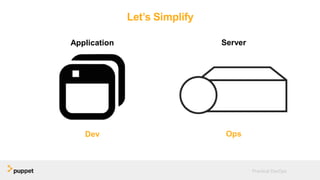
Let’s Simplify
Application
Dev
Server
Ops
Disclaimer:
None of the examples in this
presentation are
endorsements
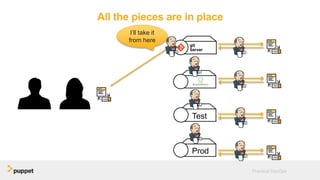
Technical Foundation
How did we get here?
Practical DevOps
DevOps needs a
“Hello, World”
Proposal
Five Key Components
● Version Control
● Package Management
● Automated Testing
● Continuous Integration
● Infrastructure as Code
Practical DevOps
Let’s start a company
Keep it simple
● Get a host
● Install web server
● Write the app
Practical DevOps
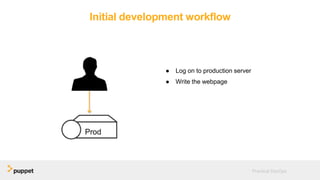
Initial development workflow
● Log on to production server
● Write the webpage
Practical DevOps
Wait, there’s more than one language?
Practical DevOps
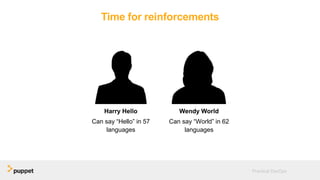
Time for reinforcements
Harry Hello
Can say “Hello” in 57
languages
Wendy World
Can say “World” in 62
languages
Practical DevOps
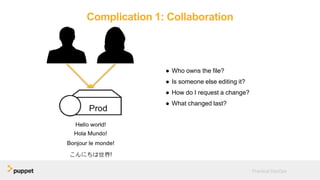
Complication 1: Collaboration
● Who owns the file?
● Is someone else editing it?
● How do I request a change?
● What changed last?
Practical DevOps
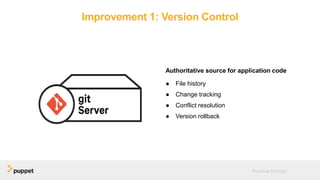
Improvement 1: Version Control
Authoritative source for application code
● File history
● Change tracking
● Conflict resolution
● Version rollback
Practical DevOps
Version Control: Security Implications
● Attack vector
● Access controls
— View code
— Commit code
● Sensitive data
Practical DevOps
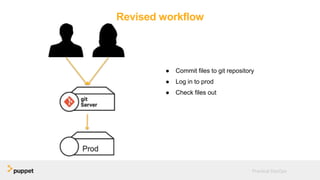
Revised workflow
● Commit files to git repository
● Log in to prod
● Check files out
Practical DevOps
Complication 2: Distribution
● No validation
● No dependencies
● Version management
● Dev tools on Prod servers
Practical DevOps
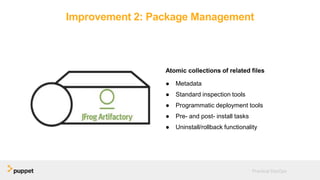
Improvement 2: Package Management
Atomic collections of related files
● Metadata
● Standard inspection tools
● Programmatic deployment tools
● Pre- and post- install tasks
● Uninstall/rollback functionality
Practical DevOps
Package Management: Security Implications
● Installation is generally trusted
● Validate package integrity
— MD5 sums
Practical DevOps
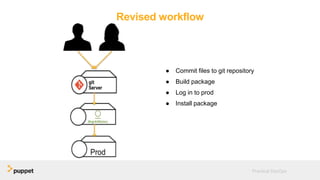
Revised workflow
● Commit files to git repository
● Build package
● Log in to prod
● Install package
Practical DevOps
Time to make the
magic happen
Let’s ship this thing…
Nice work, Harry.
Practical DevOps
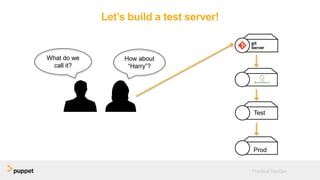
Let’s build a test server!
Practical DevOps
How about
“Harry”?
What do we
call it?
Test
Prod
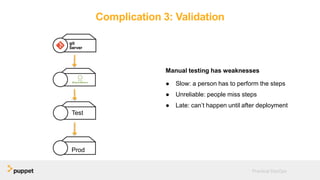
Complication 3: Validation
Manual testing has weaknesses
● Slow: a person has to perform the steps
● Unreliable: people miss steps
● Late: can’t happen until after deployment
Practical DevOps
Test
Prod
Improvement 3: Automated tests
● Fast
● Consistent
● Run early and often
— Locally
— On check-in
— On deployment
Practical DevOps
Automated tests: Security Implications
● Generally positive!
● Validate code, behavior
● Validate package contents
Practical DevOps
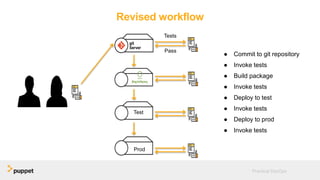
Revised workflow
● Commit to git repository
● Invoke tests
● Build package
● Invoke tests
● Deploy to test
● Invoke tests
● Deploy to prod
● Invoke tests
Practical DevOps
Test
Prod
Tests
Pass
Now we’re cooking with gas
Complication 4: Orchestration
We’re just telling the computers what to do
● Manage code
● Run tests
● Build packages
● Deploy packages
Practical DevOps
Improvement 4: Continuous Integration
Continuous Integration Servers
● Define jobs
● Run tests
● Build packages
● Deploy apps
● Run jobs on target servers
● Chain jobs together
● Stop execution if a job fails
Practical DevOps
Continuous Integration: Security Implications
● Single point of entry to infrastructure
● Elevated access to managed servers
● Arbitrary job execution
Practical DevOps
All the pieces are in place
Practical DevOps
Test
Prod
I’ll take it
from here
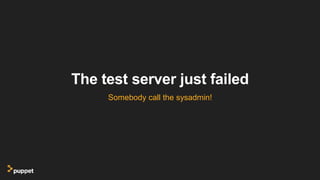
The test server just failed
Somebody call the sysadmin!
Here I come to save the day
Practical DevOps
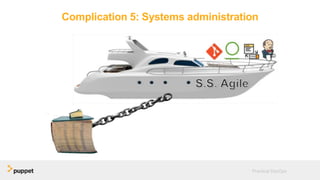
Complication 5: Systems administration
Practical DevOps
Progressively smaller anchors
● Run books
● Pile of shell scripts
● Golden images
● VM templates
Practical DevOps
Improvement 5: Infrastructure as code
● Rewrite configuration instructions
● Interpreted by computers
● Managed identically to app code
Practical DevOps
Infrastructure as code: Security implications
● Agents run as root on all servers
● Code is generally trusted
● Wide-ranging abilities
— Package installation
— Service reconfiguration
— Arbitrary script execution
● Runs unattended
Practical DevOps
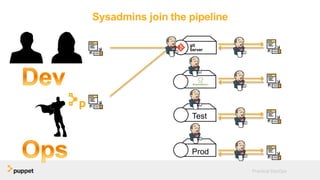
Sysadmins join the pipeline

Practical DevOps
Test
Prod
DevOps
The directed use of
automation to build a common
workflow for developers and
operations
DevOps
The directed use of
automation to build a common
workflow for developers and
operations
But what about all those security
questions?
Implications: Security
Are DevOps and security mutually exclusive?
Practical DevOps
There is a perception that
DevOps is incompatible with
strong security.
We feed this perception
● Emphasize trust over verification
● Purist mentality
— If it interferes with efficiency, it’s not DevOps
● Security is an afterthought – deal with it
in Production
Practical DevOps
Is security the new ops?
Security organizations have real
concerns
Security concerns
● Financial protection
● Intellectual property
● Customer data
Practical DevOps
Compromises are costly and on the rise
Requirements of security organizations
● Rigor
— Minimize opportunities to introduce
vulnerabilities
● Visibility
— Understand what has changed, so that effects
can be evaluated
● Responsiveness
— When a vulnerability is identified, remediate it
as quickly as possible
Practical DevOps
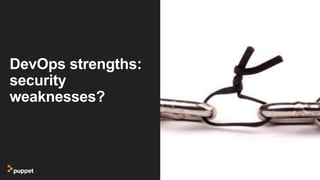
DevOps strengths:
security
weaknesses?
DevOps Strength: Collaboration
● Dev and Ops teams working together is a
huge benefit
● Security often gets left out
● Stop throwing over the wall to ops, keep
throwing over the wall to security
Practical DevOps
DevOps Strength: Automation
● Fewer eyes and minds on the code
● Less consideration of concerns outside of
direct application functionality
— We’re only validating what we test
Practical DevOps
DevOps Strength: Speed
● More changes introduced to production
more frequently
● Less time to measure the impact of a
change
● Often making updates before previous
changes have been validated
Practical DevOps
These aren’t fundamental flaws
We’ve just been insufficiently inclusive
Collaboration: Include Security
● Design for security
● Assess security implications of changes
in tickets
● Incorporate security patches into the
delivery pipeline
Practical DevOps
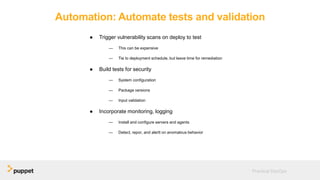
Automation: Automate tests and validation
● Trigger vulnerability scans on deploy to test
— This can be expensive
— Tie to deployment schedule, but leave time for remediation
● Build tests for security
— System configuration
— Package versions
— Input validation
● Incorporate monitoring, logging
— Install and configure servers and agents
— Detect, repor, and alertt on anomalous behavior
Practical DevOps
Speed: Accelerate remediation
● Use delivery pipeline to push OS patches
to production
● Update, test, and deploy custom
applications more quickly
● Use monitoring and logging to identify
vulnerabilities and anomalous behavior
more quickly
Practical DevOps
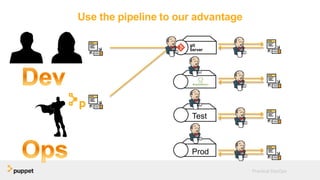
Use the pipeline to our advantage
Practical DevOps
Test
Prod
Security Implications for a DevOps Transformation

Security Implications for a DevOps Transformation

  • 1.
    Security Implications of aDevOps transformation
  • 2.
    Greg Sarjeant - Puppet -Manager of Professional Services - 20 Years in IT - Puppet user since 2012
  • 3.
    Agenda ● Overview ● Technicalbaseline ● Implications for security Practical DevOps
  • 4.
    Overview What do wemean by DevOps? Practical DevOps
  • 5.
    Most DevOps conversationis loosely defined ● What DevOps isn’t ● Value proposition ● High-level characteristics — Fewer silos — Common tools — Tech closer to customers Practical DevOps
  • 6.
    This makes ithard to quantify What are the impacts on security?
  • 7.
  • 8.
    Disclaimer: None of theexamples in this presentation are endorsements
  • 9.
    Technical Foundation How didwe get here? Practical DevOps
  • 10.
  • 11.
    Proposal Five Key Components ●Version Control ● Package Management ● Automated Testing ● Continuous Integration ● Infrastructure as Code Practical DevOps
  • 12.
    Let’s start acompany Keep it simple ● Get a host ● Install web server ● Write the app Practical DevOps
  • 13.
    Initial development workflow ●Log on to production server ● Write the webpage Practical DevOps
  • 14.
    Wait, there’s morethan one language? Practical DevOps
  • 15.
    Time for reinforcements HarryHello Can say “Hello” in 57 languages Wendy World Can say “World” in 62 languages Practical DevOps
  • 16.
    Complication 1: Collaboration ●Who owns the file? ● Is someone else editing it? ● How do I request a change? ● What changed last? Practical DevOps
  • 17.
    Improvement 1: VersionControl Authoritative source for application code ● File history ● Change tracking ● Conflict resolution ● Version rollback Practical DevOps
  • 18.
    Version Control: SecurityImplications ● Attack vector ● Access controls — View code — Commit code ● Sensitive data Practical DevOps
  • 19.
    Revised workflow ● Commitfiles to git repository ● Log in to prod ● Check files out Practical DevOps
  • 20.
    Complication 2: Distribution ●No validation ● No dependencies ● Version management ● Dev tools on Prod servers Practical DevOps
  • 21.
    Improvement 2: PackageManagement Atomic collections of related files ● Metadata ● Standard inspection tools ● Programmatic deployment tools ● Pre- and post- install tasks ● Uninstall/rollback functionality Practical DevOps
  • 22.
    Package Management: SecurityImplications ● Installation is generally trusted ● Validate package integrity — MD5 sums Practical DevOps
  • 23.
    Revised workflow ● Commitfiles to git repository ● Build package ● Log in to prod ● Install package Practical DevOps
  • 24.
    Time to makethe magic happen Let’s ship this thing…
  • 25.
  • 26.
    Let’s build atest server! Practical DevOps How about “Harry”? What do we call it? Test Prod
  • 27.
    Complication 3: Validation Manualtesting has weaknesses ● Slow: a person has to perform the steps ● Unreliable: people miss steps ● Late: can’t happen until after deployment Practical DevOps Test Prod
  • 28.
    Improvement 3: Automatedtests ● Fast ● Consistent ● Run early and often — Locally — On check-in — On deployment Practical DevOps
  • 29.
    Automated tests: SecurityImplications ● Generally positive! ● Validate code, behavior ● Validate package contents Practical DevOps
  • 30.
    Revised workflow ● Committo git repository ● Invoke tests ● Build package ● Invoke tests ● Deploy to test ● Invoke tests ● Deploy to prod ● Invoke tests Practical DevOps Test Prod Tests Pass
  • 31.
  • 32.
    Complication 4: Orchestration We’rejust telling the computers what to do ● Manage code ● Run tests ● Build packages ● Deploy packages Practical DevOps
  • 33.
    Improvement 4: ContinuousIntegration Continuous Integration Servers ● Define jobs ● Run tests ● Build packages ● Deploy apps ● Run jobs on target servers ● Chain jobs together ● Stop execution if a job fails Practical DevOps
  • 34.
    Continuous Integration: SecurityImplications ● Single point of entry to infrastructure ● Elevated access to managed servers ● Arbitrary job execution Practical DevOps
  • 35.
    All the piecesare in place Practical DevOps Test Prod I’ll take it from here
  • 36.
    The test serverjust failed Somebody call the sysadmin!
  • 37.
    Here I cometo save the day Practical DevOps
  • 38.
    Complication 5: Systemsadministration Practical DevOps
  • 39.
    Progressively smaller anchors ●Run books ● Pile of shell scripts ● Golden images ● VM templates Practical DevOps
  • 40.
    Improvement 5: Infrastructureas code ● Rewrite configuration instructions ● Interpreted by computers ● Managed identically to app code Practical DevOps
  • 41.
    Infrastructure as code:Security implications ● Agents run as root on all servers ● Code is generally trusted ● Wide-ranging abilities — Package installation — Service reconfiguration — Arbitrary script execution ● Runs unattended Practical DevOps
  • 42.
    Sysadmins join thepipeline Practical DevOps Test Prod
  • 43.
    DevOps The directed useof automation to build a common workflow for developers and operations DevOps The directed use of automation to build a common workflow for developers and operations
  • 44.
    But what aboutall those security questions?
  • 45.
    Implications: Security Are DevOpsand security mutually exclusive? Practical DevOps
  • 46.
    There is aperception that DevOps is incompatible with strong security.
  • 47.
    We feed thisperception ● Emphasize trust over verification ● Purist mentality — If it interferes with efficiency, it’s not DevOps ● Security is an afterthought – deal with it in Production Practical DevOps Is security the new ops?
  • 48.
  • 49.
    Security concerns ● Financialprotection ● Intellectual property ● Customer data Practical DevOps Compromises are costly and on the rise
  • 50.
    Requirements of securityorganizations ● Rigor — Minimize opportunities to introduce vulnerabilities ● Visibility — Understand what has changed, so that effects can be evaluated ● Responsiveness — When a vulnerability is identified, remediate it as quickly as possible Practical DevOps
  • 51.
  • 52.
    DevOps Strength: Collaboration ●Dev and Ops teams working together is a huge benefit ● Security often gets left out ● Stop throwing over the wall to ops, keep throwing over the wall to security Practical DevOps
  • 53.
    DevOps Strength: Automation ●Fewer eyes and minds on the code ● Less consideration of concerns outside of direct application functionality — We’re only validating what we test Practical DevOps
  • 54.
    DevOps Strength: Speed ●More changes introduced to production more frequently ● Less time to measure the impact of a change ● Often making updates before previous changes have been validated Practical DevOps
  • 55.
    These aren’t fundamentalflaws We’ve just been insufficiently inclusive
  • 56.
    Collaboration: Include Security ●Design for security ● Assess security implications of changes in tickets ● Incorporate security patches into the delivery pipeline Practical DevOps
  • 57.
    Automation: Automate testsand validation ● Trigger vulnerability scans on deploy to test — This can be expensive — Tie to deployment schedule, but leave time for remediation ● Build tests for security — System configuration — Package versions — Input validation ● Incorporate monitoring, logging — Install and configure servers and agents — Detect, repor, and alertt on anomalous behavior Practical DevOps
  • 58.
    Speed: Accelerate remediation ●Use delivery pipeline to push OS patches to production ● Update, test, and deploy custom applications more quickly ● Use monitoring and logging to identify vulnerabilities and anomalous behavior more quickly Practical DevOps
  • 59.
    Use the pipelineto our advantage Practical DevOps Test Prod

Editor's Notes

  • #2 Introduce yourself
  • #3 When you’re learning something new, you don’t dive in at the end – you start at the beginning. So let’s take that approach to familiarizing ourselves with DevOps. We’ll take the case of a new startup, and build to a DevOps toolchain as we encounter – and solve – the common problems in a software development process.
  • #6 This is by design
  • #7 We need a more concrete frame of reference in order to assess operational impacts of a DevOps transformation.
  • #8 Peopleoften talk about a DevOps Toolchain, and present it like this. There’s an awful lot going on here, and this can only overwhelm people who don’t have a clear conception of DevOps. Fundamentally, DevOps can be best understood as the latest step in a series of improvements to the way that IT organizations write software and deliver it to servers. By placing DevOps on a continuum in this way, we can give it context and define a company’s “DevOps transformation” in terms of the larger technological transformations that have led us to DevOps. Let’s strip away all this complexity now and get back to basics.
  • #10 Okay, so how did we get here?
  • #11 When you’re learning something new, you don’t dive in at the end – you start at the beginning. So let’s take that approach to familiarizing ourselves with DevOps. We’ll take the case of a new startup, and build to a DevOps toolchain as we encounter – and solve – the common problems in a software development process.
  • #12 When we’re just getting started, building our application is pretty easy.
  • #13 When we’re just getting started, building our application is pretty easy.
  • #14 It’s almost not worth calling it a workflow at this point. I’m just logging on to my single server and writing the webpage live. Easy-peasy.
  • #15 Inevitably, when we go live we discover complications. In this case, we can’t very well say “Hello, world!” to the world if we only say it in English. Looks like we need to do some more work. But I can’t keep up with this. I’m not a language expert and I don’t have the time to go around looking up translations while doing the business of running my incredibly popular website. Let’s hire some developers.
  • #16 So we hire some developers to handle the increasing demand for features.
  • #17 Now that we have two people, our initial approach is already starting to break down. We need a more effective way to collaborate so we aren’t endlessly stepping on each other’s toes or spending lots of time trying to figure out what’s changed and who did what. It’s a pain for people to keep track of all this
  • #18 This is where a good version control system excels. It facilitates collaboration by handling all of the bookkeeping (change tracking, versioning, conflict resolution), and freeing the developers to focus more on writing code.
  • #19 This is still mostly a manual process, and has some weaknesses. There’s no validation that I’m checking out the right thing, or putting it in the right place with the right permissions. I can’t manage dependencies. I need knowledge of the underlying VCS structure in order to manage versions. Some orgs have restrictions against having dev tools (such as VCS clients) on production systems. Ask: How can we solve this one?
  • #20 With a version control server in place, we can make our first revision to the workflow. Now, instead of making changes directly on the production server, we commit our changes to the version control server and then check out the new files on the production server.
  • #21 This is still mostly a manual process, and has some weaknesses. There’s no validation that I’m checking out the right thing, or putting it in the right place with the right permissions. I can’t manage dependencies. I need knowledge of the underlying VCS structure in order to manage versions. Some orgs have restrictions against having dev tools (such as VCS clients) on production systems. Ask: How can we solve this one?
  • #22 We can overcome most of these limitations by introducing package management. Instead of copying files directly to our destination server, we can bundle them into a single, atomic package that contains metatdata (version info, installation location, dependencies) and provides facilities for automated installation and uninstallation activities.
  • #23 This is still mostly a manual process, and has some weaknesses. There’s no validation that I’m checking out the right thing, or putting it in the right place with the right permissions. I can’t manage dependencies. I need knowledge of the underlying VCS structure in order to manage versions. Some orgs have restrictions against having dev tools (such as VCS clients) on production systems. Ask: How can we solve this one?
  • #24 Now we revise our workflow further. After checking the latest version of code, we build a package that contains all of the files. We then deploy that single package to the server, rather than copying a lot of files. This results in deployments that are faster, more reproducible, and more reliable than was previously possible.
  • #25 ThinWe now have effective collaboaration and easy deployments. We can get our multi-lingual greeting site out to the people. Let’s do it.
  • #26 Whoops. Automation without validation just gets bugs to production faster.
  • #27 The most straightforward way to validate our code’s quality is to set up a test server, and deploy to it first before we deploy to production. That allows us to validate the test application before it hits production.
  • #28 This helps, but our test process has the same weaknesses that all manual processes share. They are slow and unreliable. People aren’t as good at repetitive, systematic tasks like validation as machines are. This testing also happens late. By the time we run the first test, we’ve already committed the code to version control, built a package, and deployed it to one environment. That’s a lot of work when we have no idea whether the code is any good. It would be better to catch the problems earlier.
  • #29 If we can come up with a way to allow the computer to do our tests, then we gain all the benefits of automation. Because of this, people have written a variety of automated testing frameworks that do just that. Once we’ve automated our tests, it’s easier to apply them earlier (and more frequently) in the lifecycle.
  • #30 If we can come up with a way to allow the computer to do our tests, then we gain all the benefits of automation. Because of this, people have written a variety of automated testing frameworks that do just that. Once we’ve automated our tests, it’s easier to apply them earlier (and more frequently) in the lifecycle.
  • #31 So now we revise the workflow again. Rather that a single, monolithic, manual test late in the process, we inject a series of automated tests throughout. This gets the tests dome more quickly and helps to ensure the quality of the code at each step of the process. Remember, this is iterative.
  • #33 Now, computers are doing the bulk of our work for us. They track the versions of the code, run tests on the code, bundle it into packages, deploy it to our servers. Outside of writing the code, just about the only thing that people are doing is telling the computers what to do and when. Turns out we can offload that to computers, too.
  • #34 Continuous Integration servers, at their root, are job execution engines. They can monitor entities (like a VCS repo) and kick off jobs in response to events, or they can be made to kick jobs off by invoking an API. The jobs can be invoked on any servers to which the CI server has access (generally via SSH or an installed agent). This gives us a way to let the computers. Jobs can be chained to other jobs, creating what is commonly known as a “pipeline.” You can even define workflow and reporting logic, so a pipeline run can be stopped and the proper people notified automatically if a job fails. This allows us to take still more work out of the hands of people and transfer it to a machine.
  • #35 If we can come up with a way to allow the computer to do our tests, then we gain all the benefits of automation. Because of this, people have written a variety of automated testing frameworks that do just that. Once we’ve automated our tests, it’s easier to apply them earlier (and more frequently) in the lifecycle.
  • #36 Now we’ve automated all of the steps of the development process that lend themselves to automation. Our developers can focus solely on writing code, and as soon as they check something in, our automated workflow kicks in and does the rest. We’ve attained nirvana…
  • #37 …almost. Things always fail, and usually at the worst time. We’ve got a great app development and delivery process, but what happens when a piece of the infrastructure breaks?
  • #38 We call in the sysadmin, of course. And this is where agile dreams have been dashed for decades. For a surprisingly long time, there was no good way to write the instructions for (re)building a server in a way that a computer could interpret. Instead, sysadmins operated from memory or from giant runbooks (paper or electronic).
  • #39 We call in the sysadmin, of course. And this is where agile dreams have been dashed for decades. For a surprisingly long time, there was no good way to write the instructions for (re)building a server in a way that a computer could interpret. Instead, sysadmins operated from memory or from giant runbooks (paper or electronic).
  • #40 Over time, we created a series of progressively smaller anchors, but we almost always came back to the giant runbook. Sometimes a shell script would replace a paragraph or two, but we’d still have a line in our tome that said “and then run this script.” Golden images and VM snapshots removed some of the drift and repetition, but those starting points were still generally built by hand an then imaged. If anything in the underlying image needed to change, we made the change by had and rebuilt the image.
  • #41 What we really needed was the same thing the developers had all along: a way to rewrite the instructions that we followed for building a machine – that is, our runbook – in a way that allows a computer to interpret and act upon them. This breakthrough was infrastructure as code.
  • #42 Over time, we created a series of progressively smaller anchors, but we almost always came back to the giant runbook. Sometimes a shell script would replace a paragraph or two, but we’d still have a line in our tome that said “and then run this script.” Golden images and VM snapshots removed some of the drift and repetition, but those starting points were still generally built by hand an then imaged. If anything in the underlying image needed to change, we made the change by had and rebuilt the image.
  • #43 Once we have an implementation of infrastructure as code, we can apply all of the same tools that our developers have been using with such success to system configuration. This was the shift from agile development with an anchor to DevOps. It’s important to recognize that there is almost nothing new here – most of the technology and practice has existed for years in software development circles. The one thing that changed was the introduction of a way to express system configurations in a manner that allowed us to bring those software development practices to bear on system configuration management.
  • #48 Please don’t call it DevOpsSec But in a lot of ways, the DevOps community regards security orgs in a similar manner to ops in the past. We throw things over the wall for security to deal with later.
  • #50 Even if a compromise doesn’t cause direct harm in the form of IP theft or financial loss, the negative publicity associated with disclosure can cause significant harm.
  • #51 None of this is unreasonable. Though sometimes the processes to ensure them can be burdensome, the requirements themselves are sound.
  • #52 The very things that make DevOps so successful as a development methodolgy undermine the confidence of security organizations.
  • #56 Were you wondering when I’d get to the part where this is actually good for security?
  • #60 Each of the testing and CI points in the pipeline represents an opportunity to incorporate security. We can also extend this pipeline in order to incorporate automated logging and monitoring systems.