1
Copyright © Serena Software 2015
Serena Business Manager
Visualizing 2016
David J. Easter
Director of Product Management,
SBM & Solutions
April 2016
2
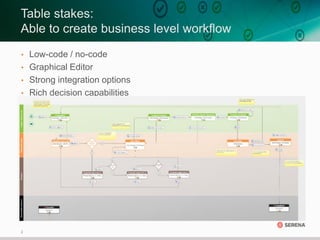
Table stakes:
Able to create business level workflow
• Low-code / no-code
• Graphical Editor
• Strong integration options
• Rich decision capabilities
3
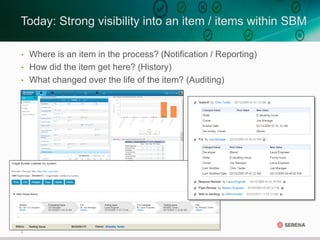
• Where is an item in the process? (Notification / Reporting)
• How did the item get here? (History)
• What changed over the life of the item? (Auditing)
Today: Strong visibility into an item / items within SBM
4
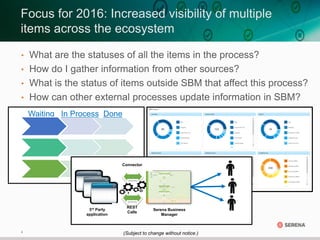
Waiting In Process Done
3rd Party
application
Serena Business
Manager
REST
Calls
Connector
• What are the statuses of all the items in the process?
• How do I gather information from other sources?
• What is the status of items outside SBM that affect this process?
• How can other external processes update information in SBM?
Focus for 2016: Increased visibility of multiple
items across the ecosystem
(Subject to change without notice.)
5
What’s coming in ‘Aurora’
1HCY’16
6
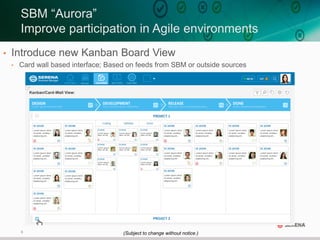
• Introduce new Kanban Board View
• Card wall based interface; Based on feeds from SBM or outside sources
SBM “Aurora”
Improve participation in Agile environments
(Subject to change without notice.)
7
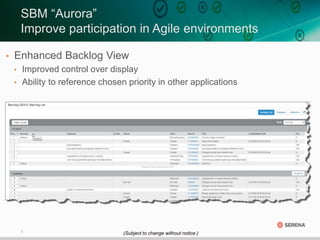
• Enhanced Backlog View
• Improved control over display
• Ability to reference chosen priority in other applications
SBM “Aurora”
Improve participation in Agile environments
(Subject to change without notice.)
8
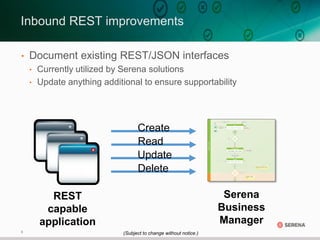
• Document existing REST/JSON interfaces
• Currently utilized by Serena solutions
• Update anything additional to ensure supportability
Inbound REST improvements
REST
capable
application
Serena
Business
Manager
Create
Read
Update
Delete
(Subject to change without notice.)
9
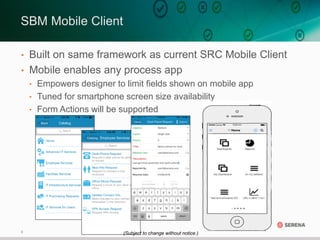
• Built on same framework as current SRC Mobile Client
• Mobile enables any process app
• Empowers designer to limit fields shown on mobile app
• Tuned for smartphone screen size availability
• Form Actions will be supported
SBM Mobile Client
(Subject to change without notice.)
10
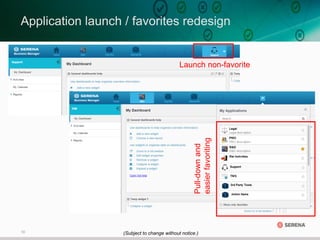
Application launch / favorites redesign
Launch non-favorite
Pull-downand
easierfavoriting
(Subject to change without notice.)
11
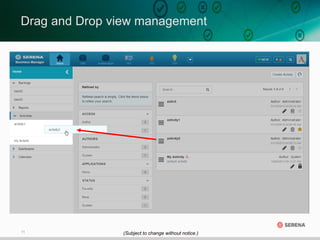
Drag and Drop view management
(Subject to change without notice.)
12
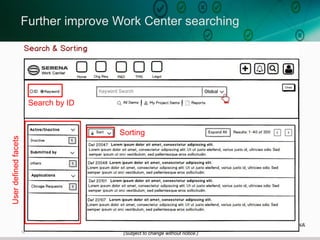
Further improve Work Center searching
Userdefinedfacets
Search by ID
Sorting
(Subject to change without notice.)
13
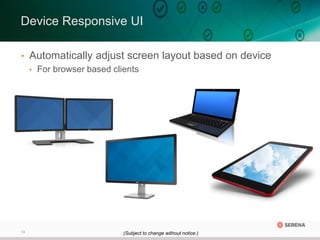
• Automatically adjust screen layout based on device
• For browser based clients
Device Responsive UI
(Subject to change without notice.)
14
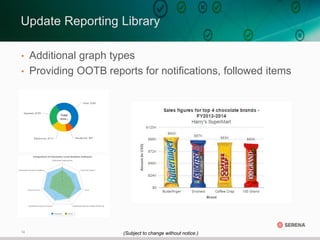
Update Reporting Library
• Additional graph types
• Providing OOTB reports for notifications, followed items
(Subject to change without notice.)
15
Sneak Peek at
“Babylon” (2HCY16)
16
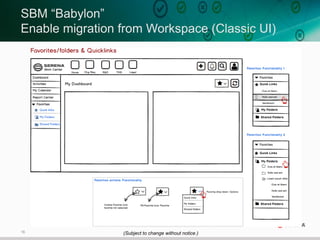
SBM “Babylon”
Enable migration from Workspace (Classic UI)
(Subject to change without notice.)
17
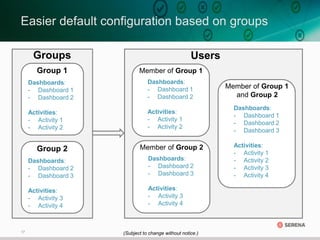
Groups
Easier default configuration based on groups
Group 2
Dashboards:
- Dashboard 2
- Dashboard 3
Activities:
- Activity 3
- Activity 4
Member of Group 1
Dashboards:
- Dashboard 1
- Dashboard 2
Activities:
- Activity 1
- Activity 2
Member of Group 2
Dashboards:
- Dashboard 2
- Dashboard 3
Activities:
- Activity 3
- Activity 4
Member of Group 1
and Group 2
Dashboards:
- Dashboard 1
- Dashboard 2
- Dashboard 3
Activities:
- Activity 1
- Activity 2
- Activity 3
- Activity 4
Group 1
Dashboards:
- Dashboard 1
- Dashboard 2
Activities:
- Activity 1
- Activity 2
Users
(Subject to change without notice.)
18
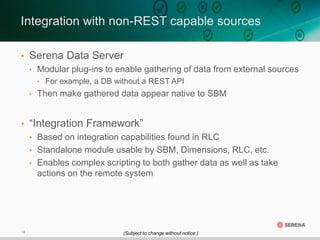
• Serena Data Server
• Modular plug-ins to enable gathering of data from external sources
• For example, a DB without a REST API
• Then make gathered data appear native to SBM
• “Integration Framework”
• Based on integration capabilities found in RLC
• Standalone module usable by SBM, Dimensions, RLC, etc.
• Enables complex scripting to both gather data as well as take
actions on the remote system
Integration with non-REST capable sources
(Subject to change without notice.)
19
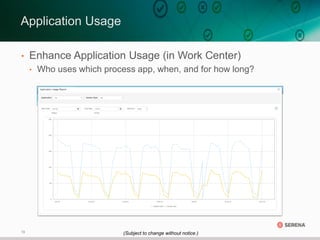
• Enhance Application Usage (in Work Center)
• Who uses which process app, when, and for how long?
Application Usage
(Subject to change without notice.)
20
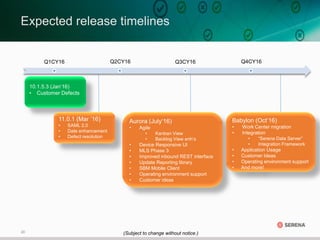
Expected release timelines
Q1CY16 Q2CY16 Q3CY16 Q4CY16
Aurora (July‘16)
• Agile
• Kanban View
• Backlog View enh’s
• Device Responsive UI
• MLS Phase 3
• Improved inbound REST interface
• Update Reporting library
• SBM Mobile Client
• Operating environment support
• Customer ideas
10.1.5.3 (Jan‘16)
• Customer Defects
11.0.1 (Mar ’16)
• SAML 2.0
• Date enhancement
• Defect resolution
(Subject to change without notice.)
Babylon (Oct’16)
• Work Center migration
• Integration
• “Serena Data Server”
• Integration Framework
• Application Usage
• Customer Ideas
• Operating environment support
• And more!
21
Thank You!

Serena Business Manager Visualizing 2016

  • 1.
    1 Copyright © SerenaSoftware 2015 Serena Business Manager Visualizing 2016 David J. Easter Director of Product Management, SBM & Solutions April 2016
  • 2.
    2 Table stakes: Able tocreate business level workflow • Low-code / no-code • Graphical Editor • Strong integration options • Rich decision capabilities
  • 3.
    3 • Where isan item in the process? (Notification / Reporting) • How did the item get here? (History) • What changed over the life of the item? (Auditing) Today: Strong visibility into an item / items within SBM
  • 4.
    4 Waiting In ProcessDone 3rd Party application Serena Business Manager REST Calls Connector • What are the statuses of all the items in the process? • How do I gather information from other sources? • What is the status of items outside SBM that affect this process? • How can other external processes update information in SBM? Focus for 2016: Increased visibility of multiple items across the ecosystem (Subject to change without notice.)
  • 5.
    5 What’s coming in‘Aurora’ 1HCY’16
  • 6.
    6 • Introduce newKanban Board View • Card wall based interface; Based on feeds from SBM or outside sources SBM “Aurora” Improve participation in Agile environments (Subject to change without notice.)
  • 7.
    7 • Enhanced BacklogView • Improved control over display • Ability to reference chosen priority in other applications SBM “Aurora” Improve participation in Agile environments (Subject to change without notice.)
  • 8.
    8 • Document existingREST/JSON interfaces • Currently utilized by Serena solutions • Update anything additional to ensure supportability Inbound REST improvements REST capable application Serena Business Manager Create Read Update Delete (Subject to change without notice.)
  • 9.
    9 • Built onsame framework as current SRC Mobile Client • Mobile enables any process app • Empowers designer to limit fields shown on mobile app • Tuned for smartphone screen size availability • Form Actions will be supported SBM Mobile Client (Subject to change without notice.)
  • 10.
    10 Application launch /favorites redesign Launch non-favorite Pull-downand easierfavoriting (Subject to change without notice.)
  • 11.
    11 Drag and Dropview management (Subject to change without notice.)
  • 12.
    12 Further improve WorkCenter searching Userdefinedfacets Search by ID Sorting (Subject to change without notice.)
  • 13.
    13 • Automatically adjustscreen layout based on device • For browser based clients Device Responsive UI (Subject to change without notice.)
  • 14.
    14 Update Reporting Library •Additional graph types • Providing OOTB reports for notifications, followed items (Subject to change without notice.)
  • 15.
  • 16.
    16 SBM “Babylon” Enable migrationfrom Workspace (Classic UI) (Subject to change without notice.)
  • 17.
    17 Groups Easier default configurationbased on groups Group 2 Dashboards: - Dashboard 2 - Dashboard 3 Activities: - Activity 3 - Activity 4 Member of Group 1 Dashboards: - Dashboard 1 - Dashboard 2 Activities: - Activity 1 - Activity 2 Member of Group 2 Dashboards: - Dashboard 2 - Dashboard 3 Activities: - Activity 3 - Activity 4 Member of Group 1 and Group 2 Dashboards: - Dashboard 1 - Dashboard 2 - Dashboard 3 Activities: - Activity 1 - Activity 2 - Activity 3 - Activity 4 Group 1 Dashboards: - Dashboard 1 - Dashboard 2 Activities: - Activity 1 - Activity 2 Users (Subject to change without notice.)
  • 18.
    18 • Serena DataServer • Modular plug-ins to enable gathering of data from external sources • For example, a DB without a REST API • Then make gathered data appear native to SBM • “Integration Framework” • Based on integration capabilities found in RLC • Standalone module usable by SBM, Dimensions, RLC, etc. • Enables complex scripting to both gather data as well as take actions on the remote system Integration with non-REST capable sources (Subject to change without notice.)
  • 19.
    19 • Enhance ApplicationUsage (in Work Center) • Who uses which process app, when, and for how long? Application Usage (Subject to change without notice.)
  • 20.
    20 Expected release timelines Q1CY16Q2CY16 Q3CY16 Q4CY16 Aurora (July‘16) • Agile • Kanban View • Backlog View enh’s • Device Responsive UI • MLS Phase 3 • Improved inbound REST interface • Update Reporting library • SBM Mobile Client • Operating environment support • Customer ideas 10.1.5.3 (Jan‘16) • Customer Defects 11.0.1 (Mar ’16) • SAML 2.0 • Date enhancement • Defect resolution (Subject to change without notice.) Babylon (Oct’16) • Work Center migration • Integration • “Serena Data Server” • Integration Framework • Application Usage • Customer Ideas • Operating environment support • And more!
  • 21.