SEARCH ENGINE OPTIMIZATION 101
Wix Team, November 2012
What is SEO?
Search Engine Optimization:
 How to optimize your website to get ranked higher in search results
 How to make your website content more relevant for search queries
 Get your visitors to share your website content
SEO
Quality Content + Relevant Keywords
 Site Architecture – how well it is
organized
 Domain Names
 Site Description & Titles
 Images and videos
 Content optimization
 Internal links
XXX,
XXXXX,
XXXXXX
Community interest
 Local directories
 Social tools
 Shared content
 Location feature
 External links
SEO – Search Engines‟ Ranking Method
Search Engines
Algorithm
How to identify your keywords
Make a list with all the services you are providing
Now short list only the most relevant keywords
Prepare a 10 keywords‟ list to be used in your website
One of your keywords should be your location
SEO – Step 1: Finding Relevant Keywords
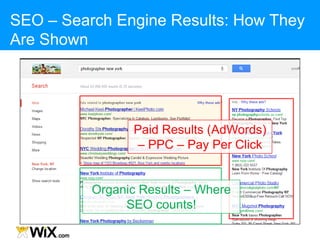
SEO – Search Engine Results: How They
Are Shown
Paid Results (AdWords)
– PPC – Pay Per Click
Organic Results – Where
SEO counts!
20 %
80 %
SEO – Search Engine Results: PPC vs SEO
Website‟s Title
Website‟s Domain Name
Website‟s Description
SEO – Search Engine Results: Organic
SEO – Step 2: Optimization Steps
Website‟s Domain Name
Website‟s Title
Website‟s Description
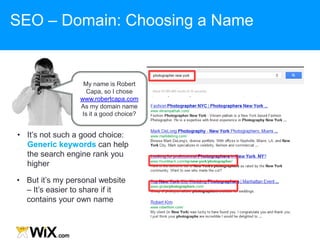
• But it‟s my personal website
– It‟s easier to share if it
contains your own name
• It‟s not such a good choice:
Generic keywords can help
the search engine rank you
higher
SEO – Domain: Choosing a Name
My name is Robert
Capa, so I chose
www.robertcapa.com
As my domain name
Is it a good choice?
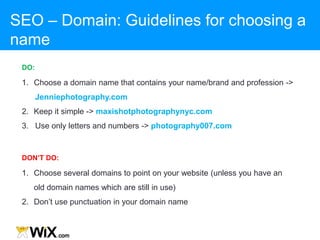
1. Choose a domain name that contains your name/brand and profession ->
Jenniephotography.com
2. Keep it simple -> maxishotphotographynyc.com
3. Use only letters and numbers -> photography007.com
DO:
1. Choose several domains to point on your website (unless you have an
old domain names which are still in use)
2. Don‟t use punctuation in your domain name
DON’T DO:
SEO – Domain: Guidelines for choosing a
name
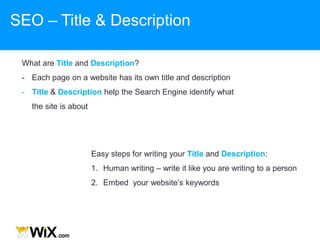
What are Title and Description?
- Each page on a website has its own title and description
- Title & Description help the Search Engine identify what
the site is about
Easy steps for writing your Title and Description:
1. Human writing – write it like you are writing to a person
2. Embed your website‟s keywords
SEO – Title & Description
- Write your Title for every page
- Change the homepage Title from „Home‟ to your brand name
- Give the generic name + your brand name to each page
Gallery | cookieshop
Services | cookieshop
Home -> cookieshop
SEO – Title & Description: Setting a Title
This is my private
restaurant. Here you can
find all the data you‟ll need
in order to eat our famous
dishes
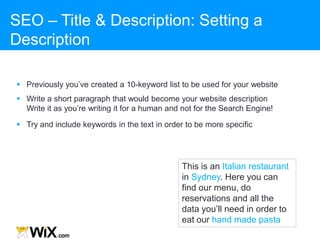
This is an Italian restaurant
in Sydney. Here you can
find our menu, do
reservations and all the
data you‟ll need in order to
eat our hand made pasta
SEO – Title & Description: Setting a
Description
 Previously you‟ve created a 10-keyword list to be used for your website
 Write a short paragraph that would become your website description
Write it as you‟re writing it for a human and not for the Search Engine!
 Try and include keywords in the text in order to be more specific
SEO – Title & Description: Setting a Title &
Description
Title length: Max
70 characters
Keywords usage
in description –
not more than 3
Enter your 10
keywords‟ list
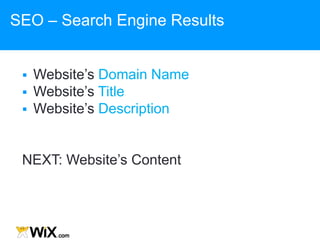
SEO – Search Engine Results
 Website‟s Domain Name
 Website‟s Title
 Website‟s Description
NEXT: Website‟s Content
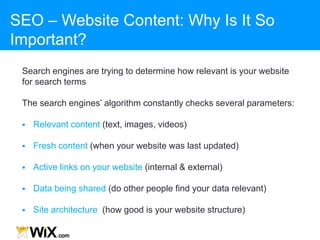
SEO – Website Content: Why Is It So
Important?
Search engines are trying to determine how relevant is your website
for search terms
The search engines‟ algorithm constantly checks several parameters:
 Relevant content (text, images, videos)
 Fresh content (when your website was last updated)
 Active links on your website (internal & external)
 Data being shared (do other people find your data relevant)
 Site architecture (how good is your website structure)
High volume of search-engines‟ queries are for images
SEO – Website Content: Relevant Images
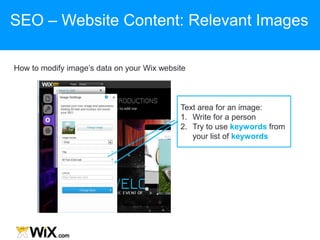
How to modify image‟s data on your Wix website
Text area for an image:
1. Write for a person
2. Try to use keywords from
your list of keywords
SEO – Website Content: Relevant Images
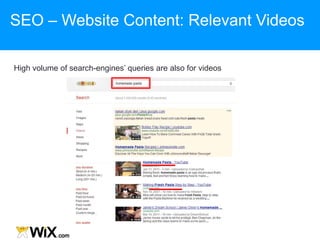
High volume of search-engines‟ queries are also for videos
SEO – Website Content: Relevant Videos
Step # 1: Upload the video (Youtube, Vimeo, Etc.)
Step # 2: Write relevant title, description and tags. Try to use your website‟s
keywords. Add a link to your website in the description
SEO – Website Content: Relevant Videos
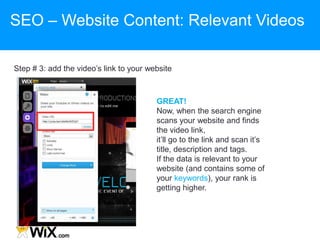
Step # 3: add the video‟s link to your website
GREAT!
Now, when the search engine
scans your website and finds
the video link,
it‟ll go to the link and scan it‟s
title, description and tags.
If the data is relevant to your
website (and contains some of
your keywords), your rank is
getting higher.
SEO – Website Content: Relevant Videos
Websites with fresh content receive higher rank!
Some tips on how to keep it fresh:
 Add „latest news‟ or „events‟ page - create new content periodically
 Add new photos to your gallery - add a description with (up to 3) keywords
SEO – Website Content: Relevant & Fresh
Content
Anchor text: Visible, clickable text in a hyperlink. The words contained in the
anchor text can determine the rank that page will receive by search engines
Tips:
 Create Anchor text inside a paragraph wherever you can help your visitors
advance:
‒ Restaurant website: “learn about our daily specials” – “specials” should
link to the menu page
 Once a week post a comment on a related forum with a link to your website
 Once a week find an article on a related subject in one of the major websites
and add a link on your website to this article as anchor text
SEO – Website Content: Relevant Links
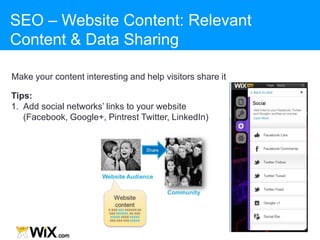
Make your content interesting and help visitors share it
Tips:
1. Add social networks‟ links to your website
(Facebook, Google+, Pintrest Twitter, LinkedIn)
SEO – Website Content: Relevant
Content & Data Sharing
Make sure your business and website are listed on directories
Tips:
 Submit your business‟ Name, Address and Phone (NAP) to
directories
 Make sure that the format you‟re submitting is identical in all
directories and across the web
SEO – Publish & Submit Your Website
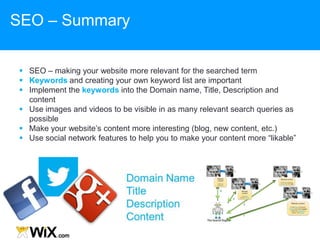
 SEO – making your website more relevant for the searched term
 Keywords and creating your own keyword list are important
 Implement the keywords into the Domain name, Title, Description and
content
 Use images and videos to be visible in as many relevant search queries as
possible
 Make your website‟s content more interesting (blog, new content, etc.)
 Use social network features to help you to make your content more “likable”
SEO – Summary
promote.wix.com/seo/ www.wix.com/support/forum/html5
SEO – Helpful links
Thank You!

SEO presentation

  • 1.
    SEARCH ENGINE OPTIMIZATION101 Wix Team, November 2012
  • 2.
    What is SEO? SearchEngine Optimization:  How to optimize your website to get ranked higher in search results  How to make your website content more relevant for search queries  Get your visitors to share your website content SEO
  • 3.
    Quality Content +Relevant Keywords  Site Architecture – how well it is organized  Domain Names  Site Description & Titles  Images and videos  Content optimization  Internal links XXX, XXXXX, XXXXXX Community interest  Local directories  Social tools  Shared content  Location feature  External links SEO – Search Engines‟ Ranking Method Search Engines Algorithm
  • 4.
    How to identifyyour keywords Make a list with all the services you are providing Now short list only the most relevant keywords Prepare a 10 keywords‟ list to be used in your website One of your keywords should be your location SEO – Step 1: Finding Relevant Keywords
  • 5.
    SEO – SearchEngine Results: How They Are Shown Paid Results (AdWords) – PPC – Pay Per Click Organic Results – Where SEO counts!
  • 6.
    20 % 80 % SEO– Search Engine Results: PPC vs SEO
  • 7.
    Website‟s Title Website‟s DomainName Website‟s Description SEO – Search Engine Results: Organic
  • 8.
    SEO – Step2: Optimization Steps Website‟s Domain Name Website‟s Title Website‟s Description
  • 9.
    • But it‟smy personal website – It‟s easier to share if it contains your own name • It‟s not such a good choice: Generic keywords can help the search engine rank you higher SEO – Domain: Choosing a Name My name is Robert Capa, so I chose www.robertcapa.com As my domain name Is it a good choice?
  • 10.
    1. Choose adomain name that contains your name/brand and profession -> Jenniephotography.com 2. Keep it simple -> maxishotphotographynyc.com 3. Use only letters and numbers -> photography007.com DO: 1. Choose several domains to point on your website (unless you have an old domain names which are still in use) 2. Don‟t use punctuation in your domain name DON’T DO: SEO – Domain: Guidelines for choosing a name
  • 11.
    What are Titleand Description? - Each page on a website has its own title and description - Title & Description help the Search Engine identify what the site is about Easy steps for writing your Title and Description: 1. Human writing – write it like you are writing to a person 2. Embed your website‟s keywords SEO – Title & Description
  • 12.
    - Write yourTitle for every page - Change the homepage Title from „Home‟ to your brand name - Give the generic name + your brand name to each page Gallery | cookieshop Services | cookieshop Home -> cookieshop SEO – Title & Description: Setting a Title
  • 13.
    This is myprivate restaurant. Here you can find all the data you‟ll need in order to eat our famous dishes This is an Italian restaurant in Sydney. Here you can find our menu, do reservations and all the data you‟ll need in order to eat our hand made pasta SEO – Title & Description: Setting a Description  Previously you‟ve created a 10-keyword list to be used for your website  Write a short paragraph that would become your website description Write it as you‟re writing it for a human and not for the Search Engine!  Try and include keywords in the text in order to be more specific
  • 14.
    SEO – Title& Description: Setting a Title & Description Title length: Max 70 characters Keywords usage in description – not more than 3 Enter your 10 keywords‟ list
  • 15.
    SEO – SearchEngine Results  Website‟s Domain Name  Website‟s Title  Website‟s Description NEXT: Website‟s Content
  • 16.
    SEO – WebsiteContent: Why Is It So Important? Search engines are trying to determine how relevant is your website for search terms The search engines‟ algorithm constantly checks several parameters:  Relevant content (text, images, videos)  Fresh content (when your website was last updated)  Active links on your website (internal & external)  Data being shared (do other people find your data relevant)  Site architecture (how good is your website structure)
  • 17.
    High volume ofsearch-engines‟ queries are for images SEO – Website Content: Relevant Images
  • 18.
    How to modifyimage‟s data on your Wix website Text area for an image: 1. Write for a person 2. Try to use keywords from your list of keywords SEO – Website Content: Relevant Images
  • 19.
    High volume ofsearch-engines‟ queries are also for videos SEO – Website Content: Relevant Videos
  • 20.
    Step # 1:Upload the video (Youtube, Vimeo, Etc.) Step # 2: Write relevant title, description and tags. Try to use your website‟s keywords. Add a link to your website in the description SEO – Website Content: Relevant Videos
  • 21.
    Step # 3:add the video‟s link to your website GREAT! Now, when the search engine scans your website and finds the video link, it‟ll go to the link and scan it‟s title, description and tags. If the data is relevant to your website (and contains some of your keywords), your rank is getting higher. SEO – Website Content: Relevant Videos
  • 22.
    Websites with freshcontent receive higher rank! Some tips on how to keep it fresh:  Add „latest news‟ or „events‟ page - create new content periodically  Add new photos to your gallery - add a description with (up to 3) keywords SEO – Website Content: Relevant & Fresh Content
  • 23.
    Anchor text: Visible,clickable text in a hyperlink. The words contained in the anchor text can determine the rank that page will receive by search engines Tips:  Create Anchor text inside a paragraph wherever you can help your visitors advance: ‒ Restaurant website: “learn about our daily specials” – “specials” should link to the menu page  Once a week post a comment on a related forum with a link to your website  Once a week find an article on a related subject in one of the major websites and add a link on your website to this article as anchor text SEO – Website Content: Relevant Links
  • 24.
    Make your contentinteresting and help visitors share it Tips: 1. Add social networks‟ links to your website (Facebook, Google+, Pintrest Twitter, LinkedIn) SEO – Website Content: Relevant Content & Data Sharing
  • 25.
    Make sure yourbusiness and website are listed on directories Tips:  Submit your business‟ Name, Address and Phone (NAP) to directories  Make sure that the format you‟re submitting is identical in all directories and across the web SEO – Publish & Submit Your Website
  • 26.
     SEO –making your website more relevant for the searched term  Keywords and creating your own keyword list are important  Implement the keywords into the Domain name, Title, Description and content  Use images and videos to be visible in as many relevant search queries as possible  Make your website‟s content more interesting (blog, new content, etc.)  Use social network features to help you to make your content more “likable” SEO – Summary
  • 27.
  • 28.