


SEO for WordPress Ruth Maude, Dandelion Web Design How to do better in Google
Choose the best SEO platform
Keywords:   make a list Know what search terms you want to target before you begin your web project Poll your client base for terms List multiple ways to say the same thing  Use the Google Ad-words keyword tool  Check out Google Suggests
Use Keywords in the Naming Structure of Web site Keyword-rich domain name
Anchor Text Anchor text is the visible, clickable text in a hyperlink Search engines give weight to the keywords used in link so don’t use “click here”
Use Keywords in the Naming Structure of Web site Keyword-rich domain name People use your business name or your domain name as the anchor text of a link Permalink settings
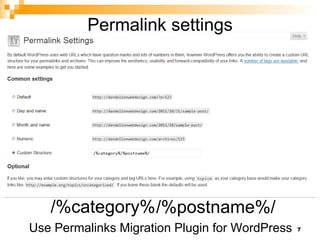
Permalink settings /%postname%/ /%category% Use Permalinks Migration Plugin for WordPress
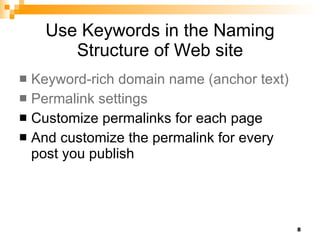
Use Keywords in the Naming Structure of Web site Keyword-rich domain name (anchor text) Permalink settings Customize permalinks for each page And customize the permalink for every post you publish
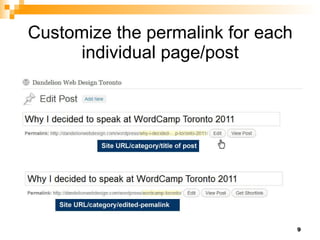
Customize the permalink for each individual page/post
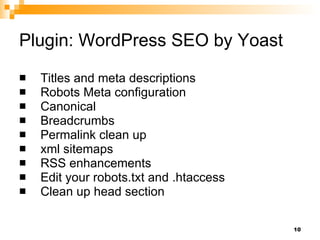
Plugin: WordPress SEO by Yoast Titles and meta descriptions Robots Meta configuration Canonical Breadcrumbs Permalink clean up xml sitemaps RSS enhancements Edit your robots.txt and .htaccess Clean up head section
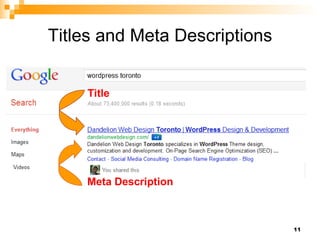
Titles and Meta Descriptions Title Meta Description
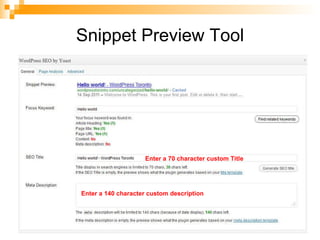
Snippet Preview Tool Enter a 70 character custom Title Enter a 140 character custom description
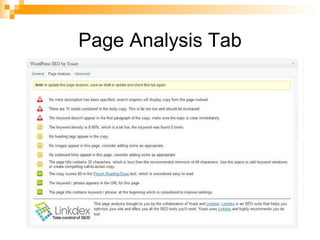
Page Analysis Tab
xml sitemap Tells search engines which pages are to be crawled Links to all the URLs for a site Metadata about each URL (when it was last updated, how often it usually changes, and how important it is relative to other URLs in the site)  The plugin will automatically update the xml sitemap when you publish a new post
Content Write for search engines Write for the way people read on the Web
Write for Search Engines Images are pretty but search engines need text Pull out your list of keywords If you don't have a word on your site – search engines won't return your site for that term H1 – one per page  - used for Page/Post titles  H2, H3 …
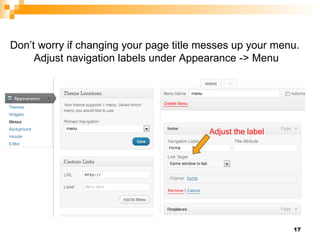
Adjust the label Don’t worry if changing your page title messes up your menu.  Adjust navigation labels under Appearance -> Menu
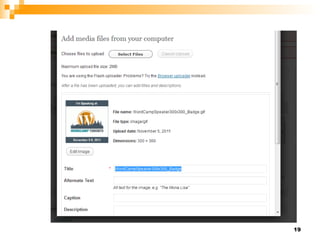
Write for Search Engines Images are pretty but search engines need text Pull out your list of keywords If you don't have a word on your site – search engines won't return your site for that term H1 – one per page  - used for Page/Post titles   H2, H3 …  Use image alt text
 
Write for Search Engines Images are pretty but search engines need text Pull out your list of keywords If you don't have a word on your site – search engines won't return your site for that term H1 – one per page  -  H2, H3 …  <h1>Page/Post title with keywords</h1> Menu Use image alt text Use anchor text for internal linking
Page Speed Keep image file size as small as possible Don’t scale images Use the W3 Total Cache plugin
Write for People People read differently on the Web Chunk text Keep sentences and paragraphs short Call-to-action button Keep main message above the fold
Google Tools Google Webmaster Tools Google Analytics Google Place Page Google Plus
Links Number of inbound back links How reputable is the link Relevance of link Anchor text Create great content Social media
Drive traffic to your site with social media
Links Number of inbound back links Relevance of link Anchor text Create great content Social media Guest blogging Commenting on other blogs
Recommended Plugins Permalinks Migration Plugin WordPress SEO by Yoast Google Analytics for WordPress by Yoast Rank Reporter W3 Total Cache Sexy Bookmarks, Social Media Widget Related Posts Plugin
dandelionwebdesign.com @dandelionweb Web Copy Writer: dawncomber.com

SEO for WordPress WordCamp Toronto 2011

  • 1.
    SEO for WordPressRuth Maude, Dandelion Web Design How to do better in Google
  • 2.
    Choose the bestSEO platform
  • 3.
    Keywords: make a list Know what search terms you want to target before you begin your web project Poll your client base for terms List multiple ways to say the same thing Use the Google Ad-words keyword tool Check out Google Suggests
  • 4.
    Use Keywords inthe Naming Structure of Web site Keyword-rich domain name
  • 5.
    Anchor Text Anchortext is the visible, clickable text in a hyperlink Search engines give weight to the keywords used in link so don’t use “click here”
  • 6.
    Use Keywords inthe Naming Structure of Web site Keyword-rich domain name People use your business name or your domain name as the anchor text of a link Permalink settings
  • 7.
    Permalink settings /%postname%//%category% Use Permalinks Migration Plugin for WordPress
  • 8.
    Use Keywords inthe Naming Structure of Web site Keyword-rich domain name (anchor text) Permalink settings Customize permalinks for each page And customize the permalink for every post you publish
  • 9.
    Customize the permalinkfor each individual page/post
  • 10.
    Plugin: WordPress SEOby Yoast Titles and meta descriptions Robots Meta configuration Canonical Breadcrumbs Permalink clean up xml sitemaps RSS enhancements Edit your robots.txt and .htaccess Clean up head section
  • 11.
    Titles and MetaDescriptions Title Meta Description
  • 12.
    Snippet Preview ToolEnter a 70 character custom Title Enter a 140 character custom description
  • 13.
  • 14.
    xml sitemap Tellssearch engines which pages are to be crawled Links to all the URLs for a site Metadata about each URL (when it was last updated, how often it usually changes, and how important it is relative to other URLs in the site) The plugin will automatically update the xml sitemap when you publish a new post
  • 15.
    Content Write forsearch engines Write for the way people read on the Web
  • 16.
    Write for SearchEngines Images are pretty but search engines need text Pull out your list of keywords If you don't have a word on your site – search engines won't return your site for that term H1 – one per page - used for Page/Post titles H2, H3 …
  • 17.
    Adjust the labelDon’t worry if changing your page title messes up your menu. Adjust navigation labels under Appearance -> Menu
  • 18.
    Write for SearchEngines Images are pretty but search engines need text Pull out your list of keywords If you don't have a word on your site – search engines won't return your site for that term H1 – one per page - used for Page/Post titles H2, H3 … Use image alt text
  • 19.
  • 20.
    Write for SearchEngines Images are pretty but search engines need text Pull out your list of keywords If you don't have a word on your site – search engines won't return your site for that term H1 – one per page - H2, H3 … <h1>Page/Post title with keywords</h1> Menu Use image alt text Use anchor text for internal linking
  • 21.
    Page Speed Keepimage file size as small as possible Don’t scale images Use the W3 Total Cache plugin
  • 22.
    Write for PeoplePeople read differently on the Web Chunk text Keep sentences and paragraphs short Call-to-action button Keep main message above the fold
  • 23.
    Google Tools GoogleWebmaster Tools Google Analytics Google Place Page Google Plus
  • 24.
    Links Number ofinbound back links How reputable is the link Relevance of link Anchor text Create great content Social media
  • 25.
    Drive traffic toyour site with social media
  • 26.
    Links Number ofinbound back links Relevance of link Anchor text Create great content Social media Guest blogging Commenting on other blogs
  • 27.
    Recommended Plugins PermalinksMigration Plugin WordPress SEO by Yoast Google Analytics for WordPress by Yoast Rank Reporter W3 Total Cache Sexy Bookmarks, Social Media Widget Related Posts Plugin
  • 28.
    dandelionwebdesign.com @dandelionweb WebCopy Writer: dawncomber.com