Great SEO Results
Presented by
Katherine Chalmers
Agenda
• SEO introduction
• Keyword strategies
• On-page optimization
• Site enhancements to boost search results
• Off-page optimization
• Advanced topics (if time permits)
–  Social media, Wordpress, localization, promo strategies, etc.
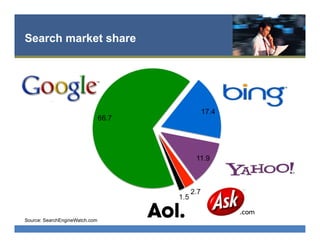
Search market share
Source: SearchEngineWatch.com
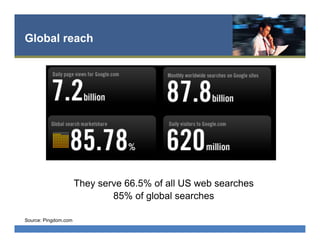
Global reach
Source: Pingdom.com
They serve 66.5% of all US web searches
85% of global searches
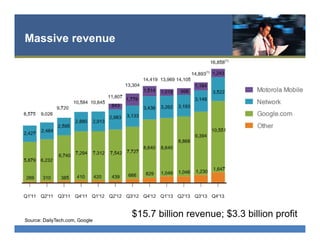
Massive revenue
Source: DailyTech.com, Google
$15.7 billion revenue; $3.3 billion profit
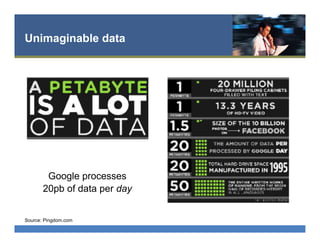
Unimaginable data
Source: Pingdom.com
Google processes
20pb of data per day
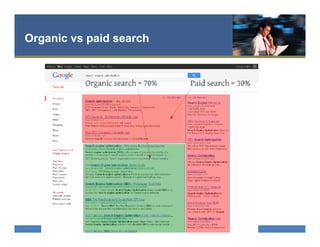
Organic vs paid search
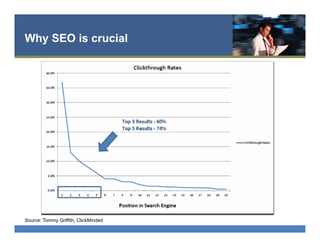
Why SEO is crucial
Source: Tommy Griffith, ClickMinded
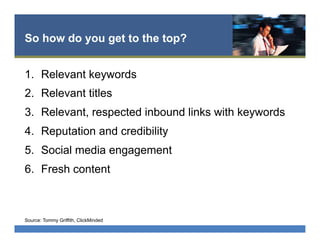
So how do you get to the top?
1.  Relevant keywords
2.  Relevant titles
3.  Relevant, respected inbound links with keywords
4.  Reputation and credibility
5.  Social media engagement
6.  Fresh content
Source: Tommy Griffith, ClickMinded
Three key optimization targets
•  On-page optimization
•  Off-page optimization
•  Social media optimization
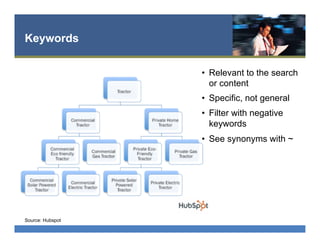
Keywords
•  Relevant to the search
or content
•  Specific, not general
•  Filter with negative
keywords
•  See synonyms with ~
Source: Hubspot
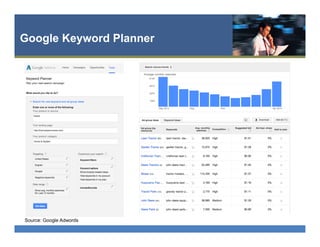
Google Keyword Planner
Source: Google Adwords
Key word suggestions
Source: Hubspot
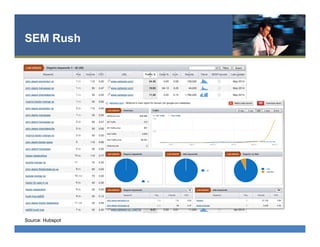
SEM Rush
Source: Hubspot
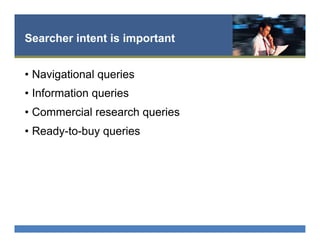
Searcher intent is important
•  Navigational queries
•  Information queries
•  Commercial research queries
•  Ready-to-buy queries
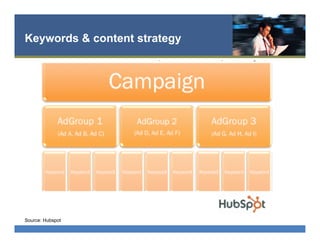
Keywords & content strategy
Source: Hubspot
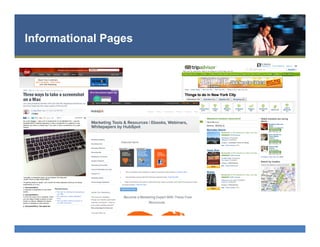
Informational Pages
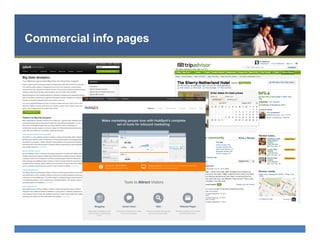
Commercial info pages
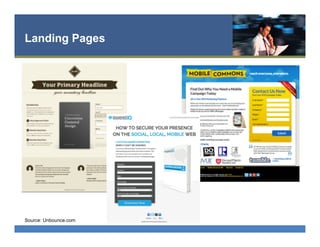
Landing Pages
Source: Unbounce.com
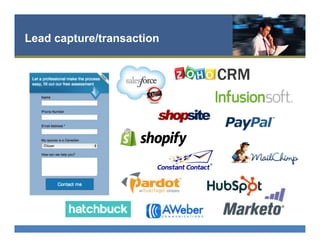
Lead capture/transaction
On-page optimization elements
•  Title tags
•  Meta description
•  Heading tags
•  Image optimization
•  Body content
•  Internal link anchor text
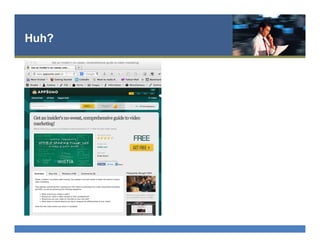
Huh?
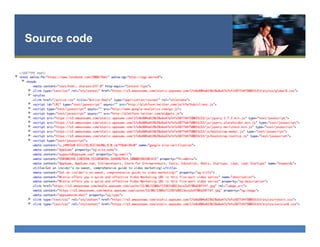
Source code
Title tags
•  Ideally about 65 characters
•  Most important element for humans and robots
•  Tells what the page is about
•  Should be unique for every page
•  Include keywords – closer to the front is better
Meta description
•  Ideally about 150 characters
•  Include keywords (they get bolded in Google)
•  Do not affect SEO rankings
•  Do affect click through rates
•  Invisible to people
•  Google may use or might grab a content snippet
containing your keyword instead
Heading tags
•  Identify and organize the content on your page
•  Use your primary keyword at least once
•  Write for humans - don’t overdo the keywords
•  <h1>, <h2>, <h3>
Image optimization
•  Convey info about images that spider robots and
visually challenged visitors cannot see
•  Use ALT tags to describe image
•  Image name and alt tags work together
•  Don’t be stupid with keyword stuffing – great place
to use constellation of synonyms
Body content
•  Length varies – 100-4000 words
– Viral content 2000+ words
•  Design for human users
– Natural language, no keyword stuffing
•  Using your primary keyword 2-3 times is enough
– Keyword density and text-to-code ratios don’t matter
Internal linking
•  How you link to your content
•  Primary keywords should be used when linking to
the relevant content for them
•  Click depth has an impact
•  Page location of link has an impact
– Main content, footer, sidebar, etc.
•  Internal links are less valuable than inbound
external links
Review: On-page Basics
•  Title tags
•  Meta description
•  Heading tags
•  Image optimization
•  Body content
•  Internal link anchor text
Google Panda
•  February 2011, updated March 2012
•  Over-optimization penalty for low-quality, thin sites
with heavy advertising and scraped content
•  Affects rankings of an entire site, not single pages
– A few bad, duplicate pages can bring down traffic for an
entire site
•  Not a problem if you adhere to Google’s site
quality guidelines
Source: Wikipedia
Google Penguin
•  April 2012
•  Penalties for sites using black hat SEO
– Keyword stuffing, cloaking, link schemes
– Duplicate content, spamdexing, link bombing
– Doorway pages, link spam, spam blogs, hijacking
•  Not a problem if you adhere to Google’s site
quality guidelines
Source: Wikipedia
High quality site guidelines
•  Would you trust the information presented in this article?
•  Is this article written by an expert or enthusiast who knows the topic
well, or is it more shallow in nature?
•  Does the site have duplicate, overlapping, or redundant articles on the
same or similar topics with slightly different keyword variations?
•  Would you be comfortable giving your credit card information to this
site?
•  Does this article have spelling, stylistic, or factual errors?
•  Are the topics driven by genuine interests of readers of the site, or does
the site generate content by attempting to guess what might rank well
in search engines?
Source: Google
High quality site guidelines
•  Does the article provide original content or information, original
reporting, original research, or original analysis?
•  Does the page provide substantial value when compared to other
pages in search results?
•  How much quality control is done on content?
•  Does the article describe both sides of a story?
•  Is the site a recognized authority on its topic?
•  Is the content mass-produced by or outsourced to a large number of
creators, or spread across a large network of sites, so that individual
pages or sites don’t get as much attention or care?
•  Was the article edited well, or does it appear sloppy or hastily
produced?
Source: Google
High quality site guidelines
•  For a health related query, would you trust information from this site?
•  Would you recognize this site as an authoritative source when
mentioned by name?
•  Does this article provide a complete or comprehensive description of
the topic?
•  Does this article contain insightful analysis or interesting information
that is beyond obvious?
•  Is this the sort of page you’d want to bookmark, share with a friend, or
recommend?
•  Does this article have an excessive amount of ads that distract from or
interfere with the main content?
Source: Google
High quality site guidelines
•  Would you expect to see this article in a printed magazine,
encyclopedia or book?
•  Are the articles short, unsubstantial, or otherwise lacking in helpful
specifics?
•  Are the pages produced with great care and attention to detail vs. less
attention to detail?
•  Would users complain when they see pages from this site?
Source: Google
Site Structure
and SEO
Clean up – company is coming!
•  Load speed
•  Duplicate content
•  Canonical URLs and tags
•  301 redirects
•  Site navigation and internal links
•  Site maps
Fast, easy load time improvements
•  Clean, spare code
•  Proper use of CSS & JavaScript files
– CSS at the top and JavaScript at the bottom
•  Optimize images appropriately
•  Fix broken links
–  Broken Link Checker plugin
•  Identify sizes in image tags
•  Google page speed insights tool
– https://developers.google.com/speed/pagespeed/insights
Advanced load speed optimization
•  Upgrade your server
•  Leverage browser caching with expires tags
•  Use a content delivery network (CDN)
•  Use image sprites (spriteme.org)
•  Minify your code
–  Autoptimize plugin, www.willpeavy.com/minifier
•  Minimize redirects and host names
Source: http://moz.com/blog/15-tips-to-speed-up-your-website
Duplicate content
•  Duplicate content or duplicate URLs?
– Use canonical URLs to streamline
•  Print friendly pages – replace with print css
•  Resolve www vs. non-www issues
•  Redirect duplicate pages to original
•  Use no-index robots meta tags for pages with
duplicate content (like category pages)
Source: Yoast.com
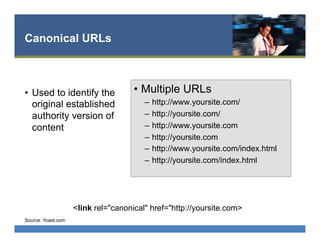
Canonical URLs
•  Used to identify the
original established
authority version of
content
•  Multiple URLs
–  http://www.yoursite.com/
–  http://yoursite.com/
–  http://www.yoursite.com
–  http://yoursite.com
–  http://www.yoursite.com/index.html
–  http://yoursite.com/index.html
Source: Yoast.com
<link rel="canonical" href="http://yoursite.com>
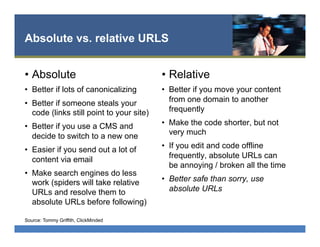
Absolute vs. relative URLS
•  Absolute
•  Better if lots of canonicalizing
•  Better if someone steals your
code (links still point to your site)
•  Better if you use a CMS and
decide to switch to a new one
•  Easier if you send out a lot of
content via email
•  Make search engines do less
work (spiders will take relative
URLs and resolve them to
absolute URLs before following)
•  Relative
•  Better if you move your content
from one domain to another
frequently
•  Make the code shorter, but not
very much
•  If you edit and code offline
frequently, absolute URLs can
be annoying / broken all the time
•  Better safe than sorry, use
absolute URLs
Source: Tommy Griffith, ClickMinded
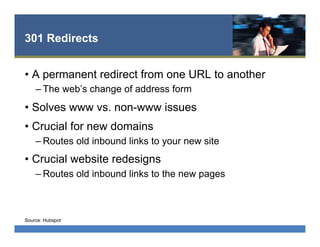
301 Redirects
•  A permanent redirect from one URL to another
– The web’s change of address form
•  Solves www vs. non-www issues
•  Crucial for new domains
– Routes old inbound links to your new site
•  Crucial website redesigns
– Routes old inbound links to the new pages
Source: Hubspot
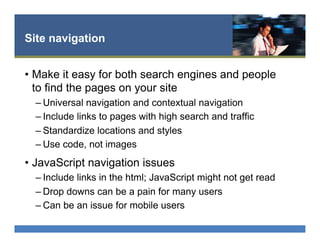
Site navigation
•  Make it easy for both search engines and people
to find the pages on your site
– Universal navigation and contextual navigation
– Include links to pages with high search and traffic
– Standardize locations and styles
– Use code, not images
•  JavaScript navigation issues
– Include links in the html; JavaScript might not get read
– Drop downs can be a pain for many users
– Can be an issue for mobile users
Internal links
•  Make it easy for bots and people to find relevant
content on your site quickly
– Footer navigation, site maps
– Keyword links
– Link to most important pages from homepage
– Link to most popular pages
– Link to common exit pages
Site Maps
•  HTML for people
– Plugins available for CMS
•  XML for search engines
– sitemap.xml
– Locate in root directory
– Limit to 100-150 pages
– Use a sitemap generator
– Link to location in Google Webmaster Tools and Bing
Webmaster Tools
– Often used by local site search tools too
Off-site SEO
tactics
(stuff on other people’s pages)
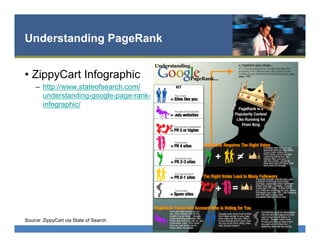
Understanding PageRank
•  ZippyCart Infographic
–  http://www.stateofsearch.com/
understanding-google-page-rank-
infographic/
Source: ZippyCart via State of Search
Link Building Basics
“If you lie down with dogs, you’ll get up with fleas.”
- Ben Franklin
• 4 simple rules from Tommy Griffith
–  Get links from good, trusted content.
– Don’t get links from bad, spammy content!
– Link to good, trusted content.
– Don’t link to bad, spammy content!
Source: Tommy Griffith, ClickMinded
Ideal link criteria
•  The link is on a relevant site
–  What is the overall topic of the domain? What's the page topic? What's the
title of the page? What is the content on that page? What kinds of sites are
linking to THAT page, and that domain? (think about link neighborhoods!)
•  The link is on a high quality site
–  How old is it? How many quality, "authoritative" links does it have? Does
Google trust it? Is it ranking well for its own keywords?
•  The link has the keywords in the anchor text of the link
–  Does the link say "San Francisco 49er Jerseys" or "Click Here"?
•  The link is pointing to the topical page, and not the root
domain
•  Links are long-lasting and don't CHURN
Source: Tommy Griffith, ClickMinded
Link profiles should be natural
•  The pattern of your links should follow natural web
engagement patters – show a variety of types of
links, a variety of types of sites and follow natural
frequency patterns
•  Partial match and related match keywords are
better than all links using the same text
Source: Tommy Griffith, ClickMinded
Competitor Analysis
•  Analyze links for keyword ideas and to see what
keywords they are
•  Look for low-hanging fruit and potentially good
relationships to build
•  If they have the links, can you get them too? Can
you find similar opportunities?
•  Use Site Explorer, Site Diagnosis, Lipperhay
Popular link tactics
•  Guest Blogging
•  Blog Comments
•  Providing Testimonials
•  Getting Interviewed/HARO
•  Content Marketing
–  Create a guide or resource
–  Create a top 10, top 100,
top anything else
–  Create great videos
–  White papers/special reports
•  Link-out!
•  Social Bookmarking
•  Sponsor a college club /
alumni newsletter
•  Answer questions in
forums / Q&A sites
•  Asking current customers
and partners to link
•  Contribute to Wikipedia
Social media: own your brand
•  Twitter
•  Facebook
•  LinkedIn
•  Yelp
•  YouTube
•  Pinterest
•  About.me
•  Technorati
•  StumbleUpon
•  Digg
•  Gravatar
•  Scribd.com
•  Flickr
•  Google+
Semantic Markup/Schema.org
•  Authorship markup
– Allows your photo to
appear in results
– Links to Google+
•  Local business schema
and geotags
•  Event schema
•  Coupon schema
•  Video Object schema
•  Recipes
•  Person schema for
execs and employees
•  Product schema
•  Facebook Open Graph
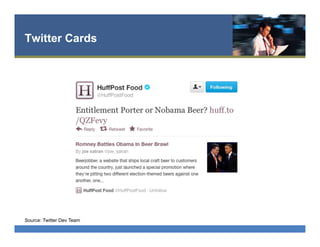
•  Twitter Cards
Source: SearchEngingeLand.com
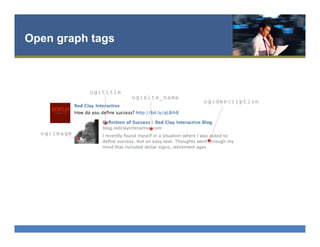
Open graph tags
Twitter Cards
Source: Twitter Dev Team
SEO Checklist 2013
•  Install Google Analytics
•  Set up Webmaster Tools
–  Bing & Google
•  Wordpress Plugins
–  Google Analytics
–  Yoast SEO for Wordpress
•  Check for 404 errors
–  Google Webmaster Tools
•  Check 301 redirects
–  Browseo
•  Check for broken links
•  Update keyword research
•  Check competitor links
•  Add keywords to your page
URLs whenever possible
•  Add title meta tags
•  Add description meta tags
•  Add keyword meta tags
•  Optimize images
–  Fast, alt tags, file names
Source: Tommy Griffith, ClickMinded
SEO Checklist 2013
•  Check heading code and include
keywords when possible
•  Make sure you have at least 100
words or keyword relevant
content on every page
•  Use keyword synonyms in a
natural way in your content
•  Use internal links effectively
•  Remove/resolve duplicate
content as much as possible
•  Use absolute URLs
•  Check site speed
•  Create an XML sitemap
•  Create a robots.txt file
•  Is your site mobile friendly?
•  Check your on-page
optimization with MetaFever
Source: Tommy Griffith, ClickMinded
Tools & Resources
•  Google Keyword Tool
•  Google Webmaster Tool
•  Bing Webmaster Tool
•  Google Page Speed
Insights Tool
•  Link Diagnosis
•  Moz Open Site Explorer
•  Lipperhey Links
•  Browseo
•  MetaFever’s On-page
Optimization Report
•  Schema.org
Contact
• Katherine Chalmers
linkedin.com/in/katherinechalmers
@kathchalmers
kath@katherinechalmers.com
703.740.0178
Handouts
slideshare.net/katchal

Getting Started with Search Engine Optimization

  • 1.
    Great SEO Results Presentedby Katherine Chalmers
  • 2.
    Agenda • SEO introduction • Keyword strategies • On-pageoptimization • Site enhancements to boost search results • Off-page optimization • Advanced topics (if time permits) –  Social media, Wordpress, localization, promo strategies, etc.
  • 3.
    Search market share Source:SearchEngineWatch.com
  • 4.
    Global reach Source: Pingdom.com Theyserve 66.5% of all US web searches 85% of global searches
  • 5.
    Massive revenue Source: DailyTech.com,Google $15.7 billion revenue; $3.3 billion profit
  • 6.
    Unimaginable data Source: Pingdom.com Googleprocesses 20pb of data per day
  • 7.
  • 8.
    Why SEO iscrucial Source: Tommy Griffith, ClickMinded
  • 9.
    So how doyou get to the top? 1.  Relevant keywords 2.  Relevant titles 3.  Relevant, respected inbound links with keywords 4.  Reputation and credibility 5.  Social media engagement 6.  Fresh content Source: Tommy Griffith, ClickMinded
  • 10.
    Three key optimizationtargets •  On-page optimization •  Off-page optimization •  Social media optimization
  • 11.
    Keywords •  Relevant tothe search or content •  Specific, not general •  Filter with negative keywords •  See synonyms with ~ Source: Hubspot
  • 12.
  • 13.
  • 14.
  • 15.
    Searcher intent isimportant •  Navigational queries •  Information queries •  Commercial research queries •  Ready-to-buy queries
  • 16.
    Keywords & contentstrategy Source: Hubspot
  • 17.
  • 18.
  • 19.
  • 20.
  • 21.
    On-page optimization elements • Title tags •  Meta description •  Heading tags •  Image optimization •  Body content •  Internal link anchor text
  • 22.
  • 23.
  • 24.
    Title tags •  Ideallyabout 65 characters •  Most important element for humans and robots •  Tells what the page is about •  Should be unique for every page •  Include keywords – closer to the front is better
  • 25.
    Meta description •  Ideallyabout 150 characters •  Include keywords (they get bolded in Google) •  Do not affect SEO rankings •  Do affect click through rates •  Invisible to people •  Google may use or might grab a content snippet containing your keyword instead
  • 26.
    Heading tags •  Identifyand organize the content on your page •  Use your primary keyword at least once •  Write for humans - don’t overdo the keywords •  <h1>, <h2>, <h3>
  • 27.
    Image optimization •  Conveyinfo about images that spider robots and visually challenged visitors cannot see •  Use ALT tags to describe image •  Image name and alt tags work together •  Don’t be stupid with keyword stuffing – great place to use constellation of synonyms
  • 28.
    Body content •  Lengthvaries – 100-4000 words – Viral content 2000+ words •  Design for human users – Natural language, no keyword stuffing •  Using your primary keyword 2-3 times is enough – Keyword density and text-to-code ratios don’t matter
  • 29.
    Internal linking •  Howyou link to your content •  Primary keywords should be used when linking to the relevant content for them •  Click depth has an impact •  Page location of link has an impact – Main content, footer, sidebar, etc. •  Internal links are less valuable than inbound external links
  • 30.
    Review: On-page Basics • Title tags •  Meta description •  Heading tags •  Image optimization •  Body content •  Internal link anchor text
  • 31.
    Google Panda •  February2011, updated March 2012 •  Over-optimization penalty for low-quality, thin sites with heavy advertising and scraped content •  Affects rankings of an entire site, not single pages – A few bad, duplicate pages can bring down traffic for an entire site •  Not a problem if you adhere to Google’s site quality guidelines Source: Wikipedia
  • 32.
    Google Penguin •  April2012 •  Penalties for sites using black hat SEO – Keyword stuffing, cloaking, link schemes – Duplicate content, spamdexing, link bombing – Doorway pages, link spam, spam blogs, hijacking •  Not a problem if you adhere to Google’s site quality guidelines Source: Wikipedia
  • 33.
    High quality siteguidelines •  Would you trust the information presented in this article? •  Is this article written by an expert or enthusiast who knows the topic well, or is it more shallow in nature? •  Does the site have duplicate, overlapping, or redundant articles on the same or similar topics with slightly different keyword variations? •  Would you be comfortable giving your credit card information to this site? •  Does this article have spelling, stylistic, or factual errors? •  Are the topics driven by genuine interests of readers of the site, or does the site generate content by attempting to guess what might rank well in search engines? Source: Google
  • 34.
    High quality siteguidelines •  Does the article provide original content or information, original reporting, original research, or original analysis? •  Does the page provide substantial value when compared to other pages in search results? •  How much quality control is done on content? •  Does the article describe both sides of a story? •  Is the site a recognized authority on its topic? •  Is the content mass-produced by or outsourced to a large number of creators, or spread across a large network of sites, so that individual pages or sites don’t get as much attention or care? •  Was the article edited well, or does it appear sloppy or hastily produced? Source: Google
  • 35.
    High quality siteguidelines •  For a health related query, would you trust information from this site? •  Would you recognize this site as an authoritative source when mentioned by name? •  Does this article provide a complete or comprehensive description of the topic? •  Does this article contain insightful analysis or interesting information that is beyond obvious? •  Is this the sort of page you’d want to bookmark, share with a friend, or recommend? •  Does this article have an excessive amount of ads that distract from or interfere with the main content? Source: Google
  • 36.
    High quality siteguidelines •  Would you expect to see this article in a printed magazine, encyclopedia or book? •  Are the articles short, unsubstantial, or otherwise lacking in helpful specifics? •  Are the pages produced with great care and attention to detail vs. less attention to detail? •  Would users complain when they see pages from this site? Source: Google
  • 37.
  • 38.
    Clean up –company is coming! •  Load speed •  Duplicate content •  Canonical URLs and tags •  301 redirects •  Site navigation and internal links •  Site maps
  • 39.
    Fast, easy loadtime improvements •  Clean, spare code •  Proper use of CSS & JavaScript files – CSS at the top and JavaScript at the bottom •  Optimize images appropriately •  Fix broken links –  Broken Link Checker plugin •  Identify sizes in image tags •  Google page speed insights tool – https://developers.google.com/speed/pagespeed/insights
  • 40.
    Advanced load speedoptimization •  Upgrade your server •  Leverage browser caching with expires tags •  Use a content delivery network (CDN) •  Use image sprites (spriteme.org) •  Minify your code –  Autoptimize plugin, www.willpeavy.com/minifier •  Minimize redirects and host names Source: http://moz.com/blog/15-tips-to-speed-up-your-website
  • 41.
    Duplicate content •  Duplicatecontent or duplicate URLs? – Use canonical URLs to streamline •  Print friendly pages – replace with print css •  Resolve www vs. non-www issues •  Redirect duplicate pages to original •  Use no-index robots meta tags for pages with duplicate content (like category pages) Source: Yoast.com
  • 42.
    Canonical URLs •  Usedto identify the original established authority version of content •  Multiple URLs –  http://www.yoursite.com/ –  http://yoursite.com/ –  http://www.yoursite.com –  http://yoursite.com –  http://www.yoursite.com/index.html –  http://yoursite.com/index.html Source: Yoast.com <link rel="canonical" href="http://yoursite.com>
  • 43.
    Absolute vs. relativeURLS •  Absolute •  Better if lots of canonicalizing •  Better if someone steals your code (links still point to your site) •  Better if you use a CMS and decide to switch to a new one •  Easier if you send out a lot of content via email •  Make search engines do less work (spiders will take relative URLs and resolve them to absolute URLs before following) •  Relative •  Better if you move your content from one domain to another frequently •  Make the code shorter, but not very much •  If you edit and code offline frequently, absolute URLs can be annoying / broken all the time •  Better safe than sorry, use absolute URLs Source: Tommy Griffith, ClickMinded
  • 44.
    301 Redirects •  Apermanent redirect from one URL to another – The web’s change of address form •  Solves www vs. non-www issues •  Crucial for new domains – Routes old inbound links to your new site •  Crucial website redesigns – Routes old inbound links to the new pages Source: Hubspot
  • 45.
    Site navigation •  Makeit easy for both search engines and people to find the pages on your site – Universal navigation and contextual navigation – Include links to pages with high search and traffic – Standardize locations and styles – Use code, not images •  JavaScript navigation issues – Include links in the html; JavaScript might not get read – Drop downs can be a pain for many users – Can be an issue for mobile users
  • 46.
    Internal links •  Makeit easy for bots and people to find relevant content on your site quickly – Footer navigation, site maps – Keyword links – Link to most important pages from homepage – Link to most popular pages – Link to common exit pages
  • 47.
    Site Maps •  HTMLfor people – Plugins available for CMS •  XML for search engines – sitemap.xml – Locate in root directory – Limit to 100-150 pages – Use a sitemap generator – Link to location in Google Webmaster Tools and Bing Webmaster Tools – Often used by local site search tools too
  • 48.
    Off-site SEO tactics (stuff onother people’s pages)
  • 49.
    Understanding PageRank •  ZippyCartInfographic –  http://www.stateofsearch.com/ understanding-google-page-rank- infographic/ Source: ZippyCart via State of Search
  • 50.
    Link Building Basics “Ifyou lie down with dogs, you’ll get up with fleas.” - Ben Franklin • 4 simple rules from Tommy Griffith –  Get links from good, trusted content. – Don’t get links from bad, spammy content! – Link to good, trusted content. – Don’t link to bad, spammy content! Source: Tommy Griffith, ClickMinded
  • 51.
    Ideal link criteria • The link is on a relevant site –  What is the overall topic of the domain? What's the page topic? What's the title of the page? What is the content on that page? What kinds of sites are linking to THAT page, and that domain? (think about link neighborhoods!) •  The link is on a high quality site –  How old is it? How many quality, "authoritative" links does it have? Does Google trust it? Is it ranking well for its own keywords? •  The link has the keywords in the anchor text of the link –  Does the link say "San Francisco 49er Jerseys" or "Click Here"? •  The link is pointing to the topical page, and not the root domain •  Links are long-lasting and don't CHURN Source: Tommy Griffith, ClickMinded
  • 52.
    Link profiles shouldbe natural •  The pattern of your links should follow natural web engagement patters – show a variety of types of links, a variety of types of sites and follow natural frequency patterns •  Partial match and related match keywords are better than all links using the same text Source: Tommy Griffith, ClickMinded
  • 53.
    Competitor Analysis •  Analyzelinks for keyword ideas and to see what keywords they are •  Look for low-hanging fruit and potentially good relationships to build •  If they have the links, can you get them too? Can you find similar opportunities? •  Use Site Explorer, Site Diagnosis, Lipperhay
  • 54.
    Popular link tactics • Guest Blogging •  Blog Comments •  Providing Testimonials •  Getting Interviewed/HARO •  Content Marketing –  Create a guide or resource –  Create a top 10, top 100, top anything else –  Create great videos –  White papers/special reports •  Link-out! •  Social Bookmarking •  Sponsor a college club / alumni newsletter •  Answer questions in forums / Q&A sites •  Asking current customers and partners to link •  Contribute to Wikipedia
  • 55.
    Social media: ownyour brand •  Twitter •  Facebook •  LinkedIn •  Yelp •  YouTube •  Pinterest •  About.me •  Technorati •  StumbleUpon •  Digg •  Gravatar •  Scribd.com •  Flickr •  Google+
  • 56.
    Semantic Markup/Schema.org •  Authorshipmarkup – Allows your photo to appear in results – Links to Google+ •  Local business schema and geotags •  Event schema •  Coupon schema •  Video Object schema •  Recipes •  Person schema for execs and employees •  Product schema •  Facebook Open Graph •  Twitter Cards Source: SearchEngingeLand.com
  • 57.
  • 58.
  • 59.
    SEO Checklist 2013 • Install Google Analytics •  Set up Webmaster Tools –  Bing & Google •  Wordpress Plugins –  Google Analytics –  Yoast SEO for Wordpress •  Check for 404 errors –  Google Webmaster Tools •  Check 301 redirects –  Browseo •  Check for broken links •  Update keyword research •  Check competitor links •  Add keywords to your page URLs whenever possible •  Add title meta tags •  Add description meta tags •  Add keyword meta tags •  Optimize images –  Fast, alt tags, file names Source: Tommy Griffith, ClickMinded
  • 60.
    SEO Checklist 2013 • Check heading code and include keywords when possible •  Make sure you have at least 100 words or keyword relevant content on every page •  Use keyword synonyms in a natural way in your content •  Use internal links effectively •  Remove/resolve duplicate content as much as possible •  Use absolute URLs •  Check site speed •  Create an XML sitemap •  Create a robots.txt file •  Is your site mobile friendly? •  Check your on-page optimization with MetaFever Source: Tommy Griffith, ClickMinded
  • 61.
    Tools & Resources • Google Keyword Tool •  Google Webmaster Tool •  Bing Webmaster Tool •  Google Page Speed Insights Tool •  Link Diagnosis •  Moz Open Site Explorer •  Lipperhey Links •  Browseo •  MetaFever’s On-page Optimization Report •  Schema.org
  • 62.