SECURING ASTERISK;A PRACTICAL APPROACH


  SUMAN	
  KUMAR	
  SAHA	


  Manager,	
  System	
  Administra6on	


  Dhakacom	
  Limited	


  suman@dhakacom.com	
  
AGENDA
§  Typical Threats Overview
§  Call stealing
§  Compromising the server
§  How to Protect the PBX
§  SSH communication
§  Separating data & voice
§  HTTP communication
§  Passwords
§  etc.
TYPICAL THREATS
§  Stealing of calls via:
§  telephony
§  VoIP trunks
§  SIP
§  IAX2
§  Compromising the Linux server via SSH/HTTP
STEALING CALLS VIA TELEPHONY OR VOIP TRUNKS
§  Disable the option of uncontrolled trunk-to-
trunk calls
§  DISA (Direct Inward System Access)
§  use long passwords
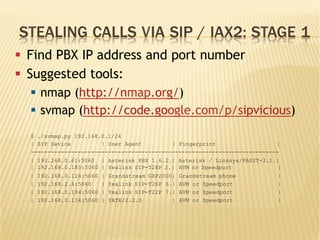
STEALING CALLS VIA SIP / IAX2: STAGE 1
§  Find PBX IP address and port number
§  Suggested tools:
§  nmap (http://nmap.org/)
§  svmap (http://code.google.com/p/sipvicious)
$ ./svmap.py 192.168.0.1/24
| SIP Device | User Agent | Fingerprint |
--------------------------------------------------------------------------
| 192.168.0.61:5060 | Asterisk PBX 1.6.2.| Asterisk / Linksys/PAP2T-3.1.|
| 192.168.0.185:5060 | Yealink SIP-T28P 2.| AVM or Speedport |
| 192.168.0.124:5060 | Grandstream GXP2000| Grandstream phone |
| 192.168.2.4:5060 | Yealink SIP-T26P 6.| AVM or Speedport |
| 192.168.0.184:5060 | Yealink SIP-T22P 7.| AVM or Speedport |
| 192.168.0.134:5060 | YATE/2.2.0 | AVM or Speedport |
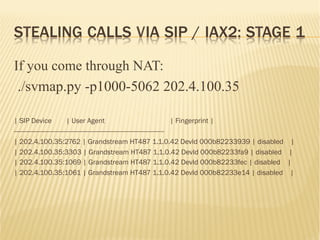
STEALING CALLS VIA SIP / IAX2: STAGE 1
If you come through NAT:
./svmap.py -p1000-5062 202.4.100.35
| SIP Device | User Agent | Fingerprint |
-----------------------------------------------------------------------------------
| 202.4.100.35:2762 | Grandstream HT487 1.1.0.42 DevId 000b82233939 | disabled |
| 202.4.100.35:3303 | Grandstream HT487 1.1.0.42 DevId 000b82233fa9 | disabled |
| 202.4.100.35:1069 | Grandstream HT487 1.1.0.42 DevId 000b82233fec | disabled |
| 202.4.100.35:1061 | Grandstream HT487 1.1.0.42 DevId 000b82233e14 | disabled |
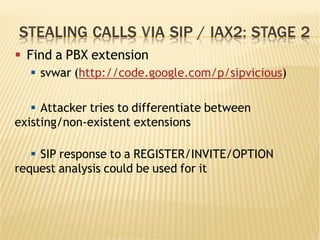
STEALING CALLS VIA SIP / IAX2: STAGE 2
§  Find a PBX extension
§  svwar (http://code.google.com/p/sipvicious)
§  Attacker tries to differentiate between
existing/non-existent extensions
§  SIP response to a REGISTER/INVITE/OPTION
request analysis could be used for it
STEALING CALLS VIA SIP / IAX2: STAGE 2
[root@ippbx sipvicious-0.2.8]# ./svwar.py -e1001 202.4.96.18 –force
ERROR:TakeASip:Response: 'SIP/2.0 401 UnauthorizedrnVia: SIP/
2.0/UDP
202.4.96.20:5061;branch=z9hG4bK-3218676409;received=202.
4.96.20;rport=5061rnFrom: "1001"<sip:
1001@202.4.96.18>;tag=31303031013337333237353837333
0rnTo: "1001"<sip:1001@202.4.96.18>;tag=as26840901r
nCall-ID: 677757433rnCSeq: 1 REGISTERrnServer: Asterisk
PBX 1.8.10.1~dfsg-1ubuntu1rnAllow: INVITE, ACK, CANCEL,
OPTIONS, BYE, REFER, SUBSCRIBE, NOTIFY, INFO, PUBLISHr
nSupported: replaces, timerrnWWW-Authenticate: Digest
algorithm=MD5, realm="asterisk", nonce="03f9b484"rnContent-
Length: 0rnrn'
WARNING:root:found nothing
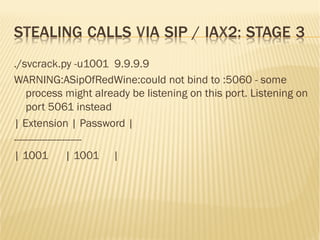
STEALING CALLS VIA SIP / IAX2: STAGE 3
§  Find the password
§  svcrak (http://code.google.com/p/sipvicious)
§  When PBX is attacked there are many warning
messages in the Asterisk log:
[Jun..
for
] NOTICE[30940]
'192.168.0.192'
chan_sip.c: Registration
- Wrong
password
from '"308" failed
[Jun..
for
] NOTICE[30940]
'192.168.0.192'
chan_sip.c: Registration
- Wrong
password
from '"308" failed
[Jun..
for
] NOTICE[30940]
'192.168.0.192'
chan_sip.c: Registration
- Wrong
password
from '"308" failed
[Jun.. ] NOTICE[30940] chan_sip.c: Registration from '"308" failed
for '192.168.0.192' - Wrong password
STEALING CALLS VIA SIP / IAX2: STAGE 3
./svcrack.py -u1001 9.9.9.9
WARNING:ASipOfRedWine:could not bind to :5060 - some
process might already be listening on this port. Listening on
port 5061 instead
| Extension | Password |
------------------------
| 1001 | 1001 |
STEALING CALLS VIA SIP / IAX2: STAGE 4
§  The PBX has been conquered
§  A malicious user has registered an extension
and makes calls for free
§  In many cases this will be discovered only
when the next telephone bill is received
COMPROMISING THE LINUX SERVER
§  An Asterisk server is a regular Linux machine
that can also be compromised
§  Malware (viruses, trojan horses etc) may
infiltrate via different Linux networking
services such as SSH or HTTP
HOW TO PROTECT THE PBX
§  There are countless methods to “harden” a
server against attack
§  Each method has its price
§  99% of attacks are “simple” attacks, and
there are simple means to prevent them
SSH COMMUNICATION
§  Use public/private key authentication instead of
password authentication
§  Create a user account and disable log in as 'root':
§  /etc/ssh/sshd_config
§  Then it will be possible to connect to the PBX as a
non-'root' user, and then become a “super-user”:
§  ssh john@my-pbx-ip -p 4245
§  su -
§PermitRootLogin no
§  or
§
PermitRootLogin without-password
SSH COMMUNICATION CONT’D
§  Restrict the source IP addresses that are
allowed to access the server
§  Don't use the default SSH port (22/tcp)
a.  arrange port forwarding on the NAT router
or
b.  change the listening port in the PBX SSH
server configuration:
•  /etc/ssh/sshd_config
•  #Port 22
•  Port 4245
SEPARATING DATA & VOIP NETWORKS
§  Some customers with higher security
requirements separate the VoIP network
from the data network
§  Dedicated cabling network not required;
VLAN technology may be used instead
§  Helps prevent company data servers from
direct access from potentially vulnerable
VoIP devices
HTTP COMMUNICATION
§  Don't expose the PBX Web server to the
Internet
§  Use SSH tunneling for the PBX Web-based
management interface
§  Windows users can create SSH tunnels very
easily using PuTTY
PASSWORDS
§  Don't use the default passwords
§  Don't use simple passwords
SECURE VOIP COMMUNICATION
§  Don't expose SIP and IAX2 ports unless
absolutely necessary
§  Use IP restriction for internal VoIP extensions
§  Allows use of weak passwords or no passwords
for the internal extensions
§  Use strong passwords for remote extensions
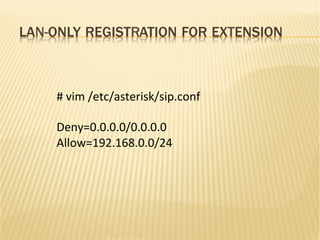
LAN-ONLY REGISTRATION FOR EXTENSION
#	
  vim	
  /etc/asterisk/sip.conf	


Deny=0.0.0.0/0.0.0.0	
  
Allow=192.168.0.0/24	
  
INTRUSION DETECTION OPTIONS
§  It is possible to use a network intrusion
detection system
§  Fail2Ban (http://www.fail2ban.org)
§  Scans the log files and updates firewall rules
to reject the IP address
§  Snort (http://www.snort.org)
§  Powerful network intrusion prevention and
detection system (IDS/IPS)
FAIL2BAN FEATURES
§  Log-based brute force blocker
§  Runs as daemon
§  unlike cron-based tools, no delay before taking action
§  can use iptables or TCP Wrappers (/etc/
hosts.deny)
§  can handle more than one service: sshd, apache,
SIP traffic etc.
§  can send e-mail notifications
§  can ban IPs either for a limited amount of time or
permanently
FAIL2BAN USAGE
[asterisk-iptables]
# if more than 4 attempts are made within 6 hours, ban for 24
hours
enabled = true
filter = asterisk
action = iptables-allports[name=ASTERISK, protocol=all]
sendmail[name=ASTERISK, dest=suman@dhakacom.com,
sender=fail2ban@dhakacom.com]
logpath = /var/log/asterisk/messages
maxretry = 4
findtime = 21600
bantime = 86400
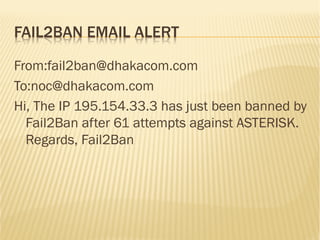
FAIL2BAN EMAIL ALERT
From:fail2ban@dhakacom.com
To:noc@dhakacom.com
Hi, The IP 195.154.33.3 has just been banned by
Fail2Ban after 61 attempts against ASTERISK.
Regards, Fail2Ban
SNORT FEATURES
§  Sniffer mode
§  Logger mode
§  NIDS mode
§  Can capture and analyze traffic for several
servers
§  Intrusion prevention mode
§  Extremely mature system; actively developed
since 1998
SNORT USAGE
Packet sniffer: Snort reads IP packets and
displays them on the console.
#./snort -vd
Packet Logger: Snort logs IP packets.
#./snort -dev -l /var/log/snort
Intrusion Detection System: Snort uses rule sets
to inspect IP packets. When an IP packet
matches the characteristics of a given rule,
Snort may take one or more actions.
SNORT NIDS MODE
To run Snort for intrusion detection and log all
packets relative to the 192.168.10.0 network,
use the command:
snort -d -h 192.168.10.0 -l -c snort.conf
SUMMARY
§  Types of threats
§  Call stealing
§  Intrusion
§  Best practices
§  Protecting the PBX
§  Detecting attacks quickly
THANK YOU
suman@dhakacom.com	
  

Securing Asterisk: A practical approach

  • 1.
    SECURING ASTERISK;A PRACTICALAPPROACH          SUMAN  KUMAR  SAHA            Manager,  System  Administra6on                      Dhakacom  Limited            suman@dhakacom.com  
  • 2.
    AGENDA §  Typical ThreatsOverview §  Call stealing §  Compromising the server §  How to Protect the PBX §  SSH communication §  Separating data & voice §  HTTP communication §  Passwords §  etc.
  • 3.
    TYPICAL THREATS §  Stealingof calls via: §  telephony §  VoIP trunks §  SIP §  IAX2 §  Compromising the Linux server via SSH/HTTP
  • 4.
    STEALING CALLS VIATELEPHONY OR VOIP TRUNKS §  Disable the option of uncontrolled trunk-to- trunk calls §  DISA (Direct Inward System Access) §  use long passwords
  • 5.
    STEALING CALLS VIASIP / IAX2: STAGE 1 §  Find PBX IP address and port number §  Suggested tools: §  nmap (http://nmap.org/) §  svmap (http://code.google.com/p/sipvicious) $ ./svmap.py 192.168.0.1/24 | SIP Device | User Agent | Fingerprint | -------------------------------------------------------------------------- | 192.168.0.61:5060 | Asterisk PBX 1.6.2.| Asterisk / Linksys/PAP2T-3.1.| | 192.168.0.185:5060 | Yealink SIP-T28P 2.| AVM or Speedport | | 192.168.0.124:5060 | Grandstream GXP2000| Grandstream phone | | 192.168.2.4:5060 | Yealink SIP-T26P 6.| AVM or Speedport | | 192.168.0.184:5060 | Yealink SIP-T22P 7.| AVM or Speedport | | 192.168.0.134:5060 | YATE/2.2.0 | AVM or Speedport |
  • 6.
    STEALING CALLS VIASIP / IAX2: STAGE 1 If you come through NAT: ./svmap.py -p1000-5062 202.4.100.35 | SIP Device | User Agent | Fingerprint | ----------------------------------------------------------------------------------- | 202.4.100.35:2762 | Grandstream HT487 1.1.0.42 DevId 000b82233939 | disabled | | 202.4.100.35:3303 | Grandstream HT487 1.1.0.42 DevId 000b82233fa9 | disabled | | 202.4.100.35:1069 | Grandstream HT487 1.1.0.42 DevId 000b82233fec | disabled | | 202.4.100.35:1061 | Grandstream HT487 1.1.0.42 DevId 000b82233e14 | disabled |
  • 7.
    STEALING CALLS VIASIP / IAX2: STAGE 2 §  Find a PBX extension §  svwar (http://code.google.com/p/sipvicious) §  Attacker tries to differentiate between existing/non-existent extensions §  SIP response to a REGISTER/INVITE/OPTION request analysis could be used for it
  • 8.
    STEALING CALLS VIASIP / IAX2: STAGE 2 [root@ippbx sipvicious-0.2.8]# ./svwar.py -e1001 202.4.96.18 –force ERROR:TakeASip:Response: 'SIP/2.0 401 UnauthorizedrnVia: SIP/ 2.0/UDP 202.4.96.20:5061;branch=z9hG4bK-3218676409;received=202. 4.96.20;rport=5061rnFrom: "1001"<sip: 1001@202.4.96.18>;tag=31303031013337333237353837333 0rnTo: "1001"<sip:1001@202.4.96.18>;tag=as26840901r nCall-ID: 677757433rnCSeq: 1 REGISTERrnServer: Asterisk PBX 1.8.10.1~dfsg-1ubuntu1rnAllow: INVITE, ACK, CANCEL, OPTIONS, BYE, REFER, SUBSCRIBE, NOTIFY, INFO, PUBLISHr nSupported: replaces, timerrnWWW-Authenticate: Digest algorithm=MD5, realm="asterisk", nonce="03f9b484"rnContent- Length: 0rnrn' WARNING:root:found nothing
  • 9.
    STEALING CALLS VIASIP / IAX2: STAGE 3 §  Find the password §  svcrak (http://code.google.com/p/sipvicious) §  When PBX is attacked there are many warning messages in the Asterisk log: [Jun.. for ] NOTICE[30940] '192.168.0.192' chan_sip.c: Registration - Wrong password from '"308" failed [Jun.. for ] NOTICE[30940] '192.168.0.192' chan_sip.c: Registration - Wrong password from '"308" failed [Jun.. for ] NOTICE[30940] '192.168.0.192' chan_sip.c: Registration - Wrong password from '"308" failed [Jun.. ] NOTICE[30940] chan_sip.c: Registration from '"308" failed for '192.168.0.192' - Wrong password
  • 10.
    STEALING CALLS VIASIP / IAX2: STAGE 3 ./svcrack.py -u1001 9.9.9.9 WARNING:ASipOfRedWine:could not bind to :5060 - some process might already be listening on this port. Listening on port 5061 instead | Extension | Password | ------------------------ | 1001 | 1001 |
  • 11.
    STEALING CALLS VIASIP / IAX2: STAGE 4 §  The PBX has been conquered §  A malicious user has registered an extension and makes calls for free §  In many cases this will be discovered only when the next telephone bill is received
  • 12.
    COMPROMISING THE LINUXSERVER §  An Asterisk server is a regular Linux machine that can also be compromised §  Malware (viruses, trojan horses etc) may infiltrate via different Linux networking services such as SSH or HTTP
  • 13.
    HOW TO PROTECTTHE PBX §  There are countless methods to “harden” a server against attack §  Each method has its price §  99% of attacks are “simple” attacks, and there are simple means to prevent them
  • 14.
    SSH COMMUNICATION §  Usepublic/private key authentication instead of password authentication §  Create a user account and disable log in as 'root': §  /etc/ssh/sshd_config §  Then it will be possible to connect to the PBX as a non-'root' user, and then become a “super-user”: §  ssh john@my-pbx-ip -p 4245 §  su - §PermitRootLogin no §  or § PermitRootLogin without-password
  • 15.
    SSH COMMUNICATION CONT’D § Restrict the source IP addresses that are allowed to access the server §  Don't use the default SSH port (22/tcp) a.  arrange port forwarding on the NAT router or b.  change the listening port in the PBX SSH server configuration: •  /etc/ssh/sshd_config •  #Port 22 •  Port 4245
  • 16.
    SEPARATING DATA &VOIP NETWORKS §  Some customers with higher security requirements separate the VoIP network from the data network §  Dedicated cabling network not required; VLAN technology may be used instead §  Helps prevent company data servers from direct access from potentially vulnerable VoIP devices
  • 17.
    HTTP COMMUNICATION §  Don'texpose the PBX Web server to the Internet §  Use SSH tunneling for the PBX Web-based management interface §  Windows users can create SSH tunnels very easily using PuTTY
  • 18.
    PASSWORDS §  Don't usethe default passwords §  Don't use simple passwords
  • 19.
    SECURE VOIP COMMUNICATION § Don't expose SIP and IAX2 ports unless absolutely necessary §  Use IP restriction for internal VoIP extensions §  Allows use of weak passwords or no passwords for the internal extensions §  Use strong passwords for remote extensions
  • 20.
    LAN-ONLY REGISTRATION FOREXTENSION #  vim  /etc/asterisk/sip.conf     Deny=0.0.0.0/0.0.0.0   Allow=192.168.0.0/24  
  • 21.
    INTRUSION DETECTION OPTIONS § It is possible to use a network intrusion detection system §  Fail2Ban (http://www.fail2ban.org) §  Scans the log files and updates firewall rules to reject the IP address §  Snort (http://www.snort.org) §  Powerful network intrusion prevention and detection system (IDS/IPS)
  • 22.
    FAIL2BAN FEATURES §  Log-basedbrute force blocker §  Runs as daemon §  unlike cron-based tools, no delay before taking action §  can use iptables or TCP Wrappers (/etc/ hosts.deny) §  can handle more than one service: sshd, apache, SIP traffic etc. §  can send e-mail notifications §  can ban IPs either for a limited amount of time or permanently
  • 23.
    FAIL2BAN USAGE [asterisk-iptables] # ifmore than 4 attempts are made within 6 hours, ban for 24 hours enabled = true filter = asterisk action = iptables-allports[name=ASTERISK, protocol=all] sendmail[name=ASTERISK, dest=suman@dhakacom.com, sender=fail2ban@dhakacom.com] logpath = /var/log/asterisk/messages maxretry = 4 findtime = 21600 bantime = 86400
  • 24.
    FAIL2BAN EMAIL ALERT From:fail2ban@dhakacom.com To:noc@dhakacom.com Hi,The IP 195.154.33.3 has just been banned by Fail2Ban after 61 attempts against ASTERISK. Regards, Fail2Ban
  • 25.
    SNORT FEATURES §  Sniffermode §  Logger mode §  NIDS mode §  Can capture and analyze traffic for several servers §  Intrusion prevention mode §  Extremely mature system; actively developed since 1998
  • 26.
    SNORT USAGE Packet sniffer:Snort reads IP packets and displays them on the console. #./snort -vd Packet Logger: Snort logs IP packets. #./snort -dev -l /var/log/snort Intrusion Detection System: Snort uses rule sets to inspect IP packets. When an IP packet matches the characteristics of a given rule, Snort may take one or more actions.
  • 27.
    SNORT NIDS MODE Torun Snort for intrusion detection and log all packets relative to the 192.168.10.0 network, use the command: snort -d -h 192.168.10.0 -l -c snort.conf
  • 28.
    SUMMARY §  Types ofthreats §  Call stealing §  Intrusion §  Best practices §  Protecting the PBX §  Detecting attacks quickly
  • 29.