
Md. Rashedul Hasan
E-mail: rashedul.engr@gmail.com
Dhaka, Bangladesh
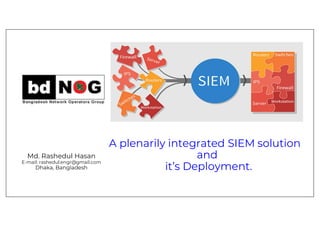
A plenarily integrated SIEM solution
and
it’s Deployment.
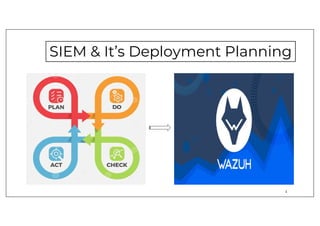
SIEM & It’s Deployment Planning
2
Why Wazuh SIEM?
Some of the more common use cases of the Wazuh solution-
• Intrusion detection
• Log data analysis
• File integrity monitoring
• Anomaly and Malware detection
• Vulnerability detection
• VirusTotal integration
• Configuration assessment
• Incident response
• Regulatory compliance
• Cloud security
• Containers security
3
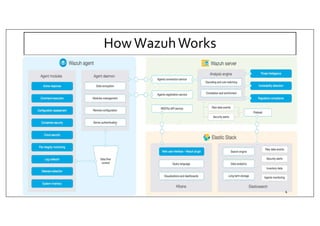
HowWazuhWorks
4
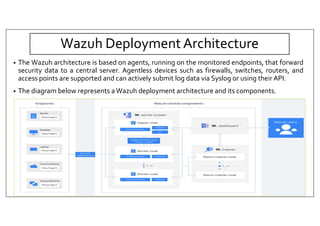
Wazuh Deployment Architecture
• The Wazuh architecture is based on agents, running on the monitored endpoints, that forward
security data to a central server. Agentless devices such as firewalls, switches, routers, and
access points are supported and can actively submit log data via Syslog or using their API.
• The diagram below represents aWazuh deployment architecture and its components.
5
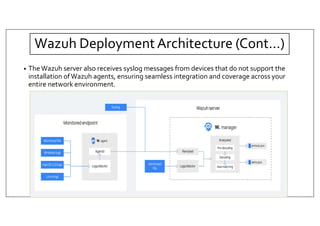
• TheWazuh server also receives syslog messages from devices that do not support the
installation ofWazuh agents, ensuring seamless integration and coverage across your
entire network environment.
6
Wazuh Deployment Architecture (Cont…)
Deploying WAZUH
7
Preparing for the Installation
• Operating System:
Wazuh can be installed on various operating systems, including CentOS, Debian, Ubuntu, Windows, and
macOS.
• Hardware Specifications:
Hardware requirements highly depend on the number of protected endpoints and cloud workloads.
• Software Dependencies:
Wazuh requires several software components, including Elastic Stack, Filebeat, and Wazuh Manager.
Elastic Stack is a set of open-source tools for data processing and analysis, including Elasticsearch,
Logstash, and Kibana.
Filebeat is a lightweight agent that collects log data from different sources and forward it to
Elasticsearch.
Wazuh Manager is the central component of the Wazuh architecture, which receives data from the
WazuhAgents and processes it to generate alerts and notifications.
8
Step-by-Step Installation
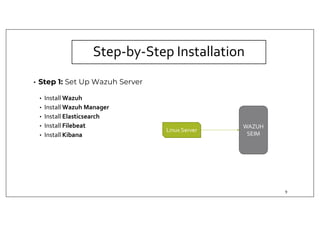
• Step 1: Set Up Wazuh Server
• Install Wazuh
• Install Wazuh Manager
• Install Elasticsearch
• Install Filebeat
• Install Kibana
WAZUH
SEIM
Linux Server
9
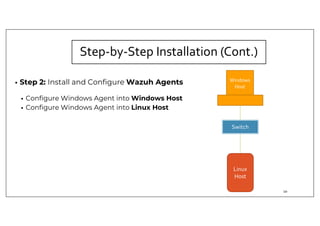
• Step 2: Install and Configure Wazuh Agents
• Configure Windows Agent into Windows Host
• Configure Windows Agent into Linux Host
Linux
Host
Switch
Windows
Host
Step-by-Step Installation (Cont.)
10
Syslog
Server
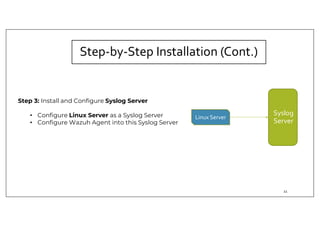
Step 3: Install and Configure Syslog Server
• Configure Linux Server as a Syslog Server
• Configure Wazuh Agent into this Syslog Server
Linux Server
Step-by-Step Installation (Cont.)
11
Syslog
Server
Router
Firewall
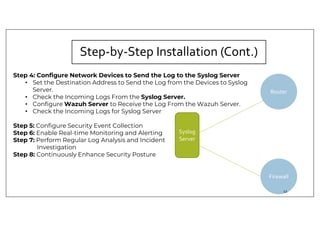
Step 4: Configure Network Devices to Send the Log to the Syslog Server
• Set the Destination Address to Send the Log from the Devices to Syslog
Server.
• Check the Incoming Logs From the Syslog Server.
• Configure Wazuh Server to Receive the Log From the Wazuh Server.
• Check the Incoming Logs for Syslog Server
Step 5: Configure Security Event Collection
Step 6: Enable Real-time Monitoring and Alerting
Step 7: Perform Regular Log Analysis and Incident
Investigation
Step 8: Continuously Enhance Security Posture
Step-by-Step Installation (Cont.)
12
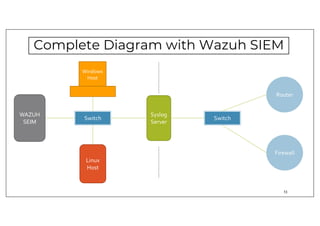
Complete Diagram with Wazuh SIEM
Linux
Host
Switch
Windows
Host
Syslog
Server
Router
Switch
Firewall
WAZUH
SEIM
13
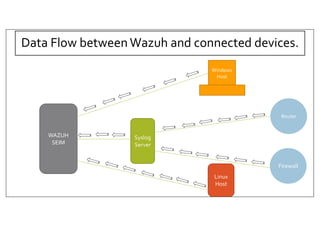
Data Flow between Wazuh and connected devices.
Linux
Host
Windows
Host
Syslog
Server
Router
Firewall
WAZUH
SEIM
Custom rules and decoders
We can use Wazuh to build decoders that will match on ANYTHING.This flexibility allows us
to ingest any type of log intoWazuh, which in turn is written into Elasticsearch and viewable
within Kibana.
Customize theWazuh ruleset to fit your needs and enhance detection capabilities.
To achieve this, we can:
• Modify the default rules and decoders.
• Add new custom rules and decoders.
15
Adding new decoders and rules
• This example on how to create new decoders and rules.
The following log corresponds to a program called example:
Dec 25 20:45:02 MyHost example[12345]: User 'admin' logged from '192.168.1.100’
16
Adding a new decoder……
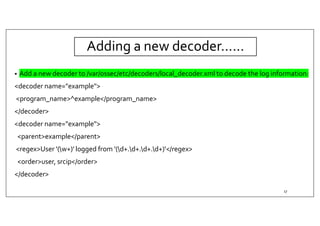
• Add a new decoder to /var/ossec/etc/decoders/local_decoder.xml to decode the log information:
<decoder name="example">
<program_name>^example</program_name>
</decoder>
<decoder name="example">
<parent>example</parent>
<regex>User '(w+)' logged from '(d+.d+.d+.d+)'</regex>
<order>user, srcip</order>
</decoder>
17
Adding Rule …..
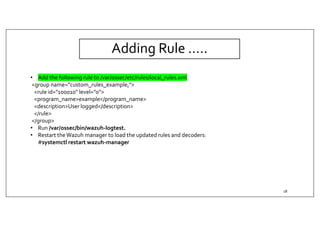
• Add the following rule to /var/ossec/etc/rules/local_rules.xml.
<group name="custom_rules_example,">
<rule id="100010" level="0">
<program_name>example</program_name>
<description>User logged</description>
</rule>
</group>
• Run /var/ossec/bin/wazuh-logtest.
• Restart theWazuh manager to load the updated rules and decoders:
#systemctl restart wazuh-manager
18
Wazuh SIEM Demo
19
Agents overview
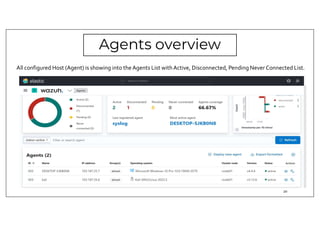
All configured Host (Agent) is showing into the Agents List withActive, Disconnected, Pending Never Connected List.
20
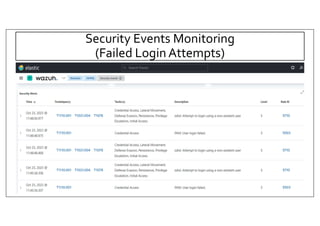
Security Events Monitoring
(Failed Login Attempts)
21
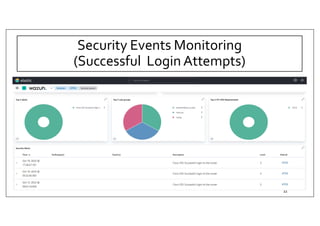
Security Events Monitoring
(Successful Login Attempts)
22
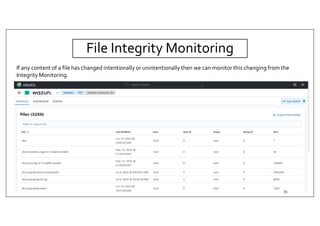
File Integrity Monitoring
If any content of a file has changed intentionally or unintentionally then we can monitor this changing from the
Integrity Monitoring.
23
Next Plan
• As Specific Agent is not available for Network Devices, I have added Network Devices
through Syslog Server.
Now I am working to add network devices directly into the Wazuh Server
• Configure Notification and Policies to get more advantage.
• Detecting and removing malware usingVirusTotal integration
24
Resources
• For Installation:
• https://github.com/wazuh/wazuh
• https://documentation.wazuh.com/current/deployment-options/elastic-stack/all-in-one-
deployment/index.html
• Understanding Wazuh Decoders
• https://socfortress.medium.com/understanding-wazuh-decoders-4093e8fc242c
• https://www.youtube.com/watch?app=desktop&v=2HMo4h7elAA
• Windows Agent Configuration:
• https://www.songer.pro/install-and-configure-wazuh-agent-windows/
• Linux Agent Configuration:
• https://thelinuxos.com/
25
26

A plenarily integrated SIEM solution and it’s Deployment

  • 1.
    Md. Rashedul Hasan E-mail:rashedul.engr@gmail.com Dhaka, Bangladesh A plenarily integrated SIEM solution and it’s Deployment.
  • 2.
    SIEM & It’sDeployment Planning 2
  • 3.
    Why Wazuh SIEM? Someof the more common use cases of the Wazuh solution- • Intrusion detection • Log data analysis • File integrity monitoring • Anomaly and Malware detection • Vulnerability detection • VirusTotal integration • Configuration assessment • Incident response • Regulatory compliance • Cloud security • Containers security 3
  • 4.
  • 5.
    Wazuh Deployment Architecture •The Wazuh architecture is based on agents, running on the monitored endpoints, that forward security data to a central server. Agentless devices such as firewalls, switches, routers, and access points are supported and can actively submit log data via Syslog or using their API. • The diagram below represents aWazuh deployment architecture and its components. 5
  • 6.
    • TheWazuh serveralso receives syslog messages from devices that do not support the installation ofWazuh agents, ensuring seamless integration and coverage across your entire network environment. 6 Wazuh Deployment Architecture (Cont…)
  • 7.
  • 8.
    Preparing for theInstallation • Operating System: Wazuh can be installed on various operating systems, including CentOS, Debian, Ubuntu, Windows, and macOS. • Hardware Specifications: Hardware requirements highly depend on the number of protected endpoints and cloud workloads. • Software Dependencies: Wazuh requires several software components, including Elastic Stack, Filebeat, and Wazuh Manager. Elastic Stack is a set of open-source tools for data processing and analysis, including Elasticsearch, Logstash, and Kibana. Filebeat is a lightweight agent that collects log data from different sources and forward it to Elasticsearch. Wazuh Manager is the central component of the Wazuh architecture, which receives data from the WazuhAgents and processes it to generate alerts and notifications. 8
  • 9.
    Step-by-Step Installation • Step1: Set Up Wazuh Server • Install Wazuh • Install Wazuh Manager • Install Elasticsearch • Install Filebeat • Install Kibana WAZUH SEIM Linux Server 9
  • 10.
    • Step 2:Install and Configure Wazuh Agents • Configure Windows Agent into Windows Host • Configure Windows Agent into Linux Host Linux Host Switch Windows Host Step-by-Step Installation (Cont.) 10
  • 11.
    Syslog Server Step 3: Installand Configure Syslog Server • Configure Linux Server as a Syslog Server • Configure Wazuh Agent into this Syslog Server Linux Server Step-by-Step Installation (Cont.) 11
  • 12.
    Syslog Server Router Firewall Step 4: ConfigureNetwork Devices to Send the Log to the Syslog Server • Set the Destination Address to Send the Log from the Devices to Syslog Server. • Check the Incoming Logs From the Syslog Server. • Configure Wazuh Server to Receive the Log From the Wazuh Server. • Check the Incoming Logs for Syslog Server Step 5: Configure Security Event Collection Step 6: Enable Real-time Monitoring and Alerting Step 7: Perform Regular Log Analysis and Incident Investigation Step 8: Continuously Enhance Security Posture Step-by-Step Installation (Cont.) 12
  • 13.
    Complete Diagram withWazuh SIEM Linux Host Switch Windows Host Syslog Server Router Switch Firewall WAZUH SEIM 13
  • 14.
    Data Flow betweenWazuh and connected devices. Linux Host Windows Host Syslog Server Router Firewall WAZUH SEIM
  • 15.
    Custom rules anddecoders We can use Wazuh to build decoders that will match on ANYTHING.This flexibility allows us to ingest any type of log intoWazuh, which in turn is written into Elasticsearch and viewable within Kibana. Customize theWazuh ruleset to fit your needs and enhance detection capabilities. To achieve this, we can: • Modify the default rules and decoders. • Add new custom rules and decoders. 15
  • 16.
    Adding new decodersand rules • This example on how to create new decoders and rules. The following log corresponds to a program called example: Dec 25 20:45:02 MyHost example[12345]: User 'admin' logged from '192.168.1.100’ 16
  • 17.
    Adding a newdecoder…… • Add a new decoder to /var/ossec/etc/decoders/local_decoder.xml to decode the log information: <decoder name="example"> <program_name>^example</program_name> </decoder> <decoder name="example"> <parent>example</parent> <regex>User '(w+)' logged from '(d+.d+.d+.d+)'</regex> <order>user, srcip</order> </decoder> 17
  • 18.
    Adding Rule ….. •Add the following rule to /var/ossec/etc/rules/local_rules.xml. <group name="custom_rules_example,"> <rule id="100010" level="0"> <program_name>example</program_name> <description>User logged</description> </rule> </group> • Run /var/ossec/bin/wazuh-logtest. • Restart theWazuh manager to load the updated rules and decoders: #systemctl restart wazuh-manager 18
  • 19.
  • 20.
    Agents overview All configuredHost (Agent) is showing into the Agents List withActive, Disconnected, Pending Never Connected List. 20
  • 21.
  • 22.
  • 23.
    File Integrity Monitoring Ifany content of a file has changed intentionally or unintentionally then we can monitor this changing from the Integrity Monitoring. 23
  • 24.
    Next Plan • AsSpecific Agent is not available for Network Devices, I have added Network Devices through Syslog Server. Now I am working to add network devices directly into the Wazuh Server • Configure Notification and Policies to get more advantage. • Detecting and removing malware usingVirusTotal integration 24
  • 25.
    Resources • For Installation: •https://github.com/wazuh/wazuh • https://documentation.wazuh.com/current/deployment-options/elastic-stack/all-in-one- deployment/index.html • Understanding Wazuh Decoders • https://socfortress.medium.com/understanding-wazuh-decoders-4093e8fc242c • https://www.youtube.com/watch?app=desktop&v=2HMo4h7elAA • Windows Agent Configuration: • https://www.songer.pro/install-and-configure-wazuh-agent-windows/ • Linux Agent Configuration: • https://thelinuxos.com/ 25
  • 26.