Secure Web Services 
Rob Daigneau http://ArcSage.com 
Copyright © 2013 Rob Daigneau, All rights reserved
Overview 
•About me 
•Introduction 
•The OWASP 2013 Top Ten List and Web Services 
Copyright © 2013 Rob Daigneau, All rights reserved
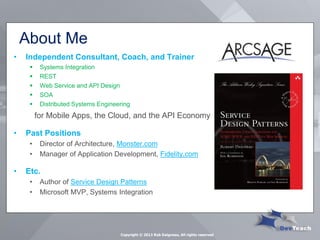
About Me 
Copyright © 2013 Rob Daigneau, All rights reserved 
•Independent Consultant, Coach, and Trainer 
Systems Integration 
REST 
Web Service and API Design 
SOA 
Distributed Systems Engineering 
for Mobile Apps, the Cloud, and the API Economy 
•Past Positions 
•Director of Architecture, Monster.com 
•Manager of Application Development, Fidelity.com 
•Etc. 
•Author of Service Design Patterns 
•Microsoft MVP, Systems Integration
Introduction 
•Open Web Application Security Project 
Annual recommendations for secure web applications 
It’s a game of leap frog 
•Scope of Talk 
Security is a HUGE subject 
I’m more interested in Public APIs 
Skipping Windows Authentication and Forms Authentication 
ASP.NET Web API, not WCF 
•Won’t be demonstrating exploits 
Copyright © 2013 Rob Daigneau, All rights reserved
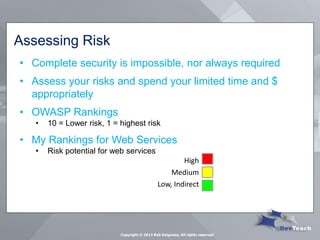
Assessing Risk 
•Complete security is impossible, nor always required 
•Assess your risks and spend your limited time and $ appropriately 
•OWASP Rankings 
•10 = Lower risk, 1 = highest risk 
•My Rankings for Web Services 
•Risk potential for web services 
High 
Medium 
Low, Indirect 
Copyright © 2013 Rob Daigneau, All rights reserved
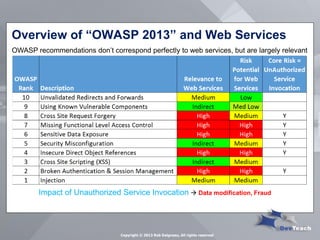
Overview of “OWASP 2013” and Web Services 
Impact of Unauthorized Service Invocation  Data modification, Fraud 
OWASP recommendations don’t correspond perfectly to web services, but are largely relevant 
Copyright © 2013 Rob Daigneau, All rights reserved
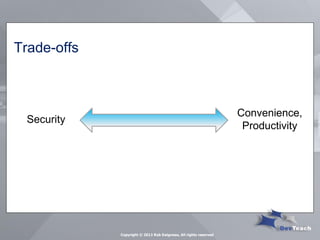
Trade-offs 
Security 
Convenience, Productivity 
Copyright © 2013 Rob Daigneau, All rights reserved
#10 Unvalidated Redirects and Forwards 
Copyright © 2013 Rob Daigneau, All rights reserved
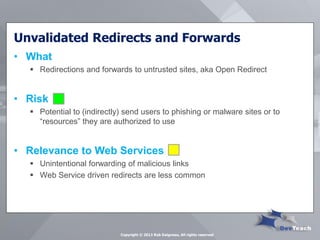
Unvalidated Redirects and Forwards 
•What 
Redirections and forwards to untrusted sites, aka Open Redirect 
•Risk 
Potential to (indirectly) send users to phishing or malware sites or to “resources” they are authorized to use 
•Relevance to Web Services 
Unintentional forwarding of malicious links 
Web Service driven redirects are less common 
Copyright © 2013 Rob Daigneau, All rights reserved
Unvalidated Redirects and Forwards 
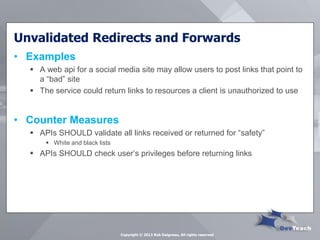
•Examples 
A web api for a social media site may allow users to post links that point to a “bad” site 
The service could return links to resources a client is unauthorized to use 
•Counter Measures 
APIs SHOULD validate all links received or returned for “safety” 
White and black lists 
APIs SHOULD check user’s privileges before returning links 
Copyright © 2013 Rob Daigneau, All rights reserved
#9 Using Known Vulnerable Components 
Copyright © 2013 Rob Daigneau, All rights reserved
Using Known Vulnerable Components 
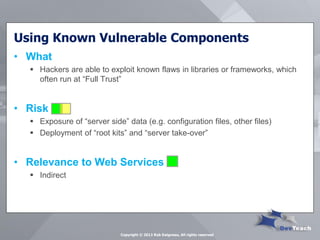
•What 
Hackers are able to exploit known flaws in libraries or frameworks, which often run at “Full Trust” 
•Risk 
Exposure of “server side” data (e.g. configuration files, other files) 
Deployment of “root kits” and “server take-over” 
•Relevance to Web Services 
Indirect 
Copyright © 2013 Rob Daigneau, All rights reserved
Using Known Vulnerable Components 
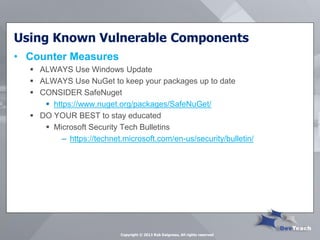
•Counter Measures 
ALWAYS Use Windows Update 
ALWAYS Use NuGet to keep your packages up to date 
CONSIDER SafeNuget 
https://www.nuget.org/packages/SafeNuGet/ 
DO YOUR BEST to stay educated 
Microsoft Security Tech Bulletins 
–https://technet.microsoft.com/en-us/security/bulletin/ 
Copyright © 2013 Rob Daigneau, All rights reserved
#8 Cross Site Request Forgery 
Copyright © 2013 Rob Daigneau, All rights reserved
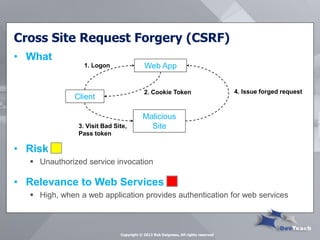
Cross Site Request Forgery (CSRF) 
•What 
•Risk 
Unauthorized service invocation 
•Relevance to Web Services 
High, when a web application provides authentication for web services 
Client 
Web App 
Malicious Site 
1. Logon 
2. Cookie Token 
3. Visit Bad Site, Pass token 
4. Issue forged request 
Copyright © 2013 Rob Daigneau, All rights reserved
Cross Site Request Forgery (CSRF) 
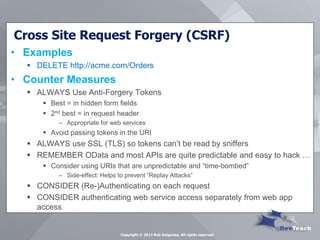
•Examples 
DELETE http://acme.com/Orders 
•Counter Measures 
ALWAYS Use Anti-Forgery Tokens 
Best = in hidden form fields 
2nd best = in request header 
–Appropriate for web services 
Avoid passing tokens in the URI 
ALWAYS use SSL (TLS) so tokens can’t be read by sniffers 
REMEMBER OData and most APIs are quite predictable and easy to hack … 
Consider using URIs that are unpredictable and “time-bombed” 
–Side-effect: Helps to prevent “Replay Attacks” 
CONSIDER (Re-)Authenticating on each request 
CONSIDER authenticating web service access separately from web app access 
Copyright © 2013 Rob Daigneau, All rights reserved
#7 Missing Functional Level Access Control 
Copyright © 2013 Rob Daigneau, All rights reserved
Missing Functional Level Access Control 
•What 
Not checking user credentials and privileges before allowing invocation of web service 
Web service(s) may (naively) assume that authorization checks were performed by web app or (JavaScript) client 
•Risk 
Unauthorized service invocation 
•Relevance to Web Services 
High 
Copyright © 2013 Rob Daigneau, All rights reserved
Missing Functional Level Access Control 
•Counter Measures 
ALWAYS Implement authorization checks on every web service operation 
Check should be performed regardless of similar checks done by web apps or (JavaScript) clients 
… more on Authorization a little later 
Copyright © 2013 Rob Daigneau, All rights reserved
#6 Sensitive Data Exposure 
Copyright © 2013 Rob Daigneau, All rights reserved
Sensitive Data Exposure 
•What 
Many web services do not properly protect sensitive data 
e.g. Credit card info, Tax IDs, User credentials, etc. 
•Risk 
Unauthorized service invocation 
•Relevance to Web Services 
High 
Copyright © 2013 Rob Daigneau, All rights reserved
Sensitive Data Exposure 
•Counter Measures 
ALWAYS Use Transport Layer Security (TLS, SSL) when sending or receiving sensitive data (including session tokens) 
ALWAYS Implement “Functional Level Access Controls” at the web service 
CONSIDER encrypting especially sensitive data (in transit), e.g. … 
User credentials … 
–SHA hash 
Credit card data and Personally Identifiable Information (PII) … 
–Asymmetric encryption 
NEVER store sensitive data if you don’t have to (e.g. credit card data) 
WATCH OUT for accidental transfer of sensitive data buried in “deep object hierarchies” 
NEVER convey Exception details in any HTTP Response 
Beware of HTTP 500 status 
Copyright © 2013 Rob Daigneau, All rights reserved
#5 Security Misconfiguration 
Copyright © 2013 Rob Daigneau, All rights reserved
Security Misconfiguration 
•What 
Leaving default accounts active and “back-doors” open (e.g. admin services) 
•Risk 
Unauthorized service invocation 
•Relevance to Web Services 
Indirect 
Copyright © 2013 Rob Daigneau, All rights reserved
Security Misconfiguration 
•Counter Measures 
ALWAYS Disable/inactivate default accounts, change passwords 
ALWAYS Make sure your SSL certificates haven’t expired 
NEVER use custom certificates (makecert tool) in production 
CONSIDER creating fine-grained database roles for access to different tables, views, and stored procedures 
CONSIDER locking down configuration files and removing unused portions. 
CONSIDER Encryption of sensitive portions of configuration file 
ALWAYS Disable unnecessary services and features across the platform stack 
CAREFUL with Windows Update 
ALWAYS Use NuGet to keep your packages up to date 
Copyright © 2013 Rob Daigneau, All rights reserved
#4 Insecure Direct Object References 
Copyright © 2013 Rob Daigneau, All rights reserved
Insecure Direct Object Reference 
•What 
An authenticated user changes the value of a URI segment, query string parameter, or request body content in order to gain unauthorized access 
•Risk 
Unauthorized service invocation 
•Relevance to Web Services 
High 
Copyright © 2013 Rob Daigneau, All rights reserved
Insecure Direct Object Reference 
•Counter Measures 
ALWAYS Authenticate and Authorize user on each access 
Easy to validate user’s access to general logical areas 
More difficult to authorize access to individual entities/records 
NEVER expose auto-generated (integer) IDs in the URI or request body when creating Public/Internet APIs 
Consider using surrogate keys 
REMEMBER that predictable URIs (e.g. OData) are easy to hack, … consider using random “time-bombed” URIs and Surrogate Keys (i.e. Reference Maps) 
Side effect  Helps prevent “Replay Attacks” 
ALWAYS be on the look-out for accidental transfer of sensitive data buried in “deep object hierarchies” 
Copyright © 2013 Rob Daigneau, All rights reserved
#3 Cross Site Scripting (XSS) 
Copyright © 2013 Rob Daigneau, All rights reserved
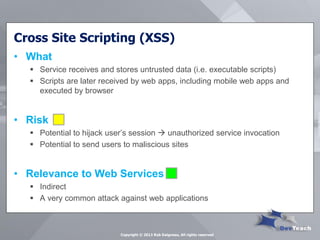
Cross Site Scripting (XSS) 
•What 
Service receives and stores untrusted data (i.e. executable scripts) 
Scripts are later received by web apps, including mobile web apps and executed by browser 
•Risk 
Potential to hijack user’s session  unauthorized service invocation 
Potential to send users to maliscious sites 
•Relevance to Web Services 
Indirect 
A very common attack against web applications 
Copyright © 2013 Rob Daigneau, All rights reserved
Cross Site Scripting (XSS) 
•Counter Measures 
CONSIDER if service should accept scripts from clients and return scripts to clients? 
ALWAYS validate input received by web service 
URIs, query string parameters, request body, cookies 
–E.g. Regex for URIs, RFC 3986 
REMEMBER that web applications SHOULD use HTML output encoding to ensure scripts are properly “escaped” preventing execution in the browse 
Copyright © 2013 Rob Daigneau, All rights reserved
#2 Broken Authentication & Session Management 
Copyright © 2013 Rob Daigneau, All rights reserved
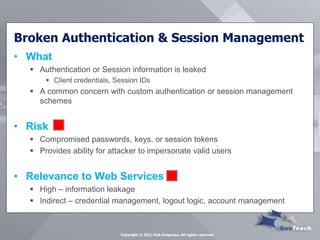
Broken Authentication & Session Management 
•What 
Authentication or Session information is leaked 
Client credentials, Session IDs 
A common concern with custom authentication or session management schemes 
•Risk 
Compromised passwords, keys, or session tokens 
Provides ability for attacker to impersonate valid users 
•Relevance to Web Services 
High – information leakage 
Indirect – credential management, logout logic, account management 
Copyright © 2013 Rob Daigneau, All rights reserved
Broken Authentication & Session Management 
•Counter Measures 
ALWAYS use SSL when using Basic or Forms Authentication 
Credentials are passed in clear text, Base-64 encoded 
ALWAYS keep sessions “short-lived”, enforce time-outs 
NEVER pass tokens in URI, they can be easily stolen (if not using SSL) 
Instead, pass in HTTP request headers or body 
Copyright © 2013 Rob Daigneau, All rights reserved
The ASP.NET Web API and Authentication 
•IIS Authentication 
Basic, Digest, Windows 
•Forms Authentication 
User credentials are acquired through a custom login form 
Once user authenticated, server issues a “ticket” (i.e. token/cookie) that’s passed in subsequent requests 
Relevant only to Web APIs that are called from a web application in same logical domain 
Copyright © 2013 Rob Daigneau, All rights reserved
The ASP.NET Web API and Authentication 
•Custom Authentication 
Good for public, Internet APIs 
May leverage Basic or Digest Authentication, or even Client Certificates 
Service may check for user credentials or client certificates in Message Handlers 
Copyright © 2013 Rob Daigneau, All rights reserved
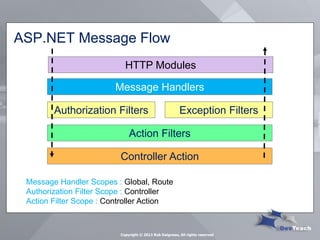
HTTP Modules 
ASP.NET Message Flow 
Message Handlers 
Authorization Filters 
Action Filters 
Exception Filters 
Controller Action 
Copyright © 2013 Rob Daigneau, All rights reserved 
Message Handler Scopes : Global, Route Authorization Filter Scope : Controller Action Filter Scope : Controller Action
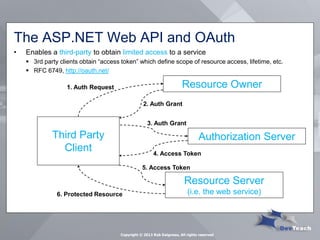
The ASP.NET Web API and OAuth 
•Enables a third-party to obtain limited access to a service 
3rd party clients obtain “access token” which define scope of resource access, lifetime, etc. 
RFC 6749, http://oauth.net/ 
Third Party Client 
Resource Owner 
Authorization Server 
Resource Server (i.e. the web service) 
1. Auth Request 
2. Auth Grant 
3. Auth Grant 
4. Access Token 
5. Access Token 
6. Protected Resource 
Copyright © 2013 Rob Daigneau, All rights reserved
#1 Injection 
Copyright © 2013 Rob Daigneau, All rights reserved
Injection 
•What 
Occurs when commands or queries are passed through query strings or request body 
•Risk 
Service executes the command or query causing… 
Sensitive data to be revealed 
Data corruption 
Denial of Service 
•Relevance to Web Services 
Medium 
Copyright © 2013 Rob Daigneau, All rights reserved
Injection 
•Counter Measures 
CONSIDER validating data input for input that looks like a command 
URI segment values, query strings, request body, request headers 
ALWAYS use named parameters in ADO.NET queries 
Strong data typing helps 
CONSIDER using Entity Framework and LINQ 
Provides similar protections as parameterized queries 
CONSIDER constraining access with different logons for different roles 
E.g. Setting privileges on Data Services 
Copyright © 2013 Rob Daigneau, All rights reserved
Thank you 
Copyright © 2013 Rob Daigneau, All rights reserved 
Rob Daigneau http://ArcSage.com http://ServiceDesignPatterns.com info@ArcSage.com 
Harness the power of modern computing platforms
APPENDIX 
Copyright © 2013 Rob Daigneau, All rights reserved
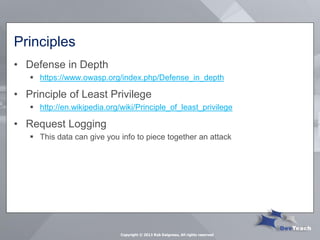
Principles 
•Defense in Depth 
https://www.owasp.org/index.php/Defense_in_depth 
•Principle of Least Privilege 
http://en.wikipedia.org/wiki/Principle_of_least_privilege 
•Request Logging 
This data can give you info to piece together an attack 
Copyright © 2013 Rob Daigneau, All rights reserved
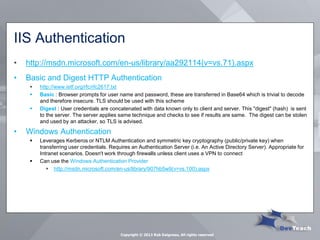
IIS Authentication 
•http://msdn.microsoft.com/en-us/library/aa292114(v=vs.71).aspx 
•Basic and Digest HTTP Authentication 
http://www.ietf.org/rfc/rfc2617.txt 
Basic : Browser prompts for user name and password, these are transferred in Base64 which is trivial to decode and therefore insecure. TLS should be used with this scheme 
Digest : User credentials are concatenated with data known only to client and server. This "digest" (hash) is sent to the server. The server applies same technique and checks to see if results are same. The digest can be stolen and used by an attacker, so TLS is advised. 
•Windows Authentication 
Leverages Kerberos or NTLM Authentication and symmetric key cryptography (public/private key) when transferring user credentials. Requires an Authentication Server (i.e. An Active Directory Server). Appropriate for Intranet scenarios. Doesn't work through firewalls unless client uses a VPN to connect 
Can use the Windows Authentication Provider 
http://msdn.microsoft.com/en-us/library/907hb5w9(v=vs.100).aspx 
Copyright © 2013 Rob Daigneau, All rights reserved
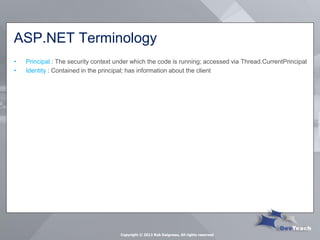
ASP.NET Terminology 
•Principal : The security context under which the code is running; accessed via Thread.CurrentPrincipal 
•Identity : Contained in the principal; has information about the client 
Copyright © 2013 Rob Daigneau, All rights reserved
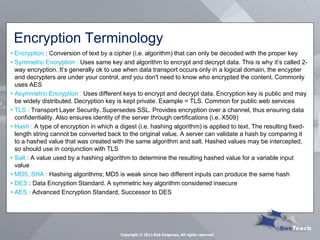
Encryption Terminology 
•Encryption : Conversion of text by a cipher (i.e. algorithm) that can only be decoded with the proper key 
•Symmetric Encryption : Uses same key and algorithm to encrypt and decrypt data. This is why it’s called 2- way encryption. It’s generally ok to use when data transport occurs only in a logical domain, the encypter and decrypters are under your control, and you don't need to know who encrypted the content. Commonly uses AES 
•Asymmetric Encryption : Uses different keys to encrypt and decrypt data. Encryption key is public and may be widely distributed. Decryption key is kept private. Example = TLS. Common for public web services 
•TLS : Transport Layer Security. Supersedes SSL. Provides encryption over a channel, thus ensuring data confidentiality. Also ensures identity of the server through certifications (i.e. X509) 
•Hash : A type of encryption in which a digest (i.e. hashing algorithm) is applied to text. The resulting fixed- length string cannot be converted back to the original value. A server can validate a hash by comparing it to a hashed value that was created with the same algorithm and salt. Hashed values may be intercepted, so should use in conjunction with TLS 
•Salt : A value used by a hashing algorithm to determine the resulting hashed value for a variable input value 
•MD5, SHA : Hashing algorithms; MD5 is weak since two different inputs can produce the same hash 
•DES : Data Encryption Standard. A symmetric key algorithm considered insecure 
•AES : Advanced Encryption Standard, Successor to DES 
Copyright © 2013 Rob Daigneau, All rights reserved

Secure Web Services

  • 1.
    Secure Web Services Rob Daigneau http://ArcSage.com Copyright © 2013 Rob Daigneau, All rights reserved
  • 2.
    Overview •About me •Introduction •The OWASP 2013 Top Ten List and Web Services Copyright © 2013 Rob Daigneau, All rights reserved
  • 3.
    About Me Copyright© 2013 Rob Daigneau, All rights reserved •Independent Consultant, Coach, and Trainer Systems Integration REST Web Service and API Design SOA Distributed Systems Engineering for Mobile Apps, the Cloud, and the API Economy •Past Positions •Director of Architecture, Monster.com •Manager of Application Development, Fidelity.com •Etc. •Author of Service Design Patterns •Microsoft MVP, Systems Integration
  • 4.
    Introduction •Open WebApplication Security Project Annual recommendations for secure web applications It’s a game of leap frog •Scope of Talk Security is a HUGE subject I’m more interested in Public APIs Skipping Windows Authentication and Forms Authentication ASP.NET Web API, not WCF •Won’t be demonstrating exploits Copyright © 2013 Rob Daigneau, All rights reserved
  • 5.
    Assessing Risk •Completesecurity is impossible, nor always required •Assess your risks and spend your limited time and $ appropriately •OWASP Rankings •10 = Lower risk, 1 = highest risk •My Rankings for Web Services •Risk potential for web services High Medium Low, Indirect Copyright © 2013 Rob Daigneau, All rights reserved
  • 6.
    Overview of “OWASP2013” and Web Services Impact of Unauthorized Service Invocation  Data modification, Fraud OWASP recommendations don’t correspond perfectly to web services, but are largely relevant Copyright © 2013 Rob Daigneau, All rights reserved
  • 7.
    Trade-offs Security Convenience,Productivity Copyright © 2013 Rob Daigneau, All rights reserved
  • 8.
    #10 Unvalidated Redirectsand Forwards Copyright © 2013 Rob Daigneau, All rights reserved
  • 9.
    Unvalidated Redirects andForwards •What Redirections and forwards to untrusted sites, aka Open Redirect •Risk Potential to (indirectly) send users to phishing or malware sites or to “resources” they are authorized to use •Relevance to Web Services Unintentional forwarding of malicious links Web Service driven redirects are less common Copyright © 2013 Rob Daigneau, All rights reserved
  • 10.
    Unvalidated Redirects andForwards •Examples A web api for a social media site may allow users to post links that point to a “bad” site The service could return links to resources a client is unauthorized to use •Counter Measures APIs SHOULD validate all links received or returned for “safety” White and black lists APIs SHOULD check user’s privileges before returning links Copyright © 2013 Rob Daigneau, All rights reserved
  • 11.
    #9 Using KnownVulnerable Components Copyright © 2013 Rob Daigneau, All rights reserved
  • 12.
    Using Known VulnerableComponents •What Hackers are able to exploit known flaws in libraries or frameworks, which often run at “Full Trust” •Risk Exposure of “server side” data (e.g. configuration files, other files) Deployment of “root kits” and “server take-over” •Relevance to Web Services Indirect Copyright © 2013 Rob Daigneau, All rights reserved
  • 13.
    Using Known VulnerableComponents •Counter Measures ALWAYS Use Windows Update ALWAYS Use NuGet to keep your packages up to date CONSIDER SafeNuget https://www.nuget.org/packages/SafeNuGet/ DO YOUR BEST to stay educated Microsoft Security Tech Bulletins –https://technet.microsoft.com/en-us/security/bulletin/ Copyright © 2013 Rob Daigneau, All rights reserved
  • 14.
    #8 Cross SiteRequest Forgery Copyright © 2013 Rob Daigneau, All rights reserved
  • 15.
    Cross Site RequestForgery (CSRF) •What •Risk Unauthorized service invocation •Relevance to Web Services High, when a web application provides authentication for web services Client Web App Malicious Site 1. Logon 2. Cookie Token 3. Visit Bad Site, Pass token 4. Issue forged request Copyright © 2013 Rob Daigneau, All rights reserved
  • 16.
    Cross Site RequestForgery (CSRF) •Examples DELETE http://acme.com/Orders •Counter Measures ALWAYS Use Anti-Forgery Tokens Best = in hidden form fields 2nd best = in request header –Appropriate for web services Avoid passing tokens in the URI ALWAYS use SSL (TLS) so tokens can’t be read by sniffers REMEMBER OData and most APIs are quite predictable and easy to hack … Consider using URIs that are unpredictable and “time-bombed” –Side-effect: Helps to prevent “Replay Attacks” CONSIDER (Re-)Authenticating on each request CONSIDER authenticating web service access separately from web app access Copyright © 2013 Rob Daigneau, All rights reserved
  • 17.
    #7 Missing FunctionalLevel Access Control Copyright © 2013 Rob Daigneau, All rights reserved
  • 18.
    Missing Functional LevelAccess Control •What Not checking user credentials and privileges before allowing invocation of web service Web service(s) may (naively) assume that authorization checks were performed by web app or (JavaScript) client •Risk Unauthorized service invocation •Relevance to Web Services High Copyright © 2013 Rob Daigneau, All rights reserved
  • 19.
    Missing Functional LevelAccess Control •Counter Measures ALWAYS Implement authorization checks on every web service operation Check should be performed regardless of similar checks done by web apps or (JavaScript) clients … more on Authorization a little later Copyright © 2013 Rob Daigneau, All rights reserved
  • 20.
    #6 Sensitive DataExposure Copyright © 2013 Rob Daigneau, All rights reserved
  • 21.
    Sensitive Data Exposure •What Many web services do not properly protect sensitive data e.g. Credit card info, Tax IDs, User credentials, etc. •Risk Unauthorized service invocation •Relevance to Web Services High Copyright © 2013 Rob Daigneau, All rights reserved
  • 22.
    Sensitive Data Exposure •Counter Measures ALWAYS Use Transport Layer Security (TLS, SSL) when sending or receiving sensitive data (including session tokens) ALWAYS Implement “Functional Level Access Controls” at the web service CONSIDER encrypting especially sensitive data (in transit), e.g. … User credentials … –SHA hash Credit card data and Personally Identifiable Information (PII) … –Asymmetric encryption NEVER store sensitive data if you don’t have to (e.g. credit card data) WATCH OUT for accidental transfer of sensitive data buried in “deep object hierarchies” NEVER convey Exception details in any HTTP Response Beware of HTTP 500 status Copyright © 2013 Rob Daigneau, All rights reserved
  • 23.
    #5 Security Misconfiguration Copyright © 2013 Rob Daigneau, All rights reserved
  • 24.
    Security Misconfiguration •What Leaving default accounts active and “back-doors” open (e.g. admin services) •Risk Unauthorized service invocation •Relevance to Web Services Indirect Copyright © 2013 Rob Daigneau, All rights reserved
  • 25.
    Security Misconfiguration •CounterMeasures ALWAYS Disable/inactivate default accounts, change passwords ALWAYS Make sure your SSL certificates haven’t expired NEVER use custom certificates (makecert tool) in production CONSIDER creating fine-grained database roles for access to different tables, views, and stored procedures CONSIDER locking down configuration files and removing unused portions. CONSIDER Encryption of sensitive portions of configuration file ALWAYS Disable unnecessary services and features across the platform stack CAREFUL with Windows Update ALWAYS Use NuGet to keep your packages up to date Copyright © 2013 Rob Daigneau, All rights reserved
  • 26.
    #4 Insecure DirectObject References Copyright © 2013 Rob Daigneau, All rights reserved
  • 27.
    Insecure Direct ObjectReference •What An authenticated user changes the value of a URI segment, query string parameter, or request body content in order to gain unauthorized access •Risk Unauthorized service invocation •Relevance to Web Services High Copyright © 2013 Rob Daigneau, All rights reserved
  • 28.
    Insecure Direct ObjectReference •Counter Measures ALWAYS Authenticate and Authorize user on each access Easy to validate user’s access to general logical areas More difficult to authorize access to individual entities/records NEVER expose auto-generated (integer) IDs in the URI or request body when creating Public/Internet APIs Consider using surrogate keys REMEMBER that predictable URIs (e.g. OData) are easy to hack, … consider using random “time-bombed” URIs and Surrogate Keys (i.e. Reference Maps) Side effect  Helps prevent “Replay Attacks” ALWAYS be on the look-out for accidental transfer of sensitive data buried in “deep object hierarchies” Copyright © 2013 Rob Daigneau, All rights reserved
  • 29.
    #3 Cross SiteScripting (XSS) Copyright © 2013 Rob Daigneau, All rights reserved
  • 30.
    Cross Site Scripting(XSS) •What Service receives and stores untrusted data (i.e. executable scripts) Scripts are later received by web apps, including mobile web apps and executed by browser •Risk Potential to hijack user’s session  unauthorized service invocation Potential to send users to maliscious sites •Relevance to Web Services Indirect A very common attack against web applications Copyright © 2013 Rob Daigneau, All rights reserved
  • 31.
    Cross Site Scripting(XSS) •Counter Measures CONSIDER if service should accept scripts from clients and return scripts to clients? ALWAYS validate input received by web service URIs, query string parameters, request body, cookies –E.g. Regex for URIs, RFC 3986 REMEMBER that web applications SHOULD use HTML output encoding to ensure scripts are properly “escaped” preventing execution in the browse Copyright © 2013 Rob Daigneau, All rights reserved
  • 32.
    #2 Broken Authentication& Session Management Copyright © 2013 Rob Daigneau, All rights reserved
  • 33.
    Broken Authentication &Session Management •What Authentication or Session information is leaked Client credentials, Session IDs A common concern with custom authentication or session management schemes •Risk Compromised passwords, keys, or session tokens Provides ability for attacker to impersonate valid users •Relevance to Web Services High – information leakage Indirect – credential management, logout logic, account management Copyright © 2013 Rob Daigneau, All rights reserved
  • 34.
    Broken Authentication &Session Management •Counter Measures ALWAYS use SSL when using Basic or Forms Authentication Credentials are passed in clear text, Base-64 encoded ALWAYS keep sessions “short-lived”, enforce time-outs NEVER pass tokens in URI, they can be easily stolen (if not using SSL) Instead, pass in HTTP request headers or body Copyright © 2013 Rob Daigneau, All rights reserved
  • 35.
    The ASP.NET WebAPI and Authentication •IIS Authentication Basic, Digest, Windows •Forms Authentication User credentials are acquired through a custom login form Once user authenticated, server issues a “ticket” (i.e. token/cookie) that’s passed in subsequent requests Relevant only to Web APIs that are called from a web application in same logical domain Copyright © 2013 Rob Daigneau, All rights reserved
  • 36.
    The ASP.NET WebAPI and Authentication •Custom Authentication Good for public, Internet APIs May leverage Basic or Digest Authentication, or even Client Certificates Service may check for user credentials or client certificates in Message Handlers Copyright © 2013 Rob Daigneau, All rights reserved
  • 37.
    HTTP Modules ASP.NETMessage Flow Message Handlers Authorization Filters Action Filters Exception Filters Controller Action Copyright © 2013 Rob Daigneau, All rights reserved Message Handler Scopes : Global, Route Authorization Filter Scope : Controller Action Filter Scope : Controller Action
  • 38.
    The ASP.NET WebAPI and OAuth •Enables a third-party to obtain limited access to a service 3rd party clients obtain “access token” which define scope of resource access, lifetime, etc. RFC 6749, http://oauth.net/ Third Party Client Resource Owner Authorization Server Resource Server (i.e. the web service) 1. Auth Request 2. Auth Grant 3. Auth Grant 4. Access Token 5. Access Token 6. Protected Resource Copyright © 2013 Rob Daigneau, All rights reserved
  • 39.
    #1 Injection Copyright© 2013 Rob Daigneau, All rights reserved
  • 40.
    Injection •What Occurswhen commands or queries are passed through query strings or request body •Risk Service executes the command or query causing… Sensitive data to be revealed Data corruption Denial of Service •Relevance to Web Services Medium Copyright © 2013 Rob Daigneau, All rights reserved
  • 41.
    Injection •Counter Measures CONSIDER validating data input for input that looks like a command URI segment values, query strings, request body, request headers ALWAYS use named parameters in ADO.NET queries Strong data typing helps CONSIDER using Entity Framework and LINQ Provides similar protections as parameterized queries CONSIDER constraining access with different logons for different roles E.g. Setting privileges on Data Services Copyright © 2013 Rob Daigneau, All rights reserved
  • 42.
    Thank you Copyright© 2013 Rob Daigneau, All rights reserved Rob Daigneau http://ArcSage.com http://ServiceDesignPatterns.com info@ArcSage.com Harness the power of modern computing platforms
  • 43.
    APPENDIX Copyright ©2013 Rob Daigneau, All rights reserved
  • 44.
    Principles •Defense inDepth https://www.owasp.org/index.php/Defense_in_depth •Principle of Least Privilege http://en.wikipedia.org/wiki/Principle_of_least_privilege •Request Logging This data can give you info to piece together an attack Copyright © 2013 Rob Daigneau, All rights reserved
  • 45.
    IIS Authentication •http://msdn.microsoft.com/en-us/library/aa292114(v=vs.71).aspx •Basic and Digest HTTP Authentication http://www.ietf.org/rfc/rfc2617.txt Basic : Browser prompts for user name and password, these are transferred in Base64 which is trivial to decode and therefore insecure. TLS should be used with this scheme Digest : User credentials are concatenated with data known only to client and server. This "digest" (hash) is sent to the server. The server applies same technique and checks to see if results are same. The digest can be stolen and used by an attacker, so TLS is advised. •Windows Authentication Leverages Kerberos or NTLM Authentication and symmetric key cryptography (public/private key) when transferring user credentials. Requires an Authentication Server (i.e. An Active Directory Server). Appropriate for Intranet scenarios. Doesn't work through firewalls unless client uses a VPN to connect Can use the Windows Authentication Provider http://msdn.microsoft.com/en-us/library/907hb5w9(v=vs.100).aspx Copyright © 2013 Rob Daigneau, All rights reserved
  • 46.
    ASP.NET Terminology •Principal: The security context under which the code is running; accessed via Thread.CurrentPrincipal •Identity : Contained in the principal; has information about the client Copyright © 2013 Rob Daigneau, All rights reserved
  • 47.
    Encryption Terminology •Encryption: Conversion of text by a cipher (i.e. algorithm) that can only be decoded with the proper key •Symmetric Encryption : Uses same key and algorithm to encrypt and decrypt data. This is why it’s called 2- way encryption. It’s generally ok to use when data transport occurs only in a logical domain, the encypter and decrypters are under your control, and you don't need to know who encrypted the content. Commonly uses AES •Asymmetric Encryption : Uses different keys to encrypt and decrypt data. Encryption key is public and may be widely distributed. Decryption key is kept private. Example = TLS. Common for public web services •TLS : Transport Layer Security. Supersedes SSL. Provides encryption over a channel, thus ensuring data confidentiality. Also ensures identity of the server through certifications (i.e. X509) •Hash : A type of encryption in which a digest (i.e. hashing algorithm) is applied to text. The resulting fixed- length string cannot be converted back to the original value. A server can validate a hash by comparing it to a hashed value that was created with the same algorithm and salt. Hashed values may be intercepted, so should use in conjunction with TLS •Salt : A value used by a hashing algorithm to determine the resulting hashed value for a variable input value •MD5, SHA : Hashing algorithms; MD5 is weak since two different inputs can produce the same hash •DES : Data Encryption Standard. A symmetric key algorithm considered insecure •AES : Advanced Encryption Standard, Successor to DES Copyright © 2013 Rob Daigneau, All rights reserved