






Greg Patton
OWASP AppSecEU | May 21, 2015
The API Assessment Primer
Agenda
•  Introduction
•  Why API security matters
•  Assessment considerations
•  Common API vulnerabilities
•  Takeaways
2
About me
Greg Patton
SAST Manager, HP Fortify on Demand
•  Manage the static analysis testing team for HP FoD
•  Nearly ten years of DAST experience with web & mobile apps
•  Attended my 1st OWASP meeting on June 7, 2007 (Houston, TX)
hacker@hp.com
3
Why API Security Matters
APIs are everywhere
•  Mobile apps
•  Internet of Things (IoT)
•  Service Oriented
Architecture (SOA)
•  Enterprise thick-client apps
5
API insecurity
•  New surface area = dangerous surface area
•  Many API developers haven’t had security training
•  Many assume security through obscurity
•  Analyzing any given API is likely to yield significant
vulnerabilities
6
API Security Assessment Considerations
API security testing approach
•  Acquire information
•  Capture runtime traffic
•  Map the API
•  Use automated scanners
•  Manually test, test, test
8
What to collect pre-assessment
•  Source code
–  Static analysis & review
•  Documentation
–  Regular user &
–  Admin documentation
•  Valid request data
–  Known-good param values
–  Order of function calls
9
Toolbox
Ensure you have tools to
•  Capture network traffic
•  Send Requests
Some of my favorite API tools
•  SoapUI
•  WSAttacker
•  HP WebInspect
•  ZAP
•  BURP Suite Pro
•  Wireshark
•  Echo Mirage
•  Chrome: Advanced Rest Client
•  Firefox: Hackbar
10
API Mapping
Fully map the API, listing all
methods and functionality at
the start of an assessment
Web Protocol Message Format
–  XML (SOAP)
–  JSON (REST)
Examine online files:
–  asmx
–  /help & help docs
–  WSDL (.NET) & WADL (Java)
–  Doxegen & help docs
Google
–  inurl:wsdl site:example.com
Explore
–  runtime operations
11
API Mapping | Testing
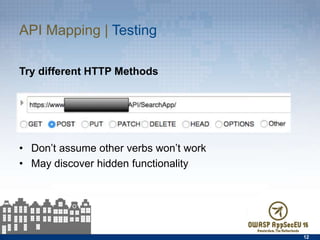
Try different HTTP Methods
•  Don’t assume other verbs won’t work
•  May discover hidden functionality
12
API Mapping | Testing
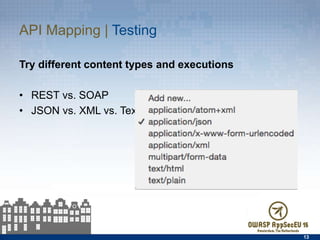
Try different content types and executions
•  REST vs. SOAP
•  JSON vs. XML vs. Text
13
Common API Vulnerabilities
  Broken Authentication &
Session Management
  Information Leakage
  Not-So-Hidden Functionality
  Lack of Access Control
  Lack of Insecure Transport
  Injection Flaws
  Failure to Protect Keys
15
Authentication & Session | Concerns
•  No authentication
•  Insecure framework
implementation
–  openID - SAML
–  oAuth - WS-Security
•  Non-expiring session tokens
•  Weak password complexity
•  Lack of account lockout
•  Lack of logout/session expiration
mechanism
16
Authentication & Session | Testing
•  Attempt to send requests with no
authentication
•  Review authentication scheme or
framework
•  Attempt to use simple passwords
•  Attempt to use old session tokens
•  Verify logout functionality truly
expires sessions
•  Weak password complexity
•  Attempt to lock account
17
Authentication & Session | Protections
•  Require authentication
•  Require strong password
•  Use up-to-date frameworks
–  Latest version of oAuth, etc.
•  Ensure there is a way to
logout / expire sessions
•  Pay special attention to
sensitive operations
•  Use rate limiting to guard
again Brute Force abuse
18
Information Leakage | Concerns
Often APIs respond with more
data than required
•  Apps returning all records
instead of only needed or
requested records
–  Particularly common in
mobile applications
•  Lack of data limiters
–  No limits on the number of
requests a user can send
–  Brute force all records
•  Error messages often
contain “interesting” info
19
Information Leakage | Concerns
2014 RSA Mobile App - Exposed Personal Data
•  App designed for connecting with conference activities,
viewing schedules, venue maps, etc.
•  App used a web API to download information about every
registered user of the application
•  http://blog.ioactive.com/2014/02/beware-your-rsa-mobile-
app-download.html
20
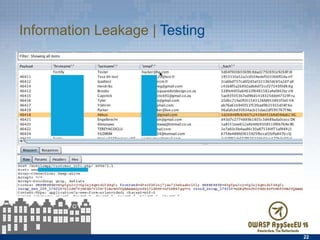
Information Leakage | Testing
•  Review API responses
–  Do they return more data
than what was requested?
•  Try wildcard values
–  * , %, ?, space, etc.
•  Review error messages
–  Do they reveal technical
information?
–  Do they reveal enumeration
flaws?
21
Information Leakage | Testing
22
Information Leakage | Protections
•  Only return requested &
needed data
•  Review responses for
sensitive information
•  Review error messages
23
Hidden functionality | Concerns
API hidden functionality flaws are largely introduced due to
faulty developer assumptions, i.e. not thinking like an attacker
•  assume obscurity
•  assume users will use functions only as intended
24
Hidden functionality | Testing
•  Test different HTTP verbs
–  GET, POST, PUT, DELETE, etc.
•  Check for API verbs
–  get user, edit user, modify user,
add user, delete user
•  Fuzz to find hidden operations
–  https://www.owasp.org/
index.php/
OWASP_SecLists_Project
•  Review WSDLs, etc. for
functionality not called at
runtime
25
Hidden functionality | Protections
•  Ensure only required
methods are exposed
–  Consider creating separate
APIs for admin & sensitive
functionality
•  Ensure authentication
scheme protects sensitive
functions
26
Lack of access controls | Concerns
APIs don’t always verify the requestor
is authorized for the target object
•  Indirect Object References
•  Tampering with commands
–  Bypass client-side controls
–  Tampering with queries
•  Incoming & outgoing data
•  Malicious upload/download
27
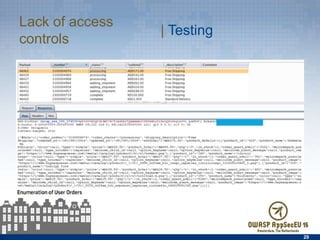
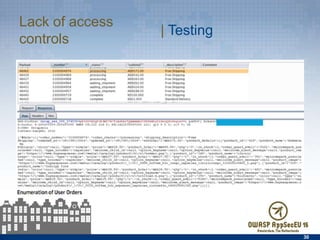
Lack of access controls
28
| Testing
Intercept & modify requests
–  Modify parameters to
attempt to access other data
•  Account numbers, User IDs,
Order numbers, etc.
Intercept & modify responses
–  Change the content available
in mobile apps
–  Bypass controls
29
Lack of access controls | Testing
30
Lack of access controls | Testing
•  Validate Parameters
•  Test for proper protection
of sensitive information
•  Review who has access to
sensitive information
•  Ensure only authorized
users have access to
sensitive information
31
Lack of access controls | Protections
Transport security flaws | Concerns
APIs often lack sufficient
protection of confidentiality
and integrity of data in
transit.
•  Devices connected to
untrustworthy networks
•  Sensitive data transmitted
in clear-text
–  No encryption
–  Encryption not enforced
•  Poorly implemented SSL/
TLS
32
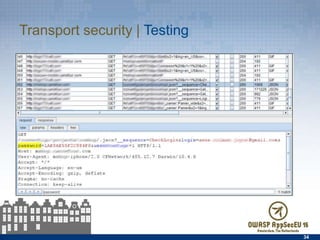
Transport security flaws | Testing
•  Review network traffic
•  Check for cipher flaws &
versions
–  SSLdigger, SSLScan, & other
SSL testing tools
33
Transport security | Testing
34
Transport security | Protections
Ensure data is protected in
transit
•  Ensure sensitive data is
never transmitted in clear-
text
•  Turn on and enforce
transport encryption
–  HTTPS everywhere
35
Injection | Concerns
•  SQL injection
•  Cross-site scripting
•  Xpath injection
•  XML DoS
•  XXE – XML external entity
36
Injection | Testing
•  Fuzz all parameters
•  Utilize web scanners
•  Manually tamper with
requests
•  Fuzz parameters and
review results
•  https://www.owasp.org/
index.php/Projects/
OWASP_SecLists_Project
37
Injection | Protections
38
•  Validate all parameters
server-side before
generating output
•  Do not assume clients will
adhere to the API
specifications
Key Management | Concerns
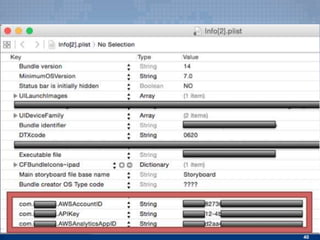
Commonly find API keys in
•  Mobile app binaries
–  Especially in manifest & .plist files
•  Thick-client apps
–  Hardcoded
–  In .config, .ini, .txt, etc. files
•  Online source code repositories
–  GitHub, BitBucket, etc.
39
40
$2375 Mistake
•  Developer accidentally uploaded Amazon S3 keys to GitHub
–  Took them down & deleted all traces within 5 minutes
•  Automated bot searching for API keys found them
•  Amazon API allows users to spin up EC2 instances
•  $2375 bill overnight
http://www.devfactor.net/2014/12/30/2375-amazon-mistake/
•  Similar Amazon WS story
https://securosis.com/blog/my-500-cloud-security-screwup
41
Key Management | Testing
•  Search for API keys
•  Review online source code
repositories for API Keys
•  Run Strings on binaries &
GREP for keys
•  Review mobile binaries
–  Manifest files
–  .plist files
–  SQLite Databases
42
Key Management | Protections
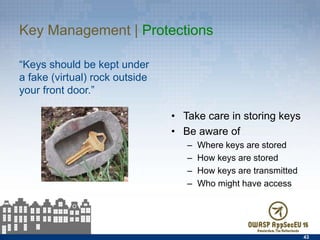
“Keys should be kept under a
fake (virtual) rock outside your
front door.”
43
•  Take care in storing keys
•  Be aware of
–  Where keys are stored
–  How keys are stored
–  How keys are transmitted
–  Who might have access
Takeaways
Takeaways
Adopt the attacker mindset
–  Think like an attacker while
evaluating your own APIs
–  Identify places that
developers likely made
assumptions
–  Attempt to take advantage of
those assumptions
–  As a developer, think in terms
of abuse vs. just regular use
45
Takeaways
Go with an absolute least-
privilege approach
–  Do not expose any operations
that are not needed
–  Do not expose any data that
is not required
46
Takeaways
Leverage available resources
https://www.owasp.org
•  https://www.owasp.org/index.php/Testing_for_Web_Services
•  https://www.owasp.org/index.php/Web_Service_Security_Cheat_Sheet
•  https://www.owasp.org/index.php/REST_Assessment_Cheat_Sheet
•  https://www.owasp.org/index.php/REST_Security_Cheat_Sheet
•  https://www.owasp.org/index.php/OWASP_Mobile_Security_Project
•  https://www.owasp.org/index.php/
OWASP_Internet_of_Things_Top_Ten_Project
•  https://www.owasp.org/index.php/OWASP_SecLists_Project
47
Reach out
Greg Patton
hacker@hp.com
http://hp.com/go/fortifyondemand
48
Appendix: Tools & References
Tools
•  http://www.soapui.org
•  https://www.runscope.com
•  http://sourceforge.net/projects/ws-attacker/
•  https://www.getpostman.com
•  https://www.bindshell.net/tools/echomirage
•  https://chrome.google.com/webstore/detail/advanced-rest-client/
hgmloofddffdnphfgcellkdfbfbjeloo
•  http://smartbear.com/product/ready-api/overview/
50
References
•  http://webappsecmovies.sourceforge.net/webgoat/#Web_Services
•  https://media.blackhat.com/bh-us-11/Johnson/
BH_US_11_JohnsonEstonAbraham_Dont_Drop_the_SOAP_WP.pdf
•  http://resources.infosecinstitute.com/soap-attack-2/
•  http://h30499.www3.hp.com/t5/Fortify-Application-Security/XPATH-Assisted-
XXE-Attacks/ba-p/6721576#.VVP43WAZ2e0
•  http://h30499.www3.hp.com/t5/Fortify-Application-Security/XML-External-
Entity-Injection-For-Fun-and-Maybe-Profit/ba-p/6592074#.VVP5vGAZ2e0
•  http://www.troyhunt.com/2014/09/hack-your-api-first-learn-how-to.html
•  http://blog.smartbear.com/readyapi/api-security-testing-how-to-hack-an-api-
and-get-away-with-it-part-1-of-3/
51

The API Primer (OWASP AppSec Europe, May 2015)

  • 1.
    Greg Patton OWASP AppSecEU| May 21, 2015 The API Assessment Primer
  • 2.
    Agenda •  Introduction •  WhyAPI security matters •  Assessment considerations •  Common API vulnerabilities •  Takeaways 2
  • 3.
    About me Greg Patton SASTManager, HP Fortify on Demand •  Manage the static analysis testing team for HP FoD •  Nearly ten years of DAST experience with web & mobile apps •  Attended my 1st OWASP meeting on June 7, 2007 (Houston, TX) hacker@hp.com 3
  • 4.
  • 5.
    APIs are everywhere • Mobile apps •  Internet of Things (IoT) •  Service Oriented Architecture (SOA) •  Enterprise thick-client apps 5
  • 6.
    API insecurity •  Newsurface area = dangerous surface area •  Many API developers haven’t had security training •  Many assume security through obscurity •  Analyzing any given API is likely to yield significant vulnerabilities 6
  • 7.
  • 8.
    API security testingapproach •  Acquire information •  Capture runtime traffic •  Map the API •  Use automated scanners •  Manually test, test, test 8
  • 9.
    What to collectpre-assessment •  Source code –  Static analysis & review •  Documentation –  Regular user & –  Admin documentation •  Valid request data –  Known-good param values –  Order of function calls 9
  • 10.
    Toolbox Ensure you havetools to •  Capture network traffic •  Send Requests Some of my favorite API tools •  SoapUI •  WSAttacker •  HP WebInspect •  ZAP •  BURP Suite Pro •  Wireshark •  Echo Mirage •  Chrome: Advanced Rest Client •  Firefox: Hackbar 10
  • 11.
    API Mapping Fully mapthe API, listing all methods and functionality at the start of an assessment Web Protocol Message Format –  XML (SOAP) –  JSON (REST) Examine online files: –  asmx –  /help & help docs –  WSDL (.NET) & WADL (Java) –  Doxegen & help docs Google –  inurl:wsdl site:example.com Explore –  runtime operations 11
  • 12.
    API Mapping |Testing Try different HTTP Methods •  Don’t assume other verbs won’t work •  May discover hidden functionality 12
  • 13.
    API Mapping |Testing Try different content types and executions •  REST vs. SOAP •  JSON vs. XML vs. Text 13
  • 14.
  • 15.
    Common API Vulnerabilities  Broken Authentication & Session Management   Information Leakage   Not-So-Hidden Functionality   Lack of Access Control   Lack of Insecure Transport   Injection Flaws   Failure to Protect Keys 15
  • 16.
    Authentication & Session| Concerns •  No authentication •  Insecure framework implementation –  openID - SAML –  oAuth - WS-Security •  Non-expiring session tokens •  Weak password complexity •  Lack of account lockout •  Lack of logout/session expiration mechanism 16
  • 17.
    Authentication & Session| Testing •  Attempt to send requests with no authentication •  Review authentication scheme or framework •  Attempt to use simple passwords •  Attempt to use old session tokens •  Verify logout functionality truly expires sessions •  Weak password complexity •  Attempt to lock account 17
  • 18.
    Authentication & Session| Protections •  Require authentication •  Require strong password •  Use up-to-date frameworks –  Latest version of oAuth, etc. •  Ensure there is a way to logout / expire sessions •  Pay special attention to sensitive operations •  Use rate limiting to guard again Brute Force abuse 18
  • 19.
    Information Leakage |Concerns Often APIs respond with more data than required •  Apps returning all records instead of only needed or requested records –  Particularly common in mobile applications •  Lack of data limiters –  No limits on the number of requests a user can send –  Brute force all records •  Error messages often contain “interesting” info 19
  • 20.
    Information Leakage |Concerns 2014 RSA Mobile App - Exposed Personal Data •  App designed for connecting with conference activities, viewing schedules, venue maps, etc. •  App used a web API to download information about every registered user of the application •  http://blog.ioactive.com/2014/02/beware-your-rsa-mobile- app-download.html 20
  • 21.
    Information Leakage |Testing •  Review API responses –  Do they return more data than what was requested? •  Try wildcard values –  * , %, ?, space, etc. •  Review error messages –  Do they reveal technical information? –  Do they reveal enumeration flaws? 21
  • 22.
  • 23.
    Information Leakage |Protections •  Only return requested & needed data •  Review responses for sensitive information •  Review error messages 23
  • 24.
    Hidden functionality |Concerns API hidden functionality flaws are largely introduced due to faulty developer assumptions, i.e. not thinking like an attacker •  assume obscurity •  assume users will use functions only as intended 24
  • 25.
    Hidden functionality |Testing •  Test different HTTP verbs –  GET, POST, PUT, DELETE, etc. •  Check for API verbs –  get user, edit user, modify user, add user, delete user •  Fuzz to find hidden operations –  https://www.owasp.org/ index.php/ OWASP_SecLists_Project •  Review WSDLs, etc. for functionality not called at runtime 25
  • 26.
    Hidden functionality |Protections •  Ensure only required methods are exposed –  Consider creating separate APIs for admin & sensitive functionality •  Ensure authentication scheme protects sensitive functions 26
  • 27.
    Lack of accesscontrols | Concerns APIs don’t always verify the requestor is authorized for the target object •  Indirect Object References •  Tampering with commands –  Bypass client-side controls –  Tampering with queries •  Incoming & outgoing data •  Malicious upload/download 27
  • 28.
    Lack of accesscontrols 28 | Testing Intercept & modify requests –  Modify parameters to attempt to access other data •  Account numbers, User IDs, Order numbers, etc. Intercept & modify responses –  Change the content available in mobile apps –  Bypass controls
  • 29.
    29 Lack of accesscontrols | Testing
  • 30.
    30 Lack of accesscontrols | Testing
  • 31.
    •  Validate Parameters • Test for proper protection of sensitive information •  Review who has access to sensitive information •  Ensure only authorized users have access to sensitive information 31 Lack of access controls | Protections
  • 32.
    Transport security flaws| Concerns APIs often lack sufficient protection of confidentiality and integrity of data in transit. •  Devices connected to untrustworthy networks •  Sensitive data transmitted in clear-text –  No encryption –  Encryption not enforced •  Poorly implemented SSL/ TLS 32
  • 33.
    Transport security flaws| Testing •  Review network traffic •  Check for cipher flaws & versions –  SSLdigger, SSLScan, & other SSL testing tools 33
  • 34.
  • 35.
    Transport security |Protections Ensure data is protected in transit •  Ensure sensitive data is never transmitted in clear- text •  Turn on and enforce transport encryption –  HTTPS everywhere 35
  • 36.
    Injection | Concerns • SQL injection •  Cross-site scripting •  Xpath injection •  XML DoS •  XXE – XML external entity 36
  • 37.
    Injection | Testing • Fuzz all parameters •  Utilize web scanners •  Manually tamper with requests •  Fuzz parameters and review results •  https://www.owasp.org/ index.php/Projects/ OWASP_SecLists_Project 37
  • 38.
    Injection | Protections 38 • Validate all parameters server-side before generating output •  Do not assume clients will adhere to the API specifications
  • 39.
    Key Management |Concerns Commonly find API keys in •  Mobile app binaries –  Especially in manifest & .plist files •  Thick-client apps –  Hardcoded –  In .config, .ini, .txt, etc. files •  Online source code repositories –  GitHub, BitBucket, etc. 39
  • 40.
  • 41.
    $2375 Mistake •  Developeraccidentally uploaded Amazon S3 keys to GitHub –  Took them down & deleted all traces within 5 minutes •  Automated bot searching for API keys found them •  Amazon API allows users to spin up EC2 instances •  $2375 bill overnight http://www.devfactor.net/2014/12/30/2375-amazon-mistake/ •  Similar Amazon WS story https://securosis.com/blog/my-500-cloud-security-screwup 41
  • 42.
    Key Management |Testing •  Search for API keys •  Review online source code repositories for API Keys •  Run Strings on binaries & GREP for keys •  Review mobile binaries –  Manifest files –  .plist files –  SQLite Databases 42
  • 43.
    Key Management |Protections “Keys should be kept under a fake (virtual) rock outside your front door.” 43 •  Take care in storing keys •  Be aware of –  Where keys are stored –  How keys are stored –  How keys are transmitted –  Who might have access
  • 44.
  • 45.
    Takeaways Adopt the attackermindset –  Think like an attacker while evaluating your own APIs –  Identify places that developers likely made assumptions –  Attempt to take advantage of those assumptions –  As a developer, think in terms of abuse vs. just regular use 45
  • 46.
    Takeaways Go with anabsolute least- privilege approach –  Do not expose any operations that are not needed –  Do not expose any data that is not required 46
  • 47.
    Takeaways Leverage available resources https://www.owasp.org • https://www.owasp.org/index.php/Testing_for_Web_Services •  https://www.owasp.org/index.php/Web_Service_Security_Cheat_Sheet •  https://www.owasp.org/index.php/REST_Assessment_Cheat_Sheet •  https://www.owasp.org/index.php/REST_Security_Cheat_Sheet •  https://www.owasp.org/index.php/OWASP_Mobile_Security_Project •  https://www.owasp.org/index.php/ OWASP_Internet_of_Things_Top_Ten_Project •  https://www.owasp.org/index.php/OWASP_SecLists_Project 47
  • 48.
  • 49.
  • 50.
    Tools •  http://www.soapui.org •  https://www.runscope.com • http://sourceforge.net/projects/ws-attacker/ •  https://www.getpostman.com •  https://www.bindshell.net/tools/echomirage •  https://chrome.google.com/webstore/detail/advanced-rest-client/ hgmloofddffdnphfgcellkdfbfbjeloo •  http://smartbear.com/product/ready-api/overview/ 50
  • 51.
    References •  http://webappsecmovies.sourceforge.net/webgoat/#Web_Services •  https://media.blackhat.com/bh-us-11/Johnson/ BH_US_11_JohnsonEstonAbraham_Dont_Drop_the_SOAP_WP.pdf • http://resources.infosecinstitute.com/soap-attack-2/ •  http://h30499.www3.hp.com/t5/Fortify-Application-Security/XPATH-Assisted- XXE-Attacks/ba-p/6721576#.VVP43WAZ2e0 •  http://h30499.www3.hp.com/t5/Fortify-Application-Security/XML-External- Entity-Injection-For-Fun-and-Maybe-Profit/ba-p/6592074#.VVP5vGAZ2e0 •  http://www.troyhunt.com/2014/09/hack-your-api-first-learn-how-to.html •  http://blog.smartbear.com/readyapi/api-security-testing-how-to-hack-an-api- and-get-away-with-it-part-1-of-3/ 51

Editor's Notes

  • #6 Gartner reports an estimated 4.9 billion connected things in use in 2015 Businesses often expose systems that had not previously been accessible from outside of their networks. Often, these formerly sheltered systems are not fully vetted against security flaws
  • #7 If anyone’s going to put features over security to get the product out the door, it’s likely to be a mobile team The newer, more eager the shop – the higher the chance of issues
  • #9 Acquire information Map the API Capture runtime traffic Use the application Use WS Client Verify you have valid requests/responses for inscope operations Scan WebInspect WS Scan Burp
  • #10 Ensure the customer has provided valid requests and responses for each operation if you are not able to acquire them through use of the application.
  • #12 Most APIs today are using the HTTP protocol, which goes for both REST and SOAP. Messages sent over the web are sent using some message format. JSON is predominant in the REST world, while XML is mandatory in the SOAP world.
  • #17 A number of back-end APIs assume (quite wrongly) that an app will be only thing that will access it. However, the servers that an app is accessing (whether they're your own or the servers of any third-party system your app may be accessing) should have security measures in place to prevent unauthorized users from accessing data. It's critical that back-end services be hardened against malicious attackers. This means all APIs should be verified and proper security methods be employed to ensure only authorized personnel have access. Insufficient Authentication ­ Web Services that perform sensitive functions should require authentication.
  • #19 Mitigations ­ For any sensitive transaction, each request should be associated with an authenticated identity and each service or data provided should be associated with authorization rules.
  • #23 Sample mobile app that returns user information – including their names, email addresses, and password hashes
  • #28 Tampering and trust flaws
  • #29 Use Burp/ZAP to scan between insertion points Identifying id parameters and sequentially iterate through possible values
  • #33 Insecure Communications – Attackers can steal or modify information if not protected while in transit. Smartphones will often be connected to untrustworthy networks Poorly implemented SSL/TLS SSL/TLS Implementations not updated Implementations vulnerable to POODLE Implementations allowing the use of SSL v2 Many mobile developers are allowing SSL communication with any host Trusting any certificate it sees Allows expired certificates Allows trivial MiTM attacks Can connect to HTTPS once, and then fall back to plain-HTTP Once in the middle, attackers can model your app’s functionality
  • #35 Review network traffic
  • #37 Injection flaws occur when software does not properly validate input. An attacker could craft malicious input that causes the API to perform operations on behalf of the attacker. Classes of injection flaws include Cross Site Scripting, SQL Injection, and XPath Injection. XML Denial of Service Issues ­ XML is a versatile data­encoding standard. However, parsing XML can be processor intensive and complex, which can lead to security issues. One common issue is a denial of service (DOS) against a web service. If an attacker crafts an XML message with very large payloads, recursive content, excessive nesting, malicious external entities, or with malicious DTDs (Data Type Documents), a DOS can occur. Mitigations ­ Developers must validate all parameters server side prior to using them and prior to generating output. The developer should not assume clients will generate valid input or adhere to the API specifications.
  • #39 Mitigations ­ Developers must validate all parameters server side prior to using them and prior to generating output. The developer should not assume clients will generate valid input or adhere to the API specifications.
  • #42 Attackers are scraping GitHub for AWS credentials embedded in code (and probably other cloud services). I highly doubt I was specifically targeted. They then use these to launch extra large instances for Bitcoin mining, and mask the traffic with Tor.
  • #44 Seriously – Be mindful of what you publish publically In apps, ensure binary protections are in place Rotate your keys periodically
  • #45 As you can see, vulnerabilities already present and well documented in web applications are exposed in APIs as well. The flavor or method for attacking may be slightly different but at the heart of the exploit lays the same root cause. Insecure coding practices coupled with a lack of secure design.