SEATTLE Tableau USER GROUP
Viz & Share
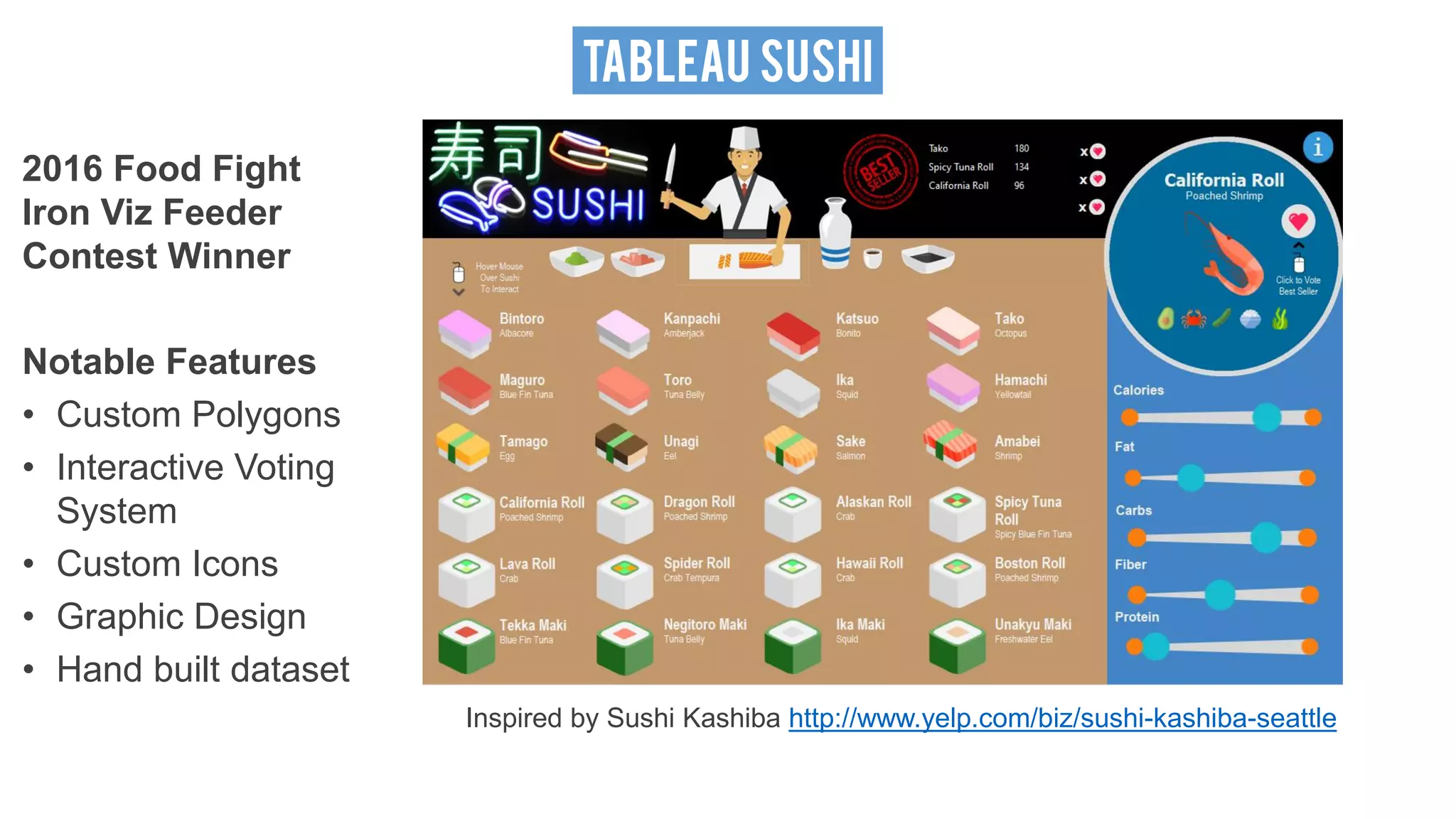
TABLEAU SUSHI
2016 Food Fight
Iron Viz Feeder
Contest Winner
Notable Features
• Custom Polygons
• Interactive Voting
System
• Custom Icons
• Graphic Design
• Hand built dataset
Inspired by Sushi Kashiba http://www.yelp.com/biz/sushi-kashiba-seattle
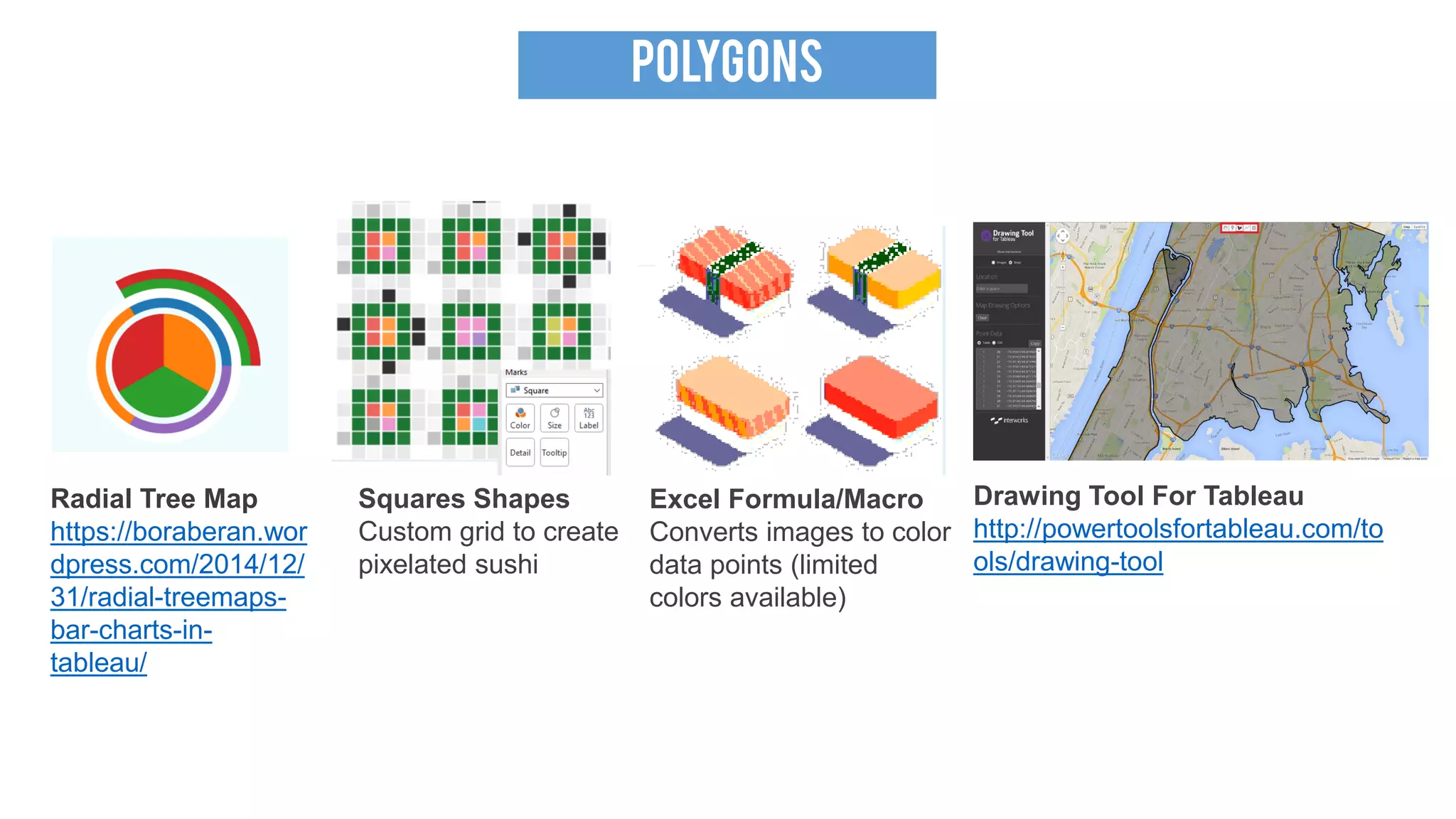
POLYGONS
Radial Tree Map
https://boraberan.wor
dpress.com/2014/12/
31/radial-treemaps-
bar-charts-in-
tableau/
Squares Shapes
Custom grid to create
pixelated sushi
Excel Formula/Macro
Converts images to color
data points (limited
colors available)
Drawing Tool For Tableau
http://powertoolsfortableau.com/to
ols/drawing-tool
POLYGONS
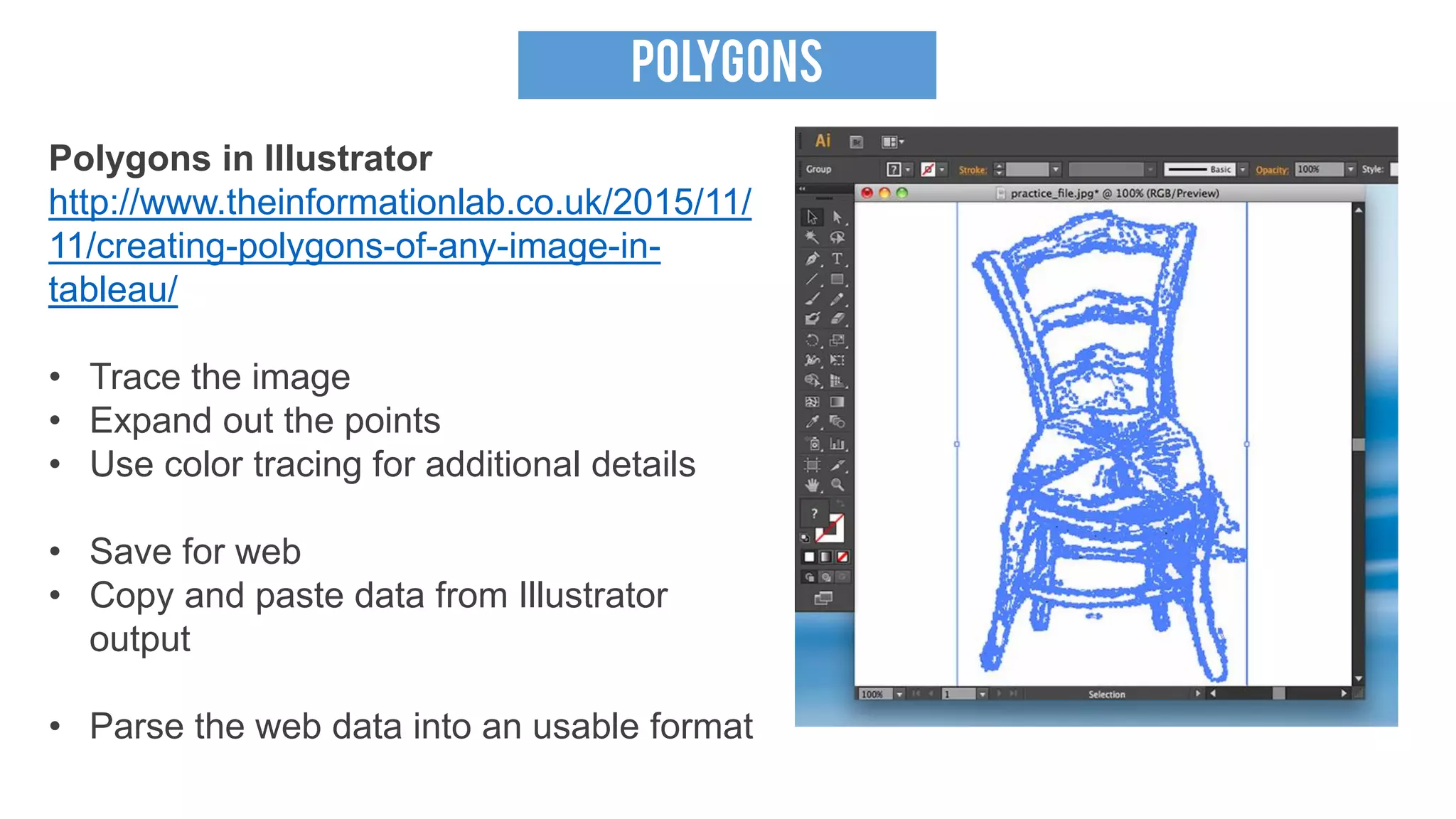
Polygons in Illustrator
http://www.theinformationlab.co.uk/2015/11/
11/creating-polygons-of-any-image-in-
tableau/
• Trace the image
• Expand out the points
• Use color tracing for additional details
• Save for web
• Copy and paste data from Illustrator
output
• Parse the web data into an usable format
POLYGONS
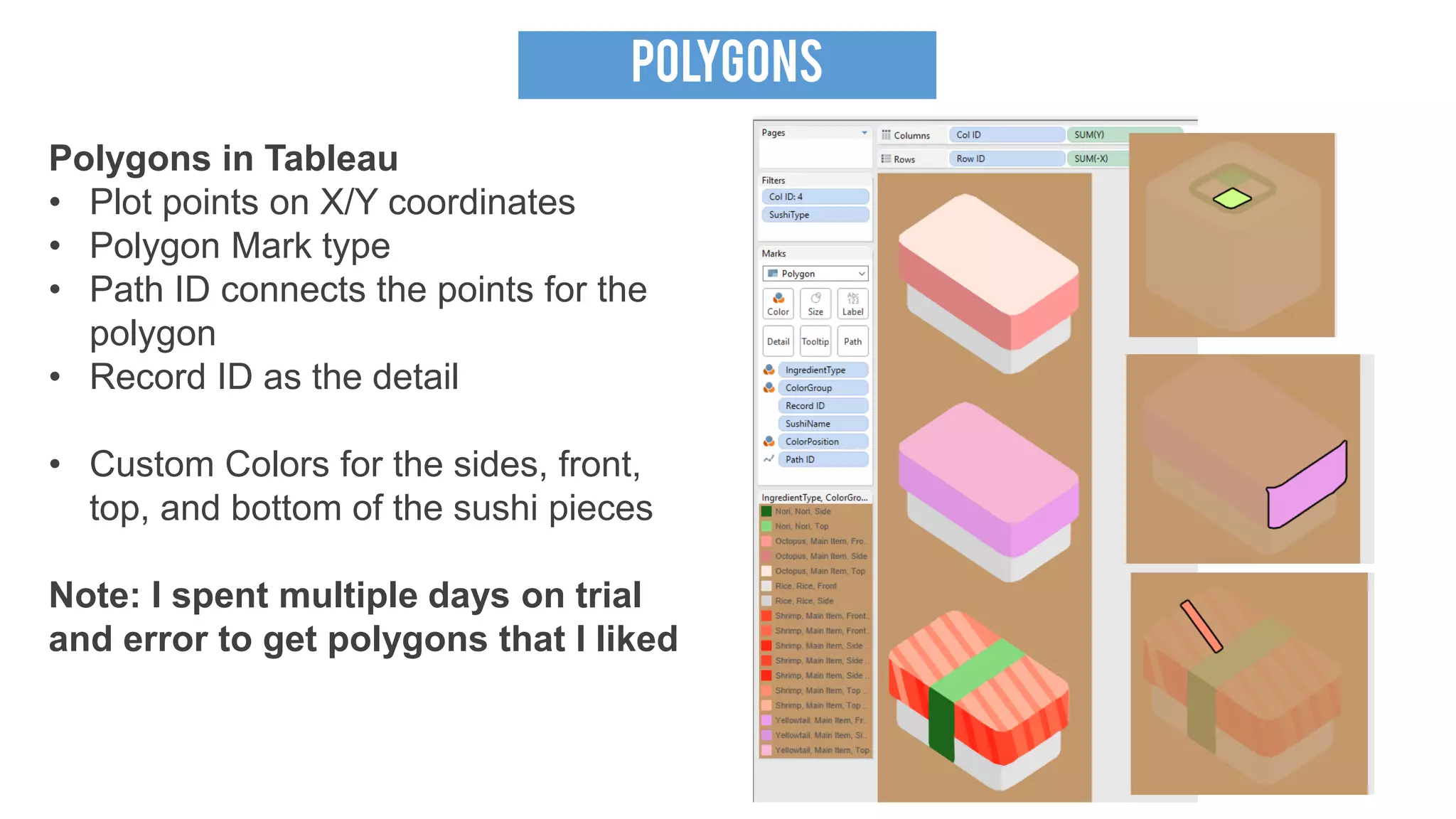
Polygons in Tableau
• Plot points on X/Y coordinates
• Polygon Mark type
• Path ID connects the points for the
polygon
• Record ID as the detail
• Custom Colors for the sides, front,
top, and bottom of the sushi pieces
Note: I spent multiple days on trial
and error to get polygons that I liked
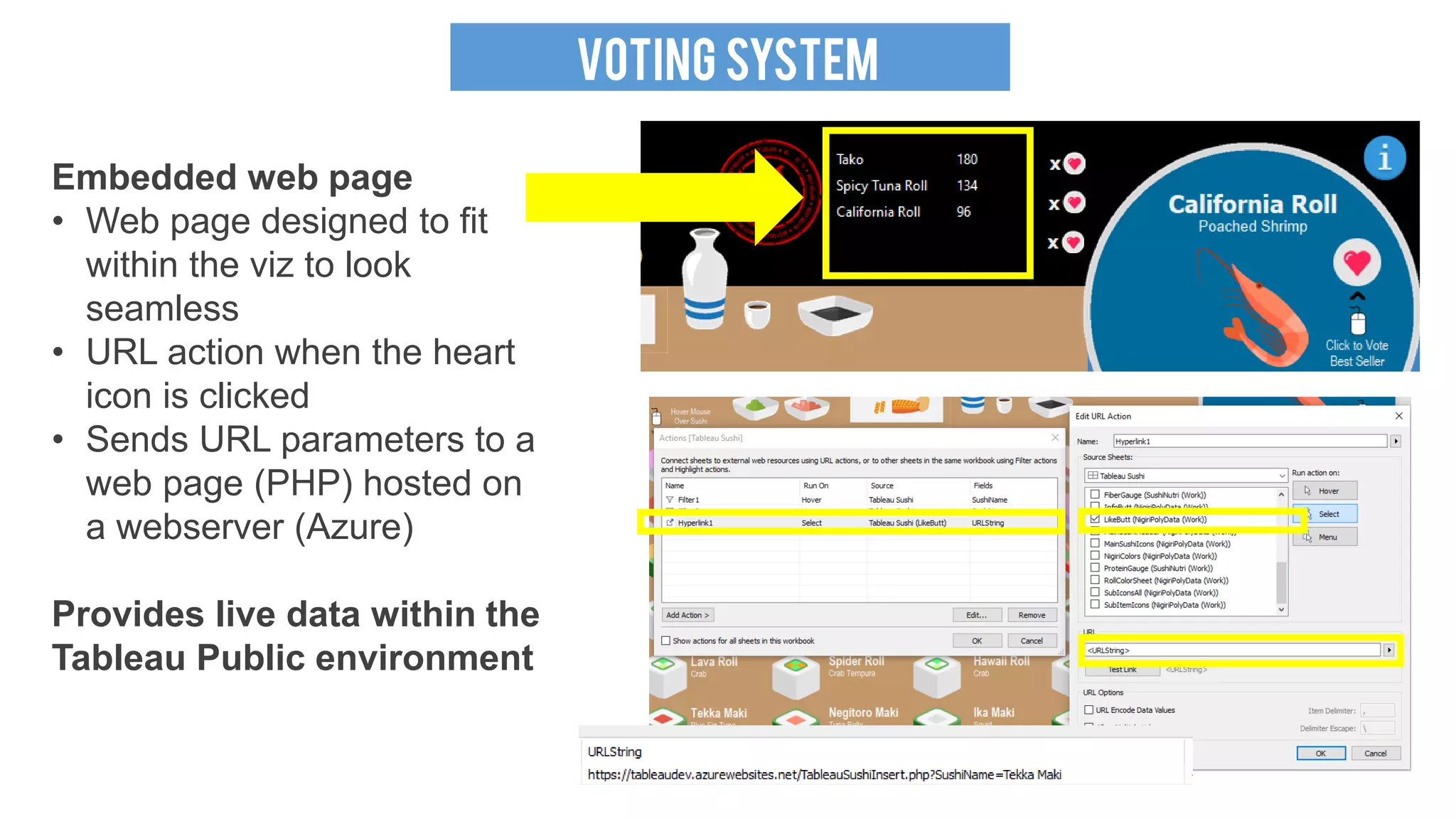
VOTING SYSTEM
Embedded web page
• Web page designed to fit
within the viz to look
seamless
• URL action when the heart
icon is clicked
• Sends URL parameters to a
web page (PHP) hosted on
a webserver (Azure)
Provides live data within the
Tableau Public environment
VOTING SYSTEM
Embedded web page
• PHP page with a data
connection to a SQL
Server on Azure (free
instance)
• Grab the value from the
URL parameter
(SushiName)
• Insert a vote for the
sushi item into a table
• Displayed Top 3 based
on the number of votes
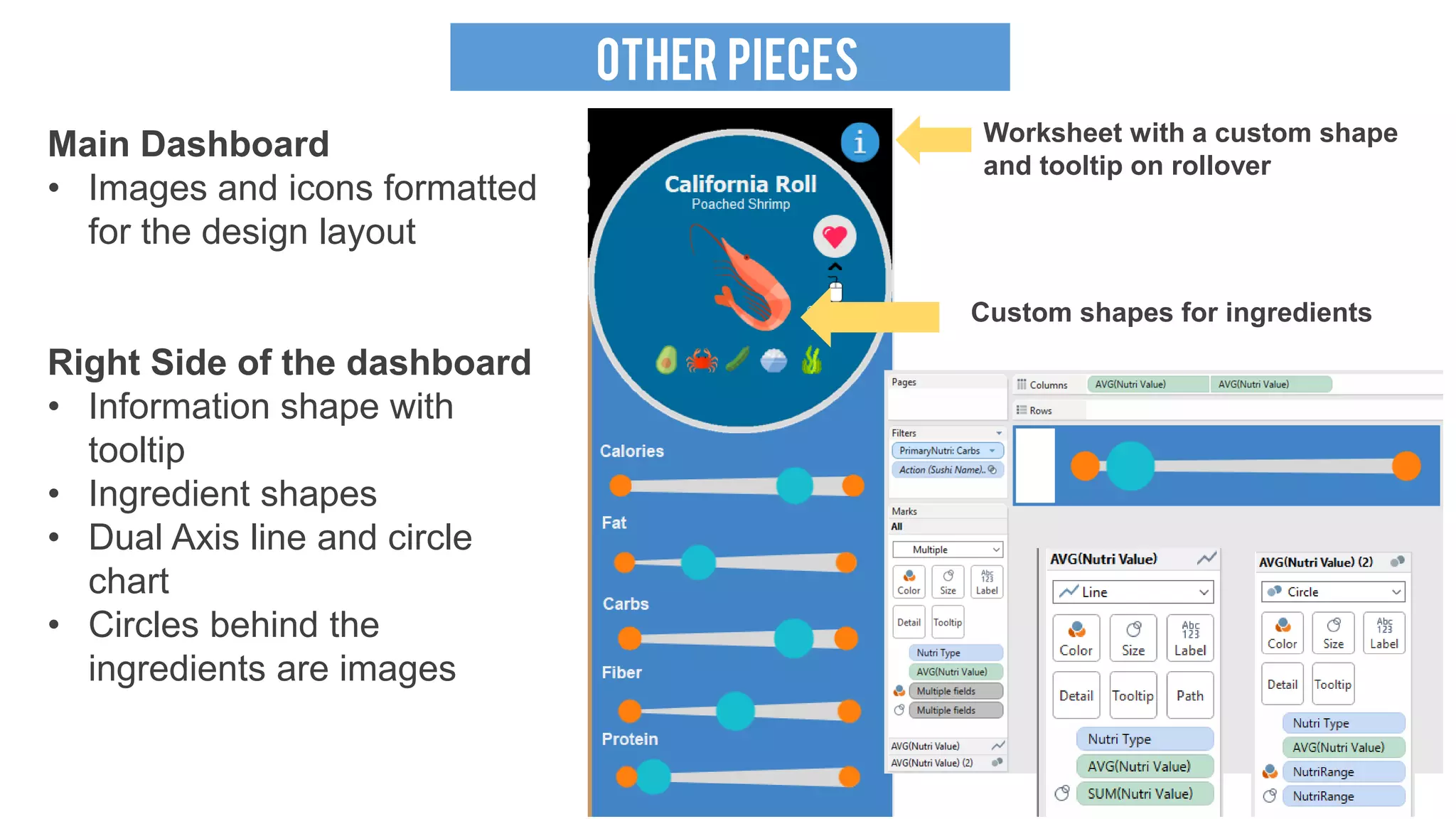
OTHER PIECES
Worksheet with a custom shape
and tooltip on rollover
Custom shapes for ingredients
Main Dashboard
• Images and icons formatted
for the design layout
Right Side of the dashboard
• Information shape with
tooltip
• Ingredient shapes
• Dual Axis line and circle
chart
• Circles behind the
ingredients are images
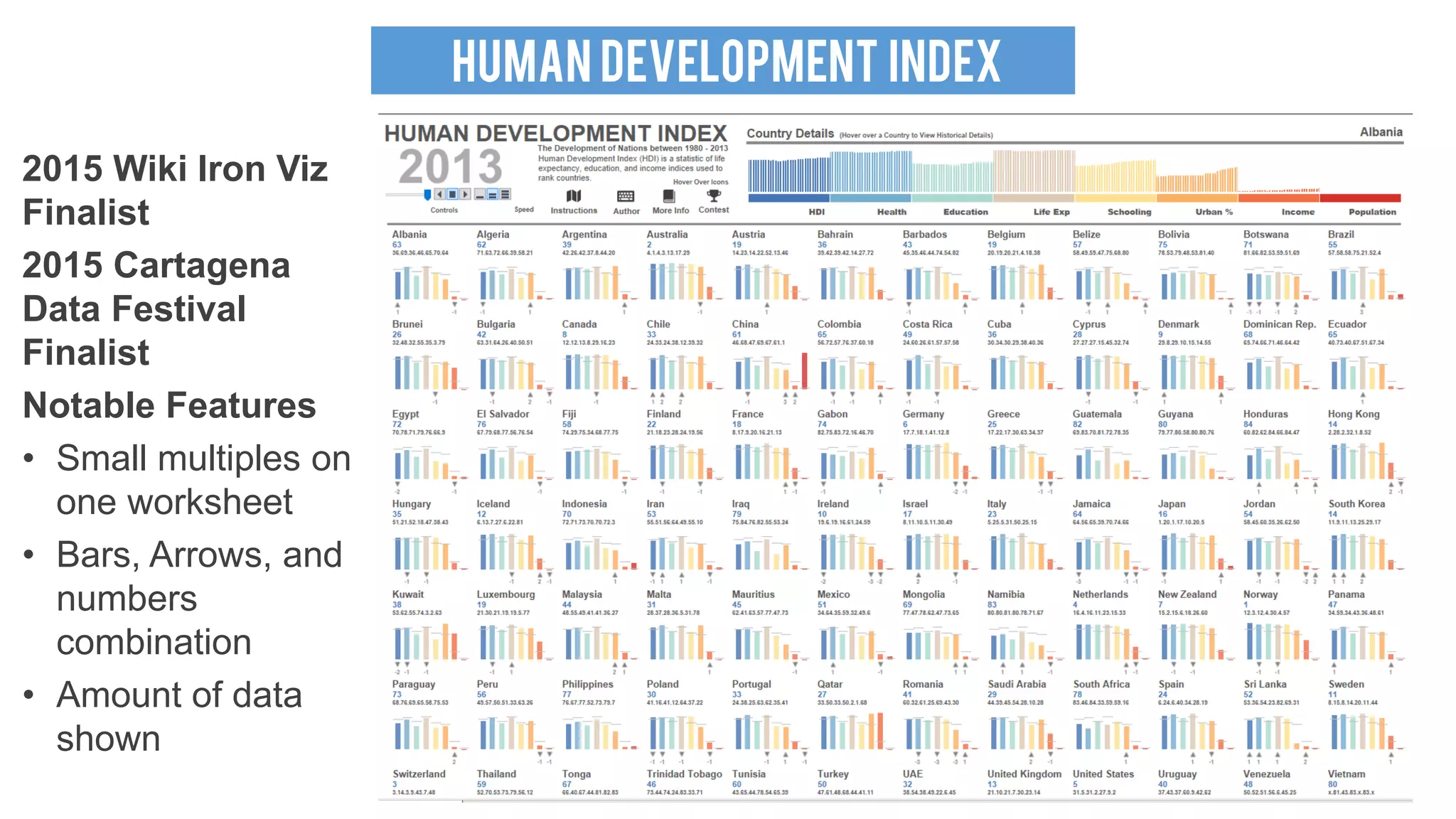
HUMAN DEVELOPMENT INDEX
2015 Wiki Iron Viz
Finalist
2015 Cartagena
Data Festival
Finalist
Notable Features
• Small multiples on
one worksheet
• Bars, Arrows, and
numbers
combination
• Amount of data
shown
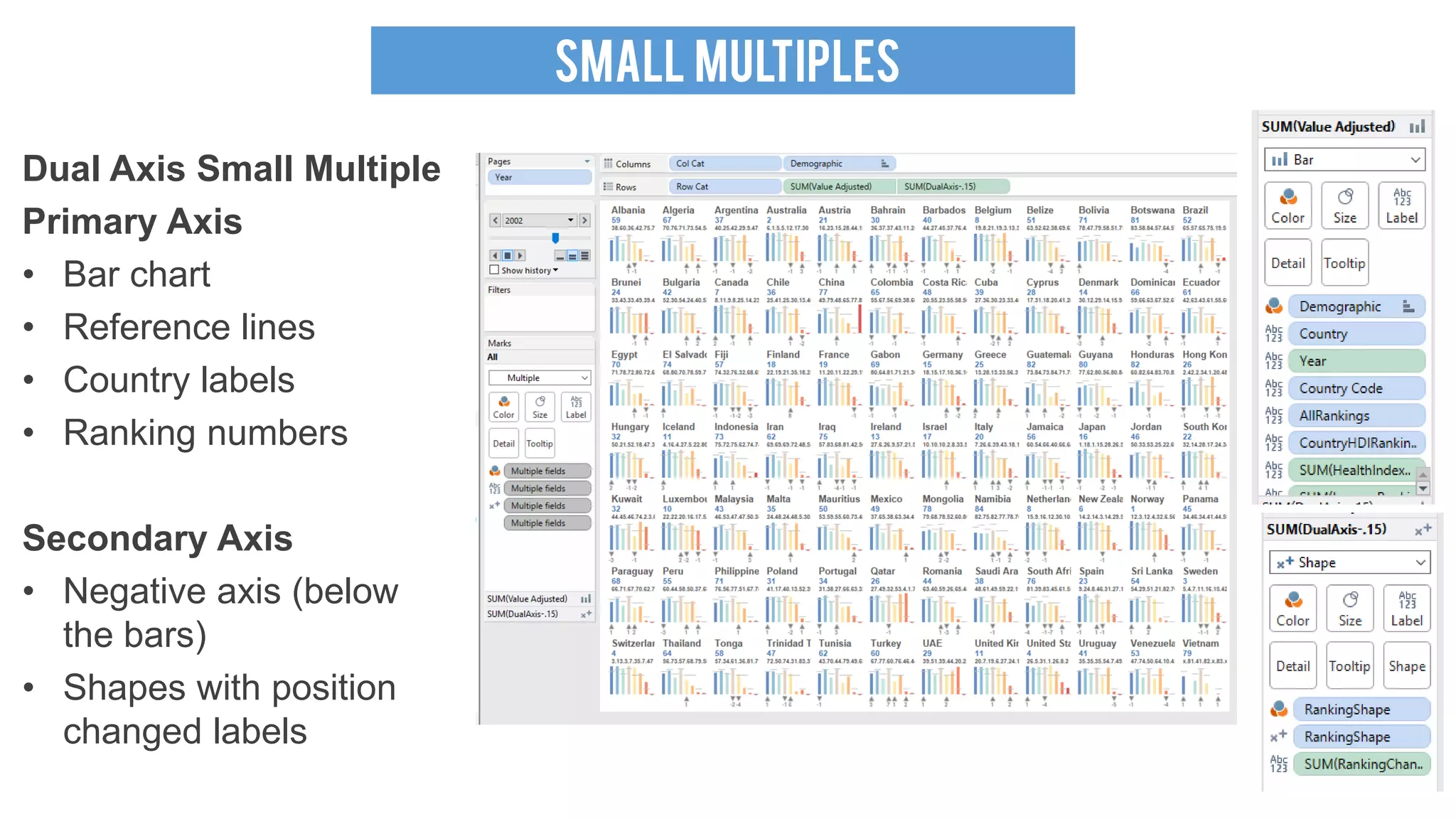
SMALL MULTIPLES
Dual Axis Small Multiple
Primary Axis
• Bar chart
• Reference lines
• Country labels
• Ranking numbers
Secondary Axis
• Negative axis (below
the bars)
• Shapes with position
changed labels
SMALL MULTIPLES
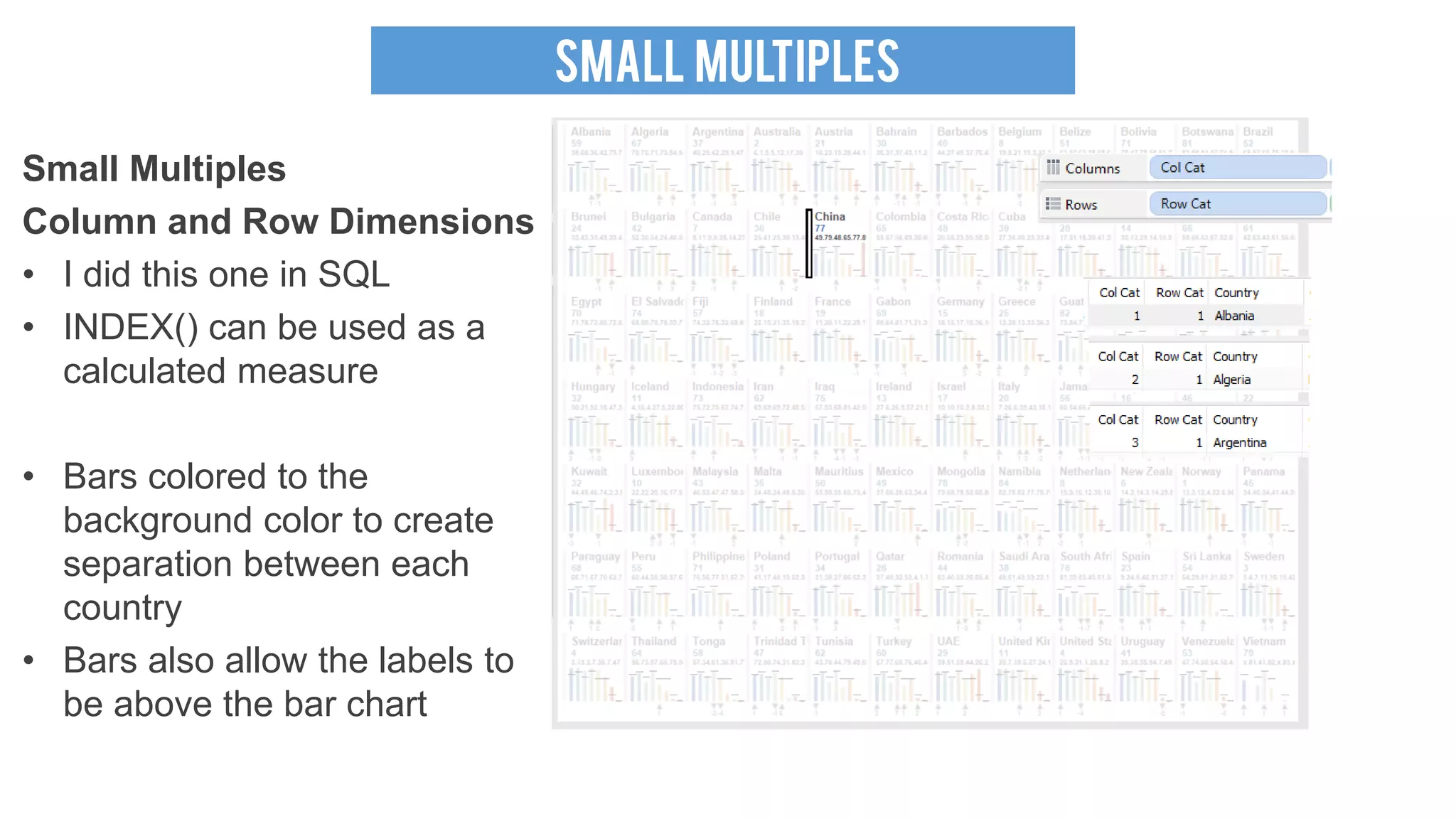
Small Multiples
Column and Row Dimensions
• I did this one in SQL
• INDEX() can be used as a
calculated measure
• Bars colored to the
background color to create
separation between each
country
• Bars also allow the labels to
be above the bar chart
OTHER PIECES
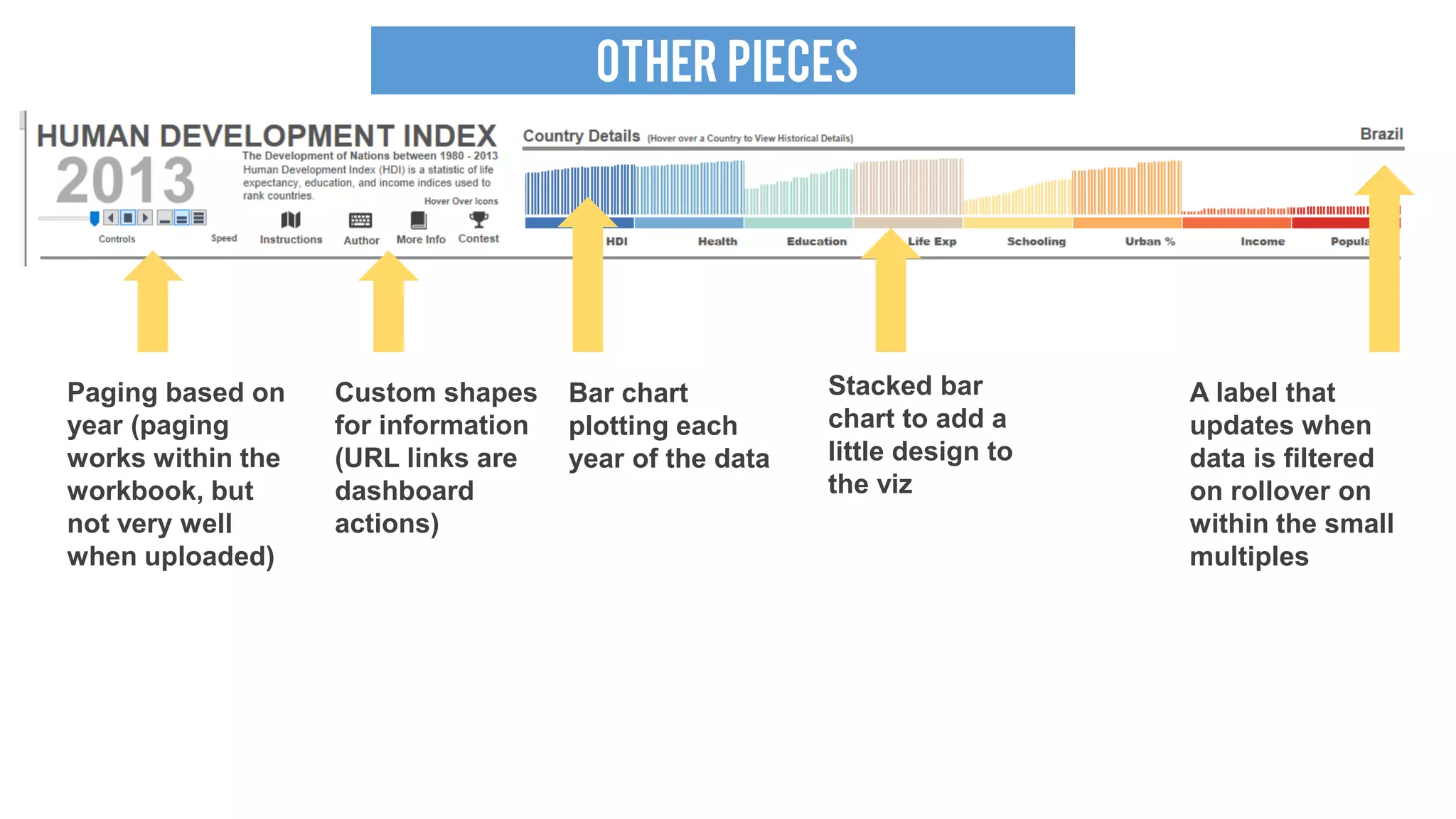
Paging based on
year (paging
works within the
workbook, but
not very well
when uploaded)
Custom shapes
for information
(URL links are
dashboard
actions)
Stacked bar
chart to add a
little design to
the viz
A label that
updates when
data is filtered
on rollover on
within the small
multiples
Bar chart
plotting each
year of the data
13
ThankS!

SeaTug Presentation (Viz & Share) Seattle Tableau User Group

  • 1.
    SEATTLE Tableau USERGROUP Viz & Share
  • 2.
    TABLEAU SUSHI 2016 FoodFight Iron Viz Feeder Contest Winner Notable Features • Custom Polygons • Interactive Voting System • Custom Icons • Graphic Design • Hand built dataset Inspired by Sushi Kashiba http://www.yelp.com/biz/sushi-kashiba-seattle
  • 3.
    POLYGONS Radial Tree Map https://boraberan.wor dpress.com/2014/12/ 31/radial-treemaps- bar-charts-in- tableau/ SquaresShapes Custom grid to create pixelated sushi Excel Formula/Macro Converts images to color data points (limited colors available) Drawing Tool For Tableau http://powertoolsfortableau.com/to ols/drawing-tool
  • 4.
    POLYGONS Polygons in Illustrator http://www.theinformationlab.co.uk/2015/11/ 11/creating-polygons-of-any-image-in- tableau/ •Trace the image • Expand out the points • Use color tracing for additional details • Save for web • Copy and paste data from Illustrator output • Parse the web data into an usable format
  • 5.
    POLYGONS Polygons in Tableau •Plot points on X/Y coordinates • Polygon Mark type • Path ID connects the points for the polygon • Record ID as the detail • Custom Colors for the sides, front, top, and bottom of the sushi pieces Note: I spent multiple days on trial and error to get polygons that I liked
  • 6.
    VOTING SYSTEM Embedded webpage • Web page designed to fit within the viz to look seamless • URL action when the heart icon is clicked • Sends URL parameters to a web page (PHP) hosted on a webserver (Azure) Provides live data within the Tableau Public environment
  • 7.
    VOTING SYSTEM Embedded webpage • PHP page with a data connection to a SQL Server on Azure (free instance) • Grab the value from the URL parameter (SushiName) • Insert a vote for the sushi item into a table • Displayed Top 3 based on the number of votes
  • 8.
    OTHER PIECES Worksheet witha custom shape and tooltip on rollover Custom shapes for ingredients Main Dashboard • Images and icons formatted for the design layout Right Side of the dashboard • Information shape with tooltip • Ingredient shapes • Dual Axis line and circle chart • Circles behind the ingredients are images
  • 9.
    HUMAN DEVELOPMENT INDEX 2015Wiki Iron Viz Finalist 2015 Cartagena Data Festival Finalist Notable Features • Small multiples on one worksheet • Bars, Arrows, and numbers combination • Amount of data shown
  • 10.
    SMALL MULTIPLES Dual AxisSmall Multiple Primary Axis • Bar chart • Reference lines • Country labels • Ranking numbers Secondary Axis • Negative axis (below the bars) • Shapes with position changed labels
  • 11.
    SMALL MULTIPLES Small Multiples Columnand Row Dimensions • I did this one in SQL • INDEX() can be used as a calculated measure • Bars colored to the background color to create separation between each country • Bars also allow the labels to be above the bar chart
  • 12.
    OTHER PIECES Paging basedon year (paging works within the workbook, but not very well when uploaded) Custom shapes for information (URL links are dashboard actions) Stacked bar chart to add a little design to the viz A label that updates when data is filtered on rollover on within the small multiples Bar chart plotting each year of the data
  • 13.