Choose Your Map
Lorenzo Vercellati
lvercellati@solidq.com
Sponsors
Lorenzo Vercellati
Power BI Solutions Architect @ SolidQ
SQL Saturday Speaker, Power BI Trainer
Working on Database since 2000, on SQL Server since 2007
PowerBI User Group Milan Administrator
Medieval History Graduate, Homebrewer
@supergimi
https://www.linkedin.com/in/lorenzovercellati/
Agenda
Coming Soon…
• Prepare Your Data
• Build a Strong Geography Dimension
• Clean Your Data
• Categorize Your Data
• Maps! Maps! Maps!
Prepare Your Data
Build a Strong Geography Dimension
Use Codes:
• ISTAT Codes (M052, F704 instead of Vimercate or Monza)
• State or Province Codes (AN, NY, IDF instead of Ancona, New York, Ile-de-France)
• Country Codes (ITA, USA, MEX instead of Italy, United States, Mexico)
Descriptions depends on too many factors
… and ERRORS!
Demo
Build a Strong Geography Dimension
Build a multi-level Hierarchy
Asia <continent>
Africa <continent>
Europe <continent>
North America <continent>
Canada <country>
Mexico <country>
United States of America <country>
New England <region>
Midwest <region>
California <region>
Sacramento Valley <region>
Sierra Nevada <region>
Bay Area <region>
Berkeley <city>
Palo Alto <city>
San Francisco <city>
Mission <district>
Golden Gate <district>
Castro-Noe Valley <district>
Build a Strong Geography Dimension
Use Latitude and Longitude as soon as possible
Categorize Your Data
1
2
3
4
Help Bing doing its work!
Maps! Maps! Maps!
Out of the Box vs. Custom
Out of the Box
Out of the box
Filled Map Shape Map
ArcGIS Maps
Map
Map with R
Map
• Categorize your data to help
Bing Service
• Use combination of Location
field and Longitude and Latitude
with drill down for good results
Demo
Filled Map
• Great for US geographies
• Not so great outside of US
Shape Map
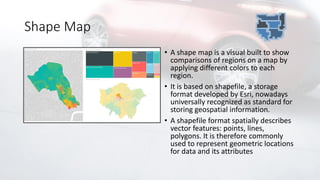
• A shape map is a visual built to show
comparisons of regions on a map by
applying different colors to each
region.
• It is based on shapefile, a storage
format developed by Esri, nowadays
universally recognized as standard for
storing geospatial information.
• A shapefile format spatially describes
vector features: points, lines,
polygons. It is therefore commonly
used to represent geometric locations
for data and its attributes
Shape Map
• Enabled in Preview Features
• Use mapshaper.org to convert to
TopoJSON
• If necessary, update manually
your TopoJSON
Custom Shape Map
0
1
2
3
4
5
6
7
8
9
10
11
12
13
14 15
16
17
20
21
22
23
24
25
26
27
28
30
31
33
34
35
36
37
38
39
40
41
42
43
44
45
46
47
49
51
52
53
54
80
78
79
85
76
77
86
You can create your custom shape map and use it in Power
BI
You have to edit a topojson file, that generates the map
You can edit directly topojson file
You can use an online converter
Topojson is a subtype of geojson file type
Topojson structure consists in:
A list of arcs
A list of object with references to a sequence of contiguous
arcs
Custom Shape Map
Arcs are defined by an entry point and a sequence of
point.
Arcs have a defined direction
Object defined by arcs with reverse direction are
referenced by –arcs + 1
76
-77
An object can be a Polygon or a MultiPolygon
Every Polygon is defined by a set of contiguous arcs.
0
1
2
3
4
5
6
7
8
9
10
11
12
13
14 15
16
17
20
21
22
23
24
25
26
27
28
30
31
33
34
35
36
37
38
39
40
41
42
43
44
45
46
47
49
51
52
53
54
80
78
79
85
76
77
86
Demo
ArcGIS Maps
• A GIS (Geographic Information
System) is a computer-based
tool that analyzes, stores,
manipulates and visualizes
geographic information on a
map.
• ArcGIS is the software developed
by Esri, for creating and using
maps, performing spatial
analysis, sharing and discovering
geographic information.
ArcGIS Maps
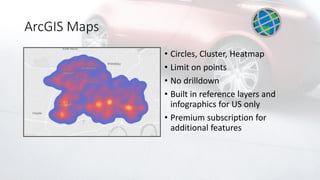
• Circles, Cluster, Heatmap
• Limit on points
• No drilldown
• Built in reference layers and
infographics for US only
• Premium subscription for
additional features
Demo
Maps with R
• R is the most common
open source language for
statistical computing and
graphics.
• R provides a wide variety
of statistical and graphical
techniques
Maps with R
• R scripts are fully supported in Power
BI, offering the way to perform
analytical and statistical analysis and to
create compelling visuals. The
integration of R in PowerBI grants
access to a rich array of data
visualizations not present in the
standard PowerBI set.
• R is shipped with a huge number of
packages for spatial data analysis and
plotting. Many sort of maps
(choropleths, map projections,
topological maps, animated maps, …)
and sketch options are available with R.
Map with R
• R Engine
• R packages (ggplot2, maps)
• R knowledge
Demo
Is There Anybody Out There?
Custom Maps from Marketplace
Globe Data Bars Globe Map Drilldown
Choropleth
Drilldown
Cartogram
Mapbox Icon Map
…and Others more!
Flow Map
Mapbox
• Requires access token
• Shows large number of points
• Multiple background layers,
including custom
• Cluster, Heatmap, Circles &
Choropleth
• Need to aggregate data
manually
Demo
Flow Map
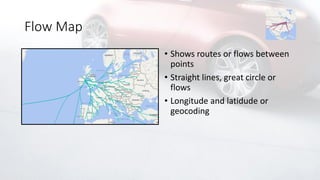
• Shows routes or flows between
points
• Straight lines, great circle or
flows
• Longitude and latidude or
geocoding
Demo
Icon Map
• Open Streetmap, Mapbox,
Thunderforest &
openweathermap layers
• Circles, lines and icons
Demo
Drilldown Choropleth
• Custom shapes required in
TopoJSON and hosted externally
Drilldown Cartogram
• Custom shapes required in
TopoJSON and hosted externally
Synoptic Panel
• https://synoptic.design/
• Time-intensive compared to
other Power BI map options
• Some templates available in the
Synoptic gallery
• Fully customized areas for any
image
Globe Map
• Good for storytelling
• Not so good for analysis
Globe Data Bars
• No longer working 
Links on the Road
Maps
• https://mapshaper.org/
• https://christopherfinlan.com/category/datazen/maps/
• http://dataveld.com/2016/09/12/topojson-map-files-for-power-bi-shape-
map/
• https://powerbi.microsoft.com/en-us/blog/esri-plus-subscription-for-
arcgis-maps-for-power-bi-is-now-available/?cdn=disable
• https://github.com/deldersveld/topojson
• http://dataveld.com/2016/09/01/overcoming-potential-power-bi-shape-
map-rendering-issues/
TopoJson
• https://en.wikipedia.org/wiki/GeoJSON
• https://macwright.org/2015/03/23/geojson-second-bite.html
• http://geoexamples.com/d3/2015/09/25/d3-EUROSTAT-topojson.html
• https://blog.mapbox.com/the-fastest-maps-in-microsoft-power-bi-
4fc81b7ef890
• https://docs.microsoft.com/en-us/power-bi/visuals/power-bi-map-tips-
and-tricks
• https://www.esri.com/en-us/arcgis/products/arcgis-maps-for-power-
bi/overview
…and more!
“To put a city in a book, to put the world on one sheet of paper: maps are the
most condensed humanized spaces of all...They make the landscape fit
indoors, make us masters of sights we can't see and spaces we can't cover.”
-Robert Harbison
Q&A
Grazie!

Power BI - Choose your map

  • 1.
    Choose Your Map LorenzoVercellati lvercellati@solidq.com
  • 2.
  • 3.
    Lorenzo Vercellati Power BISolutions Architect @ SolidQ SQL Saturday Speaker, Power BI Trainer Working on Database since 2000, on SQL Server since 2007 PowerBI User Group Milan Administrator Medieval History Graduate, Homebrewer @supergimi https://www.linkedin.com/in/lorenzovercellati/
  • 4.
  • 5.
    Coming Soon… • PrepareYour Data • Build a Strong Geography Dimension • Clean Your Data • Categorize Your Data • Maps! Maps! Maps!
  • 7.
  • 8.
    Build a StrongGeography Dimension Use Codes: • ISTAT Codes (M052, F704 instead of Vimercate or Monza) • State or Province Codes (AN, NY, IDF instead of Ancona, New York, Ile-de-France) • Country Codes (ITA, USA, MEX instead of Italy, United States, Mexico) Descriptions depends on too many factors … and ERRORS!
  • 9.
  • 10.
    Build a StrongGeography Dimension Build a multi-level Hierarchy Asia <continent> Africa <continent> Europe <continent> North America <continent> Canada <country> Mexico <country> United States of America <country> New England <region> Midwest <region> California <region> Sacramento Valley <region> Sierra Nevada <region> Bay Area <region> Berkeley <city> Palo Alto <city> San Francisco <city> Mission <district> Golden Gate <district> Castro-Noe Valley <district>
  • 11.
    Build a StrongGeography Dimension Use Latitude and Longitude as soon as possible
  • 12.
  • 13.
  • 15.
    Out of theBox vs. Custom
  • 16.
  • 17.
    Out of thebox Filled Map Shape Map ArcGIS Maps Map Map with R
  • 18.
    Map • Categorize yourdata to help Bing Service • Use combination of Location field and Longitude and Latitude with drill down for good results
  • 19.
  • 20.
    Filled Map • Greatfor US geographies • Not so great outside of US
  • 21.
    Shape Map • Ashape map is a visual built to show comparisons of regions on a map by applying different colors to each region. • It is based on shapefile, a storage format developed by Esri, nowadays universally recognized as standard for storing geospatial information. • A shapefile format spatially describes vector features: points, lines, polygons. It is therefore commonly used to represent geometric locations for data and its attributes
  • 22.
    Shape Map • Enabledin Preview Features • Use mapshaper.org to convert to TopoJSON • If necessary, update manually your TopoJSON
  • 23.
    Custom Shape Map 0 1 2 3 4 5 6 7 8 9 10 11 12 13 1415 16 17 20 21 22 23 24 25 26 27 28 30 31 33 34 35 36 37 38 39 40 41 42 43 44 45 46 47 49 51 52 53 54 80 78 79 85 76 77 86 You can create your custom shape map and use it in Power BI You have to edit a topojson file, that generates the map You can edit directly topojson file You can use an online converter Topojson is a subtype of geojson file type Topojson structure consists in: A list of arcs A list of object with references to a sequence of contiguous arcs
  • 24.
    Custom Shape Map Arcsare defined by an entry point and a sequence of point. Arcs have a defined direction Object defined by arcs with reverse direction are referenced by –arcs + 1 76 -77 An object can be a Polygon or a MultiPolygon Every Polygon is defined by a set of contiguous arcs. 0 1 2 3 4 5 6 7 8 9 10 11 12 13 14 15 16 17 20 21 22 23 24 25 26 27 28 30 31 33 34 35 36 37 38 39 40 41 42 43 44 45 46 47 49 51 52 53 54 80 78 79 85 76 77 86
  • 25.
  • 26.
    ArcGIS Maps • AGIS (Geographic Information System) is a computer-based tool that analyzes, stores, manipulates and visualizes geographic information on a map. • ArcGIS is the software developed by Esri, for creating and using maps, performing spatial analysis, sharing and discovering geographic information.
  • 27.
    ArcGIS Maps • Circles,Cluster, Heatmap • Limit on points • No drilldown • Built in reference layers and infographics for US only • Premium subscription for additional features
  • 28.
  • 29.
    Maps with R •R is the most common open source language for statistical computing and graphics. • R provides a wide variety of statistical and graphical techniques
  • 30.
    Maps with R •R scripts are fully supported in Power BI, offering the way to perform analytical and statistical analysis and to create compelling visuals. The integration of R in PowerBI grants access to a rich array of data visualizations not present in the standard PowerBI set. • R is shipped with a huge number of packages for spatial data analysis and plotting. Many sort of maps (choropleths, map projections, topological maps, animated maps, …) and sketch options are available with R.
  • 31.
    Map with R •R Engine • R packages (ggplot2, maps) • R knowledge
  • 32.
  • 33.
    Is There AnybodyOut There?
  • 34.
    Custom Maps fromMarketplace Globe Data Bars Globe Map Drilldown Choropleth Drilldown Cartogram Mapbox Icon Map …and Others more! Flow Map
  • 35.
    Mapbox • Requires accesstoken • Shows large number of points • Multiple background layers, including custom • Cluster, Heatmap, Circles & Choropleth • Need to aggregate data manually
  • 36.
  • 37.
    Flow Map • Showsroutes or flows between points • Straight lines, great circle or flows • Longitude and latidude or geocoding
  • 38.
  • 39.
    Icon Map • OpenStreetmap, Mapbox, Thunderforest & openweathermap layers • Circles, lines and icons
  • 40.
  • 41.
    Drilldown Choropleth • Customshapes required in TopoJSON and hosted externally
  • 42.
    Drilldown Cartogram • Customshapes required in TopoJSON and hosted externally
  • 43.
    Synoptic Panel • https://synoptic.design/ •Time-intensive compared to other Power BI map options • Some templates available in the Synoptic gallery • Fully customized areas for any image
  • 44.
    Globe Map • Goodfor storytelling • Not so good for analysis
  • 45.
    Globe Data Bars •No longer working 
  • 46.
  • 47.
    Maps • https://mapshaper.org/ • https://christopherfinlan.com/category/datazen/maps/ •http://dataveld.com/2016/09/12/topojson-map-files-for-power-bi-shape- map/ • https://powerbi.microsoft.com/en-us/blog/esri-plus-subscription-for- arcgis-maps-for-power-bi-is-now-available/?cdn=disable • https://github.com/deldersveld/topojson • http://dataveld.com/2016/09/01/overcoming-potential-power-bi-shape- map-rendering-issues/
  • 48.
  • 49.
  • 50.
    “To put acity in a book, to put the world on one sheet of paper: maps are the most condensed humanized spaces of all...They make the landscape fit indoors, make us masters of sights we can't see and spaces we can't cover.” -Robert Harbison
  • 51.
  • 52.