SAP SD Course Content
Order Fulfillment I

Unit 1: Navigation

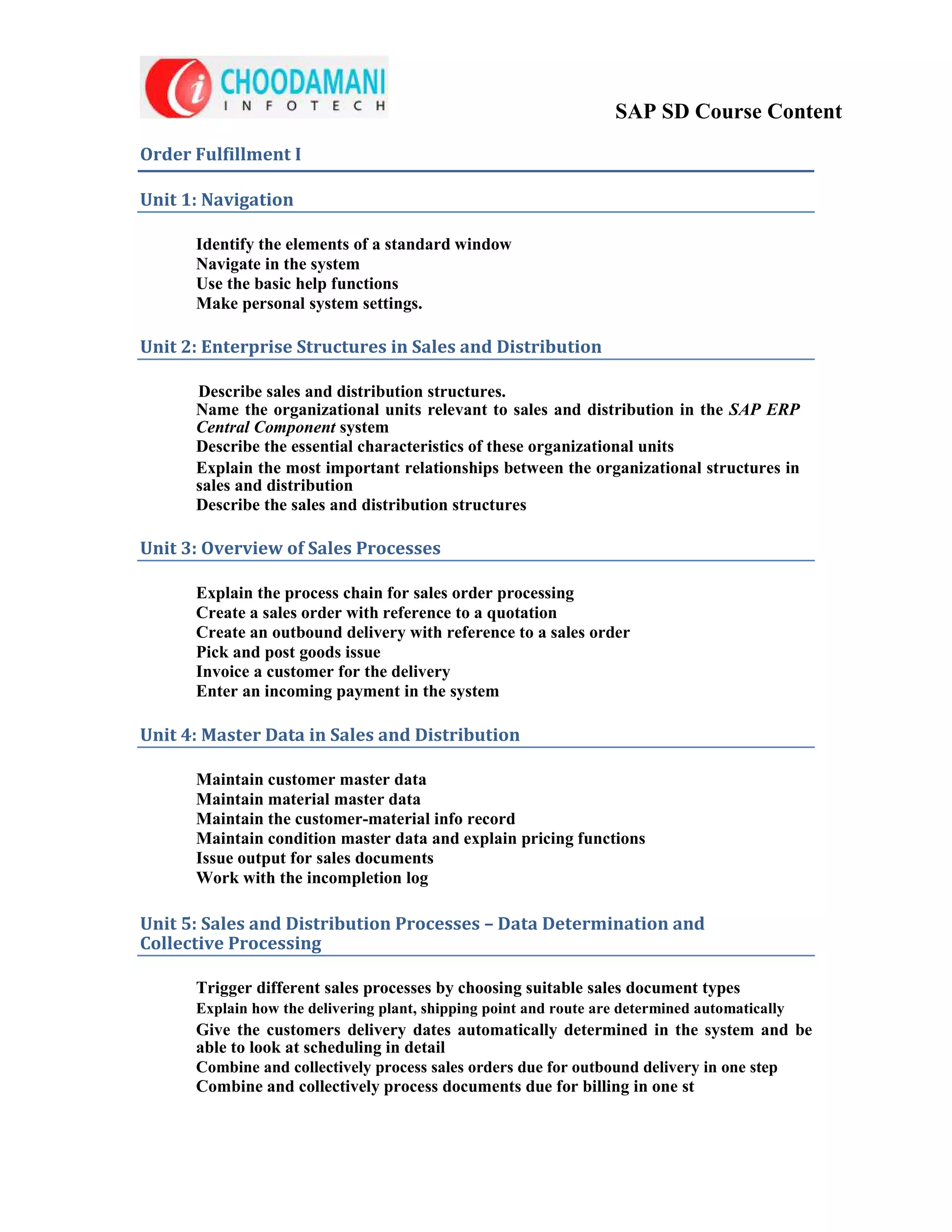
      Identify the elements of a standard window
      Navigate in the system
      Use the basic help functions
      Make personal system settings.

Unit 2: Enterprise Structures in Sales and Distribution

      Describe sales and distribution structures.
      Name the organizational units relevant to sales and distribution in the SAP ERP
      Central Component system
      Describe the essential characteristics of these organizational units
      Explain the most important relationships between the organizational structures in
      sales and distribution
      Describe the sales and distribution structures

Unit 3: Overview of Sales Processes

      Explain the process chain for sales order processing
      Create a sales order with reference to a quotation
      Create an outbound delivery with reference to a sales order
      Pick and post goods issue
      Invoice a customer for the delivery
      Enter an incoming payment in the system

Unit 4: Master Data in Sales and Distribution

      Maintain customer master data
      Maintain material master data
      Maintain the customer-material info record
      Maintain condition master data and explain pricing functions
      Issue output for sales documents
      Work with the incompletion log

Unit 5: Sales and Distribution Processes – Data Determination and
Collective Processing

      Trigger different sales processes by choosing suitable sales document types
      Explain how the delivering plant, shipping point and route are determined automatically
      Give the customers delivery dates automatically determined in the system and be
      able to look at scheduling in detail
      Combine and collectively process sales orders due for outbound delivery in one step
      Combine and collectively process documents due for billing in one st
SAP SD Course Content
Unit 6: Availability Check

      Describe the basic principles and function of the availability check
      Use the availability check as part of order processing
      Explain how deliveries are shipped
      Describe how shipment costs are billed to the customer
      Explain how financial information is transferred from the billing document
      into the accounting document

Unit 7: Make-To-Order

      Describe presales activities
      Use inquiries and quotations
      Explain key functions of item categories
      Track the status of assembly orders for make-to-order sales orders
Unit 8: Complaints Processing

Unit 9: Enterprise Structures in Sales and Distribution

      Use organizational units in the SAP system to map the different areas in your company
      Set up enterprise structures by assigning them to organizational units
      Adjust the organizational structures to meet the legal and business requirements
      of your company

Unit 10: Sales Order Processing

      Determine the origin of document data from various sources, like the material
      master, the customer master, or Customizing
      Find and use the tools and help for entering and processing sales orders

Unit 11: Controlling Sales Documents

      Describe the basic principles of business process control in sales.
      Identify the elements that control the sales documents
      Name examples of different sales document types used for different business processes
      Explain what the sales document type does
      Create Customizing settings for the sales document type
      Restrict the validity of sales document types to sales areas
      Identify and explain the important control parameters for item categories
      Create a new item category
      Configure the system so that item categories are automatically assigned to a
      sales document type
      Control settings for bills of material in the sales document.
      Identify and explain the most important control parameters for schedule line categories
      Create a new schedule line category
      Configure your settings so that schedule line categories are automatically
      assigned to each sales document item
SAP SD Course Content
Unit 12: Data Flow

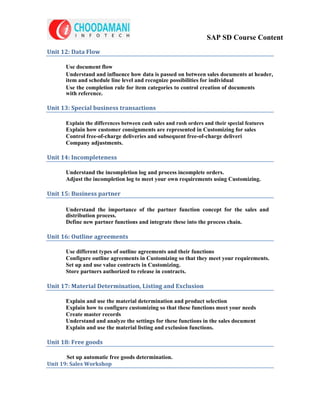
       Use document flow
       Understand and influence how data is passed on between sales documents at header,
       item and schedule line level and recognize possibilities for individual
       Use the completion rule for item categories to control creation of documents
       with reference.

Unit 13: Special business transactions

       Explain the differences between cash sales and rush orders and their special features
       Explain how customer consignments are represented in Customizing for sales
       Control free-of-charge deliveries and subsequent free-of-charge deliveri
       Company adjustments.

Unit 14: Incompleteness

       Understand the incompletion log and process incomplete orders.
       Adjust the incompletion log to meet your own requirements using Customizing.

Unit 15: Business partner

       Understand the importance of the partner function concept for the sales and
       distribution process.
       Define new partner functions and integrate these into the process chain.

Unit 16: Outline agreements

       Use different types of outline agreements and their functions
       Configure outline agreements in Customizing so that they meet your requirements.
       Set up and use value contracts in Customizing.
       Store partners authorized to release in contracts.

Unit 17: Material Determination, Listing and Exclusion

       Explain and use the material determination and product selection
       Explain how to configure customizing so that these functions meet your needs
       Create master records
       Understand and analyze the settings for these functions in the sales document
       Explain and use the material listing and exclusion functions.

Unit 18: Free goods

       Set up automatic free goods determination.
Unit 19: Sales Workshop
SAP SD Course Content
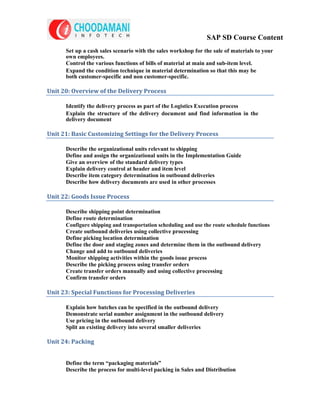
      Set up a cash sales scenario with the sales workshop for the sale of materials to your
      own employees.
      Control the various functions of bills of material at main and sub-item level.
      Expand the condition technique in material determination so that this may be
      both customer-specific and non customer-specific.

Unit 20: Overview of the Delivery Process

      Identify the delivery process as part of the Logistics Execution process
      Explain the structure of the delivery document and find information in the
      delivery document

Unit 21: Basic Customizing Settings for the Delivery Process

      Describe the organizational units relevant to shipping
      Define and assign the organizational units in the Implementation Guide
      Give an overview of the standard delivery types
      Explain delivery control at header and item level
      Describe item category determination in outbound deliveries
      Describe how delivery documents are used in other processes

Unit 22: Goods Issue Process

      Describe shipping point determination
      Define route determination
      Configure shipping and transportation scheduling and use the route schedule functions
      Create outbound deliveries using collective processing
      Define picking location determination
      Define the door and staging zones and determine them in the outbound delivery
      Change and add to outbound deliveries
      Monitor shipping activities within the goods issue process
      Describe the picking process using transfer orders
      Create transfer orders manually and using collective processing
      Confirm transfer orders

Unit 23: Special Functions for Processing Deliveries

      Explain how batches can be specified in the outbound delivery
      Demonstrate serial number assignment in the outbound delivery
      Use pricing in the outbound delivery
      Split an existing delivery into several smaller deliveries

Unit 24: Packing


      Define the term “packaging materials”
      Describe the process for multi-level packing in Sales and Distribution
SAP SD Course Content
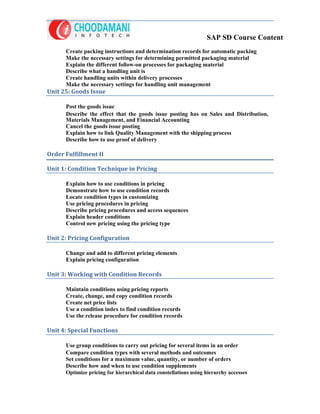
      Create packing instructions and determination records for automatic packing
      Make the necessary settings for determining permitted packaging material
      Explain the different follow-on processes for packaging material
      Describe what a handling unit is
      Create handling units within delivery processes
      Make the necessary settings for handling unit management
Unit 25: Goods Issue

      Post the goods issue
      Describe the effect that the goods issue posting has on Sales and Distribution,
      Materials Management, and Financial Accounting
      Cancel the goods issue posting
      Explain how to link Quality Management with the shipping process
      Describe how to use proof of delivery

Order Fulfillment II

Unit 1: Condition Technique in Pricing

      Explain how to use conditions in pricing
      Demonstrate how to use condition records
      Locate condition types in customizing
      Use pricing procedures in pricing
      Describe pricing procedures and access sequences
      Explain header conditions
      Control new pricing using the pricing type

Unit 2: Pricing Configuration

      Change and add to different pricing elements
      Explain pricing configuration

Unit 3: Working with Condition Records

      Maintain conditions using pricing reports
      Create, change, and copy condition records
      Create net price lists
      Use a condition index to find condition records
      Use the release procedure for condition records

Unit 4: Special Functions

      Use group conditions to carry out pricing for several items in an order
      Compare condition types with several methods and outcomes
      Set conditions for a maximum value, quantity, or number of orders
      Describe how and when to use condition supplements
      Optimize pricing for hierarchical data constellations using hierarchy accesses
SAP SD Course Content
      Explain the techniques of data determination in access using the price book as an
      example
      Implement customizing settings for pricing

Unit 5: Condition Types

      Create order values and net prices manually
      Set a minimum price for a material or a minimum value for an order
      Set interval scales for conditions
      Use customer hierarchies for price agreements
      Describe the effect of condition formulae
      Round final amounts
      Determine costs and cash discount amounts statistically in pricing
      Describe how expected customer prices transferred using EDI are used

Unit 6: Taxes, Pricing Agreements, and Rebates

      Describe the criteria taken into account to determine taxes
      Describe how taxes are determined for each order item
      Use agreements to implement and evaluate marketing projects
      Describe the entire rebate processing procedure
      Create rebate agreements
      Perform rebate settlements
      Control rebate processing in Customizing

Unit 7: Introduction

      Apply the billing functionality in Sales and Distribution
      Configure the system to meet your company-specific billing requirements
      Describe the integration of the billing document within the SD process chain
      Explain the transfer of data from Sales and Distribution to Financial Accounting
      Describe the structure of a billing document
      Access the different information contained in the billing document

Unit 8: Basics

      Describe the relevant organizational units in Sales and Distribution and Financial
      Accounting

Unit 9: Controlling the Billing Process

      Describe different business transactions in the context of billing and billing types
      Demonstrate the importance of the item category within billing
      Explain the assignment of these organizational units to one anoth
Unit 10: Special Billing Types
SAP SD Course Content
      Explain the process flow and methods of control for various business transactions
      within the context of billing
      Explain the process flow and methods of control for various business transactions
      within the context of billing.

Unit 11: Data Flow

      Name the documents that can form the basis of the billing document
      Describe the way the process chain is mapped in the document flow
      Demonstrate the different sources for the data in the billing document
      Name the requirements that must be met in order for billing to be carried out

Unit 12: Creating Billing Documents

      Explain the different options for creating billing documents
      Explain the significance of the billing due list for creating billing documents in
      collective runs
      Demonstrate the option for displaying invoice creation on specific dates
      Describe how to cancel a collective billing run
      Describe the different control parameters within the framework of copying control

Unit 13: Types of Settlements

      Explain the different types of settlement
      Give the reasons for splitting an invoice
      Make the required settings for using invoice lists

Unit 14: Special Business Transactions

      Carry out a business process with periodic billing and milestone billing
      Describe the process for down payment processing in Sales and Distribution
      and Financial Accounting
      Describe the process for instalment payments

Unit 15: Account Determination

      Describe the different areas in which account determination is used
      Describe the account determination process
      Explain the use and determination of business areas

Unit 16: Copying Control

      modify copying control to meet special requirements

Unit 18: Text Control
SAP SD Course Content
      Identify the source of texts in Sales and Distribution
      Describe the criteria which influence how texts are determined
      Define and assign text types in Customizing
      Edit texts manually in the sales document

Unit 19: Output

      Describe the purpose of output types
      Set up various transmission media for issuing or printing output
      Select the dispatch times at which the output is issued
      Adjust the output determination to meet customer-specific requirements
      Explain how output types are processed in the SAP system
      Assess the degree of difficulty involved in adjusting the existing layout for output
      types to meet your requirements
      Name the steps needed for integrating customer-specific output types

Unit 20: System Modifications

      define account groups for maintaining customer master records
      adapt screens that use the display element “table control” to meet your
      specific requirements
      create and use transaction variants

SAP SD Course Content

  • 1.
    SAP SD CourseContent Order Fulfillment I Unit 1: Navigation Identify the elements of a standard window Navigate in the system Use the basic help functions Make personal system settings. Unit 2: Enterprise Structures in Sales and Distribution Describe sales and distribution structures. Name the organizational units relevant to sales and distribution in the SAP ERP Central Component system Describe the essential characteristics of these organizational units Explain the most important relationships between the organizational structures in sales and distribution Describe the sales and distribution structures Unit 3: Overview of Sales Processes Explain the process chain for sales order processing Create a sales order with reference to a quotation Create an outbound delivery with reference to a sales order Pick and post goods issue Invoice a customer for the delivery Enter an incoming payment in the system Unit 4: Master Data in Sales and Distribution Maintain customer master data Maintain material master data Maintain the customer-material info record Maintain condition master data and explain pricing functions Issue output for sales documents Work with the incompletion log Unit 5: Sales and Distribution Processes – Data Determination and Collective Processing Trigger different sales processes by choosing suitable sales document types Explain how the delivering plant, shipping point and route are determined automatically Give the customers delivery dates automatically determined in the system and be able to look at scheduling in detail Combine and collectively process sales orders due for outbound delivery in one step Combine and collectively process documents due for billing in one st
  • 2.
    SAP SD CourseContent Unit 6: Availability Check Describe the basic principles and function of the availability check Use the availability check as part of order processing Explain how deliveries are shipped Describe how shipment costs are billed to the customer Explain how financial information is transferred from the billing document into the accounting document Unit 7: Make-To-Order Describe presales activities Use inquiries and quotations Explain key functions of item categories Track the status of assembly orders for make-to-order sales orders Unit 8: Complaints Processing Unit 9: Enterprise Structures in Sales and Distribution Use organizational units in the SAP system to map the different areas in your company Set up enterprise structures by assigning them to organizational units Adjust the organizational structures to meet the legal and business requirements of your company Unit 10: Sales Order Processing Determine the origin of document data from various sources, like the material master, the customer master, or Customizing Find and use the tools and help for entering and processing sales orders Unit 11: Controlling Sales Documents Describe the basic principles of business process control in sales. Identify the elements that control the sales documents Name examples of different sales document types used for different business processes Explain what the sales document type does Create Customizing settings for the sales document type Restrict the validity of sales document types to sales areas Identify and explain the important control parameters for item categories Create a new item category Configure the system so that item categories are automatically assigned to a sales document type Control settings for bills of material in the sales document. Identify and explain the most important control parameters for schedule line categories Create a new schedule line category Configure your settings so that schedule line categories are automatically assigned to each sales document item
  • 3.
    SAP SD CourseContent Unit 12: Data Flow Use document flow Understand and influence how data is passed on between sales documents at header, item and schedule line level and recognize possibilities for individual Use the completion rule for item categories to control creation of documents with reference. Unit 13: Special business transactions Explain the differences between cash sales and rush orders and their special features Explain how customer consignments are represented in Customizing for sales Control free-of-charge deliveries and subsequent free-of-charge deliveri Company adjustments. Unit 14: Incompleteness Understand the incompletion log and process incomplete orders. Adjust the incompletion log to meet your own requirements using Customizing. Unit 15: Business partner Understand the importance of the partner function concept for the sales and distribution process. Define new partner functions and integrate these into the process chain. Unit 16: Outline agreements Use different types of outline agreements and their functions Configure outline agreements in Customizing so that they meet your requirements. Set up and use value contracts in Customizing. Store partners authorized to release in contracts. Unit 17: Material Determination, Listing and Exclusion Explain and use the material determination and product selection Explain how to configure customizing so that these functions meet your needs Create master records Understand and analyze the settings for these functions in the sales document Explain and use the material listing and exclusion functions. Unit 18: Free goods Set up automatic free goods determination. Unit 19: Sales Workshop
  • 4.
    SAP SD CourseContent Set up a cash sales scenario with the sales workshop for the sale of materials to your own employees. Control the various functions of bills of material at main and sub-item level. Expand the condition technique in material determination so that this may be both customer-specific and non customer-specific. Unit 20: Overview of the Delivery Process Identify the delivery process as part of the Logistics Execution process Explain the structure of the delivery document and find information in the delivery document Unit 21: Basic Customizing Settings for the Delivery Process Describe the organizational units relevant to shipping Define and assign the organizational units in the Implementation Guide Give an overview of the standard delivery types Explain delivery control at header and item level Describe item category determination in outbound deliveries Describe how delivery documents are used in other processes Unit 22: Goods Issue Process Describe shipping point determination Define route determination Configure shipping and transportation scheduling and use the route schedule functions Create outbound deliveries using collective processing Define picking location determination Define the door and staging zones and determine them in the outbound delivery Change and add to outbound deliveries Monitor shipping activities within the goods issue process Describe the picking process using transfer orders Create transfer orders manually and using collective processing Confirm transfer orders Unit 23: Special Functions for Processing Deliveries Explain how batches can be specified in the outbound delivery Demonstrate serial number assignment in the outbound delivery Use pricing in the outbound delivery Split an existing delivery into several smaller deliveries Unit 24: Packing Define the term “packaging materials” Describe the process for multi-level packing in Sales and Distribution
  • 5.
    SAP SD CourseContent Create packing instructions and determination records for automatic packing Make the necessary settings for determining permitted packaging material Explain the different follow-on processes for packaging material Describe what a handling unit is Create handling units within delivery processes Make the necessary settings for handling unit management Unit 25: Goods Issue Post the goods issue Describe the effect that the goods issue posting has on Sales and Distribution, Materials Management, and Financial Accounting Cancel the goods issue posting Explain how to link Quality Management with the shipping process Describe how to use proof of delivery Order Fulfillment II Unit 1: Condition Technique in Pricing Explain how to use conditions in pricing Demonstrate how to use condition records Locate condition types in customizing Use pricing procedures in pricing Describe pricing procedures and access sequences Explain header conditions Control new pricing using the pricing type Unit 2: Pricing Configuration Change and add to different pricing elements Explain pricing configuration Unit 3: Working with Condition Records Maintain conditions using pricing reports Create, change, and copy condition records Create net price lists Use a condition index to find condition records Use the release procedure for condition records Unit 4: Special Functions Use group conditions to carry out pricing for several items in an order Compare condition types with several methods and outcomes Set conditions for a maximum value, quantity, or number of orders Describe how and when to use condition supplements Optimize pricing for hierarchical data constellations using hierarchy accesses
  • 6.
    SAP SD CourseContent Explain the techniques of data determination in access using the price book as an example Implement customizing settings for pricing Unit 5: Condition Types Create order values and net prices manually Set a minimum price for a material or a minimum value for an order Set interval scales for conditions Use customer hierarchies for price agreements Describe the effect of condition formulae Round final amounts Determine costs and cash discount amounts statistically in pricing Describe how expected customer prices transferred using EDI are used Unit 6: Taxes, Pricing Agreements, and Rebates Describe the criteria taken into account to determine taxes Describe how taxes are determined for each order item Use agreements to implement and evaluate marketing projects Describe the entire rebate processing procedure Create rebate agreements Perform rebate settlements Control rebate processing in Customizing Unit 7: Introduction Apply the billing functionality in Sales and Distribution Configure the system to meet your company-specific billing requirements Describe the integration of the billing document within the SD process chain Explain the transfer of data from Sales and Distribution to Financial Accounting Describe the structure of a billing document Access the different information contained in the billing document Unit 8: Basics Describe the relevant organizational units in Sales and Distribution and Financial Accounting Unit 9: Controlling the Billing Process Describe different business transactions in the context of billing and billing types Demonstrate the importance of the item category within billing Explain the assignment of these organizational units to one anoth Unit 10: Special Billing Types
  • 7.
    SAP SD CourseContent Explain the process flow and methods of control for various business transactions within the context of billing Explain the process flow and methods of control for various business transactions within the context of billing. Unit 11: Data Flow Name the documents that can form the basis of the billing document Describe the way the process chain is mapped in the document flow Demonstrate the different sources for the data in the billing document Name the requirements that must be met in order for billing to be carried out Unit 12: Creating Billing Documents Explain the different options for creating billing documents Explain the significance of the billing due list for creating billing documents in collective runs Demonstrate the option for displaying invoice creation on specific dates Describe how to cancel a collective billing run Describe the different control parameters within the framework of copying control Unit 13: Types of Settlements Explain the different types of settlement Give the reasons for splitting an invoice Make the required settings for using invoice lists Unit 14: Special Business Transactions Carry out a business process with periodic billing and milestone billing Describe the process for down payment processing in Sales and Distribution and Financial Accounting Describe the process for instalment payments Unit 15: Account Determination Describe the different areas in which account determination is used Describe the account determination process Explain the use and determination of business areas Unit 16: Copying Control modify copying control to meet special requirements Unit 18: Text Control
  • 8.
    SAP SD CourseContent Identify the source of texts in Sales and Distribution Describe the criteria which influence how texts are determined Define and assign text types in Customizing Edit texts manually in the sales document Unit 19: Output Describe the purpose of output types Set up various transmission media for issuing or printing output Select the dispatch times at which the output is issued Adjust the output determination to meet customer-specific requirements Explain how output types are processed in the SAP system Assess the degree of difficulty involved in adjusting the existing layout for output types to meet your requirements Name the steps needed for integrating customer-specific output types Unit 20: System Modifications define account groups for maintaining customer master records adapt screens that use the display element “table control” to meet your specific requirements create and use transaction variants