SAP SD THIRD PARTY
PROCESS
Third Party Process Sales
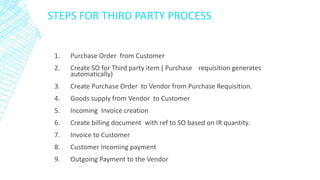
STEPS FOR THIRD PARTY PROCESS
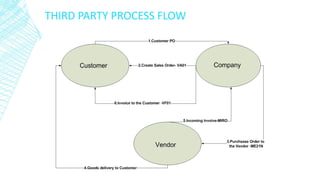
1. Purchase Order from Customer
2. Create SO for Third party item ( Purchase requisition generates
automatically)
3. Create Purchase Order to Vendor from Purchase Requisition.
4. Goods supply from Vendor to Customer
5. Incoming Invoice creation
6. Create billing document with ref to SO based on IR quantity.
7. Invoice to Customer
8. Customer Incoming payment
9. Outgoing Payment to the Vendor
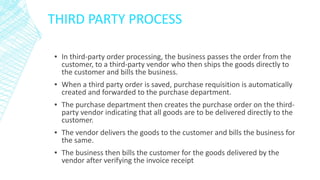
THIRD PARTY PROCESS
▪ In third-party order processing, the business passes the order from the
customer, to a third-party vendor who then ships the goods directly to
the customer and bills the business.
▪ When a third party order is saved, purchase requisition is automatically
created and forwarded to the purchase department.
▪ The purchase department then creates the purchase order on the third-
party vendor indicating that all goods are to be delivered directly to the
customer.
▪ The vendor delivers the goods to the customer and bills the business for
the same.
▪ The business then bills the customer for the goods delivered by the
vendor after verifying the invoice receipt
THIRD PARTY PROCESS FLOW
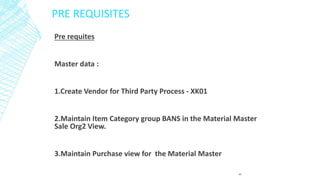
PRE REQUISITES
Pre requites
Master data :
1.Create Vendor for Third Party Process - XK01
2.Maintain Item Category group BANS in the Material Master
Sale Org2 View.
3.Maintain Purchase view for the Material Master
5
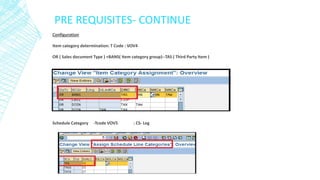
PRE REQUISITES- CONTINUE
Configuration
Item category determination: T Code : VOV4
OR ( Sales document Type ) +BANS( Item category group)--TAS ( Third Party Item )
Schedule Category -Tcode VOV5 : CS- Leg
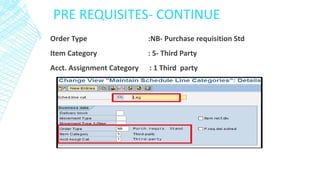
PRE REQUISITES- CONTINUE
Order Type :NB- Purchase requisition Std
Item Category : 5- Third Party
Acct. Assignment Category : 1 Third party
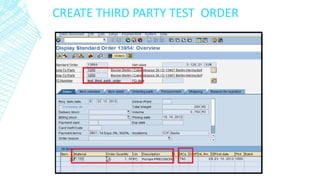
CREATE THIRD PARTY TEST ORDER
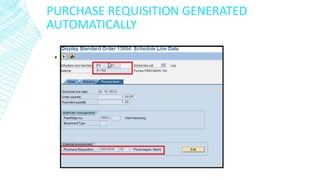
PURCHASE REQUISITION GENERATED
AUTOMATICALLY
▪ Note down purchase requisition: 10015315
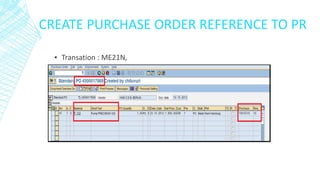
CREATE PURCHASE ORDER REFERENCE TO PR
▪ Transation : ME21N,
▪ PO created 4500017989 reference to PR 10015315
POST VENDOR INCOMING INVOICE
▪ Transaction: MIRO
▪ Incoming Vendor Invoice posted 5105609122
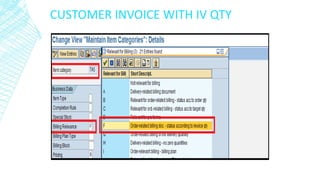
CUSTOMER INVOICE WITH IV QTY
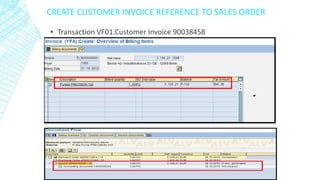
CREATE CUSTOMER INVOICE REFERENCE TO SALES ORDER
▪ Transaction VF01.Customer Invoice 90038458
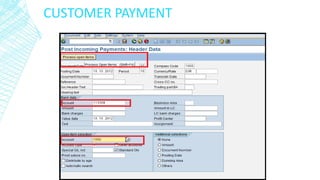
CUSTOMER PAYMENT
POSTING INCOMING CUSTOMER PAYMENT
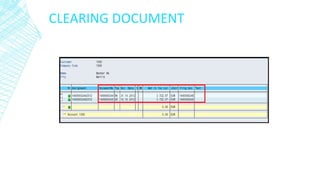
CLEARING DOCUMENT
CUSTOMER ACCOUNT PAYMENT CREDIT
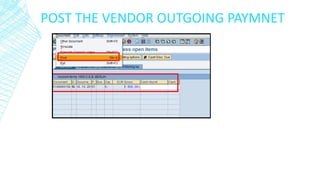
VENDOR OUTGOING PAYMENT
▪ Transaction : FB-53
POST THE VENDOR OUTGOING PAYMNET
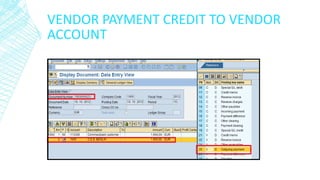
VENDOR PAYMENT CREDIT TO VENDOR
ACCOUNT
Subscribe us for more videos
https://www.youtube.com/channel/UChEgn76
Dyey7WQB-oPiZ6tw/featured
HAPPY LEARNING!
Please visit www.saptutorials.in for online
training

SAP SD third party process

  • 1.
    SAP SD THIRDPARTY PROCESS Third Party Process Sales
  • 2.
    STEPS FOR THIRDPARTY PROCESS 1. Purchase Order from Customer 2. Create SO for Third party item ( Purchase requisition generates automatically) 3. Create Purchase Order to Vendor from Purchase Requisition. 4. Goods supply from Vendor to Customer 5. Incoming Invoice creation 6. Create billing document with ref to SO based on IR quantity. 7. Invoice to Customer 8. Customer Incoming payment 9. Outgoing Payment to the Vendor
  • 3.
    THIRD PARTY PROCESS ▪In third-party order processing, the business passes the order from the customer, to a third-party vendor who then ships the goods directly to the customer and bills the business. ▪ When a third party order is saved, purchase requisition is automatically created and forwarded to the purchase department. ▪ The purchase department then creates the purchase order on the third- party vendor indicating that all goods are to be delivered directly to the customer. ▪ The vendor delivers the goods to the customer and bills the business for the same. ▪ The business then bills the customer for the goods delivered by the vendor after verifying the invoice receipt
  • 4.
  • 5.
    PRE REQUISITES Pre requites Masterdata : 1.Create Vendor for Third Party Process - XK01 2.Maintain Item Category group BANS in the Material Master Sale Org2 View. 3.Maintain Purchase view for the Material Master 5
  • 6.
    PRE REQUISITES- CONTINUE Configuration Itemcategory determination: T Code : VOV4 OR ( Sales document Type ) +BANS( Item category group)--TAS ( Third Party Item ) Schedule Category -Tcode VOV5 : CS- Leg
  • 7.
    PRE REQUISITES- CONTINUE OrderType :NB- Purchase requisition Std Item Category : 5- Third Party Acct. Assignment Category : 1 Third party
  • 8.
  • 9.
    PURCHASE REQUISITION GENERATED AUTOMATICALLY ▪Note down purchase requisition: 10015315
  • 10.
    CREATE PURCHASE ORDERREFERENCE TO PR ▪ Transation : ME21N, ▪ PO created 4500017989 reference to PR 10015315
  • 11.
    POST VENDOR INCOMINGINVOICE ▪ Transaction: MIRO ▪ Incoming Vendor Invoice posted 5105609122
  • 12.
  • 13.
    CREATE CUSTOMER INVOICEREFERENCE TO SALES ORDER ▪ Transaction VF01.Customer Invoice 90038458
  • 14.
  • 15.
  • 16.
  • 17.
  • 18.
    VENDOR OUTGOING PAYMENT ▪Transaction : FB-53
  • 19.
    POST THE VENDOROUTGOING PAYMNET
  • 20.
    VENDOR PAYMENT CREDITTO VENDOR ACCOUNT
  • 21.
    Subscribe us formore videos https://www.youtube.com/channel/UChEgn76 Dyey7WQB-oPiZ6tw/featured HAPPY LEARNING! Please visit www.saptutorials.in for online training