ANCILLARY
DEVELOPMENT
MAGAZINE
ADVERT
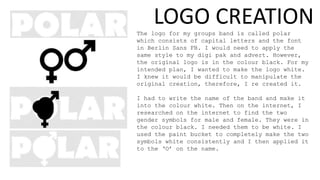
The logo for my groups band is called polar
which consists of capital letters and the font
in Berlin Sans FB. I would need to apply the
same style to my digi pak and advert. However,
the original logo is in the colour black. For my
intended plan, I wanted to make the logo white.
I knew it would be difficult to manipulate the
original creation, therefore, I re created it.
I had to write the name of the band and make it
into the colour white. Then on the internet, I
researched on the internet to find the two
gender symbols for male and female. They were in
the colour black. I needed them to be white. I
used the paint bucket to completely make the two
symbols white consistently and I then applied it
to the ‘O’ on the name.
LOGO CREATION
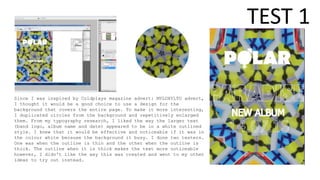
Since I was inspired by Coldplays magazine advert: MYLOXYLTO advert,
I thought it would be a good choice to use a design for the
background that covers the entire page. To make it more interesting,
I duplicated circles from the background and repetitively enlarged
them. From my typography research, I liked the way the larger text
(band logo, album name and date) appeared to be in a white outlined
style. I knew that it would be effective and noticeable if it was in
the colour white because the background it busy. I done two testers.
One was when the outline is thin and the other when the outline is
thick. The outline when it is thick makes the text more noticeable
however, I didn't like the way this was created and went to my other
ideas to try out instead.
TEST 1
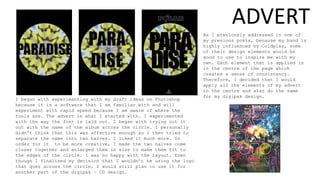
I began with experimenting with my draft ideas on Photoshop
because it is a software that I am familiar with and will
experiment with rapid speed because I am aware of where the
tools are. The advert is what I started with. I experimented
with the way the font is laid out. I began with trying out it
out with the name of the album across the circle. I personally
didn't think that this was affective enough so I then tried to
separate the name into two halves. I liked it much more. In
order for it to be more creative, I made the two halves come
closer together and enlarged them in size to make them fit to
the edges of the circle. I was no happy with the layout. Even
though I finalised my decision that I wouldn’t be using the logo
that goes across the circle, I would still plan to use it for
another part of the digipak – CD design.
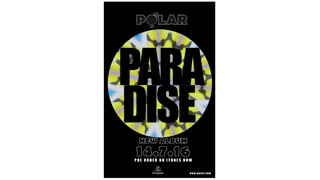
As I previously addressed in one of
my previous posts, because my band is
highly influenced by Coldplay, some
of their design elements would be
good to use to inspire me with my
own. Each element that is applied is
in the centre of the page which
creates a sense of consistency.
Therefore, I decided that I would
apply all the elements of my advert
in the centre and also do the same
for my digipak design.
ADVERT
FRONT COVER
TEXT
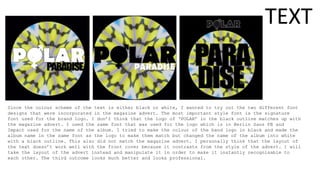
Since the colour scheme of the text is either black or white, I wanted to try out the two different font
designs that were incorporated in the magazine advert. The most important style font is the signature
font used for the brand logo. I don’t think that the logo of ‘POLAR’ in the black outline matches up with
the magazine advert. I used the same font that was used for the logo which is in Berlin Sans FB and
Impact used for the name of the album. I tried to make the colour of the band logo in black and made the
album name in the same font as the logo to make them match but changed the name of the album into white
with a black outline. This also did not match the magazine advert. I personally think that the layout of
the text doesn’t work well with the front cover because it contrasts from the style of the advert. I will
take the layout of the advert instead and manipulate it in order to make it instantly recognisable to
each other. The third outcome looks much better and looks professional.
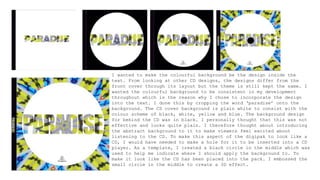
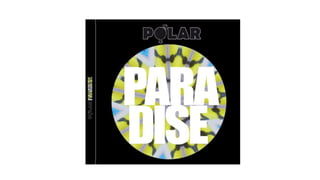
I wanted to make the colourful background be the design inside the
text. From looking at other CD designs, the designs differ from the
front cover through its layout but the theme is still kept the same. I
wanted the colourful background to be consistent in my development
throughout which is the reason why I chose to incorporate the design
into the text. I done this by cropping the word ‘paradise’ onto the
background. The CD cover background is plain white to consist with the
colour scheme of black, white, yellow and blue. The background design
for behind the CD was in black. I personally thought that this was not
effective and looks quite plain. I therefore thought about introducing
the abstract background to it to make viewers feel excited about
listening to the CD. To make this aspect of the digipak to look like a
CD, I would have needed to make a hole for it to be inserted into a CD
player. As a template, I created a black circle in the middle which was
used to help me indicate where I should apply the background to. To
make it look like the CD has been placed into the pack. I embossed the
small circle in the middle to create a 3D effect.
CD DESIGN
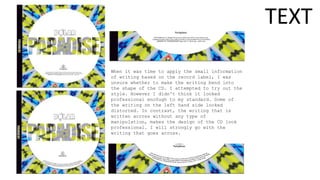
When it was time to apply the small information
of writing based on the record label, I was
unsure whether to make the writing bend into
the shape of the CD. I attempted to try out the
style. However I didn't think it looked
professional eno0ugh to my standard. Some of
the writing on the left hand side looked
distorted. In contrast, the writing that is
written across without any type of
manipulation, makes the design of the CD look
professional. I will strongly go with the
writing that goes across.
TEXT
BOOKLET
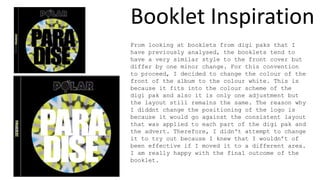
Booklet Inspiration
From looking at booklets from digi paks that I
have previously analysed, the booklets tend to
have a very similar style to the front cover but
differ by one minor change. For this convention
to proceed, I decided to change the colour of the
front of the album to the colour white. This is
because it fits into the colour scheme of the
digi pak and also it is only one adjustment but
the layout still remains the same. The reason why
I diddnt change the positioning of the logo is
because it would go against the consistent layout
that was applied to each part of the digi pak and
the advert. Therefore, I didn't attempt to change
it to try out because I knew that I wouldn’t of
been effective if I moved it to a different area.
I am really happy with the final outcome of the
booklet.
BACK COVER
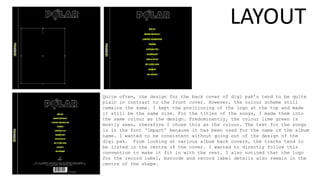
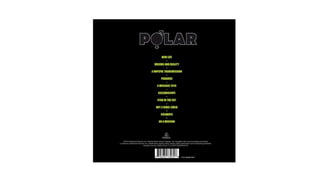
Quite often, the design for the back cover of digi pak’s tend to be quite
plain in contrast to the front cover. However, the colour scheme still
remains the same. I kept the positioning of the logo at the top and made
it still be the same size. For the titles of the songs, I made them into
the same colour as the design. Predominantly, the colour lime green is
mostly seen, therefore I chose this as the colour. The text for the songs
is in the font ‘Impact’ because it has been used for the name of the album
name. I wanted to be consistent without going out of the design of the
digi pak. From looking at various album back covers, the tracks tend to
be listed in the centre of the cover. I wanted to directly follow this
convention to make it fit in with the rest. I also noticed that the logo
for the record label, barcode and record label details also remain in the
centre of the shape.
LAYOUT
Screenshots for development

Screenshots for development

  • 1.
  • 2.
  • 3.
    The logo formy groups band is called polar which consists of capital letters and the font in Berlin Sans FB. I would need to apply the same style to my digi pak and advert. However, the original logo is in the colour black. For my intended plan, I wanted to make the logo white. I knew it would be difficult to manipulate the original creation, therefore, I re created it. I had to write the name of the band and make it into the colour white. Then on the internet, I researched on the internet to find the two gender symbols for male and female. They were in the colour black. I needed them to be white. I used the paint bucket to completely make the two symbols white consistently and I then applied it to the ‘O’ on the name. LOGO CREATION
  • 4.
    Since I wasinspired by Coldplays magazine advert: MYLOXYLTO advert, I thought it would be a good choice to use a design for the background that covers the entire page. To make it more interesting, I duplicated circles from the background and repetitively enlarged them. From my typography research, I liked the way the larger text (band logo, album name and date) appeared to be in a white outlined style. I knew that it would be effective and noticeable if it was in the colour white because the background it busy. I done two testers. One was when the outline is thin and the other when the outline is thick. The outline when it is thick makes the text more noticeable however, I didn't like the way this was created and went to my other ideas to try out instead. TEST 1
  • 5.
    I began withexperimenting with my draft ideas on Photoshop because it is a software that I am familiar with and will experiment with rapid speed because I am aware of where the tools are. The advert is what I started with. I experimented with the way the font is laid out. I began with trying out it out with the name of the album across the circle. I personally didn't think that this was affective enough so I then tried to separate the name into two halves. I liked it much more. In order for it to be more creative, I made the two halves come closer together and enlarged them in size to make them fit to the edges of the circle. I was no happy with the layout. Even though I finalised my decision that I wouldn’t be using the logo that goes across the circle, I would still plan to use it for another part of the digipak – CD design. As I previously addressed in one of my previous posts, because my band is highly influenced by Coldplay, some of their design elements would be good to use to inspire me with my own. Each element that is applied is in the centre of the page which creates a sense of consistency. Therefore, I decided that I would apply all the elements of my advert in the centre and also do the same for my digipak design. ADVERT
  • 7.
  • 8.
    TEXT Since the colourscheme of the text is either black or white, I wanted to try out the two different font designs that were incorporated in the magazine advert. The most important style font is the signature font used for the brand logo. I don’t think that the logo of ‘POLAR’ in the black outline matches up with the magazine advert. I used the same font that was used for the logo which is in Berlin Sans FB and Impact used for the name of the album. I tried to make the colour of the band logo in black and made the album name in the same font as the logo to make them match but changed the name of the album into white with a black outline. This also did not match the magazine advert. I personally think that the layout of the text doesn’t work well with the front cover because it contrasts from the style of the advert. I will take the layout of the advert instead and manipulate it in order to make it instantly recognisable to each other. The third outcome looks much better and looks professional.
  • 9.
    I wanted tomake the colourful background be the design inside the text. From looking at other CD designs, the designs differ from the front cover through its layout but the theme is still kept the same. I wanted the colourful background to be consistent in my development throughout which is the reason why I chose to incorporate the design into the text. I done this by cropping the word ‘paradise’ onto the background. The CD cover background is plain white to consist with the colour scheme of black, white, yellow and blue. The background design for behind the CD was in black. I personally thought that this was not effective and looks quite plain. I therefore thought about introducing the abstract background to it to make viewers feel excited about listening to the CD. To make this aspect of the digipak to look like a CD, I would have needed to make a hole for it to be inserted into a CD player. As a template, I created a black circle in the middle which was used to help me indicate where I should apply the background to. To make it look like the CD has been placed into the pack. I embossed the small circle in the middle to create a 3D effect.
  • 10.
  • 11.
    When it wastime to apply the small information of writing based on the record label, I was unsure whether to make the writing bend into the shape of the CD. I attempted to try out the style. However I didn't think it looked professional eno0ugh to my standard. Some of the writing on the left hand side looked distorted. In contrast, the writing that is written across without any type of manipulation, makes the design of the CD look professional. I will strongly go with the writing that goes across. TEXT
  • 12.
  • 13.
    Booklet Inspiration From lookingat booklets from digi paks that I have previously analysed, the booklets tend to have a very similar style to the front cover but differ by one minor change. For this convention to proceed, I decided to change the colour of the front of the album to the colour white. This is because it fits into the colour scheme of the digi pak and also it is only one adjustment but the layout still remains the same. The reason why I diddnt change the positioning of the logo is because it would go against the consistent layout that was applied to each part of the digi pak and the advert. Therefore, I didn't attempt to change it to try out because I knew that I wouldn’t of been effective if I moved it to a different area. I am really happy with the final outcome of the booklet.
  • 15.
  • 16.
    Quite often, thedesign for the back cover of digi pak’s tend to be quite plain in contrast to the front cover. However, the colour scheme still remains the same. I kept the positioning of the logo at the top and made it still be the same size. For the titles of the songs, I made them into the same colour as the design. Predominantly, the colour lime green is mostly seen, therefore I chose this as the colour. The text for the songs is in the font ‘Impact’ because it has been used for the name of the album name. I wanted to be consistent without going out of the design of the digi pak. From looking at various album back covers, the tracks tend to be listed in the centre of the cover. I wanted to directly follow this convention to make it fit in with the rest. I also noticed that the logo for the record label, barcode and record label details also remain in the centre of the shape. LAYOUT