Screencasting
to Instruct
1
What are screencasts?
□ Screencasts capture all or a portion of
a computer screen while the author
narrates what the viewer is seeing in a
voice-over audio.
□ Screencasts are used by businesses
and organizations for a wide variety of
purposes and viewed by both internal
and external audiences.
2
Internal Screencasts
■ Collaborate with others to share
ideas, solve problems, and
communicate asynchronously,
■ Provide progress reports to project
managers,
■ Provide employee training
materials,
■ Create internal multimedia
communication that is more
accessible for employees with
disabilities,
■ And much more……
External Screencasts
■ Target a specific audience by
personalizing the sales pitch to that
audience,
■ Provide external technical
documentation such as
specifications, instructions,
definitions, and descriptions to
enhance product support,
■ Create external multimedia
communication that is more
accessible for audiences with
disabilities,
■And much more . . . . .
3
Here are a few examples
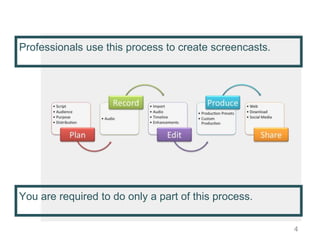
Professionals use this process to create screencasts.
4
You are required to do only a part of this process.
5
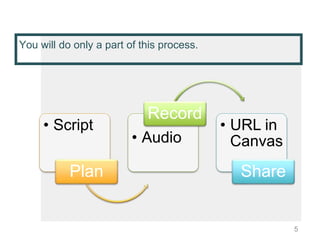
You will do only a part of this process.
• Script
Plan
• Audio
Record
• URL in
Canvas
Share
You will need a microphone.
• Most computers have a built-in mic, and that will
work for your screencast.
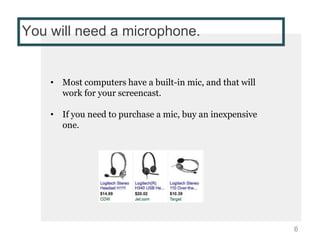
• If you need to purchase a mic, buy an inexpensive
one.
6
There are 5 steps to this screencast.
• Step 1: Choose a screencasting tool
• Step 2: Choose the size of the screen
• Step 3: Write the Script
• Step 4: Practice the Script
• Step 5: Record the Screencast
7
Step 1: Choose a tool.
• You need a tool that has a screencapture feature AND
will host the file.
• What you will submit for evaluation is the URL address
of your file.
• Your file must play for a user without having to be
downloaded.
• I recommend Screencastomatic or Jing.
8
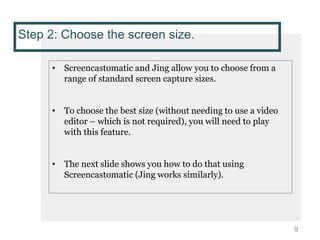
Step 2: Choose the screen size.
• Screencastomatic and Jing allow you to choose from a
range of standard screen capture sizes.
• To choose the best size (without needing to use a video
editor – which is not required), you will need to play
with this feature.
• The next slide shows you how to do that using
Screencastomatic (Jing works similarly).
9
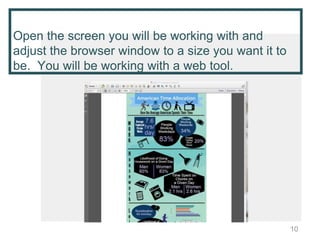
Open the screen you will be working with and
adjust the browser window to a size you want it to
be. You will be working with a web tool.
10
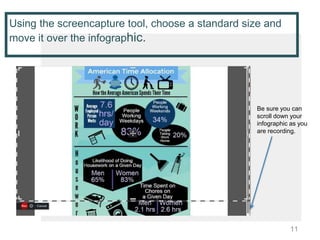
Using the screencapture tool, choose a standard size and
move it over the infographic.
11
Be sure you can
scroll down your
infographic as you
are recording.
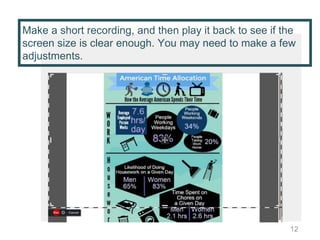
Make a short recording, and then play it back to see if the
screen size is clear enough. You may need to make a few
adjustments.
12
Step 3: Write the script.
• Opening. Because this is an internal screencast, you
will not want to open with music. Just briefly greet the
audience and explain the purpose of your screencast.
Base your script on your written instructions, but you
must adapt it for your medium.
• Instructions. As you record your audio, you will be
“walking” viewers through your web tool usage process
and clearly showing an audience of different levels to
use it. To do that, you need to assess your tone and the
content you need to include.
• Conclusion. Signal that your walkthrough is finished.
This may be as simple as inviting the audience to
contact you if they have questions.
13
Step 4: Practice and mark the script.
• Practice the script, and as you do, mark where you want
to pause, emphasize words or phrases, etc.
• Do a test recording and play back. Work on improving
your speaking style.
• Use the tips on vocal variety and diction under the
Project 3 Tools and Resources module to help you if
your voice lacks variety or you have problems with
diction.
• The idea is not to develop a professional broadcasting
style but to clearly articulate what you are saying and to
use effective vocal expression.
14
Step 5: Record the screencast.
• Your screencast doesn’t need to entertain, but it should
clearly walk an audience of all technical levels through
your instructions, it should be professional, and it
must be useful to your audience.
15
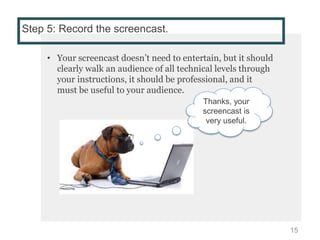
Thanks, your
screencast is
very useful.

Screencasting instructions

  • 1.
  • 2.
    What are screencasts? □Screencasts capture all or a portion of a computer screen while the author narrates what the viewer is seeing in a voice-over audio. □ Screencasts are used by businesses and organizations for a wide variety of purposes and viewed by both internal and external audiences. 2
  • 3.
    Internal Screencasts ■ Collaboratewith others to share ideas, solve problems, and communicate asynchronously, ■ Provide progress reports to project managers, ■ Provide employee training materials, ■ Create internal multimedia communication that is more accessible for employees with disabilities, ■ And much more…… External Screencasts ■ Target a specific audience by personalizing the sales pitch to that audience, ■ Provide external technical documentation such as specifications, instructions, definitions, and descriptions to enhance product support, ■ Create external multimedia communication that is more accessible for audiences with disabilities, ■And much more . . . . . 3 Here are a few examples
  • 4.
    Professionals use thisprocess to create screencasts. 4 You are required to do only a part of this process.
  • 5.
    5 You will doonly a part of this process. • Script Plan • Audio Record • URL in Canvas Share
  • 6.
    You will needa microphone. • Most computers have a built-in mic, and that will work for your screencast. • If you need to purchase a mic, buy an inexpensive one. 6
  • 7.
    There are 5steps to this screencast. • Step 1: Choose a screencasting tool • Step 2: Choose the size of the screen • Step 3: Write the Script • Step 4: Practice the Script • Step 5: Record the Screencast 7
  • 8.
    Step 1: Choosea tool. • You need a tool that has a screencapture feature AND will host the file. • What you will submit for evaluation is the URL address of your file. • Your file must play for a user without having to be downloaded. • I recommend Screencastomatic or Jing. 8
  • 9.
    Step 2: Choosethe screen size. • Screencastomatic and Jing allow you to choose from a range of standard screen capture sizes. • To choose the best size (without needing to use a video editor – which is not required), you will need to play with this feature. • The next slide shows you how to do that using Screencastomatic (Jing works similarly). 9
  • 10.
    Open the screenyou will be working with and adjust the browser window to a size you want it to be. You will be working with a web tool. 10
  • 11.
    Using the screencapturetool, choose a standard size and move it over the infographic. 11 Be sure you can scroll down your infographic as you are recording.
  • 12.
    Make a shortrecording, and then play it back to see if the screen size is clear enough. You may need to make a few adjustments. 12
  • 13.
    Step 3: Writethe script. • Opening. Because this is an internal screencast, you will not want to open with music. Just briefly greet the audience and explain the purpose of your screencast. Base your script on your written instructions, but you must adapt it for your medium. • Instructions. As you record your audio, you will be “walking” viewers through your web tool usage process and clearly showing an audience of different levels to use it. To do that, you need to assess your tone and the content you need to include. • Conclusion. Signal that your walkthrough is finished. This may be as simple as inviting the audience to contact you if they have questions. 13
  • 14.
    Step 4: Practiceand mark the script. • Practice the script, and as you do, mark where you want to pause, emphasize words or phrases, etc. • Do a test recording and play back. Work on improving your speaking style. • Use the tips on vocal variety and diction under the Project 3 Tools and Resources module to help you if your voice lacks variety or you have problems with diction. • The idea is not to develop a professional broadcasting style but to clearly articulate what you are saying and to use effective vocal expression. 14
  • 15.
    Step 5: Recordthe screencast. • Your screencast doesn’t need to entertain, but it should clearly walk an audience of all technical levels through your instructions, it should be professional, and it must be useful to your audience. 15 Thanks, your screencast is very useful.