



Technical Director, 10gen
@jonnyeight alvin@10gen.com alvinonmongodb.com
Alvin Richards
#MongoDBdays
Schema Design
3 Real World Use Cases
I'm planning a Trip to LA…
Single Table En
Agenda
• Why is schema design important
• 3 Real World Schemas
– Inbox
– IndexedAttributes
– Multiple Identities
• Conclusions
Why is Schema Design
important?
• Largest factor for a performant system
• Schema design with MongoDB is different
• RBMS – "What answers do I have?"
• MongoDB – "What question will I have?"
• Must consider use case with schema
#1 - Message Inbox
Let’s get
Social
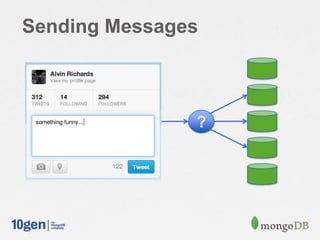
Sending Messages
?
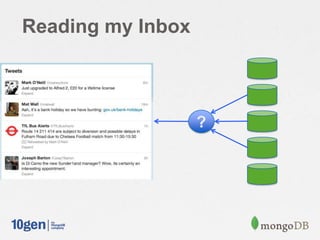
Reading my Inbox
?
Design Goals
• Efficiently send new messages to recipients
• Efficiently read inbox
3 Approaches (there are
more)
• Fan out on Read
• Fan out on Write
• Fan out on Write with Bucketing
Fan out on read – Send
Message
Shard 1 Shard 2 Shard 3
Send
Message
db.inbox.save(
{ to: [ "Bob", "Jane" ], … } )
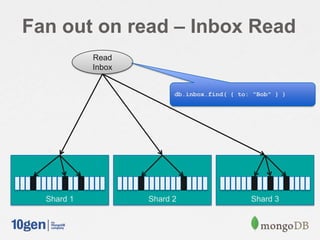
Fan out on read – Inbox Read
Shard 1 Shard 2 Shard 3
Read
Inbox
db.inbox.find( { to: "Bob" } )
// Shard on "from"
db.shardCollection( "mongodbdays.inbox", { from: 1 } )
// Make sure we have an index to handle inbox reads
db.inbox.ensureIndex( { to: 1, sent: 1 } )
msg = {
from: "Joe",
to: [ "Bob", "Jane" ],
sent: new Date(),
message: "Hi!",
}
// Send a message
db.inbox.save( msg )
// Read my inbox
db.inbox.find( { to: "Bob" } ).sort( { sent: -1 } )
Fan out on read
Considerations
1 document per message sent
Multiple recipients in an array key
Reading inbox finds all messages with my own
name in the recipient field
✖Requires scatter-gather on sharded cluster
✖Then a lot of random IO on a shard to find
everything
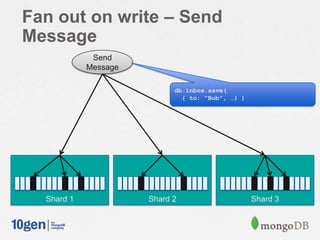
Fan out on write – Send
Message
Shard 1 Shard 2 Shard 3
Send
Message
db.inbox.save(
{ to: "Bob", …} )
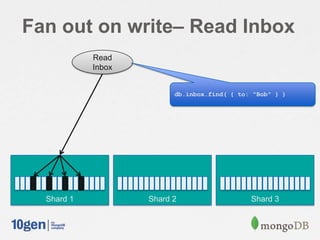
Fan out on write– Read Inbox
Shard 1 Shard 2 Shard 3
Read
Inbox
db.inbox.find( { to: "Bob" } )
// Shard on “recipient” and “sent”
db.shardCollection( "mongodbdays.inbox", { ”recipient”: 1, ”sent”: 1 } )
msg = {
from: "Joe”,
recipient: [ "Bob", "Jane" ],
sent: new Date(),
message: "Hi!",
}
// Send a message
for ( recipient in msg.recipient ) {
msg.to = recipient
db.inbox.save( msg );
}
// Read my inbox
db.inbox.find( { to: "Joe" } ).sort( { sent: -1 } )
Fan out on write
Considerations
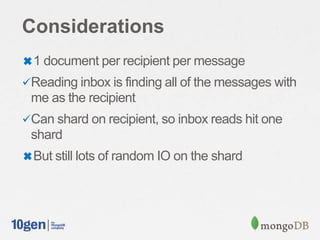
✖1 document per recipient per message
Reading inbox is finding all of the messages with
me as the recipient
Can shard on recipient, so inbox reads hit one
shard
✖But still lots of random IO on the shard
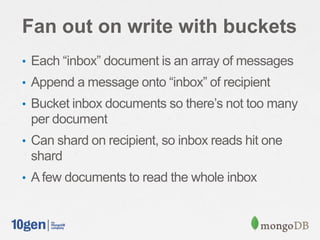
Fan out on write with buckets
• Each “inbox” document is an array of messages
• Append a message onto “inbox” of recipient
• Bucket inbox documents so there’s not too many
per document
• Can shard on recipient, so inbox reads hit one
shard
• A few documents to read the whole inbox
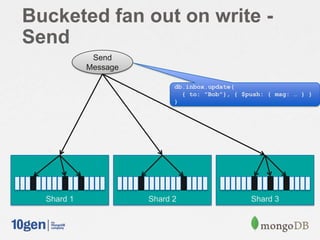
Bucketed fan out on write -
Send
Shard 1 Shard 2 Shard 3
Send
Message
db.inbox.update(
{ to: "Bob"}, { $push: { msg: … } }
)
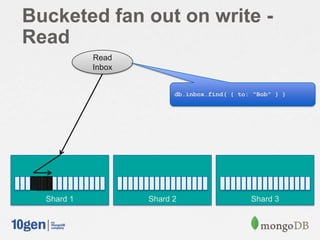
Bucketed fan out on write -
Read
Shard 1 Shard 2 Shard 3
Read
Inbox
db.inbox.find( { to: "Bob" } )
// Shard on “owner / sequence”
db.shardCollection( "mongodbdays.inbox", { owner: 1, sequence: 1 } )
db.shardCollection( "mongodbdays.users", { user_name: 1 } )
msg = {
from: "Joe",
to: [ "Bob", "Jane" ],
sent: new Date(),
message: "Hi!",
}
// Send a message
for( recipient in msg.to) {
count = db.users.findAndModify({
query: { user_name: msg.to[recipient] },
update: { "$inc": { "msg_count": 1 } },
upsert: true,
new: true }).msg_count;
sequence = Math.floor(count / 50);
db.inbox.update( { to: msg.to[recipient], sequence: sequence },
{ $push: { "messages": msg } },
{ upsert: true } );
}
// Read my inbox
db.inbox.find( { to: "Joe" } ).sort ( { sequence: -1 } ).limit( 2 )
Fan out on write – with
buckets
Considerations
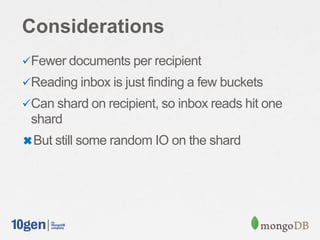
Fewer documents per recipient
Reading inbox is just finding a few buckets
Can shard on recipient, so inbox reads hit one
shard
✖But still some random IO on the shard
But…
• What if I do not / cannot retain all history?
– Space limited: Hours, Days, Weeks, $$$
– Legislative limited: HIPPA, SOX, DPA
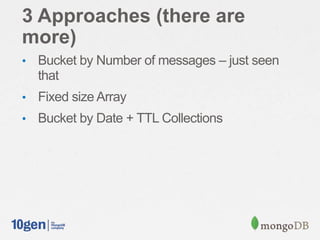
3 Approaches (there are
more)
• Bucket by Number of messages – just seen
that
• Fixed size Array
• Bucket by Date + TTL Collections
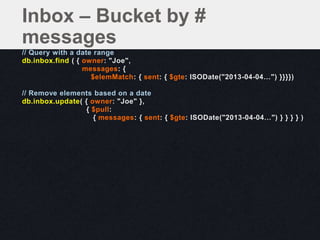
// Query with a date range
db.inbox.find ( { owner: "Joe",
messages: {
$elemMatch: { sent: { $gte: ISODate("2013-04-04…") }}}})
// Remove elements based on a date
db.inbox.update( { owner: "Joe" },
{ $pull:
{ messages: { sent: { $gte: ISODate("2013-04-04…") } } } } )
Inbox – Bucket by #
messages
Considerations
Limited to a known range of messages
✖Shrinking documents
• space can be reclaimed with
db.runCommand ( { compact: '<collection>' } )
✖Removing the document after the last element
in the array as been removed
– { "_id" : …, "messages" : [ ], "owner" :
"friend1", "sequence" : 0 }
msg = {
from: "Your Boss",
to: [ "Bob" ],
sent: new Date(),
message: "CALL ME NOW!"
}
// 2.4 Introduces $each, $sort and $slice for $push
db.messages.update(
{ _id: 1 },
{ $push: { messages: { $each: [ msg ],
$sort: { sent: 1 },
$slice: -50
}
}
}
)
Maintain the latest – Fixed
Size Array
Push this object
onto the array
Sort the resulting
array by "sent"
Limit the array to
50 elements
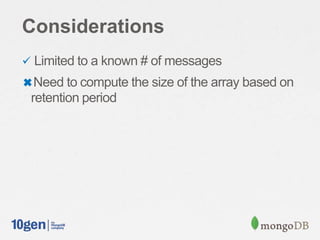
Considerations
 Limited to a known # of messages
✖Need to compute the size of the array based on
retention period
// messages: one doc per user per day
db.inbox.findOne()
{
_id: 1,
to: "Joe",
sequence: ISODate("2013-02-04T00:00:00.392Z"),
messages: [ ]
}
// Auto expires data after 31536000 seconds = 1 year
db.messages.ensureIndex( { sequence: 1 },
{ expireAfterSeconds: 31536000 } )
TTL Collections
Considerations
 Limited to a known range of messages
 Automatic purge of expired data
No need to have a CRON task, etc. to do this
✖ Per Collection basis
#3 – Indexed Attributes
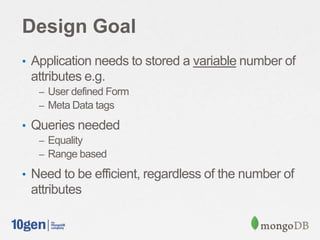
Design Goal
• Application needs to stored a variable number of
attributes e.g.
– User defined Form
– Meta Data tags
• Queries needed
– Equality
– Range based
• Need to be efficient, regardless of the number of
attributes
2 Approaches (there are
more)
• Attributes
• Attributes as Objects in an Array
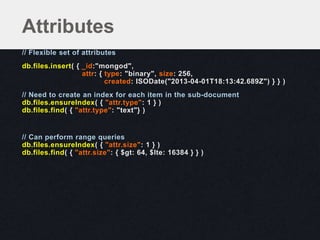
// Flexible set of attributes
db.files.insert( { _id:"mongod",
attr: { type: "binary", size: 256,
created: ISODate("2013-04-01T18:13:42.689Z") } } )
// Need to create an index for each item in the sub-document
db.files.ensureIndex( { "attr.type": 1 } )
db.files.find( { "attr.type": "text"} )
// Can perform range queries
db.files.ensureIndex( { "attr.size": 1 } )
db.files.find( { "attr.size": { $gt: 64, $lte: 16384 } } )
Attributes
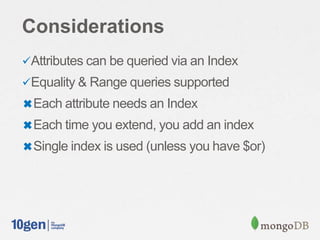
Considerations
Attributes can be queried via an Index
Equality & Range queries supported
✖Each attribute needs an Index
✖Each time you extend, you add an index
✖Single index is used (unless you have $or)
// Flexible set of attributes, each attribute is an object
db.files.insert( { _id: "mongod",
attr: [ { type: "binary" },
{ size: 256 },
{ created: ISODate("2013-04-01T18:13:42.689Z") } ] } )
db.files.ensureIndex( { attr: 1 } )
Attributes as Objects in Array
// Range queries
db.files.find( { attr: { $gt: { size:64 }, $lte: { size: 16384 } } } )
db.files.find( { attr:
{ $gte: { created: ISODate("2013-02-01T00:00:01.689Z") } } } )
// Multiple condition – Only the first predicate on the query can use the Index
// ensure that this is the most selective.
// Index Intersection will allow multiple indexes, see SERVER-3071
db.files.find( { $and: [ { attr: { $gte: { created: ISODate("2013-02-01T…") } } },
{ attr: { $gt: { size:128 }, $lte: { size: 16384 } } }
] } )
// Each $or can use an index
db.files.find( { $or: [ { attr: { $gte: { created: ISODate("2013-02-01T…") } } },
{ attr: { $gt: { size:128 }, $lte: { size: 16384 } } }
] } )
Queries
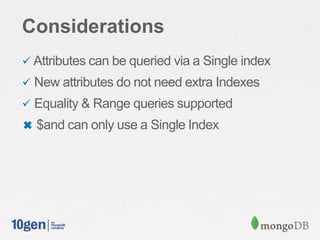
Considerations
 Attributes can be queried via a Single index
 New attributes do not need extra Indexes
 Equality & Range queries supported
✖ $and can only use a Single Index
#3 – Multiple Identities
Design Goal
• Ability to look up by a number of different
identities e.g.
• Username
• Email address
• FB Handle
• LinkedIn URL
2 Approaches (there are
more)
• Multiple Identifiers in a single document
• Separate Identifiers from Content
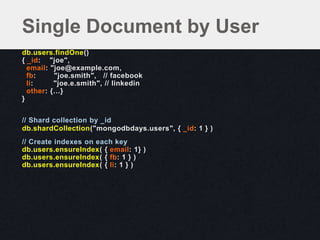
db.users.findOne()
{ _id: "joe",
email: "joe@example.com,
fb: "joe.smith", // facebook
li: "joe.e.smith", // linkedin
other: {…}
}
// Shard collection by _id
db.shardCollection("mongodbdays.users", { _id: 1 } )
// Create indexes on each key
db.users.ensureIndex( { email: 1} )
db.users.ensureIndex( { fb: 1 } )
db.users.ensureIndex( { li: 1 } )
Single Document by User
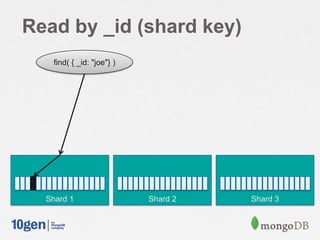
Read by _id (shard key)
Shard 1 Shard 2 Shard 3
find( { _id: "joe"} )
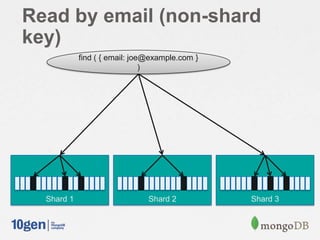
Read by email (non-shard
key)
Shard 1 Shard 2 Shard 3
find ( { email: joe@example.com }
)
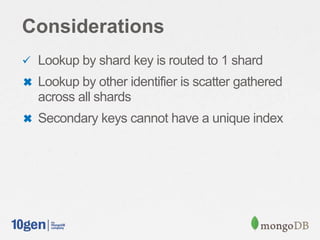
Considerations
 Lookup by shard key is routed to 1 shard
✖ Lookup by other identifier is scatter gathered
across all shards
✖ Secondary keys cannot have a unique index
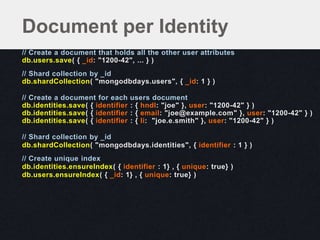
// Create a document that holds all the other user attributes
db.users.save( { _id: "1200-42", ... } )
// Shard collection by _id
db.shardCollection( "mongodbdays.users", { _id: 1 } )
// Create a document for each users document
db.identities.save( { identifier : { hndl: "joe" }, user: "1200-42" } )
db.identities.save( { identifier : { email: "joe@example.com" }, user: "1200-42" } )
db.identities.save( { identifier : { li: "joe.e.smith" }, user: "1200-42" } )
// Shard collection by _id
db.shardCollection( "mongodbdays.identities", { identifier : 1 } )
// Create unique index
db.identities.ensureIndex( { identifier : 1} , { unique: true} )
db.users.ensureIndex( { _id: 1} , { unique: true} )
Document per Identity
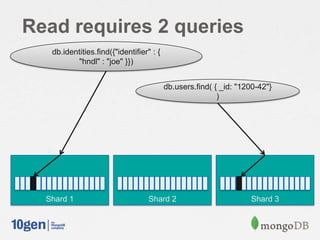
Read requires 2 queries
Shard 1 Shard 2 Shard 3
db.identities.find({"identifier" : {
"hndl" : "joe" }})
db.users.find( { _id: "1200-42"}
)
Considerations
 Multiple queries, but always routed
 Lookup to Identities is a routed query
 Lookup to Users is a routed query
 Unique indexes available
Conclusion
Summary
• Multiple ways to model a domain problem
• Understand the key uses cases of your app
• Balance between ease of query vs. ease of write
• Avoid Random IO
• Avoid Scatter / Gather query pattern
Technical Director, 10gen
@jonnyeight alvin@10gen.com alvinonmongodb.com
Alvin Richards
#MongoDBdays
Thank You

MongoDB San Francisco 2013: Data Modeling Examples From the Real World presented by Alvin Richards, 10Gen Technical Director for EMEA, 10gen

  • 1.
    Technical Director, 10gen @jonnyeightalvin@10gen.com alvinonmongodb.com Alvin Richards #MongoDBdays Schema Design 3 Real World Use Cases
  • 2.
    I'm planning aTrip to LA…
  • 3.
    Single Table En Agenda •Why is schema design important • 3 Real World Schemas – Inbox – IndexedAttributes – Multiple Identities • Conclusions
  • 4.
    Why is SchemaDesign important? • Largest factor for a performant system • Schema design with MongoDB is different • RBMS – "What answers do I have?" • MongoDB – "What question will I have?" • Must consider use case with schema
  • 5.
  • 6.
  • 7.
  • 8.
  • 9.
    Design Goals • Efficientlysend new messages to recipients • Efficiently read inbox
  • 10.
    3 Approaches (thereare more) • Fan out on Read • Fan out on Write • Fan out on Write with Bucketing
  • 11.
    Fan out onread – Send Message Shard 1 Shard 2 Shard 3 Send Message db.inbox.save( { to: [ "Bob", "Jane" ], … } )
  • 12.
    Fan out onread – Inbox Read Shard 1 Shard 2 Shard 3 Read Inbox db.inbox.find( { to: "Bob" } )
  • 13.
    // Shard on"from" db.shardCollection( "mongodbdays.inbox", { from: 1 } ) // Make sure we have an index to handle inbox reads db.inbox.ensureIndex( { to: 1, sent: 1 } ) msg = { from: "Joe", to: [ "Bob", "Jane" ], sent: new Date(), message: "Hi!", } // Send a message db.inbox.save( msg ) // Read my inbox db.inbox.find( { to: "Bob" } ).sort( { sent: -1 } ) Fan out on read
  • 14.
    Considerations 1 document permessage sent Multiple recipients in an array key Reading inbox finds all messages with my own name in the recipient field ✖Requires scatter-gather on sharded cluster ✖Then a lot of random IO on a shard to find everything
  • 15.
    Fan out onwrite – Send Message Shard 1 Shard 2 Shard 3 Send Message db.inbox.save( { to: "Bob", …} )
  • 16.
    Fan out onwrite– Read Inbox Shard 1 Shard 2 Shard 3 Read Inbox db.inbox.find( { to: "Bob" } )
  • 17.
    // Shard on“recipient” and “sent” db.shardCollection( "mongodbdays.inbox", { ”recipient”: 1, ”sent”: 1 } ) msg = { from: "Joe”, recipient: [ "Bob", "Jane" ], sent: new Date(), message: "Hi!", } // Send a message for ( recipient in msg.recipient ) { msg.to = recipient db.inbox.save( msg ); } // Read my inbox db.inbox.find( { to: "Joe" } ).sort( { sent: -1 } ) Fan out on write
  • 18.
    Considerations ✖1 document perrecipient per message Reading inbox is finding all of the messages with me as the recipient Can shard on recipient, so inbox reads hit one shard ✖But still lots of random IO on the shard
  • 19.
    Fan out onwrite with buckets • Each “inbox” document is an array of messages • Append a message onto “inbox” of recipient • Bucket inbox documents so there’s not too many per document • Can shard on recipient, so inbox reads hit one shard • A few documents to read the whole inbox
  • 20.
    Bucketed fan outon write - Send Shard 1 Shard 2 Shard 3 Send Message db.inbox.update( { to: "Bob"}, { $push: { msg: … } } )
  • 21.
    Bucketed fan outon write - Read Shard 1 Shard 2 Shard 3 Read Inbox db.inbox.find( { to: "Bob" } )
  • 22.
    // Shard on“owner / sequence” db.shardCollection( "mongodbdays.inbox", { owner: 1, sequence: 1 } ) db.shardCollection( "mongodbdays.users", { user_name: 1 } ) msg = { from: "Joe", to: [ "Bob", "Jane" ], sent: new Date(), message: "Hi!", } // Send a message for( recipient in msg.to) { count = db.users.findAndModify({ query: { user_name: msg.to[recipient] }, update: { "$inc": { "msg_count": 1 } }, upsert: true, new: true }).msg_count; sequence = Math.floor(count / 50); db.inbox.update( { to: msg.to[recipient], sequence: sequence }, { $push: { "messages": msg } }, { upsert: true } ); } // Read my inbox db.inbox.find( { to: "Joe" } ).sort ( { sequence: -1 } ).limit( 2 ) Fan out on write – with buckets
  • 23.
    Considerations Fewer documents perrecipient Reading inbox is just finding a few buckets Can shard on recipient, so inbox reads hit one shard ✖But still some random IO on the shard
  • 24.
    But… • What ifI do not / cannot retain all history? – Space limited: Hours, Days, Weeks, $$$ – Legislative limited: HIPPA, SOX, DPA
  • 25.
    3 Approaches (thereare more) • Bucket by Number of messages – just seen that • Fixed size Array • Bucket by Date + TTL Collections
  • 26.
    // Query witha date range db.inbox.find ( { owner: "Joe", messages: { $elemMatch: { sent: { $gte: ISODate("2013-04-04…") }}}}) // Remove elements based on a date db.inbox.update( { owner: "Joe" }, { $pull: { messages: { sent: { $gte: ISODate("2013-04-04…") } } } } ) Inbox – Bucket by # messages
  • 27.
    Considerations Limited to aknown range of messages ✖Shrinking documents • space can be reclaimed with db.runCommand ( { compact: '<collection>' } ) ✖Removing the document after the last element in the array as been removed – { "_id" : …, "messages" : [ ], "owner" : "friend1", "sequence" : 0 }
  • 28.
    msg = { from:"Your Boss", to: [ "Bob" ], sent: new Date(), message: "CALL ME NOW!" } // 2.4 Introduces $each, $sort and $slice for $push db.messages.update( { _id: 1 }, { $push: { messages: { $each: [ msg ], $sort: { sent: 1 }, $slice: -50 } } } ) Maintain the latest – Fixed Size Array Push this object onto the array Sort the resulting array by "sent" Limit the array to 50 elements
  • 29.
    Considerations  Limited toa known # of messages ✖Need to compute the size of the array based on retention period
  • 30.
    // messages: onedoc per user per day db.inbox.findOne() { _id: 1, to: "Joe", sequence: ISODate("2013-02-04T00:00:00.392Z"), messages: [ ] } // Auto expires data after 31536000 seconds = 1 year db.messages.ensureIndex( { sequence: 1 }, { expireAfterSeconds: 31536000 } ) TTL Collections
  • 31.
    Considerations  Limited toa known range of messages  Automatic purge of expired data No need to have a CRON task, etc. to do this ✖ Per Collection basis
  • 32.
    #3 – IndexedAttributes
  • 33.
    Design Goal • Applicationneeds to stored a variable number of attributes e.g. – User defined Form – Meta Data tags • Queries needed – Equality – Range based • Need to be efficient, regardless of the number of attributes
  • 34.
    2 Approaches (thereare more) • Attributes • Attributes as Objects in an Array
  • 35.
    // Flexible setof attributes db.files.insert( { _id:"mongod", attr: { type: "binary", size: 256, created: ISODate("2013-04-01T18:13:42.689Z") } } ) // Need to create an index for each item in the sub-document db.files.ensureIndex( { "attr.type": 1 } ) db.files.find( { "attr.type": "text"} ) // Can perform range queries db.files.ensureIndex( { "attr.size": 1 } ) db.files.find( { "attr.size": { $gt: 64, $lte: 16384 } } ) Attributes
  • 36.
    Considerations Attributes can bequeried via an Index Equality & Range queries supported ✖Each attribute needs an Index ✖Each time you extend, you add an index ✖Single index is used (unless you have $or)
  • 37.
    // Flexible setof attributes, each attribute is an object db.files.insert( { _id: "mongod", attr: [ { type: "binary" }, { size: 256 }, { created: ISODate("2013-04-01T18:13:42.689Z") } ] } ) db.files.ensureIndex( { attr: 1 } ) Attributes as Objects in Array
  • 38.
    // Range queries db.files.find({ attr: { $gt: { size:64 }, $lte: { size: 16384 } } } ) db.files.find( { attr: { $gte: { created: ISODate("2013-02-01T00:00:01.689Z") } } } ) // Multiple condition – Only the first predicate on the query can use the Index // ensure that this is the most selective. // Index Intersection will allow multiple indexes, see SERVER-3071 db.files.find( { $and: [ { attr: { $gte: { created: ISODate("2013-02-01T…") } } }, { attr: { $gt: { size:128 }, $lte: { size: 16384 } } } ] } ) // Each $or can use an index db.files.find( { $or: [ { attr: { $gte: { created: ISODate("2013-02-01T…") } } }, { attr: { $gt: { size:128 }, $lte: { size: 16384 } } } ] } ) Queries
  • 39.
    Considerations  Attributes canbe queried via a Single index  New attributes do not need extra Indexes  Equality & Range queries supported ✖ $and can only use a Single Index
  • 40.
    #3 – MultipleIdentities
  • 41.
    Design Goal • Abilityto look up by a number of different identities e.g. • Username • Email address • FB Handle • LinkedIn URL
  • 42.
    2 Approaches (thereare more) • Multiple Identifiers in a single document • Separate Identifiers from Content
  • 43.
    db.users.findOne() { _id: "joe", email:"joe@example.com, fb: "joe.smith", // facebook li: "joe.e.smith", // linkedin other: {…} } // Shard collection by _id db.shardCollection("mongodbdays.users", { _id: 1 } ) // Create indexes on each key db.users.ensureIndex( { email: 1} ) db.users.ensureIndex( { fb: 1 } ) db.users.ensureIndex( { li: 1 } ) Single Document by User
  • 44.
    Read by _id(shard key) Shard 1 Shard 2 Shard 3 find( { _id: "joe"} )
  • 45.
    Read by email(non-shard key) Shard 1 Shard 2 Shard 3 find ( { email: joe@example.com } )
  • 46.
    Considerations  Lookup byshard key is routed to 1 shard ✖ Lookup by other identifier is scatter gathered across all shards ✖ Secondary keys cannot have a unique index
  • 47.
    // Create adocument that holds all the other user attributes db.users.save( { _id: "1200-42", ... } ) // Shard collection by _id db.shardCollection( "mongodbdays.users", { _id: 1 } ) // Create a document for each users document db.identities.save( { identifier : { hndl: "joe" }, user: "1200-42" } ) db.identities.save( { identifier : { email: "joe@example.com" }, user: "1200-42" } ) db.identities.save( { identifier : { li: "joe.e.smith" }, user: "1200-42" } ) // Shard collection by _id db.shardCollection( "mongodbdays.identities", { identifier : 1 } ) // Create unique index db.identities.ensureIndex( { identifier : 1} , { unique: true} ) db.users.ensureIndex( { _id: 1} , { unique: true} ) Document per Identity
  • 48.
    Read requires 2queries Shard 1 Shard 2 Shard 3 db.identities.find({"identifier" : { "hndl" : "joe" }}) db.users.find( { _id: "1200-42"} )
  • 49.
    Considerations  Multiple queries,but always routed  Lookup to Identities is a routed query  Lookup to Users is a routed query  Unique indexes available
  • 50.
  • 51.
    Summary • Multiple waysto model a domain problem • Understand the key uses cases of your app • Balance between ease of query vs. ease of write • Avoid Random IO • Avoid Scatter / Gather query pattern
  • 52.
    Technical Director, 10gen @jonnyeightalvin@10gen.com alvinonmongodb.com Alvin Richards #MongoDBdays Thank You