Download as KEY, PPTX







![Sample rich document
>
db.orders.findOne()
{
_id
:
1,
customer
:
{
customer_id
:
1234,
name
:
"John
Doe",
address
:
{
line1
:
"123
Main
St",
city
:
"Duncannon",
state
:
"PA",
zip
:
"12345‐6789"
}
}
items
:
[
{
item_id
:
111,
...
}
//
data
for
first
item
{
item_id
:
222,
...
}
//
data
for
next
item
...
]
}](https://image.slidesharecdn.com/mongoatlantaschemadesign-110209151134-phpapp02/85/Schema-Design-12-320.jpg)



![Document design
• Design documents that map simply to your
application data
>
book
=
{
author
:
"Ernest
Hemingway",
title
:
"The
Old
Man
and
the
Sea",
tags
:
["American
Literature",
"Sea",
"Large
Fish"]
}
>
db.books.insert(book)
>](https://image.slidesharecdn.com/mongoatlantaschemadesign-110209151134-phpapp02/85/Schema-Design-16-320.jpg)
![Find the document
>
db.books.find({
author
:
"Ernest
Hemingway"
})
{
_id
:
ObjectId("12345678901234567890abcd"),
author
:
"Ernest
Hemingway",
title
:
"The
Old
Man
and
the
Sea",
tags
:
["American
Literature",
"Sea",
"Large
Fish"]
}
>
Notes:
•Every document must have a unique _id
•MongoDB will generate one automatically if
your document does not have an _id](https://image.slidesharecdn.com/mongoatlantaschemadesign-110209151134-phpapp02/85/Schema-Design-17-320.jpg)
![Find via index
>
db.books.ensureIndex({
author
:
1
})
>
db.books.find({
author
:
"Ernest
Hemingway"
})
{
_id
:
ObjectId("12345678901234567890abcd"),
author
:
"Ernest
Hemingway",
title
:
"The
Old
Man
and
the
Sea",
tags
:
["American
Literature",
"Sea",
"Large
Fish"]
}
>](https://image.slidesharecdn.com/mongoatlantaschemadesign-110209151134-phpapp02/85/Schema-Design-18-320.jpg)

![Verify index is used
Examine the query plan
>
db.books.find({
author
:
"Ernest
Hemingway"
}).explain()
{
cursor
:
"BtreeCursor
author_1",
nscanned
:
1,
nscannedObjects
:
1,
n
:
1,
millis
:
1,
indexBounds
:
{
author
:
[
[
"Ernest
Hemingway",
"Ernest
Hemingway"
]
]
}
}
>](https://image.slidesharecdn.com/mongoatlantaschemadesign-110209151134-phpapp02/85/Schema-Design-20-320.jpg)



![Extended schema
>
db.books.find({
title
:
"The
Old
Man
and
the
Sea"
})
{
_id
:
ObjectId("12345678901234567890abcd"),
author
:
"Ernest
Hemingway",
title
:
"The
Old
Man
and
the
Sea",
tags
:
["American
Literature",
"Sea",
"Large
Fish"],
comments_count
:
1,
comments
:
[
{
author
:
"Robert",
text
:
"Great
book",
date
:
"Wed
Feb
02
2011
10:36:18
..."
}
]
}
>](https://image.slidesharecdn.com/mongoatlantaschemadesign-110209151134-phpapp02/85/Schema-Design-24-320.jpg)




![One-to-many: embedded array
>
db.books.find()
{
author
:
"Ernest
Hemingway",
title
:
"The
Old
Man
and
the
Sea",
comments
:
[
{
author
:
"Robert",
text
:
"Great
book"
},
{
author
:
"Jim",
text
:
"I
didn't
like
it"
}
]
}
>](https://image.slidesharecdn.com/mongoatlantaschemadesign-110209151134-phpapp02/85/Schema-Design-31-320.jpg)
![One to many: embedded trees
>
db.books.find()
{
author
:
"Ernest
Hemingway",
title
:
"The
Old
Man
and
the
Sea",
comments
:
[
{
author
:
"Robert",
text
:
"Great
book"
replies
:
[
{
author
:
"Jim",
text
:
"I
didn't
like
it"
}
]
}
]
}
>](https://image.slidesharecdn.com/mongoatlantaschemadesign-110209151134-phpapp02/85/Schema-Design-32-320.jpg)
![One-to-many: normalized
>
db.books.find()
{
_id
:
1,
author
:
"Ernest
Hemingway",
title
:
"The
Old
Man
and
the
Sea",
comment_ids
:
[1,
2]
}
>
db.comments.find()
{
_id
:
1,
book_id
:
1,
author
:
"Robert",
text
:
"Great
book"
}
{
_id
:
2,
book_id
:
1,
author
:
"Jim",
text
:
"I
didn't
like
it"
}
>](https://image.slidesharecdn.com/mongoatlantaschemadesign-110209151134-phpapp02/85/Schema-Design-33-320.jpg)

![Many-to-many: products and categories
>
db.products.find()
{
_id
:
1,
name
:
"Baseball
bat",
category_ids
:
[1,
2]
}
>
db.categories.find()
{
_id
:
1,
name
:
"Sports
Equipment",
product_ids
:
[1]
}
{
_id
:
2,
name
:
"Baseball",
product_ids
:
[1,
...]
}](https://image.slidesharecdn.com/mongoatlantaschemadesign-110209151134-phpapp02/85/Schema-Design-35-320.jpg)

![Many-to-many: products and categories
(normalized)
>
db.products.find()
{
_id
:
1,
name
:
"Baseball
bat",
category_ids
:
[1,
2]
}
>
db.categories.find()
{
_id
:
1,
name
:
"Sports
Equipment"
}
{
_id
:
2,
name
:
"Baseball"
}](https://image.slidesharecdn.com/mongoatlantaschemadesign-110209151134-phpapp02/85/Schema-Design-37-320.jpg)

![Trees: full tree in document
{
comments
:
[
{
author
:
"Robert",
text
:
"...",
replies
:
[
{
author
:
"Jim",
text
:
"...",
replies
:
[]
}
]
}
]
}
Pros:
single
document,
performance,
intuitive
Cons:
hard
to
search,
hard
to
get
partial
results,
document
size
limit
could
be
reached](https://image.slidesharecdn.com/mongoatlantaschemadesign-110209151134-phpapp02/85/Schema-Design-40-320.jpg)
![Trees: array of ancestors
>
db.nodes.find()
{
_id
:
1
}
{
_id
:
2,
ancestors
:
[1],
parent
:
1
}
{
_id
:
3,
ancestors
:
[1,
2],
parent
:
2
}
{
_id
:
4,
ancestors
:
[1,
2],
parent
:
2
}
{
_id
:
5,
ancestors
:
[1],
parent
:
1
}
{
_id
:
6,
ancestors
:
[1,
5],
parent
:
5
}](https://image.slidesharecdn.com/mongoatlantaschemadesign-110209151134-phpapp02/85/Schema-Design-42-320.jpg)
![Trees: paths (queries)
//
find
all
descendents
of
2
>
db.nodes.find({
path
:
/,2,/
})
//
find
all
children
of
2
>
db.nodes.find({
path
:
/,2,[^,]+,$/
})
or
>
db.nodes.find({
path
:
/,2,$/
})
//
if
_id
is
not
on
path
//
find
all
ancestors
of
6
//
not
so
easy
//
find
all
siblings
of
3
//
not
so
easy](https://image.slidesharecdn.com/mongoatlantaschemadesign-110209151134-phpapp02/85/Schema-Design-45-320.jpg)




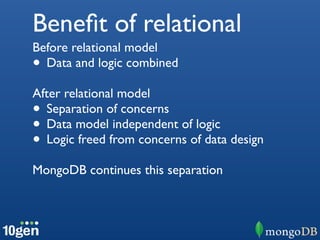
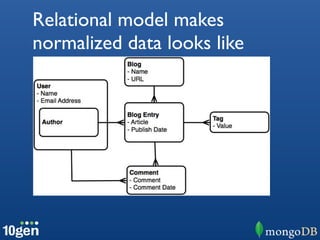
The document provides an overview of schema design in MongoDB. It discusses topics like basic data modeling, manipulating data, and evolving schemas over time. It also covers common data modeling patterns such as single table inheritance, one-to-many, many-to-many, and tree structures. The document compares MongoDB's flexible schema approach to relational databases and discusses concepts like normalization, collections, embedded documents, and indexing.


![MongoDB .local San Francisco 2020: Powering the new age data demands [Infosys]](https://cdn.slidesharecdn.com/ss_thumbnails/315pminfosysfinalsfoversionvocalpart1-200120221508-thumbnail.jpg?width=640&height=640&fit=bounds)


