Download as KEY, PPTX






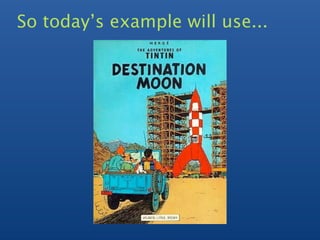
![Design Session
Design documents that simply map to
your application
> post
=
{
author:
"Hergé",
date:
new
Date(),
text:
"Destination
Moon",
tags:
[
"comic",
"adventure"
]
}
>
db.post.save(post)](https://image.slidesharecdn.com/mongoaustin-schemadesign-110225134945-phpapp01/85/Schema-Design-Mongo-Austin-11-320.jpg)
![Find the document
>
db.posts.find()
{
_id:
ObjectId("4c4ba5c0672c685e5e8aabf3"),
author:
"Hergé",
date:
"Sat
Jul
24
2010
19:47:11
GMT‐0700
(PDT)",
text:
"Destination
Moon",
tags:
[
"comic",
"adventure"
]
}
Notes:
• ID must be unique, but can be anything you’d like
• MongoDB will generate a default ID if one is not
supplied](https://image.slidesharecdn.com/mongoaustin-schemadesign-110225134945-phpapp01/85/Schema-Design-Mongo-Austin-12-320.jpg)


![Examine the query plan
>
db.blogs.find(
{
author:
'Hergé'
}
).explain()
{
"cursor"
:
"BtreeCursor
author_1",
"nscanned"
:
1,
"nscannedObjects"
:
1,
"n"
:
1,
"millis"
:
5,
"indexBounds"
:
{
"author"
:
[
[
"Hergé",
"Hergé"
]
]
}
}](https://image.slidesharecdn.com/mongoaustin-schemadesign-110225134945-phpapp01/85/Schema-Design-Mongo-Austin-15-320.jpg)


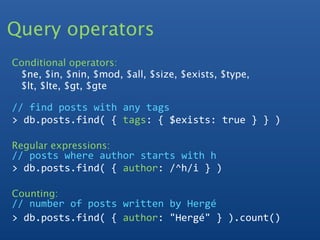

![Extending the Schema
{
_id
:
ObjectId("4c4ba5c0672c685e5e8aabf3"),
author
:
"Hergé",
date
:
"Sat
Jul
24
2010
19:47:11
GMT‐0700
(PDT)",
text
:
"Destination
Moon",
tags
:
[
"comic",
"adventure"
],
comments
:
[
{
author
:
"Bernie",
date
:
"Sat
Jul
24
2010
20:51:03
GMT‐0700
(PDT)",
text
:
"great
book"
}
],
comments_count:
1
}](https://image.slidesharecdn.com/mongoaustin-schemadesign-110225134945-phpapp01/85/Schema-Design-Mongo-Austin-20-320.jpg)




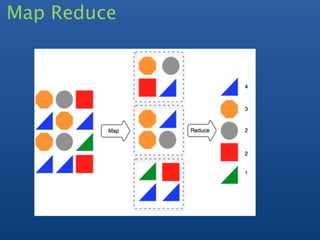
![Map reduce : count tags
mapFunc
=
function
()
{
this.tags.forEach(
function(
z
)
{
emit(
z,
{
count:
1
}
);
}
);
}
reduceFunc
=
function(
k,
v
)
{
var
total
=
0;
for
(
var
i
=
0;
i
<
v.length;
i++
)
{
total
+=
v[i].count;
}
return
{
count:
total
};
}
res
=
db.posts.mapReduce(
mapFunc,
reduceFunc
)
>db[res.result].find()
{
_id
:
"comic",
value
:
{
count
:
1
}
}
{
_id
:
"adventure",
value
:
{
count
:
1
}
}](https://image.slidesharecdn.com/mongoaustin-schemadesign-110225134945-phpapp01/85/Schema-Design-Mongo-Austin-26-320.jpg)

![Group - Count post by Author
cmd
=
{
key:
{
"author":
true
},
initial:
{
count:
0
},
reduce:
function(obj,
prev)
{
prev.count++;
},
};
result
=
db.posts.group(cmd);
[
{
"author"
:
"Hergé",
"count"
:
1
},
{
"author"
:
"Kyle",
"count"
:
3
}
]](https://image.slidesharecdn.com/mongoaustin-schemadesign-110225134945-phpapp01/85/Schema-Design-Mongo-Austin-28-320.jpg)




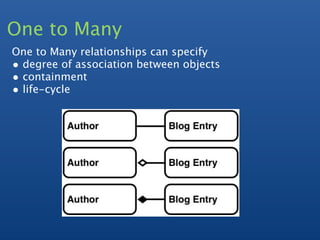
![One to Many
- Embedded Array / Array Keys
- slice operator to return subset of array
- some queries harder
e.g find latest comments across all documents
blogs:
{
author
:
"Hergé",
date
:
"Sat
Jul
24
2010
19:47:11
GMT‐0700
(PDT)",
comments
:
[
{
author
:
"Bernie",
date
:
"Sat
Jul
24
2010
20:51:03
GMT‐0700
(PDT)",
text
:
"great
book"
}
]
}](https://image.slidesharecdn.com/mongoaustin-schemadesign-110225134945-phpapp01/85/Schema-Design-Mongo-Austin-36-320.jpg)
![One to Many
- Embedded tree
- Single document
- Natural
- Hard to query
blogs:
{
author
:
"Hergé",
date
:
"Sat
Jul
24
2010
19:47:11
GMT‐0700
(PDT)",
comments
:
[
{
author
:
"Bernie",
date
:
"Sat
Jul
24
2010
20:51:03
GMT‐0700
(PDT)",
text
:
"great
book",
replies:
[
{
author
:
“James”,
...
}
]
}
]
}](https://image.slidesharecdn.com/mongoaustin-schemadesign-110225134945-phpapp01/85/Schema-Design-Mongo-Austin-37-320.jpg)
![One to Many
- Normalized (2 collections)
- most flexible
- more queries
blogs:
{
author
:
"Hergé",
date
:
"Sat
Jul
24
2010
19:47:11
GMT‐0700
(PDT)",
comments
:
[
{
comment
:
ObjectId(“1”)
}
]
}
comments
:
{
_id
:
“1”,
author
:
"James",
date
:
"Sat
Jul
24
2010
20:51:03
..."
}](https://image.slidesharecdn.com/mongoaustin-schemadesign-110225134945-phpapp01/85/Schema-Design-Mongo-Austin-38-320.jpg)
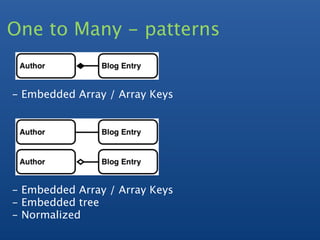
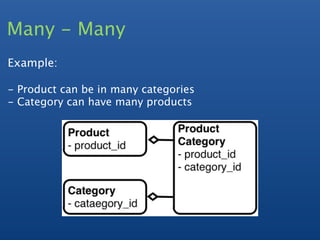
![Many - Many
products:
{
_id:
ObjectId("10"),
name:
"Destination
Moon",
category_ids:
[
ObjectId("20"),
ObjectId("30")
]
}](https://image.slidesharecdn.com/mongoaustin-schemadesign-110225134945-phpapp01/85/Schema-Design-Mongo-Austin-41-320.jpg)
![Many - Many
products:
{
_id:
ObjectId("10"),
name:
"Destination
Moon",
category_ids:
[
ObjectId("20"),
ObjectId("30")
]
}
categories:
{
_id:
ObjectId("20"),
name:
"adventure",
product_ids:
[
ObjectId("10"),
ObjectId("11"),
ObjectId("12")
]
}](https://image.slidesharecdn.com/mongoaustin-schemadesign-110225134945-phpapp01/85/Schema-Design-Mongo-Austin-42-320.jpg)
![Many - Many
products:
{
_id:
ObjectId("10"),
name:
"Destination
Moon",
category_ids:
[
ObjectId("20"),
ObjectId("30")
]
}
categories:
{
_id:
ObjectId("20"),
name:
"adventure",
product_ids:
[
ObjectId("10"),
ObjectId("11"),
ObjectId("12")
]
}
//All
categories
for
a
given
product
>
db.categories.find(
{
product_ids:
ObjectId("10")
}
)](https://image.slidesharecdn.com/mongoaustin-schemadesign-110225134945-phpapp01/85/Schema-Design-Mongo-Austin-43-320.jpg)
![Alternative
products:
{
_id:
ObjectId("10"),
name:
"Destination
Moon",
category_ids:
[
ObjectId("20"),
ObjectId("30")
]
}
categories:
{
_id:
ObjectId("20"),
name:
"adventure"
}](https://image.slidesharecdn.com/mongoaustin-schemadesign-110225134945-phpapp01/85/Schema-Design-Mongo-Austin-44-320.jpg)
![Alternative
products:
{
_id:
ObjectId("10"),
name:
"Destination
Moon",
category_ids:
[
ObjectId("20"),
ObjectId("30")
]
}
categories:
{
_id:
ObjectId("20"),
name:
"adventure"
}
//
All
products
for
a
given
category
>
db.products.find(
{
category_ids:
ObjectId("20")
}
)](https://image.slidesharecdn.com/mongoaustin-schemadesign-110225134945-phpapp01/85/Schema-Design-Mongo-Austin-45-320.jpg)
![Alternative
products:
{
_id:
ObjectId("10"),
name:
"Destination
Moon",
category_ids:
[
ObjectId("20"),
ObjectId("30")
]
}
categories:
{
_id:
ObjectId("20"),
name:
"adventure"
}
//
All
products
for
a
given
category
>
db.products.find(
{
category_ids:
ObjectId("20")
}
)
//
All
categories
for
a
given
product
product
=
db.products.find(_id
:
some_id)
>
db.categories.find(
{
_id
:
{
$in
:
product.category_ids
}
}
)](https://image.slidesharecdn.com/mongoaustin-schemadesign-110225134945-phpapp01/85/Schema-Design-Mongo-Austin-46-320.jpg)
![Trees
Full Tree in Document
{
comments:
[
{
author:
"Bernie",
text:
"...",
replies:
[
{author:
"James",
text:
"...",
replies:
[
]
}
]
}
]
}
Pros: Single Document, Performance, Intuitive
Cons: Hard to search, Partial Results, 16MB limit](https://image.slidesharecdn.com/mongoaustin-schemadesign-110225134945-phpapp01/85/Schema-Design-Mongo-Austin-47-320.jpg)
![Array of Ancestors
- Store all Ancestors of a node
{
_id:
"a"
}
{
_id:
"b",
ancestors:
[
"a"
],
parent:
"a"
}
{
_id:
"c",
ancestors:
[
"a",
"b"
],
parent:
"b"
}
{
_id:
"d",
ancestors:
[
"a",
"b"
],
parent:
"b"
}
{
_id:
"e",
ancestors:
[
"a"
],
parent:
"a"
}
{
_id:
"f",
ancestors:
[
"a",
"e"
],
parent:
"e"
}](https://image.slidesharecdn.com/mongoaustin-schemadesign-110225134945-phpapp01/85/Schema-Design-Mongo-Austin-49-320.jpg)
![Array of Ancestors
- Store all Ancestors of a node
{
_id:
"a"
}
{
_id:
"b",
ancestors:
[
"a"
],
parent:
"a"
}
{
_id:
"c",
ancestors:
[
"a",
"b"
],
parent:
"b"
}
{
_id:
"d",
ancestors:
[
"a",
"b"
],
parent:
"b"
}
{
_id:
"e",
ancestors:
[
"a"
],
parent:
"a"
}
{
_id:
"f",
ancestors:
[
"a",
"e"
],
parent:
"e"
}
//find
all
descendants
of
b:
>
db.tree2.find(
{
ancestors:
'b'
}
)
//find
all
direct
descendants
of
b:
>
db.tree2.find(
{
parent:
'b'
}
)](https://image.slidesharecdn.com/mongoaustin-schemadesign-110225134945-phpapp01/85/Schema-Design-Mongo-Austin-50-320.jpg)
![Array of Ancestors
- Store all Ancestors of a node
{
_id:
"a"
}
{
_id:
"b",
ancestors:
[
"a"
],
parent:
"a"
}
{
_id:
"c",
ancestors:
[
"a",
"b"
],
parent:
"b"
}
{
_id:
"d",
ancestors:
[
"a",
"b"
],
parent:
"b"
}
{
_id:
"e",
ancestors:
[
"a"
],
parent:
"a"
}
{
_id:
"f",
ancestors:
[
"a",
"e"
],
parent:
"e"
}
//find
all
descendants
of
b:
>
db.tree2.find(
{
ancestors:
'b'
}
)
//find
all
direct
descendants
of
b:
>
db.tree2.find(
{
parent:
'b'
}
)
//find
all
ancestors
of
f:
>
ancestors
=
db.tree2.findOne(
{
_id:
'f'
}
).ancestors
>
db.tree2.find(
{
_id:
{
$in
:
ancestors
}
)](https://image.slidesharecdn.com/mongoaustin-schemadesign-110225134945-phpapp01/85/Schema-Design-Mongo-Austin-51-320.jpg)
![Trees as Paths
Store hierarchy as a path expression
- Separate each node by a delimiter, e.g. "/"
- Use text search for find parts of a tree
{
comments:
[
{
author:
"Bernie",
text:
"initial
post",
path:
"/"
},
{
author:
"Jim",
text:
"jim’s
comment",
path:
"/jim"
},
{
author:
"Bernie",
text:
"Bernie’s
reply
to
Jim",
path
:
"/jim/bernie"}
]
}
//
Find
the
conversations
Jim
was
a
part
of
>
db.posts.find(
{
path:
/jim/i
}
)](https://image.slidesharecdn.com/mongoaustin-schemadesign-110225134945-phpapp01/85/Schema-Design-Mongo-Austin-52-320.jpg)





The document provides information on schema design in MongoDB, including: 1) Discussing benefits of modeling data independently of logic using a document-based model similar to relational databases. 2) Demonstrating examples of modeling data including embedding documents and linking collections to extend the schema. 3) Covering additional topics like indexing, querying, aggregation techniques like map-reduce and grouping.


![MongoDB .local San Francisco 2020: Powering the new age data demands [Infosys]](https://cdn.slidesharecdn.com/ss_thumbnails/315pminfosysfinalsfoversionvocalpart1-200120221508-thumbnail.jpg?width=640&height=640&fit=bounds)


