Using MongoDB in
      Anger
   Techniques and
   Considerations
Kyle Banker
kyle@10gen.com and @hwaet
Four topics:
Schema design

Indexing

Concurrency

Durability
I. Schema design
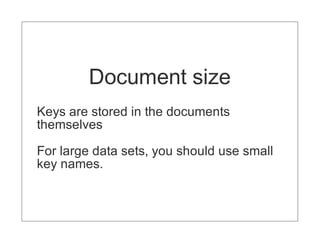
Document size
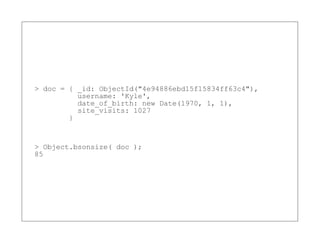
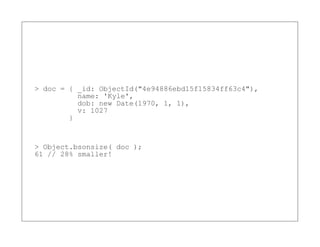
Keys are stored in the documents
themselves

For large data sets, you should use small
key names.
> doc = { _id: ObjectId("4e94886ebd15f15834ff63c4"),
          username: 'Kyle',
          date_of_birth: new Date(1970, 1, 1),
          site_visits: 1027
        }


> Object.bsonsize( doc );
85
> doc = { _id: ObjectId("4e94886ebd15f15834ff63c4"),
          name: 'Kyle',
          dob: new Date(1970, 1, 1),
          v: 1027
        }


> Object.bsonsize( doc );
61 // 28% smaller!
Document growth
Certain schema designs require documents
to grow significantly.

This can be expensive.
// Sample: user with followers
{ _id: ObjectId("4e94886ebd15f15834ff63c4"),
  name: 'Kyle'
  followers: [
    { user_id: ObjectId("4e94875fbd15f15834ff63c3")

      name: 'arussell' },
        { user_id: ObjectId("4e94875fbd15f15834ff63c4")
          name: 'bsmith' }
    ]
}
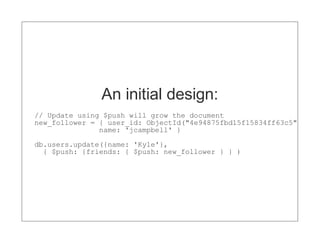
An initial design:
// Update using $push will grow the document
new_follower = { user_id: ObjectId("4e94875fbd15f15834ff63c5")
               name: 'jcampbell' }
db.users.update({name: 'Kyle'},
  { $push: {friends: { $push: new_follower } } )
Let's break this down...
At first, documents are inserted with no
extra space.

But updates that change the size of the
documents will alter the padding factor.

Even with a large padding factor,
documents that grow unbounded will still
eventually have to be moved.
Relocation is expensive:
All index entry pointers must be updated.

Entire document must be rewritten in a new
place on disk (possibly not in RAM).

May cause fragmentation. Increases the
number of entries in the free list.
A better design:
// User collection
{ _id: ObjectId("4e94886ebd15f15834ff63c4"),
  name: 'Kyle'
}

// Followers collection
{ friend_id: ObjectId("4e94875fbd15f15834ff63c3")
  name: 'arussell' },

{ friend_id: ObjectId("4e94875fbd15f15834ff63c4")
  name: 'bsmith' }
The upshot?
Rich documents are still useful. They
simplify the representation of objects and
can increase query performance because of
their pre-joined structure.

However, if your documents are going to
grow unbounded, it's best to separate them
into multiple collections.
Pre-aggregation
Aggregation
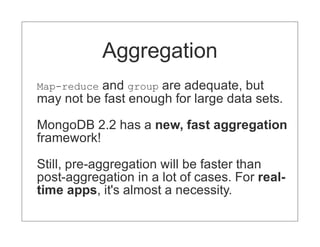
Map-reduceand group are adequate, but
may not be fast enough for large data sets.

MongoDB 2.2 has a new, fast aggregation
framework!

Still, pre-aggregation will be faster than
post-aggregation in a lot of cases. For real-
time apps, it's almost a necessity.
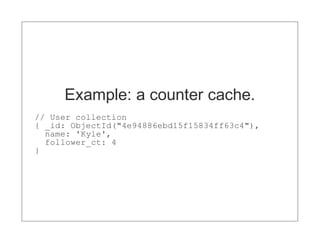
Example: a counter cache.
// User collection
{ _id: ObjectId("4e94886ebd15f15834ff63c4"),
  name: 'Kyle',
  follower_ct: 4
}
Using the $inc operator:
// This increment is in-place.
// (i.e., no rewriting of the document).
db.users.update({name: 'Kyle'},
  {$inc: {follower_ct: 1}})
Need a real-world example?
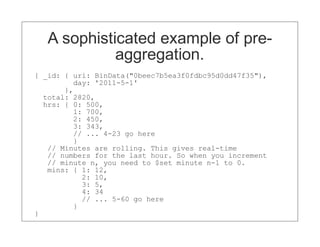
A sophisticated example of pre-
             aggregation.
{ _id: { uri: BinData("0beec7b5ea3f0fdbc95d0dd47f35"),
         day: '2011-5-1'
       },
  total: 2820,
  hrs: { 0: 500,
         1: 700,
         2: 450,
         3: 343,
         // ... 4-23 go here
         }
   // Minutes are rolling. This gives real-time
   // numbers for the last hour. So when you increment
   // minute n, you need to $set minute n-1 to 0.
   mins: { 1: 12,
           2: 10,
           3: 5,
           4: 34
           // ... 5-60 go here
         }
}
Schema design summary
Think hard about the size of your
documents. Optimize keys and data types
(not discussed).

If your documents are growing unbounded,
you may have the wrong schema design.

Consider operations that rewrite documents
(and individual values) in-place. $inc and
(sometimes) $set is great examples of this.
II. Indexing
It's all about efficiency:
Fundamental, but widely misunderstood.

The right indexes gives you the most
efficient use of your hardware (RAM, disk,
and CPU).

The wrong indexes, or no indexes
altogether, make trivial workloads
impossible to run, even on high-end
hardware.
The Basics
Every query should use an index. Use the
MongoDB log or the query profiler to identify
queries not using an index. The value of
nscanned should be low.

Know about compound-key index. Know
which indexes can be utilized for sorts,
ranges, etc. Learn to use explain().

Good resources on indexing: MongoDB in
Action and High Performance MySQL.
For the best performance, you should have
            Working set
enough RAM to contain indexes and
working set.
Working set is the portion of your total data
size that's regularly used by the application.
For some applications, working set might be
50% of data size. For others, it's close to
100%.

For example, think about Foursquare's
checkins database. Because checkins are
constantly queried to calculate badges,
checkins must live in RAM. So working set
on this database is 100%.
Working set (cont.)
On the other end of the spectrum, Craigslist
uses MongoDB as a listing archive. This
archive is rarely queried. Therefore, it
doesn't matter if data size is much larger
than RAM, since the working set is small.
Special indexing features...
Sparse indexes
Use a sparse index to reduce index size. A
sparse include will include only those
document having the indexed key.

For example, suppose you have 10 million
users, of which only 100K are paying
subscribers. You can index only those fields
relevant to paid subscriptions with a sparse
index.
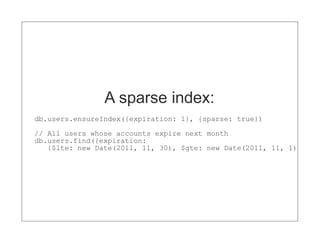
A sparse index:
db.users.ensureIndex({expiration: 1}, {sparse: true})

// All users whose accounts expire next month
db.users.find({expiration:
   {$lte: new Date(2011, 11, 30), $gte: new Date(2011, 11, 1)})
Index-only queries
If you only need a few values, you can
return those values directly from the index.
This eliminates the indirection from index to
data files on the server.

Specify the fields you want, and exclude the
_id field.

The explain() method will display
{indexOnly: true}.
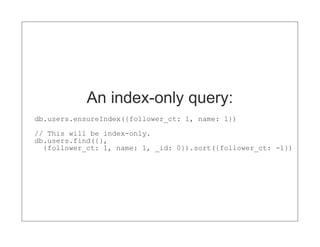
An index-only query:
db.users.ensureIndex({follower_ct: 1, name: 1})
// This will be index-only.
db.users.find({},
  {follower_ct: 1, name: 1, _id: 0}).sort({follower_ct: -1})
Indexing summary
Learn about indexing.

Ensure that your queries are using the most
efficient index.

Investigate sparse indexes and index-only
queries for performance-intensive apps.
Concurrency
Current implementation:
Concurrency is still somewhat coarse-
grained. For any given mongod, there's a
server-wide reader-writer lock, with a variety
of yielding optimizations.

For example, in MongoDB 2.0, the server
won't hold a write lock around a page fault.

On the roadmap are database-level locking,
collection-level locking, and extent-based
locking.
To avoid concurrency-related
        bottlenecks:
 Separate orthogonal concerns into multiple
 smaller deployments. For example, one for
 analytics and another for the rest of the app.

 Ensure that your indexes and working set fit
 in RAM.

 Do not attempt to scale reads with
 secondary nodes unless your application is
 mostly read-heavy.
mostly read-heavy.


     IV. Durability
Four topics:
Storage

Journaling

Write concern

Replication
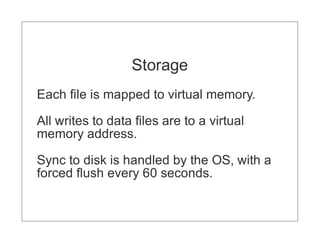
Storage
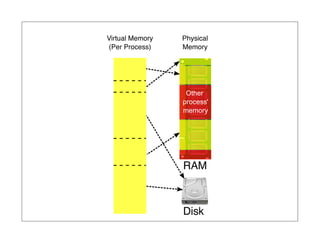
Each file is mapped to virtual memory.

All writes to data files are to a virtual
memory address.

Sync to disk is handled by the OS, with a
forced flush every 60 seconds.
Virtual Memory   Physical
(Per Process)    Memory


                 RAM


                 Disk
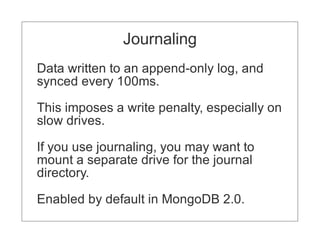
Journaling
Data written to an append-only log, and
synced every 100ms.

This imposes a write penalty, especially on
slow drives.

If you use journaling, you may want to
mount a separate drive for the journal
directory.

Enabled by default in MongoDB 2.0.
Replication
Fast, automatic failover.

Simplifies backups.

If you don't want to use journaling, you can
use replication instead. Recovery can be
trickier, but writes will be faster.
Write concern
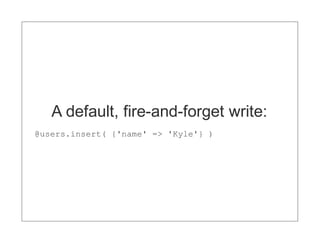
A default, fire-and-forget write:
@users.insert( {'name' => 'Kyle'} )
Write with a round trip:
@users.insert( {'name' => 'Kyle'}, :safe => true )
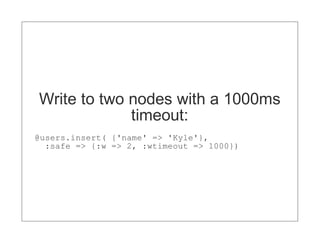
Write to two nodes with a 1000ms
             timeout:
@users.insert( {'name' => 'Kyle'},
  :safe => {:w => 2, :wtimeout => 1000})
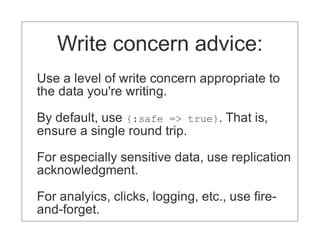
Write concern advice:
Use a level of write concern appropriate to
the data you're writing.

By default, use {:safe => true}. That is,
ensure a single round trip.

For especially sensitive data, use replication
acknowledgment.

For analyics, clicks, logging, etc., use fire-
and-forget.
Durability in anger
Use replication for durability. You can,
optionally, keep a single, passive replica
with durability enabled.

Use write concern judiciously.
Topics we didn't cover:
Hardware and deployment practices.

Sharding and schema design at scale.

(Lots of videos on these at 10gen.com!)
Announcements, Questions,
       and Credits
 http://www.flickr.com/photos/foamcow/34055184/

 http://www.flickr.com/photos/reedinglessons/2239767394

 http://www.flickr.com/photos/edelman/6031599707

 http://www.flickr.com/photos/curtisperry/5386879526/

 http://www.flickr.com/photos/ryanspalding/4756905846
Thank you

Mongodb in-anger-boston-rb-2011

  • 1.
    Using MongoDB in Anger Techniques and Considerations
  • 2.
  • 3.
  • 4.
  • 5.
    Document size Keys arestored in the documents themselves For large data sets, you should use small key names.
  • 6.
    > doc ={ _id: ObjectId("4e94886ebd15f15834ff63c4"), username: 'Kyle', date_of_birth: new Date(1970, 1, 1), site_visits: 1027 } > Object.bsonsize( doc ); 85
  • 7.
    > doc ={ _id: ObjectId("4e94886ebd15f15834ff63c4"), name: 'Kyle', dob: new Date(1970, 1, 1), v: 1027 } > Object.bsonsize( doc ); 61 // 28% smaller!
  • 8.
    Document growth Certain schemadesigns require documents to grow significantly. This can be expensive.
  • 9.
    // Sample: userwith followers { _id: ObjectId("4e94886ebd15f15834ff63c4"), name: 'Kyle' followers: [ { user_id: ObjectId("4e94875fbd15f15834ff63c3") name: 'arussell' }, { user_id: ObjectId("4e94875fbd15f15834ff63c4") name: 'bsmith' } ] }
  • 10.
    An initial design: //Update using $push will grow the document new_follower = { user_id: ObjectId("4e94875fbd15f15834ff63c5") name: 'jcampbell' } db.users.update({name: 'Kyle'}, { $push: {friends: { $push: new_follower } } )
  • 11.
    Let's break thisdown... At first, documents are inserted with no extra space. But updates that change the size of the documents will alter the padding factor. Even with a large padding factor, documents that grow unbounded will still eventually have to be moved.
  • 12.
    Relocation is expensive: Allindex entry pointers must be updated. Entire document must be rewritten in a new place on disk (possibly not in RAM). May cause fragmentation. Increases the number of entries in the free list.
  • 13.
    A better design: //User collection { _id: ObjectId("4e94886ebd15f15834ff63c4"), name: 'Kyle' } // Followers collection { friend_id: ObjectId("4e94875fbd15f15834ff63c3") name: 'arussell' }, { friend_id: ObjectId("4e94875fbd15f15834ff63c4") name: 'bsmith' }
  • 14.
    The upshot? Rich documentsare still useful. They simplify the representation of objects and can increase query performance because of their pre-joined structure. However, if your documents are going to grow unbounded, it's best to separate them into multiple collections.
  • 15.
  • 16.
    Aggregation Map-reduceand group areadequate, but may not be fast enough for large data sets. MongoDB 2.2 has a new, fast aggregation framework! Still, pre-aggregation will be faster than post-aggregation in a lot of cases. For real- time apps, it's almost a necessity.
  • 17.
    Example: a countercache. // User collection { _id: ObjectId("4e94886ebd15f15834ff63c4"), name: 'Kyle', follower_ct: 4 }
  • 18.
    Using the $incoperator: // This increment is in-place. // (i.e., no rewriting of the document). db.users.update({name: 'Kyle'}, {$inc: {follower_ct: 1}})
  • 19.
  • 20.
    A sophisticated exampleof pre- aggregation. { _id: { uri: BinData("0beec7b5ea3f0fdbc95d0dd47f35"), day: '2011-5-1' }, total: 2820, hrs: { 0: 500, 1: 700, 2: 450, 3: 343, // ... 4-23 go here } // Minutes are rolling. This gives real-time // numbers for the last hour. So when you increment // minute n, you need to $set minute n-1 to 0. mins: { 1: 12, 2: 10, 3: 5, 4: 34 // ... 5-60 go here } }
  • 21.
    Schema design summary Thinkhard about the size of your documents. Optimize keys and data types (not discussed). If your documents are growing unbounded, you may have the wrong schema design. Consider operations that rewrite documents (and individual values) in-place. $inc and (sometimes) $set is great examples of this.
  • 22.
  • 23.
    It's all aboutefficiency: Fundamental, but widely misunderstood. The right indexes gives you the most efficient use of your hardware (RAM, disk, and CPU). The wrong indexes, or no indexes altogether, make trivial workloads impossible to run, even on high-end hardware.
  • 24.
    The Basics Every queryshould use an index. Use the MongoDB log or the query profiler to identify queries not using an index. The value of nscanned should be low. Know about compound-key index. Know which indexes can be utilized for sorts, ranges, etc. Learn to use explain(). Good resources on indexing: MongoDB in Action and High Performance MySQL.
  • 25.
    For the bestperformance, you should have Working set enough RAM to contain indexes and working set. Working set is the portion of your total data size that's regularly used by the application. For some applications, working set might be 50% of data size. For others, it's close to 100%. For example, think about Foursquare's checkins database. Because checkins are constantly queried to calculate badges, checkins must live in RAM. So working set on this database is 100%.
  • 26.
    Working set (cont.) Onthe other end of the spectrum, Craigslist uses MongoDB as a listing archive. This archive is rarely queried. Therefore, it doesn't matter if data size is much larger than RAM, since the working set is small.
  • 27.
  • 28.
    Sparse indexes Use asparse index to reduce index size. A sparse include will include only those document having the indexed key. For example, suppose you have 10 million users, of which only 100K are paying subscribers. You can index only those fields relevant to paid subscriptions with a sparse index.
  • 29.
    A sparse index: db.users.ensureIndex({expiration:1}, {sparse: true}) // All users whose accounts expire next month db.users.find({expiration: {$lte: new Date(2011, 11, 30), $gte: new Date(2011, 11, 1)})
  • 30.
    Index-only queries If youonly need a few values, you can return those values directly from the index. This eliminates the indirection from index to data files on the server. Specify the fields you want, and exclude the _id field. The explain() method will display {indexOnly: true}.
  • 31.
    An index-only query: db.users.ensureIndex({follower_ct:1, name: 1}) // This will be index-only. db.users.find({}, {follower_ct: 1, name: 1, _id: 0}).sort({follower_ct: -1})
  • 32.
    Indexing summary Learn aboutindexing. Ensure that your queries are using the most efficient index. Investigate sparse indexes and index-only queries for performance-intensive apps.
  • 33.
  • 34.
    Current implementation: Concurrency isstill somewhat coarse- grained. For any given mongod, there's a server-wide reader-writer lock, with a variety of yielding optimizations. For example, in MongoDB 2.0, the server won't hold a write lock around a page fault. On the roadmap are database-level locking, collection-level locking, and extent-based locking.
  • 35.
    To avoid concurrency-related bottlenecks: Separate orthogonal concerns into multiple smaller deployments. For example, one for analytics and another for the rest of the app. Ensure that your indexes and working set fit in RAM. Do not attempt to scale reads with secondary nodes unless your application is mostly read-heavy.
  • 36.
    mostly read-heavy. IV. Durability
  • 37.
  • 38.
    Storage Each file ismapped to virtual memory. All writes to data files are to a virtual memory address. Sync to disk is handled by the OS, with a forced flush every 60 seconds.
  • 39.
    Virtual Memory Physical (Per Process) Memory RAM Disk
  • 40.
    Journaling Data written toan append-only log, and synced every 100ms. This imposes a write penalty, especially on slow drives. If you use journaling, you may want to mount a separate drive for the journal directory. Enabled by default in MongoDB 2.0.
  • 41.
    Replication Fast, automatic failover. Simplifiesbackups. If you don't want to use journaling, you can use replication instead. Recovery can be trickier, but writes will be faster.
  • 42.
  • 43.
    A default, fire-and-forgetwrite: @users.insert( {'name' => 'Kyle'} )
  • 44.
    Write with around trip: @users.insert( {'name' => 'Kyle'}, :safe => true )
  • 45.
    Write to twonodes with a 1000ms timeout: @users.insert( {'name' => 'Kyle'}, :safe => {:w => 2, :wtimeout => 1000})
  • 46.
    Write concern advice: Usea level of write concern appropriate to the data you're writing. By default, use {:safe => true}. That is, ensure a single round trip. For especially sensitive data, use replication acknowledgment. For analyics, clicks, logging, etc., use fire- and-forget.
  • 47.
    Durability in anger Usereplication for durability. You can, optionally, keep a single, passive replica with durability enabled. Use write concern judiciously.
  • 48.
    Topics we didn'tcover: Hardware and deployment practices. Sharding and schema design at scale. (Lots of videos on these at 10gen.com!)
  • 49.
    Announcements, Questions, and Credits http://www.flickr.com/photos/foamcow/34055184/ http://www.flickr.com/photos/reedinglessons/2239767394 http://www.flickr.com/photos/edelman/6031599707 http://www.flickr.com/photos/curtisperry/5386879526/ http://www.flickr.com/photos/ryanspalding/4756905846
  • 50.