

Schema Design
 with MongoDB

     Antoine Girbal

   antoine@10gen.com
      @antoinegirbal
So why model data?


  http://www.flickr.com/photos/42304632@N00/493639870/
Normalization
• Goals
• Avoid anomalies when inserting, updating or
  deleting
• Minimize redesign when extending the
  schema
• Avoid bias toward a particular query
• Make use of all SQL features
• In MongoDB
• Similar goals apply but rules are different
• Denormalization for optimization is an option:
  most features still exist, contrary to BLOBS
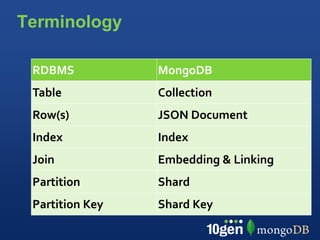
Terminology

 RDBMS           MongoDB
 Table           Collection
 Row(s)          JSON Document
 Index           Index
 Join            Embedding & Linking
 Partition       Shard
 Partition Key   Shard Key
Collections Basics
• Equivalent to a Table in SQL
• Cheap to create (max 24000)
• Collections don’t have a fixed schema
• Common for documents in a collection
  to share a schema
• Document schema can evolve
• Consider using multiple related
  collections tied together by a naming
  convention:
 •  e.g. LogData-2011-02-08
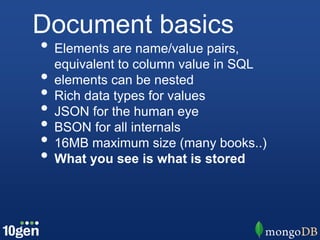
Document basics
• Elements are name/value pairs,
  equivalent to column value in SQL
• elements can be nested
• Rich data types for values
• JSON for the human eye
• BSON for all internals
• 16MB maximum size (many books..)
• What you see is what is stored
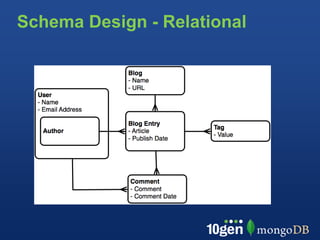
Schema Design - Relational
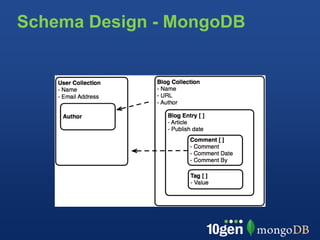
Schema Design - MongoDB
                  embedding
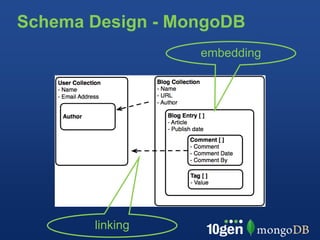
Schema Design - MongoDB
                  embedding


       linking
Design Session

Design documents that simply map to your application

> post = { author: "Hergé",
       date: ISODate("2011-09-18T09:56:06.298Z"),
       text: "Destination Moon",
       tags: ["comic", "adventure"]
     }

> db.blogs.save(post)
Find the document
> db.blogs.find()

 { _id: ObjectId("4c4ba5c0672c685e5e8aabf3"),
   author: "Hergé",
   date: ISODate("2011-09-18T09:56:06.298Z"),
   text: "Destination Moon",
   tags: [ "comic", "adventure" ]
 }

Notes:
• ID must be unique, but can be anything you’d like
• MongoDB will generate a default ID if one is not supplied
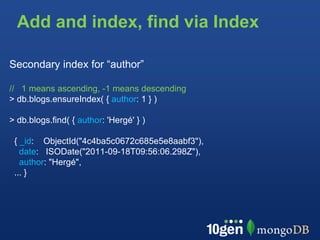
Add and index, find via Index

Secondary index for “author”

// 1 means ascending, -1 means descending
> db.blogs.ensureIndex( { author: 1 } )

> db.blogs.find( { author: 'Hergé' } )

 { _id: ObjectId("4c4ba5c0672c685e5e8aabf3"),
   date: ISODate("2011-09-18T09:56:06.298Z"),
   author: "Hergé",
 ... }
Examine the query plan

> db.blogs.find( { author: "Hergé" } ).explain()
{
      "cursor" : "BtreeCursor author_1",
      "nscanned" : 1,
      "nscannedObjects" : 1,
      "n" : 1,
      "millis" : 5,
      "indexBounds" : {
             "author" : [
                    [
                          "Hergé",
                          "Hergé"
                    ]
             ]
      }
}
Examine the query plan

> db.blogs.find( { author: "Hergé" } ).explain()
{
      "cursor" : "BtreeCursor author_1",
      "nscanned" : 1,
      "nscannedObjects" : 1,
      "n" : 1,
      "millis" : 5,
      "indexBounds" : {
             "author" : [
                    [
                          "Hergé",
                          "Hergé"
                    ]
             ]
      }
}
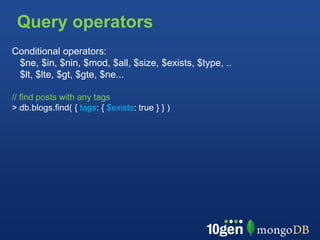
Query operators
Conditional operators:
 $ne, $in, $nin, $mod, $all, $size, $exists, $type, ..
 $lt, $lte, $gt, $gte, $ne...

// find posts with any tags
> db.blogs.find( { tags: { $exists: true } } )
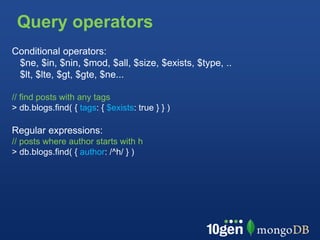
Query operators
Conditional operators:
 $ne, $in, $nin, $mod, $all, $size, $exists, $type, ..
 $lt, $lte, $gt, $gte, $ne...

// find posts with any tags
> db.blogs.find( { tags: { $exists: true } } )

Regular expressions:
// posts where author starts with h
> db.blogs.find( { author: /^h/ } )
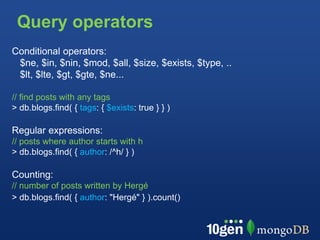
Query operators
Conditional operators:
 $ne, $in, $nin, $mod, $all, $size, $exists, $type, ..
 $lt, $lte, $gt, $gte, $ne...

// find posts with any tags
> db.blogs.find( { tags: { $exists: true } } )

Regular expressions:
// posts where author starts with h
> db.blogs.find( { author: /^h/ } )

Counting:
// number of posts written by Hergé
> db.blogs.find( { author: "Hergé" } ).count()
Extending the Schema
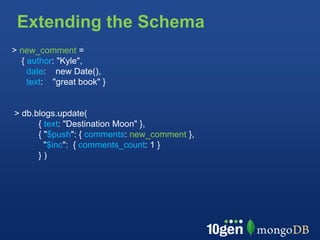
> new_comment =
  { author: "Kyle",
    date: new Date(),
    text: "great book" }


> db.blogs.update(
      { text: "Destination Moon" },
      { "$push": { comments: new_comment },
        "$inc": { comments_count: 1 }
      })
Extending the Schema
> db.blogs.find( { author: "Hergé"} )

{ _id : ObjectId("4c4ba5c0672c685e5e8aabf3"),
  author : "Hergé",
  date : ISODate("2011-09-18T09:56:06.298Z"),
  text : "Destination Moon",
  tags : [ "comic", "adventure" ],
  comments : [
     {
             author : "Kyle",
             date : ISODate("2011-09-19T09:56:06.298Z"),
             text : "great book"
     }
  ],
  comments_count: 1
}
Extending the Schema
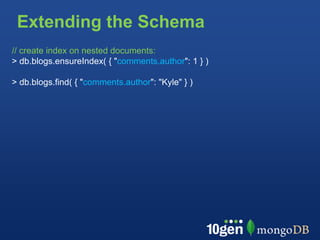
// create index on nested documents:
> db.blogs.ensureIndex( { "comments.author": 1 } )

> db.blogs.find( { "comments.author": "Kyle" } )
Extending the Schema
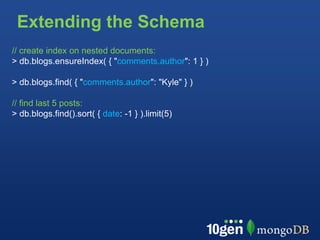
// create index on nested documents:
> db.blogs.ensureIndex( { "comments.author": 1 } )

> db.blogs.find( { "comments.author": "Kyle" } )

// find last 5 posts:
> db.blogs.find().sort( { date: -1 } ).limit(5)
Extending the Schema
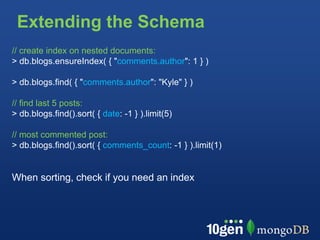
// create index on nested documents:
> db.blogs.ensureIndex( { "comments.author": 1 } )

> db.blogs.find( { "comments.author": "Kyle" } )

// find last 5 posts:
> db.blogs.find().sort( { date: -1 } ).limit(5)

// most commented post:
> db.blogs.find().sort( { comments_count: -1 } ).limit(1)


When sorting, check if you need an index
Common Patterns

 Patterns:
 • Inheritance
 • one to one
 • one to many
 • many to many
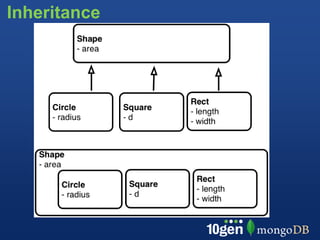
Inheritance
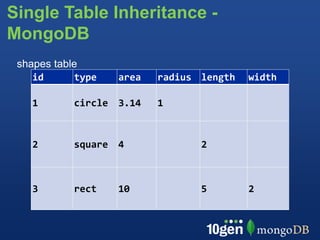
Single Table Inheritance -
MongoDB
 shapes table
    id      type   area   radius length   width

   1       circle 3.14    1


   2       square 4              2


   3       rect    10            5        2
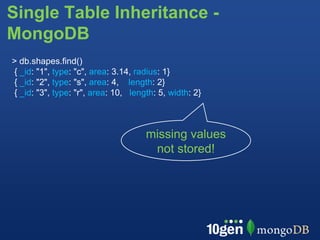
Single Table Inheritance -
MongoDB
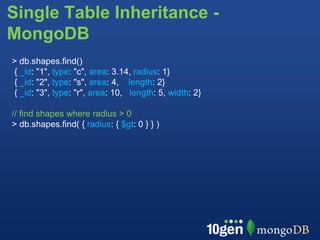
> db.shapes.find()
{ _id: "1", type: "c", area: 3.14, radius: 1}
{ _id: "2", type: "s", area: 4, length: 2}
{ _id: "3", type: "r", area: 10, length: 5, width: 2}


                                     missing values
                                      not stored!
Single Table Inheritance -
MongoDB
> db.shapes.find()
{ _id: "1", type: "c", area: 3.14, radius: 1}
{ _id: "2", type: "s", area: 4, length: 2}
{ _id: "3", type: "r", area: 10, length: 5, width: 2}

// find shapes where radius > 0
> db.shapes.find( { radius: { $gt: 0 } } )
Single Table Inheritance -
MongoDB
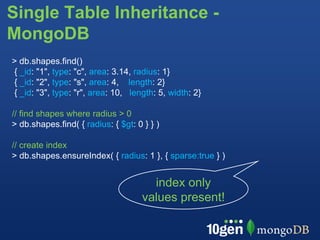
> db.shapes.find()
{ _id: "1", type: "c", area: 3.14, radius: 1}
{ _id: "2", type: "s", area: 4, length: 2}
{ _id: "3", type: "r", area: 10, length: 5, width: 2}

// find shapes where radius > 0
> db.shapes.find( { radius: { $gt: 0 } } )

// create index
> db.shapes.ensureIndex( { radius: 1 }, { sparse:true } )


                                       index only
                                     values present!
One to Many
  Either:

  •Embedded Array / Document:
    • improves read speed
    • simplifies schema
  •Normalize:
    • if list grows significantly
    • if sub items are updated often
    • if sub items are more than 1 level
       deep and need updating
One to Many
Embedded Array:
•$slice operator to return subset of comments
•some queries become harder (e.g find latest comments across all blogs)
blogs: {
   author : "Hergé",
   date : ISODate("2011-09-18T09:56:06.298Z"),
   comments : [
        {
             author : "Kyle",
             date : ISODate("2011-09-19T09:56:06.298Z"),
             text : "great book"
        }
   ]
}
One to Many
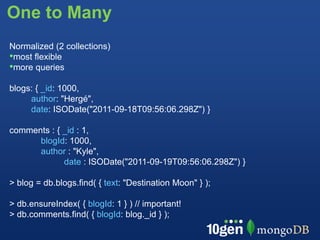
Normalized (2 collections)
•most flexible
•more queries
blogs: { _id: 1000,
     author: "Hergé",
     date: ISODate("2011-09-18T09:56:06.298Z") }

comments : { _id : 1,
      blogId: 1000,
      author : "Kyle",
             date : ISODate("2011-09-19T09:56:06.298Z") }

> blog = db.blogs.find( { text: "Destination Moon" } );

> db.ensureIndex( { blogId: 1 } ) // important!
> db.comments.find( { blogId: blog._id } );
Many - Many
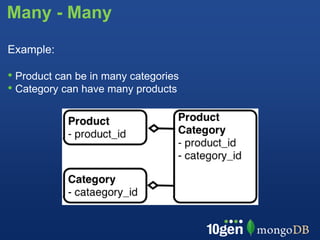
Example:

• Product can be in many categories
• Category can have many products
Many - Many
// Each product list the IDs of the categories
products:
   { _id: 10, name: "Destination Moon",
     category_ids: [ 20, 30 ] }
Many - Many
// Each product list the IDs of the categories
products:
   { _id: 10, name: "Destination Moon",
     category_ids: [ 20, 30 ] }

// Each category lists the IDs of the products
categories:
   { _id: 20, name: "adventure",
     product_ids: [ 10, 11, 12 ] }

categories:
  { _id: 21, name: "movie",
    product_ids: [ 10 ] }
Many - Many
// Each product list the IDs of the categories
products:
   { _id: 10, name: "Destination Moon",
     category_ids: [ 20, 30 ] }

// Each category lists the IDs of the products
categories:
   { _id: 20, name: "adventure",
     product_ids: [ 10, 11, 12 ] }

categories:
  { _id: 21, name: "movie",
    product_ids: [ 10 ] }

Cuts mapping table and 2 indexes, but:
• potential consistency issue
• lists can grow too large
Alternative
// Each product list the IDs of the categories
products:
   { _id: 10, name: "Destination Moon",
     category_ids: [ 20, 30 ] }

// Association not stored on the categories
categories:
   { _id: 20,
     name: "adventure"}
Alternative
// Each product list the IDs of the categories
products:
   { _id: 10, name: "Destination Moon",
     category_ids: [ 20, 30 ] }

// Association not stored on the categories
categories:
   { _id: 20,
     name: "adventure"}

// All products for a given category
> db.products.ensureIndex( { category_ids: 1} ) // yes!
> db.products.find( { category_ids: 20 } )
Common Use Cases

 Use cases:
 • Trees
 • Time Series
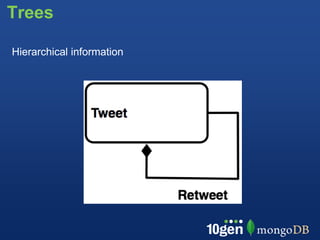
Trees

Hierarchical information
Trees

Full Tree in Document

{ retweet: [
   { who: “Kyle”, text: “...”,
     retweet: [
        {who: “James”, text: “...”,
          retweet: []}
     ]}
  ]
}

Pros: Single Document, Performance, Intuitive

Cons: Hard to search or update, document can easily get
too large
Array of Ancestors                                 A   B   C
// Store all Ancestors of a node                       E   D
  { _id: "a" }
  { _id: "b", tree: [ "a" ],     retweet: "a" }            F
  { _id: "c", tree: [ "a", "b" ], retweet: "b" }
  { _id: "d", tree: [ "a", "b" ], retweet: "b" }
  { _id: "e", tree: [ "a" ],     retweet: "a" }
  { _id: "f", tree: [ "a", "e" ], retweet: "e" }

// find all direct retweets of "b"
> db.tweets.find( { retweet: "b" } )
Array of Ancestors                                 A   B   C
// Store all Ancestors of a node                       E   D
  { _id: "a" }
  { _id: "b", tree: [ "a" ],     retweet: "a" }            F
  { _id: "c", tree: [ "a", "b" ], retweet: "b" }
  { _id: "d", tree: [ "a", "b" ], retweet: "b" }
  { _id: "e", tree: [ "a" ],     retweet: "a" }
  { _id: "f", tree: [ "a", "e" ], retweet: "e" }

// find all direct retweets of "b"
> db.tweets.find( { retweet: "b" } )

// find all retweets of "e" anywhere in tree
> db.tweets.find( { tree: "e" } )
Array of Ancestors                                  A   B   C
// Store all Ancestors of a node                        E   D
  { _id: "a" }
  { _id: "b", tree: [ "a" ],     retweet: "a" }             F
  { _id: "c", tree: [ "a", "b" ], retweet: "b" }
  { _id: "d", tree: [ "a", "b" ], retweet: "b" }
  { _id: "e", tree: [ "a" ],     retweet: "a" }
  { _id: "f", tree: [ "a", "e" ], retweet: "e" }

// find all direct retweets of "b"
> db.tweets.find( { retweet: "b" } )

// find all retweets of "e" anywhere in tree
> db.tweets.find( { tree: "e" } )

// find tweet history of f:
> tweets = db.tweets.findOne( { _id: "f" } ).tree
> db.tweets.find( { _id: { $in : tweets } } )
Trees as Paths                                 A   B   C
Store hierarchy as a path expression               E   D
• Separate each node by a delimiter, e.g. “,”
• Use text search for find parts of a tree             F
• search must be left-rooted and use an index!
{ retweets: [
    { _id: "a", text: "initial tweet",
      path: "a" },
    { _id: "b", text: "reweet with comment",
      path: "a,b" },
    { _id: "c", text: "reply to retweet",
      path : "a,b,c"} ] }

// Find the conversations "a" started
> db.tweets.find( { path: /^a/ } )
// Find the conversations under a branch
> db.tweets.find( { path: /^a,b/ } )
Time Series

• Records stats by
 • Day, Hour, Minute

• Show time series
Time Series

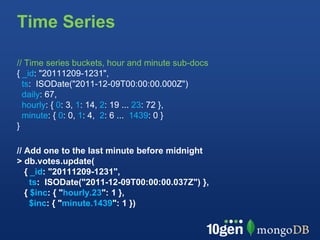
// Time series buckets, hour and minute sub-docs
{ _id: "20111209-1231",
  ts: ISODate("2011-12-09T00:00:00.000Z")
  daily: 67,
  hourly: { 0: 3, 1: 14, 2: 19 ... 23: 72 },
  minute: { 0: 0, 1: 4, 2: 6 ... 1439: 0 }
}

// Add one to the last minute before midnight
> db.votes.update(
   { _id: "20111209-1231",
     ts: ISODate("2011-12-09T00:00:00.037Z") },
   { $inc: { "hourly.23": 1 },
     $inc: { "minute.1439": 1 })
BSON Storage

• Sequence of key/value pairs
• NOT a hash map
• Optimized to scan quickly


     0 1 2 3 ... 1439
What is the cost of update the minute before
midnight?
BSON Storage

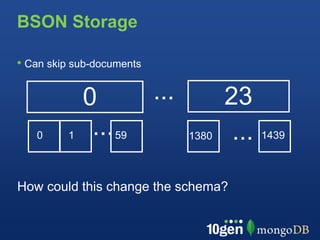
• Can skip sub-documents

             0             ...          23
   0     1    ... 59             1380    ...   1439


How could this change the schema?
Time Series
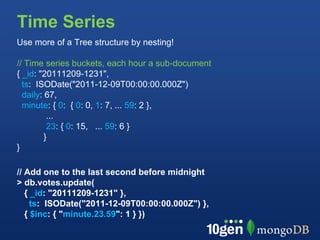
Use more of a Tree structure by nesting!

// Time series buckets, each hour a sub-document
{ _id: "20111209-1231",
  ts: ISODate("2011-12-09T00:00:00.000Z")
  daily: 67,
  minute: { 0: { 0: 0, 1: 7, ... 59: 2 },
          ...
          23: { 0: 15, ... 59: 6 }
         }
}

// Add one to the last second before midnight
> db.votes.update(
   { _id: "20111209-1231" },
     ts: ISODate("2011-12-09T00:00:00.000Z") },
   { $inc: { "minute.23.59": 1 } })
Duplicate data
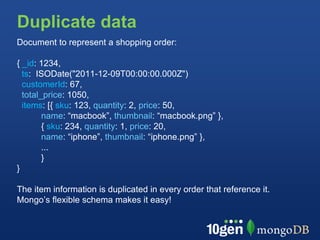
Document to represent a shopping order:

{ _id: 1234,
  ts: ISODate("2011-12-09T00:00:00.000Z")
  customerId: 67,
  total_price: 1050,
  items: [{ sku: 123, quantity: 2, price: 50,
        name: “macbook”, thumbnail: “macbook.png” },
        { sku: 234, quantity: 1, price: 20,
        name: “iphone”, thumbnail: “iphone.png” },
        ...
        }
}

The item information is duplicated in every order that reference it.
Mongo’s flexible schema makes it easy!
Duplicate data
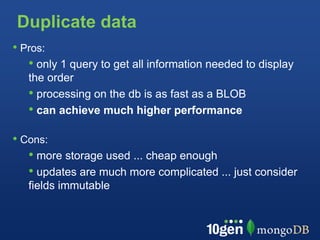
• Pros:
   • only 1 query to get all information needed to display
   the order
   • processing on the db is as fast as a BLOB
   • can achieve much higher performance

• Cons:
   • more storage used ... cheap enough
   • updates are much more complicated ... just consider
   fields immutable
Summary
• Basic data design principles stay the same ...
• But MongoDB is more flexible and brings possibilities
• embed or duplicate data to speed up operations, cut down
the number of collections and indexes

• watch for documents growing too large
• make sure to use the proper indexes for querying and sorting
• schema should feel natural to your application!
download at mongodb.org


      conferences, appearances, and meetups
                 http://www.10gen.com/events


  Facebook              |   Twitter    |       LinkedIn
http://bit.ly/mongofb       @mongodb       http://linkd.in/joinmongo

10gen Presents Schema Design and Data Modeling

  • 1.
    Schema Design withMongoDB Antoine Girbal antoine@10gen.com @antoinegirbal
  • 2.
    So why modeldata? http://www.flickr.com/photos/42304632@N00/493639870/
  • 3.
    Normalization • Goals • Avoidanomalies when inserting, updating or deleting • Minimize redesign when extending the schema • Avoid bias toward a particular query • Make use of all SQL features • In MongoDB • Similar goals apply but rules are different • Denormalization for optimization is an option: most features still exist, contrary to BLOBS
  • 4.
    Terminology RDBMS MongoDB Table Collection Row(s) JSON Document Index Index Join Embedding & Linking Partition Shard Partition Key Shard Key
  • 5.
    Collections Basics • Equivalentto a Table in SQL • Cheap to create (max 24000) • Collections don’t have a fixed schema • Common for documents in a collection to share a schema • Document schema can evolve • Consider using multiple related collections tied together by a naming convention: • e.g. LogData-2011-02-08
  • 6.
    Document basics • Elementsare name/value pairs, equivalent to column value in SQL • elements can be nested • Rich data types for values • JSON for the human eye • BSON for all internals • 16MB maximum size (many books..) • What you see is what is stored
  • 7.
    Schema Design -Relational
  • 8.
  • 9.
    Schema Design -MongoDB embedding
  • 10.
    Schema Design -MongoDB embedding linking
  • 11.
    Design Session Design documentsthat simply map to your application > post = { author: "Hergé", date: ISODate("2011-09-18T09:56:06.298Z"), text: "Destination Moon", tags: ["comic", "adventure"] } > db.blogs.save(post)
  • 12.
    Find the document >db.blogs.find() { _id: ObjectId("4c4ba5c0672c685e5e8aabf3"), author: "Hergé", date: ISODate("2011-09-18T09:56:06.298Z"), text: "Destination Moon", tags: [ "comic", "adventure" ] } Notes: • ID must be unique, but can be anything you’d like • MongoDB will generate a default ID if one is not supplied
  • 13.
    Add and index,find via Index Secondary index for “author” // 1 means ascending, -1 means descending > db.blogs.ensureIndex( { author: 1 } ) > db.blogs.find( { author: 'Hergé' } ) { _id: ObjectId("4c4ba5c0672c685e5e8aabf3"), date: ISODate("2011-09-18T09:56:06.298Z"), author: "Hergé", ... }
  • 14.
    Examine the queryplan > db.blogs.find( { author: "Hergé" } ).explain() { "cursor" : "BtreeCursor author_1", "nscanned" : 1, "nscannedObjects" : 1, "n" : 1, "millis" : 5, "indexBounds" : { "author" : [ [ "Hergé", "Hergé" ] ] } }
  • 15.
    Examine the queryplan > db.blogs.find( { author: "Hergé" } ).explain() { "cursor" : "BtreeCursor author_1", "nscanned" : 1, "nscannedObjects" : 1, "n" : 1, "millis" : 5, "indexBounds" : { "author" : [ [ "Hergé", "Hergé" ] ] } }
  • 16.
    Query operators Conditional operators: $ne, $in, $nin, $mod, $all, $size, $exists, $type, .. $lt, $lte, $gt, $gte, $ne... // find posts with any tags > db.blogs.find( { tags: { $exists: true } } )
  • 17.
    Query operators Conditional operators: $ne, $in, $nin, $mod, $all, $size, $exists, $type, .. $lt, $lte, $gt, $gte, $ne... // find posts with any tags > db.blogs.find( { tags: { $exists: true } } ) Regular expressions: // posts where author starts with h > db.blogs.find( { author: /^h/ } )
  • 18.
    Query operators Conditional operators: $ne, $in, $nin, $mod, $all, $size, $exists, $type, .. $lt, $lte, $gt, $gte, $ne... // find posts with any tags > db.blogs.find( { tags: { $exists: true } } ) Regular expressions: // posts where author starts with h > db.blogs.find( { author: /^h/ } ) Counting: // number of posts written by Hergé > db.blogs.find( { author: "Hergé" } ).count()
  • 19.
    Extending the Schema >new_comment = { author: "Kyle", date: new Date(), text: "great book" } > db.blogs.update( { text: "Destination Moon" }, { "$push": { comments: new_comment }, "$inc": { comments_count: 1 } })
  • 20.
    Extending the Schema >db.blogs.find( { author: "Hergé"} ) { _id : ObjectId("4c4ba5c0672c685e5e8aabf3"), author : "Hergé", date : ISODate("2011-09-18T09:56:06.298Z"), text : "Destination Moon", tags : [ "comic", "adventure" ], comments : [ { author : "Kyle", date : ISODate("2011-09-19T09:56:06.298Z"), text : "great book" } ], comments_count: 1 }
  • 21.
    Extending the Schema //create index on nested documents: > db.blogs.ensureIndex( { "comments.author": 1 } ) > db.blogs.find( { "comments.author": "Kyle" } )
  • 22.
    Extending the Schema //create index on nested documents: > db.blogs.ensureIndex( { "comments.author": 1 } ) > db.blogs.find( { "comments.author": "Kyle" } ) // find last 5 posts: > db.blogs.find().sort( { date: -1 } ).limit(5)
  • 23.
    Extending the Schema //create index on nested documents: > db.blogs.ensureIndex( { "comments.author": 1 } ) > db.blogs.find( { "comments.author": "Kyle" } ) // find last 5 posts: > db.blogs.find().sort( { date: -1 } ).limit(5) // most commented post: > db.blogs.find().sort( { comments_count: -1 } ).limit(1) When sorting, check if you need an index
  • 24.
    Common Patterns Patterns: • Inheritance • one to one • one to many • many to many
  • 25.
  • 26.
    Single Table Inheritance- MongoDB shapes table id type area radius length width 1 circle 3.14 1 2 square 4 2 3 rect 10 5 2
  • 27.
    Single Table Inheritance- MongoDB > db.shapes.find() { _id: "1", type: "c", area: 3.14, radius: 1} { _id: "2", type: "s", area: 4, length: 2} { _id: "3", type: "r", area: 10, length: 5, width: 2} missing values not stored!
  • 28.
    Single Table Inheritance- MongoDB > db.shapes.find() { _id: "1", type: "c", area: 3.14, radius: 1} { _id: "2", type: "s", area: 4, length: 2} { _id: "3", type: "r", area: 10, length: 5, width: 2} // find shapes where radius > 0 > db.shapes.find( { radius: { $gt: 0 } } )
  • 29.
    Single Table Inheritance- MongoDB > db.shapes.find() { _id: "1", type: "c", area: 3.14, radius: 1} { _id: "2", type: "s", area: 4, length: 2} { _id: "3", type: "r", area: 10, length: 5, width: 2} // find shapes where radius > 0 > db.shapes.find( { radius: { $gt: 0 } } ) // create index > db.shapes.ensureIndex( { radius: 1 }, { sparse:true } ) index only values present!
  • 30.
    One to Many Either: •Embedded Array / Document: • improves read speed • simplifies schema •Normalize: • if list grows significantly • if sub items are updated often • if sub items are more than 1 level deep and need updating
  • 31.
    One to Many EmbeddedArray: •$slice operator to return subset of comments •some queries become harder (e.g find latest comments across all blogs) blogs: { author : "Hergé", date : ISODate("2011-09-18T09:56:06.298Z"), comments : [ { author : "Kyle", date : ISODate("2011-09-19T09:56:06.298Z"), text : "great book" } ] }
  • 32.
    One to Many Normalized(2 collections) •most flexible •more queries blogs: { _id: 1000, author: "Hergé", date: ISODate("2011-09-18T09:56:06.298Z") } comments : { _id : 1, blogId: 1000, author : "Kyle", date : ISODate("2011-09-19T09:56:06.298Z") } > blog = db.blogs.find( { text: "Destination Moon" } ); > db.ensureIndex( { blogId: 1 } ) // important! > db.comments.find( { blogId: blog._id } );
  • 33.
    Many - Many Example: •Product can be in many categories • Category can have many products
  • 34.
    Many - Many //Each product list the IDs of the categories products: { _id: 10, name: "Destination Moon", category_ids: [ 20, 30 ] }
  • 35.
    Many - Many //Each product list the IDs of the categories products: { _id: 10, name: "Destination Moon", category_ids: [ 20, 30 ] } // Each category lists the IDs of the products categories: { _id: 20, name: "adventure", product_ids: [ 10, 11, 12 ] } categories: { _id: 21, name: "movie", product_ids: [ 10 ] }
  • 36.
    Many - Many //Each product list the IDs of the categories products: { _id: 10, name: "Destination Moon", category_ids: [ 20, 30 ] } // Each category lists the IDs of the products categories: { _id: 20, name: "adventure", product_ids: [ 10, 11, 12 ] } categories: { _id: 21, name: "movie", product_ids: [ 10 ] } Cuts mapping table and 2 indexes, but: • potential consistency issue • lists can grow too large
  • 37.
    Alternative // Each productlist the IDs of the categories products: { _id: 10, name: "Destination Moon", category_ids: [ 20, 30 ] } // Association not stored on the categories categories: { _id: 20, name: "adventure"}
  • 38.
    Alternative // Each productlist the IDs of the categories products: { _id: 10, name: "Destination Moon", category_ids: [ 20, 30 ] } // Association not stored on the categories categories: { _id: 20, name: "adventure"} // All products for a given category > db.products.ensureIndex( { category_ids: 1} ) // yes! > db.products.find( { category_ids: 20 } )
  • 39.
    Common Use Cases Use cases: • Trees • Time Series
  • 40.
  • 41.
    Trees Full Tree inDocument { retweet: [ { who: “Kyle”, text: “...”, retweet: [ {who: “James”, text: “...”, retweet: []} ]} ] } Pros: Single Document, Performance, Intuitive Cons: Hard to search or update, document can easily get too large
  • 42.
    Array of Ancestors A B C // Store all Ancestors of a node E D { _id: "a" } { _id: "b", tree: [ "a" ], retweet: "a" } F { _id: "c", tree: [ "a", "b" ], retweet: "b" } { _id: "d", tree: [ "a", "b" ], retweet: "b" } { _id: "e", tree: [ "a" ], retweet: "a" } { _id: "f", tree: [ "a", "e" ], retweet: "e" } // find all direct retweets of "b" > db.tweets.find( { retweet: "b" } )
  • 43.
    Array of Ancestors A B C // Store all Ancestors of a node E D { _id: "a" } { _id: "b", tree: [ "a" ], retweet: "a" } F { _id: "c", tree: [ "a", "b" ], retweet: "b" } { _id: "d", tree: [ "a", "b" ], retweet: "b" } { _id: "e", tree: [ "a" ], retweet: "a" } { _id: "f", tree: [ "a", "e" ], retweet: "e" } // find all direct retweets of "b" > db.tweets.find( { retweet: "b" } ) // find all retweets of "e" anywhere in tree > db.tweets.find( { tree: "e" } )
  • 44.
    Array of Ancestors A B C // Store all Ancestors of a node E D { _id: "a" } { _id: "b", tree: [ "a" ], retweet: "a" } F { _id: "c", tree: [ "a", "b" ], retweet: "b" } { _id: "d", tree: [ "a", "b" ], retweet: "b" } { _id: "e", tree: [ "a" ], retweet: "a" } { _id: "f", tree: [ "a", "e" ], retweet: "e" } // find all direct retweets of "b" > db.tweets.find( { retweet: "b" } ) // find all retweets of "e" anywhere in tree > db.tweets.find( { tree: "e" } ) // find tweet history of f: > tweets = db.tweets.findOne( { _id: "f" } ).tree > db.tweets.find( { _id: { $in : tweets } } )
  • 45.
    Trees as Paths A B C Store hierarchy as a path expression E D • Separate each node by a delimiter, e.g. “,” • Use text search for find parts of a tree F • search must be left-rooted and use an index! { retweets: [ { _id: "a", text: "initial tweet", path: "a" }, { _id: "b", text: "reweet with comment", path: "a,b" }, { _id: "c", text: "reply to retweet", path : "a,b,c"} ] } // Find the conversations "a" started > db.tweets.find( { path: /^a/ } ) // Find the conversations under a branch > db.tweets.find( { path: /^a,b/ } )
  • 46.
    Time Series • Recordsstats by • Day, Hour, Minute • Show time series
  • 47.
    Time Series // Timeseries buckets, hour and minute sub-docs { _id: "20111209-1231", ts: ISODate("2011-12-09T00:00:00.000Z") daily: 67, hourly: { 0: 3, 1: 14, 2: 19 ... 23: 72 }, minute: { 0: 0, 1: 4, 2: 6 ... 1439: 0 } } // Add one to the last minute before midnight > db.votes.update( { _id: "20111209-1231", ts: ISODate("2011-12-09T00:00:00.037Z") }, { $inc: { "hourly.23": 1 }, $inc: { "minute.1439": 1 })
  • 48.
    BSON Storage • Sequenceof key/value pairs • NOT a hash map • Optimized to scan quickly 0 1 2 3 ... 1439 What is the cost of update the minute before midnight?
  • 49.
    BSON Storage • Canskip sub-documents 0 ... 23 0 1 ... 59 1380 ... 1439 How could this change the schema?
  • 50.
    Time Series Use moreof a Tree structure by nesting! // Time series buckets, each hour a sub-document { _id: "20111209-1231", ts: ISODate("2011-12-09T00:00:00.000Z") daily: 67, minute: { 0: { 0: 0, 1: 7, ... 59: 2 }, ... 23: { 0: 15, ... 59: 6 } } } // Add one to the last second before midnight > db.votes.update( { _id: "20111209-1231" }, ts: ISODate("2011-12-09T00:00:00.000Z") }, { $inc: { "minute.23.59": 1 } })
  • 51.
    Duplicate data Document torepresent a shopping order: { _id: 1234, ts: ISODate("2011-12-09T00:00:00.000Z") customerId: 67, total_price: 1050, items: [{ sku: 123, quantity: 2, price: 50, name: “macbook”, thumbnail: “macbook.png” }, { sku: 234, quantity: 1, price: 20, name: “iphone”, thumbnail: “iphone.png” }, ... } } The item information is duplicated in every order that reference it. Mongo’s flexible schema makes it easy!
  • 52.
    Duplicate data • Pros: • only 1 query to get all information needed to display the order • processing on the db is as fast as a BLOB • can achieve much higher performance • Cons: • more storage used ... cheap enough • updates are much more complicated ... just consider fields immutable
  • 53.
    Summary • Basic datadesign principles stay the same ... • But MongoDB is more flexible and brings possibilities • embed or duplicate data to speed up operations, cut down the number of collections and indexes • watch for documents growing too large • make sure to use the proper indexes for querying and sorting • schema should feel natural to your application!
  • 54.
    download at mongodb.org conferences, appearances, and meetups http://www.10gen.com/events Facebook | Twitter | LinkedIn http://bit.ly/mongofb @mongodb http://linkd.in/joinmongo