



KMR Software Services provides training material on SAP PLM. The document includes an index listing topics such as material master, bill of materials, work centers, routings, classification, engineering change management, document management, CAD integration, and collaboration tools in SAP PLM. It also provides overviews of SAP as a system and the SAP PLM application, describing its key capabilities and benefits such as reducing costs, improving quality, and enabling faster product development.
KMR Software Services Pvt Ltd provides SAP PLM training materials. The transcript introduces the company and outlines the index of topics covered in their training on SAP.
SAP stands for Systems, Applications, and Products in Data Processing. SAP offers tailored solutions across various modules like Financials, HR, and PLM.
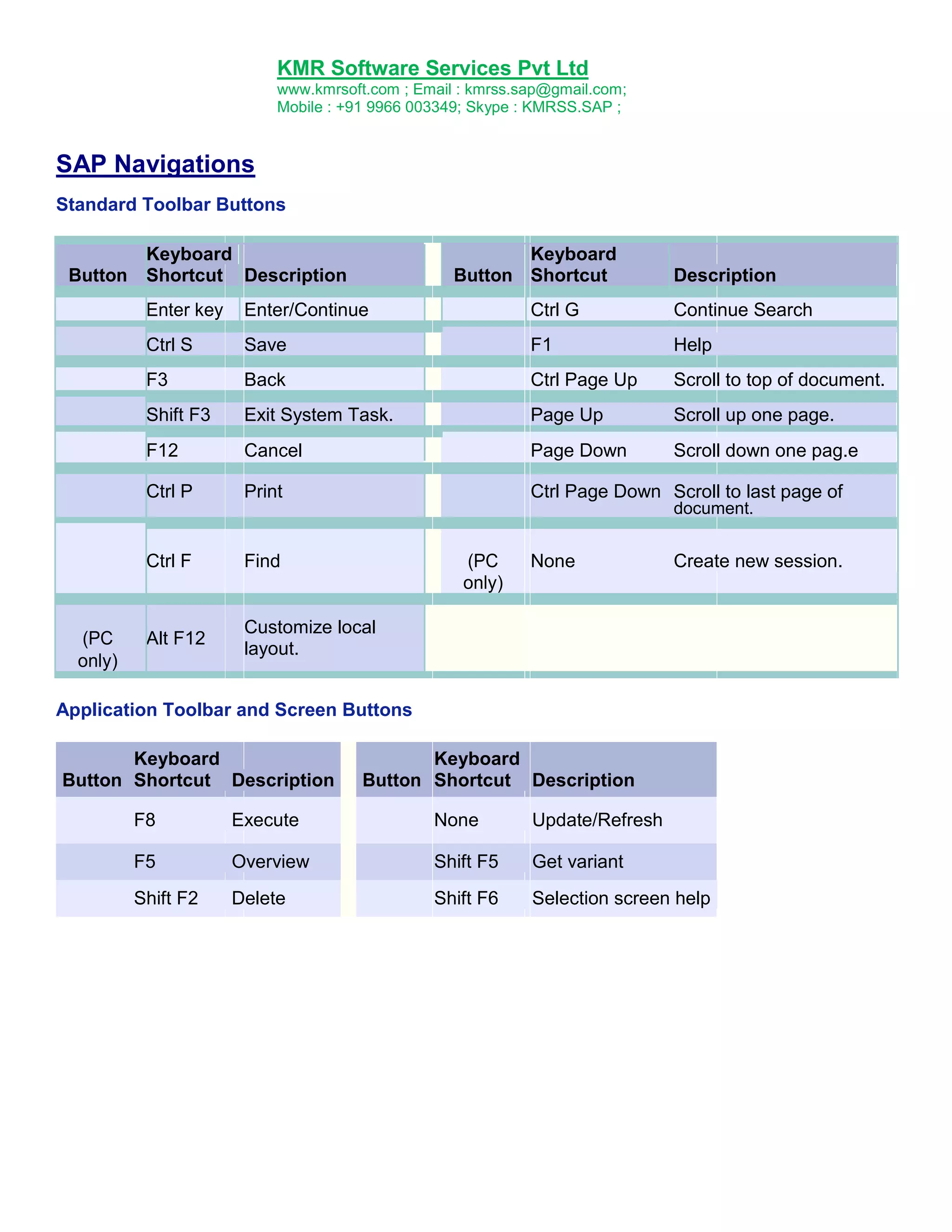
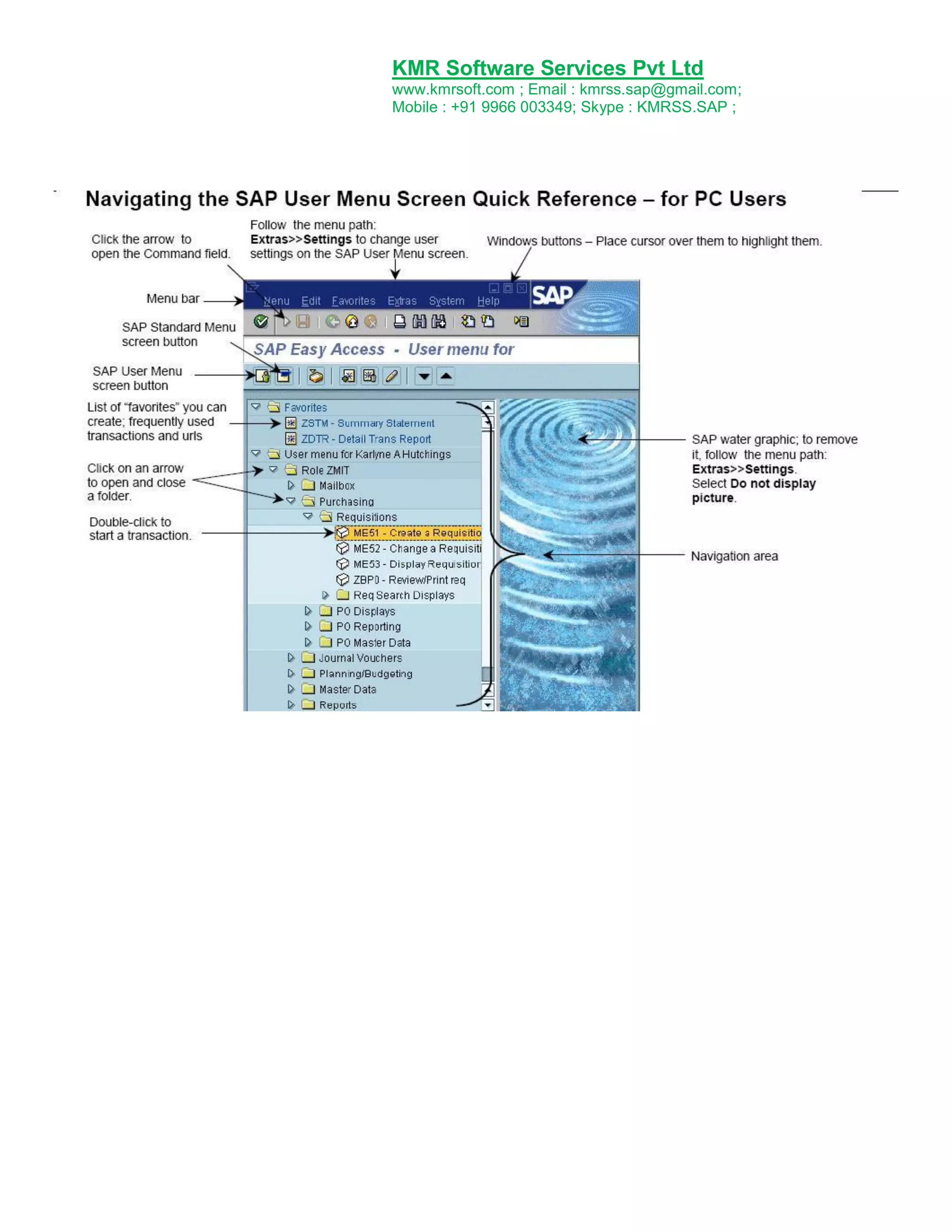
This section explains various SAP navigation shortcuts and toolbar functionalities to enhance user efficiency within the SAP system.
PLM facilitates innovation and product management from ideation to end-of-life, improving productivity and reducing costs.
This segment compares various PLM systems, highlighting their respective vendors and focuses on the strategic integration of SAP PLM functionalities.
Overview of critical components in SAP like Material Master, Company Code, Plant, and their importance in managing organizational data.
Introduction to Bills of Material, its structure, types, and how it supports production planning, emphasizing its role in defining product assemblies.
Detailed definitions of work centers and routings, essential elements in production planning that determine operational steps in manufacturing.
The classification system in SAP allows for the categorization of objects based on criteria for easier management and retrieval.
ECM oversees modifications in production data like BOMs, ensuring accurate documentation and historical tracking of changes.DMS integrates document management within SAP, enabling efficient storage, retrieval, and distribution of product-related documents.
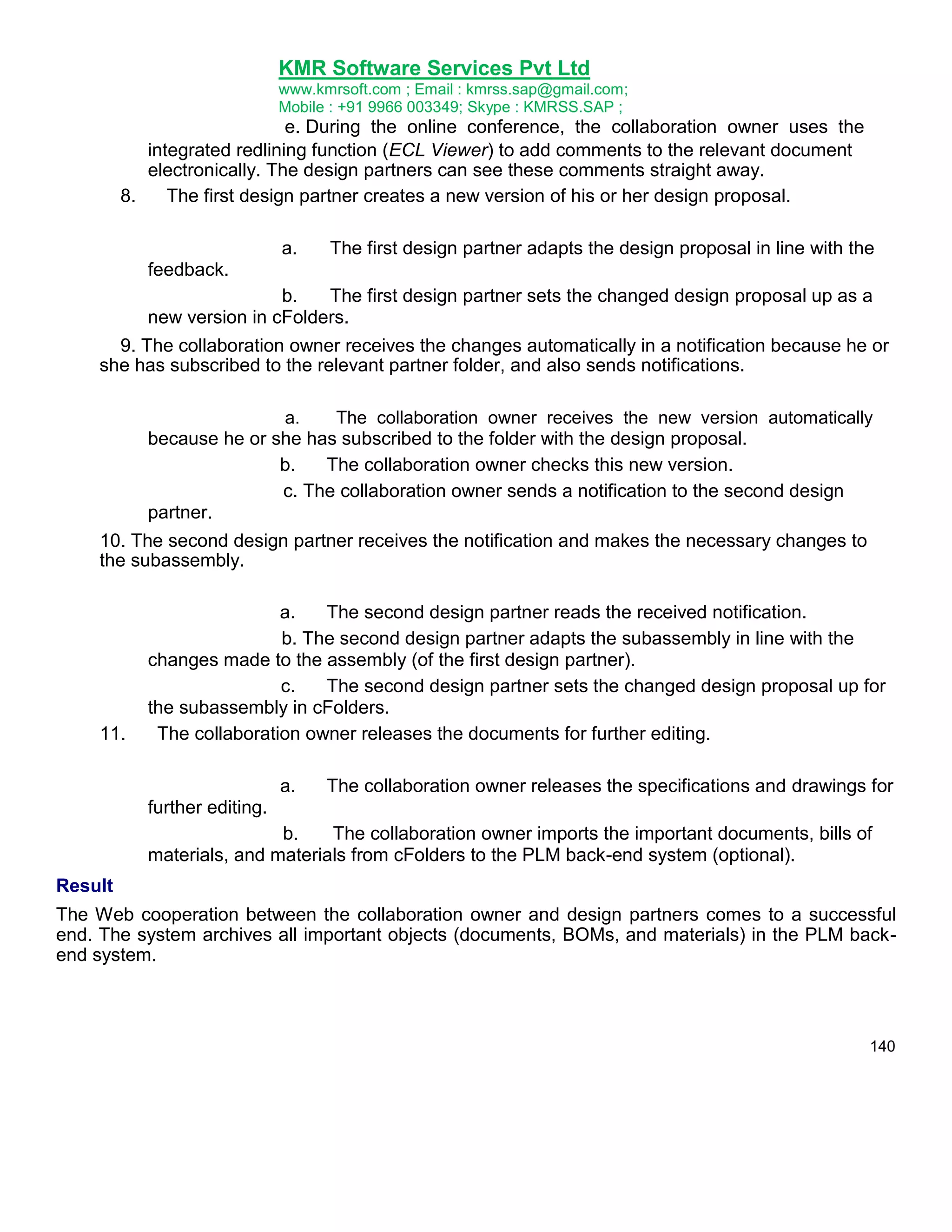
Collaboration tools like cFolders and cProjects facilitate efficient teamwork and process management across organizations during project development.
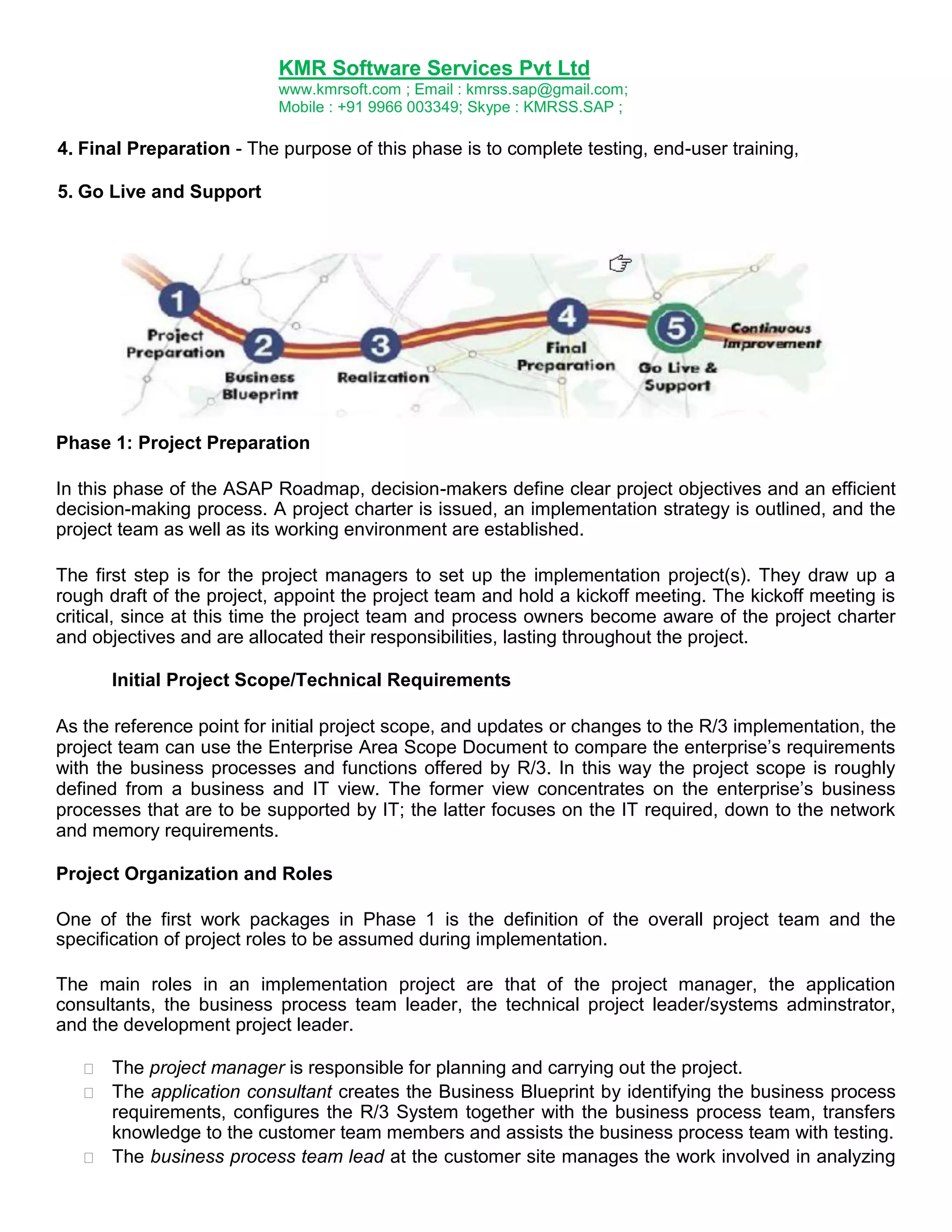
ASAP (Accelerated SAP) is a project management framework guiding implementation phases from project preparation to go-live.
Introduction to key SAP terminologies such as ABAP, Client, and Workflow among others, crucial for understanding SAP system functions.
KMR Software ServicesPvt Ltd
www.kmrsoft.com ; Email : kmrss.sap@gmail.com;
Mobile : +91 9966 003349; Skype : KMRSS.SAP ;
TRAINING MATERIAL ON
SAP PLM
Prepared by
KMR Software Services
www.kmrsoft.com
Email : info@kmrsoft.com
2.
KMR Software ServicesPvt Ltd
www.kmrsoft.com ; Email : kmrss.sap@gmail.com;
Mobile : +91 9966 003349; Skype : KMRSS.SAP ;
Index
An Introduction to SAP ...............................................................................................................................03
SAP Navigations ............................................................................................................................................04
What is PLM?.................................................................................................................................................10
Different PLM Systems ...............................................................................................................................12
Master data ...................................................................................................................................................15
Material Master ............................................................................................................................................17
Bill of Material (BOM) .................................................................................................................................29
Work Center ..................................................................................................................................................44
Routings ..........................................................................................................................................................47
Classification ..................................................................................................................................................53
Engineering Change Management ..........................................................................................................63
Document Management ............................................................................................................................88
SAP Easy Document Management
..............................................................................121
CAD Desktop (CA-CAD) ............................................................................................................................ 128
Collaboration Folders (cFolders) ........................................................................................................... 135
Collaboration Projects (cProjects) ........................................................................................................ 143
Web User Interface of SAP Product Lifecycle Management (PLM-WUI).................................... 159
What is ASAP Methodology.................................................................................................................... 167
Glossary of SAP terms .............................................................................................................................. 179
2
.
An Introduction to SAP
3.
KMR Software ServicesPvt Ltd
www.kmrsoft.com ; Email : kmrss.sap@gmail.com;
Mobile : +91 9966 003349; Skype : KMRSS.SAP ;
SAP: Systems Applications and Products in Data Process
SAP was founded in 1972 in Walldorf, Germany. It stands for Systems, Applications and Products in
Data Processing. Over the years, it has grown and evolved to become the world premier provider of
client/server business solutions for which it is so well known today. The SAP R/3 enterprise
application suite for open client/server systems has established new standards for providing business
information management solutions.
Advantages of Using SAP R/3 in comparison with other Similar Tools
Technology playing a major role in today's business environment. So many companies and
corporations have adopted information technology on a large scale by using Enterprise Resource
Planning (ERP) systems to accomplish their business transaction and data processing needs. And in
this technology SAP R/3 plays a significant role when compared with other similar tools.
SAP Modules Overview
Production Planning
Materials Management
Sales & Distribution
Finance & Accounting, etc…
SAP now are moving away from describing their system as a set of SAP Modules, and now are
using the term „solutions‟, which is much better, as follows:
Financials
Human Resources
Customer Relationship Management
Supplier Relationship Management
Product Lifecycle Management
Supply Chain Management
Business Intelligence
4.
KMR Software ServicesPvt Ltd
www.kmrsoft.com ; Email : kmrss.sap@gmail.com;
Mobile : +91 9966 003349; Skype : KMRSS.SAP ;
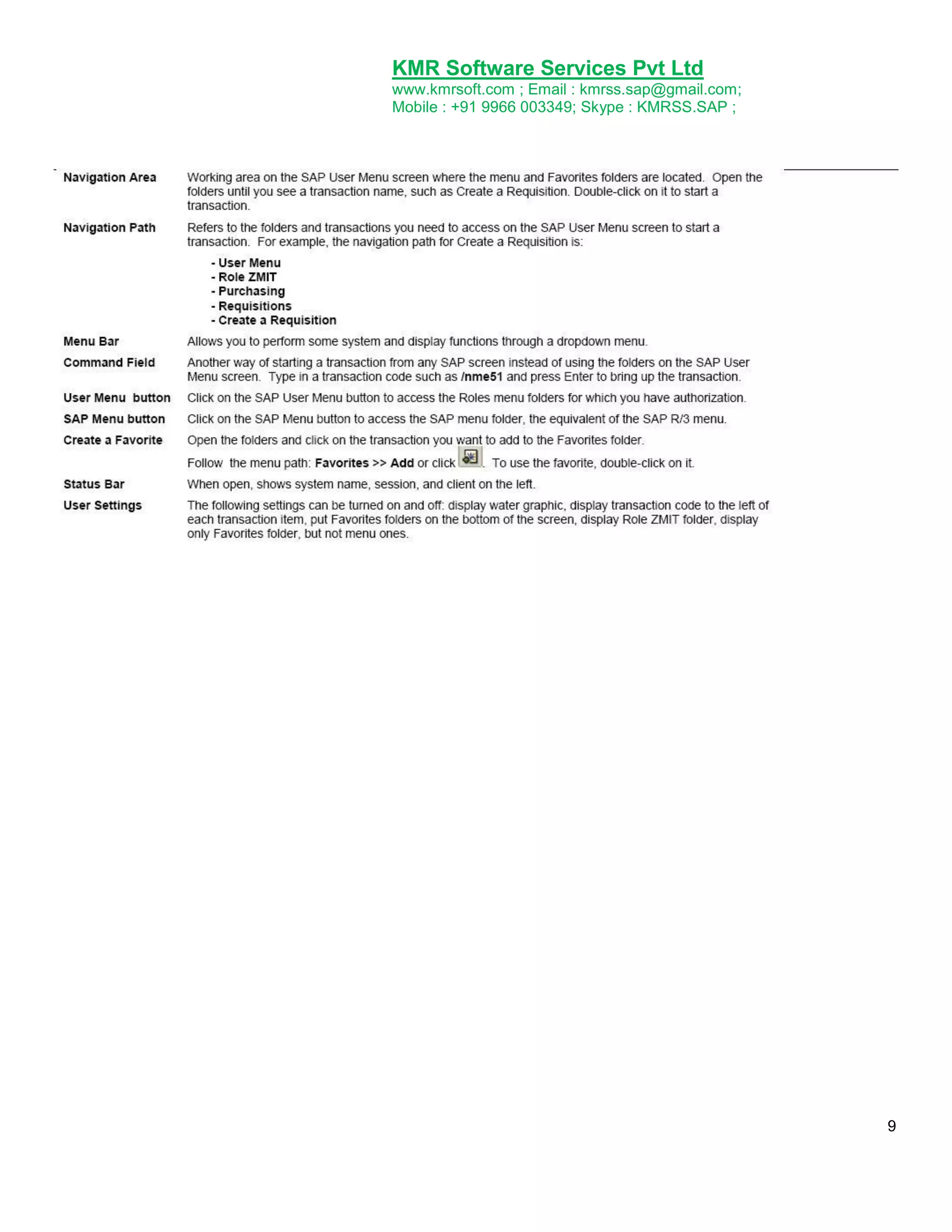
SAP Navigations
Standard Toolbar Buttons
Button
Keyboard
Shortcut Description
Keyboard
Button Shortcut
Description
Enter key
Enter/Continue
Ctrl G
Continue Search
Ctrl S
Save
F1
Help
F3
Back
Ctrl Page Up
Scroll to top of document.
Shift F3
Exit System Task.
Page Up
Scroll up one page.
F12
Cancel
Page Down
Scroll down one pag.e
Ctrl P
Print
Ctrl Page Down Scroll to last page of
document.
Ctrl F
(PC
only)
Find
(PC
only)
Alt F12
None
Create new session.
Customize local
layout.
Application Toolbar and Screen Buttons
Keyboard
Button Shortcut Description
Keyboard
Button Shortcut Description
F8
Execute
None
Update/Refresh
F5
Overview
Shift F5
Get variant
Shift F2
Delete
Shift F6
Selection screen help
5.
KMR Software ServicesPvt Ltd
www.kmrsoft.com ; Email : kmrss.sap@gmail.com;
Mobile : +91 9966 003349; Skype : KMRSS.SAP ;
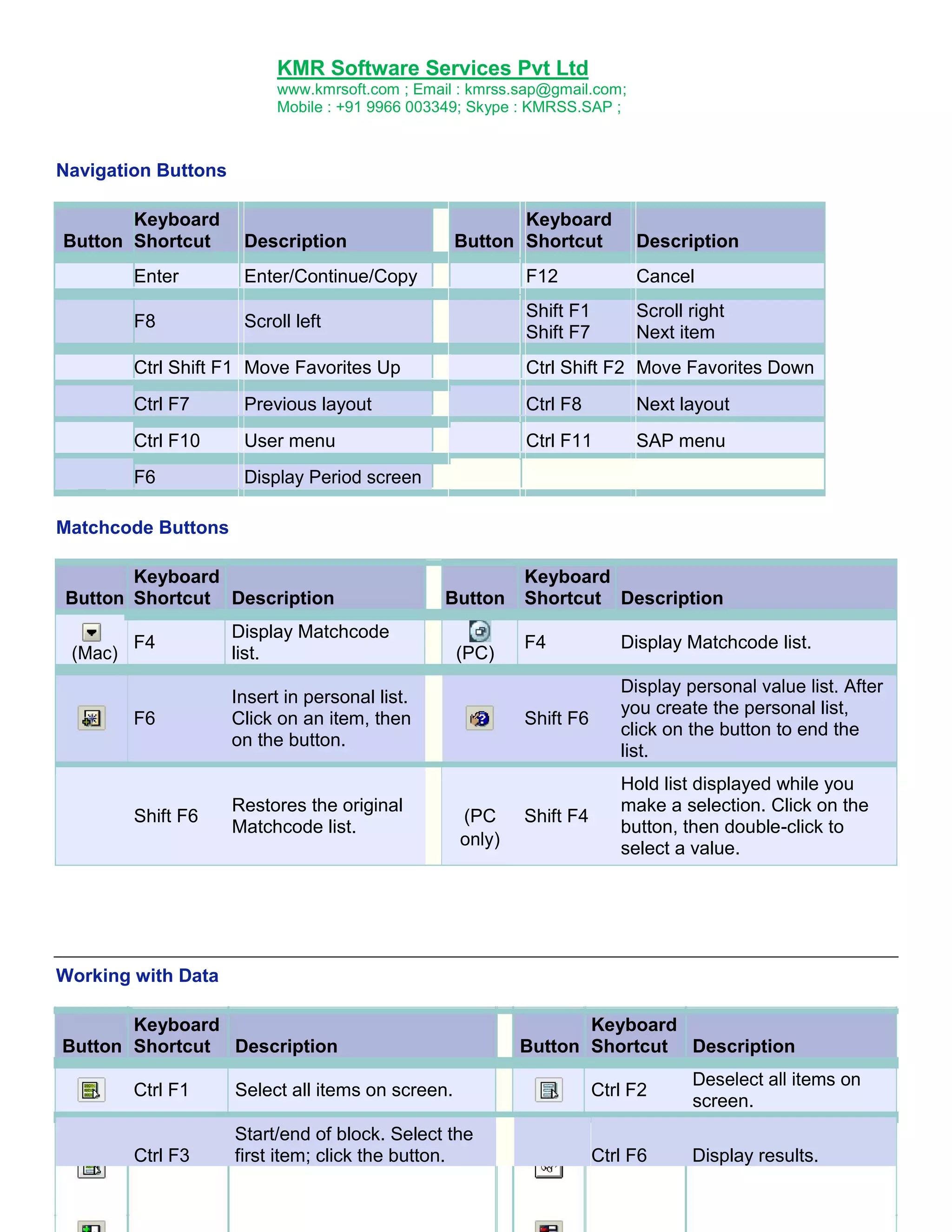
Navigation Buttons
Keyboard
Button Shortcut
Keyboard
Button Shortcut
Description
Description
Enter
Enter/Continue/Copy
F12
Cancel
F8
Scroll left
Shift F1
Shift F7
Scroll right
Next item
Ctrl Shift F1 Move Favorites Up
Ctrl Shift F2 Move Favorites Down
Ctrl F7
Previous layout
Ctrl F8
Next layout
Ctrl F10
User menu
Ctrl F11
SAP menu
F6
Display Period screen
Matchcode Buttons
Keyboard
Button Shortcut Description
F4
Display Matchcode
list.
F6
(Mac)
Button
Insert in personal list.
Click on an item, then
on the button.
Shift F6
Restores the original
Matchcode list.
Keyboard
Shortcut Description
(PC
only)
F4
Display Matchcode list.
Shift F6
(PC)
Display personal value list. After
you create the personal list,
click on the button to end the
list.
Shift F4
Hold list displayed while you
make a selection. Click on the
button, then double-click to
select a value.
Working with Data
Keyboard
Button Shortcut Description
Keyboard
Button Shortcut Description
Ctrl F1
Select all items on screen.
Ctrl F2
Deselect all items on
screen.
Ctrl F3
Start/end of block. Select the
first item; click the button.
Ctrl F6
Display results.
6.
KMR Software ServicesPvt Ltd
www.kmrsoft.com ; Email : kmrss.sap@gmail.com;
Mobile : +91 9966 003349; Skype : KMRSS.SAP ;
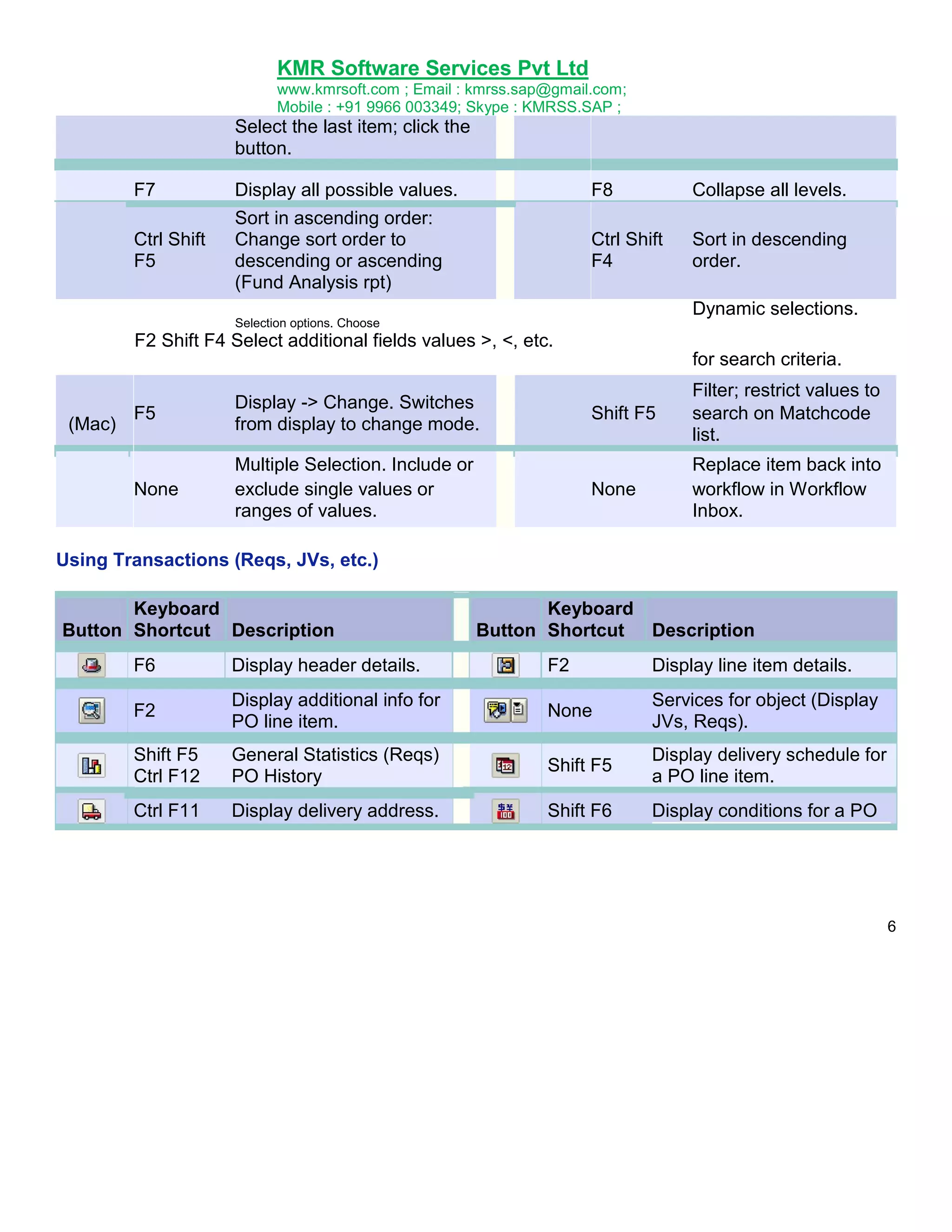
Select the last item; click the
button.
F7
Display all possible values.
F8
Collapse all levels.
Ctrl Shift
F5
Sort in ascending order:
Change sort order to
descending or ascending
(Fund Analysis rpt)
Ctrl Shift
F4
Sort in descending
order.
Dynamic selections.
Selection options. Choose
F2 Shift F4 Select additional fields values >, <, etc.
for search criteria.
Shift F5
Multiple Selection. Include or
exclude single values or
ranges of values.
Filter; restrict values to
search on Matchcode
list.
None
F5
None
(Mac)
Display -> Change. Switches
from display to change mode.
Replace item back into
workflow in Workflow
Inbox.
Using Transactions (Reqs, JVs, etc.)
Keyboard
Button Shortcut Description
Keyboard
Button Shortcut Description
F6
Display header details.
F2
Display line item details.
F2
Display additional info for
PO line item.
None
Services for object (Display
JVs, Reqs).
Shift F5
Ctrl F12
General Statistics (Reqs)
PO History
Shift F5
Display delivery schedule for
a PO line item.
Ctrl F11
Display delivery address.
Shift F6
Display conditions for a PO
6
7.
KMR Software ServicesPvt Ltd
www.kmrsoft.com ; Email : kmrss.sap@gmail.com;
Mobile : +91 9966 003349; Skype : KMRSS.SAP ;
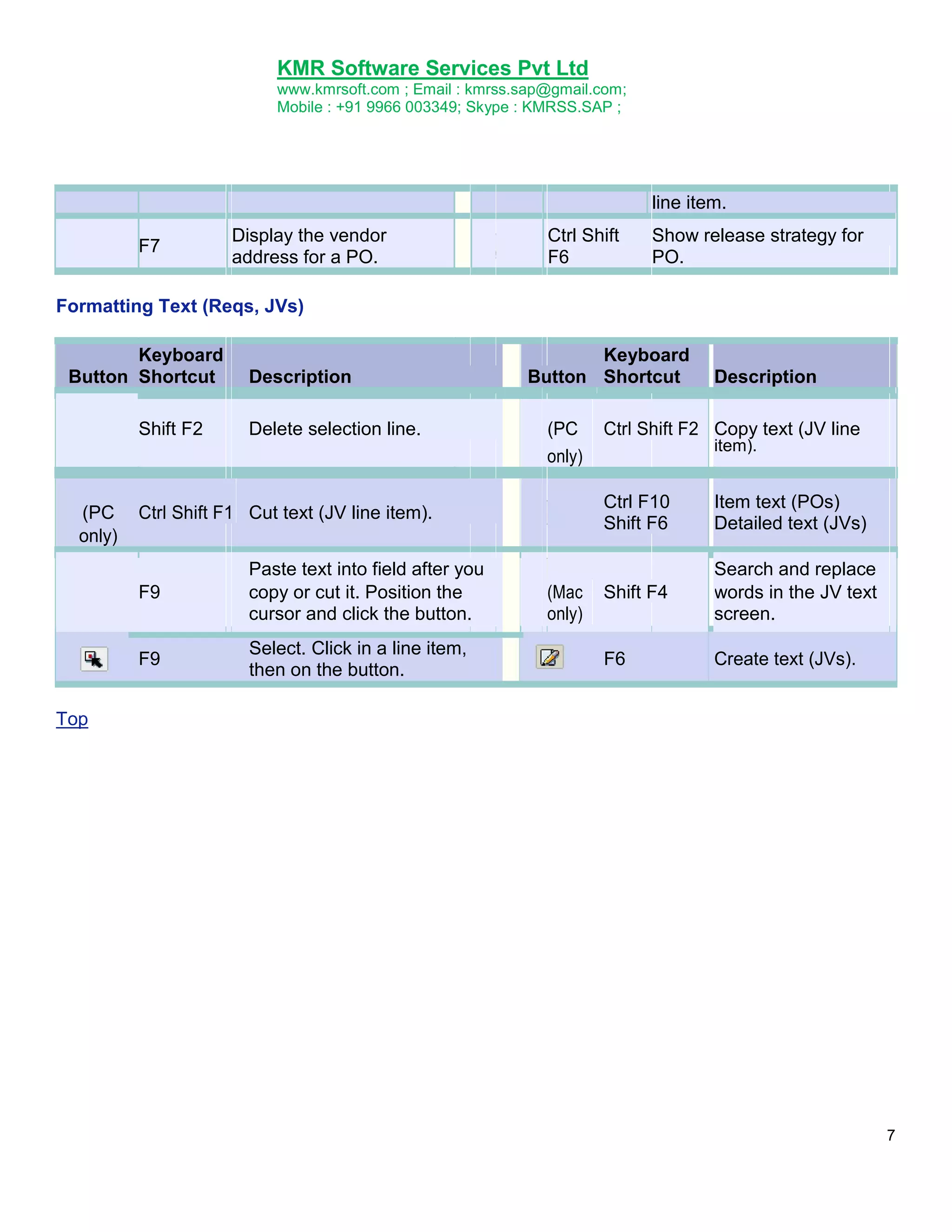
line item.
F7
Display the vendor
address for a PO.
Ctrl Shift
F6
Show release strategy for
PO.
Formatting Text (Reqs, JVs)
Keyboard
Button Shortcut
Shift F2
(PC
only)
Description
Delete selection line.
Keyboard
Button Shortcut
(PC
only)
F9
F9
Select. Click in a line item,
then on the button.
Ctrl Shift F2 Copy text (JV line
item).
Ctrl F10
Shift F6
Ctrl Shift F1 Cut text (JV line item).
Paste text into field after you
copy or cut it. Position the
cursor and click the button.
Description
(Mac
only)
Item text (POs)
Detailed text (JVs)
Shift F4
Search and replace
words in the JV text
screen.
F6
Create text (JVs).
Top
7
KMR Software ServicesPvt Ltd
www.kmrsoft.com ; Email : kmrss.sap@gmail.com;
Mobile : +91 9966 003349; Skype : KMRSS.SAP ;
What is PLM?
Product lifecycle management or PLM is an all-encompassing approach for innovation, new product
development and introduction (NPDI) and product information management from ideation to end of
life.
Business Drivers
Innovation and new product development are essential for most companies to sustain future revenue
growth. Customers demand more new products in shorter time intervals, often customized to their
own needs. They want more attractive designs, better performance, better quality, lower prices, and
instant availability. To meet these needs companies have to be able to collaborate closely within their
own organization and with partners and suppliers located in various parts of the world. At the same
time companies have to manage increasing product and manufacturing complexities due to a quickly
growing number of environmental and regulatory rules and requirements.
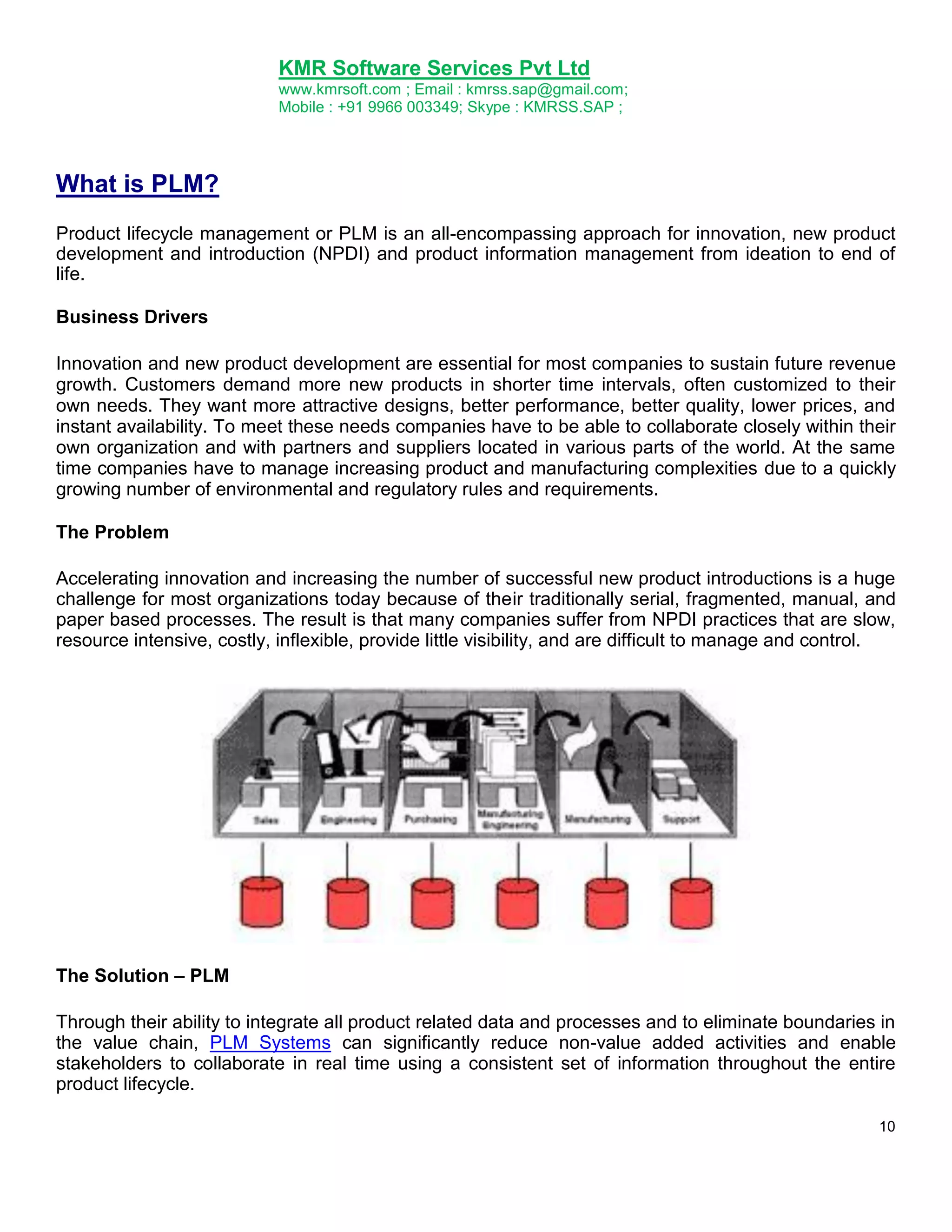
The Problem
Accelerating innovation and increasing the number of successful new product introductions is a huge
challenge for most organizations today because of their traditionally serial, fragmented, manual, and
paper based processes. The result is that many companies suffer from NPDI practices that are slow,
resource intensive, costly, inflexible, provide little visibility, and are difficult to manage and control.
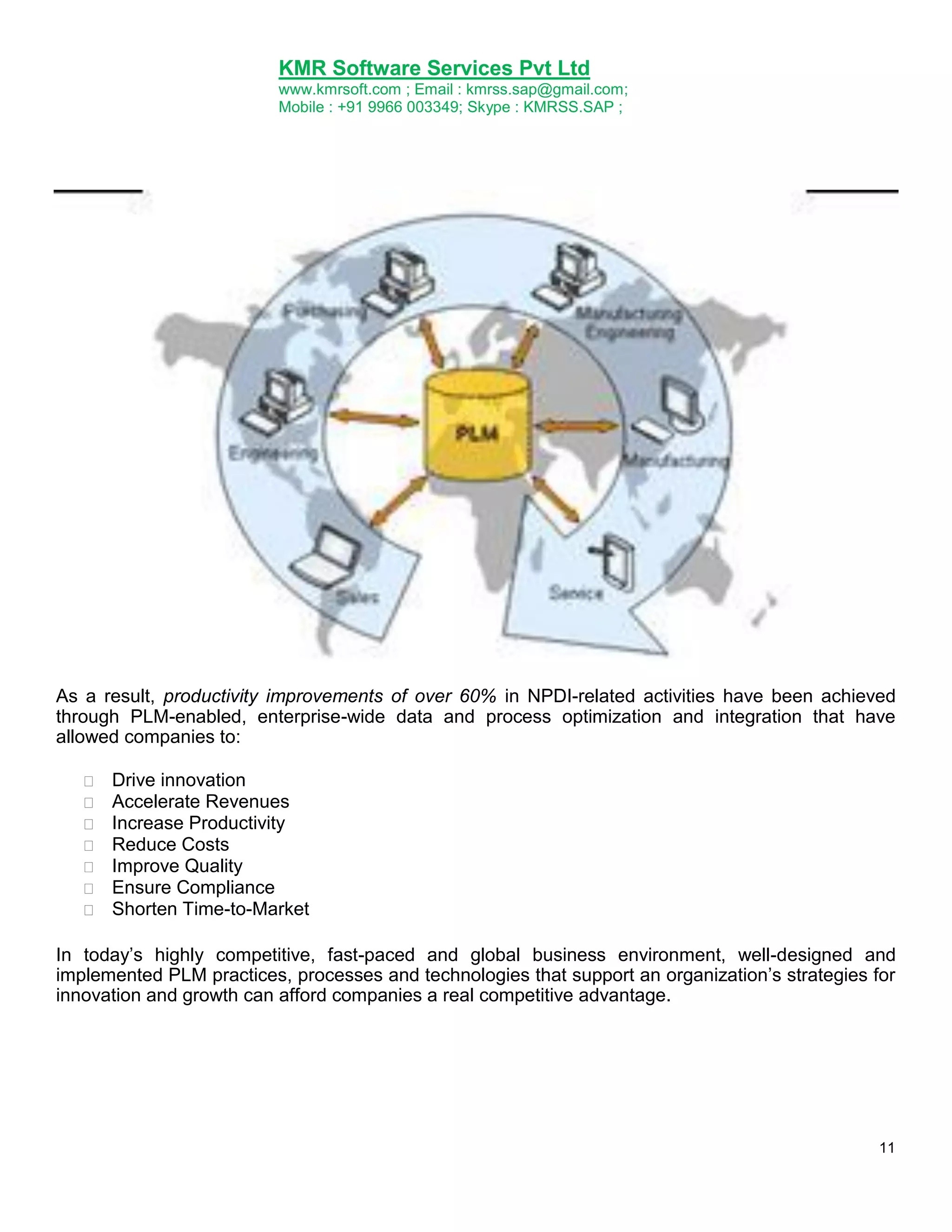
The Solution – PLM
Through their ability to integrate all product related data and processes and to eliminate boundaries in
the value chain, PLM Systems can significantly reduce non-value added activities and enable
stakeholders to collaborate in real time using a consistent set of information throughout the entire
product lifecycle.
10
KMR Software ServicesPvt Ltd
www.kmrsoft.com ; Email : kmrss.sap@gmail.com;
Mobile : +91 9966 003349; Skype : KMRSS.SAP ;
As a result, productivity improvements of over 60% in NPDI-related activities have been achieved
through PLM-enabled, enterprise-wide data and process optimization and integration that have
allowed companies to:
Drive innovation
Accelerate Revenues
Increase Productivity
Reduce Costs
Improve Quality
Ensure Compliance
Shorten Time-to-Market
In today‟s highly competitive, fast-paced and global business environment, well-designed and
implemented PLM practices, processes and technologies that support an organization‟s strategies for
innovation and growth can afford companies a real competitive advantage.
11
KMR Software ServicesPvt Ltd
www.kmrsoft.com ; Email : kmrss.sap@gmail.com;
Mobile : +91 9966 003349; Skype : KMRSS.SAP ;
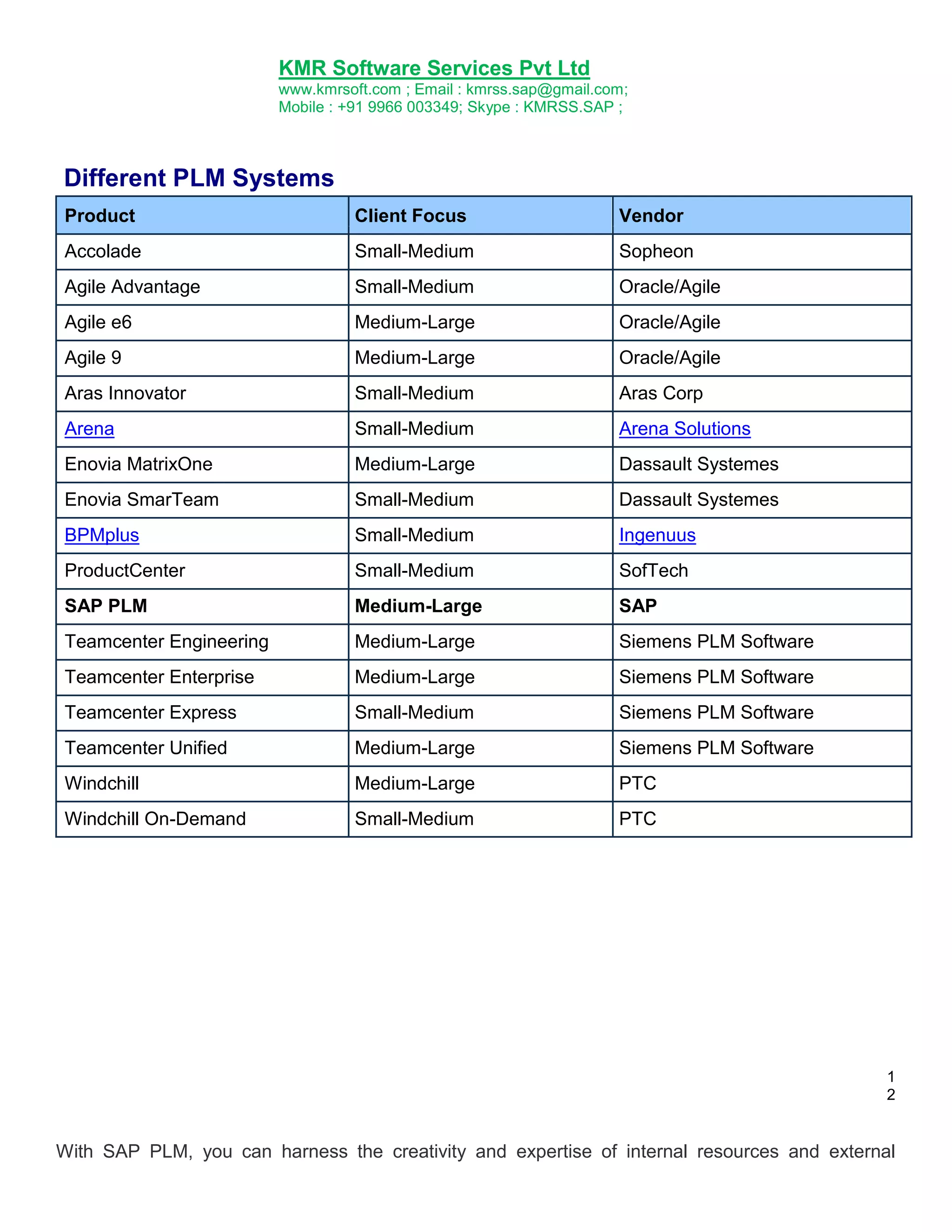
Different PLM Systems
Product
Client Focus
Vendor
Accolade
Small-Medium
Sopheon
Agile Advantage
Small-Medium
Oracle/Agile
Agile e6
Medium-Large
Oracle/Agile
Agile 9
Medium-Large
Oracle/Agile
Aras Innovator
Small-Medium
Aras Corp
Arena
Small-Medium
Arena Solutions
Enovia MatrixOne
Medium-Large
Dassault Systemes
Enovia SmarTeam
Small-Medium
Dassault Systemes
BPMplus
Small-Medium
Ingenuus
ProductCenter
Small-Medium
SofTech
SAP PLM
Medium-Large
SAP
Teamcenter Engineering
Medium-Large
Siemens PLM Software
Teamcenter Enterprise
Medium-Large
Siemens PLM Software
Teamcenter Express
Small-Medium
Siemens PLM Software
Teamcenter Unified
Medium-Large
Siemens PLM Software
Windchill
Medium-Large
PTC
Windchill On-Demand
Small-Medium
PTC
1
2
With SAP PLM, you can harness the creativity and expertise of internal resources and external
17.
KMR Software ServicesPvt Ltd
www.kmrsoft.com ; Email : kmrss.sap@gmail.com;
Mobile : +91 9966 003349; Skype : KMRSS.SAP ;
partners to quickly turn concepts and ideas into successful products. You can manage product
innovation and new product development, production ramp-up, product change management, and
maintenance. And you can transfer, track, and control product and asset information throughout the
extended supply chain to ensure speed, quality, efficiency, and, ultimately, profitability. Thousands of
successful companies use SAP PLM in a wide variety of industries, including high tech, automotive,
consumer products, engineering, and construction. SAP PLM enables companies like yours to do the
following.
Choose product concepts that support your corporate strategy. You can screen and
rationalize new ideas, conduct preliminary assessments, perform detailed analyses leading
into prototype design, and reevaluate and revise the product concept based on early findings.
Manage product and project portfolios with advanced capabilities for systematic idea
management and concept (or business case) evaluation for fast decision making. SAP PLM
helps you perform project management tasks including project structuring over scheduling,
resource management, and cost management and reporting. The focus is on process
methodologies, deliverables, commitments, and responsibilities - all the things that can make a
difference to your business. Strategic portfolio management allows you to monitor, analyze,
evaluate, and optimize your overall portfolio, including concepts, projects, and products.
Support the processes along the life cycle of all discrete manufacturing industries. SAP
PLM lets you tightly integrate authoring environments such as mechanical or electronic CAD
systems; product development; web-based collaboration with external business partners;
prototype procurement; production and evaluation; and product structures and configurations
for sales, equipment and technical asset structures, service, and maintenance.
Support the processes along the life cycle of all process manufacturing industries.
Quality management capabilities, product costing, and multilevel recipe management allow
you to transform enterprise recipes into site-level and plant-level recipes.
Collect and store product-related data for the entire life cycle. You can consolidate and
have easy access to technical document management, development and planning, and
service and maintenance.
Manage corporate services as part of your environmental, health, and safety (EH&S)
audit program. SAP PLM allows you to monitor complex regulations, manage data and
documents, track dangerous materials and products, carry out waste disposal, enhance
employee public safety, and support preventive healthcare.
The SAP Product Lifecycle Management (SAP PLM) application can help you quickly develop and
deliver the products that drive your business. With SAP PLM, you gain the following benefits:
13
Reduced costs - SAP PLM allows you to outsource tasks and focus on your company's core
competencies while controlling the cost of relationship management. The solution also allows you
to manage the cost of changes and evaluate the progress of projects across product lines.
Better business results - With SAP PLM, you can develop innovative products, explore new
market opportunities, gain a higher market share, and increase customer satisfaction.
Higher product quality - SAP PLM helps you manage product quality and reduce waste
throughout every phase of the product life cycle.
18.
KMR Software ServicesPvt Ltd
www.kmrsoft.com ; Email : kmrss.sap@gmail.com;
Mobile : +91 9966 003349; Skype : KMRSS.SAP ;
Faster development - The solution reduces time to market and time to volume by integrating
supply chain management and procurement closely.
Improved manufacturing operations - SAP PLM enables you to plan, measure, and track
equipment availability, operation, safety, and maintenance.
Higher productivity - SAP PLM increases productivity through an easy-to-use, role-based
enterprise portal that delivers all of the necessary content to workers.
Better business decisions - SAP PLM supports decision-making at all levels with powerful
analytics covering areas such as portfolio management, occupational health, product safety,
product quality, and maintenance management.
Lower cost of ownership - SAP PLM can be integrated with operational systems, such as
computer-aided design, ERP, CRM, SRM, and SCM systems. Using a modular approach, you can
implement gradually to meet evolving needs.
14
Master data
Material Master
Bill of Material
Work Center
Routing
19.
KMR Software ServicesPvt Ltd
www.kmrsoft.com ; Email : kmrss.sap@gmail.com;
Mobile : +91 9966 003349; Skype : KMRSS.SAP ;
Material Master
Purpose
The material master contains information on all the materials that a company procures or produces,
stores, and sells. It is the company's central source for retrieving material-specific data. This
information is stored in individual material master records.
Integration
The material master is used by all components in the SAP Logistics System. The integration of all
material data in a single database object eliminates redundant data storage. In the SAP Logistics
System, the data contained in the material master is required, for example, for the following functions:
In Purchasing for ordering
In Inventory Management for goods movement postings and physical inventory
In Invoice Verification for posting invoices
In Sales and Distribution for sales order processing
In Production Planning and Control for material requirements planning, scheduling, and work
scheduling
Definition
The material master has a hierarchical structure resembling the organizational structure of a
company. Some material data is valid at all organizational levels, while other data is valid only at
certain levels. The organizational units are as follows:
Client
Company Code
Plant
Storage Location
Purchasing Organization
Sales Organization
Warehouse Number
Storage Type
17
20.
KMR Software ServicesPvt Ltd
www.kmrsoft.com ; Email : kmrss.sap@gmail.com;
Mobile : +91 9966 003349; Skype : KMRSS.SAP ;
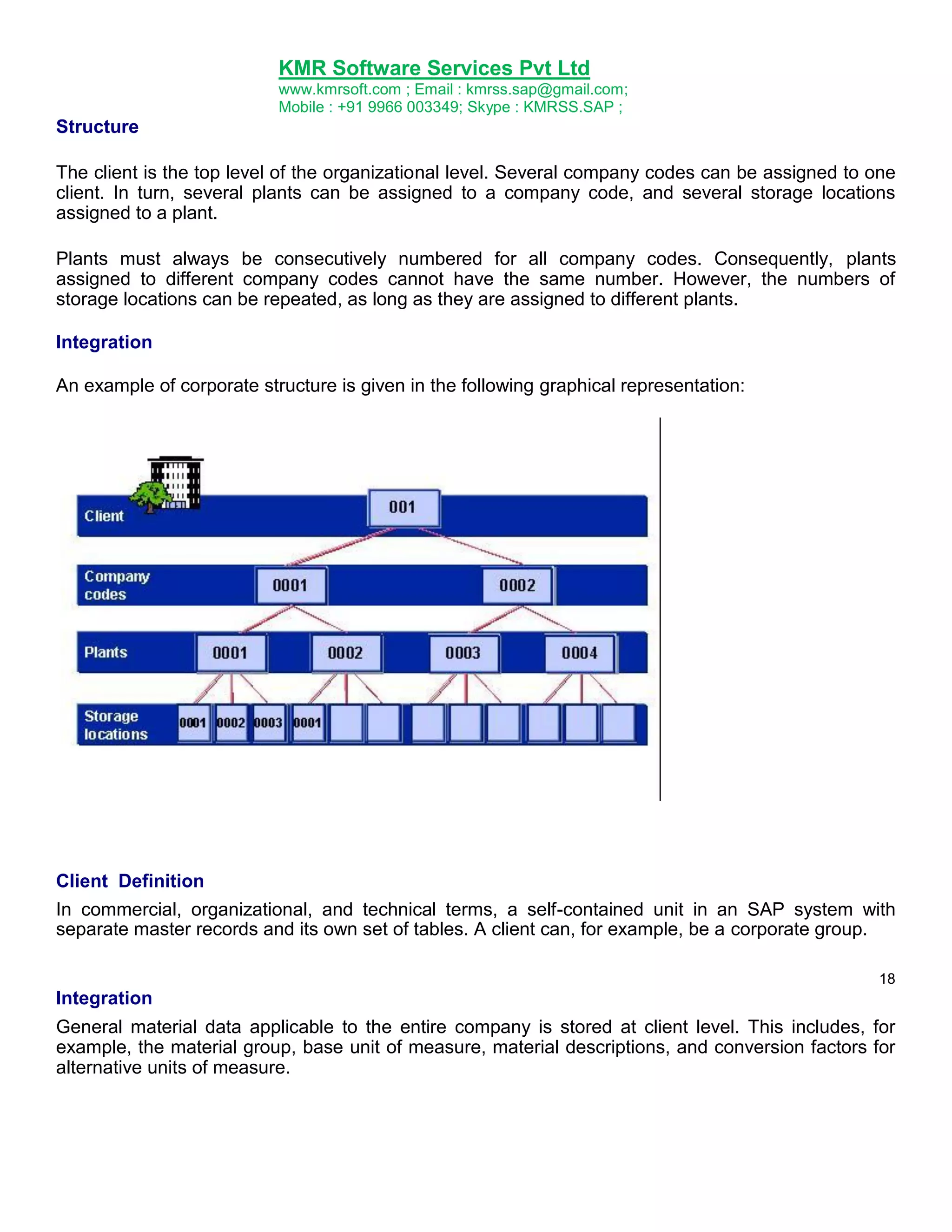
Structure
The client is the top level of the organizational level. Several company codes can be assigned to one
client. In turn, several plants can be assigned to a company code, and several storage locations
assigned to a plant.
Plants must always be consecutively numbered for all company codes. Consequently, plants
assigned to different company codes cannot have the same number. However, the numbers of
storage locations can be repeated, as long as they are assigned to different plants.
Integration
An example of corporate structure is given in the following graphical representation:
Client Definition
In commercial, organizational, and technical terms, a self-contained unit in an SAP system with
separate master records and its own set of tables. A client can, for example, be a corporate group.
18
Integration
General material data applicable to the entire company is stored at client level. This includes, for
example, the material group, base unit of measure, material descriptions, and conversion factors for
alternative units of measure.
21.
KMR Software ServicesPvt Ltd
www.kmrsoft.com ; Email : kmrss.sap@gmail.com;
Mobile : +91 9966 003349; Skype : KMRSS.SAP ;
Company Code Definition
The smallest organizational unit for which a complete self-contained set of accounts can be drawn up
for purposes of external reporting. This involves recording all relevant transactions and generating all
supporting documents for financial statements such as balance sheets and profit and loss
statements. A company code can, for example, be a company or subsidiary
Integration
All data that is valid for a particular company code, as well as for the plants and storage locations
assigned to it, is stored at company code level. This includes, for example, accounting data and
costing data if valuation is at company code level.
Plant Definition
An organizational unit serving to subdivide an enterprise according to production, procurement,
maintenance, and materials planning aspects. It is a place where either materials are produced or
goods and services provided.
Use
The preferred shipping point for a plant is defined as the default shipping point, which depends on the
shipping condition and the loading condition.
For the placement of materials in storage (stock put-away), a storage location is assigned to a plant.
The storage location depends on the storage condition and the placement situation.
The business area that is responsible for a plant is determined as a function of the division. As a rule,
a valuation area corresponds to a plant.
Structure
A plant can assume a variety of roles:
19
As a maintenance plant, it includes the maintenance objects that are spatially located within
this plant. The maintenance tasks that are to be performed are specified within a maintenance
planning plant.
As a retail or wholesale site, it makes merchandise available for distribution and sale.
A plant can be subdivided into storage locations, allowing stocks of materials to be broken down
according to predefined criteria (for example, location and materials planning aspects).
22.
KMR Software ServicesPvt Ltd
www.kmrsoft.com ; Email : kmrss.sap@gmail.com;
Mobile : +91 9966 003349; Skype : KMRSS.SAP ;
A plant can be subdivided into locations and operational areas. Subdivision into locations takes
geographical criteria into account, whereas subdivision into operational areas reflects responsibilities
for maintenance.
Integration
All data that is valid for a particular plant, as well as for the storage locations belonging to it, is stored
at plant level. This includes, for example, MRP data and forecast data.
Purchasing Organization Definition
An organizational unit subdividing an enterprise according to the requirements of Purchasing. It
procures materials and services, negotiates conditions of purchase with vendors, and is responsible
for such transactions.
Structure
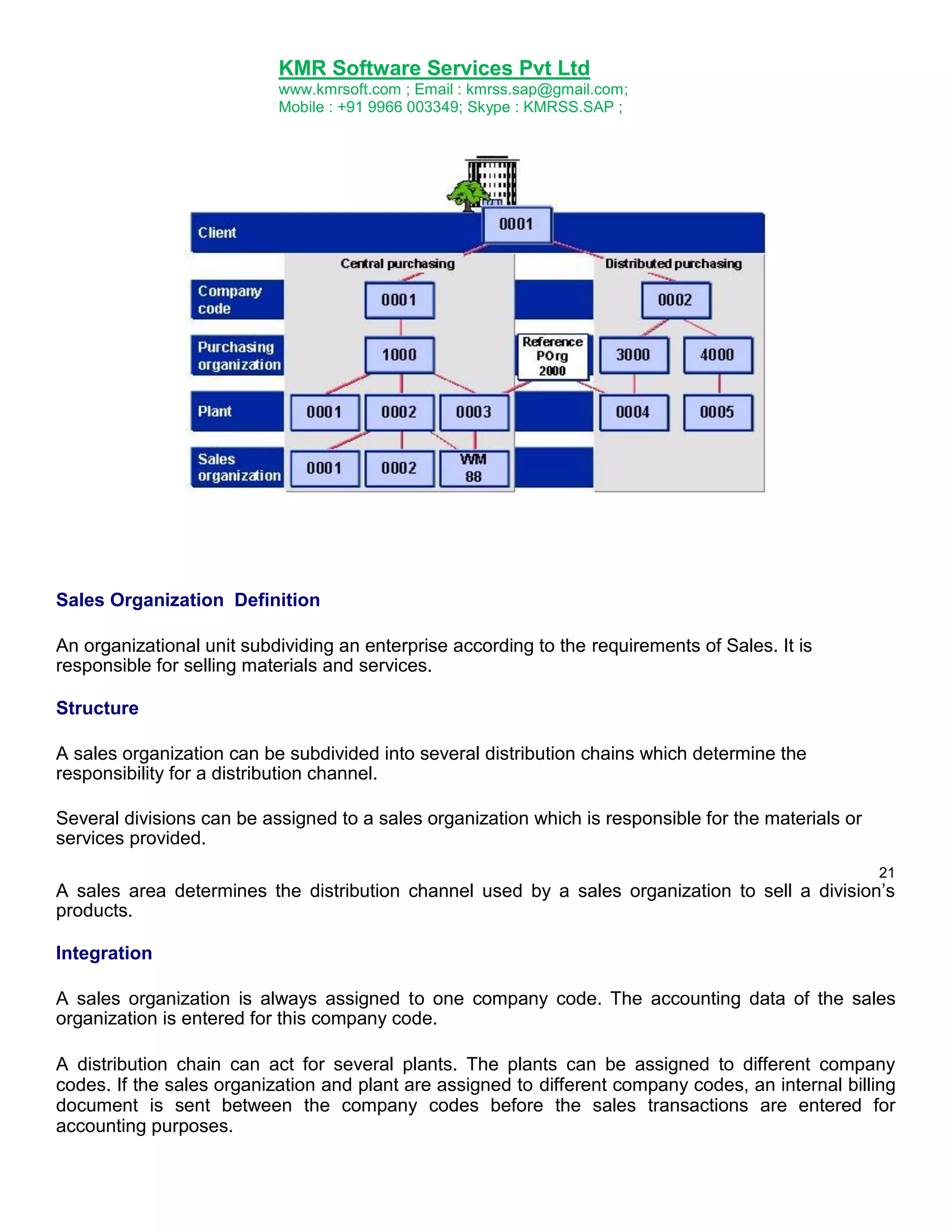
The form of procurement is defined by the assignment of purchasing organizations to company codes
and plants.
The following forms of purchasing exist:
Corporate-group-wide
A purchasing organization procures for all the company codes belonging to a client.
Company-specific
A purchasing organization procures for just one company code.
Plant-specific
A purchasing organization procures for a plant.
20
Mixed forms are possible, which can be replicated in the system by the use of reference purchasing
organizations.
A purchasing organization can utilize the more favorable conditions and contracts of the reference
purchasing organization that has been assigned to it.
Integration
An example of corporate structure with purchasing organization is given in the following graphic
representation:
23.
KMR Software ServicesPvt Ltd
www.kmrsoft.com ; Email : kmrss.sap@gmail.com;
Mobile : +91 9966 003349; Skype : KMRSS.SAP ;
Sales Organization Definition
An organizational unit subdividing an enterprise according to the requirements of Sales. It is
responsible for selling materials and services.
Structure
A sales organization can be subdivided into several distribution chains which determine the
responsibility for a distribution channel.
Several divisions can be assigned to a sales organization which is responsible for the materials or
services provided.
21
A sales area determines the distribution channel used by a sales organization to sell a division‟s
products.
Integration
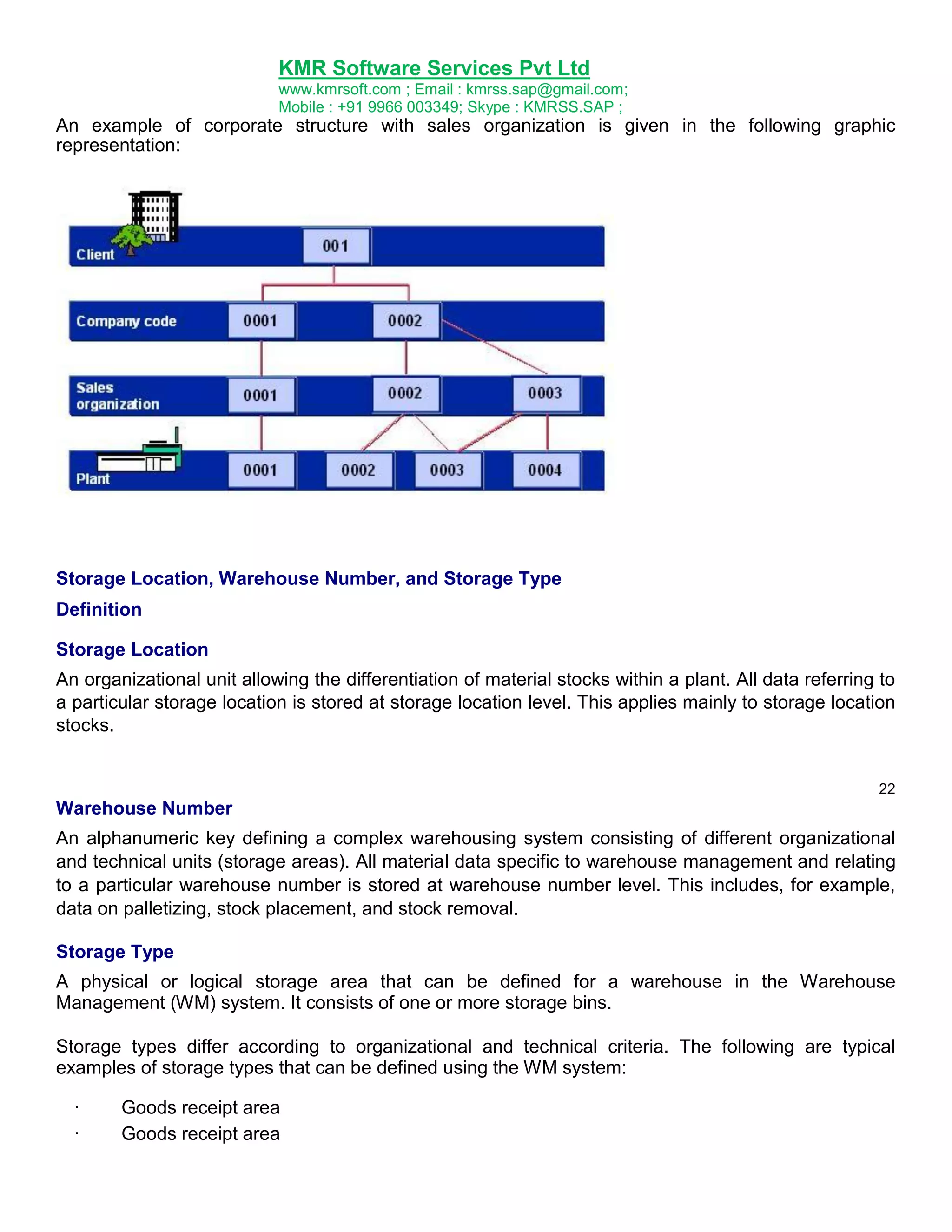
A sales organization is always assigned to one company code. The accounting data of the sales
organization is entered for this company code.
A distribution chain can act for several plants. The plants can be assigned to different company
codes. If the sales organization and plant are assigned to different company codes, an internal billing
document is sent between the company codes before the sales transactions are entered for
accounting purposes.
24.
KMR Software ServicesPvt Ltd
www.kmrsoft.com ; Email : kmrss.sap@gmail.com;
Mobile : +91 9966 003349; Skype : KMRSS.SAP ;
An example of corporate structure with sales organization is given in the following graphic
representation:
Storage Location, Warehouse Number, and Storage Type
Definition
Storage Location
An organizational unit allowing the differentiation of material stocks within a plant. All data referring to
a particular storage location is stored at storage location level. This applies mainly to storage location
stocks.
22
Warehouse Number
An alphanumeric key defining a complex warehousing system consisting of different organizational
and technical units (storage areas). All material data specific to warehouse management and relating
to a particular warehouse number is stored at warehouse number level. This includes, for example,
data on palletizing, stock placement, and stock removal.
Storage Type
A physical or logical storage area that can be defined for a warehouse in the Warehouse
Management (WM) system. It consists of one or more storage bins.
Storage types differ according to organizational and technical criteria. The following are typical
examples of storage types that can be defined using the WM system:
·
·
Goods receipt area
Goods receipt area
25.
KMR Software ServicesPvt Ltd
www.kmrsoft.com ; Email : kmrss.sap@gmail.com;
Mobile : +91 9966 003349; Skype : KMRSS.SAP ;
·
·
Picking area
High rack storage area
All material data specific to warehouse management and relating to a particular storage type is stored
at storage type level. This includes, for example, fixed storage bins as well as maximum and
minimum storage bin quantities.
Use
The warehouse number and storage type are of relevance only if your company uses the WM
system.
Material Numbers Definition
Number uniquely identifying a material master record, and thus a material.
Use
For every material that your company uses, you must create a material master record in the material
master. This record is uniquely identified by a material number.
You can assign mnemonic keys or nonmnemonic keys as material numbers, depending on the
method your company prefers. For this reason, you have the following types of number assignment in
the system:
External number assignment
·
If your company uses mnemonic keys (normally alphanumeric), you enter the character string
you want to use as the material number when you create the material master record.
Internal number assignment
23
If your company uses nonmnemonic keys, you do not enter a material number when creating a
material master record. Instead, the system assigns a consecutive number to the material. This
number is visible when you maintain the material master record.
Industry Sectors
Use
When you create a material master record, you are required to classify the material according to
industry sector and material type.
Like material types, industry sectors have control functions in the SAP system. For example, it is a
factor determining the screen sequence and field selection in a material master record. Once you
have assigned an industry sector to a material, you cannot change the industry sector again
afterwards.
26.
KMR Software ServicesPvt Ltd
www.kmrsoft.com ; Email : kmrss.sap@gmail.com;
Mobile : +91 9966 003349; Skype : KMRSS.SAP ;
Features
The standard system contains the following industry sectors. The ID used to identify the industry
sector internally appears in parentheses.
Plant engineering and construction (A)
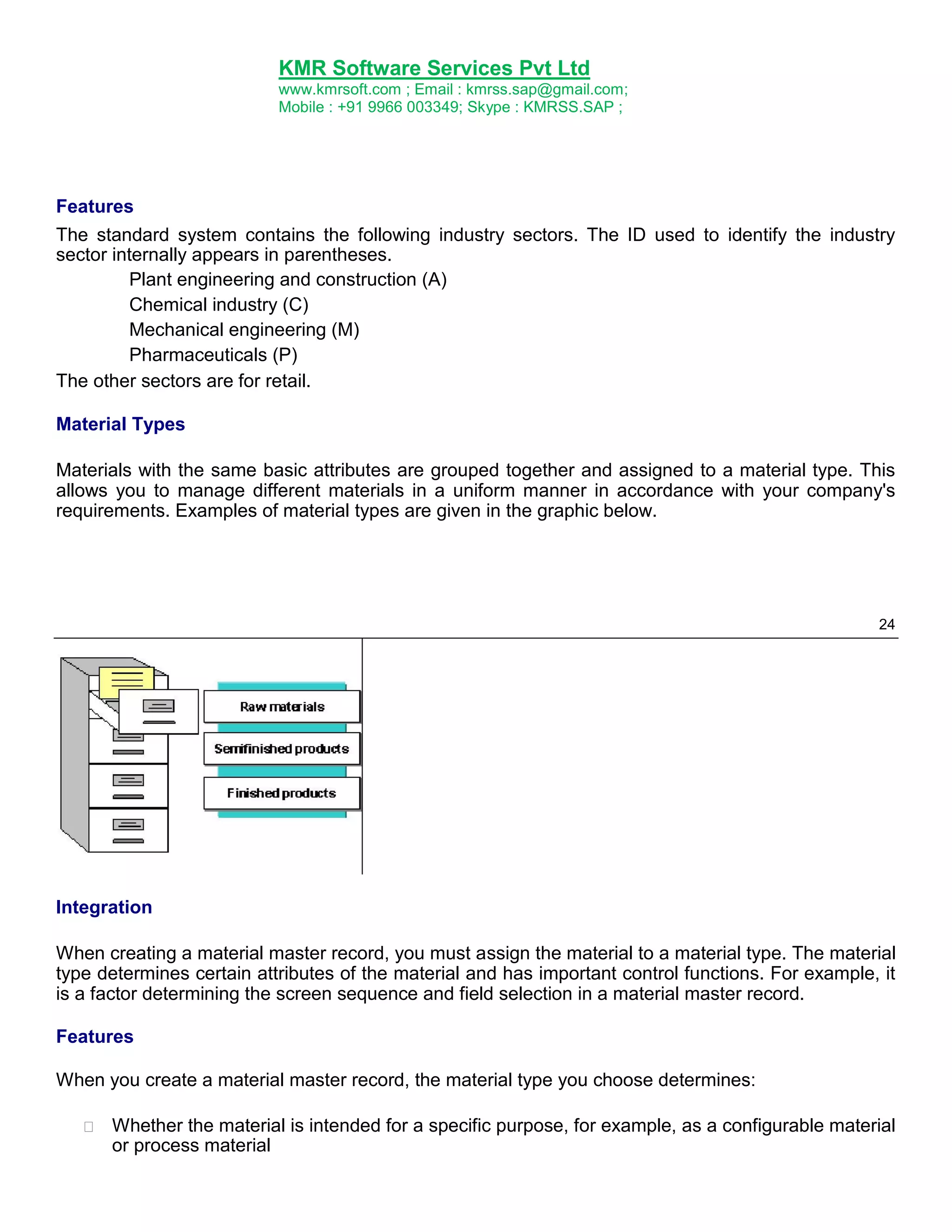
Chemical industry (C)
Mechanical engineering (M)
Pharmaceuticals (P)
The other sectors are for retail.
Material Types
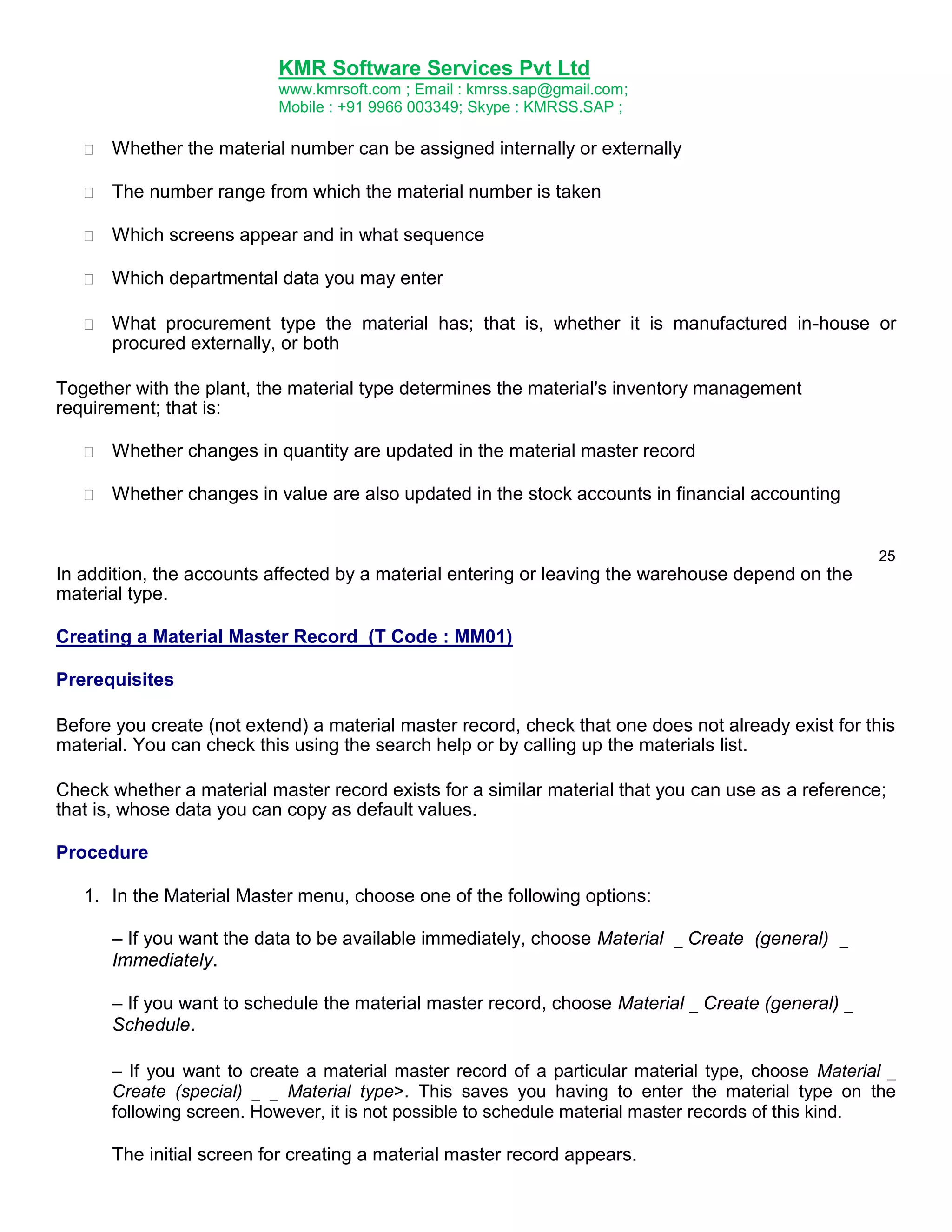
Materials with the same basic attributes are grouped together and assigned to a material type. This
allows you to manage different materials in a uniform manner in accordance with your company's
requirements. Examples of material types are given in the graphic below.
24
Integration
When creating a material master record, you must assign the material to a material type. The material
type determines certain attributes of the material and has important control functions. For example, it
is a factor determining the screen sequence and field selection in a material master record.
Features
When you create a material master record, the material type you choose determines:
Whether the material is intended for a specific purpose, for example, as a configurable material
or process material
27.
KMR Software ServicesPvt Ltd
www.kmrsoft.com ; Email : kmrss.sap@gmail.com;
Mobile : +91 9966 003349; Skype : KMRSS.SAP ;
Whether the material number can be assigned internally or externally
The number range from which the material number is taken
Which screens appear and in what sequence
Which departmental data you may enter
What procurement type the material has; that is, whether it is manufactured in-house or
procured externally, or both
Together with the plant, the material type determines the material's inventory management
requirement; that is:
Whether changes in quantity are updated in the material master record
Whether changes in value are also updated in the stock accounts in financial accounting
25
In addition, the accounts affected by a material entering or leaving the warehouse depend on the
material type.
Creating a Material Master Record (T Code : MM01)
Prerequisites
Before you create (not extend) a material master record, check that one does not already exist for this
material. You can check this using the search help or by calling up the materials list.
Check whether a material master record exists for a similar material that you can use as a reference;
that is, whose data you can copy as default values.
Procedure
1. In the Material Master menu, choose one of the following options:
– If you want the data to be available immediately, choose Material _ Create (general) _
Immediately.
– If you want to schedule the material master record, choose Material _ Create (general) _
Schedule.
– If you want to create a material master record of a particular material type, choose Material _
Create (special) _ _ Material type>. This saves you having to enter the material type on the
following screen. However, it is not possible to schedule material master records of this kind.
The initial screen for creating a material master record appears.
28.
KMR Software ServicesPvt Ltd
www.kmrsoft.com ; Email : kmrss.sap@gmail.com;
Mobile : +91 9966 003349; Skype : KMRSS.SAP ;
2. Enter the following data:
– Material number (only in the case of external number assignment and if allowed by the
material type; otherwise leave this field blank)
– Industry sector
– Material type (unless you have created the material by choosing Material _ Create (special)
_ _ Material type>)
If you want to use another material master record as a reference, enter the number of the
reference material under Copy from.
If you are scheduling the material master record, enter the following data:
26
– Key date from which the material master record is to be valid
– Change number if you want to use engineering change management
If you have entered a key date, the system checks that it does not precede the valid-from date of
the change number. If you have not entered a key date, the system uses the valid-from date of the
change number. In both cases, the date must be in the future.
Choose Enter.
The Select View(s) dialog box appears. The views displayed at this point depend on how the
material type has been configured in Customizing for the Material Master in Define Attributes of
Material Types.
3. Select the views, that is, the user departments, for which you want to enter data and choose
Enter.
The Organizational Levels dialog box appears.
Specify the organizational levels as required and, if appropriate, enter a profile.
If you have specified a reference material, also specify under Copy from the organizational levels
of the reference material whose data is to be copied as default values. If you do not do this, the
system will copy only the data at client level.
Choose Enter.
The data screen for the first user department appears.
4. Enter the material description and the base unit of measure in the appropriate fields (if not already
copied from the reference material). This information is mandatory and identical for all user
departments. Consult with the other users to decide what you are going to enter here.
29.
KMR Software ServicesPvt Ltd
www.kmrsoft.com ; Email : kmrss.sap@gmail.com;
Mobile : +91 9966 003349; Skype : KMRSS.SAP ;
Enter the data for your user department as required.
Choose Enter to access the data screen for the next user department and enter your data for the
other user departments selected in the Select View(s) dialog box. The system issues a message
telling you when you have reached the data screen for the last user department selected.
If you want to enter data for a user department that you did not select in the Select View(s) dialog
box, you can access the user department direct by choosing it, but only if you are
27
authorized to process data for this user department and if the user department is allowed by
the material type.
5. Save your data.
The initial screen appears, where you can start to create the next material master record
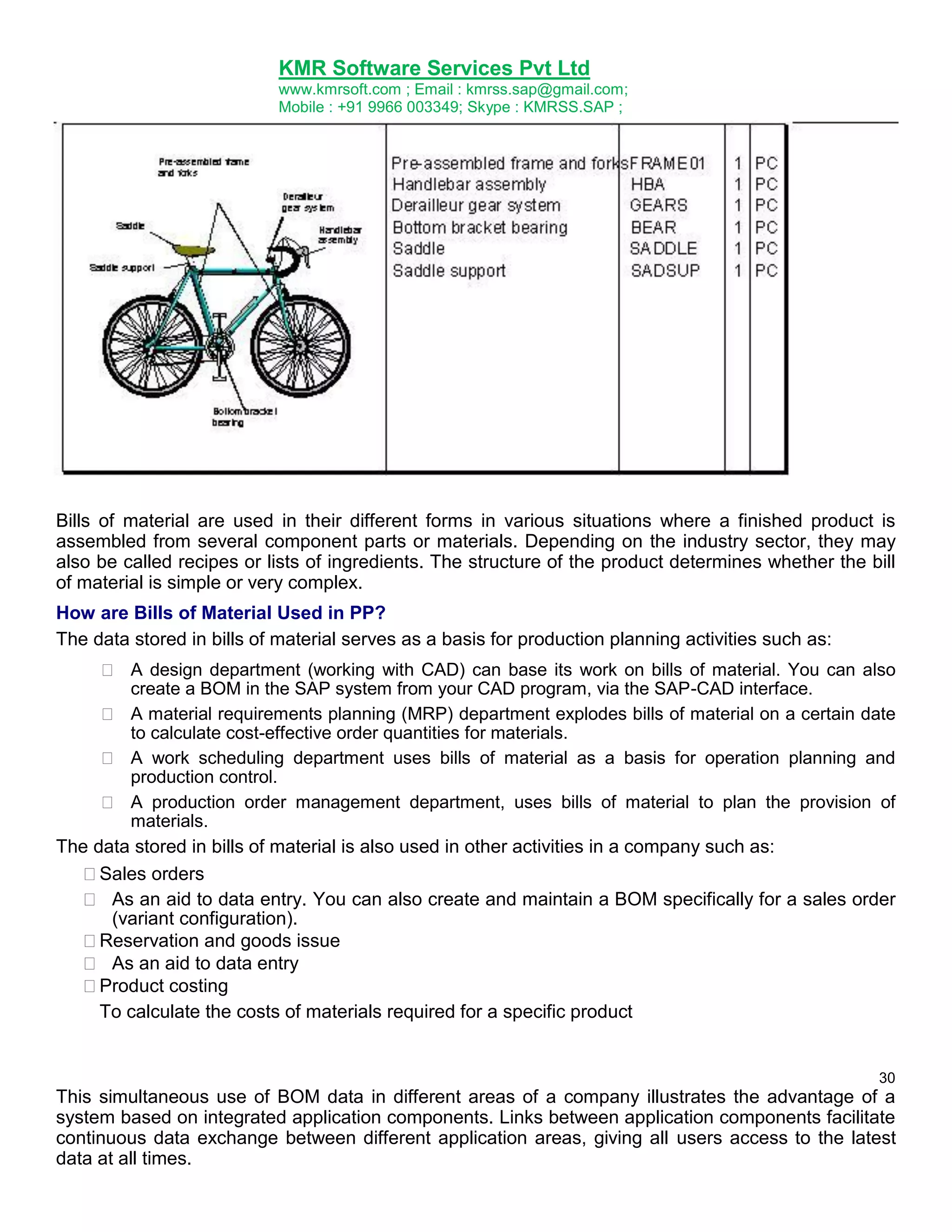
Important Transaction codes for Material Master in SAP
Function
Create
Change
Display
Flag for Deletion
Display Changes
Mass Maintenance
Change Material type
Material list
T code
MM01
MM02
MM03
MM06
MM04
MM17
MMAM
MM60
30.
KMR Software ServicesPvt Ltd
www.kmrsoft.com ; Email : kmrss.sap@gmail.com;
Mobile : +91 9966 003349; Skype : KMRSS.SAP ;
Bill of Material (BOM)
Definition
A formally structured list of the components that make up a product or assembly. The list contains the
object number of each component, together with the quantity and unit of measure.
BOMs are used in their different forms in various situations where a finished product is assembled
from several component parts or materials. Depending on the industry sector, they can also be called
recipes or lists of ingredients and so on.
They contain important basic data for numerous areas of a company, for example:
MRP
Material provisions for production
Product costing
Plant maintenance
You can create the following BOMs in the SAP system:
Material BOMs
Equipment BOMs
Functional location BOMs
Document structures
Order BOM
Work breakdown structure (WBS) BOM
Selection Criteria
Selection is necessary if you plan production in the system or if you want to maintain BOMs for
technical objects from the area plant maintenance. If very large documents about BOMs are to be
cumulated in the document management system (DMS), you also have to select these components.
Bills of Material in Production Planning
Bills of material (BOMs) and routings contain essential master data for integrated materials
management and production control. In the design department, a new product is designed such that it
is suitable for production and for its intended purpose. The result of this product phase is drawings
and a list of all the parts required to produce the product. This list is the bill of material.
German standard (DIN) number 199, part 2, number 51, defines a bill of material as follows:
A bill of material is a complete, formally structured list of the components that make up a
product or assembly. The list contains the object number of each component, together with
the quantity and unit of measure.
A bill of material can only refer to a quantity of at least 1 of an object.
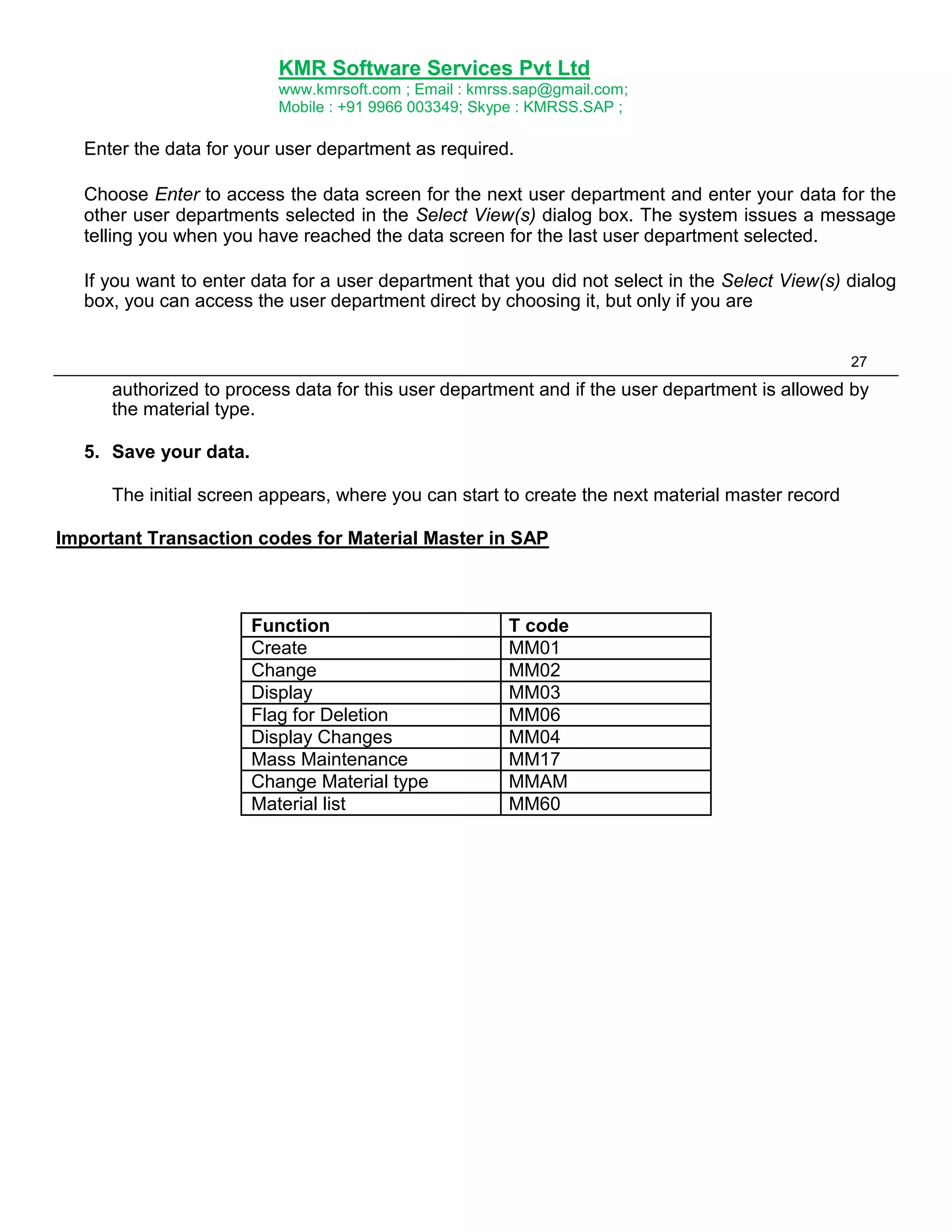
The graphic below shows some components of a bicycle that are included in a BOM.
29
31.
KMR Software ServicesPvt Ltd
www.kmrsoft.com ; Email : kmrss.sap@gmail.com;
Mobile : +91 9966 003349; Skype : KMRSS.SAP ;
Bills of material are used in their different forms in various situations where a finished product is
assembled from several component parts or materials. Depending on the industry sector, they may
also be called recipes or lists of ingredients. The structure of the product determines whether the bill
of material is simple or very complex.
How are Bills of Material Used in PP?
The data stored in bills of material serves as a basis for production planning activities such as:
A design department (working with CAD) can base its work on bills of material. You can also
create a BOM in the SAP system from your CAD program, via the SAP-CAD interface.
A material requirements planning (MRP) department explodes bills of material on a certain date
to calculate cost-effective order quantities for materials.
A work scheduling department uses bills of material as a basis for operation planning and
production control.
A production order management department, uses bills of material to plan the provision of
materials.
The data stored in bills of material is also used in other activities in a company such as:
Sales orders
As an aid to data entry. You can also create and maintain a BOM specifically for a sales order
(variant configuration).
Reservation and goods issue
As an aid to data entry
Product costing
To calculate the costs of materials required for a specific product
30
This simultaneous use of BOM data in different areas of a company illustrates the advantage of a
system based on integrated application components. Links between application components facilitate
continuous data exchange between different application areas, giving all users access to the latest
data at all times.
32.
KMR Software ServicesPvt Ltd
www.kmrsoft.com ; Email : kmrss.sap@gmail.com;
Mobile : +91 9966 003349; Skype : KMRSS.SAP ;
Single-Level BOMs
You can break down large and complex product structures into a number of related units. Each unit
can be represented by a BOM, referred to in this documentation as a single-level BOM.
A single-level BOM describes one or more assemblies by means of component quantities. In the
following, the term single-level BOM will be shortened to BOM.
In practice, a single-level BOM is often a collection of standardized assemblies. A single-level BOM
can be either a complete machine or an individual part.
You can use single-level BOMs to define one-time solutions for recurring tasks. Once you have
defined your solution in the form of a single- level BOM, you can use it whenever you need it and
combine it with other BOMs as required.
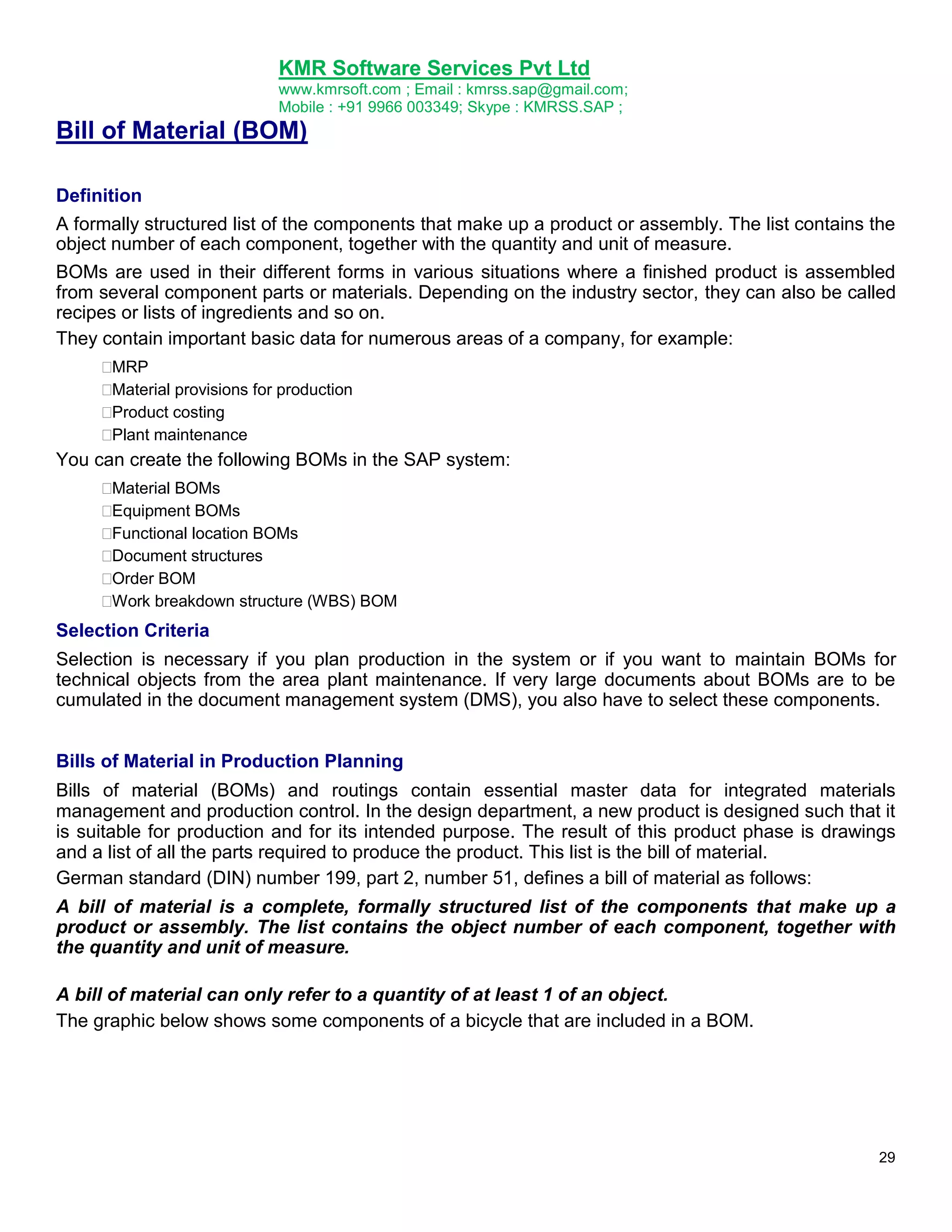
The graphic below shows single-level BOMs for a men‟s racing bicycle for different levels of the
production process.
Assemblies
A group of semi-finished products or parts that are assembled together and form either a finished
product or a component of a finished product is known as an assembly.
An assembly is identified by a material number and generally functions as a single unit.
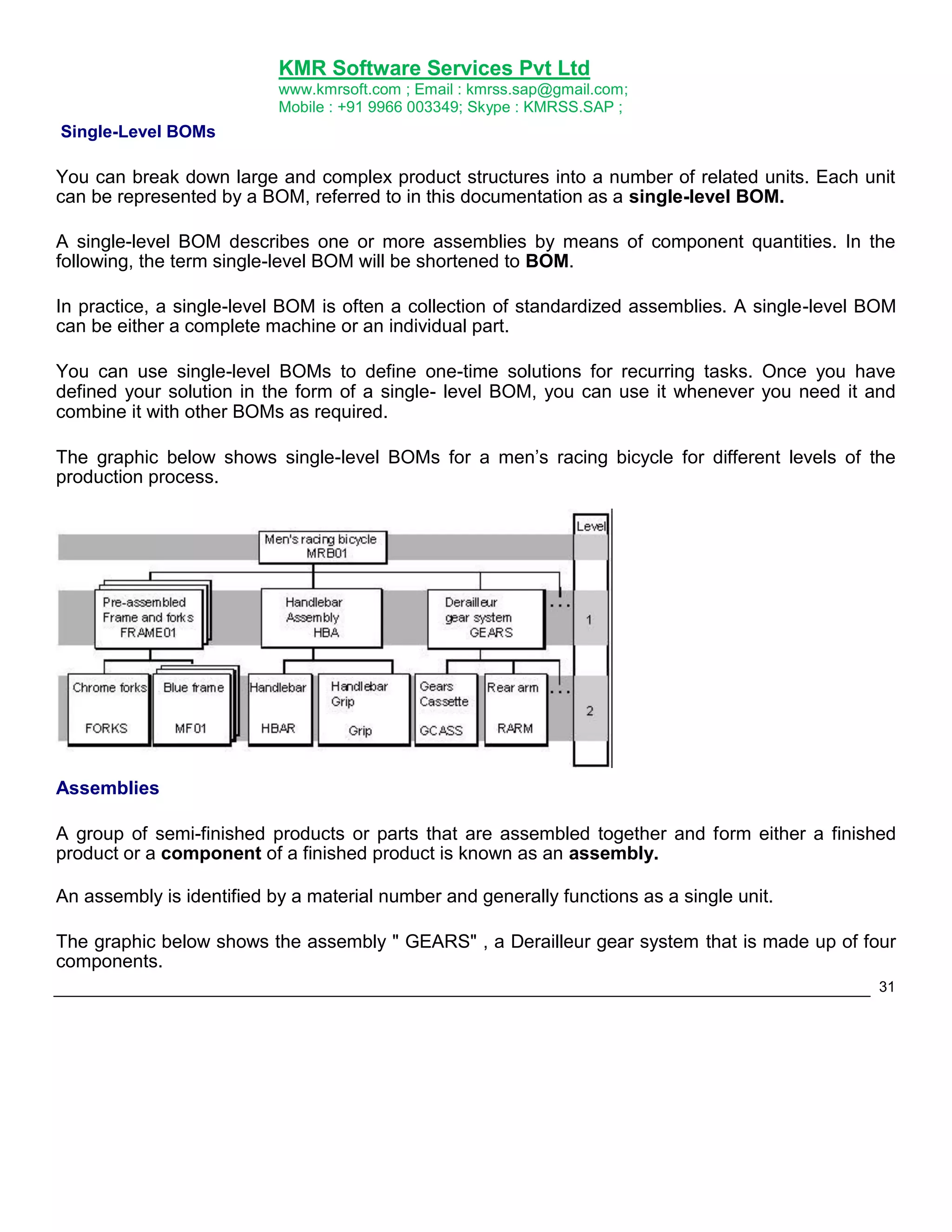
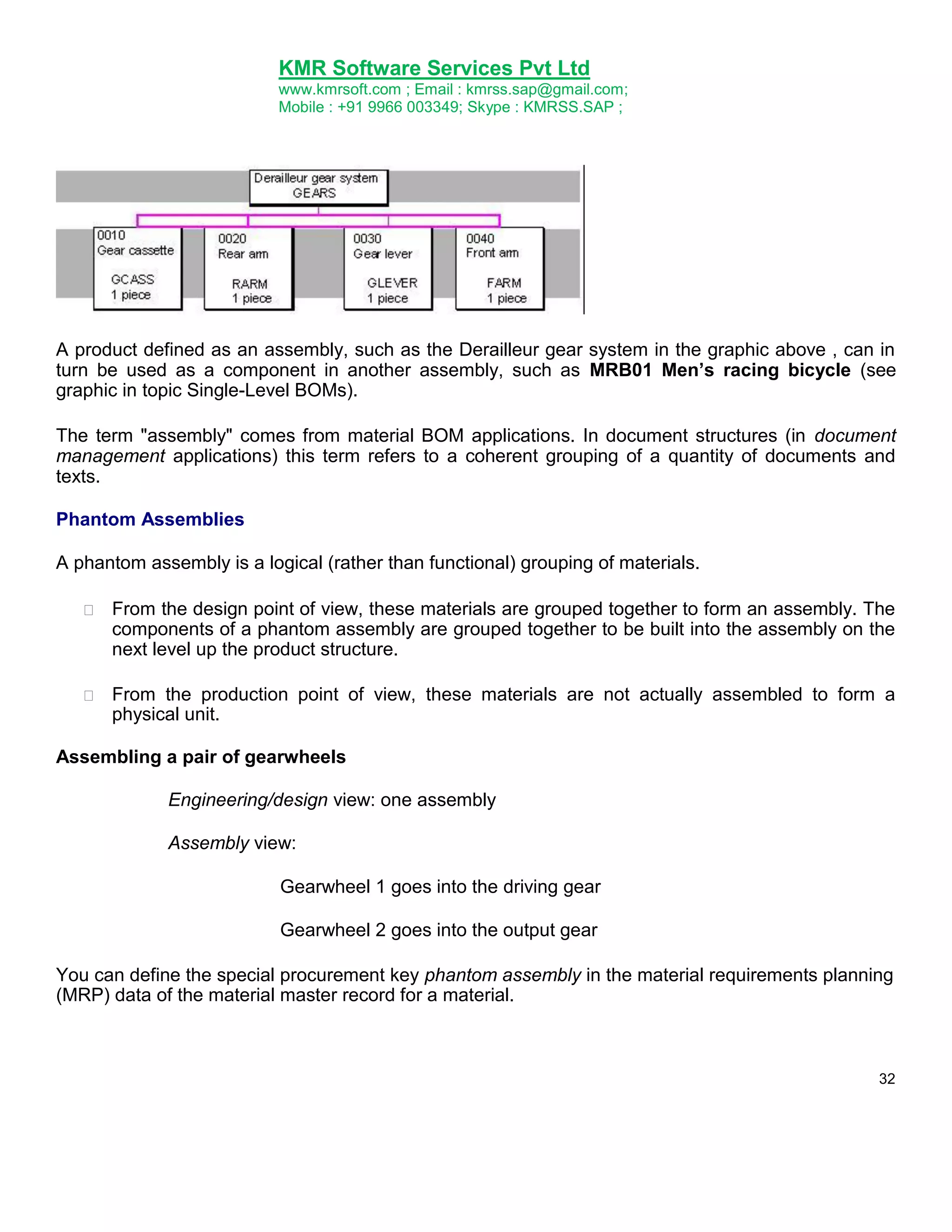
The graphic below shows the assembly " GEARS" , a Derailleur gear system that is made up of four
components.
31
33.
KMR Software ServicesPvt Ltd
www.kmrsoft.com ; Email : kmrss.sap@gmail.com;
Mobile : +91 9966 003349; Skype : KMRSS.SAP ;
A product defined as an assembly, such as the Derailleur gear system in the graphic above , can in
turn be used as a component in another assembly, such as MRB01 Men’s racing bicycle (see
graphic in topic Single-Level BOMs).
The term "assembly" comes from material BOM applications. In document structures (in document
management applications) this term refers to a coherent grouping of a quantity of documents and
texts.
Phantom Assemblies
A phantom assembly is a logical (rather than functional) grouping of materials.
From the design point of view, these materials are grouped together to form an assembly. The
components of a phantom assembly are grouped together to be built into the assembly on the
next level up the product structure.
From the production point of view, these materials are not actually assembled to form a
physical unit.
Assembling a pair of gearwheels
Engineering/design view: one assembly
Assembly view:
Gearwheel 1 goes into the driving gear
Gearwheel 2 goes into the output gear
You can define the special procurement key phantom assembly in the material requirements planning
(MRP) data of the material master record for a material.
32
34.
KMR Software ServicesPvt Ltd
www.kmrsoft.com ; Email : kmrss.sap@gmail.com;
Mobile : +91 9966 003349; Skype : KMRSS.SAP ;
Dependent requirements for the superior assembly are passed directly down to the components of
the phantom assembly, skipping the phantom assembly. Planned orders and purchase requisitions
are also produced only for the components of the phantom assembly.
Validity
In the standard system, validity areas and periods are used to define the precise conditions under
which a bill of material is valid in different areas of a company.
Area of Validity
Material BOMs can be valid on different organizational levels:
You can use a material BOM to manage data that applies directly to production. This is why
the area of validity is the plant. The plant is the location where all necessary workscheduling procedures are organized, such as MRP and creating,routings. In this case, you
create a plant-specific BOM.
However, you can also create a group BOM, without reference to a plant. For example, a
designer maintains a group BOM during the design phase of a product, then the BOM is
allocated to one or more plants for production purposes.
You can extend the area of validity of a BOM by allocating the same BOM to a material in
different plants.
Group BOM
If you create a material BOM without reference to a plant, the BOM is valid throughout your
company. To do this, you leave the Plant field blank. The system checks whether material masters
exist. There are no system checks for plant data.
Plant-Specific Material BOM
If you create a material BOM with reference to a plant, the system makes a number of checks. A
material master record with plant data for the relevant plant must exist for the BOM header material.
When you enter items, the system checks whether plant data exists for the material components (see
Extending the Area of Validity).
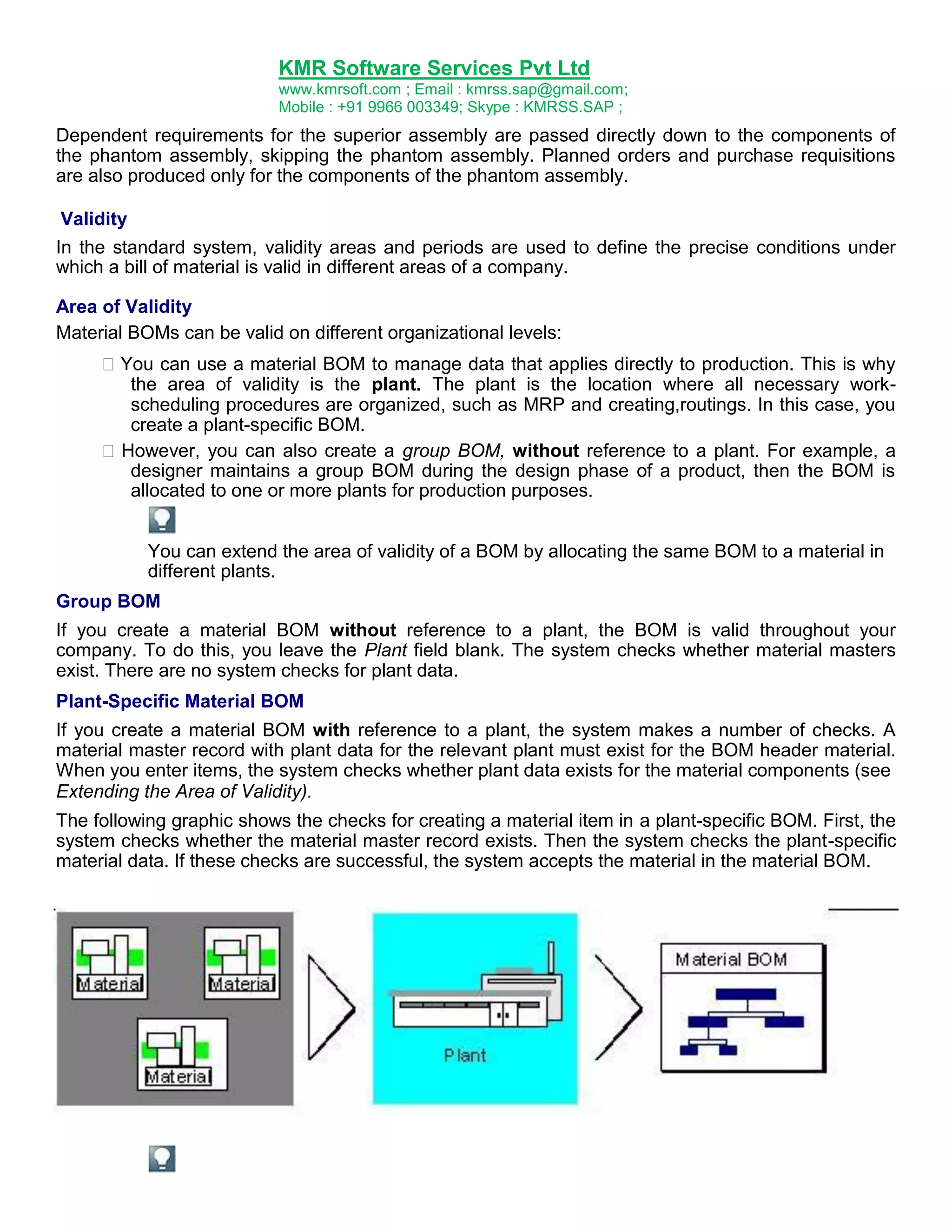
The following graphic shows the checks for creating a material item in a plant-specific BOM. First, the
system checks whether the material master record exists. Then the system checks the plant-specific
material data. If these checks are successful, the system accepts the material in the material BOM.
35.
KMR Software ServicesPvt Ltd
www.kmrsoft.com ; Email : kmrss.sap@gmail.com;
Mobile : +91 9966 003349; Skype : KMRSS.SAP ;
You create equipment BOMs for a specific maintenance planning plant. However,
equipments are managed at client (group) level, not at plant level. Usually, the system
checks plant data for a BOM item, but there is a special item category for BOM items that
are relevant to plant maintenance, so the system does not check plant data for these
items.
Extending the Area of Validity
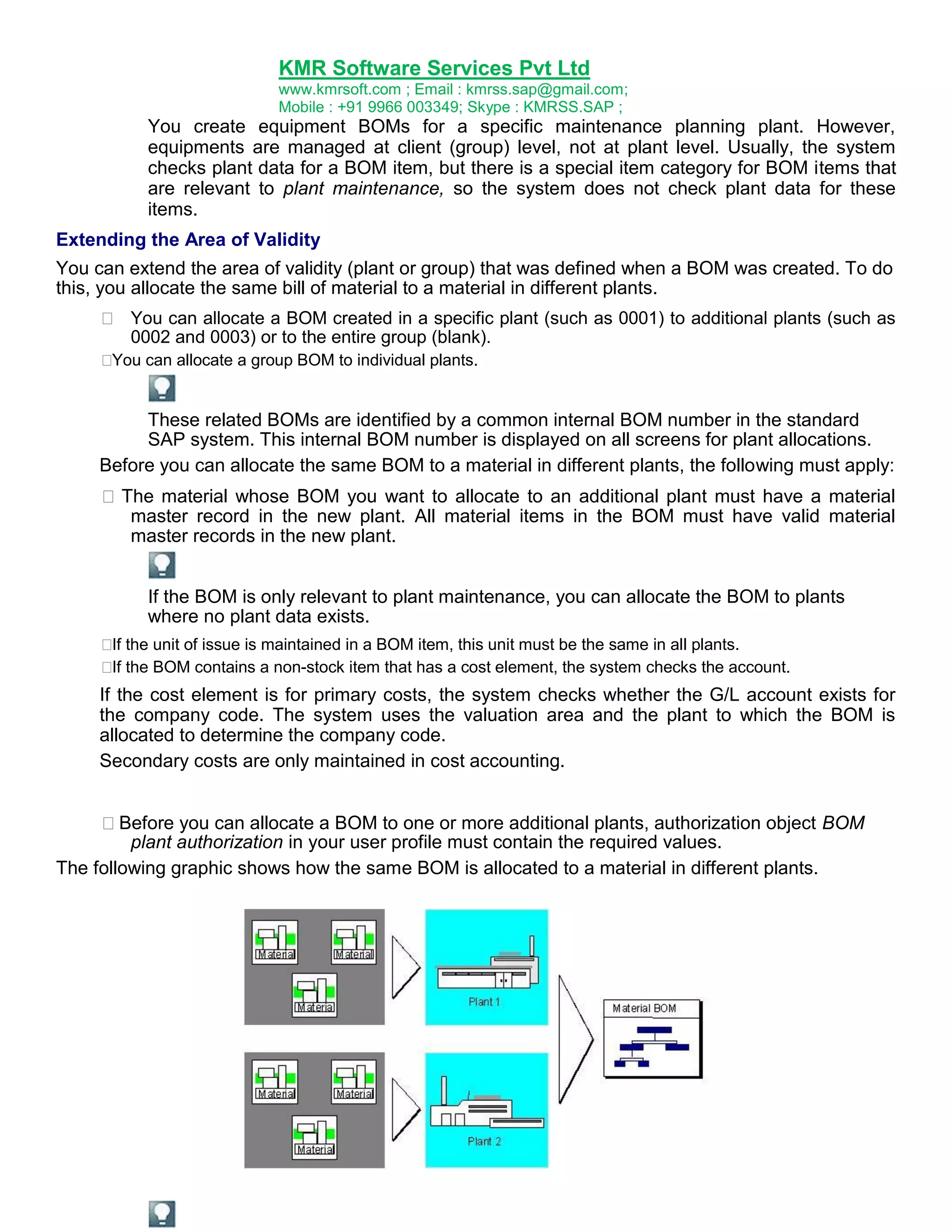
You can extend the area of validity (plant or group) that was defined when a BOM was created. To do
this, you allocate the same bill of material to a material in different plants.
You can allocate a BOM created in a specific plant (such as 0001) to additional plants (such as
0002 and 0003) or to the entire group (blank).
You can allocate a group BOM to individual plants.
These related BOMs are identified by a common internal BOM number in the standard
SAP system. This internal BOM number is displayed on all screens for plant allocations.
Before you can allocate the same BOM to a material in different plants, the following must apply:
The material whose BOM you want to allocate to an additional plant must have a material
master record in the new plant. All material items in the BOM must have valid material
master records in the new plant.
If the BOM is only relevant to plant maintenance, you can allocate the BOM to plants
where no plant data exists.
the unit of issue is maintained in a BOM item, this unit must be the same in all plants.
If
the BOM contains a non-stock item that has a cost element, the system checks the account.
If
If the cost element is for primary costs, the system checks whether the G/L account exists for
the company code. The system uses the valuation area and the plant to which the BOM is
allocated to determine the company code.
Secondary costs are only maintained in cost accounting.
Before you can allocate a BOM to one or more additional plants, authorization object BOM
plant authorization in your user profile must contain the required values.
The following graphic shows how the same BOM is allocated to a material in different plants.
36.
KMR Software ServicesPvt Ltd
www.kmrsoft.com ; Email : kmrss.sap@gmail.com;
Mobile : +91 9966 003349; Skype : KMRSS.SAP ;
If you want to allocate the BOM for a material to a plant where the material already has a
multiple BOM (identified by the same internal BOM number), you can only allocate one
alternative from this BOM group to the material in this plant.
Plant allocations are also supported for equipment BOMs and functional location BOMs.
Validity Period
In the standard system, the effectivity of a BOM header or BOM item is defined by time, using the
Valid-from date. For example, a BOM has 4 items instead of 3 as of December 12, 1999.
The validity period is the time during which the BOM header or BOM item is valid. This period is
delimited by the following data in the BOM header and BOM item:
Valid-from dates
When you create a BOM, this date determines the point in time at which this BOM becomes
effective.
If you create or change a BOM using a change number, the system takes the valid-from date
from the change master record.
Valid-to dates
This date determines the end of the validity period of the BOM. The system default is
December 31, 9999. If you change a BOM using a change number, the system determines the
valid-to date dynamically.
If you change a BOM using a change number with a valid-from date, the pre-change validity
period of the BOM header or BOM item ends at exactly 00.00 hours on this valid-from date.
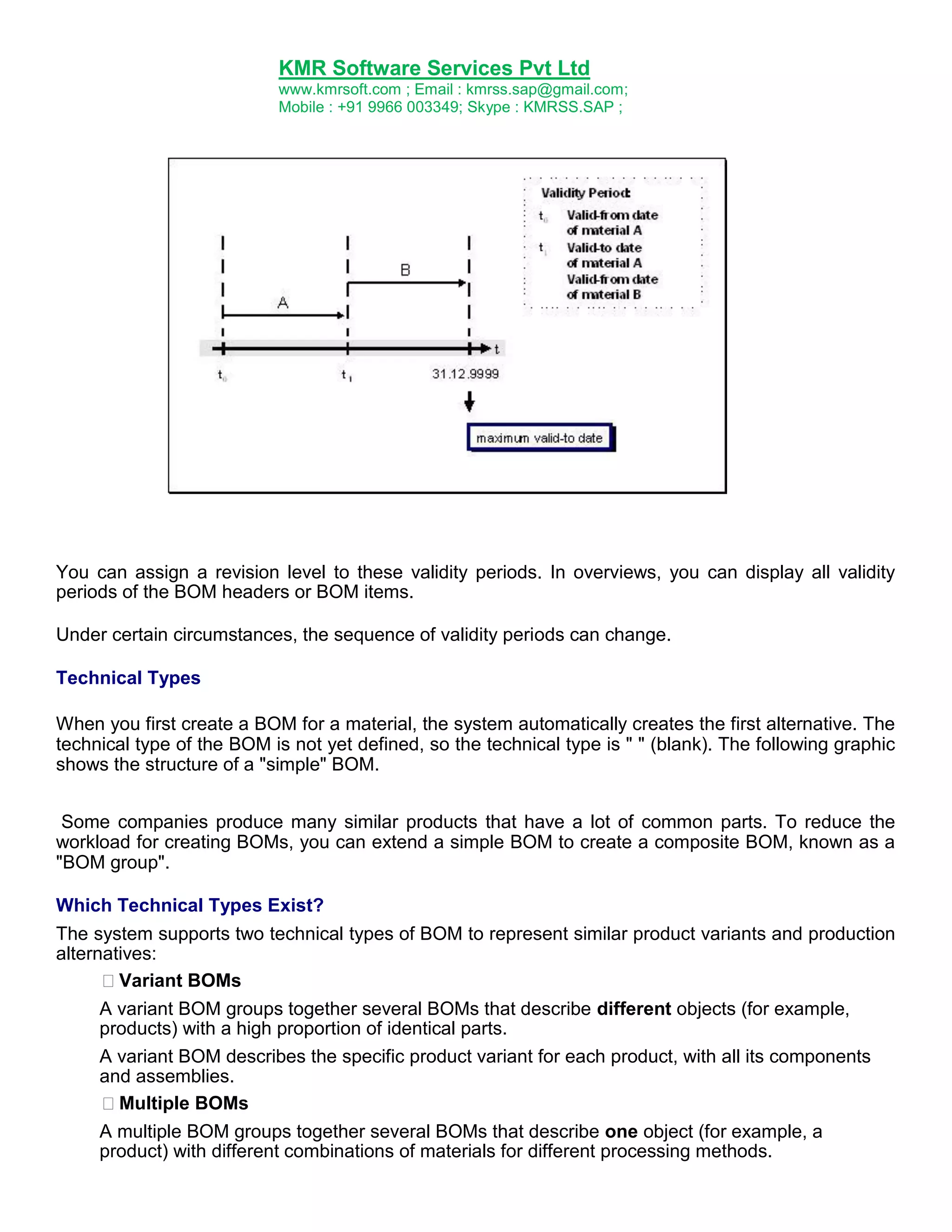
If you change a BOM header or a BOM item with a change number, you generate 2 validity periods,
as shown in the following example.
In a BOM, you replace component A with component B using a change number with a specific validfrom date (d1). The system saves both the status of the BOM before the change with the old
component A and the status of the BOM after the change with the new component B.
37.
KMR Software ServicesPvt Ltd
www.kmrsoft.com ; Email : kmrss.sap@gmail.com;
Mobile : +91 9966 003349; Skype : KMRSS.SAP ;
You can assign a revision level to these validity periods. In overviews, you can display all validity
periods of the BOM headers or BOM items.
Under certain circumstances, the sequence of validity periods can change.
Technical Types
When you first create a BOM for a material, the system automatically creates the first alternative. The
technical type of the BOM is not yet defined, so the technical type is " " (blank). The following graphic
shows the structure of a "simple" BOM.
Some companies produce many similar products that have a lot of common parts. To reduce the
workload for creating BOMs, you can extend a simple BOM to create a composite BOM, known as a
"BOM group".
Which Technical Types Exist?
The system supports two technical types of BOM to represent similar product variants and production
alternatives:
Variant BOMs
A variant BOM groups together several BOMs that describe different objects (for example,
products) with a high proportion of identical parts.
A variant BOM describes the specific product variant for each product, with all its components
and assemblies.
Multiple BOMs
A multiple BOM groups together several BOMs that describe one object (for example, a
product) with different combinations of materials for different processing methods.
38.
KMR Software ServicesPvt Ltd
www.kmrsoft.com ; Email : kmrss.sap@gmail.com;
Mobile : +91 9966 003349; Skype : KMRSS.SAP ;
The system does not define the technical type until you create either an additional
alternative for a BOM or a different variant for an existing BOM.
If you already know which technical type you want when you create a BOM, you can
define the technical type using a special function.
When do I Create a Variant BOM?
The term "variant" refers to changes to the basic model of a product. These changes occur when
components are left out or added.
If you are producing several similar products that have a lot of common parts, you can describe these
products using a variant BOM. This is the case, for example, if you replace one material component
with another to make a different product. Variants can also differ by containing different quantities of
a component. You create the new BOM as a variant of an existing BOM.
You can only create a variant BOM from a simple material BOM. No multiple BOM can exist for the
material. A multiple BOM cannot be converted to a variant BOM.
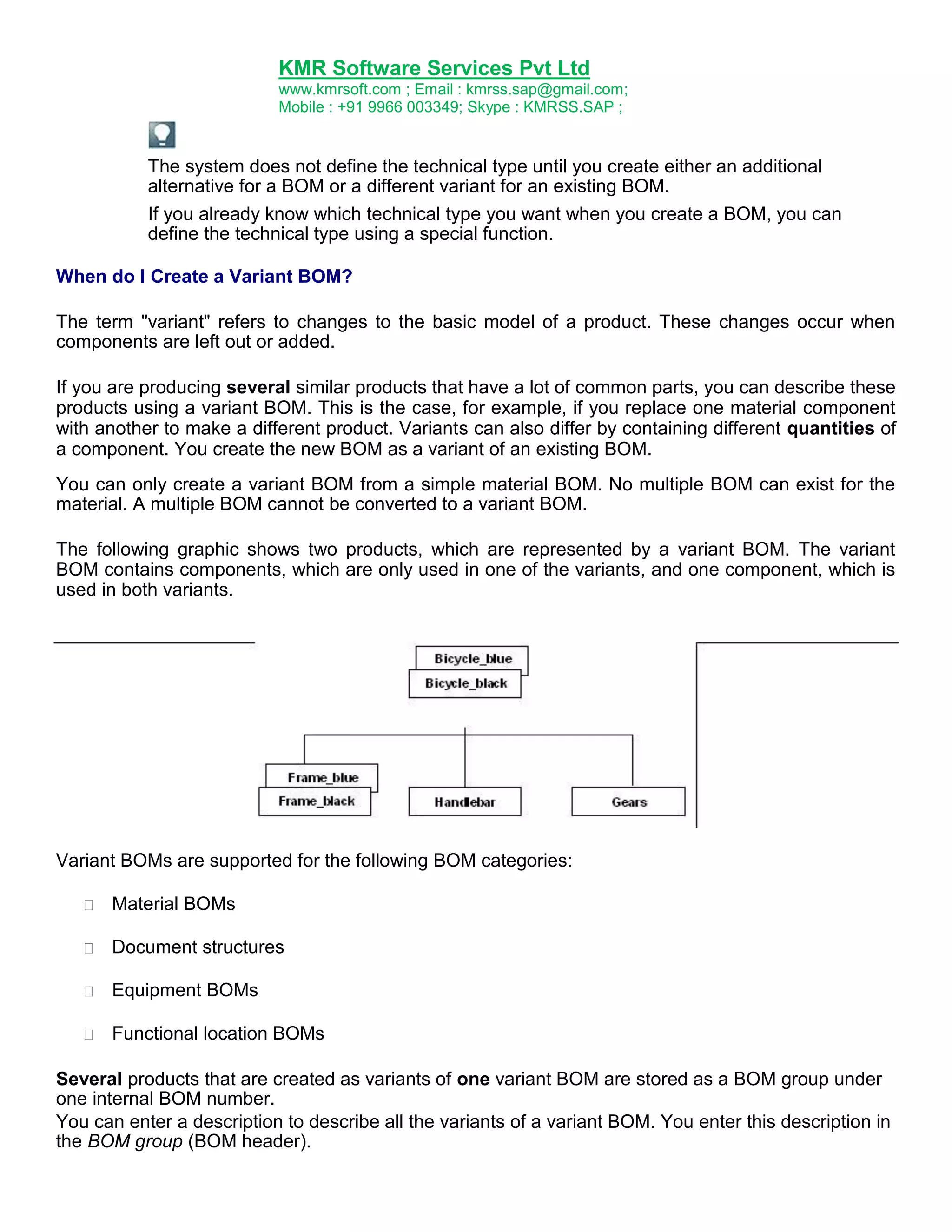
The following graphic shows two products, which are represented by a variant BOM. The variant
BOM contains components, which are only used in one of the variants, and one component, which is
used in both variants.
Variant BOMs are supported for the following BOM categories:
Material BOMs
Document structures
Equipment BOMs
Functional location BOMs
Several products that are created as variants of one variant BOM are stored as a BOM group under
one internal BOM number.
You can enter a description to describe all the variants of a variant BOM. You enter this description in
the BOM group (BOM header).
39.
KMR Software ServicesPvt Ltd
www.kmrsoft.com ; Email : kmrss.sap@gmail.com;
Mobile : +91 9966 003349; Skype : KMRSS.SAP ;
As soon as you process one variant of a variant BOM, all the other variants are locked for
processing.
As soon as you process one variant using a change number, you must use a change number
to process all the variants in the BOM group.
When do I Create a Multiple BOM?
One product can be manufactured from alternative combinations of materials depending on the
quantity to be produced (lot size). The product is represented by a number of alternative BOMs
(alternatives). The differences between the alternative BOMs are only small. Usually the only
difference is in the quantity of individual components.
Multiple BOMs are only supported for material BOMs.
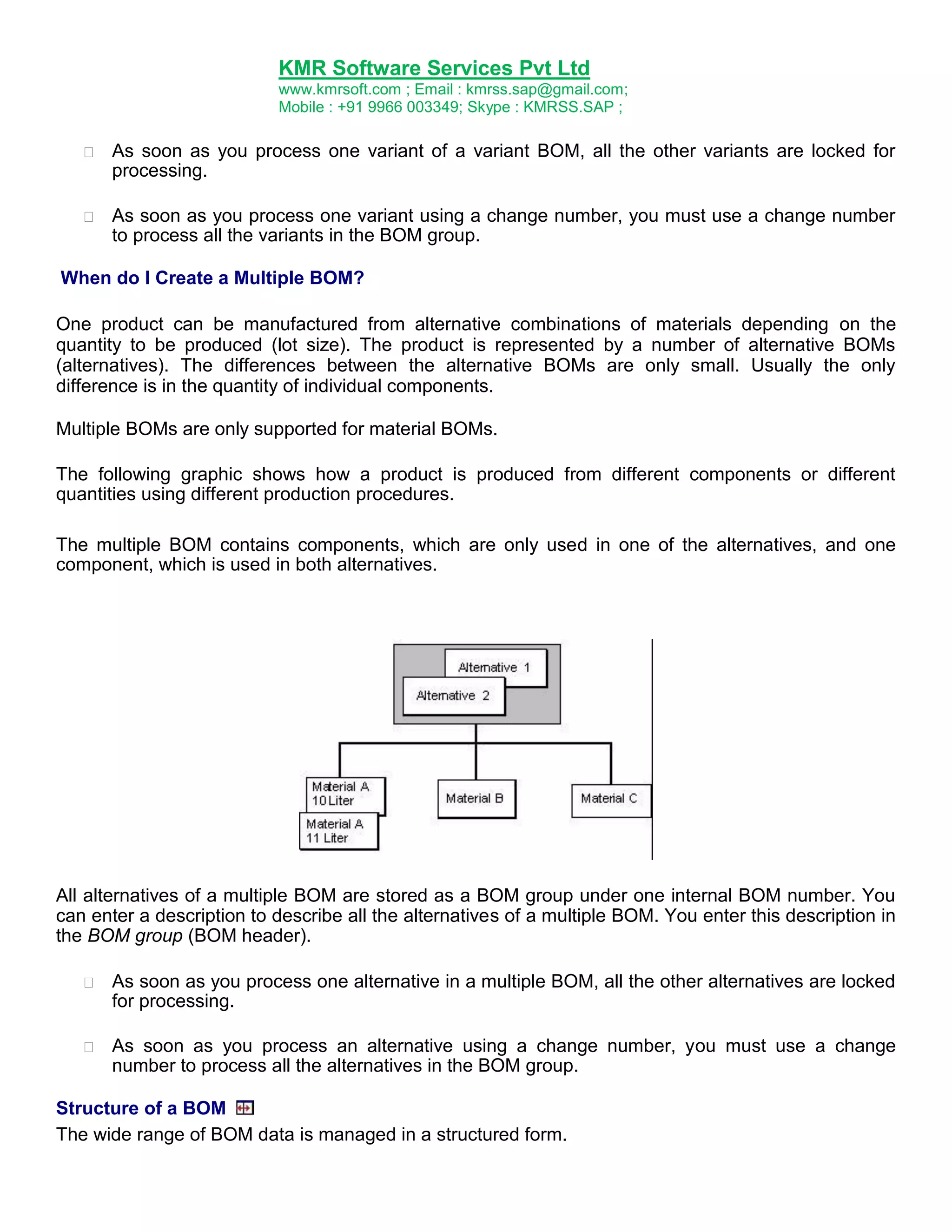
The following graphic shows how a product is produced from different components or different
quantities using different production procedures.
The multiple BOM contains components, which are only used in one of the alternatives, and one
component, which is used in both alternatives.
All alternatives of a multiple BOM are stored as a BOM group under one internal BOM number. You
can enter a description to describe all the alternatives of a multiple BOM. You enter this description in
the BOM group (BOM header).
As soon as you process one alternative in a multiple BOM, all the other alternatives are locked
for processing.
As soon as you process an alternative using a change number, you must use a change
number to process all the alternatives in the BOM group.
Structure of a BOM
The wide range of BOM data is managed in a structured form.
40.
KMR Software ServicesPvt Ltd
www.kmrsoft.com ; Email : kmrss.sap@gmail.com;
Mobile : +91 9966 003349; Skype : KMRSS.SAP ;
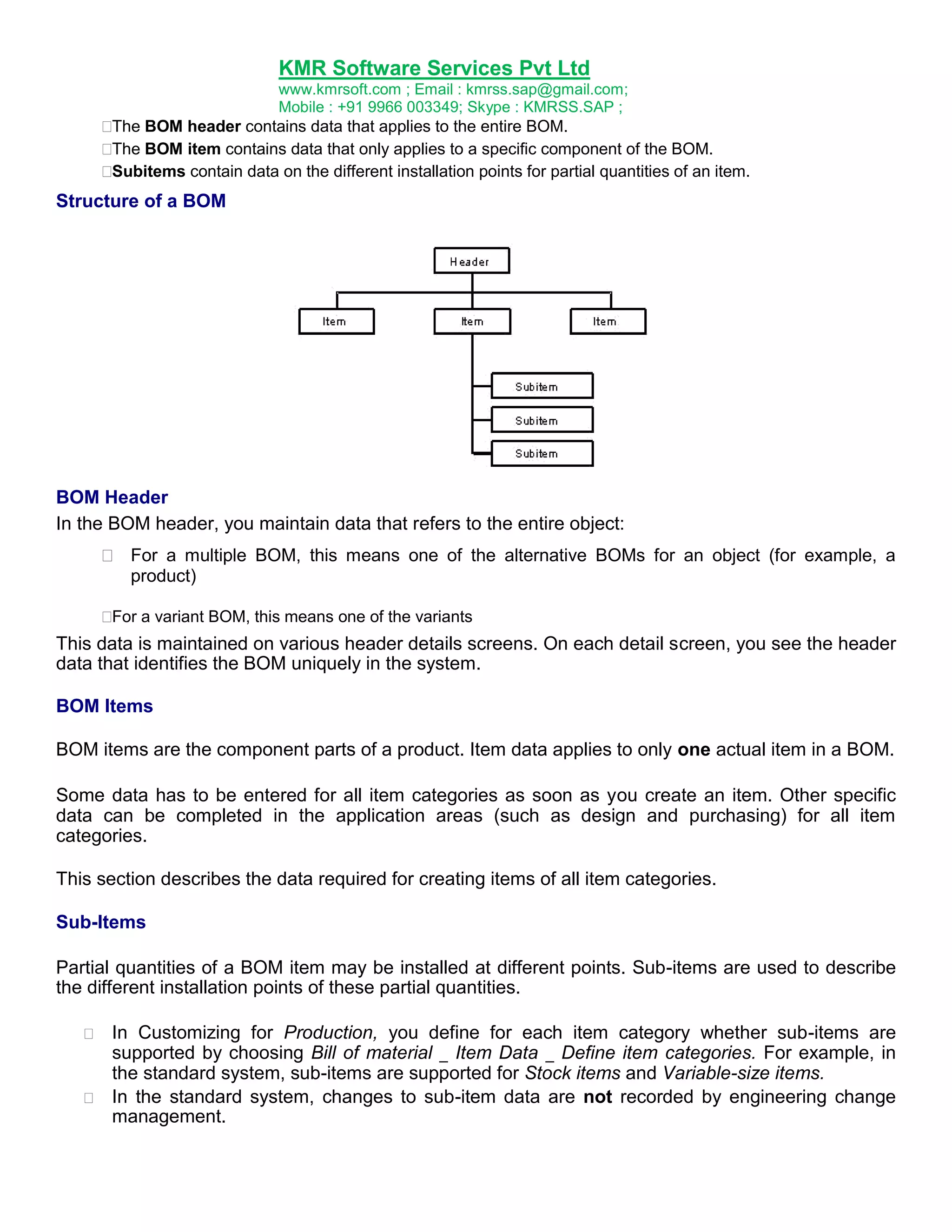
The BOM header contains data that applies to the entire BOM.
The BOM item contains data that only applies to a specific component of the BOM.
Subitems contain data on the different installation points for partial quantities of an item.
Structure of a BOM
BOM Header
In the BOM header, you maintain data that refers to the entire object:
For a multiple BOM, this means one of the alternative BOMs for an object (for example, a
product)
a variant BOM, this means one of the variants
For
This data is maintained on various header details screens. On each detail screen, you see the header
data that identifies the BOM uniquely in the system.
BOM Items
BOM items are the component parts of a product. Item data applies to only one actual item in a BOM.
Some data has to be entered for all item categories as soon as you create an item. Other specific
data can be completed in the application areas (such as design and purchasing) for all item
categories.
This section describes the data required for creating items of all item categories.
Sub-Items
Partial quantities of a BOM item may be installed at different points. Sub-items are used to describe
the different installation points of these partial quantities.
In Customizing for Production, you define for each item category whether sub-items are
supported by choosing Bill of material _ Item Data _ Define item categories. For example, in
the standard system, sub-items are supported for Stock items and Variable-size items.
In the standard system, changes to sub-item data are not recorded by engineering change
management.
41.
KMR Software ServicesPvt Ltd
www.kmrsoft.com ; Email : kmrss.sap@gmail.com;
Mobile : +91 9966 003349; Skype : KMRSS.SAP ;
In Customizing for bills of material, under Define modification parameters, you can define
whether the old change state of a sub-item is retained after you change the sub-item.
If at least one values of the sub-item is changed with changed effectivity parameters, the
system creates a new item record for the new change state.
You can maintain the sub-item quantity and a description for each sub-item.
Sub-items have no operational function in the BOM. They are not copied to the
production order. However, you can use sub-items to help you create programs for your
company (for example, automatic assembly programs).
In the production of printed circuit boards, the resistors of a printed circuit are installed
in different positions. Information on the installation point, precise coordinates,
installation method, and instructions for the automatic assembly machines is stored as
independent programs.
Create Material BOM (T code: CS01)
1. In the SAP Easy Access Menu choose Logistics Production Master Data Bills of Material Bill of
material _ Material BOM Create.
The Create Material BOM: initial screen screen appears. On this screen, you maintain data
that identifies the bill of material, as well effectivity data.
2. In the Material field, enter the material for which you want to create the BOM.
- If you do not know the material number, you can look for the material using the entry help
(F4).
- If the material for which you want to create a BOM has a material type that cannot be used in
combination with the BOM usage you have entered, you see an error message.
3. Enter a Plant.
– If you want the BOM to be effective in a specific plant, enter the plant. You can allocate the
BOM to additional plants later on under certain circumstances (Create allocation of BOM to
plant).
– If you want to create a group BOM, do not enter a plant.
4. Enter a usage.
If a parameter is defined in your user master record as a default value for the Usage field, the
system enters this default.
41
When you select a BOM usage, you define the maximum range of item statuses that can be
42.
KMR Software ServicesPvt Ltd
www.kmrsoft.com ; Email : kmrss.sap@gmail.com;
Mobile : +91 9966 003349; Skype : KMRSS.SAP ;
assigned to all items in the BOM. For each usage, you can only maintain certain item status
indicators.
You cannot change the usage at a later date. However, you can create other BOMs for the material
(in the selected plant) with different usages.
5. The Alternative field is used to identify one BOM in a BOM group (multiple BOM).
When you create a simple BOM, you do not need to enter an alternative.
– If you do not make an entry when you first create a BOM, the system automatically creates
alternative 01.
– If you already know when you first create a BOM that you want to extend the BOM to make a
multiple BOM, and that this alternative is not alternative 01, enter an alphanumeric value.
Maintain the data on the effectivity period:
6. Enter a change number if required.
– If you want to create the BOM without a change number , do not make an entry in the
Change number field. Enter the date on which the BOM is to become valid in the system in the
Valid from field.
– Enter a Change number if you want the BOM to have a history requirement as soon as it is
created. If you enter a change number, you must enter a valid change number each time you
want to change or extend the BOM. Usually, you only process a BOM with a change number
once the BOM has been released for production.
When you select a change number, you need to consider the following points:
– Which object types (for example, BOMs or task lists) can be processed with this change number
– Which effectivity period will the change number give the BOM (valid-from date)
– The reason for the change
The system copies the valid-from date from the change master record into the Valid from field.
7. You may want to assign a revision level to a specific stage of development of the material for
which you want to create a BOM. This revision level is assigned with reference to a change
number.
– If you want to create a BOM for the material at a certain revision level, enter the revision
level.
If you display the possible entries, you see a list of all revision levels for the material. The
change numbers with their valid-from dates are assigned to these revision levels.
43.
KMR Software ServicesPvt Ltd
www.kmrsoft.com ; Email : kmrss.sap@gmail.com;
Mobile : +91 9966 003349; Skype : KMRSS.SAP ;
– Copy the revision level you require by double clicking.
The system enters the valid-from date from the change master record in the Valid from field.
8. Confirm your entries by clicking
.
The system makes a series of checks. For example, the system checks whether the material
master record exists in the selected plant and whether the material type can be used in
combination with the BOM usage.
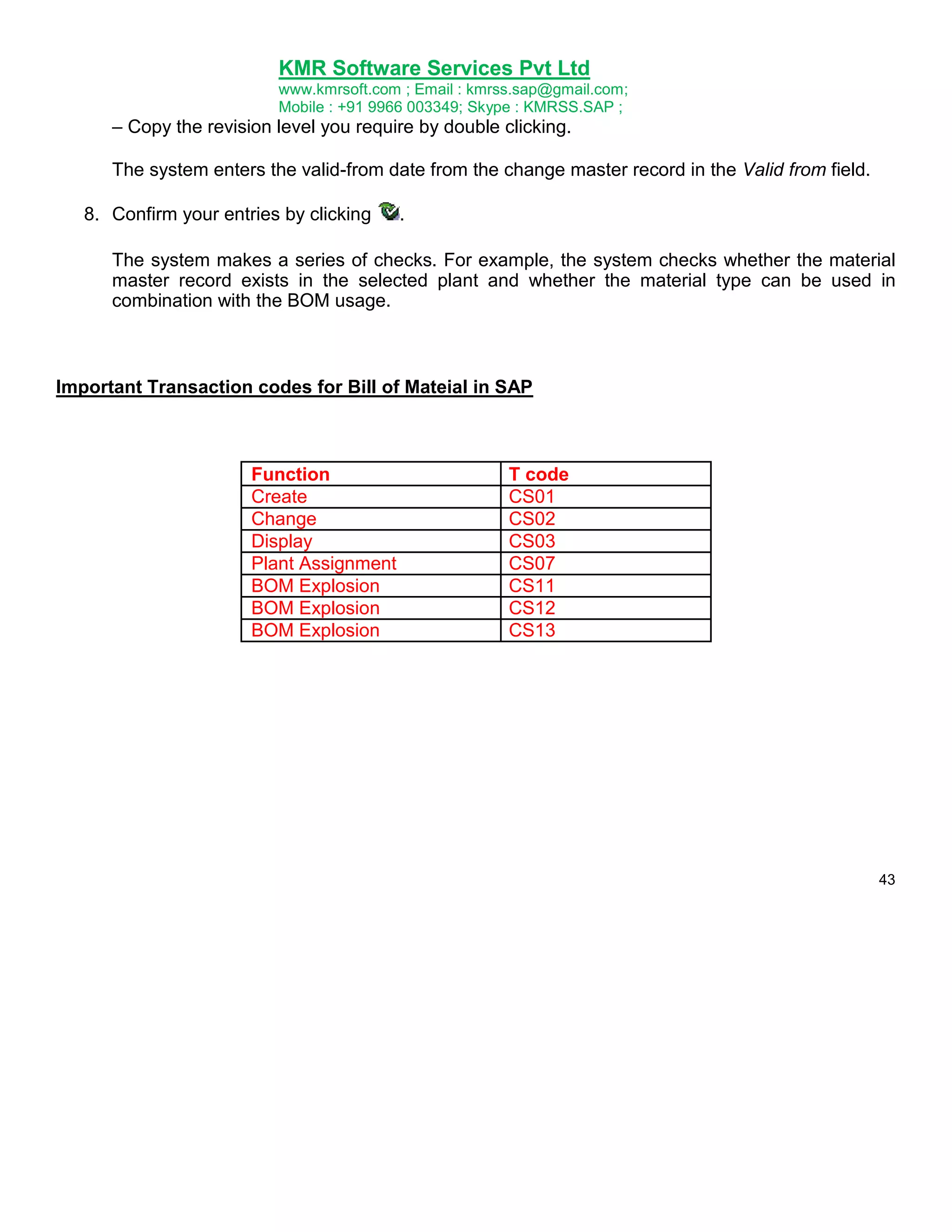
Important Transaction codes for Bill of Mateial in SAP
Function
Create
Change
Display
Plant Assignment
BOM Explosion
BOM Explosion
BOM Explosion
T code
CS01
CS02
CS03
CS07
CS11
CS12
CS13
43
44.
KMR Software ServicesPvt Ltd
www.kmrsoft.com ; Email : kmrss.sap@gmail.com;
Mobile : +91 9966 003349; Skype : KMRSS.SAP ;
Work Center
Definition
Operations are carried out at a work center. In the SAP system work centers are business objects
that can represent the following real work centers, for example:
Machines, machine groups
Production lines
Assembly work centers
Employees, groups of employees
Use
Together with bills of material and routings, work centers belong to the most important master data in
the production planning and control system. Work centers are used in task list operations and work
orders. Task lists are for example routings, maintenance task lists, inspection plans and standard
networks. Work orders are created for production, quality assurance, plant maintenance and for the
Project System as networks.
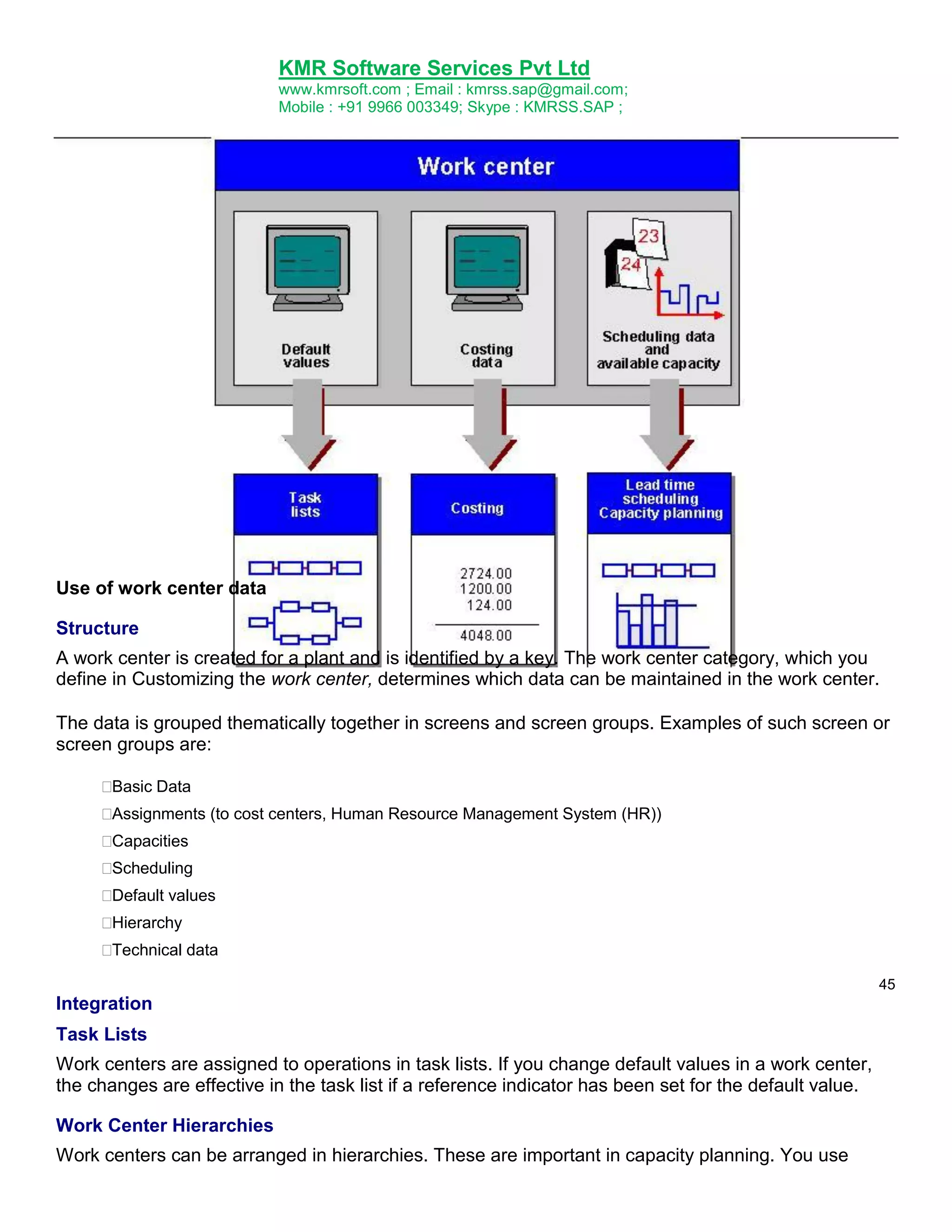
Data in work centers is used for
Scheduling
Operating times and formulas are entered in the work center, so that the duration of an
operation can be calculated.
Costing
Formulas are entered in the work center, so that the costs of an operation can be calculated. A
work center is also assigned to a cost center.
Capacity planning
The available capacity and formulas for calculating capacity requirements are entered in the
work center.
Simplifying operation maintenance
Various default values for operations can be entered in the work center.
The following graphic illustrates the use of work center data.
45.
KMR Software ServicesPvt Ltd
www.kmrsoft.com ; Email : kmrss.sap@gmail.com;
Mobile : +91 9966 003349; Skype : KMRSS.SAP ;
Use of work center data
Structure
A work center is created for a plant and is identified by a key. The work center category, which you
define in Customizing the work center, determines which data can be maintained in the work center.
The data is grouped thematically together in screens and screen groups. Examples of such screen or
screen groups are:
Basic Data
Assignments (to cost centers, Human Resource Management System (HR))
Capacities
Scheduling
Default values
Hierarchy
Technical data
45
Integration
Task Lists
Work centers are assigned to operations in task lists. If you change default values in a work center,
the changes are effective in the task list if a reference indicator has been set for the default value.
Work Center Hierarchies
Work centers can be arranged in hierarchies. These are important in capacity planning. You use
46.
KMR Software ServicesPvt Ltd
www.kmrsoft.com ; Email : kmrss.sap@gmail.com;
Mobile : +91 9966 003349; Skype : KMRSS.SAP ;
hierarchies to cumulate available capacities and capacity requirements in a hierarchy work center.
Important Transaction codes for Work Center in SAP
Function
Create
Change
Display
T code
CR01
CR02
CR03
46
Routings
Definition
A routing is a description of which operations (process steps) have to be carried out and in which
order to produce a material (product). As well as information about the operations and the order in
which they are carried out, a routing also contains details about the work centers at which they are
carried out as well as about the required production resources and tools (includes jigs and
fixtures). Standard values for the execution of individual operations are also saved in routings.
Routings (generic) consist of the following objects:
47.
KMR Software ServicesPvt Ltd
www.kmrsoft.com ; Email : kmrss.sap@gmail.com;
Mobile : +91 9966 003349; Skype : KMRSS.SAP ;
Routing
Rate routing
Reference operation set
Reference rate routing
Use
A routing is used as a source for creating a production order or a run schedule header by copying.
Structure
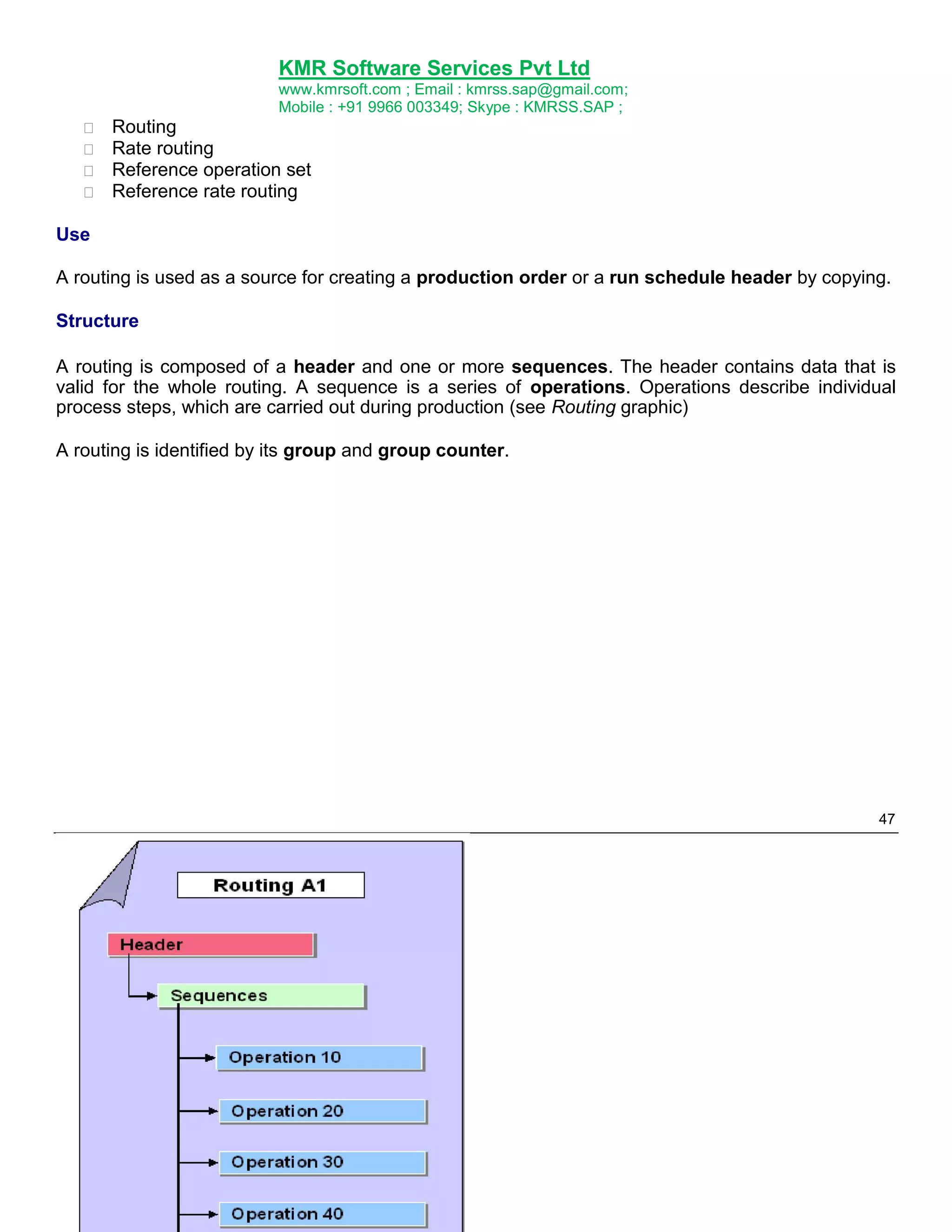
A routing is composed of a header and one or more sequences. The header contains data that is
valid for the whole routing. A sequence is a series of operations. Operations describe individual
process steps, which are carried out during production (see Routing graphic)
A routing is identified by its group and group counter.
47
48.
KMR Software ServicesPvt Ltd
www.kmrsoft.com ; Email : kmrss.sap@gmail.com;
Mobile : +91 9966 003349; Skype : KMRSS.SAP ;
Group and Group counter
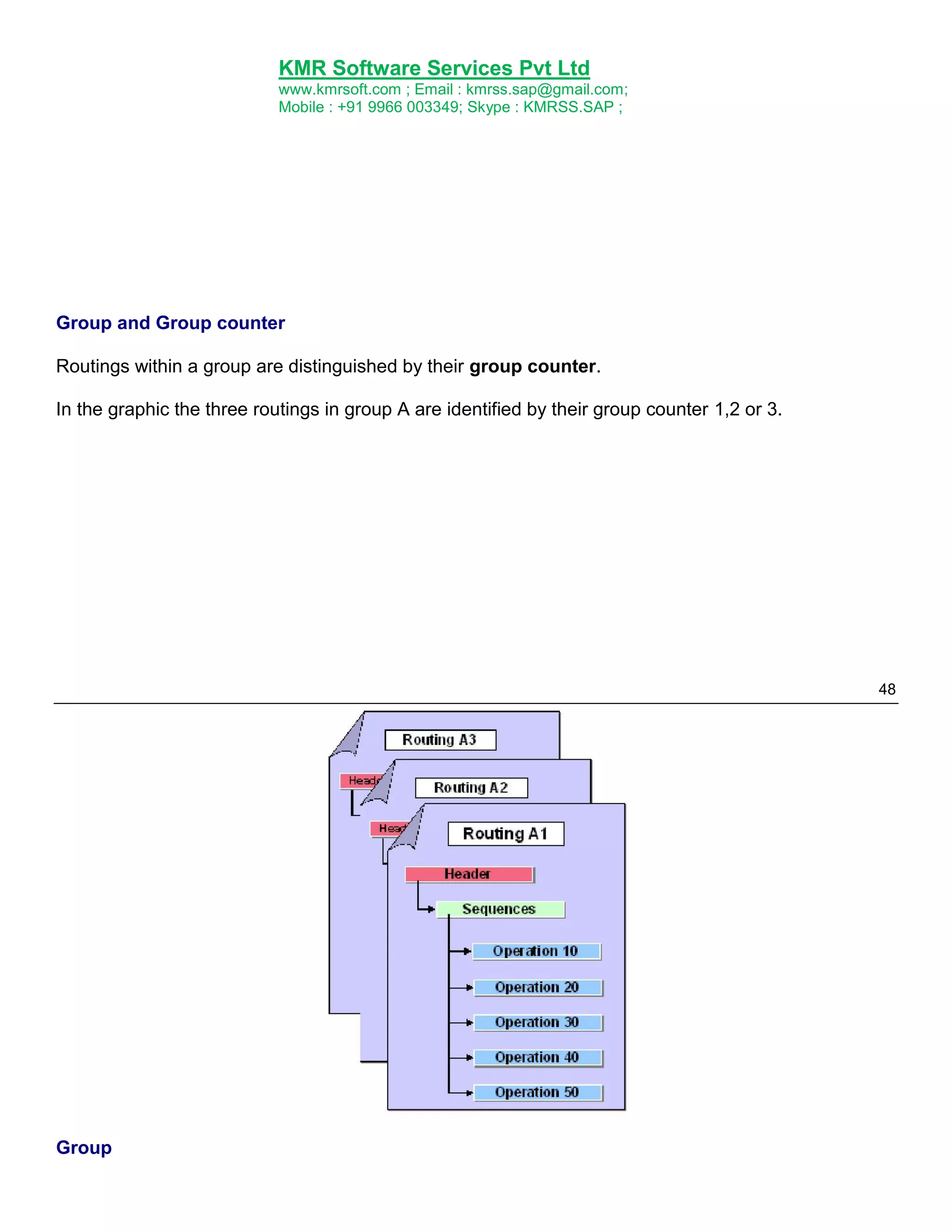
Routings within a group are distinguished by their group counter.
In the graphic the three routings in group A are identified by their group counter 1,2 or 3.
48
Group
49.
KMR Software ServicesPvt Ltd
www.kmrsoft.com ; Email : kmrss.sap@gmail.com;
Mobile : +91 9966 003349; Skype : KMRSS.SAP ;
Assignment of a material to be produced to a routing
Before you can produce a material with a routing, you have to assign the material to the routing. The
routing and the material can exist in different plants.
According to the task list type, a routing can
Have one or more materials to be produced assigned to it.
(This is relevant for normal routings and rate routing that are used directly for producing a
material.)
You do not have to assign a material to a routing. However, you cannot use the routing (rate
routing) in a production order or run schedule header, until you have done so.
Have no material to be produced assigned to it
This applies to reference operation sets and reference rate routings that can only be used as
part of a routing or rate routing.
49
Assignment of material components to operations
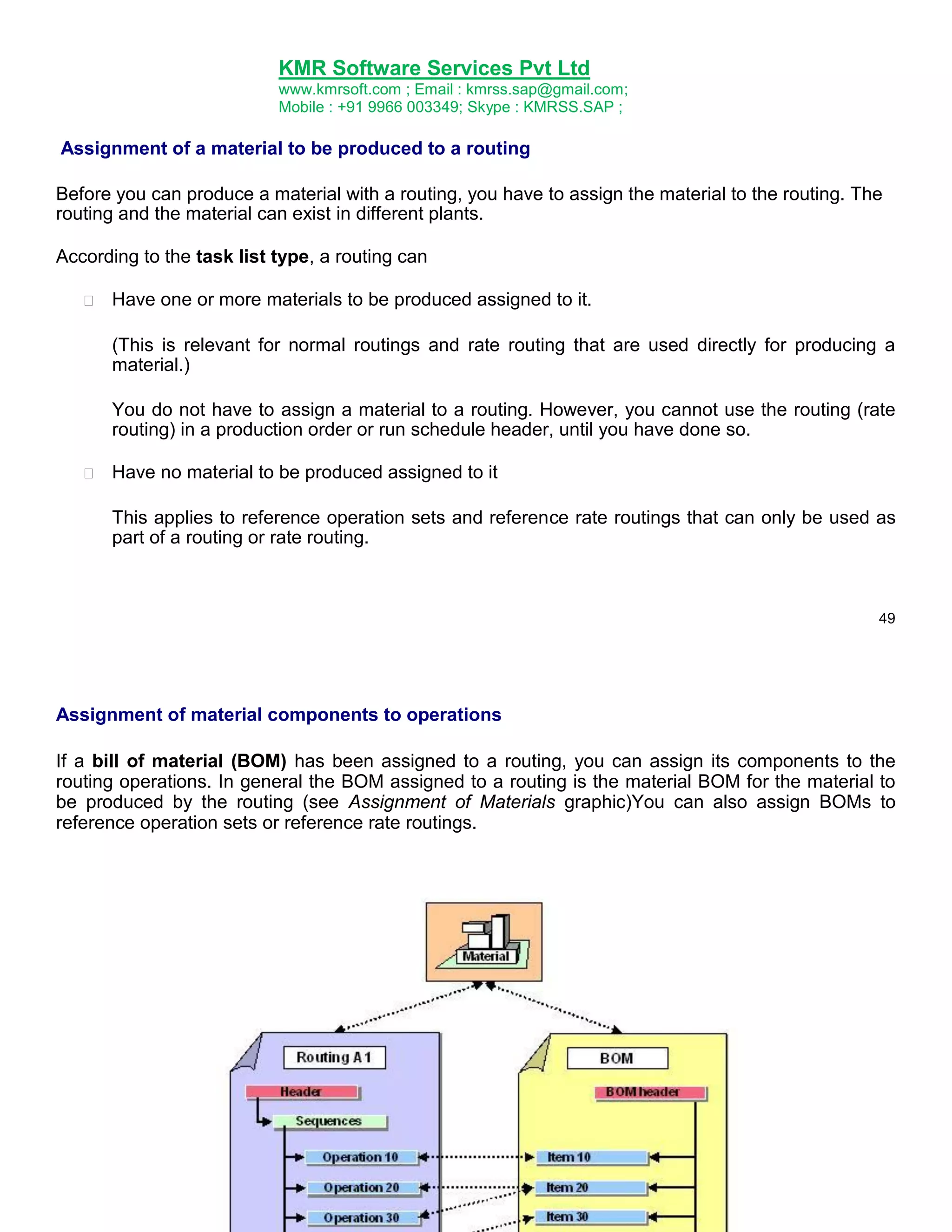
If a bill of material (BOM) has been assigned to a routing, you can assign its components to the
routing operations. In general the BOM assigned to a routing is the material BOM for the material to
be produced by the routing (see Assignment of Materials graphic)You can also assign BOMs to
reference operation sets or reference rate routings.
50.
KMR Software ServicesPvt Ltd
www.kmrsoft.com ; Email : kmrss.sap@gmail.com;
Mobile : +91 9966 003349; Skype : KMRSS.SAP ;
Assignment of Materials to be Produced and Material Components
Routing Structure and Navigation
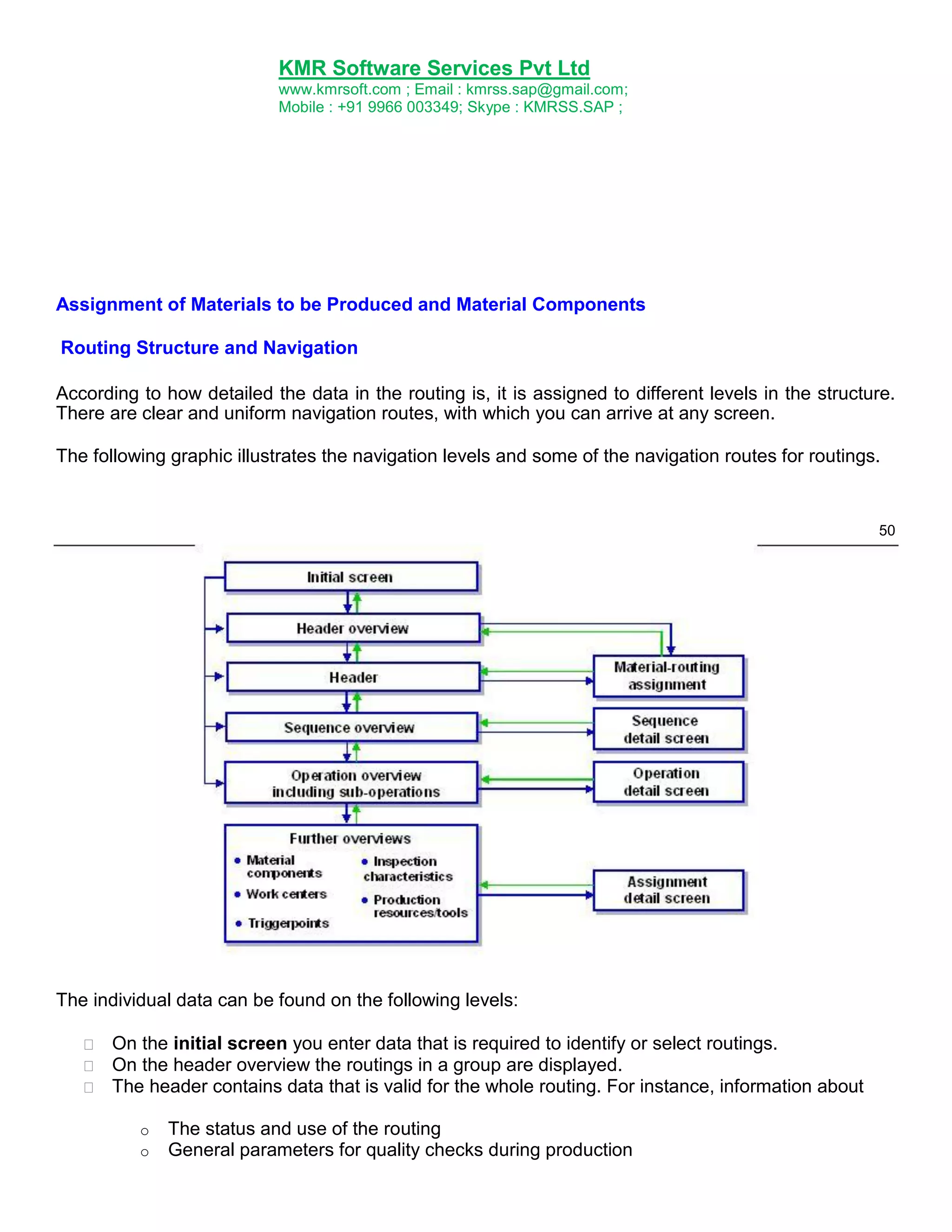
According to how detailed the data in the routing is, it is assigned to different levels in the structure.
There are clear and uniform navigation routes, with which you can arrive at any screen.
The following graphic illustrates the navigation levels and some of the navigation routes for routings.
50
The individual data can be found on the following levels:
On the initial screen you enter data that is required to identify or select routings.
On the header overview the routings in a group are displayed.
The header contains data that is valid for the whole routing. For instance, information about
o
o
The status and use of the routing
General parameters for quality checks during production
51.
KMR Software ServicesPvt Ltd
www.kmrsoft.com ; Email : kmrss.sap@gmail.com;
Mobile : +91 9966 003349; Skype : KMRSS.SAP ;
o
The validity period
You can call up the following information from the header:
o
o
Details about assignments of material component to the routing. That is, about the
materials that are produced by the routing.
A long text for a more detailed description of the routing
The sequence overview contains, for instance,
o
o
The sequences, that are a group of process steps in a routing
The sequence category, whether the sequence is a standard sequence, a parallel
sequence or an alternative sequence.
The operation overview contains, for instance,
51
o
o
o
Operations and sub-operation, which describe the process steps in the routing
The work center where they are carried out
A short description of the process step
The operation overview is the central screen for routing maintenance. From here you can
branch to the header, the detail screens for operations and sub-operations as well as other
overviews for routings.
On the detail screens for operations and sub-operations you can find data that is relevant to
individual operations or sub-operations, such as,
o
o
o
Details about external processing or personnel qualifications
Standard values and other information for scheduling
Parameters for quality checks during production
Further overview screens exist for the assignments and assignments to each operation or suboperation. An overview is presented of the following objects that are relevant for a process
step:
o
o
o
o
o
Material components
Work centers
Production Resources/Tools
Inspection characteristics
Trigger points
The additional information for each assignment or assignment is contained on the relevant
detail screen. This could be scheduling data for work centers or control indicators for
inspection characteristics.
Important Transaction codes for Routing in SAP
Function
Create
T code
CA01
52.
KMR Software ServicesPvt Ltd
www.kmrsoft.com ; Email : kmrss.sap@gmail.com;
Mobile : +91 9966 003349; Skype : KMRSS.SAP ;
Change
Display
CA02
CA03
52
Classification
Purpose
The classification system allows you to use characteristics to describe all types of objects, and to
group similar objects in classes – to classify objects, in other words, so that you can find them more
easily later.
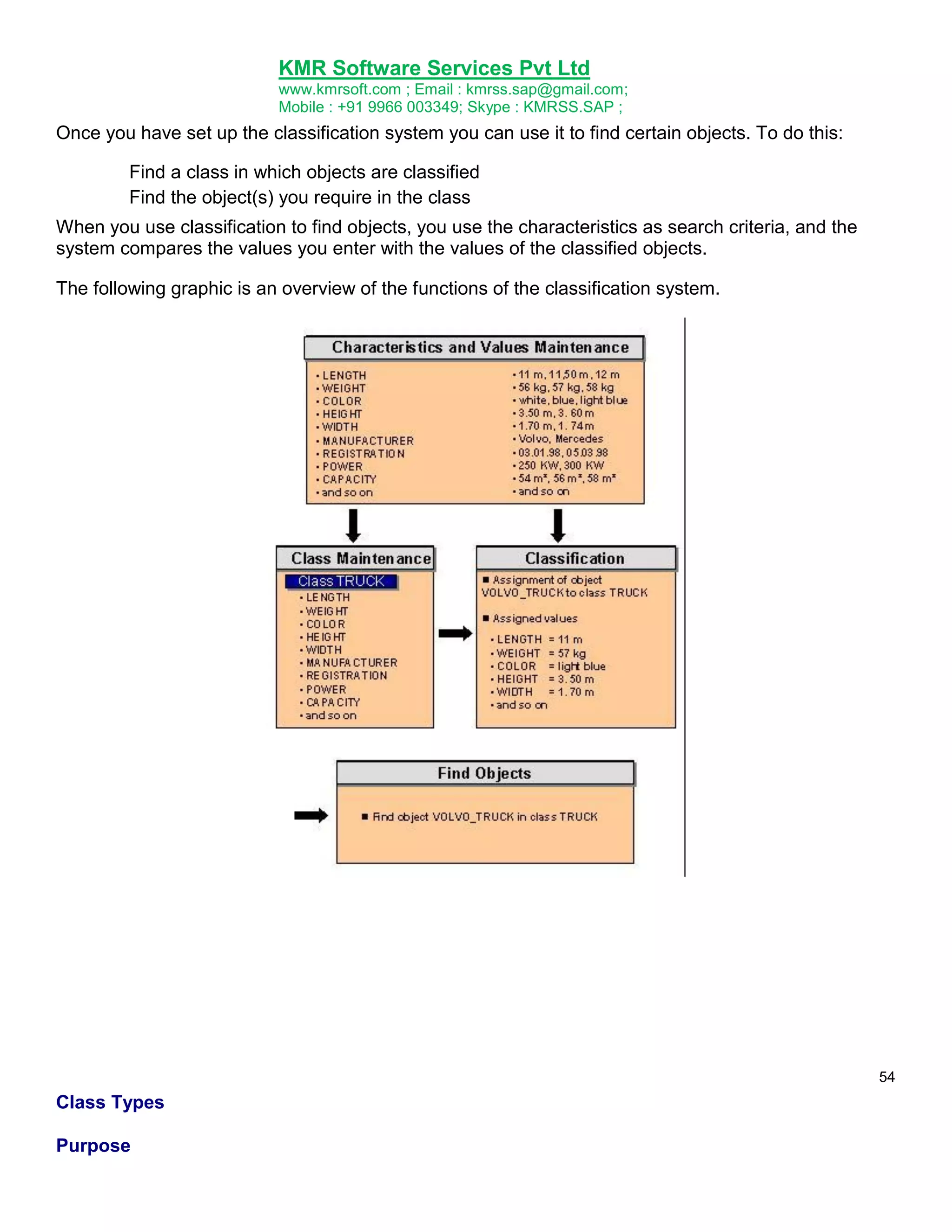
You then use the classes to help you to find objects more easily, using the characteristics defined in
them as search criteria. This ensures that you can find objects with similar or identical characteristics
as quickly as possible.
Integration
The classification system allows you to classify all types of object. First, you must define certain
settings in Customizing for the classification system. For more information, see Customizing for the
Classification System.
SAP has predefined a number of object types (for example, materials, and equipment). The settings
for these object types have already been defined in Customizing, so you can start to set up your
classification system for these object types without defining further settings.
Features
Before you can use classification functions, you need to set up your classification system.
The there are three steps to setting up a classification system:
1. Defining the Properties of Objects
You use characteristics to describe the properties of objects. You create characteristics centrally
in the system.
2. Creating Classes
You need classes to classify objects. These classes must be set up. During set up you must
assign characteristics to the classes.
3. Assigning Objects
53.
KMR Software ServicesPvt Ltd
www.kmrsoft.com ; Email : kmrss.sap@gmail.com;
Mobile : +91 9966 003349; Skype : KMRSS.SAP ;
Once you have created the classes you require for classification, you can assign objects to
these classes. You use the characteristics of the class to describe the objects you classify.
This completes the data you require to use your classification system. You can then use your
classification system to find objects that match the criteria you require.
For hints on setting up your classification system so as to optimize system performance for finding
objects, see System Performance.
53
54.
KMR Software ServicesPvt Ltd
www.kmrsoft.com ; Email : kmrss.sap@gmail.com;
Mobile : +91 9966 003349; Skype : KMRSS.SAP ;
Once you have set up the classification system you can use it to find certain objects. To do this:
Find a class in which objects are classified
Find the object(s) you require in the class
When you use classification to find objects, you use the characteristics as search criteria, and the
system compares the values you enter with the values of the classified objects.
The following graphic is an overview of the functions of the classification system.
54
Class Types
Purpose
55.
KMR Software ServicesPvt Ltd
www.kmrsoft.com ; Email : kmrss.sap@gmail.com;
Mobile : +91 9966 003349; Skype : KMRSS.SAP ;
The class type is a central concept in the classification system. The class type determines how
classes are processed, and how objects can be classified and retrieved in these classes. In
Customizing for Classification, you define the settings for a class type. You define class types for a
specific object type, such as materials. You can then use classes of this class type to classify objects
of this object type.
When you first create a class, you must enter a class type for the class. Each class type is a closed
system. There is no link between the different class types.
Features
The class type determines the following:
Which object types you can assign to a class
Which class maintenance functions you can process
Whether you can classify objects in more than one class
Which class statuses, organizational areas, and text types are supported in class maintenance
functions
Whether you can use engineering change management for classification
Which filter functions you can use to restrict the search result
Class types 001, 300, and 200 are defined for materials. In Customizing for
Classification, you define the settings for a class type.
55
All materials can be classified with class type 001. Class type 300 is for variant
configuration. Class type 200 is for classes that are used as class items in bills of
material. You can classify the same materials separately in these class types.
You can use class type 012 to classify characteristics. This class type is defined only
has the Keywords, Characteristics, and Texts screens in class maintenance functions.
56.
KMR Software ServicesPvt Ltd
www.kmrsoft.com ; Email : kmrss.sap@gmail.com;
Mobile : +91 9966 003349; Skype : KMRSS.SAP ;
You can only classify characteristics in characteristics maintenance functions –you
cannot use the assignment functions in the classification menu. In this case the
indicator Classify master record only was set. No organizational areas were maintained
for the characteristics. For this reason, if you create a class of class type 012, you
cannot select any organizational areas.
Classes
Purpose
Classes allow you to group objects together according to criteria that you define.
You create classes for certain object types for example, material, workplace, equipment.
You use the class type to determine which object types can be classified in a class.
You can assign characteristics to your class. These describe the objects that you classify in
your class. When you assign a characteristic to a class, you can adapt (overwrite) the
characteristic.
Classification
Purpose
Classification is the process of assigning objects to classes and using the characteristics of the class
to assign values to these objects.
You classify objects so that you can use the classification system to search for them.
Integration
Classification is part of the classification system. Before you can classify objects, you must create
classes.
Features
56
There are different ways to classify objects:
You can classify objects from the object maintenance functions, where you can assign the
object to one or more classes.
Some object types can only be classified from their master record. In Customizing for the
Classification System, the Class. in master rec. indicator is set for these object types.
You can use the assignment functions in the classification menu to classify objects.
57.
KMR Software ServicesPvt Ltd
www.kmrsoft.com ; Email : kmrss.sap@gmail.com;
Mobile : +91 9966 003349; Skype : KMRSS.SAP ;
o
o
You can assign an object to one or more classes.
You can assign one or more objects to a class.
Class Hierarchy
Purpose
You can set up your classification system as a hierarchical structure, to help you target your
searches for objects.
For example, instead of classifying all of the nails, bolts, and nuts in your company in one class
for FASTENERS, you assign other classes to FASTENERS, such as NAILS, BOLTS, and
NUTS, and other classes to these classes, if required. You only use the classes on the bottom
level to classify objects.
You can start your search for objects with class FASTENERS, and continue your search down the
different levels of the hierarchy.
Integration
58.
KMR Software ServicesPvt Ltd
www.kmrsoft.com ; Email : kmrss.sap@gmail.com;
Mobile : +91 9966 003349; Skype : KMRSS.SAP ;
In Customizing for the Classification System, in activity Maintain Object Types and Class Types, you
define whether hierarchies are supported for each class type.
If the class type allows you to set up a hierarchy, you do not define classes as hierarchy classes. You
can assign both objects and classes to any class
Features
Class Hierarchies Without Inherited Characteristics
In a class hierarchy without inherited characteristics, you do not assign characteristics to the classes
on higher levels. Only the classes that you use to classify objects have characteristics, which
describe the objects you classify.
Class Hierarchies With Inherited Characteristics
In a class hierarchy with inherited characteristics, you assign characteristics to the classes on higher
levels. All classes lower down in the hierarchy inherit these characteristics. If you want to use a
characteristic in all of the classes in a hierarchy, you only need to enter the characteristic once on the
top level.
58
You can use inherited characteristics to restrict your search for objects to specific classes. You
can then select a class and continue your search in this class.
Class Hierarchies as Graphics
You can also display and maintain a class hierarchy in graphical form. For more information,
Object Dependencies in
Classification Purpose
You can use dependencies as an aid to entry for classifying objects. For example, you can
ensure that a racing handlebar can only be selected for a racing bicycle.
Dependencies are only effective for classifying objects. They are not used for classifying classes
or finding objects via classes.
Using object dependencies
Classification system function
Classifying objects
Assigning classes
Dependencies
YES
NO
Finding objects
NO
59.
KMR Software ServicesPvt Ltd
www.kmrsoft.com ; Email : kmrss.sap@gmail.com;
Mobile : +91 9966 003349; Skype : KMRSS.SAP ;
You can assign dependencies to characteristics and characteristic values for classification. You
can use the following dependency types:
Using Dependency Types
Dependency type
Preconditions
Selection conditions
Actions
Object
Characteristic, characteristic value
Characteristics
Characteristic, characteristic value
Procedures
Characteristic, characteristic value
Object dependencies can be used in classification and in variant configuration. In variant
configuration, they are used to make it easier to create an order for a complex product with a
large number of variants.
If both applications are in use in your company, you may find that object dependencies are used
for two completely different purposes. However, it is not currently possible to separate the use of
object dependencies in classification from their use in variant configuration.
The object dependencies assigned to characteristics or characteristic values apply in both
classification and variant configuration functions. For this reason, we recommend that you create
dependencies as general rules that apply to both classification and variant configuration.
5
9
Characteristics
Purpose
In classification, characteristics describe the properties of objects. The values of a characteristic
specify these properties.
Characteristic COLOR has the values 'red', 'green', and 'blue'. When you classify an object,
you use this characteristic to specify the color of the object.
You create characteristics centrally, then assign them to classes. When you assign a characteristic to
a class, you can adapt (overwrite) the characteristic.
When you assign objects to a class, you assign values to the characteristics.
You can use characteristics in other application areas, as well as classification. Characteristics serve
different purposes in different applications (see Integration).
Integration
Characteristics are used in the following application areas:
PP-PI – Process Industries: To describe the PI-PCS interface in the process control
station QM – Quality Management:
To transfer inspection values to batch classification. (The characteristics in classification are
referred to as "general characteristics" in mySAP PLM quality management.)
60.
KMR Software ServicesPvt Ltd
www.kmrsoft.com ; Email : kmrss.sap@gmail.com;
Mobile : +91 9966 003349; Skype : KMRSS.SAP ;
To produce quality certificates
EH&S – Environment, Health and Safety: To describe the properties of substances
PP-CAP: In formulas for determining standard values
LO – batches: Substance processing
MM – Purchasing: In the procedure for releasing purchase requisitions and purchasing documents
with classification
LO – Variant Configuration: To configure complex
products CA – Classification:
For classification: To describe the properties of the objects you classify
For finding objects: As search criteria for finding objects that have been classified
1.
Easy Cost Planning: To enter and assign values to costs incurred. For information on how to
proceed,
Features
When you create or change a characteristic, you can define the following settings:
60
Format
For example, numeric format is for figures, and character format is for alphanumeric
characters. Units of measure for numeric values
Templates for entering values
Required entries for a characteristic (required
characteristics) Whether intervals are allowed as values
Language-dependent descriptions and texts for characteristics and characteristic
values Display options for characteristics on the value assignment screen
Allowed values
Default values that are set automatically on the value assignment screen
To describe how characteristics and characteristic values in classification influence each other, you
can assign dependencies to them.
Creating, Changing, and Displaying Characteristics
Procedure
To create a characteristic:
1. From the classification menu, choose Characteristics.
2. Enter your data on the initial screen:
o
o
In the Characteristic field, enter a name for your new characteristic. Use the Naming
Conventions for characteristic names.
Enter a change number if you want to create the characteristic using engineering
change management.
61.
KMR Software ServicesPvt Ltd
www.kmrsoft.com ; Email : kmrss.sap@gmail.com;
Mobile : +91 9966 003349; Skype : KMRSS.SAP ;
o
o
o
To do this, choose processing type Create characteristic.
You can also copy the data of an existing characteristic. Use the pushbutton
by copying. Enter the name of a characteristic you want to copy.
Confirm your entries.
3. On the Basic data tab page enter the most important control data for the characteristic.
You must maintain the basic data for all characteristics. All other screens are optional.
To change a characteristic select the pushbutton Change in characteristics after entering the
characteristic. To display the characteristic choose the pushbutton
Display.
Create
KMR Software ServicesPvt Ltd
www.kmrsoft.com ; Email : kmrss.sap@gmail.com;
Mobile : +91 9966 003349; Skype : KMRSS.SAP ;
Engineering Change Management
Engineering Change Management is a central logistics function that can be used to change various
aspects of production basic data (for example, BOMs, task lists, materials, and documents ) with
history (with date effectivity) or depending on specific conditions (with parameter effectivity).
A change with history has the following distinctive characteristics:
It takes effect under precisely defined conditions (precise date or specific effectivity parameter
value).
The changed object is saved twice: in its state before and after the changes.
A change master record or ECR/ECO controls and documents the changes.
Changes With and Without History
For technical and commercial reasons, it is necessary to change industrial products from time
to time.
Technical reasons for changes include, for example, technical faults that have to be put right
and the introduction of new environmental or safety regulations. For commercial reasons, it
may be necessary to start using cheaper materials or to change a product to suit customer
requirements.
In the SAP system, you can make changes to objects both with and without history.
Changes without history
These are changes that occur during the development phase of a product and that are not
documented. The state of the object (for example, bill of material or task list) before the change
is not documented. When you change and save data, the old data is overwritten. You can only
recall the data that you saved last.
Changes with history
These are changes that may affect further activities in the procedure and should thus be
documented. For example, changing a material could incur a change in the bill of material
(BOM) and likewise then the task list and inspection plan.
In the SAP system, you can document changes with Engineering Change Management. In the
case of specific change objects (such as a material, document, or bill of material), Engineering
Change Management can be used separately for each object.
Changes With History
You can carry out a change with history with reference to a change master. This means that you can:
Determine under which conditions the change becomes effective.
You enter an effectivity based on time (valid-from date) in the standard system. You can also
make changes irrespective of dates or time. These changes become effective under other
conditions (for example, serial number effectivity).
Reproduce the processing status of a change object in different change statuses.
64.
KMR Software ServicesPvt Ltd
www.kmrsoft.com ; Email : kmrss.sap@gmail.com;
Mobile : +91 9966 003349; Skype : KMRSS.SAP ;
The change object (for example: bill of material) is stored twice: in its state before and after
the change. The new data records that are created when you make a change are saved by the
system in the original object.
In the standard system, the state of the object before the change ends with the valid-to date.
The state after the change begins with the valid-from date.
Exceptions:
o
Material
The new data records that are created when you make a change are saved by the
system in a change document.
o
Document
The system saves the change number in the document info record. Changes to the
document info record are saved in change documents. If you foresee making
fundamental changes to the document info record, then you should create a new
version with reference to a different change number.
If you define the effectivity using parameters and not the valid-from date, the parameter values
determine under which conditions the change becomes effective.
You can document the changes.
You can identify particular processing statuses of a material or document by defining revision
levels.
With the help of SAP Business Workflow you can organize and automate related work steps in
Engineering Change Management.
In certain situations, you can use a digital signature to ensure that only authorized employees
can make any changes.
The following graphic shows the information that you must maintain in the change master record:
65.
KMR Software ServicesPvt Ltd
www.kmrsoft.com ; Email : kmrss.sap@gmail.com;
Mobile : +91 9966 003349; Skype : KMRSS.SAP ;
Change Master Record
Definition
The change master record is a master record that contains information necessary for the
management and control of changes.
The change master record contains data of a descriptive character (such as the reason for the
change) and control data (such as effectivity data, object type indicators). Besides this data that the
user maintains, there is also data that is automatically updated by the system (management data).
Structure
The most important change master record data is grouped as follows:
Change header (description, effectivity data, status information)
Object type indicators (for example, BOMs, task lists, documents)
65
Object overviews for the different object types
Detail screens for the different objects (object management records)
Exactly which data is maintained depends on the function that the change master record adopts in
the change process. For example, you do not need to maintain object type indicators for a change
master record that has been created with the Leading change master record function.
Integration
In the SAP system, change master records are identified by a change number. Number Assignment
is made according to defined criteria.
In the change process, a change number can identify change master records with the following tasks:
Simple change master record (with or without release procedure)
ECR / ECO
Change master record of an engineering change hierarchy
Change leader (Leading change master record)
Change package
Creation of a Profile
Use
The profile for creating a change master record groups together default values and presettings for the
change master record.
This data is standard information that is needed repeatedly in a similar form when maintaining change
master records . The profile helps you when creating a change master record and makes it easier to
manage change data.
66.
KMR Software ServicesPvt Ltd
www.kmrsoft.com ; Email : kmrss.sap@gmail.com;
Mobile : +91 9966 003349; Skype : KMRSS.SAP ;
Prerequisites
You must have defined the profiles in Customizing for Logistics - General under Engineering Change
Management Maintain profiles.
Features
You can enter the following default values as change master record data:
Change number status
Authorization groups
Reasons for change
Status Profile
Object type profiles
You use the object type profile to define which object types can be processed with reference to
the change number.
The object type profile is therefore irrelevant to profiles for creating change master records with
the Leading change master record (Change leader) function.
Activities
1. Define the profile in Customizing.
2. Enter the profile on the initial screen when you create the change master record.
The system adopts the change master record profile values as default values. You can
overwrite these default values in the change master record. Default values for a profile that you
overwrite in the change master record are only stored in the change master record and not in
the profile.
When an object type profile is assigned to the change master record profile the system also
copies the object type indicators that you have set there. If you set the indicator in Customizing
for the object type profile Can be overridden you can change the object type indicators in the
change master record.
Number Assignment for the Change Master
Use
You use this function when you create a change master record.
67.
KMR Software ServicesPvt Ltd
www.kmrsoft.com ; Email : kmrss.sap@gmail.com;
Mobile : +91 9966 003349; Skype : KMRSS.SAP ;
Features
Depending on your company‟s requirements, you can assign either a numeric key or an alphanumeric
key.
The SAP System supports two types of number assignment:
Internal number assignment
If you want to assign consecutive numbers that are purely numeric, do not enter a change
number when you create a change master. When you save the change master, the system
assigns the next available number from the number range defined for change masters. The
system displays this number in a message.
In the Customizing for Engineering change management, under Define number ranges, you
can check which number has been reached in the internal number range.
External number assignment
In the standard SAP System, an external number range is defined for (purely numeric)
numbers.
If you want to assign an alphanumeric key, you enter an alphanumeric character string.
Please check which special characters you use. The following special characters can be
used anywhere within the change number: "-", " /", "_"
If you use the standard settings for external number assignment, you can enter any
alphanumeric key. However, if you want to restrict the external number range for alphanumeric
characters, define an additional external number range with the interval you require. You also
need to select the NR check for alpha indicator to activate checks on alphanumeric numbers.
Additional Checks for Alphanumeric Change Numbers during External Number Assignment
If you assign change numbers manually, the system performs the following checks:
If you enter a purely numeric key, the system always checks whether the key is from a
number range defined for external number assignment.
If you enter an alphanumeric key (for example, K-01), the system only checks the key if this is
defined in Customizing. In Customizing for engineering change management, under Set up
control data, you can define whether or not the system checks alphanumeric fields as well. To
do this, you use the Number range check for alpha fields indicator.
o
o
If you do not select this indicator, the system does not check number ranges for
alphanumeric numbers. In this case, you can enter any alphanumeric key.
If you select this indicator, the system checks all the external number ranges that are
defined for alphanumeric numbers.
68.
KMR Software ServicesPvt Ltd
www.kmrsoft.com ; Email : kmrss.sap@gmail.com;
Mobile : +91 9966 003349; Skype : KMRSS.SAP ;
For example, you defined an external number range for alphanumeric numbers. The
upper and lower limits of the interval are as follows:
From number: AAAAAAAAAAAA
To number: CCCCCCCCCCC
The Number range check for alpha indicator is selected. If you enter the number K-01,
which is not within the defined number range, you see the following error message:
Change number K-01 not defined for external number assignment
The following numbers can be entered: A-23-D, B22, CA45.
Activities
To display an overview of the number ranges and the current number status on the initial screen, click
No.range.
You define number ranges in Customizing for Engineering Change Management by choosing Define
number ranges.
Maintaining the Create Initial Screen
1. Choose Logistics Central functions Engineering change management Change master Create.
The Create Change Master: Initial Screen appears.
2. Enter an change number.
Do not enter anything if you want the system to assign a number itself. For more information,
Select the type:
o
o
Change master
Engineering change request (ECR)
To find out about the differences between the two types,
3. Select the change master record's function:
o
o
o
o
Without release key
With release key
Lead. chg. mast. (leading change master record)
Change package
69.
KMR Software ServicesPvt Ltd
www.kmrsoft.com ; Email : kmrss.sap@gmail.com;
Mobile : +91 9966 003349; Skype : KMRSS.SAP ;
69
3. If you want to create an engineering change request, select a change type.
6. If you want to create a change master record with parameter effectivity, enter an effectivity
type.
7. If you want to transfer the pre-defined settings from a profile defined in Customizing to the
change master record, enter the name of the profile.
8. In the Copy from dataset, you can enter the change number of an existing change master in
order to copy data (for example, change header data or object type indicators) to the new
change master as default values.
Here the system also copies all object management records from the change master record
you are using as a reference. Check which object management records you require and delete
any superfluous object management records from the new change master record if necessary.
9. Click
.
Engineering Change Hierarchy
Use
The change hierarchy enables you to make complex changes to several objects with reference to
several change numbers and group these complementary changes together for management
purposes. The many different change objects can be structured in a clear and transparent way from
different views (for example, organizational and functional) in the change hierarchy.
Integration
At the present moment in time, you can process the following objects using a change hiearchy:
All BOM categories
Task list types:
o
o
Routings
Reference operation sets
Characteristics
Characteristics of class
Classification
Prerequisites
70
70.
KMR Software ServicesPvt Ltd
www.kmrsoft.com ; Email : kmrss.sap@gmail.com;
Mobile : +91 9966 003349; Skype : KMRSS.SAP ;
You must activate the release procedure in Customizing for Logistics - General under Engineering
Change Management Set up control data. Set the Release active indicator in the Effectivity data set.
Structure
Change master records with the functions Change leader and Change package form a single-level
change hierarchy. They fulfil the following functions:
Change leaders (Leading change master records)
The leading change master record (change leader) is the superior change master record in a
change hierarchy. It groups several change numbers (change packages) together.
The following information is maintained in the leading change master record:
o
Determination of the effectivity of a change (for example, valid-from date)
o
Release procedure
The release key controls which areas the changes that are made with reference to the
allocated change numbers (change packages) are released for.
o
Deletion flag (global)
You can only set this deletion flag if the deletion flag is set for all the allocated change
packages.
Change packages
The change package is the inferior change master record in a change hierarchy. All the
change packages are allocated to a change leader. The object changes in a change hierarchy
are with reference to the change packages.
Change packages can be formed from different points of view. For example, from an
organizational point of view, the change package would just contain the objects from the
product structure that are controlled by mechanical engineering (material, BOM,
engineering/design drawing, and so on). A change package from a functional point of view
would contain the objects that form a logical unit in the product structure, for example, material,
BOM, document, routing for a gearbox.
The following information is maintained in the chnage package:
71
71.
KMR Software ServicesPvt Ltd
www.kmrsoft.com ; Email : kmrss.sap@gmail.com;
Mobile : +91 9966 003349; Skype : KMRSS.SAP ;
o
o
o
o
Choice of change objects (object management records), for example BOMs
Control of the processing procedure using system status and user status, where
appropriate
Control of the processing procedure using SAP Business Workflow
Deletion flag (local)
This deletion flag is only relevant to one individual object. You can only set a deletion flag
for the change leader if the deletion flag is set for all the allocated change packages.
You can only include an ECR / ECO in an engineering change hierarchy if you use the
Change package function because you can only enter the change objects for a change
package.
Graphical Representation
The following graphic shows the relationship between change leader, change packages and change
objects.
Releasing Changes
Changes that are made with reference to a change hierarchy have to be released using a Release
Procedure
Display
You can display an engineering change hierarchy in a tree structure.
72.
KMR Software ServicesPvt Ltd
www.kmrsoft.com ; Email : kmrss.sap@gmail.com;
Mobile : +91 9966 003349; Skype : KMRSS.SAP ;
Valid-From Dates
Use
In the standard system, the effectivity of an object change is defined solely by the valid-from date.
The valid-from date specifies the time the change becomes effective from for all the allocated change
objects. You can also define a special valid-from date (alternative date) for individual objects.
When choosing the valid-from date, you should account for the effectivity of the change objects that
are to be processed with this change number.
Integration
When you change an object (for example, a bill of material) with reference to a change number, the
system verifies if the object (for example, the bill of material) is effective from the valid-from date.
When you create the different change objects (without reference to a change number), the system sets
different commencement dates for the effectivity, depending on the object or how you create it (for
example, whether you create a material immediately or whether you schedule it).
Commencement of the validity when creating change objects (without change number)
Change object
Commencement of effectivity
BOMs
Key date
Routings
Key date
Documents
No limitations
Materials
Create
Immediately
Create
Schedule
_ No limitations
Key date
Classification system objects
No limitations
Substances
Key date
Phases
Key date
Examples:
Object in the Classification System
There is no limitation on the valid-from date for an existing object (for example, characteristic) in the
classification system.
If you create a characteristic on May 10th 1997, you can edit it with reference to a change number with
a valid-from date set for January 1st 1997.
73.
KMR Software ServicesPvt Ltd
www.kmrsoft.com ; Email : kmrss.sap@gmail.com;
Mobile : +91 9966 003349; Skype : KMRSS.SAP ;
Material BOM
You create a material BOM on the key date.
If you create the material BOM on May 10th 1997, it is effective from this date. You cannot edit it with
reference to a change number with a valid-from date set for January 1st 1997.
Features
Entering the Valid-From Date
You can maintain the valid-from date at various processing stages, depending on the Create function
you use.
If you are creating a simple change master record you must enter a valid-from date
immediately in the change master header.
If you are creating an engineering change request you do not have to enter a valid-from
date immediately. You can still enter and check the change objects without a valid-from date. You
do not have to enter a valid-from date until you want to change the engineering change request to
an engineering change order.
See also:
ECR / ECO
Changing the Valid-From Date
You can change the valid-from date. In the change header, this is only possible as long as no changes
to objects have been made with reference to the change number. As soon as an object has been
changed, the field is no longer ready for input. In this case, you must carry out a date shift.
Protected Time Period
In Customizing for Engineering Change Management, under Set up control data, you can define a time
frame for additional date checks in the Date shift dataset. You define a protected time period that is
checked in the following processing situations:
Change master record maintenance
o
o
o
o
Entering the valid-from date
Entering an alternative date
Shifting the valid-from date or an alternative date
Allocating an alternative date to a change object or deleting the allocation
Processing a change object with reference to a change number with a valid-from date in the
protected time period
o
o
Changing a change object (for example, BOM or task list)
Assigning or changing a revision level
For this date check, you can specify whether a warning message or an error message is displayed
when you try to perform these functions within the protected time period.
74.
KMR Software ServicesPvt Ltd
www.kmrsoft.com ; Email : kmrss.sap@gmail.com;
Mobile : +91 9966 003349; Skype : KMRSS.SAP ;
For example, you can specify that changes in the past are not allowed. Process flows for Materials
Requirements Planning (MRP) may be relevant to the change. If materials have to be replaced by
new materials, the replenishment lead time must be taken into account when you change the BOM.
Calculating the Protected Time Period
The baseline date for the check is the current date. The system calculates the warning or error time
(in calendar days) either forwards or backwrds in time from the current date. The protected time
period covers the key date calculated and all dates before this date.
Warning time in days
You can process objects in this time period but you receive a warning message to remind you
that the change objects need checking.
Error time in days
You are not allowed to process objects in this time period.
If you enter a negative value (for example, 10-), the system calculates the protected
time period from the current date backwards.
Example: Calculating the Protected Time Period (Warning)
Suppose you want to perform a date shift on the valid-from date of a change master record. The
following settings are defined in Customizing:
Customizing
System Checks
Date check: active
Current date: 10.10.97
75.
KMR Software ServicesPvt Ltd
www.kmrsoft.com ; Email : kmrss.sap@gmail.com;
Mobile : +91 9966 003349; Skype : KMRSS.SAP ;
Warning time: 10 calendar days
Protected time period: 10.20.97 and the days
before it
If you attempt to shift the valid-from date of your change master record to October 15, 1997, a
warning message appears because October 15, 1997 is in the protected time period. If you confirm
the warning message, you can shift the date to October 15, 1997.
If you have an Error time in days of 10 days instead, the earliest date you can shift the valid-from
date to is October 21, 1997.
Date Shift for the Valid-From Date
Using the date shift function, you can shift the valid-from date of a change master even if changes to
objects (bills of material, task lists, or classification system objects) have already been made.
The system checks the control data settings in Customizing.
Protected Time Period
Whenever you shift the valid-from date, the system recalculates the valid-to date for each effectivity
period.
You cannot shift the valid-from date if the consistency of the following change objects is not
ensured:
o
o
o
o
BOM
Routing
Object in the classification system (for example, characteristic)
Material or phrase
In this case, the system creates a temporary protocol that lists the change objects that
prevent a date shift.
Example of Inconsistency:
A BOM header, for example with the change number N1, valid-from date May 12th 1997, has
been changed. You are editing another change number (for example, N2). The same BOM
has been entered as the change object for this change number. You want to apply a date shift
and have chosen the valid-from date of change number N1 as your new date.
You can receive a warning for a BOM item in the same processing situation.
76.
KMR Software ServicesPvt Ltd
www.kmrsoft.com ; Email : kmrss.sap@gmail.com;
Mobile : +91 9966 003349; Skype : KMRSS.SAP ;
Using the authorization object C_AENR_BGR (change master authorization group), you can
define the users who are allowed to shift the valid-from date. When you do this, the system
checks activity 81 - Schedule.
Alternative Dates
In the standard system, the valid-from date in the change header is automatically valid for all the
change objects that are changed with reference to this change number.
However, you can replace this date with an alternative one for some change objects (for example,
BOM A, task list A, document 1). This is useful, for example, if the BOM is to be changed earlier than
the task list.
To do this, you create alternative dates, for example DE1 and DE2. Each of these alternative
dates has its own valid-from date, for example DE1 - 08.12.1996 and DE2 - 15.12.1996.
By allocating each alternative date to one or more change objects, you can make the change
effective on different dates but with reference to one change number.
Change Objects That Support Alternative Dates
You can only enter an alternative date for change objects that you can maintain an object
management record for.
You can currently link alternative dates to the following change objects:
BOM
Routing
Document
Material
The following graphic shows different valid-from dates for a change master record (valid-from date of
the change header and two alternative dates). These different valid-from dates are allocated to
different change objects.
Alternative Dates for a Change Master
77
77.
KMR Software ServicesPvt Ltd
www.kmrsoft.com ; Email : kmrss.sap@gmail.com;
Mobile : +91 9966 003349; Skype : KMRSS.SAP ;
ECR / ECO
You can control the progress of changes with an engineering change request (ECR) / engineering
change order (ECO).
An engineering change request is a change master record with reference to a change type. Since
processing change objects with an ECR/ECO enables you to control changes in a more precise way,
you cannot create a change request with the Change Leader (Leading change master record)
function.
The following graphic shows some additional functions that you can use when you assign a change
type to the change master record.
78
78.
KMR Software ServicesPvt Ltd
www.kmrsoft.com ; Email : kmrss.sap@gmail.com;
Mobile : +91 9966 003349; Skype : KMRSS.SAP ;
The following table shows a comparison between a simple change master record and an ECR / ECO.
Comparison of Change Master Record with ECR / ECO
Data to be
maintainedChange Master Record ECR / ECO
Change type
-
X
Internal system status
-
X
User status
X
X
Object
records
managementX
X
Generating
objectX
management records
Only when creating an
object
Entering valid-from date immediately
Until ECR becomes ECO
Editing change objects immediately
ECR must be converted
to ECO
Digital signature
X
-
79
79.
KMR Software ServicesPvt Ltd
www.kmrsoft.com ; Email : kmrss.sap@gmail.com;
Mobile : +91 9966 003349; Skype : KMRSS.SAP ;
Object Types
You can change various change objects with reference to one change master as often as you need
to. Objects with the same attributes are allocated to the same object type. For example, materials are
allocated to the Material object type, BOMs to the BOMs object type.
You can process the following object types with reference to a change number:
BOMs
Task lists
Documents
Materials
Classification system objects
o
o
o
Characteristics
Characteristics of class
Classification
Variant configuration objects
o
o
o
Object dependencies
Configuration profiles
Contents of a variant table
Objects in the Environment, Health and Safety System
o
o
o
Substances
Phases
Dangerous goods
Object Management Record
You use an object management record to control changes to one particular object and document
these changes. The number of objects that you can process with reference to a change number is
unlimited.
The object management record supports the following functions for the change object:
Special documentation
Object-specific valid-from date (alternative date)
Object-specific status network (user status)
80
80.
KMR Software ServicesPvt Ltd
www.kmrsoft.com ; Email : kmrss.sap@gmail.com;
Mobile : +91 9966 003349; Skype : KMRSS.SAP ;
Revision level (for materials and documents)
You can only enter an object management record if the indicator: Management record
required for each object (Object) is selected for the object type concerned (for example,
bill of material).
Graphic: Management Records for Object Types
The following graphic illustrates object management records in a change master for different object
types.
For example, the first object type could be material BOM. In this case, there are three object
management records for three material BOMs.
The second object type could be task list. In this case, there is one object management record
for one task list.
The third object type could be document. The change master record supports changes to
documents, but no object management record has been created for a document yet.
Undoing of Changes
Use
81.
KMR Software ServicesPvt Ltd
www.kmrsoft.com ; Email : kmrss.sap@gmail.com;
Mobile : +91 9966 003349; Skype : KMRSS.SAP ;
You can use this function to undo object changes that were made with reference to a specific change
number.
Prerequisites
Users must have the necessary authorization (authorization object C_AENR_BGR, activity 85).
Integration
In the standard system, undo is implemented for changes to important master data:
Scheduled material changes
Bill of material
Characteristic
Characteristic assignment to classes
Variant table contents
Individual dependency
Dependency net
82
Classification
In the BAdI ECM_UNDO Undo Changes, SAP provides separate classes as BAdI implementations
for each of these objects. If you want to implement undo changes for more SAP master data and for
customer-specific master data, you can use these classes as templates for your own
implementations.
Features
Data That Is Undone
Before each undo, the system checks each changed object to see whether the changes can be
undone. The following overview shows which data is undone by this function.
Activity
Result of Function
Creating objects
When you create an object with reference to a change
number and execute the Undo function, the system removes
the object from the database.
In contrast to deleting with reference to a change number, the
object is not only marked as deleted. You can also create an
object with the same name again after this undo.
Deleting objects
When you delete an object with reference to a change
number and execute the Undo function, the system only
removes the deletion indicator.
When you change an object with reference to a change
number and execute the Undo function, all changes are
always undone for each object that were made with the
Changing
objects
82.
KMR Software ServicesPvt Ltd
www.kmrsoft.com ; Email : kmrss.sap@gmail.com;
Mobile : +91 9966 003349; Skype : KMRSS.SAP ;
selected change number.
This also applies for cases where the changes were made at
different times or with different transactions.
If, for example, you create an object, change it several times,
and then delete it with the same change number, it will be
removed completely by the undo.
Constraints
If at least one change with a different change number builds on the selected change, dependent
changes exist. In this case, an undo is not possible.
The validity of the time is not always decisive for this check. It is always possible, therefore, to undo
the last change made, even if this is not the change with the newest validity date.
83
83.
KMR Software ServicesPvt Ltd
www.kmrsoft.com ; Email : kmrss.sap@gmail.com;
Mobile : +91 9966 003349; Skype : KMRSS.SAP ;
Two versions of a characteristic exist:
Version 1 with date valid from
Version 2 with date valid from
01/01/2005
01/01/2006
If you make a change with the date valid from 07/01/2005, this third version can be
undone although a version exists that lies behind it in time.
Effects on Change Master Record and Change Order
The following effects can be observed in these master records:
The change master record or change order is not changed in an undo.
Object management records are not deleted automatically.
After you have executed the Undo function, the object can be edited again without a new object
management record being created or the change being approved if necessary.
Result of Undo
After undo, the original data that was saved before the change with the selected change number
becomes valid again.
You edit a BOM with reference to a change number. For example, you add an item. When
you undo the change, the new item is removed from the BOM.
The undo is considered to be a change to the object. Therefore, after the undo, the person who
executed the Undo function appears as the person who last changed the object. If change documents
are written, they contain the changes to table contents that were made as a result of the Undo
function having been executed.
Activities
To start undo, choose Cross-Application Components → Engineering Change Management →
Change Number → Undo.
_ A list of all objects appears that were changed with reference to the change number. You can
undo changes either for individual objects or for all objects.
Only those objects are displayed for which an undo is possible. For example, scheduled
changes to materials are displayed. Immediate material changes or changes to routings are not
displayed.
_ Before you undo the changes, you can simulate the undo in order to check the affected objects. A
status and a message text tell you whether an undo is possible, or which error prevents undo.
For example, if the change order has already been released, undo is no longer possible.
The system does not check undo authorization for the simulation. This means any user with
authorization for change management can check whether an undo is possible.
Each undone change is logged.
Even when you have undone all changes and the system does not display any more changes in
its overview, you can display the log.
84.
KMR Software ServicesPvt Ltd
www.kmrsoft.com ; Email : kmrss.sap@gmail.com;
Mobile : +91 9966 003349; Skype : KMRSS.SAP ;
You can see whether changes were undone and which ones. The log also informs you which
users executed the Undo function and when.
Displaying a Change Overview
If you want to display a change overview, proceed as follows:
1. From the Engineering Change Management menu, choose Reporting
Change overview.
The Change Overview: Initial Screen appears.
2. Enter the change number whose data you want to see.
You can also execute this function for multiple change numbers in one function call. To do this,
choose Multiple selection.
The Multiple selection for change number dialog box appears.
– If you define single-value restrictions, you get information on the exact change numbers you
enter.
– You can also enter more than one interval of change numbers.
– To copy the selected values to the initial screen, choose Copy.
3. Enter indicators for your output parameters.
4. To start the reporting function, choose Execute.
5. On the result screen, all change numbers with data from the change header (valid-from date,
description, and status) appear.
After this change header data, you see the master data you selected from the output
parameters.
The datasets are produced for each change number, with a dividing line between change
numbers.
3. If the processor has approved the query, he carries out one or more of the following activities:
o
o
o
Create change notification (as follow-up notification)
Assign ECR
Create ECR
The person, who created the ECR, defines the necessary settings such as the change
type. The other processes in Engineering Change Management are controlled by the
change type.
KMR Software ServicesPvt Ltd
www.kmrsoft.com ; Email : kmrss.sap@gmail.com;
Mobile : +91 9966 003349; Skype : KMRSS.SAP ;
Document Management
Purpose
In recent years, the increasing complexity of products has led to increasingly complex development
tools, such as computer-aided design (CAD) systems, and more advanced production processes,
such as computer-aided manufacturing (CAM) systems. CAD and CAM tools have been used to
optimize production times and quality.
As this process becomes more complex, the systems for managing the technical documents involved
need to be more sophisticated. The many different procedures for describing products (such as
design drawings, photographs, and texts) mean that there is a huge increase in digitally stored data.
The quality and availability of documentation is becoming increasingly important. The Document
Management System (DMS) in the SAP System offers the following advantages:
If you link document management to computerized development and production systems, you
avoid data redundancy, maintain consistency of data, and minimize the workload involved in
entering and updating your data.
In order to use large databases to the full, you need to be able to exchange data quickly and
securely. You can access your data directly using electronic search tools, or find documents
using known parameters. You can also search for and display documents (original application
files) via the Internet/intranet.
By reducing access time and the workload involved in routine tasks, you can lower your costs
considerably.
You can use document distribution to distribute documents that are managed in the document
management system (DMS) either manually or automatically according to company-specific
processes. This ensures that the employees responsible or external partners can view or
process up-to-the-minute information.
Stricter product liability laws mean that it is becoming increasingly important to archive
documents during the life cycle of a product. The quality of a product includes the production
process and the whole organizational environment, as well as the product itself. A company
that wishes to be certified for quality management (ISO 9000 to 9006) can only meet strict
quality requirements by using high-performance document management functions.
SAP Document Management meets all these complex requirements. In addition to managing
documents, it also coordinates document processing. You can automate the entire life cycle of a
document: from document creation to document storage, from access to update. Each document can
be accessed immediately from any computer in the network.
87.
KMR Software ServicesPvt Ltd
www.kmrsoft.com ; Email : kmrss.sap@gmail.com;
Mobile : +91 9966 003349; Skype : KMRSS.SAP ;
Integration
The SAP Document Management comprises a range of functions for managing documents that may
be stored both in your SAP System and external systems.
The following graphic shows objects that you can maintain documents for in the standard SAP
System.
Features
SAP Document Management offers you a wide range of functions for managing product
documentation and ensuring problem-free data exchange between different applications.
The integration of Document Management in many SAP System applications and its functions for
interfaces to external systems, mean that you have many different ways of processing documents.
Because of this deep integration, Document Management is one of the central functions within
Logistics.
The following graphic shows the integration of Document Management in the SAP System.
89
88.
KMR Software ServicesPvt Ltd
www.kmrsoft.com ; Email : kmrss.sap@gmail.com;
Mobile : +91 9966 003349; Skype : KMRSS.SAP ;
Deep integration in the SAP System affords a wide range of functions and many options are open to
you for configuring your system to meet your company‟s specific requirements. Document
Management can be adapted to suit the needs of different user groups and industry sectors.
Examples of the Uses of Document Management
The following examples show some of the uses of document management in different areas of a
company.
Example 1
In the design
office, document management can be used to manage drawings.
All
design
drawings
can
be
linked
to
material
masters.
Using classification functions, you can search for an assembly and copy the drawing of the
assembly to a CAD system (via the CAD interface).
Example 2
Companies that process complex documents can use document structures to organize these
documents. All documents and texts that are logically connected can be grouped together in
one document structure.
Example 3
A routing contains the sequence of operations for manufacturing a product. Documents can be
allocated to the operations in a routing as production resources/tools. These documents may
be used, for example, to describe the specifications of a product, or to store inspection
requirements.
90
89.
KMR Software ServicesPvt Ltd
www.kmrsoft.com ; Email : kmrss.sap@gmail.com;
Mobile : +91 9966 003349; Skype : KMRSS.SAP ;
The following graphic shows the allocation of documents to operations.
Example 4
Documents can be linked to projects.
You can use the document hierarchy to represent individual product folders that are given to
the product administrators responsible.
Using the status management functions, you can determine that a project folder is only
released when all the documents in the folder (for example, drawings, documentation) are
released.
Document Management Menu
Calling the Menu
You have the following options for calling the document management functions:
Call the Document Management menu directly
Choose Logistics _ Central functions _ Document management. You see the main Document
Management screen.
91
90.
KMR Software ServicesPvt Ltd
www.kmrsoft.com ; Email : kmrss.sap@gmail.com;
Mobile : +91 9966 003349; Skype : KMRSS.SAP ;
Document Info Record
Definition
A document is a carrier of information. This information is either for the user/person responsible or for
exchanging between systems. A document contains information that can be stored and it can take
many different forms (such as technical drawings, graphics, programs, or text). When complete, this
information gives a full description of an object.
We use the term document info record to refer to the master record in the SAP System that stores all
the business information for a document. While the document info record contains the metadata for a
document (such as the storage location), the original file (for example, the design drawing) contains
the actual information in the document.
Structure
The document info record contains the following information:
Data that is descriptive in character (for example, laboratory)
Data with a control function (for example, document status)
Original application file data (for example, processing application or storage location)
Data that the system automatically copies (for example, CAD indicator)
Integration
Documents are identified in the SAP system using the document key fields:
Document number
Document type
Document part
Document version
Document Number
The document number, or in short, document, identifies a document as the main part of a document
key.
This is an alphanumeric field in which you can enter up to 25 characters.
The following overview shows some examples for documents.
92
91.
KMR Software ServicesPvt Ltd
www.kmrsoft.com ; Email : kmrss.sap@gmail.com;
Mobile : +91 9966 003349; Skype : KMRSS.SAP ;
Document
Document type
Document part
Version
DOC-01-AA
DRW
000
01
DOC-01-AA
DRW
000
02
DOC-02-AA
DRW
000
01
DOC-01-AA
L01
000
01
DOC-01-AA
L01
000
02
Document Type
Definition
The document type is used to categorize documents according to their distinguishing features and
the organizational procedures that result from them. The description of the document type is
language-dependent.
Use
It has important control functions in document management and is used, for example, to control the
processing flow via a status network.
Structure
The document type is an alphanumeric field in which you can enter up to three characters.
The following overview shows some examples for documents of the same and of different
document types
Document Part
Document parts subdivide a document into several documents.
Use
Document parts can be used as follows:
1. You can enter individual sheets of a complex design drawing as document parts for a document
number.
9
92.
KMR Software ServicesPvt Ltd
www.kmrsoft.com ; Email : kmrss.sap@gmail.com;
Mobile : +91 9966 003349; Skype : KMRSS.SAP ;
3
2. You can manage documents in different languages. You can enter a document in Spanish under a
different document part than the same document in French.
Structure
The Document part is an alphanumeric field in which you can enter up to three characters.
The following overview shows some examples for document parts of a document.
Document
Document Type
Document Part
Version
DOC-01-AA
DRW
000
01
DOC-01-AA
DRW
001
01
DOC-01-AA
DRW
002
01
Document Version
Definition
Document versions are used to represent the different change or delivery statuses of a document.
This field is part of the document key and is often referred to simply as Version.
Use
Document versions document a processing status in a complex change process.
Structure
The Document version is an alphanumeric field in which you can enter up to two characters.
The following overview shows some examples for the versions of a document.
Documents
Document Type
Document part
Version
DOC-01-AA
DRW
000
01
DOC-01-AA
DRW
000
02
DOC-01-AA
DRW
000
03
Status Management
Use
You can control the processing statuses of documents using status management.
_ You can define several statuses that represent important processing statuses a processing cycle
of a document.
94
93.
KMR Software ServicesPvt Ltd
www.kmrsoft.com ; Email : kmrss.sap@gmail.com;
Mobile : +91 9966 003349; Skype : KMRSS.SAP ;
_ The processing cycle of a document can be represented in a status network. You construct this
network by creating a relationship between the statuses for a document type
(predecessor/successor relationship).
In each processing situation, the system determines the possible subsequent statuses of the current
status. You can display and select these statuses using the possible entries function.
Integration
Related application areas can read a status change, for example:
SAP Business Workflow starts a workflow that distributes a task to selected employees
when a certain processing status has been reached.
The document is distributed to other systems via Application Link Enabling (ALE).
When you release a document, you can define additional checks for certain SAP objects,
such as special checks for Engineering Change Management.
Authorization object C_DRAW_STA (document status) controls authorizations for status processing
(See
Definition of a Status Network
Use
A status network represents the entire processing cycle of a document from the beginning to the end
of a phase, for example from the creation of a document to its release. The processing steps can be
defined and controlled exactly.
Prerequisites
You must define statuses for each document type in Customizing for the Document Management
System, by choosing Control data _Define document types _Define document status.
Features
The statuses that you set in a relationship to one another as predecessor and successor form the
status network.
You can allocate a status type to a status if you want to have greater control. The status type assigns
specific features to a status, for example you may only be able to set a status when you create a
document for the first time (primary status), or there may be important basic data that you are not
allowed to change with a certain status (lock status).
In the following processing situations, the system sets a status automatically:
Processing an original application file
95
94.
KMR Software ServicesPvt Ltd
www.kmrsoft.com ; Email : kmrss.sap@gmail.com;
Mobile : +91 9966 003349; Skype : KMRSS.SAP ;
Checking an original application file into an
archive The following graphic shows a status network.
Two possible primary statuses are defined as the initial status: A1 and A2. This means that two
different processes are represented at the start of this status network.
Complex predecessor and successor relationships are defined for the statuses in this network.
These relationships are checked every time a new status is set.
In the following status network, status IR has statuses WR and WK as previous statuses. This
means that status IR can only be set if the current document status is either WR or WK.
Activities
Define the important statuses for the document type that represent the processing statuses. Create
one or more predecessors for each status. A maximum of six predecessors is checked. When you set
a new status the system checks whether the current status belongs to the number of predecessors of
the new status.
Content Versions for Original Application Files
Use
Certain processing statuses of an original application file (for example, file 1 and file 4) are of special
importance to the person who created it or other employees and must be available at a later point.
96
95.
KMR Software ServicesPvt Ltd
www.kmrsoft.com ; Email : kmrss.sap@gmail.com;
Mobile : +91 9966 003349; Skype : KMRSS.SAP ;
You must be able to reproduce these special processing statuses - distinguished by the different
statuses of the document info record - without constantly creating new versions.
For this reason, it is useful to save several, chosen processing statuses automatically for one
version in a secure area. These automatically saved process statuses are called content versions.
You can display them at any time.
Integration
In Customizing for the Document Management System, you define statuses for the document types
by choosing Control data _Define document types _Define document statuses. Set the Content
version for originals indicator.
Prerequisites
A content version is created using the following prerequisites:
The original application file is stored in a secure area.
Storage can have occurred in on of the following secure areas:
1. If storage using Knowledge Provider is set for the document type the original application file
must be located in one of the defined storage categories (for example SAP database,
HTTP content server).
2. If storage using Knowledge Provider is NOT set for the document type the original
application file must be located in one of the following data carriers: SAP Database, vault or
archive.
The workstation application is defined in Customizing so the original model supports content
versions. The settings are made under General data → Define workstation application.
Features
Important processing statuses of original application files are saved in a secure area. These
processing statuses are often the basis for further processing. It could happen that later version
contain incorrect information or are technically incorrect. In this case, the original application file that
was saved in a secure area is still available.
Use the status to control that a copy is automatically created for further processing of original
application files that are in secure areas and are to be processed later. This control is done using
status indicator Content versions for originals that you can set in the definition of a status.
The new processing base or copy is a content version (also called “audit” in earlier Releases).
The following graphic shows a content version in a document info record.
97
96.
KMR Software ServicesPvt Ltd
www.kmrsoft.com ; Email : kmrss.sap@gmail.com;
Mobile : +91 9966 003349; Skype : KMRSS.SAP ;
Activities
The system creates content versions automatically.
You can display the content version in the document info record on the tab page Originals and select
them for later processing.
Linking Objects to a Document
Use
You can link documents to a large number of SAP objects (for example, materials, customer) in order
to document the objects in more detail for various business processes.
Integration
In the standard SAP system, document linking is supported for many SAP objects.
The following graphic shows some of the SAP objects that you can link to a document info record in
the standard system.
97.
KMR Software ServicesPvt Ltd
www.kmrsoft.com ; Email : kmrss.sap@gmail.com;
Mobile : +91 9966 003349; Skype : KMRSS.SAP ;
Prerequisites
In Customizing for Document Management, you can define which SAP objects can be linked to
documents of each document type by choosing Control Data. The activity Define Document Type is
divided into several work steps where you enter the following data for the object link:
Define document status
Here you decide whether an object check is made when you set a certain status for your chosen
document type. In this case, you can only set the status if there are master records for all the
linked objects.
You can link a document with status A to a material for which there is no master record in
the system. If you want to assign status B to the same document, an object check is made
for this status. If there is no master record, the status cannot be set, or you must delete the
object link.
Determine object links
Here you define settings for object links.
99
_ Choice of SAP objects to which documents can be linked
You see a list of all SAP objects that are supported for object links in the standard SAP system
by choosing the input help. You also have to enter the screen where the key fields for the
object are maintained.
_ Copying object links with new versions
You can decide whether the links for each SAP object are to be copied from the source version
when making a new version.
_ Activating additional functions for the object link
You can activate additional functions in order to link to a third object or to classify the link. For
more information, see the online help (F1 help) for the indicator Additional functions for object
links active.
Features
Linking a document to an SAP object allows you to do the following:
_
You can maintain the object links from the object or from the document.
Additional Function for Material Master Record:
In Customizing for the Material Master, you can define a standard document type by choosing
Make
Global
Settings.
Documents of this standard document type are displayed in the material master record, in the
98.
KMR Software ServicesPvt Ltd
www.kmrsoft.com ; Email : kmrss.sap@gmail.com;
Mobile : +91 9966 003349; Skype : KMRSS.SAP ;
Basic data 2 view (Extras → Document data).
You can display the original application files of a document (for example, an
engineering/design drawing) directly from the object (for example, material) using a display
application (viewer).
You can enter additional information for object links, such as:
_ Creating Long Texts for Object Links
_ Classifying Object Links
_ Additional Objects for Object Links
You can also link documents to SAP objects for which links are not supported in the
standard SAP system.
Creation of a Simple Document Hierarchy
Documents can be set up in a hierarchical relationship to each other, for example, by creating an
object link to the object type Document.
100
If there is a specific order for the documents in this link, you can represent the relationship between
the documents by using a hierarchy.
Prerequisites
The superior document already exists.
Features
By entering a superior document, you set a direct predecessor for a simple document hierarchy. The
hierarchy is not limited to this level; it can be expanded from the superior document.
The superior document can:
be superior to other documents
be inferior to another document
You can put documents of different document types into a document hierarchy. Recursiveness is not
supported. This means that a document can only be entered once in the entire explosion path.
By entering superior documents, you can represent an entire document hierarchy in the system. This
is illustrated in the following graphic.
99.
KMR Software ServicesPvt Ltd
www.kmrsoft.com ; Email : kmrss.sap@gmail.com;
Mobile : +91 9966 003349; Skype : KMRSS.SAP ;
Create Document
Use
You can create a document in different processing situations using different functions. Here, you
create a document info record that stores all of the data required to process and manage a document
(original application file).
The processing functions for documents are also available in the browser in the context
menu of a document
Prerequisites
You have carried out the necessary steps in the Control Data section in Customizing for Document
Management.
You cannot change the document type once you have saved the document.
Features
The following overview shows which functions you must call in the different processing situations.
You want to...
Screen
Function
Create a new document Document
Management menu
Document → Create
Create document
by Document
copying
template Management menu
document
(same
document type)
Document_
(using templates
copying)
Create
or by
Create new version by Initial
screen Document _ New version
copying
template Document _Edit
(from initial screen)
document
(highest
existing version)
Create new version by
copying
template
document (version that
is being processed in
the current session)
Processing
document,
example,
on
Document Data
page.
the Document _ New version
for (from Basic Data screen)
the
tab
102
100.
KMR Software ServicesPvt Ltd
www.kmrsoft.com ; Email : kmrss.sap@gmail.com;
Mobile : +91 9966 003349; Skype : KMRSS.SAP ;
Before Creating a Document Info Record
In order to create your document quickly and make sure that all the necessary data is entered and
processed, you should make the following decisions before you start:
Which document type do you want to assign to the document? The document type has
important control functions and cannot be changed once you have saved your document.
How do you want to assign document numbers, provided the document type allows both
internal and external number assignment?
Do you want to divide large documents into document parts? If so, which naming convention
do you want to use for the document parts?
If automatic version number assignment for the individual processing statuses is not supported
for the chosen document type, you must decide whether to assign a version number manually
or have the next version number assigned automatically.
Is there a document whose basic data you can copy to your new document?
Is the document part of a complex change which you want to link to other change objects using
a particular change number?
Do you want to maintain additional fields for the document?
Creating a Document
Procedure
1. From the main Document management screen, choose Document _ Create.
You see the Create document: Initial Screen.
2. In the Create document: Initial screen enter in the field Document document number.
Note the settings for the document type. Internal or mixed number assignment may be
supported for the document type.
3. Enter the document type in the Document type field.
103
101.
KMR Software ServicesPvt Ltd
www.kmrsoft.com ; Email : kmrss.sap@gmail.com;
Mobile : +91 9966 003349; Skype : KMRSS.SAP ;
4. If required, enter the following data:
o
o
Document Part
Document Version
1. Confirm your entries.
2. There are various system checks. For example, if the version number is assigned
automatically, the system checks the object link of the previous version. You can either copy
these links or cancel the link function.
The Basic Data screen of the document appears.
3. Enter the necessary data in the Document data tab page.
4. Save your document.
Original Application File of a Document Info Record
Definition
Collection of related data that reports the real information about an object or product.
In the are of PDM, information that defines a product is maintained in digital files. These electronic
documents make up a closed data amount that can be very different:
File in graphic formats for 2D engineering and design drawings or assembly instructions
Text files for load reports or specifications
3D models
Pictures (scanned drawings, photos)
Program files
You create two document info records and two original application files.
Document1:
You enter a design drawing that was created with a CAD program for the document info
record.
You compile extensive documentation in the form of a text file using a word-processing
program.
Document2:
You manage two different representative forms for one drawing. In the document info
104
102.
KMR Software ServicesPvt Ltd
www.kmrsoft.com ; Email : kmrss.sap@gmail.com;
Mobile : +91 9966 003349; Skype : KMRSS.SAP ;
record you create the original application file in the original EDP format and a file in a
pixel format based on the original application file.
Structure
The state of an original application file depends on its medium. For example, you can have the
following original application files:
Original application files that are stored on paper in a filing cabinet
You can manage these original application files with the DMS and organize how they are
processed. Processing the document info record directly is not possible.
Digital original application files
These original application files can be managed by DMS and processing process can be
organized. They can also be directly processed from the DMS.
You start the chosen workstation application, such as Microsoft Word, directly from DMS in
order to process it. You can also store special processing statuses in a secure area for later
retrieval.
You can set the scope of each original application file for each workstation application. You
can maintain more than one Content version for an original application file. Each content
version can have one or more Additional files assigned to it.
Integration
The document info record contains the metadata for an original application file. They are necessary
for managing and controlling processing flow of original application files.
To process digital original application files, such as text files, you must set the workstation application,
for example, Microsoft Word and enter the storage data.
The following overview summarizes the data from the document info record that controls processing
of original application files.
Data
Document Type
Description
Sets the storage possibilities in the secure area. The following
possibilities exist:
o Storage via Knowledge Provider in defined storage
105
103.
KMR Software ServicesPvt Ltd
www.kmrsoft.com ; Email : kmrss.sap@gmail.com;
Mobile : +91 9966 003349; Skype : KMRSS.SAP ;
systems (Content Repository)
o
Storage in Secure areas of DMS that are defined in
Customizing
of
document
management
(SAP Database, archive, vault)
Sets the number of original application files that can be
entered in a document info record.
o
o
Workstation application
Unlimited number when the document type supports
storage using Knowledge Provider.
Maximum two original application files (file 1 and file 2),
when storage is controlled by DMS.
Sets the program that is used to create and process the original
application files.
Many settings are possible in Customizing. You can set the working
directory for processing stored original application files.
Document Status
The processing flow can be controlled using a
Status network. The
status types Original in processing (C) and CheckIn Status (O) are
supported for processing original application files.
Authorizations
You can define authorizations for any processing functions for original
application files.
Processing Functions
The selection function is dependent on the place where the original application file is saved. The
following overview lists the most important functions for processing original application files.
Where original application file is
Stored
Functions
Local or on a file server
Create Edit, Display, Print
Checking an Original Application File into a Secure Storage
Area
106
104.
KMR Software ServicesPvt Ltd
www.kmrsoft.com ; Email : kmrss.sap@gmail.com;
Mobile : +91 9966 003349; Skype : KMRSS.SAP ;
Secure storage area
Create Edit, Display, Print
Document Structures
Definition
A document structure is a complete and formally structured list of linked documents including their
document number, document type, document part, version, and quantity.
Usage
Document structures help you organize complex information (documents) by creating information
units. For example, you can use a document structure to manage the entire documentation on a
very complex product, which consists of a text file, several technical drawings, photographs, various
service manuals, and films containing operating instructions.
Structure
A document structure is created for a document info record.
The document structure only contains document items and text items.
You only enter certain quantity data as general item data. Only the Item relevant to
engineering and Item relevant to plant maintenance item statuses are supported.
Recursive document structures are not supported.
The following graphic shows a document structure.
105.
KMR Software ServicesPvt Ltd
www.kmrsoft.com ; Email : kmrss.sap@gmail.com;
Mobile : +91 9966 003349; Skype : KMRSS.SAP ;
Each document in a document structure can have a document structure (assembly) of its own.
The term assembly comes originally from the context of material BOMs. In the context of
document structures, this term is used to describe a set of linked documents and text
items.
Integration
On the Basic data screen, you can recognize a document that has a document structure by the
Document structure exists indicator.
You can define revision levels for a document structure to reflect the different change statuses of a
product. Similar documents that contain only certain different items can be grouped together to form
variant document structures and assigned to a joint BOM group.
You can use a document structure as an assembly more than once in different BOM categories (for
example, material BOMs, equipment BOMs). You can create a where-used list to determine the BOMs
and document structures in which the assembly is used.The mass change function allows you to
replace an old document with a new one in several document structures or BOMs at once.
Classification for Document Management
Use
106.
KMR Software ServicesPvt Ltd
www.kmrsoft.com ; Email : kmrss.sap@gmail.com;
Mobile : +91 9966 003349; Skype : KMRSS.SAP ;
The classification system allows you to use characteristics to describe documents according to criteria
that you define, and to group similar documents together in classes.
Integration of the classification system provides the following document search options:
Comprehensive search functions provide a powerful tool for finding documents. You can display
a document by selecting matchcode ID C - Find document via class on the initial screen.
You can define extra fields for the Basic Data screen.
You can assign keywords to a document.
Prerequisites
Features
Multiple classification is supported for documents. This means that you can allocate a document to
more than one class of a specific class type.
The classification data is displayed on the screen Classification.
You can classify documents in the following processing situations:
Classifying a Document in the Document Info Record
Classifying a Document in the Classification System
The following graphic shows how more than one document can be classified in different classes (for
example, document 1 and 2 in class B). By assigning values to the characteristics (for example, format
and material), you can describe the individual documents and separate them from one another (for
example, format A0 and A5).
107.
KMR Software ServicesPvt Ltd
www.kmrsoft.com ; Email : kmrss.sap@gmail.com;
Mobile : +91 9966 003349; Skype : KMRSS.SAP ;
Engineering Change Management in Document Management
Use
All the objects that are affected by a change are grouped together in a change master record in the
change department. For example, a BOM, routing, and a document can be affected if you change a
material. The user departments make the object changes with reference to this change number (for
example, BOM change, routing change). This means that a new data record is created for the objects.
To create historical data records, documents are processed without reference to a change number.
Document versions inform you of the different change statuses of a document. Integration into the
change process is by means of the change number. The change number is entered in the basic data.
You can use engineering change management to perform the following functions:
To link documents to other SAP objects (for example, material, BOM, routing) that are also
affected by the change.
The valid-from date from the change master record gives a document a time reference.
110
Integration
You enter a change number in the basic data in the document info record. This change number
identifies
A change master record
An engineering change order
If the change number identifies an engineering change request or engineering change order, the
change procedure is also determined by the internally defined system status and user status (if
a user status is defined).
Prerequisites
The following requirements must be met before you can enter a change number for a document:
Customizing for the Document Management System
The Change number field set must be defined for the chosen document type so that the Change
number field is an optional or required field. As a result, the Valid from field is shown. You make
the required settings under Document Management System Control data Define document
types.
Change Master Record
108.
KMR Software ServicesPvt Ltd
www.kmrsoft.com ; Email : kmrss.sap@gmail.com;
Mobile : +91 9966 003349; Skype : KMRSS.SAP ;
A change master record for the change must exist in the system.
For the Document object type:
o
o
The Object type active for change number (Act.) indicator must be selected
The Object type locked for changes indicator must not be selected.
You must create an object management record in the change master for the document
concerned.
If you set the Object management record generated indicator for documents on the
Object Types screen of the change master record, you do not need to create the object
management record manually. When you change the document with reference to the
change number, the system creates an object management record automatically.
111
Features
The change number is entered in the document info record. There is a one-to-one relationship between
a change master record and its allocated document version. You cannot change the entry for the
change number once you have saved it in the document info record.
The following graphic shows how change numbers can be allocated to the document versions.
The following functions are supported for processing documents with reference to change numbers:
Creating a Change Master Record
Making a Reservation for a Change Number
109.
KMR Software ServicesPvt Ltd
Assigning a
www.kmrsoft.com ; Email : kmrss.sap@gmail.com;
Mobile : +91 9966 003349; Skype : KMRSS.SAP ;
revision level
Document Distribution
Areas of Usage
You can use document distribution to distribute documents that are managed in the document
management system (DMS) either manually or automatically. This means that you can distribute the
most current document data to internal employees or external companies, for example, either simply
as information, or to be processed further.
Implementation Notes
You can only use all functions if you are using further SAP components, such as:
Document Management System (DMS)
112
SAP Business Workflow
SAPoffice
SAPconnect interface
Computing Center Management System (Spool System)
Integration
You can only distribute documents that are maintained in the document management system using
document distribution. All SAPoffice recipient types can also receive documents via document
distribution.
You can call the document distribution functions from the Document Management menu, under
Environment → Document distribution.
You make settings in Customizing for the Document Management System under Document
distribution.
Features
Document distribution covers the following functions:
Recipient Management
You define who should receive the documents in the recipient list.
Creating and Processing Distribution Orders
You distribute the documents by making a distribution order. You control how the distribution
takes place with a distribution type. All the distribution steps are controlled by SAP Business
Workflow.
Monitoring Distribution Orders
The distribution steps that you make to send a document to the recipients are documented in the
distribution log.
110.
KMR Software ServicesPvt Ltd
www.kmrsoft.com ; Email : kmrss.sap@gmail.com;
Mobile : +91 9966 003349; Skype : KMRSS.SAP ;
Restrictions
You can distribute single documents. In the case of document structures, the lower-level documents
are not distributed automatically. You can copy these documents individually to the recipient list by
using the Product Structure, for example.
You can only distribute the documents using a distribution order that is created either manually or by a
defined event (SAP Business Workflow). You cannot distribute documents automatically just for a set
period of time (for example, subscription).
113
Product Structure Browser
Purpose
The product structure browser displays information about your product data entered in the Product
Data Management (PDM) area. This information is especially important for engineering and design as
well as production. This graphical browser gives you a quick overview of product-defined data that is
displayed structurally. You can navigate within a product structure and access all data that is relevant
for your product.
The product structure browser can also be used for executing the following tasks:
You want to determine the assignments of different documents (such as 2D drawings, 3D models,
reports, and assembly instructions) related to a product.
You want to manage release and change statuses so that you have a well-organized plan and
control of product development throughout its entire life cycle.
You want to carry out business processes for different master data of a product from a central point.
Integration
Systems
You can explode the product structure across systems. The following overview shows the
destinations where data can be read:
System
Note
Local system
The standard SAP system only allows objects to be exploded
in the local SAP system.
RFC destinations RFC destinations can only be selected when an RFC
connection is available from the system to the current SAP
system.
ALE destinations
ALE destinations can only be selected for objects that are
entered in the current SAP system with an ALE distribution
111.
KMR Software ServicesPvt Ltd
www.kmrsoft.com ; Email : kmrss.sap@gmail.com;
Mobile : +91 9966 003349; Skype : KMRSS.SAP ;
model. The setting is made in Customizing for Basis under
Distribution (ALE) → Model and Implement Business
Processes → Maintain Distribution Model.
Value Assignment Areas
The following overview shows the enterprise area where the product data can be read or values
assigned:
114
Enterprise Area
SAP Objects
Materials Management
Material
Document Management System
(DMS)
Document info record
Engineering Change Management Change master record
(ECH)
Production (Master Data)
Routings
Reference operation sets
Class System
Characteristic
Class
Plant Maintenance
Equipment
Functional location
Quality Management
Inspection plans
Material specification
Features
Calling the Product Structure Browser
You can start the browser directly using:
Logistics → Central Functions → Engineering→ Environment → Product Structure Browser
Logistics → Central Functions → Engineering Change Management → Environment → Product
Structure Browser
Logistics → Central Functions → Document Management → Environment → Product Structure
Browser
You can start the browser while processing objects:
While processing change master records: Change Master Record → Change → Environment →
Product Structure Browser
112.
KMR Software ServicesPvt Ltd
www.kmrsoft.com ; Email : kmrss.sap@gmail.com;
Mobile : +91 9966 003349; Skype : KMRSS.SAP ;
While processing document info records: Document → Change → Environment → Product Structure
Browser
Explosion Criteria
You can specify criteria for the explosion: This ensures that the product structure is clearly displayed
and that only the data you require in the current processing situation is displayed.
The overview shows the criteria you can use to explode the product structure.
115
Explosion Criteria
Selection date
Meaning
Filters
In the standard system, all the data for the different object
types is checked.
In the standard system, the product structure is exploded
on today‟s date. You can overwrite the selection date as
you wish.
Define filters to improve performance and limit the amount
of data shown.
Settings
for
product structure
the You can display the product structure in different ways,
depending on your hardware configuration.
You can use the function Settings to switch between the
old and the new views.
Values for
effectivity
parameter When you have processed an object with a change master
record that has a parameter effectivity set for it, the
explosion occurs according to the desired effectivity
conditions.
By entering the parameter, you identify one concrete
change status of the product that you want to explode.
Display
structure
product You can display the product structure and product data in
the following way:
Displaying the Product Structure in the New View
Displaying the Product Structure with the Simple List
Display
Processing Functions
You can execute object-specific business processes from the displayed product structure. The
113.
KMR Software ServicesPvt Ltd
www.kmrsoft.com ; Email : kmrss.sap@gmail.com;
Mobile : +91 9966 003349; Skype : KMRSS.SAP ;
change process can be integrated as a long-term process; Workflow tasks are part of short-term or
temporary processes.
The following overview shows you which activities you can execute in the new view.
Object
Processing Options
116
Change
record
master Copying a Change Object Using Drag and Drop
Recipient list
document
distribution
for Copying Documents Using Drag and Drop
Objects from
Engineering
Workbench
the Maintaining Objects in the Engineering Workbench
Functional location
and
equipment
Maintaining Structures from Plant Maintenance
Material
specification
Display
Object folder
Using the Product Structure for Object Folders
Original
application Displaying Original Application File with a Viewer
file of a
document
info record
Conversion
Purpose
You can optimize the product setup and development process by means of methods from Digital
Mock-Up (DMU) or Virtual Product Development Management (VPDM). All members participating in
the design process have common, regulated access to the product‟s geometry and topology and can
even display the product digitally in the development stages.
The standard SAP system‟s SAP Graphical User Interface (SAP GUI) now has a viewer from
Engineering Animation, Inc. (EAI) that allows you to view your products in the Product Lifecycle
114.
KMR Software ServicesPvt Ltd
www.kmrsoft.com ; Email : kmrss.sap@gmail.com;
Mobile : +91 9966 003349; Skype : KMRSS.SAP ;
Management (PLM) area.
This integrated viewer as well as other visualization programs can only display product information in
certain file formats. For this reason it is necessary that you are able to convert the source file into a
file format that can be displayed by the available software.
You create a drawing (file type *.model) in the CATIA system that you want to display in the
product structure. The viewer cannot display the CATIA format directly. In this case, it is
necessary to convert the file to a format in either 2D (for example *.jpg) or 3D (for example
*.jt) that can be displayed by the viewer.
The following release allows the use of conversion interface functions of Digital Mock-Up
Viewing.
Integration
You need the conversion server where the actual conversion takes place. Install the converter and
communication programs on this server.
The SAP system communicates with the conversion server via an RFC connection. You must enter
RFC destinations. Use Customizing for conversions to specify which original application files are
converted at which processing statuses.
The following graphic shows the integration.
The integration is done in the following steps:
115.
KMR Software ServicesPvt Ltd
www.kmrsoft.com ; Email : kmrss.sap@gmail.com;
Mobile : +91 9966 003349; Skype : KMRSS.SAP ;
118
Installing the Converter
One or more converters needs to be installed for the conversion process. The selection of
converters is based on which conversions are necessary and which type of files you want to
display.
Definition of an RFC destination
RFC (Remote Function Call) is an SAP interface protocol that sets up communication between
the converter and the SAP system. Notes on the definition of RFC destinations can be found
under Programs for Communication .
Customizing for Conversions
The conversion interface controls conversions of original application files and document info
records in the standard SAP system. You can specify in the SAP system which processing
status triggers an automatic conversion. The conversion specification contains all notes,
indications, and details for the conversion. It is created in Customizing for Conversions. SAP
help programs take care of the actual data transfer to the converter.
Features
The current conversion interface allows original application files and assemblies to be converted.
The following overview contains the phases of the conversion processes.
Conversion Phase
Process Flow
Start
You can start the conversion in two ways:
Document:
Converting Documents (Automatic Start)
Converting Documents (Manual Start)
Assembly:
Convert Assembly
Preparation
conversion
for Beginning background preparations
The conversion process is started as a background job. This
allows the user who started the conversion to continue
working. The user does not need to wait for the conversion to
finish. You can also set up the conversion to run only at night
(see: Customizing for Conversions).
Finding a free conversion server
The system checks which conversion server is available for
the conversion and determines where the SAP help programs
communicate with the conversion program.
The system creates a temporary directory on the conversion
server where the original application files are stored.
119
116.
KMR Software ServicesPvt Ltd
www.kmrsoft.com ; Email : kmrss.sap@gmail.com;
Mobile : +91 9966 003349; Skype : KMRSS.SAP ;
Original application files that you want to convert
Converted original application files that you want to transfer to
the SAP system.
Messages in the application log
Since the conversion process is not a dialog process, you do
not see any dialog messages during the conversion. Message
logs in the application log tell you what happened during the
conversion (Display Messages).
The scope of the output messages is determined in
Customizing for Conversions. You decide in what time frame
the logs are deleted manually or automatically.
Conversion on the
Conversion server
The conversion of original application files is done using a
converter that you installed to meet your needs.
You can set up a time period for the converter in Customizing
for Conversions and specify certain parameter values if
necessary. The selection and syntax of these parameters are
dependent on the converter.
Import of converted After conversion, the original application files are saved in the
original
application temporary working directory. The converted original
files
to
storage application files are transported to the SAP system by means
systems
of SAP help programs. The transport is done to the storage
category that was entered in the conversion specification.
You define in the conversion specification in which processing
situations the converted original application files are deleted
from the temporary working directory. You can specify, for
example, that the files are deleted once they have been
converted correctly but converted original application files with
errors are left intact.
Result
A visual result appears where the system displays a list of the original application files for the
document info record. The converted original application files are added to the originals in the source
format automatically. You can display all file formats from the tab page Original Application Files.
If the integrated viewer in the SAP system supports the converted format, then you can
display the original application file with the viewer.
120
117.
KMR Software ServicesPvt Ltd
www.kmrsoft.com ; Email : kmrss.sap@gmail.com;
Mobile : +91 9966 003349; Skype : KMRSS.SAP ;
SAP Easy Document Management
Purpose
The quality of documentation and availability of information are becoming increasingly important. SAP
Easy Document Management supports you by letting you use the extensive functions of SAP Easy
Document Management without having detailed knowledge of SAP Document Management. You can
create public and private folders, which are documents in SAP document management, in
hierarchical structures, and then save your files there.
Integration
By using SAP document management you can achieve the following:
Linking document management with computer-aided development and production systems
prevents redundant data retention and inconsistency, and reduces the effort put into entering
data and keeping it up-to-date.
The vast amount of information can only become a profit-making production factor if the data
is exchanged quickly and safely. You can access your data directly using electronic search
tools, or find documents using known parameters. It is also possible to find and display
documents (original application files) on the Internet or an intranet.
By reducing the access time and the amount of work required for routine activities,
significant cost-reduction can be achieved.
With Document Distribution, you can distribute documents that are managed using SAP
document management manually or automatically depending on the processes you use in your
company. By doing this you can ensure that the employees or the external partners responsible
get up-to-date document data immediately for information or editing.
As well as the exchange of data, new, stricter product liability laws are meaning that the
archiving of documents during the life cycle of a product is becoming increasingly significant.
The quality of a product encompasses the production process and the whole organizational
environment, as well as the product itself. A company that wishes to be certified for quality
management (ISO standards 9000 to 9006) can only meet strict quality requirements by using
high-performance document management functions.
SAP document management is more than equal to these complex requirements. It does more than
just manage, it also coordinates. It allows you to automate the entire life cycle of a document, from
document creation to document storage, from access to update. Each document can be accessed
immediately from any computer in the network.
Work with SAP Easy Document Management
Purpose
SAP Easy Document Management displays the hierarchical structure of your documents and folders
in your SAP document management system in the style of Microsoft Windows Explorer.
121
118.
KMR Software ServicesPvt Ltd
www.kmrsoft.com ; Email : kmrss.sap@gmail.com;
Mobile : +91 9966 003349; Skype : KMRSS.SAP ;
Integration
Microsoft Windows Explorer, which you use to call SAP Easy Document Management, displays the
folder structure as a tree structure on the left-hand side, and the contents of the folder as a list on the
right-hand side.
●
The tree structure contains the private folder, public folder, and the search result folder, as
well as any subfolders, or links to subfolders.
●
The list view displays one line of each document or one line for each file if the document has
more than one file
The list may be structured as follows: document description, file name, document type, status,
version, and so on. You can change the layout of this list using display layouts
Features
In SAP Easy Document Management you can perform the following functions:
●
●
●
●
●
●
●
●
●
●
Copy, move, rename, and delete documents and folders, also using drag and drop
Edit and manage private and public document structures and documents
Check in, save, and check out documents directly in a Microsoft Office application (Save As)
and edit them. (SAP Easy Document Management supports all Microsoft Office applications.)
Open documents that are in an SAP Easy Document Management folder directly in a
Microsoft Office application
The system checks out a document when you open it ( ).
Edit documents offline
Send documents
Find documents and create a results list
Edit classification data
Create object links
Define a display layout and display filter for documents
Every change that you make in SAP Easy Document Management is simultaneously copied to SAP
document management. SAP document management also controls the check-in of the original
application files. Files that you delete in SAP Easy Document Management are also deleted in SAP
document management.
You can access the documentation for SAP Easy Document Management by choosing the
icon.
122
119.
KMR Software ServicesPvt Ltd
www.kmrsoft.com ; Email : kmrss.sap@gmail.com;
Mobile : +91 9966 003349; Skype : KMRSS.SAP ;
Work with Documents and Folders
SAP Easy Document Management
SAP Easy Document Management offers you the following functions for processing and managing
your documents and folders:
Function
Prerequisites
Save
existing The file is in a local or
in SAP central directory.
files
Easy
Document
Management
Alternative Procedure
1. Copy (CTRL C) & paste (CTRL V).
CTRL + SHIFT C creates a link.
Drag and drop between two Microsoft Windows
Explorer windows
2. Choose Save As in the workstation
application
The system requests the document data,
then copies the file to the selected folder,
and automatically checks it in into the
central storage area .
3. In the context menu of a folder or file
Cut
Copy
Paste
Paste as link
123
120.
KMR Software ServicesPvt Ltd
www.kmrsoft.com ; Email : kmrss.sap@gmail.com;
Mobile : +91 9966 003349; Skype : KMRSS.SAP ;
Work
with The
documents are
Public
documents
in stored in the
public
and Folder
Private
Or
private folders Folder.
1. Double-click the appropriate file in the
folder.
2. Select file, then
choose
(SAP
Properties) or Display File ( ) or Edit
File ( ) or Delete File ( )
The system copies the file to the local
storage
area,
and
starts
the
corresponding workstation application
( means that the file is checked out for
processing).
3. In the context menu of a folder by using
Display File or Edit File or Delete
Document or Delete File.
4. Under
(SAP Properties) in Originals
with ( ) check in originals (files) again (
).
5. Print originals by choosing
. The
system checks out the file and prints it on
the standard printer.
6. In a workstation application such as
Microsoft Word, choose File → Open,
and branch to SAP Easy Document
Management and the private or public
folders.
The system displays only the documents
that match the selected workstation
application.
The system copies the file to the local
storage
area
and
starts
the
corresponding workstation
application
( ).
Create
new None
documents
and folders
See Create Documents and Folders
Create a new Different
document See Create Documents and Folders
version
of a versions already exist
document
124
121.
KMR Software ServicesPvt Ltd
www.kmrsoft.com ; Email : kmrss.sap@gmail.com;
Mobile : +91 9966 003349; Skype : KMRSS.SAP ;
Find
documents
None
See Find Documents
Copy
documents
and folders as
a URL
You have implemented
the
Z_EASYDMS_GETURL
function module.
For
more information, see
the Installation Guide
for
SAP
Easy
Document
Management
under
Function Modules
in
SAP
Easy Document
Management.
Copies a folder or document by generating a
URL. You can execute the function by choosing
Copy As URL from the context menu for a
document or folder.
Check
in The files are in a local
multiple
files or central directory.
from a
local
folder to SAP
Easy
Document
Management
at the
same
time
See Simultaneous Check-In of Multiple Files
Enhanced Microsoft Windows Explorer
SAP Easy Document Management enhances the Microsoft Windows Explorer with the corresponding
SAP functionality. The following table describes both the functions of Microsoft Windows Explorer,
and those of SAP Easy Document Management.
Function
Description
Connect to SAP system
See Starting SAP Easy Document Management
Log off from SAP system
See Starting SAP Easy Document Management
125
122.
KMR Software ServicesPvt Ltd
www.kmrsoft.com ; Email : kmrss.sap@gmail.com;
Mobile : +91 9966 003349; Skype : KMRSS.SAP ;
If the public folder has not yet been created, SAP Easy
Document Management gives you a list of the document
types that have been maintained in Customizing for SAP
Document Management when you first log on. You can
choose a document type, which is then used for all further
folders, from this list.
Create public folder
The system creates the public folder with the document type
you
selected,
the
document
number
EDIPUBLICROOTFOLDER, and the description Public
Documents. All other fields are set with default values, but
you can change these.
If there is no private folder, SAP Easy
Document
Management creates this folder when you log on for the first
time, with the User Name as the document number and a
description of your choice.
Create private folder
SAP Easy Document Management searches for the Private
Folder by the document number (user name) as well as the
document type.
Display folder structure and
documents
Branch to SAP
management
See Displaying Documents
document Data that you change in SAP document management is
copied to SAP Easy Document Management: the BAPIs for
SAP document management are called via the RFC
interface.
Display/change with
GUI
SAP See Processing with SAP GUI
Save Microsoft Outlook e- You can save e-mails either directly in Microsoft Outlook by
SAP
Easy using File → Save As or by drag and drop.
mails
in
Document Management
SAP properties
See SAP Properties
Delete document
See Deleting Documents and Folders
Delete folder
See Deleting Documents and Folders
Automatic check-in
See Automatic Check-In of Changed Files
126
123.
KMR Software ServicesPvt Ltd
www.kmrsoft.com ; Email : kmrss.sap@gmail.com;
Mobile : +91 9966 003349; Skype : KMRSS.SAP ;
Create document
See Create Documents and Folders
Change status
See Status Management
Cut, copy, paste, paste as See Drag and Drop
link
Define display filter
See Work with Filters
Find in structure
See Find Documents
Synchronize folder
See Synchronization of Folders
Display file
See Processing Files
File properties
SAP Easy Document Management checks out the file and
provides a dialog for changing the file properties. For
example, you can change the following properties:
General settings, such as the workstation application
for displaying the file
Security settings
Default settings, such as name and type
Process file
See Processing Files
Check in files
See Create Documents and Folders
Check in all checked-out
files
See Check-In of All Checked-Out Files
Rename file
SAP Easy Document Management provides a dialog for
changing a file name.
Delete file
See Work with Documents and Folders
Send file
SAP Easy Document Management adds the file to an e-mail
as an attachment.
Create new version
See Create Documents and Folders
Update local file
SAP Easy Document Management checks out the file for
processing.
127
124.
KMR Software ServicesPvt Ltd
www.kmrsoft.com ; Email : kmrss.sap@gmail.com;
Mobile : +91 9966 003349; Skype : KMRSS.SAP ;
CAD Desktop (CA-CAD)
Purpose
CAD desktop is a user interface for CAD integration, allowing you to edit document-based structures
using a CAD interface, both in the CAD system and from the SAP system. Access to CAD desktop is
through direct integration, which communicates with CAD desktop using Remote Function Call (RFC).
You can activate SAP functions directly from the CAD system. For example, you can create and edit
document-based structures directly from the CAD system.
The system uses a fully configurable user interface to display CAD structures in CAD desktop. You
can manage and display a wide variety of document information stored in the SAP system, such as
person responsible, status, and material links, in the form of display variants.
CAD desktop supports a range of CAD systems, for example:
Pro/ENGINEER
CATIA
Inventor
AutoCAD
SolidEdge
SolidWorks
Partner companies develop the corresponding interfaces. Support for concurrent engineering and
versioning enables the simultaneous processing, for example, of an assembly by several users,
where you can save the different processing statuses in the system.
Integration
Linking a CAD system and CAD desktop in the SAP system enables you to manage all components
designed in the CAD system. This has the following advantages:
Access to CAD objects is coordinated by versioning and status management in such a way that
simultaneous work by multiple users (concurrent engineering) for example, on an assembly, is
possible without inconsistency, and loss of data.
Checking mechanisms prevent inconsistent data and offer possible solutions in case of conflict.
You can use CAD desktop to load original application files that belong together from the SAP
system to the CAD system, where you can process or display them directly, and so avoid
redundant workflows.
All authorized users have access to the CAD objects (originals) stored in a central secure storage
area, and can therefore follow the development process, or make changes themselves. This
enables you to reduce redundant work steps.
128
125.
KMR Software ServicesPvt Ltd
www.kmrsoft.com ; Email : kmrss.sap@gmail.com;
Mobile : +91 9966 003349; Skype : KMRSS.SAP ;
Features
You can work with CAD desktop in views. The SAP side and the CAD side are represented
separately, so that you can get an overview of both the document-based structures and the originals
that belong to them. Comprehensive display and processing functions, which are adapted to the
objects, support the efficient handling of documents and the related originals in each view.
The following views are available in CAD desktop:
SAP View
CAD View
CAD Worklist
CAD Working Directory
Document List
In CAD desktop, as standard, the following lines are displayed above these views:
Working directory
Change number
If necessary, you can hide these lines by using the Business Add-In (BAdI) CDESK_TBM_ADDIN
with method ADD_NEW_FUNCTIONS. Additional functions can be set up using parameters in
Customizing. For more information, see Customizing for CAD Desktop (CA-CAD) under CAD
Desktop and Business Add-Ins (BAdIs).
Working with the CAD Desktop: Example Scenario
Purpose
The following process describes a possible scenario for working with CAD desktop in combination
with a CAD system. The starting point is multiple users processing a CAD object in CAD desktop
These sample processes demonstrate how you can process CAD objects, and manage user-specific
changes effectively.
This process is worth using when multiple users are working on the same CAD object (such as a part
or an assembly). In this process the SAP system ensures consistent datasets and reduced idle time
by using status management, and a range of checking mechanisms
Process Flow
User 1 creates a new assembly with two parts in the CAD system.
129
126.
KMR Software ServicesPvt Ltd
www.kmrsoft.com ; Email : kmrss.sap@gmail.com;
Mobile : +91 9966 003349; Skype : KMRSS.SAP ;
For the assembly and the two parts, user 1 creates document info records directly from the
CAD system via the SAP integration.
With the SAP interface user 1 goes from CAD desktop to the SAP system, namely in the CAD
view.
User 1 checks in the document info record to Knowledge Provider, and changes the status
(Originals → Check In and Change Status), so that other users can edit the assembly.
User 2 checks out the assembly and part 1 for display (Originals → Display), and part 2 for
changing (Originals → Edit) from the Knowledge Provider. The user changes part 2 and checks
in the drawing into the Knowledge Provider.
User 2 has the following alternatives for the check-in of part 2:
Originals → Check In Original; user 1 automatically gets the changed file on the next loading.
Create → Create New Version; the old version of part 2 stays in the assembly, but an indicator
appears (
– amber traffic light) to show that a newer version exists.
Replace → Copy and Replace; a new document is created that has no connection to the
previous one. Thus part 2 can be used as a template for a new component. For more
information, see SAP Note 795936.
If user 1 is working simultaneously on the assembly, then the system displays a conflict, as a
file was changed without change authorization. In this case, user 1 must first check out the
object before making any changes, and then check it in (possibly as a new version).
Result
Users 1 and 2 have processed the same CAD object. The following alternatives are possible:
Different versions of part 2 come into existence in the same document info record (with Create
New Version).
A new document info record exists for part 2 (with Copy and Replace).
User 2 overwrites the original drawing, and only one version of part 2 exists (with Check In
Original).
Views in CAD Desktop
Use
You call CAD desktop from a CAD system using SAP PLM direct integration. CAD desktop enables
you to conveniently manage components engineered in the CAD system from the SAP system. To do
this you can choose from the following views:
SAP View
CAD View
CAD Worklist
CAD Working Directory
Document List
127.
KMR Software ServicesPvt Ltd
www.kmrsoft.com ; Email : kmrss.sap@gmail.com;
Mobile : +91 9966 003349; Skype : KMRSS.SAP ;
A wide range of processing functions simplifies the handling of document info records and also
ensures, for example, the simultaneous processing of an assembly by multiple users.
Processing of Document Info Records and Originals
Use
CAD desktop enables you to process document info records and CAD objects in different views, with
the option of navigating to document management and the CAD system. Versioning ensures that no
information is lost during simultaneous processing by multiple users. Status management ensures
adherence to predefined processing sequences.
Integration
You use document management (CA-DMS) with CAD desktop.
Prerequisites
To be able to use CAD desktop‟s features to the full, the following settings are required in
Customizing:
●
●
●
You have defined document types.
You have defined a status network.
You have defined storage systems.
Features
The central functions of CAD desktop are the check-in and check-out of document info records into or
out of the secure storage area.
Check-in means that you copy a document info record with changes to the CAD model from your
local working directory into the secure storage area.
You can check in originals in the CAD view only. You use check in original to do this.
Check-out means that you place a copy of a document info record from the secure storage area in
your local working directory, where you can then process it further.
You can check out originals in the SAP view or in the document list, using Display/Edit
Original.
On the basis of these functions, you can perform the following functions:
Creation of Master Data in CAD Desktop
Use
128.
KMR Software ServicesPvt Ltd
www.kmrsoft.com ; Email : kmrss.sap@gmail.com;
Mobile : +91 9966 003349; Skype : KMRSS.SAP ;
You can create master data in the CAD system or in CAD desktop. You can edit the following master
data in the different views:
Activity
View
Create
record
document
info CAD view, CAD worklist, check-in assistant
Delete
record
document
info All views
Create material
record
master CAD view, CAD worklist
If you do not need data from the CAD system, in
other words, in Customizing you have not set
access to the CAD system, for example, using
variables, then this function is also active in the
usual views.
Mark material link
(see CAD view, worklist
Creation of a
Material
If you do not need data from the CAD system, in
Master Record in CAD
other words, in Customizing you have not set
132
129.
KMR Software ServicesPvt Ltd
www.kmrsoft.com ; Email : kmrss.sap@gmail.com;
Mobile : +91 9966 003349; Skype : KMRSS.SAP ;
Desktop)
access to the CAD system, for example, using
variables, then this function is also active in the
usual views.
Assign
(see CAD view, worklist
material
Creation of a
Material
Master Record in
CAD
Desktop)
If you do not need data from the CAD system, in
other words, in Customizing you have not set
access to the CAD system, for example, using
variables, then this function is also active in the
usual views.
Create material BOM
SAP view for each document info record.
Display change number
All views
Change change number
All views
Create change number
All views
Assign change number
All views
Implementation of CAD Desktop
Use
CAD desktop is called using RFC functions. The caller or calling CAD system must implement
defined callback functions that provide grouped local files to CAD desktop. The callback functions
ensure that actions in CAD desktop (in particular check-in and check-out) can be executed without
any problems.
The following types of callback functions exist:
Refresh callback function
Makes data available from the CAD system (files currently loaded, file structure of the current
model, content of the CAD working directory)
Action callback function
Provides information to the CAD connection about the execution of particular functions (for
example, check in original, versioning, and copying), so that the CAD system can react
accordingly. Sometimes the callback functions also have to provide important information, such
as new file names.
You can find the source code for CAD desktop in package CDESK.
130.
KMR Software ServicesPvt Ltd
www.kmrsoft.com ; Email : kmrss.sap@gmail.com;
Mobile : +91 9966 003349; Skype : KMRSS.SAP ;
Prerequisites
The following prerequisites are currently required for operating CAD desktop (for updates, see SAP
Note 606491):
SAP release 4.6B, 4.6C, 4.70 extension set 1.1 or 2.0, my SAP ERP 2004 or 2005
SAP Notes (depending on the Support Package status): see SAP Note 606491
Appropriate Customizing of SAP document management (CA-DMS), and a KPro content
server (FTP vault is not supported)
SAPGUI 4.6D or higher (with Unix: SAP GUI for Java 4.6D r20 or higher)
Appropriate CAD implementation that communicates with CAD desktop using RFC, and in
particular implements the callback functions correctly (see Callback Functions )
Collaboration Folders (cFolders)
Use
You use the different cFolders functions to edit collaborations, areas (both public areas and work
areas), folders, and folder objects (documents, data sheets, materials, bills of material, generic
objects, discussions, bookmarks, and texts) in cFolders.
Functions in the stricter sense are those functions that are available when you enter cFolders in
the overview tree (on the left) under Functions. These functions are available across all
collaborations.
Functions in the broader sense are all those functions that can be called and executed from within
collaborations.
Features
Functions in the Stricter Sense:
Competitive Scenarios
Collaborative Scenarios
Standards
Meetings
Received Notifications
Sent Notifications
Status Management
Search (Global Search Request)
User Groups
User Administration
Network Administration
cFolders Administration
File Storage
About cFolders (metadata for the current cFolders system)
131.
KMR Software ServicesPvt Ltd
www.kmrsoft.com ; Email : kmrss.sap@gmail.com;
Mobile : +91 9966 003349; Skype : KMRSS.SAP ;
Functions in the Broader Sense:
Integration of MS Windows File Explorer in SAP cProject Suite
File storage (object-specific)
Distributed file servers
Plug-In for processing files
135
Table filter
Thumbnails
Alias names
Archiving
Meetings (object-specific)
Notifications (object-specific)
Search functions (in addition to the global search request, the quick search)
Subscriptions
External references
Shopping cart
Templates
Status management (object-specific)
cFolders back-end integration
cFolders Application Programming Interface
Design Collaboration with cFolders
Purpose
Design Collaboration with cFoldersbrings together all business partners who are participating in a
collaboration – starting with the collaboration owner and his or her engineering and design partners,
via suppliers and manufacturers, to sales partners and customers. Design Collaboration with cFolders
provides the web-based cooperation platform Collaboration Folders (cFolders) in mySAP PLMwhich
enables all collaboration participants to work together in virtual teams in both cooperative and
competitive situations, regardless of where they are. Collaboration data structured in a hierarchy
gives the user a quick overview of the collaboration. Different cFolders functions (for example,
notifications, status management), the integrated WebEx conference tool, and SAP Back-End
Integration for documents and product structures lead to an enhanced and accelerated exchange of
information and communication flow. Using generic objects (that is, objects that can be used to map
customer-specific business objects in a cFolders collaboration) facilitates cooperation for subjects
that cannot simply be handled by document management or the exchange of product structure
information.
The integration of cFolders as a virtual drive with the Microsoft Windows File Explorer allows data to
be saved in cFolders straight from PC programs that are based on Microsoft Windows.
The (optional) integration in Collaboration with SAP NetWeaver allows access to data in cFolders via
Knowledge Management (KM) and the SAP Collaboration Room. In this integration scenario,
132.
KMR Software ServicesPvt Ltd
www.kmrsoft.com ; Email : kmrss.sap@gmail.com;
Mobile : +91 9966 003349; Skype : KMRSS.SAP ;
Collaboration with SAP NetWeaver assumes the role of a horizontal collaboration solution focusing
on cross-departmental cooperation within an enterprise and cFolders assumes the role of a vertical
collaboration solution for cooperation between enterprises in product development with external
partners.
The most significant advantages of Design Collaboration with cFoldersare:
Simplified engineering cooperation between internal and external team members no matter
where they are located around the globe.
Direct access to collaboration data that is always up-to-date.
Improved and faster exchange of information and communication flow between all persons
participating in a collaboration.
Reduced unproductive time (less meetings and business trips), engineering errors (improved
communication), and expenses (lower travel costs).
Increased capacity due to a faster time to market (shorter design cycles, less redesign)
Prerequisites
cFolders is part of the SAP cProject Suite 3.10 add-on. You can use cFolders as an independent
application without any other (SAP or non-SAP) systems. In this case, you access the application via
your internet browser (Microsoft Internet Explorer, version 5.01 or higher), and do not need access to
any additional systems.
To be able to exchange documents and product structures between your cFolders system and an
SAP back-end system, you also need the document management function (DMS – this corresponds
to the SAP CA-DMS application component and is part of mySAP PLM and mySAP ERP) and the
mySAP PLM Quality Management product structure browser.
You can also trigger cFolders processes from the Collaboration Projects(cProjects) scenario and the
SAP Bidding Engine 2.00 (part of mySAP SRM 3.00).
Customers who want to use an enhanced WebEx meeting function need a separate WebEx user
license depending on how frequently they want to use it.
Process Flow
133.
KMR Software ServicesPvt Ltd
www.kmrsoft.com ; Email : kmrss.sap@gmail.com;
Mobile : +91 9966 003349; Skype : KMRSS.SAP ;
The process above is a concrete example of the user roles collaboration participants can have and
the (sequence of) steps they can perform.
1.
The collaboration owner sets up a collaboration for a new piece of development.
a.
The collaboration owner creates a structure with work areas, folders,
subfolders, and folder objects (in particular with documents and data sheets).
2. The collaboration owner exports the necessary documents, bills of material, or materials from
the PLM back-end system (this is normally an SAP back-end system) to cFolders (optional).
a.
The collaboration owner assigns the exported objects to the
appropriate cFolders objects.
3.
The collaboration owner assigns partners and provides them with the specifications.
a.
The collaboration owner assigns design partners to the collaboration.
b.
The collaboration owner creates authorizations for the design
partners in accordance with the access rights defined for them and provides them with the
specifications (for example, gives the design partners read authorization for the folder that
contains the specification document).
c.
The collaboration owner sends notifications to the partners.
4.
The first design partner sets up a design proposal in cFolders.
a.
The first design partner draws up the required assembly according to
the specifications.
b.
The first design partner sets the design proposal up in a specified
folder for which he or she has at least write authorization.
5.
The collaboration owner subscribes to the folder with the design proposal.
6.
A second design partner sets up a design proposal in cFolders.
a.
The second design partner draws up the required subassembly
according to the specifications.
b.
The second design partner sets the design proposal up in a specified
folder for which he or she has at least write authorization.
7. The collaboration owner initiates (using the WebEx conference tool) an online conference with
the design partners and provides feedback.
a.
The collaboration owner creates a meeting with the partners and
informs them about this via (e-mail) notifications.
b.
The collaboration owner starts the meeting.
c.
The design partners participate in the meeting.
139
d.
The collaboration owner gives the partners feedback.
134.
KMR Software ServicesPvt Ltd
www.kmrsoft.com ; Email : kmrss.sap@gmail.com;
Mobile : +91 9966 003349; Skype : KMRSS.SAP ;
e. During the online conference, the collaboration owner uses the
integrated redlining function (ECL Viewer) to add comments to the relevant document
electronically. The design partners can see these comments straight away.
8.
The first design partner creates a new version of his or her design proposal.
a.
The first design partner adapts the design proposal in line with the
feedback.
b.
The first design partner sets the changed design proposal up as a
new version in cFolders.
9. The collaboration owner receives the changes automatically in a notification because he or
she has subscribed to the relevant partner folder, and also sends notifications.
a.
The collaboration owner receives the new version automatically
because he or she has subscribed to the folder with the design proposal.
b.
The collaboration owner checks this new version.
c. The collaboration owner sends a notification to the second design
partner.
10. The second design partner receives the notification and makes the necessary changes to
the subassembly.
11.
a.
The second design partner reads the received notification.
b. The second design partner adapts the subassembly in line with the
changes made to the assembly (of the first design partner).
c.
The second design partner sets the changed design proposal up for
the subassembly in cFolders.
The collaboration owner releases the documents for further editing.
a.
The collaboration owner releases the specifications and drawings for
further editing.
b.
The collaboration owner imports the important documents, bills of
materials, and materials from cFolders to the PLM back-end system (optional).
Result
The Web cooperation between the collaboration owner and design partners comes to a successful
end. The system archives all important objects (documents, BOMs, and materials) in the PLM backend system.
140
135.
KMR Software ServicesPvt Ltd
www.kmrsoft.com ; Email : kmrss.sap@gmail.com;
Mobile : +91 9966 003349; Skype : KMRSS.SAP ;
Purpose
cFolders supports the following business scenarios:
Collaborative scenario
Competitive scenario
Collaborative Scenario
The collaborative scenario is a business scenario that is non-competitive.
This scenario supports collaboration between team members and partners in the creation and
management of team projects (collaborations), in particular in the areas of engineering and
development.
The only working environment in the collaborative scenario is the Public Area.
Certain cFolders features are only available in one of the scenarios. These functions are indicated as
such in the cFolders documentation.
Competitive Scenario
The competitive scenario is a competitive business scenario.
For example, the scenario supports the following processes:
Publication of project specifications in the World Wide Web, in particular, documentation
from the area of engineering and design.
Creation of bid invitations.
Evaluation of the bids received, for example, from suppliers.
In the competitive scenario, the working environment Work Area exists, in addition to the Public Area.
Certain cFolders features are only available in one of the scenarios. These functions are indicated as
such in the cFolders documentation.
Standards
Purpose
Standards enables you to store and manage folder objects used by default in separate collaborations.
In practice, a folder object of this kind could be, for example, the “General Terms and Conditions”
document that you regularly append to another object, for example, the categorized document
“Contract” as a link.
Prerequisites
To display and use Standards, choose Settings in the menu and set the Standards indicator on the
General tab page.
Process Flow
You can create, change, delete, and archive collaborations in Standards These collaborations mostly
behave in the same way as those in collaborative scenarios, except for one difference: You can link
objects that you created in any of the collaborations in cFolders (or imported from the back-end
system) to another object in a Standards collaboration. Therefore, objects that you want to link to
136.
KMR Software ServicesPvt Ltd
www.kmrsoft.com ; Email : kmrss.sap@gmail.com;
Mobile : +91 9966 003349; Skype : KMRSS.SAP ;
each other no longer have to be in the same work area. The target object of a link can then either be
in Standards or in the same work area as the source object. The following objects can be linked to
other objects:
Materials
Bills of materials
Items
Categorized documents
Generic objects
You can link these objects to all folder objects (in Standards):
Documents
Discussions
Data sheets
Bookmarks
Materials
Bills of materials
Texts
Generic objects
However, you cannot link these objects to a folder itself.
If you want to link objects in Standards and choose them from the search help, enter one
or more search items, choose Search in: Standards and Current Work Area from the list in
the dropdown box and then New Selection. To create the link, select the required object in
the Select Documents list and choose Select.
Collaboration Projects (cProjects)
Purpose
Collaboration Projects (cProjects) is a cross-industry tool you use to plan and monitor development
and consultant projects from start to finish. cProjects supports the following processes:
Project Planning with cProjects
Project Execution with cProjects
Project Accounting with cProjects
Resource and Time Management with cProjects
For more information about cProjects analyseswith BI Content, see SAP Library for SAP
NetWeaver under SAP NetWeaver Library → SAP NetWeaver by Key Capability→
137.
KMR Software ServicesPvt Ltd
www.kmrsoft.com ; Email : kmrss.sap@gmail.com;
Mobile : +91 9966 003349; Skype : KMRSS.SAP ;
Information Integration by Key Capability → BI Content → Product Lifecycle Management →
BW: cProjects.
Project Planning with cProjects
Purpose
You can use this business process to plan and structure a project. Using project management
methods gives you a better overview of the activities to be carried out and the effect they have on the
schedule. Moreover, project planning helps you to estimate the amount of work required to carry out
the project.
Prerequisites
You have defined project templates.
A project can either be initiated by the project lead alone or it can be initiated as the result of
a number of predefined business processes that come together to form a project. Possible
business processes that trigger a project are:
_ Opportunity (SAP CRM) (see Opportunity Management)
_ Concept (SAP xPD) (see Idea and Concept Management)
_ Project proposal (SAP xRPM) (see Resource and Portfolio Management)
Process Flow
4.
5.
1. Create project (cProject Suite)
As a rule, a number of project types exist in an enterprise and a number of different project
templates are assigned to these. Project templates are used to introduce and establish
standards for projects throughout the enterprise. They may already contain project roles with
their qualifications profiles. Project templates speed up project planning for the project lead.
When you create a project, you normally choose a project type and a project template. However,
you can also create a project without a project template.
2. Define or adapt project structure (cProject Suite)
You structure the project as a hierarchy using the following project elements:
_ Project definition
_
Phases
_
Tasks
_
Checklists
_ Checklist items
Phases are typically arranged in a sequence. They contain tasks that are to be completed in this
phase. To give the project a better structure, you can divide the tasks into subtasks. Crossphase tasks can also be created directly below the project definition.
138.
KMR Software ServicesPvt Ltd
www.kmrsoft.com ; Email : kmrss.sap@gmail.com;
Mobile : +91 9966 003349; Skype : KMRSS.SAP ;
6.
You enter persons responsible for the project elements. If persons were stored for the assigned
project role, you can select the person or persons responsible from the list of these persons.
You then assign authorizations to these persons or change their authorizations.
Finally, you schedule the work required for each task.
3. Set up project schedule (cProject Suite)
You enter dates for each project element in the project structure:
_ As a rule, a phase must be completed before the next one can begin. However, you can
release tasks in the subsequent phase before the official approval if you do it manually. The
duration of each phase defines the start of the phase that follows it, following on from the
project start date.
_ Each of the tasks below the phases has a certain duration and is linked to other tasks by
relationships. The linked tasks can also be in other phases.
Relationships affect the dates calculated for each task.
_ Scheduling can take place top-down or bottom-up: Therefore, each date acts as a limit for
the project elements below it. There are different types of limits.
146
7.
You can also schedule the dates in a GANTT chart.
4. Assign documents (optional) (cProject Suite and SAP ERP)
8.
You can assign documents or document templates of any kind to the individual project
elements. In the planning phase, you specify, for example, which documents have to be created
in the project, or you use documents to make requirements for carrying out individual tasks.
5. Assign checklists (cProject Suite)
You assign one or more checklists to each phase. Checklists describe the goals that are to be
achieved in a phase. You also have the option of setting the Relevant to Approval indicator for a
checklist item, if the item has to be finished in order for the phase to be approved.
9.
You can map cross-phase items or problems by creating checklists directly below the project
definition.
You assign persons responsible to each checklist and checklist item and specify authorizations.
6. Export project (optional) (cProject Suite and Microsoft Project)
During project planning, it may be necessary to export the project. Possible reasons for this are:
_ You want to send the project to an external partner who does not have access to cProjects.
_ You want to be able to process the project when traveling, without a connection to the
company network.
You can generate a neutral XML format from the project or export the project to Microsoft
Project. You can then import the project later on and reconcile it with the project in the system.
139.
KMR Software ServicesPvt Ltd
www.kmrsoft.com ; Email : kmrss.sap@gmail.com;
Mobile : +91 9966 003349; Skype : KMRSS.SAP ;
10.
7. Structure project in subprojects (optional) (cProject Suite)
You can plan larger tasks in a separate subproject. To do this, you link a task to a separate
project, for which another employee is subproject lead.
The projects are coordinated by means of their dates only, which are dependent on each other.
If a date is brought forward or postponed, an automatic notification is initiated.
11.
8. Link business objects to project (optional) (cProject Suite, SAP ERP, and SAP CRM)
When you plan a project, you can create links to existing business objects in other systems, for
example, to a network or a sales order in mySAP ERP or to an opportunity in SAP CRM. These
links provide all project participants with a simple means of accessing information in other
systems or displaying data directly in cProjects.
12.
9. Create initial project version (optional) (cProject Suite)
Once you have completed the planning, you create a snapshot to document the original
planning status.
147
Result
Once you have carried out this process, you have a project structure with dates, planned work, and
persons responsible. You can staff the project with suitable employees from your enterprise in the
Resource and Time Management with cProjects process. Furthermore, you can plan costs in the
Project Accounting with cProjects process, to assess the economic and financial consequences of the
project.
Project Execution with cProjects
Purpose
You can use this business process to carry out a planned project. You can monitor and control how
the project is executed using a number of different mechanisms.
Using project management methods, such as a phase-by-phase process with defined transitions and
approvals as well as clearly documented tasks and responsibilities gives you a better overview of the
activities to be carried out and the effect they have on the schedule.
Moreover, this process helps you react quickly to any variances from the project plan. For example, if
defined threshold values are violated, alerts can automatically be sent to the persons responsible. In
addition, efficient reporting means that it is possible to check the current status of the project at any
time.
Prerequisites
You have completed the following processes:
140.
KMR Software ServicesPvt Ltd
www.kmrsoft.com ; Email : kmrss.sap@gmail.com;
Mobile : +91 9966 003349; Skype : KMRSS.SAP ;
Project Planning with cProjects
Resource and Time Management with cProjects
Process Flow
13.
1. Release project (cProject Suite)
You release the project. In doing this, you also automatically release the first phase and all
lower-level project elements, as far as this is possible.
A clearly laid out and personalizable worklist that already contains essential key figures helps
you to find, select, and access your existing projects.
14.
2. Create and assign documents (optional) (cProject Suite and SAP ERP)
You can assign documents of any kind to the individual project elements.
During project execution, project members assign new documents to the project elements. The
project members can select documents from a series of document templates. This speeds up
the work. The assigned documents are processed during the course of the project and can be
made into versions, as required.
Documents are either checked straight in to the system or are created and checked in to SAP
ERP document management. This depends on the system settings and available system
landscape.
15.
3. Organize collaboration with partners (optional) (cProject Suite)
If it becomes necessary to interact with external partners during the course of the project, you
can use integration with Collaboration Folders (cFolders): You create a collaboration from a
project element and transfer some or all of the documents that are assigned to the project
element to the collaboration. External partners who do not usually have a user in cProjects due
to security reasons, have access to this collaboration. The documents are then processed
further in the collaboration. Once you have finished processing the documents in cFolders, you
can transfer them back to the project element.
If you are using the SAP Enterprise Portal, you can also create a collaboration room for each
project element. This enables you to communicate with internal project participants and
interested parties or share documents with them.
16.
4. Create and send project status reports (optional) (cProject Suite)
You create project status reports at regular intervals to keep project participants and interested
parties informed about the status of a project. You can choose from several different forms and
enter your comments in the report. Each individual project status report is created as a
document, checked in to the project, and can be sent straight away, if necessary. You can also
attach other related documents to the project status reports.
17.
5. Evaluate project status (optional) (cProject Suite, SAP BW, SAP ERP, and SAP xRPM)
Reports enable you to keep yourself up-to-date about the status of the project at any time.
Reports are available for this purpose in cProjects, for example, for the following project areas:
141.
KMR Software ServicesPvt Ltd
www.kmrsoft.com ; Email : kmrss.sap@gmail.com;
Mobile : +91 9966 003349; Skype : KMRSS.SAP ;
_ Costs and budget for a project
151
_ Dates and resources for a project
Business Content in the SAP Business Information Warehouse (SAP BW) is available for crossproject reporting and graphical evaluations.
You can also upload project data to xRPM to carry out portfolio analyses and set your priorities
there.
18.
6. Simulate alternative processes in project (cProject Suite)
If complex changes need to be made at any time in a project, you can test these changes in a
simulation first, without changing the operational project. If you are satisfied with the result of the
simulation, you can transfer the changes to the current project.
19.
7. Receive alerts about unforeseen events (optional) (cProject Suite)
Alerts inform project members straight away about problems that occur. You can define the
alerts and they can be transmitted, for example, by e-mail, pager, or text message. For example,
an alert notification can automatically be sent to the person responsible on the planned finish
date for a task.
20.
8. Process checklist items and tasks (cProject Suite)
Each phase contains a number of checklist items to work through. The system displays all
checklist items for which you in your role are responsible, in a cross-project initial view. Once a
checklist item has been finished, the person responsible sets the result of the item to OK, which
indicates that the expected result has been achieved. Results can be stored in the form of
documents attached to the checklist item or by defining object links. If problems occur, you can
142.
KMR Software ServicesPvt Ltd
www.kmrsoft.com ; Email : kmrss.sap@gmail.com;
Mobile : +91 9966 003349; Skype : KMRSS.SAP ;
set a suitable status, trigger an alert, or use the object link to create a quality notification straight
away in SAP ERP.
Each phase usually also contains tasks to be completed. The system displays all tasks for which
you in your role are responsible, in a cross-project initial view. You confirm times and the
percentage complete for your tasks. In SAP Travel Management, you can also enter projectrelated travel expenses for individual tasks.
21.
9. Approve phase (cProject Suite)
Once you have worked through all the checklist items relevant to the approval, you can start the
approval process for a phase. To do this, you create an approval document that contains all the
information that is relevant to the elements of a phase. The decision makers you defined and
selected beforehand by their project role analyze the document and the project results and grant
or reject their individual approval. You confirm their decision by an electronic signature. If all
decision makers give their approval, the phase is approved. The subsequent phase is released
automatically depending on the system settings.
22. 10. Complete and close project (cProject Suite)
Once the last phase has been approved, you complete the project. Before you close the project,
you must ensure that all outstanding confirmations are in the project. Finally, you also have to
152
close and settle the objects that were created in Accounting using the Project Accounting with
cProjects process.
Result
The closed project is still available for final examinations and evaluations and can, for example, be
used to adapt the existing project templates with regards to continuous improvements by creating a
new project template from the completed project.
Project Accounting with cProjects
Purpose
You can use this business process to plan, budget, and monitor the costs and revenues of a project.
cProjects provides a convenient accounting integration function via single-object controlling in SAP
CO. You can create one or more cost collectors (CO internal order) for each project or assign your
project elements in cProjects to the WBS elements in a project structure (SAP ERP). The costs and
revenues of your project are then posted to the WBS elements.
Project accounting fulfills different purposes in the different phases of a project:
It helps you calculate the level of costs and the expected revenues when planning a project.
Once the costs have been approved, it forms the basis for allocating the budget.
During project execution, you use it to monitor and check variances in the costs.
Prerequisites
You have carried out the Project Planning with cProjects process and the planning section of the
143.
KMR Software ServicesPvt Ltd
www.kmrsoft.com ; Email : kmrss.sap@gmail.com;
Mobile : +91 9966 003349; Skype : KMRSS.SAP ;
Resource and Time Management with cProjects process.
153
Process Flow
...
23.
1. Define cost and revenue rates (cProject Suite)
You can specify cost and revenue rates for the roles involved, to serve as a basis for project
costing.
24.
2. Carry out costing for project (cProject Suite and SAP ERP)
154
144.
KMR Software ServicesPvt Ltd
www.kmrsoft.com ; Email : kmrss.sap@gmail.com;
Mobile : +91 9966 003349; Skype : KMRSS.SAP ;
Project costing is based on the cost and revenue rates and is carried out for each project role. If
the project role has already been staffed by a person, project costing is carried out per person.
Project costing provides you with an estimate of the costs and revenues based on the capacities
planned for the project.
25.
3. Create and assign cost collector (cProject Suite and SAP ERP)
You decide which objects you want to carry out your project accounting for and to which level of
detail you want to do this. You do this for each project type. You can link different project
elements (project definition, phases, and tasks) to a single WBS element from the project
structure of the project system (SAP ERP), or you can assign the project elements to different
internal orders (multilevel controlling). You have the following options:
1. a. You create a WBS structure manually for your cProjects project. The structure does not have
to be identical to the cProjects project. You then assign one or more project elements to each
WBS element as cost objects. Alternatively, the assignment can be based on the project roles.
2. b. The system automatically creates a WBS structure identical to the cProjects project in the
project system (SAP ERP) and the WBS elements are assigned automatically. You can adjust
this assignment afterwards.
26.
Alternatively, you can have an internal order created automatically as a cost collector for your
project. You can specify when the internal order is to be created:
_ When the project is saved for the first time.
_ When the project is released.
_ When you set the project status to Flag for Transfer
4. Update cost and revenue planning (cProject Suite and SAP ERP)
The costs and revenues that are calculated for a project are updated in the ERP system. As
soon as you make changes in cProjects, for example, if you staff a project role with a different
person, the system updates the costs. You can change the automatically created plan using a
costing method based on a template, or you can add more costs to the plan, for example, travel
costs or material consumption.
27.
5. Assign budget (SAP ERP)
The budget for a project is assigned on the basis of internal orders or WBS elements and you
can keep the budget up-to-date with the latest project status using the budget update function.
The availability control can always provide you with an overview of the means available.
28.
6. Collect actual costs (SAP ERP)
Commitments and actual costs are incurred in your project during the course of the realization
phase as a result of attaching documents to the internal orders or WBS elements. The actual
costs in your project result from confirmations, postings from financial accounting, such as
155
145.
KMR Software ServicesPvt Ltd
www.kmrsoft.com ; Email : kmrss.sap@gmail.com;
Mobile : +91 9966 003349; Skype : KMRSS.SAP ;
posting travel costs, and from internal activity allocations and goods movements. Commitments
are incurred, for example, by entering orders; these costs then decrease again at goods receipt.
The project member records his or her time and expenses (for example, expenses for external
employees) in the Resource and Time Management with cProjects process. Confirmation for
project tasks and roles can also be carried out directly in the Cross Application Time Sheet
(CATS).
29.
7. Carry out reporting for project (cProject Suite and SAP ERP)
The project lead can use reporting to evaluate the status of the project at any time. Reports are
available for your project accounting as part of the project evaluations (cProjects) or via the SAP
Business Information Warehouse (SAP BW).
30.
8. Settle project (cProject Suite and SAP ERP)
The planned and actual costs incurred and planned and actual revenues in a project are settled
wholly or partly for one or more recipients. The settlement transfers the costs or revenues to
financial accounting (G/L account), Asset Accounting (fixed asset), profitability analysis
(profitability segment), and Controlling (order, cost center).
Result
Precise planning and monitoring of costs and turnover creates transparency throughout the project
process and enables you, for example, to tackle development errors early on. In this way, project
accounting contributes significantly to the success of your project.
Resource and Time Management with cProjects
Purpose
You can use this business process to plan the necessary quantitative and qualitative resources for a
project and staff project roles with suitable employees from your enterprise or other enterprises. The
project members you have chosen can record the working hours for their tasks in the project
afterwards.
The advantages of resource planning are that you have the option of planning resources to the
appropriate level of detail and in doing this, can assign the available and most capable employees
from the right organizational units to the project. Time recording enables you to assign the capacities
of the project members to specific projects and tasks.
Prerequisites
You have completed the Project Planning with cProjects process and have defined project roles for
the project.
156
146.
KMR Software ServicesPvt Ltd
www.kmrsoft.com ; Email : kmrss.sap@gmail.com;
Mobile : +91 9966 003349; Skype : KMRSS.SAP ;
. ...
31.
1. Define demand for resources (cProject Suite and SAP xRPM)
First, you plan the resource requirements by assigning a required capacity to individual project
roles within a certain time frame.
Planning the required capacity for the tasks in the project and assigning the tasks to the project
roles provides a picture of the capacity required for each role. You decide whether you want to
use the required capacity determined by the task to role assignment or whether you want to
carry out planning only based on the roles.
32.
2. Specify required qualifications (optional) (cProject Suite)
You can specify qualifications for both the individual roles and the tasks. These qualifications
are necessary for staffing a role or completing a task.
33.
3. Allocate resources (cProject Suite and SAP xRPM)
If you know which employees will be members of your project, you can assign them to the
project roles straight away. You can also take the data from your portfolio planning (SAP xRPM)
into account when you select your resources.
However, you can also use the search function to find suitable employees for your project. The
following search criteria are available for finding suitable employees:
_ The required qualifications summarized from the roles and the tasks assigned to them
_ The time frame in which the role is required
_ The organizational unit you want the employee to be from
You then choose the most suitable persons from the employees listed in the results, taking into
account when they are available.
If time intervals overlap, you can also assign more than one person to a role.
If tasks exist in your enterprise for which no suitable employee is available, you can transfer the
resource requirement to SAP SRM. Suitable persons with the required qualifications and
capacities can be identified here and a purchase order can then be created. For more
information, see the following processes:
_ Requesting External Staff
_ Entering Services in SRM
_ Searching for Sources of Supply
Once a suitable person has been found, you can assign this person to the task.
34.
4. Confirm time and progress (cProject Suite and SAP ERP)
Once the project has been released, project members can record time for the activities they
have performed. Activities are confirmed for the following project elements depending on the
project type:
_ Project definition
147.
KMR Software ServicesPvt Ltd
www.kmrsoft.com ; Email : kmrss.sap@gmail.com;
Mobile : +91 9966 003349; Skype : KMRSS.SAP ;
_ Project roles to which the project member is assigned
_ Tasks to which the project member is assigned via the role
The project member can confirm both the actual work and the actual start date for the individual
tasks and then also adjust the remaining work if the total for this is different to the work
calculated automatically by the system.
Alternatively, you can record your time directly in the Cross Application Time Sheet (CATS) in
mySAP ERP. It is then automatically transferred to cProjects. For more information, see the
Time Recording process.
Result
Defining the demand for resources (process step 1) provides the basis for costing in the Project
Accounting with cProjects process. Carrying out process steps 2 and 3 leads to more accurate results
in costing.
Web User Interface of SAP Product Lifecycle Management (PLM-WUI)
You can manage the master data objects relevant to SAP PLM on the Web user interface (Web UI) of
SAP Product Lifecycle Management (SAP PLM).
Other applications are also available.
Features
A Web UI is available for the following master data objects:
Material
Material BOM
Document
Change master record
Classification
Tab pages for classes and characteristics are integrated in the Web UIs of the objects named
above.
In particular, the Web UI supports you when working with partner enterprises via the Internet. You
can give external users Web access to the data in the PLM back-end system without allowing them
direct access to the back-end system. The Web UI can be decoupled from the back-end system and
installed in a demilitarized zone (DMZ) outside your corporate firewall.
You can control access to information on the Web UI at context, user, or role level. For example, not
all users will be allowed to call up all material BOMs even though they have general authorization to
display material BOMs. You can use access control contexts (ACC) and access control lists (ACL) to
tailor user access to the objects on the PLM Web UI to your requirements.
148.
KMR Software ServicesPvt Ltd
www.kmrsoft.com ; Email : kmrss.sap@gmail.com;
Mobile : +91 9966 003349; Skype : KMRSS.SAP ;
The central point of entry is the personalized work center which provides an overview of the objects
relevant to your work, such as the objects in your favorites list or in your worklist.
You can navigate to these objects from the work center.
The PLM Web UI also provides a search for finding other objects by means of their attributes. You
can navigate straight to the objects from the search result too.
You can display any object with its relations to other objects in the Object Navigator and navigate to
related objects from there.
Product-Centric View (PCV) is available in the side panel. Product-Centric View enables easy
retrieval of product-related information from various internal data sources. It provides analytical
applications which are embedded and operate in the business application the user is working in. PCV
offers capabilities that enable customers and partners to include new data sources in PCV and to
enhance standard business content with additional analytics.
Engineering desktop (E-desktop) is also available on the Web UI. You use engineering desktop to
transfer CAD structures between a CAD system and SAP PLM if you have an optional SAP CAD
interface installed. Afterwards you can create a material BOM or an iPPE product structure (iPPE
variant assembly) based on the CAD structure.
NOTE
The Web UI does not provide a new Web-based interface for iPPE product structures.
Material on the Web UI
On the Web user interface (Web UI) for SAP Product Lifecycle Management (SAP PLM), you can
create, change, and display material details.
Features
The Web UI screens display the same data as the screens in the back-end system. However, the
data may be grouped differently than in the SAP Enterprise Resource Planning (SAP ERP) system.
The following features are available for a material in the SAP ERP system, but not on the Web UI:
In the SAP ERP system, you can extend a material by creating additional views. The Web UI
does not support this.
The following features are available for a material on the Web UI, but not in the SAP ERP system:
149.
KMR Software ServicesPvt Ltd
www.kmrsoft.com ; Email : kmrss.sap@gmail.com;
Mobile : +91 9966 003349; Skype : KMRSS.SAP ;
The General Data tab page is composed of fields from Basic Data 1 & Basic Data 2 tab pages
in addition to a few fields from the Purchasing tab page of material master in the SAP ERP
system.
You can display the material details for a revision level.
You can display the material details for a combination of material number, key date, change
number, or revision level.
You can create a bill of material (BOM) from the Change Material and Display Material
screens.
You can launch the Object Navigator application from the Change Material and Display
Material screens.
You can check the consistency of input data before saving it.
Material BOM on the Web UI
On the Web user interface (Web UI) for SAP Product Lifecycle Management (SAP PLM), you can
display, create, and change material BOMs.
NOTE
On the Web UI, the focus is on maintaining individual single-level material BOMs. Therefore, the
following functions are only available in the back-end system:
Comparison of material BOMs
Mass changes of material BOMs
Plant assignment (assignment of material BOMs to other plants)
Material BOM explosion
Change of BOM groups
Material BOM browser
Features
The Web screens display the same data as the screens in the back-end system. However, the data is
grouped differently than in the back-end system.
The following features are available for a material BOM in the SAP ERP back-end system, but not on
the Web UI:
Change management with parameter effectivity
Creation of configurable material BOMs
Configuration of material BOM items
Variant material BOMs
Class items
Assignment of material BOMs and material BOM items to project elements of cProjects
Document on the Web UI
150.
KMR Software ServicesPvt Ltd
www.kmrsoft.com ; Email : kmrss.sap@gmail.com;
Mobile : +91 9966 003349; Skype : KMRSS.SAP ;
On the Web user interface (Web UI) for SAP Product Lifecycle Management (SAP PLM), you can
create, change, and display the details for a document info record (DIR).
Features
The Web UIs display the same data as the screens in the back-end system. However, the data may
be grouped differently than in the document management system (DMS) of the SAP Enterprise
Resource Planning (SAP ERP) system.
The following features are available for a document on the Web UI, but not in DMS of the SAP ERP
system:
When you create a new version of a DIR, you can do either of the following:
o Select an existing version of a document from which you want to create the new
version.
o Use a predefined template.
In addition to object-specific views, you can display all object links for a DIR in a generic view.
Depending on Customizing, you can display a thumbnail of a linked DIR on other screens.
EXAMPLE
Depending on Customizing, you can display a thumbnail of a linked DIR from the Change
Material screen on the Web UI.
You can launch the Object Navigator application from the Change Document and Display
Document screens.
You can check the consistency of input data before saving it.
You can use the Document Browser application to assign a leading object and change the
layout of a screen.
NOTE
On the Web UI for SAP PLM, you can attach an original document to a DIR only if the Use KPro
checkbox is set in Customizing.
Change Management on the Web UI
You use change management if you want to change objects, such as materials or material BOMs,
historically using specific documentation.
162
151.
KMR Software ServicesPvt Ltd
www.kmrsoft.com ; Email : kmrss.sap@gmail.com;
Mobile : +91 9966 003349; Skype : KMRSS.SAP ;
To do this, you assign a change master record to the object. A change master record is identified by a
change number.
If you change objects without change numbers, you always change the entire data record. For each
object, can only access the data that you saved last.
When you change objects historically with a change number, the system creates a data record with
change number (change state) in addition to the original data record. As such, the different change
states are always available in the system.
Changes to objects only become valid once all the conditions defined for the change number have
been met.
On the change number, you can also document the reason for the change and store relevant
documents.
Features
You can create, change, and display change master records on the Web user interface (Web UI) of
SAP Product Lifecycle Management (SAP PLM).
The change master record consists of the following data:
Management data and effectivity (date/time effectivity or parameter effectivity)
Object types for which the change number is active
List of objects that were changed with this change number, with object managemet records
Documents and details about the reason for the change
Classification data
Compared to the scope of functions of change management in the back-end system, the following
restrictions currently exist on the Web UI:
You
can only create or change the following types of change master records: o
Simple change master record, with or without release key
o Change master record for a change hierarchy (leading change master record and
change package)
If a change order or change request was created in the back-end system, you can display it on
the Web UI.
You cannot define a parameter effectivity. If a change master record with parameter effectivity
has been created in the back-end system, the system displays the effectivity type.
You cannot generate object management records in the dialog.
163
152.
KMR Software ServicesPvt Ltd
www.kmrsoft.com ; Email : kmrss.sap@gmail.com;
Mobile : +91 9966 003349; Skype : KMRSS.SAP ;
You cannot display the document flow graphically
Classification on the Web UI
On the Web user interface (Web UI) for SAP Product Lifecyle Management (SAP PLM), you can
assign the following objects to an existing class and specify the characteristic values:
Material
Document
Change number
For a material BOM item that refers to a batch-classified material (classes of class type 23 and 50),
you can only display the assigned class and the characteristic values.
Features
The following features that are available for classification in the back-end system are not available on
the Web UI:
Parameter effectivity
Display of object dependencies of classes, characteristics, and characteristic values
Configuration trace
Catalog characteristics in the value help for characteristic values
User-defined characteristics
If you use standard characteristics and user-defined characteristics, no characteristics are
displayed on the Characteristic Values tab page.
Display of characteristics by organizational area
Change overview
List of change documents
Resolving loading errors
When classification data that is still used by an object is deleted in the back-end system (such
as classes or characteristics), the system creates an error message and you cannot save the
data on the Web UI. You must first resolve the issue in the back-end system.
Supported Classes
We support the following object types and standard class types:
164
153.
KMR Software ServicesPvt Ltd
www.kmrsoft.com ; Email : kmrss.sap@gmail.com;
Mobile : +91 9966 003349; Skype : KMRSS.SAP ;
Material (MARA)
o 001 Material Class
o 022 Batch (at plant level)
o 023 Batch (at material or client level)
o 200 Material (Configurable Objects) (at BOM item level)
o 300 Variants
Document
o 17 Document Management
o 201 Document (Configurable Objects) (class at BOM item level)
Change master record
o 025 Engineering Change Management
Material BOM item
o 050 Reconciliation
o 022 Batch (at plant level)
o 023 Batch (at material or client level)
Additionally, customer-defined class types for material, document, bill of material item and change
master record are supported.
Value Help for Characteristic Values
Note the following restrictions for the value help:
Restrictions for characteristic values with check table
o Check tables with more than 1000 entries are not supported.
o Value descriptions are only displayed if a text table exists for the check table.
Function modules used by the back-end transactions
Function modules used by the back-end transactions are not supported. If you use your own
function module to check the values of a characteristic, you must change the logic in the value
help function module that provides the characteristic values. Note: The value X for the
parameter CL_WEB_DYNPRO => IS_ACTIVE indicates that the call comes from Web Dynpro.
If the call comes from Web Dynpro, the function module must export the valid values without
calling the standard ABAP Dictionary function module for the value help.
Filtering Classes
On the Classes tab page, you can sort and filter classes according to all criteria except for the
classification status.
Display Options
The Web screens only support the following display options:
165
154.
KMR Software ServicesPvt Ltd
www.kmrsoft.com ; Email : kmrss.sap@gmail.com;
Mobile : +91 9966 003349; Skype : KMRSS.SAP ;
Display language-dependent characteristic description
Display characteristics without values (available in display mode only)
Display characteristics of selected class
Display all assigned values
Display excluded characteristics
Copy default values (available in change mode only)
For an object that is assigned to multiple classes, you can select a class in the Classes field on the
Characteristic Values tab page. To display the characteristics, the system uses the user interface
design that is assigned to the selected class. The interface design can include the characteristics of
all classes to which the object is assigned. If you only want to display the characteristics of the
selected class, you must select the Only Characteristics of Selected Class checkbox.
Characteristic Grouping
Characteristics that are grouped using the Summarize Characteristics options are displayed in the
same way as characteristics that are grouped using the Pushbutton option: On the Web screen, you
can access both types of characteristic groups and the assigned characteristics using the
Characteristic Groups pushbutton. For both options, the following are not supported:
Frames
Empty lines
Multi-column arrangement of characteristics
What is ASAP Methodology
ASAP: Accelerated Systems Application and Products in Data Processing
All implementation projects have the the following phases:
Scoping - What is to be implemented i.e. which submodules are to be implemented some clients
may not require credit management for example. Look at the project scope document carefully it will
tell you what SAP sub-modules in SAP you should be prepared for. Usually the sales people along
with project manager do it.
As is - Here you understand the existing business processes of the client . Your BPOcollect all the
ISO-documentation (if client is ISO certified), reports and forms at this stage and you analyse how
and when the reports/forms are generated, where the data is coming from. You also do a Level -2
training for your BPO so he is made aware of all the required transactions in SAP.
Once this is over BPO can start learning with the consultants help more about SAP. This is crucial
because if you miss out any transactions the BPO may forget about some of his Business processes
which may come up later. It is a good practice to ask the BPO to make flow charts to explain business
processes.
To-Be - Parallely you map these processes to SAP. Processes that you are not sure of as to whether
155.
KMR Software ServicesPvt Ltd
www.kmrsoft.com ; Email : kmrss.sap@gmail.com;
Mobile : +91 9966 003349; Skype : KMRSS.SAP ;
they are present in SAP or not you try to do a configuration of those processes, and along with the
BPO(Business process owner he is the clients employee who knows about the clients business
processes probably a middle management guy, ther can more than one), BPO involvement is
required as he may be able to tell you his requirements better. Once you do the business modelling
you
will also be made aware of the gaps between as-is and to-be , here decisons have to be made as to
wether a ABAP development/system modification is required or not and so on. Involve the BPO as
much as possible and document everything it is good practice do not be lazy about it.
Business blueprint: Here the as-is and to-be and gap analysis is explained. This is the document
that you will be using to do your configuration in the realization phase.
Realization phase: Here you do the configuration in the development server (there are three clients development,quality, production). You also decide on the master data format, so that BPO can go
collect the master data. You also gove ABAP specifications for forms, reports etc, system
modifications etc. Unit testing: Your BPOs and a few key users sit down and test your configuration in
your module only. It is good to test the BDCs that you need for uploading data at this stage so you
have more realistic data and your BDCs are tested.
167
Integration
testing:
Once all modules unit testing is over then the configuration is trasported to the Quality server, where
testing for all the modules is done by BPOs and end user, this is to check if any problems are there in
integration between various modules. Once all is okay from the QA server config is transported to the
production server.
Go live preparation Data uploading: The collected master data is checked and the uploaded into
production server(sever and client I have used interchangeably). Now you are ready for go live i.e.
users can now use the production server.
ASAP methodology means nothing but standard process for implementation of SAP, It consists of 5
phases.
1. Project preparation - consists of identifying team members and developing strategy as how to go.
2. Business Blue print - consists of identifying the client current process, reqeirement and how SAP
provides
solution.
Consists of detailed documentaion
3. Realization -The purpose of this phase is to implement all the business and process requirements
based on the
Business Blueprint.
156.
KMR Software ServicesPvt Ltd
www.kmrsoft.com ; Email : kmrss.sap@gmail.com;
Mobile : +91 9966 003349; Skype : KMRSS.SAP ;
4. Final Preparation - The purpose of this phase is to complete testing, end-user training,
5. Go Live and Support
Phase 1: Project Preparation
In this phase of the ASAP Roadmap, decision-makers define clear project objectives and an efficient
decision-making process. A project charter is issued, an implementation strategy is outlined, and the
project team as well as its working environment are established.
The first step is for the project managers to set up the implementation project(s). They draw up a
rough draft of the project, appoint the project team and hold a kickoff meeting. The kickoff meeting is
critical, since at this time the project team and process owners become aware of the project charter
and objectives and are allocated their responsibilities, lasting throughout the project.
Initial Project Scope/Technical Requirements
As the reference point for initial project scope, and updates or changes to the R/3 implementation, the
project team can use the Enterprise Area Scope Document to compare the enterprise‟s requirements
with the business processes and functions offered by R/3. In this way the project scope is roughly
defined from a business and IT view. The former view concentrates on the enterprise‟s business
processes that are to be supported by IT; the latter focuses on the IT required, down to the network
and memory requirements.
Project Organization and Roles
One of the first work packages in Phase 1 is the definition of the overall project team and the
specification of project roles to be assumed during implementation.
The main roles in an implementation project are that of the project manager, the application
consultants, the business process team leader, the technical project leader/systems adminstrator,
and the development project leader.
The project manager is responsible for planning and carrying out the project.
The application consultant creates the Business Blueprint by identifying the business process
requirements, configures the R/3 System together with the business process team, transfers
knowledge to the customer team members and assists the business process team with testing.
The business process team lead at the customer site manages the work involved in analyzing
157.
KMR Software ServicesPvt Ltd
www.kmrsoft.com ; Email : kmrss.sap@gmail.com;
Mobile : +91 9966 003349; Skype : KMRSS.SAP ;
and documenting the enterprise's business processes. This person directs and works with the
business process team members, process owners, and users in order to develop the R/3
design, configure the system and validate the design. Furthermore, this person ensures that
the R/3 implementation is tested and documented, and obtains agreement from both the
business process owners and users.
The technical team lead at the customer site is responsible for managing the completion of all
technical project deliverables. The technical team lead works with the Project Manager to
complete the technical requirements planning, and to plan and manage the technical scope
and resources schedule. The technical team lead is also responsible for the overall technical
architecture of the R/3 System.
The development project lead is responsible for managing the definition, development and
testing of necessary conversions, interfaces, reports, enhancements and authorizations.
The R/3 system administrator is responsible for configuring, monitoring, tuning, and
troubleshooting the R/3 technical environment on an ongoing basis, as well as performing
checks, tasks, and backups within the technical environment, scheduling and executing the
R/3 transport system and Computing Center Management System (CCMS). The R/3 system
administrator manages and executes the R/3 installations, upgrades and system patches.
An example of an accelerator in ASAP is the "Project Staffing User Guide", which outlines all of the
project roles, expectations, time commitments and responsibilities for everyone involved in the
implementation. It also contains pre-defined organizational chart templates for the implementation
team.
Implementation Scope
Phase 1 includes a scoping document called the Enterprise Area Scope Document, which is based
on the R/3 Reference Model and can be generated using the Project Estimator. It contains high-level
user-defined views of the scope of the project, as well as defining the corresponding plants, sites,
distribution channels, and legal entities. This scoping document maps to the Question & Answer
Database (Q&Adb), which is used in Phase 2 to determine the detailed process and development
requirements.
ASAP includes many document and reporting templates, as well as examples that can be used to
help determine implementation standards and procedures. Procedures for scope changes, issue
resolution, and team communication need to be defined. AcceleratedSAP provides you with
instructions, examples and templates to put these procedures in place.
One of the most important procedures to be defined in Phase 1 is how to carry out project
documentation, in particular R/3 System design documentation. For information on project decisions,
issue resolution, or configuration changes required at a later date, good project documentation is
invaluable. The following types of documentation should be defined in this phase and maintained
throughout the project:
Project deliverables
Project work papers and internal project team documentation
Business processes to be implemented
R/3 design specifications for enterprise-specific enhancements
158.
KMR Software ServicesPvt Ltd
www.kmrsoft.com ; Email : kmrss.sap@gmail.com;
Mobile : +91 9966 003349; Skype : KMRSS.SAP ;
Documentation on R/3 configuration and Customizing settings
End user documentation
Code corrections using OSS notes or Hot Packages
Service reports and documentation.
More information on documenting the R/3 configuration can be found in Phase 3.
System Landscape and Technical Requirements
In Phase 1, the project team decides on the system landscape, as well as on the high-level strategies
for creating R/3 clients, implementing new releases and transporting system settings. One R/3
System can be divided into multiple clients as needed, thus allowing for the handling of separate
enterprises in one R/3 installation.
The technical requirements for implementing R/3 include defining the infrastructure needed and
procuring the hardware and the necessary interfaces. For this purpose, you can make use of the
Quick Sizing Service, which can be accessed via SAPNet.
The Quick Sizing Tool, or Quick Sizer calculates CPU, disk and memory resource categories based
on the number of users working with the different components of the R/3 System in a hardware and
database independent format. The tool intends to give customers an idea of the system size
necessary to run the required workload, and therefore provides input for initial budget planning. It also
offers the possibility of transactional/quantity-based sizing, therefore enabling customers to include
their batch load in the sizing as well.
The Quick Sizing Service should be used as an input for hardware partners to identify your hardware
needs and also get an idea of the probable size of the needed hardware configuration for project and
budget planning reasons.
The archiving concept is drawn up in Phase 1. Regular, targeted archiving optimizes your hardware
use and avoids performance problems. With the Remote Archiving Service, SAP enables you to
outsource all the tasks associated with archiving the data in your R/3 System and have them
performed by SAP specialists. As part of this service, SAP also customizes the archiving
configuration in your system or verifies the current configuration. However, the Remote Archiving
Service cannot provide the concept for your archiving strategy - it must be worked out as part of your
implementation project.
It might seem too early to discuss archiving at this stage. However, eperience has shown that it is
important to define the strategy as early as possible to ensure that archiving can be carried out when
needed later.
Issues Database
Managing and resolving issues that come up during the project is an essential responsibility of the
project manager and is fundamental to the success of an implementation. The focus of the manager
should be to resolve or prevent issues. However, escalation procedures need to be in place in case
an issue cannot be solved by the project team. Typically, issues must be resolved before phase
159.
KMR Software ServicesPvt Ltd
www.kmrsoft.com ; Email : kmrss.sap@gmail.com;
Mobile : +91 9966 003349; Skype : KMRSS.SAP ;
completion or before beginning the next phase.
Issues can be regarded as hurdles that are identified during a project and may influence the success
of the project. They can be:
Unanticipated tasks
Normal tasks that cannot be completed
External factors that need to be dealt with
The Issues Database allows the project team to enter, track, and report on project issues. The
database supports the following data for each issue identified:
Priority
Project phase
Status
People responsible
Date required for solution
Date resolved
Classification (for example: resource, documentation, training or configuration issue)
Based on this data, the Issues Database enables you to quickly retrieve the information on specific
issues by using filters and views on the data entered.
Concept Check Tool
ASAP also includes a concept check tool to evaluate the system concept and configuration and alert
you to potential performance or design issues.
Using the tool checklists, you can analyze the project and implementation work either by yourself or
with the assistance of your SAP consultant. The check focuses on project organization and the
configuration of the R/3 applications.
Fig. Xxx: The Concept Check Tool
The checklists are designed dynamically, that is, as each question is answered, the following
questions are selected so that you only answer those questions relevant to your system configuration.
The checklists are used in the first two phases AcceleratedSAP, as it is advisable to deal with
questions relating to each phase of the project as they arise.
IDES – the R/3 Model Company
The R/3 International Demo and Education System (IDES) is an additional R/3 system/client which is
supplied with predefined system settings and master data. It is an integrated, fully configured, fully
functional model company with an international scope and sample product range, which you can use
early in your implementation. It is used, for example, in Phase 2 as a reference for R/3 processes and
172
160.
KMR Software ServicesPvt Ltd
www.kmrsoft.com ; Email : kmrss.sap@gmail.com;
Mobile : +91 9966 003349; Skype : KMRSS.SAP ;
functionality. After defining the corresponding link, you can branch directly from the business process
transactions of the Q&Adb to the live transaction in IDES.
In order to get started with the R/3 System quickly, you can use IDES to help visualize your own
solution. During the planning phase, you can try out all the business scenarios to find the design best
suited to your requirements. IDES also forms the basis for SAP‟s entire R/3 training program,
including examples and exercises, and is the ideal way of preparing for release changeovers.
Phase 2: Business Blueprint
In this phase you document and define the scope of your R/3 implementation and create the
Business Blueprint. The Business Blueprint is a detailed documentation of your company's
requirements in Winword format. Application consultants and the Business Process Teams achieve a
common understanding of how the enterprise intends to run its business within the R/3 System, by
carrying out requirements-gathering workshops.
During Phase 2, the project team completes R/3 Level 2 training; this is recommended as early as
possible and before the workshops start.
Fig. : Elements of the Business Blueprint
The project team selects the processes that best fit your business from R/3's functional offering, using
the following tools:
AcceleratedSAP Implementation Assistant
Question and Answer Database (Q&Adb)
Business Process Master List (BPML)
R/3 Structure Modeler
Business Navigator and external modeling tools
Project Management
Establishing a proper cycle of project management activities ensures that the implementation project
stays on target. Project Management includes all project planning, controlling and updating activities.
The activities in this work package are:
Conducting Status Meetings for the Project Team
In the status meetings each project team‟s status is reported on, and important information is
shared among the different project teams, so that there is a complete picture of the
implementation process and progress. Progress impacts budget, scheduling and resources,
173
161.
KMR Software ServicesPvt Ltd
www.kmrsoft.com ; Email : kmrss.sap@gmail.com;
Mobile : +91 9966 003349; Skype : KMRSS.SAP ;
and also the go-live date. It is important to coordinate integration aspects between the different
project teams.
Conducting the Steering Committee Meetings
These meetings update the Steering Committee on the project status and obtain decisions
about project issues that cannot be resolved by the project team (for example, changing the
schedule or obtaining additional resources).
General Project Management
ASAP makes sure that additional tasks that support the implementation project or form the
basis of further project planning are not overlooked.
Addressing organizational issues relating to organizational Change Management.
Project Team Training
Training the project team should reflect the scope of the R/3 implementation and the needs of the
individual team members. You want to conduct project team training in order for team members to
obtain R/3 functional and technical knowledge to be effective members of the implementation project
team. In the Business Blueprint phase, project team members attend Level 2 training courses.
Creating User Documentation
Once you know the number of users and tasks for R/3, you can plan the structure, contents, and
format of the user documentation. Before you create the documentation, you have to define how you
want to have documentation changes managed.
One accelerator that is available to help your documentation and training become successful is to use
the Business Process Procedures that are contained in the Business Process Master List. The BPPs,
created for most R/3 business processes and scripts, are like step-by-step procedures of how to carry
out a process. Adapting these scripts to your implementation by taking screenshots and filling in field
information allows you to easily create documentation for every business process.
System Management Procedures
In the Realization phase, procedures for system management also need to be defined, in order to
prepare the system for productive operation. This includes monitoring productive infrastructure needs,
and determining which system administration activities are necessary. The following steps are carried
out in this work package of the Realization phase:
1. Developing of system test plans
2. Defining the service level commitment
3. Establishing system administration functions
162.
KMR Software ServicesPvt Ltd
www.kmrsoft.com ; Email : kmrss.sap@gmail.com;
Mobile : +91 9966 003349; Skype : KMRSS.SAP ;
4. Setting up a Quality Assurance environment
5. Defining the design of the productive system
6. Defining system management procedures for the productive system
7. Setting up the productive environment
Quality Checks in the Realization Phase
At the end of Phase 3, the status of deliverables must be checked for completeness and accuracy.
The Project Manager performs this internal quality check, which should not be confused with the
external, independent Quality Assurance Audits after each phase.
The Quick Sizing Tool, or Quick Sizer helps you in reviewing the sizing you have determined in the
Project Preparation phase.
Some of the things validated are the configuration of the Baseline scope, the global settings made for
the R/3 System, and the organizational structure. Furthermore, it's necessary to confirm the creation
of archiving management, verify the existence of a finalized system, and ensure the creation of user
documentation and training materials.
Lastly, the preparation for end user training needs to be gone through and approved.
Phase 4: Final Preparation
The purpose of this phase is to complete the final preparation of the R/3 System for going live. This
includes testing, user training, system management and cutover activities, to finalize your readiness
to go live. This Final Preparation phase also serves to resolve all crucial open issues. On successful
completion of this phase, you are ready to run your business in your productive R/3 System.
In Phase 4, your end users go through comprehensive training. The last step will be to migrate data
to your new system. In particular a going-live check is carried out and an R/3 Help Desk set up.
This phase builds on the work done in the previous two phases so that R/3 can be handed over to the
individual departments for productive operation. This includes creating the user documentation and
training the end users. The technical environment is installed for the productive system and the
project managers make plans for going live, including the transfer of data from legacy systems and
user support in the startup phase.
175
163.
KMR Software ServicesPvt Ltd
www.kmrsoft.com ; Email : kmrss.sap@gmail.com;
Mobile : +91 9966 003349; Skype : KMRSS.SAP ;
End-user training can be the area an organization spends the most time and money to complete,
since proper training is critical if the project is to be successful. A high-level training plan should have
been developed within the Project Preparation phase, but now more detail is added. The training
program is set up according to the number of users, their location and their tasks. Once the site of the
courses and the trainers have been chosen, the courses can be held.
GoingLive
TM
Check
TM
The GoingLive
Check involves an analysis of the major system components of the R/3 installation
with regard to system consistency and reliability. For this, SAP experts log on your R/3 System via a
remote connection, inspect the configuration of individual system components, and provide valuable
recommendations for system optimization. By analyzing the individual system components before
production startup, SAP can considerably improve the availability and performance of the customer's
live system. In addition, the technical application analysis provides information on how to speed up
the core processes within R/3.
In the second step of optimization the transactions with high resource consumption are searched for
and necessary adjustments made. In the third step of verification, the changes from the two prior
sessions are validated. This check is performed in the productive operation system.
After a system goes live, some fine tuning and eliminating of potential bottlenecks is still necessary.
This is carried out four weeks after going live with the R/3 System.
Refining the Cutover
At the end of Phase 4, it is necessary to refine and validate the cutover plans generated in the
Realization phase. Among other things, this includes tasks such as the reviewing of the runtime of
test runs to estimate runtime for the complete data size. A conversion checklist for transporting all
changes into the productive system is provided for all the configuration settings to be imported.
At this stage, it is important to verify that required tasks have been successfully completed, for
example, that the technical environment is in place, the cutover programs are ready and the
application data is verified. Approval is now sought from project management and company senior
management to start the cutover process.
Here you can also refer to the Data Transfer Made Easy Guidebook created especially for this
purpose. It is located in the Knowledge Corner of the ASAP CD.
The help desk is particularly important in the first weeks after going live, but you will require help desk
support throughout the productive life of your R/3 System. An internal help desk should be staffed
and supported mainly by employees of the enterprise. Setting up a help desk involves, among other
things, installing office and technical equipment and defining OSS users. Problems which cannot be
solved by this internal help desk are forwarded to SAP via the OSS system.
176
164.
KMR Software ServicesPvt Ltd
www.kmrsoft.com ; Email : kmrss.sap@gmail.com;
Mobile : +91 9966 003349; Skype : KMRSS.SAP ;
As soon as you know when you will go live with the R/3 System or with new R/3 applications you
should inform SAP. Thus you can ensure that SAP can provide optimal support throughout your
going-live phase. For the last weeks before and first weeks after the go-live date, SAP offers the R/3
GoingLive Customer Care Service, accessible via SAPNet and OSS.
Phase 5: Go Live and Support
Now you are ready to go live with your productive system! Afterwards, the project team focuses on
supporting the end users, for which training may not be completed. It is also necessary to establish
procedures and measurements to review the benefits of your investment in R/3 on an ongoing basis.
Key SAP Services to support you in this phase include
The Online Service System (OSS)
Remote Consulting
EarlyWatch® Services
These services encompass a series of remote analyses of specific R/3 System settings, with
recommendations for improving system performance.
Post go-live activities during productive operation
The last phase of the implementation project is concerned with supporting and optimizing the
operative R/3 System, both the technical infrastructure and load distribution as well as the business
processes. Activities such as the following are carried out:
Production support facilities are defined, for example, checking system performance on a daily
basis
Validation of business processes and their configuration
Follow-up training for users
Signoffs, etc.
This phase can also include a series of follow-up projects for adding new application components or
automating and improving business processes, such as with SAP Business Workflow. The project
manager monitors the fulfillment of the enterprise goals and the return on investment.
During Phase 5, the first EarlyWatch® session should be held, where experts from SAP analyze the
system‟s technical infrastructure. The aim is to ensure that the system functions as smoothly as
possible. The purpose of SAP's EarlyWatch® Service is to improve the performance of your live R/3
System by preventing system bottlenecks. The underlying concept of SAP EarlyWatch® Service is
prevention: taking appropriate action before a problem situation develops.
Regular analysis of live R/3 Systems by teams of experts ensures that potential problems can be
recognized and remedied at an early stage. This maintains system availability and performance at a
177
165.
KMR Software ServicesPvt Ltd
www.kmrsoft.com ; Email : kmrss.sap@gmail.com;
Mobile : +91 9966 003349; Skype : KMRSS.SAP ;
high level. SAP EarlyWatch® measures the server, database, applications, configuration and system
load. The results are recorded in a status report with recommendations for system tuning.
From early productive operation onwards, SAP EarlyWatch® provides regular performance and error
analyses by evaluating statistical data on the various system components.
System and Release Upgrade
As part of R/3 system maintenance, new releases of the software, including new and enhanced
application components and corrections, are shipped at regular intervals. You will normally need to
verify or reconfigure some of the settings in order to use them.
AcceleratedSAP offers two kinds of roadmaps for moving the software forward to new releases or
versions. One is the Continuous Change Roadmap, which provides ongoing support and
assistance for the post go-live phase, and is described below. The second is the Upgrade Roadmap,
which you can use to plan and carry out an upgrade to your R/3 System.
Special Release IMGs specific to your system configuration are available. You can read the online
documentation for a new release directly from the IMG.
ASAP for Upgrades
AcceleratedSAP provides an Upgrade Roadmap and upgrade manuals to facilitate release changes
and upgrade projects. The Upgrade Roadmap enables you to take a systematic approach to release
changes and complements the available technical documentation.
Although implementing new versions of R/3 is carried out in the form of a new project, the project
team will profit from their experiences during initial implementation. Many documents already exist
and only need to be verified or extended.
Phases in an upgrade project
In order to systematically carry out an upgrade project, the ASAP Upgrade Roadmap will generate a
project plan with only the activities required. All other activities have either already been carried out or
they are not relevant. As with the Roadmap for the initial implementation, there are descriptions of the
individual tasks, and wherever possible, additional accelerators in the form of checklists, templates or
examples. The technical documentation of the upgrades is extended via ASAP to include releasespecific project management.
Release 4.0 of AcceleratedSAP contains the Continuous Change Roadmap, with standard activities
necessary after the initial implementation. In this way, SAP provides ongoing support and assistance
for post go-live activities. The tasks in that structure provide solutions for all known types of
continuous change: Business changes, technology changes or changes in the user community.
178
166.
KMR Software ServicesPvt Ltd
www.kmrsoft.com ; Email : kmrss.sap@gmail.com;
Mobile : +91 9966 003349; Skype : KMRSS.SAP ;
Glossary of SAP terms
ABAP
Advanced Business Application Programming: The programming language developed by SAP for
application development purposes. All R/3 applications are written in ABAP.
ABAP Dictionary
Central storage facility for all data used in the R/3 System. The ABAP Dictionary describes the logical
structure of application development objects and their representation in the structures of the
underlying relational database. All runtime environment components such as application programs or
the database interface get information about these objects from the ABAP Dictionary. The ABAP
Dictionary is an active data dictionary and is fully integrated in the ABAP Workbench. It forms part of
the R/3 Repository.
ABAP Program
Any program written in the ABAP programming language. Generally, there are two kinds of ABAP
programs:
Dialog programs: These are the actual R/3 programs (Basis system and applications). Dialog
programs are transactions which conduct a dialog with the user across one or more screens.
Depending on what the user enters, the dialog program reacts by presenting the next screen,
displaying list output, modifying database tables, etc.
Report programs (ABAP reports): Report programs read and evaluate data in database
tables. When you execute a report program, the output can either be displayed on the screen
or sent to a printer.
ABAP Workbench
SAP's integrated graphical programming environment which offers all the necessary tools for creating
and maintaining business applications in the R/3 System. The ABAP Workbench supports the
development and modification of R/3 client/server applications written in ABAP. You can use the tools
of the ABAP Workbench to write ABAP code, design screens, and create user interfaces.
Furthermore, you can debug and test applications for efficiency using predefined functions, as well as
access development objects and database information.
Accelerator
In ASAP, a collection of descriptive texts, how-to's, templates and examples on all subjects relating to
the implementation of the R/3 System. Some are short information texts on a particular subject,
179
167.
KMR Software ServicesPvt Ltd
www.kmrsoft.com ; Email : kmrss.sap@gmail.com;
Mobile : +91 9966 003349; Skype : KMRSS.SAP ;
others are longer texts such as white papers. There are also a number of predefined and empty
templates or forms which you can use when carrying out your implementation.
Activity
See ASAP activity or Customizing activity.
Application Link Enabling (ALE)
A technology used in the development and operation of distributed applications. Its primary function is
to support distributed, integrated installations of the R/3 System. It offers a controlled business
message exchange, while maintaining data consistency across loosely coupled R/3 applications. The
applications are not integrated using a central database but by means of synchronous and
asynchronous communication.
Application programming interface (API)
An interface used by application programs to communicate with other systems, for example, for
calling subroutines or programs on remote systems.
ASAP activity
Group of tasks in the Implementation Assistant. The results of an activity can produce certain
deliverables. An activity can be carried out by one or more project team members. Several activities
comprise a work package.
AQUA (Accelerated Quality Assurance Program)
See Quality Review Program.
Authorization concept
Concept that covers the structure and functions associated with authorization assignment and
checking in the R/3 System. You use authorizations to protect the system from unauthorized or
unwanted access.
Authorization profile
Element of the authorization system. An authorization profile gives users access to the system. A
profile contains individual authorizations, which are identified by the authorization name and one or
more authorization objects. If a profile is specified in a user master record, the user has all the
authorizations defined in this profile.
180
168.
KMR Software ServicesPvt Ltd
www.kmrsoft.com ; Email : kmrss.sap@gmail.com;
Mobile : +91 9966 003349; Skype : KMRSS.SAP ;
BAPI
See Business Application Programming Interface.
Baseline Scope
In ASAP, the Baseline Scope refers to a certain level of configuration (usually 80% of the entire
scope) which has been formally reviewed and agreed upon. The Baseline serves as a development
platform that serves as the basis for further configuration and business process development.
Baseline Scope Document
The Baseline Scope Document defines the business processes and requirements that will be
configured and played back during the baseline confirmation session.
Blueprint Generator
A component of the Q&A Database that gathers information from the CI Forms and presents the
information in an organized document. The Blueprint Generator creates a Microsoft Word document
called the Business Blueprint that includes a table of contents (listed by enterprise area, scenario,
and process) and a logical assembly of all the CI forms.
BP Master List
See Business Process Master List.
Budget Plan
This plan is a subset of the Project Plan. It contains the projected costs by month, compared with the
actual costs, and calculates the variance.
Business Application Programming Interface (BAPI)
Standard R/3 interface that enables you to integrate third-party software into the R/3 System.
Business Application Programming Interfaces (also known as Business APIs or BAPIs) are defined in
the Business Object Repository (BOR) as methods applied to SAP business objects, in order to
perform specific business tasks. BAPIs are implemented and stored in the R/3 System as RFCenabled function modules in the ABAP Workbench.
Business Blueprint
The main deliverable of the Business Blueprint phase. The blueprint document provides written
documentation of the results of the requirements gathering sessions. The purpose of this document is
to verify that a proper understanding of requirements has been communicated. The blueprint also
finalizes the detailed scope of the project.
Business Engineer
169.
KMR Software ServicesPvt Ltd
www.kmrsoft.com ; Email : kmrss.sap@gmail.com;
Mobile : +91 9966 003349; Skype : KMRSS.SAP ;
The technical platform for business engineering that lets you model and configure R/3 applications
from a business viewpoint. The components of the Business Engineer are designed to speed up the
initial implementation as well as to support continuous engineering, and contain graphical methods for
viewing, navigating, configuring, and testing the R/3 System:
R/3 Reference Model, containing all business processes and the component hierarchy
Implementation Guide (the "How-to" of R/3 Customizing)
Industry-specific models.
Business Navigator
An R/3 graphical navigation tool for displaying the models contained in the R/3 Reference Model.
There are various ways of accessing the Business Navigator (by views), intended to call up
specifically the models and list displays of the R/3 Reference Model needed. By selecting a companyspecific or project-specific filter, only the scope of the enterprise or project IMG will be displayed that
was previously selected in the IMG.
Business Navigator Web
A Web-based graphical navigation tool which allows you to browse through a model in order to
understand its structure and see how processes are related and organized on an enterprise-wide
level.
Business object
Represents a central business object in the real world, such as a purchase order. R/3 business
objects describe complete business processes. By invoking methods known as BAPIs (Business
APIs), external applications can access and manipulate the business objects via the Internet, DCOM
or CORBA.
Business object model
A type of model contained in the R/3 Reference Model used for describing business objects, including
their attributes, methods, interfaces, and their relationships. Can be displayed in graphical form with
the Business Navigator.
Business Process
See Process.
Business Process Master List
The Business Process Master List is a representation of the R/3 business processes and transactions
defined in the project scope. The BP Master List is the central data repository that feeds all business
process information to subsequent worksheets.
Business Process Procedure
170.
KMR Software ServicesPvt Ltd
www.kmrsoft.com ; Email : kmrss.sap@gmail.com;
Mobile : +91 9966 003349; Skype : KMRSS.SAP ;
An MS-Word document containing a prefilled template that provides the initial definition for
developing User Procedures and training documentation. The final BPPs are developed during the
Realization phase using the BP Master List, in which one Business Process Procedure represents
one R/3 transaction.
Business scenario
See Scenario.
Business scenario questionnaires
Questionnaires designed to facilitate requirements gathering on specific business scenarios and their
processes. These questionnaires use open-ended questions to promote the flow of information
between consultants and the customer. During the requirements gathering sessions for a company's
business scenarios, consultants capture company input in detail and adapt process models to reflect
company needs.
CATT (Computer Aided Test Tool)
CATT is an SAP test tool for grouping and automating repetitive business transactions in test runs
and text modules. It is included in the ABAP Workbench and enables you to bundle business
transactions in reusable test procedures for automated testing.
Change Management
The handling of R/3 objects as they change from one environment to another. This movement may be
from an enterprise and business perspective (where the organization or the way an enterprise makes
business changes) or it may be from an IT perspective (where an organization changes systems or
moves from one system release to a more current one). In AcceleratedSAP, a Change Management
Roadmap is being developed.
Within ASAP Project Management, change management refers to the management of changes in
scope, budget, timeline and resources.
Client
In commercial, organizational, and technical terms, a self-contained unit in the R/3 System with
separate master records and its own set of tables.
Client copy
Function that allows you to copy a client within the same R/3 System or to another R/3 System.
System settings determine what will be copied: Customizing data, business application data and/or
user master records.
Client-dependent Customizing
Customizing which is specific only to one client. Settings in client-dependent tables are valid only in
171.
KMR Software ServicesPvt Ltd
www.kmrsoft.com ; Email : kmrss.sap@gmail.com;
Mobile : +91 9966 003349; Skype : KMRSS.SAP ;
the client which was accessed during the logon process.
Client independent Customizing
See Cross-Client Customizing.
Component
Applications in the R/3 System are combinations of components. The components are held in a
hierarchy, which can be displayed in the R/3 Reference Model, that describes the functional scope of
the applications in a top-down fashion. The number of components and the number of levels an
application has in the hierarchical structure depend on its functional scope.
Component hierarchy
Tool for displaying all application components in the R/3 System. The user interface of the component
hierarchy resembles a file manager with a hierarchical structure. You can display either the standard
hierarchy of applications delivered with the system or your company-specific applications. The
component hierarchy can be displayed using the Business Navigator.
Component view
One of two navigation paths in the R/3 Reference Model. The component view shows the business
application components of the R/3 System in a hierarchical structure. It provides access to the
various models in the R/3 Reference Model (for example, processes and business objects). See
Process flow view.
Concept Check Tool
A tool enabling you to carry out quality checks on the project preparation, technical infrastructure and
R/3 configuration settings throughout the first two implementation phases of the R/3 project. In this
way you are alerted to potential data volume and configuration conflicts that could lead to
performance issues if not addressed.
Configuration cycle
A tightly controlled group of business processes that together constitute an optimal sequence and
assembly that is used for configuring and developing the R/3 solution.
Conversion
The preferred AcceleratedSAP term for the process of establishing interfaces or methods to facilitate
the transfer of large amounts of data to an R/3 System (as opposed to the term "data transfer").
Country-specific standard settings
In R/3, the settings in a client representing the legal and busines requirements of a country. SAP
delivers the German version as standard. By executing a program to generate the "country version",
172.
KMR Software ServicesPvt Ltd
www.kmrsoft.com ; Email : kmrss.sap@gmail.com;
Mobile : +91 9966 003349; Skype : KMRSS.SAP ;
the default settings reflect the country selected.
Critical activity
Each activity within the IMG has an attribute assigned to it, indicating whether the task is one where
the project team should take particular care when reviewing or changing it. This is because SAP has
determined that changing the settings for such critical activities after processing transactions could
have serious consequences. Control on these activities during and after an implementation is very
important.
Critical success factors
The key areas that have specific impact on the implementation process. They vary for every
enterprise; typical factors include: executive sponsoring, change management and control, resources
(appropriate, enough and committed), issue resolution, user involvement, clear objectives and scope.
Cross-application
Refers to tables, entities or processes that relate to more than one business application. Some
examples of cross-application components are ALE and Workflow.
Cross-client Customizing
Customizing which is specific to more than one client. Settings in cross-client tables relate to all
clients, regardless of which client was accessed during the logon process.
Customer Input form (CI form)
A standard template for gathering data on business processes. The customer input template can be
modified to reflect the specific areas of an implementation project and is used in conjunction with the
business process questions.
Customizing
Method in the R/3 System with which you install SAP functionality in your company quickly, safely,
and cost-effectively, tailor the standard functionality to fit your company's specific business needs,
and document and monitor the implementation phases in an easy-to-use R/3 project management
tool. Customizing in the R/3 System is done via the Implementation Guide (IMG).
Customizing Cross-System Viewer
Tool for comparing Customizing objects. The Customizing Cross-System Viewer compares
Customizing objects in two logical systems, where logical systems are clients either in the same R/3
System, or in different R/3 Systems.
Customizing object
Combination of Customizing tables/views that, according to business criteria, belong together and
173.
KMR Software ServicesPvt Ltd
www.kmrsoft.com ; Email : kmrss.sap@gmail.com;
Mobile : +91 9966 003349; Skype : KMRSS.SAP ;
must therefore be maintained and transported together. You define a Customizing object via an IMG
activity.
Customizing project
A Customizing project can be
an implementation project: an implementation project includes all the functionality that is
introduced for productive (live) use at one time.
a release project: a release project covers all the work you do when you introduce a new
system upgrade or release.
Cycle concept
In ASAP, a method to rapidly evolve and refine the Baseline scope into the finalized R/3 solution by
using an iterative development and playback approach. There are multiple cycles within a project,
each possessing an additional level of granularity, building upon one another, until the R/3 solution
has been realized.
186
Data model
Conceptual description of data objects, their attributes, and the relationships between them. There
are different types of data models that depend on the data structures to be defined. Example:
relational data model.
Delta Customizing
Customizing activities that are required if you want to use new functions in existing business
application components after a system or release upgrade. Delta Customizing covers new features
for functions already used in live systems.
Development system
The R/3 System in which development and Customizing work is carried out. From here, the system
data is usually transferred to the quality assurance system.
Dominant scenario
The primary scenario for an enterprise area which represents a customer‟s requirements. In the
Q&Adb, the dominant scenario is used to capture the majority (representing the 80% case) of the
customer‟s requirements and prevent having to duplicate similar requirements in many CI forms. This
means that answers given to the dominant will be used as a reference for all subordinates. The same
procedure can be used for flagging processes.
Early Watch Service
174.
KMR Software ServicesPvt Ltd
www.kmrsoft.com ; Email : kmrss.sap@gmail.com;
Mobile : +91 9966 003349; Skype : KMRSS.SAP ;
A diagnostic service for the R/3 System that supports R/3 implementation and productive operation.
Support is provided through remote connection between SAP and the customer to help control and
resolve problems such as bottlenecks.
End user documentation
Company-developed documentation for end users, to be used in training prior to going live as well as
referenced for policy and procedures. Business Process Procedures can serve as the starting point
for end user documentation.
End user procedure
In ASAP, a template that is provided for building user training materials for all different types of users.
It is also used to create user documentation.
Enhancement
As opposed to the term "modification", an addition to an R/3 standard program made via a user exit
provided for making such additions. An enhancement does not change R/3 Repository objects. With
the ABAP Workbench you can develop any R/3 Repository Objects you might need. Enhancements
are not affected by upgrading to a new release. See Modification.
Enterprise area
Part of a business area. An enterprise area is a grouping of organization units that have closely linked
work and contribute to discrete business processes. The Enterprise Area is the first level of the
Process Flow View within the Business Navigator. Examples are Procurement, Logistics,
Organization and Human Resources, and External Accounting. Also called Enterprise process area.
Enterprise Area Scope Document
An Excel spreadsheet used to reference which SAP enterprise areas and scenarios a company will
be implementing. It is used in initial scoping of the project, to assign business process owners, and
also as a reference to begin the Business Blueprint.
Enterprise IMG
The Enterprise IMG is a subset of the SAP Reference IMG, generated by selecting the application
components and countries to be implemented. You select the required countries and business
application components from the Reference IMG, in order to create your Enterprise IMG. The
Enterprise IMG contains all the activities that have to be carried out to implement the application
components that will be used in the relevant country or countries.
Event-controlled process chain (EPC)
A graphical display form used in the R/3 Reference Model to describe in detail the logical sequence of
business functions and events carried out by the R/3 System. The EPC is the fourth level of the
model and may be accessed by drilldown from the scenarios and processes.
175.
KMR Software ServicesPvt Ltd
www.kmrsoft.com ; Email : kmrss.sap@gmail.com;
Mobile : +91 9966 003349; Skype : KMRSS.SAP ;
IMG activity
Explanatory description of the steps needed to make a system setting. Activities in the IMG are linked
directly to the related Customizing transactions that are used to make the system setting concerned.
You can use the IMG activities to record notes that document your system settings. You can also
base the recording of IMG project management (status) information on IMG activities.
IMG project
See Project IMG.
IMG project documentation
Tracking, controlling and monitoring an IMG project through attaching notes to the activities in the
Implementation Guide. The notes may be kept in SAPscript or WinWord. They may be controlled
using note types to determine visibility at the project level or overall.
Implementation Guide (IMG)
Tool for configuring the R/3 System to meet customer requirements. For each business application,
the Implementation Guide explains all the steps in the implementation process, tells you the SAP
standard (factory) settings, and describes system configuration work (activities). The hierarchical
structure of the IMG reflects the structure of the R/3 application components, lists all the
documentation to do with implementing the R/3 System, and contains active functions with which you
can open Customizing transactions, write project documentation, maintain status information, and
support the management of your R/3 System implementation. There are four levels in the IMG:
The SAP Reference IMG, containing all Customizing activities in R/3
The Enterprise IMG, containing the subset generated for an enterprise
Project IMG: An subset of the Enterprise IMG for a particular implementation project
Upgrade Customizing IMG: Based either on the Enterprise IMG or on a Project IMG. For a
given release upgrade, it shows all the documents linked to a release note.
Implementation strategy
An approach to R/3 implementation. The strategy is based on long-term perspectives and includes all
the steps planned across the whole enterprise in connection with implementing the R/3 System.
Establishing the strategy is an essential part of project preparation and has a great impact on the
sequence of implementation projects, in particular for global implementations. There are various
implementation strategies: the "big bang" approach (all applications at once), phased (a few
applications or business processes at a time), or by a plant or division, etc.
Instance
An administrative unit which groups together components of an R/3 System that provide one or more
services. These services are started and stopped at the same time. All components belonging to an
instance are specified as parameters in a common instance profile. A central R/3 System consists of
176.
KMR Software ServicesPvt Ltd
www.kmrsoft.com ; Email : kmrss.sap@gmail.com;
Mobile : +91 9966 003349; Skype : KMRSS.SAP ;
a single instance which includes all the necessary SAP services.
Integration Test Plan
In ASAP, a test plan that combines the defined resources, time frames, scope and procedures for
carrying out integration testing.
Integration Testing
The testing of a chain of business processes which flow together and/or cross functional boundaries.
Integration testing also involves outputs, interfaces, procedures, organizational design, and security
profiles. Its focus is on likely business events and high-impact exceptions.
International Demonstration and Education System (IDES)
A preconfigured R/3 System containing mature sample enterprises that use most of the processes in
the R/3 System. Via a simple user guide and a range of master and transaction data, you can work
through a multitude of business scenarios.
Issue
In ASAP, an unplanned activity, project, or business situation that affects business and project goals
and delays schedules. An issue may result in changes to scope, budget, timeline, and resources.
Knowledge Corner
In the Implementation Assistant, a library of reference documents which are helpful during
requirements gathering and configuration. The different areas are called Reference Corner
(containing Customizing How-To's), Industry Corner (containing industry-specific information),
Country Corner (containing country-specific information), Service Corner (containing, for example, the
OSS Reference Guide) and Technical Corner (containing, for example, the Guidebook "System
Administration Made Easy").
Mandatory activity
Each activity within the Implementation Guide has an attribute assigned indicating whether or not the
task is one that the project team must revise because SAP standard settings may not be sufficient for
particular business requirements. Focus on mandatory activities (for example, by creating a project
view) supports a quick implementation.
Master data
In R/3, data relating to individual objects, which remains unchanged over an extended period of time.
Master data contains information that is used in the same manner for similar objects. Examples would
be the master data of a supplier containing name, address, and banking information, or the master
data of a user in the R/3 System, containing the user's name, authorizations, default printer, etc.
177.
KMR Software ServicesPvt Ltd
www.kmrsoft.com ; Email : kmrss.sap@gmail.com;
Mobile : +91 9966 003349; Skype : KMRSS.SAP ;
Model
Graphical representation of any item of business significance in the R/3 System. Together, all models
for all of the business applications included as standard are referred to as the R/3 Reference Model.
Modification
Change made to R/3 standard programs (that is, R/3 Repository objects) to meet the requirements of
a particular customer. In the event of changes made by SAP, modified R/3 Repository objects have to
be reviewed and, where necessary, adapted. See Enhancement.
Operation mode
Resource configuration for instances in the R/3 System. An operation mode defines the number of
work processes for each service in an instance and the periods when the services are available. In
R/3, operation modes support uninterrupted 24-hour operation and automatic switching of work
process types.
Organization Structure Questionnaires
In ASAP, questionnaires designed to facilitate gathering requirements on the company‟s business
mission, structure, and processes to allow for an initial mapping of the company‟s business to a
proposed SAP organizational structure. See R/3 Structure Modeler.
Preconfigured Client (PCC)
The preconfigured client is a set of transport files consisting of the most frequently used U.S. and
Canadian Customizing settings, such as the Chart of Accounts, Units of Measure, and Layout Sets.
The basic processes of MM, SD, and FI/CO are up and running from the first day the client is
transported.
Preconfigured Industry System
Preconfigured R/3 systems, each representing a specific industry. Each preconfigured industry
system includes an Industry Model, the industry-specific Customizing settings, sample master data
and industry-specific documentation.
Process
Activity describing the targeted creation or changing of business objects or conditions, usually
representing one or more R/3 transactions. EPCs portray processes in detail. Processes show how
individual functions in R/3 can be linked to solve a business task. All the functions belonging to a
process can be mapped as an EPC.
Process flow view
191
178.
KMR Software ServicesPvt Ltd
www.kmrsoft.com ; Email : kmrss.sap@gmail.com;
Mobile : +91 9966 003349; Skype : KMRSS.SAP ;
One of the two ways of viewing the R/3 Reference Model (compare: Component view). The Process
flow view provides process-oriented access to the scenarios and processes. It is arranged as a
structure containing the levels enterprise areas, scenarios, and processes with functions (EPCs).
Process model
A type of model contained in the R/3 Reference Model used for describing R/3 processes and
scenarios and how they are related to one another. You can display the process model in graphical
form as EPCs and value chains. These models can also be displayed and changed using third-party
modeling tools (from such vendors as Visio, Intellicorp, and Aris).
Production system
The live R/3 System used for normal operations. Also termed "productive system" or "delivery
system".
Project Charter
In ASAP, a document containing a clear definition of an enterprise's R/3 implementation goals,
including: objectives, scope, implementation strategy, deadlines and responsibilities. The project
Charter is drawn up by the project manager as part of the Project Preparation work package in Phase
One.
Project documentation
See IMG Project documentation.
Project Estimator (PE)
A Pre-Sales tool that provides a baseline estimation of time, resources and costs associated with a
specific R/3 implementation. The questions concern the scope, level of company and SAP team
expertise, as well as level of complexity of business processes. Using the Project Estimator, you can
generate the Enterprise Area Scope Document and a Project plan.
Project IMG
Acts as a filter on the Enterprise IMG and is used by the project team for processing the IMG
activities in their implementation project. It is configured by country and application. You can create
views of a Project IMG that limit the selection of IMG activities. These views are mandatory activities,
optional activities, critical activities, and non-critical activities.
Project Management Planning Tool
192
179.
KMR Software ServicesPvt Ltd
www.kmrsoft.com ; Email : kmrss.sap@gmail.com;
Mobile : +91 9966 003349; Skype : KMRSS.SAP ;
A software program that is used to manage the project implementation process. It provides an outline
of steps, durations, start and finish dates, resources, charts, etc. An example would be Microsoft
Project.
Project Plan
In ASAP, an overall plan with three components: the Budget Plan, the Resource Plan, and the Work
Plan.
Question and Answer Database
The Question and Answer Database is a repository of all questions and corresponding company
responses that are required to define business requirements and to develop the business solutions in
terms of the R/3 Reference Model and R/3 System. This includes business processes, technical,
organizational, and configuration questions and answers that are the source for creating the Business
Blueprint.
Quality Assurance Program
See Quality Review Program.
Quality assurance system
System in which final testing is carried out. Tested, stable development objects and Customizing
settings (Customizing object parameters) are transported to the quality assurance system from the
development and test system at defined times for final testing. From here, the system data is
transferred to the Production system.
Quality Review Program
ASAP's Quality Review Program assists the executive management and project manager at customer
sites in providing a second opinion of the implementation progress towards achieving the project
goals. The scope of the review is to investigate the application, as well as technical and project
management areas of the implementation. The review looks for good implementation practices while
following a prescribed methodology. There are four suggested times to do a quality review during the
implementation, however, they can also be determined by the Project Manager and Quality Auditor.
Quality check
A quality check occurs at the end of each phase in the Roadmap. This check is to be performed by
the Project Manager and is intended to provide verification that all activities and tasks were
performed, and produced complete and correct deliverables. After each quality check is performed,
the next phase can be started. In contrast, the Quality Review Program also assesses the
implementation risks and evaluates the implementation on an overall level.
180.
KMR Software ServicesPvt Ltd
www.kmrsoft.com ; Email : kmrss.sap@gmail.com;
Mobile : +91 9966 003349; Skype : KMRSS.SAP ;
R/3 Reference Model
Representation of the SAP R/3 System using graphical models. The R/3 Reference Model includes
process models and data models/object models. Further models, for example, industry or enterprisespecific models, can be created by reduction using the R/3 Reference Model. The R/3 Reference
Model is used to map an enterprise's requirements to R/3. It can be displayed using the Business
Navigator or Business Navigator Web.
R/3 Repository
Central storage facility for all development objects in the ABAP Workbench. These development
objects include ABAP programs, screens, and documentation. In addition to all the process models,
data models, business objects and business object models, it also includes all their data and their
relationships. The ABAP Dictionary forms part of the R/3 Repository.
R/3 Structure Modeler
An ASAP Accelerator which lets you graphically visualize the R/3 System organizational structures of
®
your enterprise using the Structure Modeler Visio template. Please note, you must be a licensed
®
Visio user to use this Accelerator.
Release note
In R/3, information containing all changes introduced in a system or release upgrade. These changes
may include functionality that has been withdrawn, added, corrected or changed.
Release project (IMG)
An implementation project which focuses only on those activities which are relevant due to a new
release. The list may be either a project or view reflecting delta or upgrade Customizing activities.
Release upgrade
Shipment and implementation of new and enhanced R/3 business application components. New
releases are shipped at fairly large intervals. Before the new functionality can be used, the system
settings and the conceptual design have to be adjusted.
Request Management
R/3, functionality which supports the creation, control and transport of all Customizing and ABAP
Workbench activities or objects between different R/3 Systems, for example, from a quality assurance
system to a production system.
Resource Plan
This plan is a subset of the Project Plan. The resource plan outlines the resources assigned to the
R/3 implementation. It displays both the planned number of workdays per month, the actual, and it
calculates the variance between the two. It also contains a cumulative planned hours worksheet.
181.
KMR Software ServicesPvt Ltd
www.kmrsoft.com ; Email : kmrss.sap@gmail.com;
Mobile : +91 9966 003349; Skype : KMRSS.SAP ;
SAP Business Workflow
Covers technologies and tools for automated control and processing of cross-application processes.
It helps coordinate those involved in a given process, the worksteps to be performed, and the data to
be processed to increase productivity.
SAP Systems Operations Manual
A document that contains the SAP standard systems administration procedures and policies. This
document should include detailed descriptions, persons responsible, and escalation management
plans for all SAP systems management activities.
SAPoffice
R/3‟s own electronic mail and folder system which enables you to send documents internally and
externally and to store them.
SAP Reference IMG
The Implementation Guide delivered in the standard R/3 version containing all IMG activities.
Scenario
A pattern for a group of business processes in the R/3 Reference Model. The EPC of a scenario
shows the sequential and logical relationships between the processes that belong to the scenario.
A scenario can be seen as a chain of business tasks that share a common dependency on either time
or an event. Event-driven scenarios are those that are based on a particular event, such as the
receipt of a sales order. Time-based scenarios are those that are based not on a particular event, but
on the passage of time. Such processes include month-end closing, standard cost revaluation, check
run, and possibly data reorganization.
Scenario process
195
See Scenario.
Scope
In ASAP, identifies the business boundaries of what is to be implemented in the way of R/3
functionality. 80% of this is defined in the Baseline scope.
Subordinate scenario/process
See Dominant scenario/process.
Task
182.
KMR Software ServicesPvt Ltd
www.kmrsoft.com ; Email : kmrss.sap@gmail.com;
Mobile : +91 9966 003349; Skype : KMRSS.SAP ;
In ASAP, a specific event to be performed by a project team member. Several tasks make up an
activity in the Roadmap.
Technical design document
A document that contains the technical description of an R/3 implementation. This document includes
physical system layout and distribution, printing infrastructure, SAP network topology, and systems
management strategies.
Transaction
An executable R/3 process, such as creating a sales order or booking a goods issue, in the R/3
System. After logon, there are the following levels in the R/3 System: the main menu level, the
application level, and the task level. A transaction is a task performed at task level. To execute a
transaction starting at main menu level, you either navigate through the menus by choosing the
appropriate menu options, or you enter the appropriate four-character transaction code in the
command field and go directly to the task level.
Transport request
In R/3, a document for copying corrections from one system type to another system type. Corrections
that have been released can be entered in a transport request. When you release a transport request,
the transport is carried out. For example, corrections may be transported from a development system
to a quality assurance system.
Transport Organizer
In R/3, a tool for preparing and managing transports which support the distribution of developments in
the system group by the ABAP Workbench and Customizing Organizer, a tool for managing
Customizing projects in the R/3 System.
196
Transport system
See Transport Organizer.
Upgrade Customizing
Comprises the IMG activities required to continue using the application components when a new
release is installed. It bundles changes to functions already in productive use.
User exit
Point in R/3 at which a customer's own program can be called. In contrast to customer exits, user
exits allow developers to access program components and data objects in the standard system. Upon
upgrading, each user exit must be checked to ensure that it conforms to the standard system. There
are User exits that use includes. These are customer enhancements that are called from the
183.
KMR Software ServicesPvt Ltd
www.kmrsoft.com ; Email : kmrss.sap@gmail.com;
Mobile : +91 9966 003349; Skype : KMRSS.SAP ;
program. Secondly, there are User exits that use tables. These are used and managed directly via
Customizing.
Value chain
In the R/3 Reference Model, an aggregated representation of business scenarios across enterprise
areas. Value chains can be defined for a particular type of business or industry, showing the overall
course of a business process across enterprise areas. On a highly aggregated level, the value chains
show how business scenarios are linked. Industry-specific value chains also help customers to
identify their business processes on an aggregated level.
View
Cross-application view of several tables in the ABAP Dictionary. When you create a table, you assign
a key to it. However, the fields in the key may be inadequate for solving some problems, so you can
generate a view from several tables or parts of tables.
A view-led Customizing transaction is used for configuring tables for simple business objects. Viewled transactions group together all relevant fields for a Customizing object in a view.
View Cluster
Grouping of Customizing objects which logically or hierarchically are allocated to a complex business
object.
Workbench Organizer
Tool for managing central and decentralized software development projects in the ABAP Workbench.
197
Workflow
See SAP Business Workflow.
Work Package
In ASAP, a group of activities designed to accomplish a major portion of a Roadmap phase.
Work Plan
A subset of the Project Plan, containing a detailed set of phases, workpackages, activities, and tasks
from the ASAP Roadmap. This information is organized in a project management planning tool such
as MS-Project. A Gantt Chart is usually contained within this work plan to view timelines,
dependencies and resources.