SAP FSCM
                    Study Materials
                          by
                       Shanker


                Shanker1812@gmail.com
                 skype ID : shanker1812


           Collection Management
                    Step by Step
                    Configuration
                  SAP Study Material


          Other Study Material Available
Dispute Management, Credit Management, Biller Direct
           Treasury & Risk Management
           FICO(Finance and Controlling)
             SD (Sales & Distribution)
            MM (Material Management)
           WM (Warehouse Management)
Process Strategies

Collection strategies used in SAP Collections Management. Strategies are used to

   •   Prioritize business partners on the worklist

   •   Define the currency in which the amounts are to be displayed in the worklist

   •   Determine the time intervals with which the business partner payables are to be sorted

   •   Define the type of integration with dunning in Accounts Receivable Accounting

   •   Determine the influence of the terms of payment on Collections Management
       (proactive receivables processing)

All specialists in a collection group collect open receivables from business partners with the
same strategy. Therefore, you have to assign a collection strategy to each collection group.
For more information, see the IMG activity Define Collection Groups .

Requirements

Before you configure strategies, you must have created the collection rules that you want to
use for the prioritization of business partners on the worklist. For more information, see the
IMG activity Define Collection Rules.

Activities

       1. Create a collection strategy. Assign a name and the attributes specified above
       (currency, specifications for proactive receivables processing and for dunning,
       definition of time intervals for sorting).
       Alternatively, you can change the existing strategies. SAP recommends that you
       create naming conventions for strategies (supported by the authorization object that
       uses the name of the strategy).
       Note that changing and deleting strategies does not disrupt productive operation and
       the use of old worklists since the system stores versions of the strategies as long as
       they are still used in worklists.

       2. Choose the collection rules that you want to have checked when the worklist is
       created.

               a) For each rule, decide whether it is to be an exit rule or whether it is to
               contribute to the valuation of a worklist item.

               b) Maintain the prerequisites and conditions for the collection rules,
               provided the rule can be parameterized.
c) You can access the documentation of a collection rule via the function User
              Documentation (info icon).

              d) The system calculates the maximum valuation as the total of valuation
              points per collection rule. It is used to determine the percentage valuation
              and therefore, the priority of a worklist item. If you use prerequisites that
              mutually exclude two rules, you may have to change the maximum valuation
              manually.

       3. If you have configured SAP Collections Management completely, and transferred
       data from Accounts Receivable Accounting, you can test the strategy: Strategy ->
       Simulate Strategy. In the subsequent dialog box, select a business partner for whom
       the worklist is created according to the strategy changed or created.

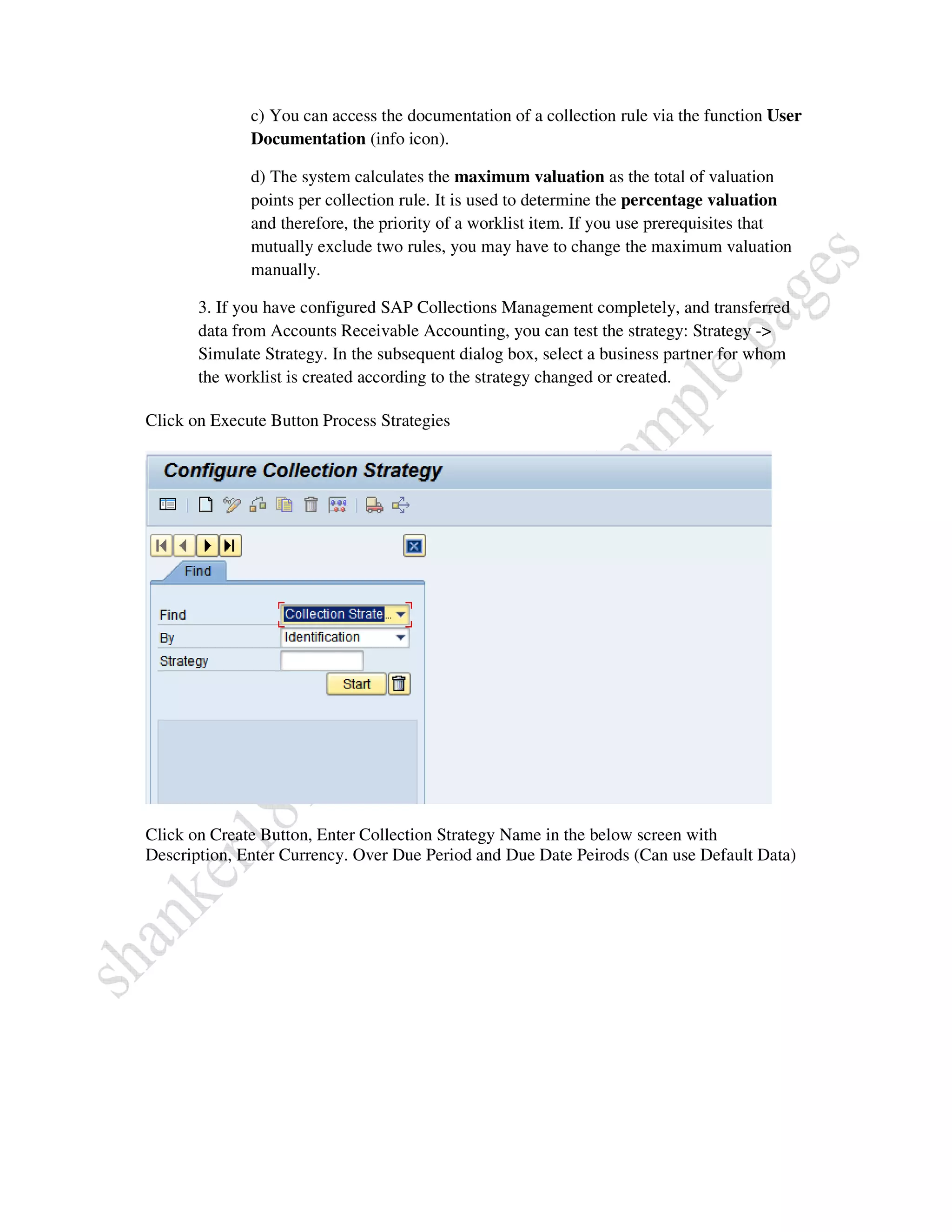
Click on Execute Button Process Strategies


Click on Create Button, Enter Collection Strategy Name in the below screen with
Description, Enter Currency. Over Due Period and Due Date Peirods (Can use Default Data)
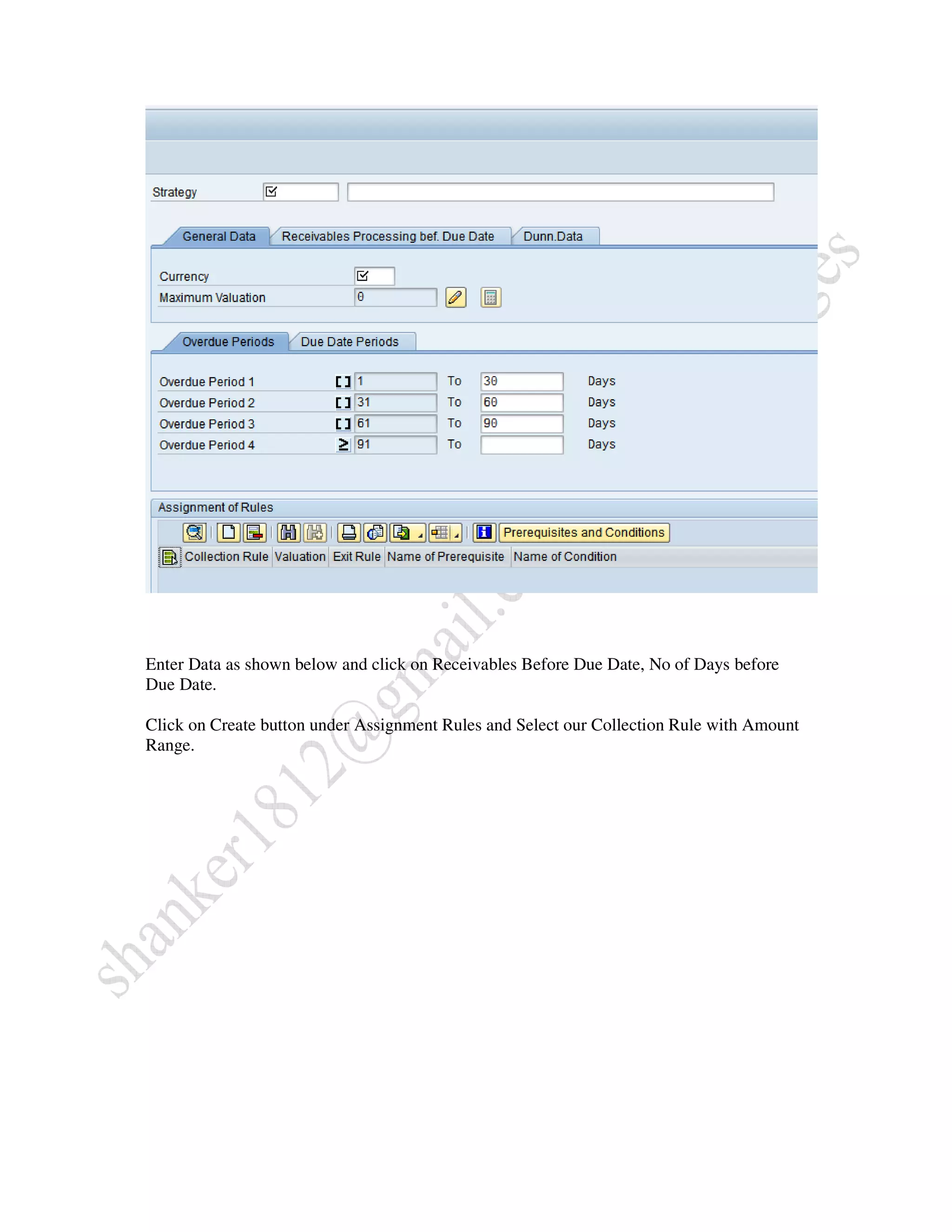
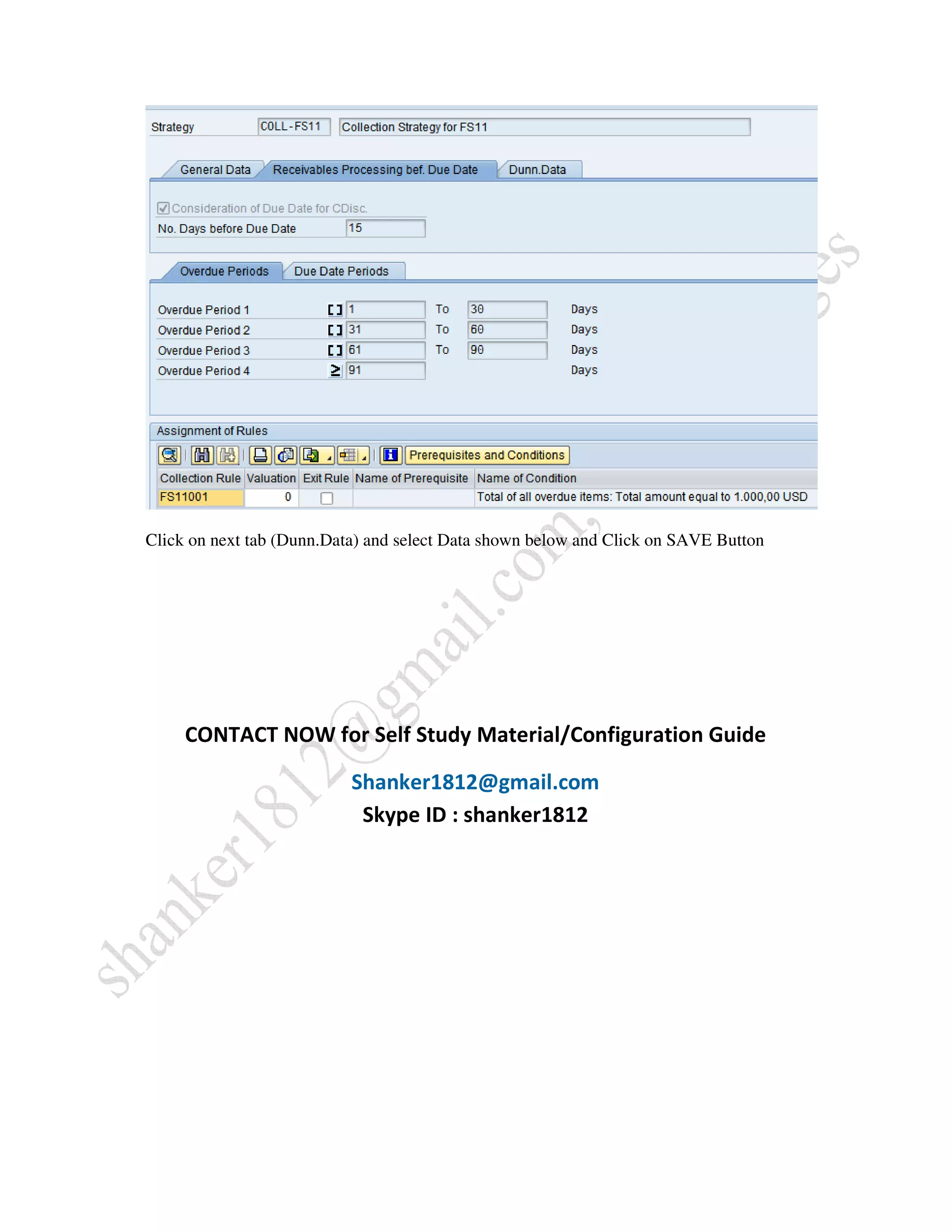
Enter Data as shown below and click on Receivables Before Due Date, No of Days before
Due Date.

Click on Create button under Assignment Rules and Select our Collection Rule with Amount
Range.
Click on next tab (Dunn.Data) and select Data shown below and Click on SAVE Button


     CONTACT NOW for Self Study Material/Configuration Guide

                           Shanker1812@gmail.com
                            Skype ID : shanker1812

Sap fscm configuration guide sample pages

  • 1.
    SAP FSCM Study Materials by Shanker Shanker1812@gmail.com skype ID : shanker1812 Collection Management Step by Step Configuration SAP Study Material Other Study Material Available Dispute Management, Credit Management, Biller Direct Treasury & Risk Management FICO(Finance and Controlling) SD (Sales & Distribution) MM (Material Management) WM (Warehouse Management)
  • 2.
    Process Strategies Collection strategiesused in SAP Collections Management. Strategies are used to • Prioritize business partners on the worklist • Define the currency in which the amounts are to be displayed in the worklist • Determine the time intervals with which the business partner payables are to be sorted • Define the type of integration with dunning in Accounts Receivable Accounting • Determine the influence of the terms of payment on Collections Management (proactive receivables processing) All specialists in a collection group collect open receivables from business partners with the same strategy. Therefore, you have to assign a collection strategy to each collection group. For more information, see the IMG activity Define Collection Groups . Requirements Before you configure strategies, you must have created the collection rules that you want to use for the prioritization of business partners on the worklist. For more information, see the IMG activity Define Collection Rules. Activities 1. Create a collection strategy. Assign a name and the attributes specified above (currency, specifications for proactive receivables processing and for dunning, definition of time intervals for sorting). Alternatively, you can change the existing strategies. SAP recommends that you create naming conventions for strategies (supported by the authorization object that uses the name of the strategy). Note that changing and deleting strategies does not disrupt productive operation and the use of old worklists since the system stores versions of the strategies as long as they are still used in worklists. 2. Choose the collection rules that you want to have checked when the worklist is created. a) For each rule, decide whether it is to be an exit rule or whether it is to contribute to the valuation of a worklist item. b) Maintain the prerequisites and conditions for the collection rules, provided the rule can be parameterized.
  • 3.
    c) You canaccess the documentation of a collection rule via the function User Documentation (info icon). d) The system calculates the maximum valuation as the total of valuation points per collection rule. It is used to determine the percentage valuation and therefore, the priority of a worklist item. If you use prerequisites that mutually exclude two rules, you may have to change the maximum valuation manually. 3. If you have configured SAP Collections Management completely, and transferred data from Accounts Receivable Accounting, you can test the strategy: Strategy -> Simulate Strategy. In the subsequent dialog box, select a business partner for whom the worklist is created according to the strategy changed or created. Click on Execute Button Process Strategies Click on Create Button, Enter Collection Strategy Name in the below screen with Description, Enter Currency. Over Due Period and Due Date Peirods (Can use Default Data)
  • 4.
    Enter Data asshown below and click on Receivables Before Due Date, No of Days before Due Date. Click on Create button under Assignment Rules and Select our Collection Rule with Amount Range.
  • 5.
    Click on nexttab (Dunn.Data) and select Data shown below and Click on SAVE Button CONTACT NOW for Self Study Material/Configuration Guide Shanker1812@gmail.com Skype ID : shanker1812