SAP FSCM – Financial Supply Chain Management


  SAP FSCM – Financial Supply Chain Management


Contact for More Information :

SAP FSCM Material & SAP FSCM Training : sunitha@sapphiregloba.biz

Contact Number : +91 99000 20252


SAP FSCM |Financial Supply Chain Management                          1
SAP FSCM – Financial Supply Chain Management


Contents at Glance


   1. SAP Financial Supply Chain Management

   2. SAP Financial Accounting

   3. SAP Sales Order Processing

   4. SAP FSCM – Credit Management

   5. SAP FSCM – Dispute Management

   6. SAP FSCM – Collection Management

   7. SAP FSCM – Biller Direct

   8. SAP FSCM Reports

   9. SAP FSCM Transaction Codes

   10. SAP FSCM Frequently Asked Questions

   11. The Authors Page


SAP FSCM |Financial Supply Chain Management                          2
SAP FSCM – Financial Supply Chain Management


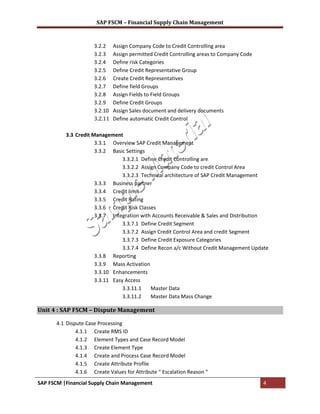
Table Of Contents
Unit 1 : SAP FSCM – Financial Supply Chain Management

       1.1 SAP FSCM Introduction
       1.2 SAP FSCM Sub modules

Unit 2 : SAP FI – Financial Accounting

          2.1 Enterprise Structure
                      2.1.1 Company
                      2.1.2 Company Code
                      2.1.3 Assign Company Code to Company
                      2.1.4 Credit Controlling Area
                      2.1.5 Assign Credit Controlling are to company code
          2.2 General ledger Accounting
                      2.2.1 Define Chart of Accounts
                      2.2.2 Assign Company Code to Chart of Accounts
                      2.2.3 Define Account Groups
                      2.2.4 Define Retained Earnings Account
                      2.2.5 GL Master Records
                                  2.2.5.1 Create reconciliation account for Sundry Debtors.
          2.3 Accounts Receivable
                      2.3.1 Define Account Groups
                      2.3.2 Define Number Ranges
                      2.3.2 Assign Number Ranges for Account Groups.
                      2.3.3 Customer Master Records
                                  2.3.3.1 Create Customer Master record in Centrally
                      2.3.4 Define Terms of Payments
                      2.3.5 Dunning
                                  2.3.5.1 Define Dunning Procedure
                                  2.3.5.2 Assign Dunning Procedure to company Code


       Unit 3 : SAP FSCM – Credit Management

          3.1 Business partner
                      3.1.1 Define Number ranges
                      3.1.2 Define Grouping and assign number ranges
                      3.1.3 Define BP role
                      3.1.4 Define BP role grouping
          3.2 Credit Control area setting
                      3.2.1 Define Credit Controlling Area

SAP FSCM |Financial Supply Chain Management                                                   3
SAP FSCM – Financial Supply Chain Management


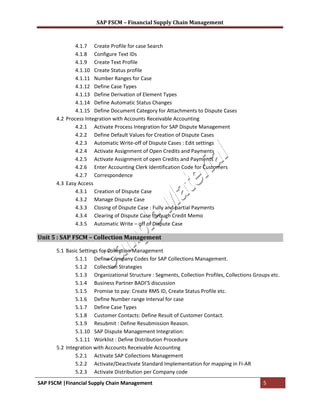
                      3.2.2    Assign Company Code to Credit Controlling area
                      3.2.3    Assign permitted Credit Controlling areas to Company Code
                      3.2.4    Define risk Categories
                      3.2.5    Define Credit Representative Group
                      3.2.6    Create Credit Representatives
                      3.2.7    Define field Groups
                      3.2.8    Assign Fields to Field Groups
                      3.2.9    Define Credit Groups
                      3.2.10   Assign Sales document and delivery documents
                      3.2.11   Define automatic Credit Control

          3.3 Credit Management
                      3.3.1 Overview SAP Credit Management
                      3.3.2 Basic Settings
                                 3.3.2.1 Define Credit Controlling are
                                 3.3.2.2 Assign Company Code to credit Control Area
                                 3.3.2.3 Technical architecture of SAP Credit Management
                      3.3.3 Business partner
                      3.3.4 Credit limit
                      3.3.5 Credit Rating
                      3.3.6 Credit Risk Classes
                      3.3.7 Integration with Accounts Receivable & Sales and Distribution
                                 3.3.7.1 Define Credit Segment
                                 3.3.7.2 Assign Credit Control Area and credit Segment
                                 3.3.7.3 Define Credit Exposure Categories
                                 3.3.7.4 Define Recon a/c Without Credit Management Update
                      3.3.8 Reporting
                      3.3.9 Mass Activation
                      3.3.10 Enhancements
                      3.3.11 Easy Access
                                 3.3.11.1    Master Data
                                 3.3.11.2    Master Data Mass Change

Unit 4 : SAP FSCM – Dispute Management

       4.1 Dispute Case Processing
               4.1.1 Create RMS ID
               4.1.2 Element Types and Case Record Model
               4.1.3 Create Element Type
               4.1.4 Create and Process Case Record Model
               4.1.5 Create Attribute Profile
               4.1.6 Create Values for Attribute “ Escalation Reason “
SAP FSCM |Financial Supply Chain Management                                                4
SAP FSCM – Financial Supply Chain Management


               4.1.7 Create Profile for case Search
               4.1.8 Configure Text IDs
               4.1.9 Create Text Profile
               4.1.10 Create Status profile
               4.1.11 Number Ranges for Case
               4.1.12 Define Case Types
               4.1.13 Define Derivation of Element Types
               4.1.14 Define Automatic Status Changes
               4.1.15 Define Document Category for Attachments to Dispute Cases
       4.2 Process Integration with Accounts Receivable Accounting
               4.2.1 Activate Process Integration for SAP Dispute Management
               4.2.2 Define Default Values for Creation of Dispute Cases
               4.2.3 Automatic Write-off of Dispute Cases : Edit settings
               4.2.4 Activate Assignment of Open Credits and Payments
               4.2.5 Activate Assignment of open Credits and Payments
               4.2.6 Enter Accounting Clerk Identification Code for Customers
               4.2.7 Correspondence
       4.3 Easy Access
               4.3.1 Creation of Dispute Case
               4.3.2 Manage Dispute Case
               4.3.3 Closing of Dispute Case : Fully and partial Payments
               4.3.4 Clearing of Dispute Case through Credit Memo
               4.3.5 Automatic Write – off of Dispute Case

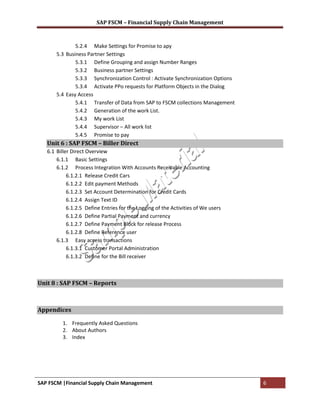
Unit 5 : SAP FSCM – Collection Management

       5.1 Basic Settings for Collection Management
               5.1.1 Define Company Codes for SAP Collections Management.
               5.1.2 Collection Strategies
               5.1.3 Organizational Structure : Segments, Collection Profiles, Collections Groups etc.
               5.1.4 Business Partner BADI’S discussion
               5.1.5 Promise to pay: Create RMS ID, Create Status Profile etc.
               5.1.6 Define Number range Interval for case
               5.1.7 Define Case Types
               5.1.8 Customer Contacts: Define Result of Customer Contact.
               5.1.9 Resubmit : Define Resubmission Reason.
               5.1.10 SAP Dispute Management Integration:
               5.1.11 Worklist : Define Distribution Procedure
       5.2 Integration with Accounts Receivable Accounting
               5.2.1 Activate SAP Collections Management
               5.2.2 Activate/Deactivate Standard Implementation for mapping in FI-AR
               5.2.3 Activate Distribution per Company code
SAP FSCM |Financial Supply Chain Management                                                    5
SAP FSCM – Financial Supply Chain Management


               5.2.4 Make Settings for Promise to apy
       5.3 Business Partner Settings
               5.3.1 Define Grouping and assign Number Ranges
               5.3.2 Business partner Settings
               5.3.3 Synchronization Control : Activate Synchronization Options
               5.3.4 Activate PPo requests for Platform Objects in the Dialog
       5.4 Easy Access
               5.4.1 Transfer of Data from SAP to FSCM collections Management
               5.4.2 Generation of the work List.
               5.4.3 My work List
               5.4.4 Supervisor – All work list
               5.4.5 Promise to pay
   Unit 6 : SAP FSCM – Biller Direct
   6.1 Biller Direct Overview
       6.1.1 Basic Settings
       6.1.2 Process Integration With Accounts Receivable Accounting
            6.1.2.1 Release Credit Cars
            6.1.2.2 Edit payment Methods
            6.1.2.3 Set Account Determination for Credit Cards
            6.1.2.4 Assign Text ID
            6.1.2.5 Define Entries for the Logging of the Activities of We users
            6.1.2.6 Define Partial Payment and currency
            6.1.2.7 Define Payment Block for release Process
            6.1.2.8 Define Reference user
       6.1.3 Easy access transactions
            6.1.3.1 Customer Portal Administration
            6.1.3.2 Define for the Bill receiver


Unit 8 : SAP FSCM – Reports


Appendices

         1. Frequently Asked Questions
         2. About Authors
         3. Index


SAP FSCM |Financial Supply Chain Management                                        6
SAP FSCM – Financial Supply Chain Management


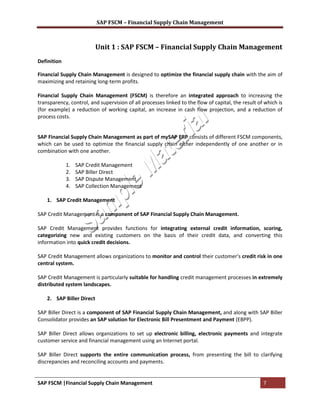
                           Unit 1 : SAP FSCM – Financial Supply Chain Management
Definition

Financial Supply Chain Management is designed to optimize the financial supply chain with the aim of
maximizing and retaining long-term profits.

Financial Supply Chain Management (FSCM) is therefore an integrated approach to increasing the
transparency, control, and supervision of all processes linked to the flow of capital, the result of which is
(for example) a reduction of working capital, an increase in cash flow projection, and a reduction of
process costs.


SAP Financial Supply Chain Management as part of mySAP ERP consists of different FSCM components,
which can be used to optimize the financial supply chain either independently of one another or in
combination with one another.

             1.   SAP Credit Management
             2.   SAP Biller Direct
             3.   SAP Dispute Management
             4.   SAP Collection Management

    1. SAP Credit Management

SAP Credit Management is a component of SAP Financial Supply Chain Management.

SAP Credit Management provides functions for integrating external credit information, scoring,
categorizing new and existing customers on the basis of their credit data, and converting this
information into quick credit decisions.

SAP Credit Management allows organizations to monitor and control their customer's credit risk in one
central system.

SAP Credit Management is particularly suitable for handling credit management processes in extremely
distributed system landscapes.

    2. SAP Biller Direct

SAP Biller Direct is a component of SAP Financial Supply Chain Management, and along with SAP Biller
Consolidator provides an SAP solution for Electronic Bill Presentment and Payment (EBPP).

SAP Biller Direct allows organizations to set up electronic billing, electronic payments and integrate
customer service and financial management using an Internet portal.

SAP Biller Direct supports the entire communication process, from presenting the bill to clarifying
discrepancies and reconciling accounts and payments.


SAP FSCM |Financial Supply Chain Management                                                         7
SAP FSCM – Financial Supply Chain Management


SAP Biller Direct is a Java-based application, which allows organizations to work closely together with
their customers and partners

   3. SAP Dispute Management

SAP Dispute Management is part of SAP Financial Supply Chain Management.

SAP Dispute Management provides functions to process discrepancies between organizations and
customers regarding the customer's financial obligation (in other words, the dispute case).

It enhances the following logistical process chains in the stage between billing and payment, should
discrepancies arise with the customer:
                             > Customer order – Delivery – Billing – Payment
                            > Contract – Service provision – Billing – Payment

   4. SAP Collection Management

According to Meta Group, Collections Management is customer-specific receivables management.

SAP Collections Management allows you to select and prioritize customer accounts, display and process
receivables for each customer account, and enter promises to pay. Processing is fully integrated with
SAP Dispute Management and SAP Accounts Receivable Accounting.


SAP FSCM |Financial Supply Chain Management                                                   8
SAP FSCM – Financial Supply Chain Management


                                                Unit 4 : SAP FSCM – Credit Management


SAP Credit Management provides tools to evaluate the creditworthiness of customers using internal
rating policies and external credit data, and enables quick and consistent credit decisions.

Organizations can use SAP Credit Management to reduce delays in payments, non-payments, and
process costs, as well as to improve relations with their top customers.

SAP Credit Management
       1 Overview
       2 Credit Master Data
       3 Process Integration
       4 Credit Rules Engine
       5 External Credit Information
       6 Reporting & Mass Changes
       7 Integration of SAP BW and SAP Portal
       8 Architecture

   1. Overview

SAP Credit Management is a component of SAP Financial Supply Chain Management.
SAP Credit Management provides functions for integrating external credit information, scoring,
categorizing new and existing customers on the basis of their credit data, and converting this
information into quick credit decisions.

SAP Credit Management allows organizations to monitor and control their customer's credit risk in one
central system.

SAP Credit Management is particularly suitable for handling credit management processes in extremely
distributed system landscapes.

Credit Management Features

              Credit limit management
                Implementation of an organization-wide credit policy
                Central management of credit limits in a distributed system landscape
              Credit case
                Central, electronic creation of credit limit applications
                Status and result monitoring of credit limit applications
              Credit rules engine
                Categorization of customers using valuation rules
                Automatic calculation and assignment of customer-specific scores and credit limits
                Check rule for credit decisions that are relevant to an order (order check)
              Credit information
                Interface for external credit agencies

SAP FSCM |Financial Supply Chain Management                                                  9
SAP FSCM – Financial Supply Chain Management


                   Input parameters for scoring formulas
                   SAP BW content
                 Credit manager portal
                   Role-based access to credit management information and analyses


                                           Configuration Steps in Credit Management
   1. Master Data

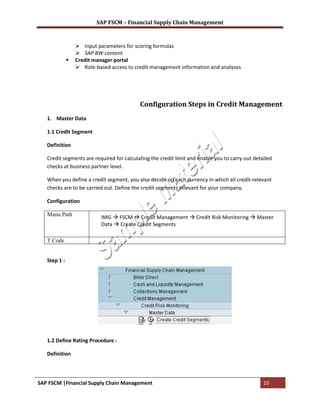
   1.1 Credit Segment

   Definition

   Credit segments are required for calculating the credit limit and enable you to carry out detailed
   checks at business partner level.

   When you define a credit segment, you also decide on each currency in which all credit-relevant
   checks are to be carried out. Define the credit segments relevant for your company.

   Configuration

   Manu Path                IMG  FSCM  Credit Management  Credit Risk Monitoring  Master
                            Data  Create Credit Segments

   T Code


   Step 1 :


   1.2 Define Rating Procedure :

   Definition


SAP FSCM |Financial Supply Chain Management                                                      10
SAP FSCM – Financial Supply Chain Management


   define the rating procedures that you can use to process external credit information for your
   business partners. You can use all of the ratings available for a business partner to calculate the
   score.

   There are two external and one internal rating procedure


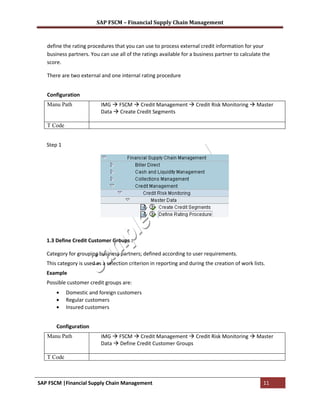
   Configuration
   Manu Path               IMG  FSCM  Credit Management  Credit Risk Monitoring  Master
                           Data  Create Credit Segments

   T Code


   Step 1


   1.3 Define Credit Customer Groups :

   Category for grouping business partners; defined according to user requirements.
   This category is used as a selection criterion in reporting and during the creation of work lists.
   Example
   Possible customer credit groups are:
            Domestic and foreign customers
            Regular customers
            Insured customers


       Configuration
   Manu Path               IMG  FSCM  Credit Management  Credit Risk Monitoring  Master
                           Data  Define Credit Customer Groups

   T Code


SAP FSCM |Financial Supply Chain Management                                                         11
SAP FSCM – Financial Supply Chain Management


   Step 1 :


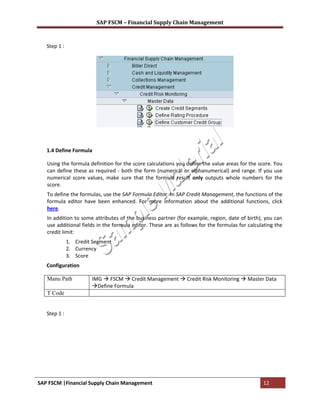
   1.4 Define Formula

   Using the formula definition for the score calculations you define the value areas for the score. You
   can define these as required - both the form (numerical or alphanumerical) and range. If you use
   numerical score values, make sure that the formula result only outputs whole numbers for the
   score.
   To define the formulas, use the SAP Formula Editor. In SAP Credit Management, the functions of the
   formula editor have been enhanced. For more information about the additional functions, click
   here.
   In addition to some attributes of the business partner (for example, region, date of birth), you can
   use additional fields in the formula editor. These are as follows for the formulas for calculating the
   credit limit:
              1. Credit Segment
              2. Currency
              3. Score
   Configuration

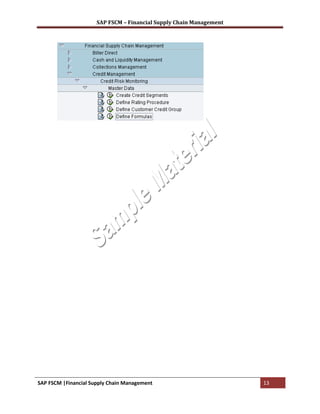
   Manu Path           IMG  FSCM  Credit Management  Credit Risk Monitoring  Master Data
                       Define Formula
   T Code


   Step 1 :


SAP FSCM |Financial Supply Chain Management                                                     12
SAP FSCM – Financial Supply Chain Management


SAP FSCM |Financial Supply Chain Management                          13

SAP FSCM Training Material

  • 1.
    SAP FSCM –Financial Supply Chain Management SAP FSCM – Financial Supply Chain Management Contact for More Information : SAP FSCM Material & SAP FSCM Training : sunitha@sapphiregloba.biz Contact Number : +91 99000 20252 SAP FSCM |Financial Supply Chain Management 1
  • 2.
    SAP FSCM –Financial Supply Chain Management Contents at Glance 1. SAP Financial Supply Chain Management 2. SAP Financial Accounting 3. SAP Sales Order Processing 4. SAP FSCM – Credit Management 5. SAP FSCM – Dispute Management 6. SAP FSCM – Collection Management 7. SAP FSCM – Biller Direct 8. SAP FSCM Reports 9. SAP FSCM Transaction Codes 10. SAP FSCM Frequently Asked Questions 11. The Authors Page SAP FSCM |Financial Supply Chain Management 2
  • 3.
    SAP FSCM –Financial Supply Chain Management Table Of Contents Unit 1 : SAP FSCM – Financial Supply Chain Management 1.1 SAP FSCM Introduction 1.2 SAP FSCM Sub modules Unit 2 : SAP FI – Financial Accounting 2.1 Enterprise Structure 2.1.1 Company 2.1.2 Company Code 2.1.3 Assign Company Code to Company 2.1.4 Credit Controlling Area 2.1.5 Assign Credit Controlling are to company code 2.2 General ledger Accounting 2.2.1 Define Chart of Accounts 2.2.2 Assign Company Code to Chart of Accounts 2.2.3 Define Account Groups 2.2.4 Define Retained Earnings Account 2.2.5 GL Master Records 2.2.5.1 Create reconciliation account for Sundry Debtors. 2.3 Accounts Receivable 2.3.1 Define Account Groups 2.3.2 Define Number Ranges 2.3.2 Assign Number Ranges for Account Groups. 2.3.3 Customer Master Records 2.3.3.1 Create Customer Master record in Centrally 2.3.4 Define Terms of Payments 2.3.5 Dunning 2.3.5.1 Define Dunning Procedure 2.3.5.2 Assign Dunning Procedure to company Code Unit 3 : SAP FSCM – Credit Management 3.1 Business partner 3.1.1 Define Number ranges 3.1.2 Define Grouping and assign number ranges 3.1.3 Define BP role 3.1.4 Define BP role grouping 3.2 Credit Control area setting 3.2.1 Define Credit Controlling Area SAP FSCM |Financial Supply Chain Management 3
  • 4.
    SAP FSCM –Financial Supply Chain Management 3.2.2 Assign Company Code to Credit Controlling area 3.2.3 Assign permitted Credit Controlling areas to Company Code 3.2.4 Define risk Categories 3.2.5 Define Credit Representative Group 3.2.6 Create Credit Representatives 3.2.7 Define field Groups 3.2.8 Assign Fields to Field Groups 3.2.9 Define Credit Groups 3.2.10 Assign Sales document and delivery documents 3.2.11 Define automatic Credit Control 3.3 Credit Management 3.3.1 Overview SAP Credit Management 3.3.2 Basic Settings 3.3.2.1 Define Credit Controlling are 3.3.2.2 Assign Company Code to credit Control Area 3.3.2.3 Technical architecture of SAP Credit Management 3.3.3 Business partner 3.3.4 Credit limit 3.3.5 Credit Rating 3.3.6 Credit Risk Classes 3.3.7 Integration with Accounts Receivable & Sales and Distribution 3.3.7.1 Define Credit Segment 3.3.7.2 Assign Credit Control Area and credit Segment 3.3.7.3 Define Credit Exposure Categories 3.3.7.4 Define Recon a/c Without Credit Management Update 3.3.8 Reporting 3.3.9 Mass Activation 3.3.10 Enhancements 3.3.11 Easy Access 3.3.11.1 Master Data 3.3.11.2 Master Data Mass Change Unit 4 : SAP FSCM – Dispute Management 4.1 Dispute Case Processing 4.1.1 Create RMS ID 4.1.2 Element Types and Case Record Model 4.1.3 Create Element Type 4.1.4 Create and Process Case Record Model 4.1.5 Create Attribute Profile 4.1.6 Create Values for Attribute “ Escalation Reason “ SAP FSCM |Financial Supply Chain Management 4
  • 5.
    SAP FSCM –Financial Supply Chain Management 4.1.7 Create Profile for case Search 4.1.8 Configure Text IDs 4.1.9 Create Text Profile 4.1.10 Create Status profile 4.1.11 Number Ranges for Case 4.1.12 Define Case Types 4.1.13 Define Derivation of Element Types 4.1.14 Define Automatic Status Changes 4.1.15 Define Document Category for Attachments to Dispute Cases 4.2 Process Integration with Accounts Receivable Accounting 4.2.1 Activate Process Integration for SAP Dispute Management 4.2.2 Define Default Values for Creation of Dispute Cases 4.2.3 Automatic Write-off of Dispute Cases : Edit settings 4.2.4 Activate Assignment of Open Credits and Payments 4.2.5 Activate Assignment of open Credits and Payments 4.2.6 Enter Accounting Clerk Identification Code for Customers 4.2.7 Correspondence 4.3 Easy Access 4.3.1 Creation of Dispute Case 4.3.2 Manage Dispute Case 4.3.3 Closing of Dispute Case : Fully and partial Payments 4.3.4 Clearing of Dispute Case through Credit Memo 4.3.5 Automatic Write – off of Dispute Case Unit 5 : SAP FSCM – Collection Management 5.1 Basic Settings for Collection Management 5.1.1 Define Company Codes for SAP Collections Management. 5.1.2 Collection Strategies 5.1.3 Organizational Structure : Segments, Collection Profiles, Collections Groups etc. 5.1.4 Business Partner BADI’S discussion 5.1.5 Promise to pay: Create RMS ID, Create Status Profile etc. 5.1.6 Define Number range Interval for case 5.1.7 Define Case Types 5.1.8 Customer Contacts: Define Result of Customer Contact. 5.1.9 Resubmit : Define Resubmission Reason. 5.1.10 SAP Dispute Management Integration: 5.1.11 Worklist : Define Distribution Procedure 5.2 Integration with Accounts Receivable Accounting 5.2.1 Activate SAP Collections Management 5.2.2 Activate/Deactivate Standard Implementation for mapping in FI-AR 5.2.3 Activate Distribution per Company code SAP FSCM |Financial Supply Chain Management 5
  • 6.
    SAP FSCM –Financial Supply Chain Management 5.2.4 Make Settings for Promise to apy 5.3 Business Partner Settings 5.3.1 Define Grouping and assign Number Ranges 5.3.2 Business partner Settings 5.3.3 Synchronization Control : Activate Synchronization Options 5.3.4 Activate PPo requests for Platform Objects in the Dialog 5.4 Easy Access 5.4.1 Transfer of Data from SAP to FSCM collections Management 5.4.2 Generation of the work List. 5.4.3 My work List 5.4.4 Supervisor – All work list 5.4.5 Promise to pay Unit 6 : SAP FSCM – Biller Direct 6.1 Biller Direct Overview 6.1.1 Basic Settings 6.1.2 Process Integration With Accounts Receivable Accounting 6.1.2.1 Release Credit Cars 6.1.2.2 Edit payment Methods 6.1.2.3 Set Account Determination for Credit Cards 6.1.2.4 Assign Text ID 6.1.2.5 Define Entries for the Logging of the Activities of We users 6.1.2.6 Define Partial Payment and currency 6.1.2.7 Define Payment Block for release Process 6.1.2.8 Define Reference user 6.1.3 Easy access transactions 6.1.3.1 Customer Portal Administration 6.1.3.2 Define for the Bill receiver Unit 8 : SAP FSCM – Reports Appendices 1. Frequently Asked Questions 2. About Authors 3. Index SAP FSCM |Financial Supply Chain Management 6
  • 7.
    SAP FSCM –Financial Supply Chain Management Unit 1 : SAP FSCM – Financial Supply Chain Management Definition Financial Supply Chain Management is designed to optimize the financial supply chain with the aim of maximizing and retaining long-term profits. Financial Supply Chain Management (FSCM) is therefore an integrated approach to increasing the transparency, control, and supervision of all processes linked to the flow of capital, the result of which is (for example) a reduction of working capital, an increase in cash flow projection, and a reduction of process costs. SAP Financial Supply Chain Management as part of mySAP ERP consists of different FSCM components, which can be used to optimize the financial supply chain either independently of one another or in combination with one another. 1. SAP Credit Management 2. SAP Biller Direct 3. SAP Dispute Management 4. SAP Collection Management 1. SAP Credit Management SAP Credit Management is a component of SAP Financial Supply Chain Management. SAP Credit Management provides functions for integrating external credit information, scoring, categorizing new and existing customers on the basis of their credit data, and converting this information into quick credit decisions. SAP Credit Management allows organizations to monitor and control their customer's credit risk in one central system. SAP Credit Management is particularly suitable for handling credit management processes in extremely distributed system landscapes. 2. SAP Biller Direct SAP Biller Direct is a component of SAP Financial Supply Chain Management, and along with SAP Biller Consolidator provides an SAP solution for Electronic Bill Presentment and Payment (EBPP). SAP Biller Direct allows organizations to set up electronic billing, electronic payments and integrate customer service and financial management using an Internet portal. SAP Biller Direct supports the entire communication process, from presenting the bill to clarifying discrepancies and reconciling accounts and payments. SAP FSCM |Financial Supply Chain Management 7
  • 8.
    SAP FSCM –Financial Supply Chain Management SAP Biller Direct is a Java-based application, which allows organizations to work closely together with their customers and partners 3. SAP Dispute Management SAP Dispute Management is part of SAP Financial Supply Chain Management. SAP Dispute Management provides functions to process discrepancies between organizations and customers regarding the customer's financial obligation (in other words, the dispute case). It enhances the following logistical process chains in the stage between billing and payment, should discrepancies arise with the customer: > Customer order – Delivery – Billing – Payment > Contract – Service provision – Billing – Payment 4. SAP Collection Management According to Meta Group, Collections Management is customer-specific receivables management. SAP Collections Management allows you to select and prioritize customer accounts, display and process receivables for each customer account, and enter promises to pay. Processing is fully integrated with SAP Dispute Management and SAP Accounts Receivable Accounting. SAP FSCM |Financial Supply Chain Management 8
  • 9.
    SAP FSCM –Financial Supply Chain Management Unit 4 : SAP FSCM – Credit Management SAP Credit Management provides tools to evaluate the creditworthiness of customers using internal rating policies and external credit data, and enables quick and consistent credit decisions. Organizations can use SAP Credit Management to reduce delays in payments, non-payments, and process costs, as well as to improve relations with their top customers. SAP Credit Management 1 Overview 2 Credit Master Data 3 Process Integration 4 Credit Rules Engine 5 External Credit Information 6 Reporting & Mass Changes 7 Integration of SAP BW and SAP Portal 8 Architecture 1. Overview SAP Credit Management is a component of SAP Financial Supply Chain Management. SAP Credit Management provides functions for integrating external credit information, scoring, categorizing new and existing customers on the basis of their credit data, and converting this information into quick credit decisions. SAP Credit Management allows organizations to monitor and control their customer's credit risk in one central system. SAP Credit Management is particularly suitable for handling credit management processes in extremely distributed system landscapes. Credit Management Features  Credit limit management  Implementation of an organization-wide credit policy  Central management of credit limits in a distributed system landscape  Credit case  Central, electronic creation of credit limit applications  Status and result monitoring of credit limit applications  Credit rules engine  Categorization of customers using valuation rules  Automatic calculation and assignment of customer-specific scores and credit limits  Check rule for credit decisions that are relevant to an order (order check)  Credit information  Interface for external credit agencies SAP FSCM |Financial Supply Chain Management 9
  • 10.
    SAP FSCM –Financial Supply Chain Management  Input parameters for scoring formulas  SAP BW content  Credit manager portal  Role-based access to credit management information and analyses Configuration Steps in Credit Management 1. Master Data 1.1 Credit Segment Definition Credit segments are required for calculating the credit limit and enable you to carry out detailed checks at business partner level. When you define a credit segment, you also decide on each currency in which all credit-relevant checks are to be carried out. Define the credit segments relevant for your company. Configuration Manu Path IMG  FSCM  Credit Management  Credit Risk Monitoring  Master Data  Create Credit Segments T Code Step 1 : 1.2 Define Rating Procedure : Definition SAP FSCM |Financial Supply Chain Management 10
  • 11.
    SAP FSCM –Financial Supply Chain Management define the rating procedures that you can use to process external credit information for your business partners. You can use all of the ratings available for a business partner to calculate the score. There are two external and one internal rating procedure Configuration Manu Path IMG  FSCM  Credit Management  Credit Risk Monitoring  Master Data  Create Credit Segments T Code Step 1 1.3 Define Credit Customer Groups : Category for grouping business partners; defined according to user requirements. This category is used as a selection criterion in reporting and during the creation of work lists. Example Possible customer credit groups are: Domestic and foreign customers Regular customers Insured customers Configuration Manu Path IMG  FSCM  Credit Management  Credit Risk Monitoring  Master Data  Define Credit Customer Groups T Code SAP FSCM |Financial Supply Chain Management 11
  • 12.
    SAP FSCM –Financial Supply Chain Management Step 1 : 1.4 Define Formula Using the formula definition for the score calculations you define the value areas for the score. You can define these as required - both the form (numerical or alphanumerical) and range. If you use numerical score values, make sure that the formula result only outputs whole numbers for the score. To define the formulas, use the SAP Formula Editor. In SAP Credit Management, the functions of the formula editor have been enhanced. For more information about the additional functions, click here. In addition to some attributes of the business partner (for example, region, date of birth), you can use additional fields in the formula editor. These are as follows for the formulas for calculating the credit limit: 1. Credit Segment 2. Currency 3. Score Configuration Manu Path IMG  FSCM  Credit Management  Credit Risk Monitoring  Master Data Define Formula T Code Step 1 : SAP FSCM |Financial Supply Chain Management 12
  • 13.
    SAP FSCM –Financial Supply Chain Management SAP FSCM |Financial Supply Chain Management 13