M A N N I N G
Norman Maurer
Marvin Allen Wolfthal
FOREWORD BY Trustin Lee
SA MP L E C HA P T E R
Netty in Action
by Norman Maurer
Marvin Allen Wolfthal
Chapter 10
Copyright 2016 Manning Publications
iii
brief contents
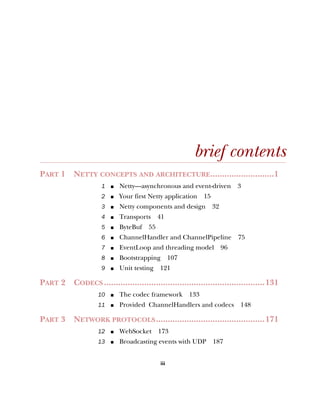
PART 1 NETTY CONCEPTS AND ARCHITECTURE...........................1
1 ■ Netty—asynchronous and event-driven 3
2 ■ Your first Netty application 15
3 ■ Netty components and design 32
4 ■ Transports 41
5 ■ ByteBuf 55
6 ■ ChannelHandler and ChannelPipeline 75
7 ■ EventLoop and threading model 96
8 ■ Bootstrapping 107
9 ■ Unit testing 121
PART 2 CODECS ....................................................................131
10 ■ The codec framework 133
11 ■ Provided ChannelHandlers and codecs 148
PART 3 NETWORK PROTOCOLS..............................................171
12 ■ WebSocket 173
13 ■ Broadcasting events with UDP 187
BRIEF CONTENTSiv
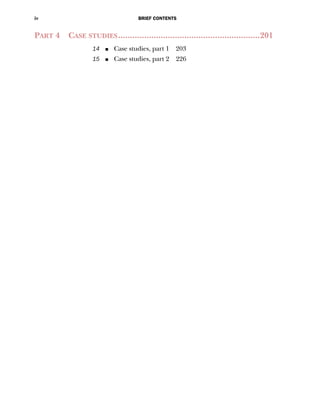
PART 4 CASE STUDIES............................................................201
14 ■ Case studies, part 1 203
15 ■ Case studies, part 2 226
133
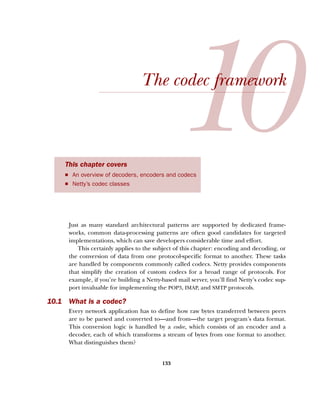
The codec framework
Just as many standard architectural patterns are supported by dedicated frame-
works, common data-processing patterns are often good candidates for targeted
implementations, which can save developers considerable time and effort.
This certainly applies to the subject of this chapter: encoding and decoding, or
the conversion of data from one protocol-specific format to another. These tasks
are handled by components commonly called codecs. Netty provides components
that simplify the creation of custom codecs for a broad range of protocols. For
example, if you’re building a Netty-based mail server, you’ll find Netty’s codec sup-
port invaluable for implementing the POP3, IMAP, and SMTP protocols.
10.1 What is a codec?
Every network application has to define how raw bytes transferred between peers
are to be parsed and converted to—and from—the target program’s data format.
This conversion logic is handled by a codec, which consists of an encoder and a
decoder, each of which transforms a stream of bytes from one format to another.
What distinguishes them?
This chapter covers
■ An overview of decoders, encoders and codecs
■ Netty’s codec classes
134 CHAPTER 10 The codec framework
Think of a message as a structured sequence of bytes having meaning for a specific
application—its data. An encoder converts that message to a format suitable for trans-
mission (most likely a byte stream); the corresponding decoder converts the network
stream back to the program’s message format. An encoder, then, operates on outbound
data and a decoder handles inbound data.
With this background information in mind, let’s examine the classes Netty pro-
vides for implementing both kinds of components.
10.2 Decoders
In this section we’ll survey Netty’s decoder classes and present concrete examples of
when and how you might use them. These classes cover two distinct use cases:
■ Decoding bytes to messages—ByteToMessageDecoder and ReplayingDecoder
■ Decoding one message type to another—MessageToMessageDecoder
Because decoders are responsible for transforming inbound data from one format to
another, it won’t surprise you to learn that Netty’s decoders implement Channel-
InboundHandler.
When would you use a decoder? Simple: whenever you need to transform inbound
data for the next ChannelInboundHandler in the ChannelPipeline. Furthermore,
thanks to the design of ChannelPipeline, you can chain together multiple decoders
to implement arbitrarily complex transformation logic, a prime example of how Netty
supports code modularity and reuse.
10.2.1 Abstract class ByteToMessageDecoder
Decoding from bytes to messages (or to another sequence of bytes) is such a common
task that Netty provides an abstract base class for it: ByteToMessageDecoder. Since you
can’t know whether the remote peer will send a complete message all at once, this
class buffers inbound data until it’s ready for processing. Table 10.1 explains its two
most important methods.
Table 10.1 ByteToMessageDecoder API
Method Description
decode(
ChannelHandlerContext ctx,
ByteBuf in,
List<Object> out)
This is the only abstract method you have to implement.
decode() is called with a ByteBuf containing
incoming data and a List to which decoded messages
are added. This call is repeated until it is determined
that no new items have been added to the List or no
more bytes are readable in the ByteBuf. Then, if the
List is not empty, its contents are passed to the next
handler in the pipeline.
decodeLast(
ChannelHandlerContext ctx,
ByteBuf in,
List<Object> out)
The default implementation provided by Netty simply
calls decode(). This method is called once, when the
Channel goes inactive. Override the method to provide
special handling.
135Decoders
For an example of how to use this class, suppose you receive a byte stream containing
simple ints, each to be handled separately. In this case, you’ll read each int from the
inbound ByteBuf and pass it to the next ChannelInboundHandler in the pipeline. To
decode the byte stream, you’ll extend ByteToMessageDecoder. (Note that the primi-
tive int will be autoboxed to an Integer when it is added to the List.)
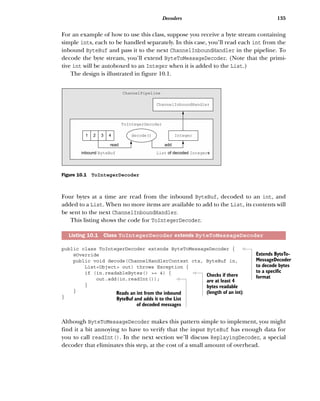
The design is illustrated in figure 10.1.
Four bytes at a time are read from the inbound ByteBuf, decoded to an int, and
added to a List. When no more items are available to add to the List, its contents will
be sent to the next ChannelInboundHandler.
This listing shows the code for ToIntegerDecoder.
public class ToIntegerDecoder extends ByteToMessageDecoder {
@Override
public void decode(ChannelHandlerContext ctx, ByteBuf in,
List<Object> out) throws Exception {
if (in.readableBytes() >= 4) {
out.add(in.readInt());
}
}
}
Although ByteToMessageDecoder makes this pattern simple to implement, you might
find it a bit annoying to have to verify that the input ByteBuf has enough data for
you to call readInt(). In the next section we’ll discuss ReplayingDecoder, a special
decoder that eliminates this step, at the cost of a small amount of overhead.
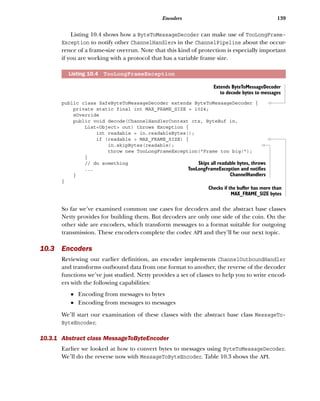
Listing 10.1 Class ToIntegerDecoder extends ByteToMessageDecoder
ChannelInboundHandler
Integer
List Integerof decoded sinbound ByteBuf
1 2 3 4
read
ChannelPipeline
ToIntegerDecoder
add
decode()
Figure 10.1 ToIntegerDecoder
Extends ByteTo-
MessageDecoder
to decode bytes
to a specific
formatChecks if there
are at least 4
bytes readable
(length of an int)Reads an int from the inbound
ByteBuf and adds it to the List
of decoded messages
136 CHAPTER 10 The codec framework
10.2.2 Abstract class ReplayingDecoder
ReplayingDecoder extends ByteToMessageDecoder and frees us from having to call
readableBytes() (as in listing 10.1). It accomplishes this by wrapping the incoming
ByteBuf with a custom ByteBuf implementation, ReplayingDecoderBuffer, that exe-
cutes the call internally.
The full declaration of this class is
public abstract class ReplayingDecoder<S> extends ByteToMessageDecoder
The parameter S specifies the type to be used for state management, where Void indi-
cates that none is to be performed. The following listing shows a reimplementation of
ToIntegerDecoder based on ReplayingDecoder.
public class ToIntegerDecoder2 extends ReplayingDecoder<Void> {
@Override
public void decode(ChannelHandlerContext ctx, ByteBuf in,
List<Object> out) throws Exception {
out.add(in.readInt());
}
}
As before, ints extracted from the ByteBuf are added to the List. If insufficient bytes
are available, this implementation of readInt() throws an Error that will be caught
and handled in the base class. The decode() method will be called again when more
data is ready for reading. (See the description of decode() in table 10.1.)
Please take note of these aspects of ReplayingDecoderBuffer:
■ Not all ByteBuf operations are supported. If an unsupported method is called,
an UnsupportedOperationException will be thrown.
■ ReplayingDecoder is slightly slower than ByteToMessageDecoder.
If you compare listings 10.1 and 10.2, it’s apparent that the latter is simpler. The exam-
ple itself is very basic, so keep in mind that in a real-life, more complex situation the
difference between using one or the other base classes might be significant. Here’s a
Reference counting in codecs
As we mentioned in chapters 5 and 6, reference counting requires special attention.
In the case of encoders and decoders, the procedure is quite simple: once a mes-
sage has been encoded or decoded, it will automatically be released by a call to
ReferenceCountUtil.release(message). If you need to keep a reference for later
use you can call ReferenceCountUtil.retain(message). This increments the ref-
erence count, preventing the message from being released.
Listing 10.2 Class ToIntegerDecoder2 extends ReplayingDecoder
Extends
Replaying-
Decoder<Void>
to decode bytes
to messagesThe incoming
ByteBuf is a
Replaying-
DecoderBuffer.
Reads an int from the inbound
ByteBuf and adds it to the List
of decoded messages
137Decoders
simple guideline: use ByteToMessageDecoder if it doesn’t introduce excessive com-
plexity; otherwise, use ReplayingDecoder.
10.2.3 Abstract class MessageToMessageDecoder
In this section we’ll explain how to convert between message formats (for example,
from one type of POJO to another) using the abstract base class
public abstract class MessageToMessageDecoder<I>
extends ChannelInboundHandlerAdapter
The parameter I specifies the type of the input msg argument to decode(), which is
the only method you have to implement. Table 10.2 shows the details of this method.
In this example, we’ll write an IntegerToStringDecoder decoder that extends Message-
ToMessageDecoder<Integer>. Its decode() method will convert the Integer argument
to its String representation and will have the following signature:
public void decode( ChannelHandlerContext ctx,
Integer msg, List<Object> out ) throws Exception
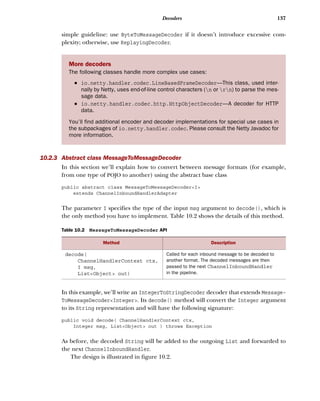
As before, the decoded String will be added to the outgoing List and forwarded to
the next ChannelInboundHandler.
The design is illustrated in figure 10.2.
More decoders
The following classes handle more complex use cases:
■ io.netty.handler.codec.LineBasedFrameDecoder—This class, used inter-
nally by Netty, uses end-of-line control characters (n or rn) to parse the mes-
sage data.
■ io.netty.handler.codec.http.HttpObjectDecoder—A decoder for HTTP
data.
You’ll find additional encoder and decoder implementations for special use cases in
the subpackages of io.netty.handler.codec. Please consult the Netty Javadoc for
more information.
Table 10.2 MessageToMessageDecoder API
Method Description
decode(
ChannelHandlerContext ctx,
I msg,
List<Object> out)
Called for each inbound message to be decoded to
another format. The decoded messages are then
passed to the next ChannelInboundHandler
in the pipeline.
138 CHAPTER 10 The codec framework
The following listing is the implementation of IntegerToStringDecoder.
public class IntegerToStringDecoder extends
MessageToMessageDecoder<Integer> {
@Override
public void decode(ChannelHandlerContext ctx, Integer msg
List<Object> out) throws Exception {
out.add(String.valueOf(msg));
}
}
10.2.4 Class TooLongFrameException
As Netty is an asynchronous framework, you’ll need to buffer bytes in memory until
you’re able to decode them. Consequently, you mustn’t allow your decoder to buffer
enough data to exhaust available memory. To address this common concern, Netty
provides a TooLongFrameException, which is intended to be thrown by decoders if a
frame exceeds a specified size limit.
To avoid this you can set a threshold of a maximum number of bytes which, if
exceeded, will cause a TooLongFrameException to be thrown (and caught by Channel-
Handler.exceptionCaught()). It will then be up to the user of the decoder to decide
how to handle the exception. Some protocols, such as HTTP, may allow you to return a
special response. In other cases, the only option may be to close the connection.
Listing 10.3 Class IntegerToStringDecoder
HttpObjectAggregator
For a more complex example, please examine the class io.netty.handler.codec
.http.HttpObjectAggregator, which extends MessageToMessageDecoder<Http-
Object>.
ChannelInboundHandler
StringInteger
List Stringsof decodedinbound Integer
read
ChannelPipeline
IntegerToStringDecoder
add
decode()
Figure 10.2 IntegerToStringDecoder
Extends MessageToMessage-
Decoder<Integer>
Converts the Integer message
to its String representation and
adds it to the output List
139Encoders
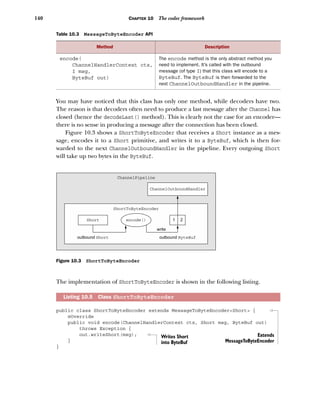
Listing 10.4 shows how a ByteToMessageDecoder can make use of TooLongFrame-
Exception to notify other ChannelHandlers in the ChannelPipeline about the occur-
rence of a frame-size overrun. Note that this kind of protection is especially important
if you are working with a protocol that has a variable frame size.
public class SafeByteToMessageDecoder extends ByteToMessageDecoder {
private static final int MAX_FRAME_SIZE = 1024;
@Override
public void decode(ChannelHandlerContext ctx, ByteBuf in,
List<Object> out) throws Exception {
int readable = in.readableBytes();
if (readable > MAX_FRAME_SIZE) {
in.skipBytes(readable);
throw new TooLongFrameException("Frame too big!");
}
// do something
...
}
}
So far we’ve examined common use cases for decoders and the abstract base classes
Netty provides for building them. But decoders are only one side of the coin. On the
other side are encoders, which transform messages to a format suitable for outgoing
transmission. These encoders complete the codec API and they’ll be our next topic.
10.3 Encoders
Reviewing our earlier definition, an encoder implements ChannelOutboundHandler
and transforms outbound data from one format to another, the reverse of the decoder
functions we’ve just studied. Netty provides a set of classes to help you to write encod-
ers with the following capabilities:
■ Encoding from messages to bytes
■ Encoding from messages to messages
We’ll start our examination of these classes with the abstract base class MessageTo-
ByteEncoder.
10.3.1 Abstract class MessageToByteEncoder
Earlier we looked at how to convert bytes to messages using ByteToMessageDecoder.
We’ll do the reverse now with MessageToByteEncoder. Table 10.3 shows the API.
Listing 10.4 TooLongFrameException
Extends ByteToMessageDecoder
to decode bytes to messages
Checks if the buffer has more than
MAX_FRAME_SIZE bytes
Skips all readable bytes, throws
TooLongFrameException and notifies
ChannelHandlers
140 CHAPTER 10 The codec framework
You may have noticed that this class has only one method, while decoders have two.
The reason is that decoders often need to produce a last message after the Channel has
closed (hence the decodeLast() method). This is clearly not the case for an encoder—
there is no sense in producing a message after the connection has been closed.
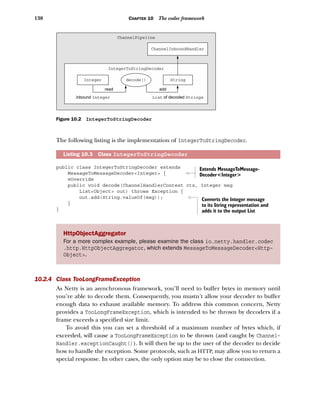
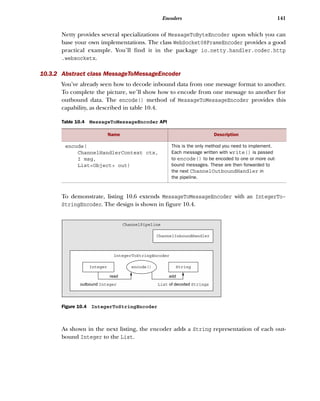
Figure 10.3 shows a ShortToByteEncoder that receives a Short instance as a mes-
sage, encodes it to a Short primitive, and writes it to a ByteBuf, which is then for-
warded to the next ChannelOutboundHandler in the pipeline. Every outgoing Short
will take up two bytes in the ByteBuf.
The implementation of ShortToByteEncoder is shown in the following listing.
public class ShortToByteEncoder extends MessageToByteEncoder<Short> {
@Override
public void encode(ChannelHandlerContext ctx, Short msg, ByteBuf out)
throws Exception {
out.writeShort(msg);
}
}
Table 10.3 MessageToByteEncoder API
Method Description
encode(
ChannelHandlerContext ctx,
I msg,
ByteBuf out)
The encode method is the only abstract method you
need to implement. It’s called with the outbound
message (of type I) that this class will encode to a
ByteBuf. The ByteBuf is then forwarded to the
next ChannelOutboundHandler in the pipeline.
Listing 10.5 Class ShortToByteEncoder
ChannelOutboundHandler
Short
outbound Short outbound ByteBuf
1 2
ChannelPipeline
ShortToByteEncoder
write
encode()
Figure 10.3 ShortToByteEncoder
Extends
MessageToByteEncoder
Writes Short
into ByteBuf
141Encoders
Netty provides several specializations of MessageToByteEncoder upon which you can
base your own implementations. The class WebSocket08FrameEncoder provides a good
practical example. You’ll find it in the package io.netty.handler.codec.http
.websocketx.
10.3.2 Abstract class MessageToMessageEncoder
You’ve already seen how to decode inbound data from one message format to another.
To complete the picture, we’ll show how to encode from one message to another for
outbound data. The encode() method of MessageToMessageEncoder provides this
capability, as described in table 10.4.
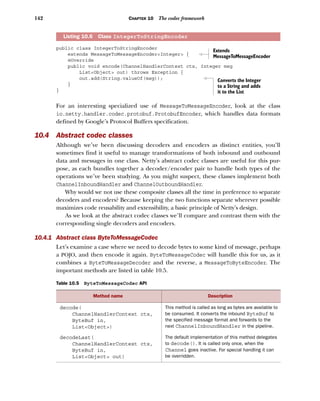
To demonstrate, listing 10.6 extends MessageToMessageEncoder with an IntegerTo-
StringEncoder. The design is shown in figure 10.4.
As shown in the next listing, the encoder adds a String representation of each out-
bound Integer to the List.
Table 10.4 MessageToMessageEncoder API
Name Description
encode(
ChannelHandlerContext ctx,
I msg,
List<Object> out)
This is the only method you need to implement.
Each message written with write() is passed
to encode() to be encoded to one or more out-
bound messages. These are then forwarded to
the next ChannelOutboundHandler in
the pipeline.
ChannelInboundHandler
StringInteger
List Stringsof decodedoutbound Integer
read
ChannelPipeline
IntegerToStringEncoder
add
encode()
Figure 10.4 IntegerToStringEncoder
142 CHAPTER 10 The codec framework
public class IntegerToStringEncoder
extends MessageToMessageEncoder<Integer> {
@Override
public void encode(ChannelHandlerContext ctx, Integer msg
List<Object> out) throws Exception {
out.add(String.valueOf(msg));
}
}
For an interesting specialized use of MessageToMessageEncoder, look at the class
io.netty.handler.codec.protobuf.ProtobufEncoder, which handles data formats
defined by Google’s Protocol Buffers specification.
10.4 Abstract codec classes
Although we’ve been discussing decoders and encoders as distinct entities, you’ll
sometimes find it useful to manage transformations of both inbound and outbound
data and messages in one class. Netty’s abstract codec classes are useful for this pur-
pose, as each bundles together a decoder/encoder pair to handle both types of the
operations we’ve been studying. As you might suspect, these classes implement both
ChannelInboundHandler and ChannelOutboundHandler.
Why would we not use these composite classes all the time in preference to separate
decoders and encoders? Because keeping the two functions separate wherever possible
maximizes code reusability and extensibility, a basic principle of Netty’s design.
As we look at the abstract codec classes we’ll compare and contrast them with the
corresponding single decoders and encoders.
10.4.1 Abstract class ByteToMessageCodec
Let’s examine a case where we need to decode bytes to some kind of message, perhaps
a POJO, and then encode it again. ByteToMessageCodec will handle this for us, as it
combines a ByteToMessageDecoder and the reverse, a MessageToByteEncoder. The
important methods are listed in table 10.5.
Listing 10.6 Class IntegerToStringEncoder
Table 10.5 ByteToMessageCodec API
Method name Description
decode(
ChannelHandlerContext ctx,
ByteBuf in,
List<Object>)
This method is called as long as bytes are available to
be consumed. It converts the inbound ByteBuf to
the specified message format and forwards to the
next ChannelInboundHandler in the pipeline.
decodeLast(
ChannelHandlerContext ctx,
ByteBuf in,
List<Object> out)
The default implementation of this method delegates
to decode(). It is called only once, when the
Channel goes inactive. For special handling it can
be overridden.
Extends
MessageToMessageEncoder
Converts the Integer
to a String and adds
it to the List
143Abstract codec classes
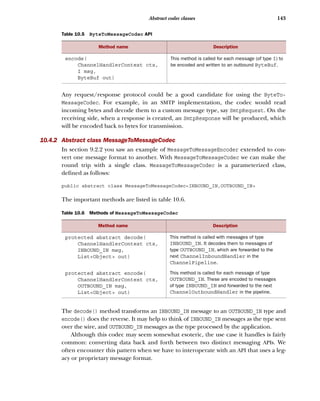
Any request/response protocol could be a good candidate for using the ByteTo-
MessageCodec. For example, in an SMTP implementation, the codec would read
incoming bytes and decode them to a custom message type, say SmtpRequest. On the
receiving side, when a response is created, an SmtpResponse will be produced, which
will be encoded back to bytes for transmission.
10.4.2 Abstract class MessageToMessageCodec
In section 9.2.2 you saw an example of MessageToMessageEncoder extended to con-
vert one message format to another. With MessageToMessageCodec we can make the
round trip with a single class. MessageToMessageCodec is a parameterized class,
defined as follows:
public abstract class MessageToMessageCodec<INBOUND_IN,OUTBOUND_IN>
The important methods are listed in table 10.6.
The decode() method transforms an INBOUND_IN message to an OUTBOUND_IN type and
encode() does the reverse. It may help to think of INBOUND_IN messages as the type sent
over the wire, and OUTBOUND_IN messages as the type processed by the application.
Although this codec may seem somewhat esoteric, the use case it handles is fairly
common: converting data back and forth between two distinct messaging APIs. We
often encounter this pattern when we have to interoperate with an API that uses a leg-
acy or proprietary message format.
encode(
ChannelHandlerContext ctx,
I msg,
ByteBuf out)
This method is called for each message (of type I) to
be encoded and written to an outbound ByteBuf.
Table 10.6 Methods of MessageToMessageCodec
Method name Description
protected abstract decode(
ChannelHandlerContext ctx,
INBOUND_IN msg,
List<Object> out)
This method is called with messages of type
INBOUND_IN. It decodes them to messages of
type OUTBOUND_IN, which are forwarded to the
next ChannelInboundHandler in the
ChannelPipeline.
protected abstract encode(
ChannelHandlerContext ctx,
OUTBOUND_IN msg,
List<Object> out)
This method is called for each message of type
OUTBOUND_IN. These are encoded to messages
of type INBOUND_IN and forwarded to the next
ChannelOutboundHandler in the pipeline.
Table 10.5 ByteToMessageCodec API
Method name Description
144 CHAPTER 10 The codec framework
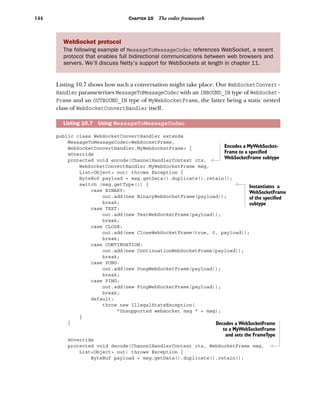
Listing 10.7 shows how such a conversation might take place. Our WebSocketConvert-
Handler parameterizes MessageToMessageCodec with an INBOUND_IN type of WebSocket-
Frame and an OUTBOUND_IN type of MyWebSocketFrame, the latter being a static nested
class of WebSocketConvertHandler itself.
public class WebSocketConvertHandler extends
MessageToMessageCodec<WebSocketFrame,
WebSocketConvertHandler.MyWebSocketFrame> {
@Override
protected void encode(ChannelHandlerContext ctx,
WebSocketConvertHandler.MyWebSocketFrame msg,
List<Object> out) throws Exception {
ByteBuf payload = msg.getData().duplicate().retain();
switch (msg.getType()) {
case BINARY:
out.add(new BinaryWebSocketFrame(payload));
break;
case TEXT:
out.add(new TextWebSocketFrame(payload));
break;
case CLOSE:
out.add(new CloseWebSocketFrame(true, 0, payload));
break;
case CONTINUATION:
out.add(new ContinuationWebSocketFrame(payload));
break;
case PONG:
out.add(new PongWebSocketFrame(payload));
break;
case PING:
out.add(new PingWebSocketFrame(payload));
break;
default:
throw new IllegalStateException(
"Unsupported websocket msg " + msg);
}
}
@Override
protected void decode(ChannelHandlerContext ctx, WebSocketFrame msg,
List<Object> out) throws Exception {
ByteBuf payload = msg.getData().duplicate().retain();
WebSocket protocol
The following example of MessageToMessageCodec references WebSocket, a recent
protocol that enables full bidirectional communications between web browsers and
servers. We’ll discuss Netty’s support for WebSockets at length in chapter 11.
Listing 10.7 Using MessageToMessageCodec
Encodes a MyWebSocket-
Frame to a specified
WebSocketFrame subtype
Instantiates a
WebSocketFrame
of the specified
subtype
Decodes a WebSocketFrame
to a MyWebSocketFrame
and sets the FrameType
145Abstract codec classes
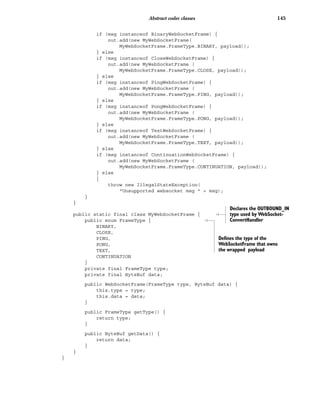
if (msg instanceof BinaryWebSocketFrame) {
out.add(new MyWebSocketFrame(
MyWebSocketFrame.FrameType.BINARY, payload));
} else
if (msg instanceof CloseWebSocketFrame) {
out.add(new MyWebSocketFrame (
MyWebSocketFrame.FrameType.CLOSE, payload));
} else
if (msg instanceof PingWebSocketFrame) {
out.add(new MyWebSocketFrame (
MyWebSocketFrame.FrameType.PING, payload));
} else
if (msg instanceof PongWebSocketFrame) {
out.add(new MyWebSocketFrame (
MyWebSocketFrame.FrameType.PONG, payload));
} else
if (msg instanceof TextWebSocketFrame) {
out.add(new MyWebSocketFrame (
MyWebSocketFrame.FrameType.TEXT, payload));
} else
if (msg instanceof ContinuationWebSocketFrame) {
out.add(new MyWebSocketFrame (
MyWebSocketFrame.FrameType.CONTINUATION, payload));
} else
{
throw new IllegalStateException(
"Unsupported websocket msg " + msg);
}
}
public static final class MyWebSocketFrame {
public enum FrameType {
BINARY,
CLOSE,
PING,
PONG,
TEXT,
CONTINUATION
}
private final FrameType type;
private final ByteBuf data;
public WebSocketFrame(FrameType type, ByteBuf data) {
this.type = type;
this.data = data;
}
public FrameType getType() {
return type;
}
public ByteBuf getData() {
return data;
}
}
}
Declares the OUTBOUND_IN
type used by WebSocket-
ConvertHandler
Defines the type of the
WebSocketFrame that owns
the wrapped payload
146 CHAPTER 10 The codec framework
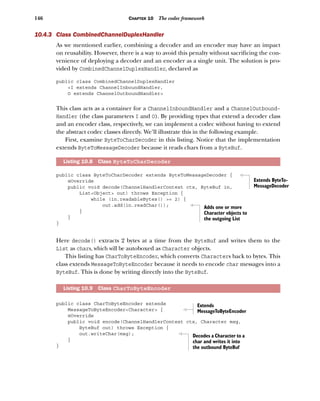
10.4.3 Class CombinedChannelDuplexHandler
As we mentioned earlier, combining a decoder and an encoder may have an impact
on reusability. However, there is a way to avoid this penalty without sacrificing the con-
venience of deploying a decoder and an encoder as a single unit. The solution is pro-
vided by CombinedChannelDuplexHandler, declared as
public class CombinedChannelDuplexHandler
<I extends ChannelInboundHandler,
O extends ChannelOutboundHandler>
This class acts as a container for a ChannelInboundHandler and a ChannelOutbound-
Handler (the class parameters I and O). By providing types that extend a decoder class
and an encoder class, respectively, we can implement a codec without having to extend
the abstract codec classes directly. We’ll illustrate this in the following example.
First, examine ByteToCharDecoder in this listing. Notice that the implementation
extends ByteToMessageDecoder because it reads chars from a ByteBuf.
public class ByteToCharDecoder extends ByteToMessageDecoder {
@Override
public void decode(ChannelHandlerContext ctx, ByteBuf in,
List<Object> out) throws Exception {
while (in.readableBytes() >= 2) {
out.add(in.readChar());
}
}
}
Here decode() extracts 2 bytes at a time from the ByteBuf and writes them to the
List as chars, which will be autoboxed as Character objects.
This listing has CharToByteEncoder, which converts Characters back to bytes. This
class extends MessageToByteEncoder because it needs to encode char messages into a
ByteBuf. This is done by writing directly into the ByteBuf.
public class CharToByteEncoder extends
MessageToByteEncoder<Character> {
@Override
public void encode(ChannelHandlerContext ctx, Character msg,
ByteBuf out) throws Exception {
out.writeChar(msg);
}
}
Listing 10.8 Class ByteToCharDecoder
Listing 10.9 Class CharToByteEncoder
Extends ByteTo-
MessageDecoder
Adds one or more
Character objects to
the outgoing List
Extends
MessageToByteEncoder
Decodes a Character to a
char and writes it into
the outbound ByteBuf
147Summary
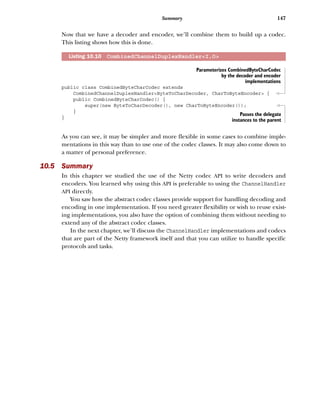
Now that we have a decoder and encoder, we’ll combine them to build up a codec.
This listing shows how this is done.
public class CombinedByteCharCodec extends
CombinedChannelDuplexHandler<ByteToCharDecoder, CharToByteEncoder> {
public CombinedByteCharCodec() {
super(new ByteToCharDecoder(), new CharToByteEncoder());
}
}
As you can see, it may be simpler and more flexible in some cases to combine imple-
mentations in this way than to use one of the codec classes. It may also come down to
a matter of personal preference.
10.5 Summary
In this chapter we studied the use of the Netty codec API to write decoders and
encoders. You learned why using this API is preferable to using the ChannelHandler
API directly.
You saw how the abstract codec classes provide support for handling decoding and
encoding in one implementation. If you need greater flexibility or wish to reuse exist-
ing implementations, you also have the option of combining them without needing to
extend any of the abstract codec classes.
In the next chapter, we’ll discuss the ChannelHandler implementations and codecs
that are part of the Netty framework itself and that you can utilize to handle specific
protocols and tasks.
Listing 10.10 CombinedChannelDuplexHandler<I,O>
Parameterizes CombinedByteCharCodec
by the decoder and encoder
implementations
Passes the delegate
instances to the parent
Maurer ● Wolfthal
N
etty is a Java-based networking framework that manages
complex networking, multithreading, and concurrency
for your applications. And Netty hides the boilerplate
and low-level code, keeping your business logic separate and
easier to reuse. With Netty, you get an easy-to-use API, leaving
you free to focus on what’s unique to your application.
Netty in Action introduces the Netty framework and shows you
how to incorporate it into your Java network applications. You
will discover how to write highly scalable applications without
getting into low-level APIs. The book teaches you to think in
an asynchronous way as you work through its many hands-on
examples and helps you master the best practices of building
large-scale network apps.
What’s Inside
● Netty from the ground up
● Asynchronous, event-driven programming
● Implementing services using different protocols
● Covers Netty 4.x
This book assumes readers are comfortable with Java and basic
network architecture.
Norman Maurer is a senior software engineer at Apple and a
core developer of Netty. Marvin Wolfthal is a Dell Services
consultant who has implemented mission-critical enterprise
systems using Netty.
To download their free eBook in PDF, ePub, and Kindle formats, owners
of this book should visit manning.com/books/netty-in-action
$54.99 / Can $63.99 [INCLUDING eBOOK]
Netty INACTION
JAVA
M A N N I N G
“The first-ever book on
Netty ... shows how to
build a high-performance,
low-latency network
application.
”—From the Foreword by
Trustin Lee, Founder of Netty
“High-performance Java
network stacks—covered from
concepts to best practices.
”—Christian Bach
Grid Trading Platform
“The most comprehensive
content for getting
the most out of Netty.
”—Jürgen Hoffmann, Red Hat
“An excellent overview of
the Netty framework. Highly
recommended to anyone
doing performance-sensitive
network I/O work in Java.
”—Yestin Johnson, Impact Radius
SEE INSERT

Sample ch10 corr-maurer_netty_december03

  • 1.
    M A NN I N G Norman Maurer Marvin Allen Wolfthal FOREWORD BY Trustin Lee SA MP L E C HA P T E R
  • 2.
    Netty in Action byNorman Maurer Marvin Allen Wolfthal Chapter 10 Copyright 2016 Manning Publications
  • 3.
    iii brief contents PART 1NETTY CONCEPTS AND ARCHITECTURE...........................1 1 ■ Netty—asynchronous and event-driven 3 2 ■ Your first Netty application 15 3 ■ Netty components and design 32 4 ■ Transports 41 5 ■ ByteBuf 55 6 ■ ChannelHandler and ChannelPipeline 75 7 ■ EventLoop and threading model 96 8 ■ Bootstrapping 107 9 ■ Unit testing 121 PART 2 CODECS ....................................................................131 10 ■ The codec framework 133 11 ■ Provided ChannelHandlers and codecs 148 PART 3 NETWORK PROTOCOLS..............................................171 12 ■ WebSocket 173 13 ■ Broadcasting events with UDP 187
  • 4.
    BRIEF CONTENTSiv PART 4CASE STUDIES............................................................201 14 ■ Case studies, part 1 203 15 ■ Case studies, part 2 226
  • 5.
    133 The codec framework Justas many standard architectural patterns are supported by dedicated frame- works, common data-processing patterns are often good candidates for targeted implementations, which can save developers considerable time and effort. This certainly applies to the subject of this chapter: encoding and decoding, or the conversion of data from one protocol-specific format to another. These tasks are handled by components commonly called codecs. Netty provides components that simplify the creation of custom codecs for a broad range of protocols. For example, if you’re building a Netty-based mail server, you’ll find Netty’s codec sup- port invaluable for implementing the POP3, IMAP, and SMTP protocols. 10.1 What is a codec? Every network application has to define how raw bytes transferred between peers are to be parsed and converted to—and from—the target program’s data format. This conversion logic is handled by a codec, which consists of an encoder and a decoder, each of which transforms a stream of bytes from one format to another. What distinguishes them? This chapter covers ■ An overview of decoders, encoders and codecs ■ Netty’s codec classes
  • 6.
    134 CHAPTER 10The codec framework Think of a message as a structured sequence of bytes having meaning for a specific application—its data. An encoder converts that message to a format suitable for trans- mission (most likely a byte stream); the corresponding decoder converts the network stream back to the program’s message format. An encoder, then, operates on outbound data and a decoder handles inbound data. With this background information in mind, let’s examine the classes Netty pro- vides for implementing both kinds of components. 10.2 Decoders In this section we’ll survey Netty’s decoder classes and present concrete examples of when and how you might use them. These classes cover two distinct use cases: ■ Decoding bytes to messages—ByteToMessageDecoder and ReplayingDecoder ■ Decoding one message type to another—MessageToMessageDecoder Because decoders are responsible for transforming inbound data from one format to another, it won’t surprise you to learn that Netty’s decoders implement Channel- InboundHandler. When would you use a decoder? Simple: whenever you need to transform inbound data for the next ChannelInboundHandler in the ChannelPipeline. Furthermore, thanks to the design of ChannelPipeline, you can chain together multiple decoders to implement arbitrarily complex transformation logic, a prime example of how Netty supports code modularity and reuse. 10.2.1 Abstract class ByteToMessageDecoder Decoding from bytes to messages (or to another sequence of bytes) is such a common task that Netty provides an abstract base class for it: ByteToMessageDecoder. Since you can’t know whether the remote peer will send a complete message all at once, this class buffers inbound data until it’s ready for processing. Table 10.1 explains its two most important methods. Table 10.1 ByteToMessageDecoder API Method Description decode( ChannelHandlerContext ctx, ByteBuf in, List<Object> out) This is the only abstract method you have to implement. decode() is called with a ByteBuf containing incoming data and a List to which decoded messages are added. This call is repeated until it is determined that no new items have been added to the List or no more bytes are readable in the ByteBuf. Then, if the List is not empty, its contents are passed to the next handler in the pipeline. decodeLast( ChannelHandlerContext ctx, ByteBuf in, List<Object> out) The default implementation provided by Netty simply calls decode(). This method is called once, when the Channel goes inactive. Override the method to provide special handling.
  • 7.
    135Decoders For an exampleof how to use this class, suppose you receive a byte stream containing simple ints, each to be handled separately. In this case, you’ll read each int from the inbound ByteBuf and pass it to the next ChannelInboundHandler in the pipeline. To decode the byte stream, you’ll extend ByteToMessageDecoder. (Note that the primi- tive int will be autoboxed to an Integer when it is added to the List.) The design is illustrated in figure 10.1. Four bytes at a time are read from the inbound ByteBuf, decoded to an int, and added to a List. When no more items are available to add to the List, its contents will be sent to the next ChannelInboundHandler. This listing shows the code for ToIntegerDecoder. public class ToIntegerDecoder extends ByteToMessageDecoder { @Override public void decode(ChannelHandlerContext ctx, ByteBuf in, List<Object> out) throws Exception { if (in.readableBytes() >= 4) { out.add(in.readInt()); } } } Although ByteToMessageDecoder makes this pattern simple to implement, you might find it a bit annoying to have to verify that the input ByteBuf has enough data for you to call readInt(). In the next section we’ll discuss ReplayingDecoder, a special decoder that eliminates this step, at the cost of a small amount of overhead. Listing 10.1 Class ToIntegerDecoder extends ByteToMessageDecoder ChannelInboundHandler Integer List Integerof decoded sinbound ByteBuf 1 2 3 4 read ChannelPipeline ToIntegerDecoder add decode() Figure 10.1 ToIntegerDecoder Extends ByteTo- MessageDecoder to decode bytes to a specific formatChecks if there are at least 4 bytes readable (length of an int)Reads an int from the inbound ByteBuf and adds it to the List of decoded messages
  • 8.
    136 CHAPTER 10The codec framework 10.2.2 Abstract class ReplayingDecoder ReplayingDecoder extends ByteToMessageDecoder and frees us from having to call readableBytes() (as in listing 10.1). It accomplishes this by wrapping the incoming ByteBuf with a custom ByteBuf implementation, ReplayingDecoderBuffer, that exe- cutes the call internally. The full declaration of this class is public abstract class ReplayingDecoder<S> extends ByteToMessageDecoder The parameter S specifies the type to be used for state management, where Void indi- cates that none is to be performed. The following listing shows a reimplementation of ToIntegerDecoder based on ReplayingDecoder. public class ToIntegerDecoder2 extends ReplayingDecoder<Void> { @Override public void decode(ChannelHandlerContext ctx, ByteBuf in, List<Object> out) throws Exception { out.add(in.readInt()); } } As before, ints extracted from the ByteBuf are added to the List. If insufficient bytes are available, this implementation of readInt() throws an Error that will be caught and handled in the base class. The decode() method will be called again when more data is ready for reading. (See the description of decode() in table 10.1.) Please take note of these aspects of ReplayingDecoderBuffer: ■ Not all ByteBuf operations are supported. If an unsupported method is called, an UnsupportedOperationException will be thrown. ■ ReplayingDecoder is slightly slower than ByteToMessageDecoder. If you compare listings 10.1 and 10.2, it’s apparent that the latter is simpler. The exam- ple itself is very basic, so keep in mind that in a real-life, more complex situation the difference between using one or the other base classes might be significant. Here’s a Reference counting in codecs As we mentioned in chapters 5 and 6, reference counting requires special attention. In the case of encoders and decoders, the procedure is quite simple: once a mes- sage has been encoded or decoded, it will automatically be released by a call to ReferenceCountUtil.release(message). If you need to keep a reference for later use you can call ReferenceCountUtil.retain(message). This increments the ref- erence count, preventing the message from being released. Listing 10.2 Class ToIntegerDecoder2 extends ReplayingDecoder Extends Replaying- Decoder<Void> to decode bytes to messagesThe incoming ByteBuf is a Replaying- DecoderBuffer. Reads an int from the inbound ByteBuf and adds it to the List of decoded messages
  • 9.
    137Decoders simple guideline: useByteToMessageDecoder if it doesn’t introduce excessive com- plexity; otherwise, use ReplayingDecoder. 10.2.3 Abstract class MessageToMessageDecoder In this section we’ll explain how to convert between message formats (for example, from one type of POJO to another) using the abstract base class public abstract class MessageToMessageDecoder<I> extends ChannelInboundHandlerAdapter The parameter I specifies the type of the input msg argument to decode(), which is the only method you have to implement. Table 10.2 shows the details of this method. In this example, we’ll write an IntegerToStringDecoder decoder that extends Message- ToMessageDecoder<Integer>. Its decode() method will convert the Integer argument to its String representation and will have the following signature: public void decode( ChannelHandlerContext ctx, Integer msg, List<Object> out ) throws Exception As before, the decoded String will be added to the outgoing List and forwarded to the next ChannelInboundHandler. The design is illustrated in figure 10.2. More decoders The following classes handle more complex use cases: ■ io.netty.handler.codec.LineBasedFrameDecoder—This class, used inter- nally by Netty, uses end-of-line control characters (n or rn) to parse the mes- sage data. ■ io.netty.handler.codec.http.HttpObjectDecoder—A decoder for HTTP data. You’ll find additional encoder and decoder implementations for special use cases in the subpackages of io.netty.handler.codec. Please consult the Netty Javadoc for more information. Table 10.2 MessageToMessageDecoder API Method Description decode( ChannelHandlerContext ctx, I msg, List<Object> out) Called for each inbound message to be decoded to another format. The decoded messages are then passed to the next ChannelInboundHandler in the pipeline.
  • 10.
    138 CHAPTER 10The codec framework The following listing is the implementation of IntegerToStringDecoder. public class IntegerToStringDecoder extends MessageToMessageDecoder<Integer> { @Override public void decode(ChannelHandlerContext ctx, Integer msg List<Object> out) throws Exception { out.add(String.valueOf(msg)); } } 10.2.4 Class TooLongFrameException As Netty is an asynchronous framework, you’ll need to buffer bytes in memory until you’re able to decode them. Consequently, you mustn’t allow your decoder to buffer enough data to exhaust available memory. To address this common concern, Netty provides a TooLongFrameException, which is intended to be thrown by decoders if a frame exceeds a specified size limit. To avoid this you can set a threshold of a maximum number of bytes which, if exceeded, will cause a TooLongFrameException to be thrown (and caught by Channel- Handler.exceptionCaught()). It will then be up to the user of the decoder to decide how to handle the exception. Some protocols, such as HTTP, may allow you to return a special response. In other cases, the only option may be to close the connection. Listing 10.3 Class IntegerToStringDecoder HttpObjectAggregator For a more complex example, please examine the class io.netty.handler.codec .http.HttpObjectAggregator, which extends MessageToMessageDecoder<Http- Object>. ChannelInboundHandler StringInteger List Stringsof decodedinbound Integer read ChannelPipeline IntegerToStringDecoder add decode() Figure 10.2 IntegerToStringDecoder Extends MessageToMessage- Decoder<Integer> Converts the Integer message to its String representation and adds it to the output List
  • 11.
    139Encoders Listing 10.4 showshow a ByteToMessageDecoder can make use of TooLongFrame- Exception to notify other ChannelHandlers in the ChannelPipeline about the occur- rence of a frame-size overrun. Note that this kind of protection is especially important if you are working with a protocol that has a variable frame size. public class SafeByteToMessageDecoder extends ByteToMessageDecoder { private static final int MAX_FRAME_SIZE = 1024; @Override public void decode(ChannelHandlerContext ctx, ByteBuf in, List<Object> out) throws Exception { int readable = in.readableBytes(); if (readable > MAX_FRAME_SIZE) { in.skipBytes(readable); throw new TooLongFrameException("Frame too big!"); } // do something ... } } So far we’ve examined common use cases for decoders and the abstract base classes Netty provides for building them. But decoders are only one side of the coin. On the other side are encoders, which transform messages to a format suitable for outgoing transmission. These encoders complete the codec API and they’ll be our next topic. 10.3 Encoders Reviewing our earlier definition, an encoder implements ChannelOutboundHandler and transforms outbound data from one format to another, the reverse of the decoder functions we’ve just studied. Netty provides a set of classes to help you to write encod- ers with the following capabilities: ■ Encoding from messages to bytes ■ Encoding from messages to messages We’ll start our examination of these classes with the abstract base class MessageTo- ByteEncoder. 10.3.1 Abstract class MessageToByteEncoder Earlier we looked at how to convert bytes to messages using ByteToMessageDecoder. We’ll do the reverse now with MessageToByteEncoder. Table 10.3 shows the API. Listing 10.4 TooLongFrameException Extends ByteToMessageDecoder to decode bytes to messages Checks if the buffer has more than MAX_FRAME_SIZE bytes Skips all readable bytes, throws TooLongFrameException and notifies ChannelHandlers
  • 12.
    140 CHAPTER 10The codec framework You may have noticed that this class has only one method, while decoders have two. The reason is that decoders often need to produce a last message after the Channel has closed (hence the decodeLast() method). This is clearly not the case for an encoder— there is no sense in producing a message after the connection has been closed. Figure 10.3 shows a ShortToByteEncoder that receives a Short instance as a mes- sage, encodes it to a Short primitive, and writes it to a ByteBuf, which is then for- warded to the next ChannelOutboundHandler in the pipeline. Every outgoing Short will take up two bytes in the ByteBuf. The implementation of ShortToByteEncoder is shown in the following listing. public class ShortToByteEncoder extends MessageToByteEncoder<Short> { @Override public void encode(ChannelHandlerContext ctx, Short msg, ByteBuf out) throws Exception { out.writeShort(msg); } } Table 10.3 MessageToByteEncoder API Method Description encode( ChannelHandlerContext ctx, I msg, ByteBuf out) The encode method is the only abstract method you need to implement. It’s called with the outbound message (of type I) that this class will encode to a ByteBuf. The ByteBuf is then forwarded to the next ChannelOutboundHandler in the pipeline. Listing 10.5 Class ShortToByteEncoder ChannelOutboundHandler Short outbound Short outbound ByteBuf 1 2 ChannelPipeline ShortToByteEncoder write encode() Figure 10.3 ShortToByteEncoder Extends MessageToByteEncoder Writes Short into ByteBuf
  • 13.
    141Encoders Netty provides severalspecializations of MessageToByteEncoder upon which you can base your own implementations. The class WebSocket08FrameEncoder provides a good practical example. You’ll find it in the package io.netty.handler.codec.http .websocketx. 10.3.2 Abstract class MessageToMessageEncoder You’ve already seen how to decode inbound data from one message format to another. To complete the picture, we’ll show how to encode from one message to another for outbound data. The encode() method of MessageToMessageEncoder provides this capability, as described in table 10.4. To demonstrate, listing 10.6 extends MessageToMessageEncoder with an IntegerTo- StringEncoder. The design is shown in figure 10.4. As shown in the next listing, the encoder adds a String representation of each out- bound Integer to the List. Table 10.4 MessageToMessageEncoder API Name Description encode( ChannelHandlerContext ctx, I msg, List<Object> out) This is the only method you need to implement. Each message written with write() is passed to encode() to be encoded to one or more out- bound messages. These are then forwarded to the next ChannelOutboundHandler in the pipeline. ChannelInboundHandler StringInteger List Stringsof decodedoutbound Integer read ChannelPipeline IntegerToStringEncoder add encode() Figure 10.4 IntegerToStringEncoder
  • 14.
    142 CHAPTER 10The codec framework public class IntegerToStringEncoder extends MessageToMessageEncoder<Integer> { @Override public void encode(ChannelHandlerContext ctx, Integer msg List<Object> out) throws Exception { out.add(String.valueOf(msg)); } } For an interesting specialized use of MessageToMessageEncoder, look at the class io.netty.handler.codec.protobuf.ProtobufEncoder, which handles data formats defined by Google’s Protocol Buffers specification. 10.4 Abstract codec classes Although we’ve been discussing decoders and encoders as distinct entities, you’ll sometimes find it useful to manage transformations of both inbound and outbound data and messages in one class. Netty’s abstract codec classes are useful for this pur- pose, as each bundles together a decoder/encoder pair to handle both types of the operations we’ve been studying. As you might suspect, these classes implement both ChannelInboundHandler and ChannelOutboundHandler. Why would we not use these composite classes all the time in preference to separate decoders and encoders? Because keeping the two functions separate wherever possible maximizes code reusability and extensibility, a basic principle of Netty’s design. As we look at the abstract codec classes we’ll compare and contrast them with the corresponding single decoders and encoders. 10.4.1 Abstract class ByteToMessageCodec Let’s examine a case where we need to decode bytes to some kind of message, perhaps a POJO, and then encode it again. ByteToMessageCodec will handle this for us, as it combines a ByteToMessageDecoder and the reverse, a MessageToByteEncoder. The important methods are listed in table 10.5. Listing 10.6 Class IntegerToStringEncoder Table 10.5 ByteToMessageCodec API Method name Description decode( ChannelHandlerContext ctx, ByteBuf in, List<Object>) This method is called as long as bytes are available to be consumed. It converts the inbound ByteBuf to the specified message format and forwards to the next ChannelInboundHandler in the pipeline. decodeLast( ChannelHandlerContext ctx, ByteBuf in, List<Object> out) The default implementation of this method delegates to decode(). It is called only once, when the Channel goes inactive. For special handling it can be overridden. Extends MessageToMessageEncoder Converts the Integer to a String and adds it to the List
  • 15.
    143Abstract codec classes Anyrequest/response protocol could be a good candidate for using the ByteTo- MessageCodec. For example, in an SMTP implementation, the codec would read incoming bytes and decode them to a custom message type, say SmtpRequest. On the receiving side, when a response is created, an SmtpResponse will be produced, which will be encoded back to bytes for transmission. 10.4.2 Abstract class MessageToMessageCodec In section 9.2.2 you saw an example of MessageToMessageEncoder extended to con- vert one message format to another. With MessageToMessageCodec we can make the round trip with a single class. MessageToMessageCodec is a parameterized class, defined as follows: public abstract class MessageToMessageCodec<INBOUND_IN,OUTBOUND_IN> The important methods are listed in table 10.6. The decode() method transforms an INBOUND_IN message to an OUTBOUND_IN type and encode() does the reverse. It may help to think of INBOUND_IN messages as the type sent over the wire, and OUTBOUND_IN messages as the type processed by the application. Although this codec may seem somewhat esoteric, the use case it handles is fairly common: converting data back and forth between two distinct messaging APIs. We often encounter this pattern when we have to interoperate with an API that uses a leg- acy or proprietary message format. encode( ChannelHandlerContext ctx, I msg, ByteBuf out) This method is called for each message (of type I) to be encoded and written to an outbound ByteBuf. Table 10.6 Methods of MessageToMessageCodec Method name Description protected abstract decode( ChannelHandlerContext ctx, INBOUND_IN msg, List<Object> out) This method is called with messages of type INBOUND_IN. It decodes them to messages of type OUTBOUND_IN, which are forwarded to the next ChannelInboundHandler in the ChannelPipeline. protected abstract encode( ChannelHandlerContext ctx, OUTBOUND_IN msg, List<Object> out) This method is called for each message of type OUTBOUND_IN. These are encoded to messages of type INBOUND_IN and forwarded to the next ChannelOutboundHandler in the pipeline. Table 10.5 ByteToMessageCodec API Method name Description
  • 16.
    144 CHAPTER 10The codec framework Listing 10.7 shows how such a conversation might take place. Our WebSocketConvert- Handler parameterizes MessageToMessageCodec with an INBOUND_IN type of WebSocket- Frame and an OUTBOUND_IN type of MyWebSocketFrame, the latter being a static nested class of WebSocketConvertHandler itself. public class WebSocketConvertHandler extends MessageToMessageCodec<WebSocketFrame, WebSocketConvertHandler.MyWebSocketFrame> { @Override protected void encode(ChannelHandlerContext ctx, WebSocketConvertHandler.MyWebSocketFrame msg, List<Object> out) throws Exception { ByteBuf payload = msg.getData().duplicate().retain(); switch (msg.getType()) { case BINARY: out.add(new BinaryWebSocketFrame(payload)); break; case TEXT: out.add(new TextWebSocketFrame(payload)); break; case CLOSE: out.add(new CloseWebSocketFrame(true, 0, payload)); break; case CONTINUATION: out.add(new ContinuationWebSocketFrame(payload)); break; case PONG: out.add(new PongWebSocketFrame(payload)); break; case PING: out.add(new PingWebSocketFrame(payload)); break; default: throw new IllegalStateException( "Unsupported websocket msg " + msg); } } @Override protected void decode(ChannelHandlerContext ctx, WebSocketFrame msg, List<Object> out) throws Exception { ByteBuf payload = msg.getData().duplicate().retain(); WebSocket protocol The following example of MessageToMessageCodec references WebSocket, a recent protocol that enables full bidirectional communications between web browsers and servers. We’ll discuss Netty’s support for WebSockets at length in chapter 11. Listing 10.7 Using MessageToMessageCodec Encodes a MyWebSocket- Frame to a specified WebSocketFrame subtype Instantiates a WebSocketFrame of the specified subtype Decodes a WebSocketFrame to a MyWebSocketFrame and sets the FrameType
  • 17.
    145Abstract codec classes if(msg instanceof BinaryWebSocketFrame) { out.add(new MyWebSocketFrame( MyWebSocketFrame.FrameType.BINARY, payload)); } else if (msg instanceof CloseWebSocketFrame) { out.add(new MyWebSocketFrame ( MyWebSocketFrame.FrameType.CLOSE, payload)); } else if (msg instanceof PingWebSocketFrame) { out.add(new MyWebSocketFrame ( MyWebSocketFrame.FrameType.PING, payload)); } else if (msg instanceof PongWebSocketFrame) { out.add(new MyWebSocketFrame ( MyWebSocketFrame.FrameType.PONG, payload)); } else if (msg instanceof TextWebSocketFrame) { out.add(new MyWebSocketFrame ( MyWebSocketFrame.FrameType.TEXT, payload)); } else if (msg instanceof ContinuationWebSocketFrame) { out.add(new MyWebSocketFrame ( MyWebSocketFrame.FrameType.CONTINUATION, payload)); } else { throw new IllegalStateException( "Unsupported websocket msg " + msg); } } public static final class MyWebSocketFrame { public enum FrameType { BINARY, CLOSE, PING, PONG, TEXT, CONTINUATION } private final FrameType type; private final ByteBuf data; public WebSocketFrame(FrameType type, ByteBuf data) { this.type = type; this.data = data; } public FrameType getType() { return type; } public ByteBuf getData() { return data; } } } Declares the OUTBOUND_IN type used by WebSocket- ConvertHandler Defines the type of the WebSocketFrame that owns the wrapped payload
  • 18.
    146 CHAPTER 10The codec framework 10.4.3 Class CombinedChannelDuplexHandler As we mentioned earlier, combining a decoder and an encoder may have an impact on reusability. However, there is a way to avoid this penalty without sacrificing the con- venience of deploying a decoder and an encoder as a single unit. The solution is pro- vided by CombinedChannelDuplexHandler, declared as public class CombinedChannelDuplexHandler <I extends ChannelInboundHandler, O extends ChannelOutboundHandler> This class acts as a container for a ChannelInboundHandler and a ChannelOutbound- Handler (the class parameters I and O). By providing types that extend a decoder class and an encoder class, respectively, we can implement a codec without having to extend the abstract codec classes directly. We’ll illustrate this in the following example. First, examine ByteToCharDecoder in this listing. Notice that the implementation extends ByteToMessageDecoder because it reads chars from a ByteBuf. public class ByteToCharDecoder extends ByteToMessageDecoder { @Override public void decode(ChannelHandlerContext ctx, ByteBuf in, List<Object> out) throws Exception { while (in.readableBytes() >= 2) { out.add(in.readChar()); } } } Here decode() extracts 2 bytes at a time from the ByteBuf and writes them to the List as chars, which will be autoboxed as Character objects. This listing has CharToByteEncoder, which converts Characters back to bytes. This class extends MessageToByteEncoder because it needs to encode char messages into a ByteBuf. This is done by writing directly into the ByteBuf. public class CharToByteEncoder extends MessageToByteEncoder<Character> { @Override public void encode(ChannelHandlerContext ctx, Character msg, ByteBuf out) throws Exception { out.writeChar(msg); } } Listing 10.8 Class ByteToCharDecoder Listing 10.9 Class CharToByteEncoder Extends ByteTo- MessageDecoder Adds one or more Character objects to the outgoing List Extends MessageToByteEncoder Decodes a Character to a char and writes it into the outbound ByteBuf
  • 19.
    147Summary Now that wehave a decoder and encoder, we’ll combine them to build up a codec. This listing shows how this is done. public class CombinedByteCharCodec extends CombinedChannelDuplexHandler<ByteToCharDecoder, CharToByteEncoder> { public CombinedByteCharCodec() { super(new ByteToCharDecoder(), new CharToByteEncoder()); } } As you can see, it may be simpler and more flexible in some cases to combine imple- mentations in this way than to use one of the codec classes. It may also come down to a matter of personal preference. 10.5 Summary In this chapter we studied the use of the Netty codec API to write decoders and encoders. You learned why using this API is preferable to using the ChannelHandler API directly. You saw how the abstract codec classes provide support for handling decoding and encoding in one implementation. If you need greater flexibility or wish to reuse exist- ing implementations, you also have the option of combining them without needing to extend any of the abstract codec classes. In the next chapter, we’ll discuss the ChannelHandler implementations and codecs that are part of the Netty framework itself and that you can utilize to handle specific protocols and tasks. Listing 10.10 CombinedChannelDuplexHandler<I,O> Parameterizes CombinedByteCharCodec by the decoder and encoder implementations Passes the delegate instances to the parent
  • 20.
    Maurer ● Wolfthal N ettyis a Java-based networking framework that manages complex networking, multithreading, and concurrency for your applications. And Netty hides the boilerplate and low-level code, keeping your business logic separate and easier to reuse. With Netty, you get an easy-to-use API, leaving you free to focus on what’s unique to your application. Netty in Action introduces the Netty framework and shows you how to incorporate it into your Java network applications. You will discover how to write highly scalable applications without getting into low-level APIs. The book teaches you to think in an asynchronous way as you work through its many hands-on examples and helps you master the best practices of building large-scale network apps. What’s Inside ● Netty from the ground up ● Asynchronous, event-driven programming ● Implementing services using different protocols ● Covers Netty 4.x This book assumes readers are comfortable with Java and basic network architecture. Norman Maurer is a senior software engineer at Apple and a core developer of Netty. Marvin Wolfthal is a Dell Services consultant who has implemented mission-critical enterprise systems using Netty. To download their free eBook in PDF, ePub, and Kindle formats, owners of this book should visit manning.com/books/netty-in-action $54.99 / Can $63.99 [INCLUDING eBOOK] Netty INACTION JAVA M A N N I N G “The first-ever book on Netty ... shows how to build a high-performance, low-latency network application. ”—From the Foreword by Trustin Lee, Founder of Netty “High-performance Java network stacks—covered from concepts to best practices. ”—Christian Bach Grid Trading Platform “The most comprehensive content for getting the most out of Netty. ”—Jürgen Hoffmann, Red Hat “An excellent overview of the Netty framework. Highly recommended to anyone doing performance-sensitive network I/O work in Java. ”—Yestin Johnson, Impact Radius SEE INSERT