www.safety-manager.ca
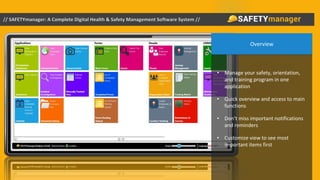
Overview
• Manage your safety, orientation,
and training program in one
application
• Quick overview and access to main
functions
• Don’t miss important notifications
and reminders
• Customize view to see most
important items first
• Create a staff directory
• Have all important employee
information stored in the software
• Personnel and existing safety
documentation can be imported
from other corporate data bases
Staff Directory
Identification Card
• From the personnel files ID cards can be created
• ID cards are tagged with a unique QR code identifier linked
to that employees unique web based information page
• This information may be accessed by any scanning
application on any smart device
• Used to check current certifications and completion of
orientations/training for site admittance verification
• Quick reference for First Responders for information such
as allergies, emergency contact, blood type, primary
physician, and more
• May also be associated with equipment for quick
reference to inspection forms, maintenance manuals,
certifications, and more
A Worker’s View
• Allows for offline access to forms
maintaining the ability to work in
remote locations independent of
connectivity
• Workers are only privy to
pertinent information given
location/division reducing
confusion
• Tiered information/functionality
access according to corporate roll
• Task notifications are
disseminated on a per user basis
Digital Forms
• All company forms are digital – no more paper to scan
or file – all forms are data mined to assist in
determining Key Performance Indicators (KPI)
• Forms completed in the field are uploaded to the
cloud, shared, and contribute to pertinent metrics in
real time
• Permanently associate digital files with forms – digital
photo/video files are embedded in the submitted
form
• Management can view submitted forms online in real
time – corresponding tasks can be assigned and
tracked to completion
• When there is no connectivity, filled forms are stored
and pushed automatically upon connection
Completed Digital Forms
• Completed documentation can be
mined for real time contributors to
KPI
• Administrators can edit/delete
forms
• Supports quick view panel for
displaying selected form
• All SAFETYmanager information is
available on desktop, laptop,
tablets (ruggedized, intrinsically
safe, or otherwise), and mobile
devices
LMS and Orientations
• Built in Learning
Management System (LMS)
• Workers can complete
assigned site orientations or
online courses
• Receive and acknowledge
new or changing policies
• View tasks or assign new
ones
• Assigned tasks can be
reassigned with notification
to all involved
Mobile Application
• Integrated mobile application
• Fill out and submit forms
including associated photo/video
files using the devices camera
• View and assign tasks
• Access all company
documentation including
manuals, policies, procedures,
regional legislation, site
orientations and more
Calendar and Tasks
• Calendar provides a quick overview of completed forms
to be filtered by form type or employee
• Easily view past due tasks, and notifications of upcoming
assignments with a clearly displayed legend. Action
items arising from forms are also tracked and displayed
as pending or overdue, or closed.
• Upload scanned forms into the calendar for easy access
• Assign tasks/forms from the calendar view
• Schedule audit action items and track completion
• Information across all divisions, locations, projects, and
even countries and continents can be mined for
contributors to KPI
Scheduled Items
• Create/View/Edit scheduled items
• Assigned items will trigger email to be
sent out to affected parties. Those
parties may reassign tasks with
notification to all involved
• Settings allow for managers to be
notified when items are overdue
• Automated reminder emails
• Sort and filter to view desired items
Review Forms
• Track filled forms
• Access the forms to view the
information covered
• Access to data is controlled by
user rights and position in
organization chart
• Administrators can edit forms
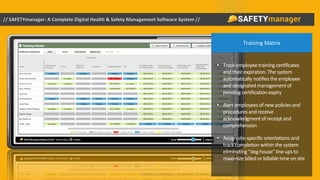
Training Matrix
• Track employee training certificates
and their expiration. The system
automatically notifies the employee
and designated management of
pending certification expiry
• Alert employees of new policies and
procedures and receive
acknowledgment of receipt and
comprehension
• Assign site-specific orientations and
track completion within the system
eliminating “dog house” line ups to
maximize billed or billable time on site
Corporate Organizational Chart
• Create a complete organization chart
for a simple visual reference to your
company’s organizational hierarchy
• Use the organizational chart to assign
notifications for specific events
• Utilize the organization chart to
automate assignments and
notifications by location, division, or
department
• “Click, drag, and drop” to change an
employee’s location, division, or
department – this will automatically
update all needed documentation the
employee can view
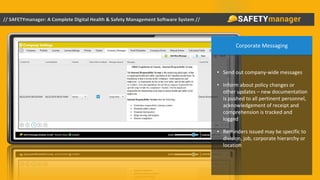
Corporate Messaging
• Send out company-wide messages
• Inform about policy changes or
other updates – new documentation
is pushed to all pertinent personnel,
acknowledgement of receipt and
comprehension is tracked and
logged
• Reminders issued may be specific to
division, job, corporate hierarchy or
location
Corporate Safety File and Policy Storage
• Have easy access to company files and
policies from within the system be it
desktop, laptop, tablet, or mobile device
• View or download the file you need
• Supports drag and drop uploading of
folders
Event Overview
• Easily access events summary
inside the software
• Track activity, changes, and
participation of personnel
• Logging of all events further
mitigates corporate liability in the
event of an incident
System Emails
• The system tracks all email
communication it sends out
• Easily access the summary to
review or resend communication
• Create specific email templates to
reduce administrative time
Important Statistics
• Track and chart the data you need in the
Calculated Fields section
• Fields can be customized to your
company’s requirements
• Tracking of Key Performance Indicators,
calculated automatically, allows the
identification of potential trends prior to
an incident occurrence
Charting Feature
• Chart the necessary data with
multiple variables
• Sort charts by location, division,
and other custom options
• All submitted forms can be mined
for data to be entered into a chart
• Set formulas for calculations
(ex. TRIF)
• Instantly produce graphic
representation of mined data for
presentation purposes
Tracking Personnel
• View real time location of personnel
• A constituent part in meeting lone worker
legislation
• Geo-fencing alerts can be automatically issued for
when personnel cross a boundary surrounding a
site or office
• Man down, speed on site, and other tolerances
can initiate notifications
• Mobile devices, digital radios, satellite tracking,
Microsoft Band, and many other sources may be
integrated
• With the integration of new technologies like the
Microsoft Band, additional vital information may
be tracked on hazardous sites such as heart rate
and blood pressure
Journey Management
• Automate your journey management
legislative compliance
• Access pre trip checklists and
questionnaires from mobile devices or
tablets to assess risk level
• Track progress and assign predetermined
check in points
• Report and disseminate incidents from the
field with one message to alert all
pertinent personnel
• Assign multiple users to the same trip
Asset Management
• Know the location of fixed and mobile assets instantly
• Store and access records pertaining to the asset – serial
number, purchase and warranty information, maintenance
manuals, inspection and maintenance forms
• Schedule in advance maintenance and inspections and
know through automated notifications whether or not the
tasks have been complete
• Access all information and documentation pertaining to an
asset through the simple scan of a QR coded sticker.
• Associate an asset with a job or area – know when it
arrives or if it leaves prescribed boundaries
Asset Records
• Store and access records pertaining to the
asset – serial number, purchase and
warranty information, maintenance
manuals, inspection and maintenance
forms
• Access all information and documentation
pertaining to an asset through the simple
scan of a QR coded sticker.
• Schedule in advance maintenance and
inspections and know through automated
notifications whether or not the tasks have
been complete
• Convenient Maintenance Dashboard
shows quick summary of scheduled
maintenance
Security
• Access and review imagery from remote
locations
• Support multiple IP enabled cameras
• Store individual events triggered by motion
• Compressed video files are automatically
uploaded to geo redundant storage
• Archived video is viewable at any time from any
location by all authorized personnel
• The system can be enabled to trigger alerts to
appropriate personnel when motion is detected
in off hours or secured locations
For additional information, to schedule a presentation,
or simply to contact a representative:
info@safety-manager.ca
403.387.2371
www.safety-manager.ca

SAFETYmanager Presentation 07112016

  • 1.
  • 2.
    Overview • Manage yoursafety, orientation, and training program in one application • Quick overview and access to main functions • Don’t miss important notifications and reminders • Customize view to see most important items first
  • 3.
    • Create astaff directory • Have all important employee information stored in the software • Personnel and existing safety documentation can be imported from other corporate data bases Staff Directory
  • 4.
    Identification Card • Fromthe personnel files ID cards can be created • ID cards are tagged with a unique QR code identifier linked to that employees unique web based information page • This information may be accessed by any scanning application on any smart device • Used to check current certifications and completion of orientations/training for site admittance verification • Quick reference for First Responders for information such as allergies, emergency contact, blood type, primary physician, and more • May also be associated with equipment for quick reference to inspection forms, maintenance manuals, certifications, and more
  • 5.
    A Worker’s View •Allows for offline access to forms maintaining the ability to work in remote locations independent of connectivity • Workers are only privy to pertinent information given location/division reducing confusion • Tiered information/functionality access according to corporate roll • Task notifications are disseminated on a per user basis
  • 6.
    Digital Forms • Allcompany forms are digital – no more paper to scan or file – all forms are data mined to assist in determining Key Performance Indicators (KPI) • Forms completed in the field are uploaded to the cloud, shared, and contribute to pertinent metrics in real time • Permanently associate digital files with forms – digital photo/video files are embedded in the submitted form • Management can view submitted forms online in real time – corresponding tasks can be assigned and tracked to completion • When there is no connectivity, filled forms are stored and pushed automatically upon connection
  • 7.
    Completed Digital Forms •Completed documentation can be mined for real time contributors to KPI • Administrators can edit/delete forms • Supports quick view panel for displaying selected form • All SAFETYmanager information is available on desktop, laptop, tablets (ruggedized, intrinsically safe, or otherwise), and mobile devices
  • 8.
    LMS and Orientations •Built in Learning Management System (LMS) • Workers can complete assigned site orientations or online courses • Receive and acknowledge new or changing policies • View tasks or assign new ones • Assigned tasks can be reassigned with notification to all involved
  • 9.
    Mobile Application • Integratedmobile application • Fill out and submit forms including associated photo/video files using the devices camera • View and assign tasks • Access all company documentation including manuals, policies, procedures, regional legislation, site orientations and more
  • 10.
    Calendar and Tasks •Calendar provides a quick overview of completed forms to be filtered by form type or employee • Easily view past due tasks, and notifications of upcoming assignments with a clearly displayed legend. Action items arising from forms are also tracked and displayed as pending or overdue, or closed. • Upload scanned forms into the calendar for easy access • Assign tasks/forms from the calendar view • Schedule audit action items and track completion • Information across all divisions, locations, projects, and even countries and continents can be mined for contributors to KPI
  • 11.
    Scheduled Items • Create/View/Editscheduled items • Assigned items will trigger email to be sent out to affected parties. Those parties may reassign tasks with notification to all involved • Settings allow for managers to be notified when items are overdue • Automated reminder emails • Sort and filter to view desired items
  • 12.
    Review Forms • Trackfilled forms • Access the forms to view the information covered • Access to data is controlled by user rights and position in organization chart • Administrators can edit forms
  • 13.
    Training Matrix • Trackemployee training certificates and their expiration. The system automatically notifies the employee and designated management of pending certification expiry • Alert employees of new policies and procedures and receive acknowledgment of receipt and comprehension • Assign site-specific orientations and track completion within the system eliminating “dog house” line ups to maximize billed or billable time on site
  • 14.
    Corporate Organizational Chart •Create a complete organization chart for a simple visual reference to your company’s organizational hierarchy • Use the organizational chart to assign notifications for specific events • Utilize the organization chart to automate assignments and notifications by location, division, or department • “Click, drag, and drop” to change an employee’s location, division, or department – this will automatically update all needed documentation the employee can view
  • 15.
    Corporate Messaging • Sendout company-wide messages • Inform about policy changes or other updates – new documentation is pushed to all pertinent personnel, acknowledgement of receipt and comprehension is tracked and logged • Reminders issued may be specific to division, job, corporate hierarchy or location
  • 16.
    Corporate Safety Fileand Policy Storage • Have easy access to company files and policies from within the system be it desktop, laptop, tablet, or mobile device • View or download the file you need • Supports drag and drop uploading of folders
  • 17.
    Event Overview • Easilyaccess events summary inside the software • Track activity, changes, and participation of personnel • Logging of all events further mitigates corporate liability in the event of an incident
  • 18.
    System Emails • Thesystem tracks all email communication it sends out • Easily access the summary to review or resend communication • Create specific email templates to reduce administrative time
  • 19.
    Important Statistics • Trackand chart the data you need in the Calculated Fields section • Fields can be customized to your company’s requirements • Tracking of Key Performance Indicators, calculated automatically, allows the identification of potential trends prior to an incident occurrence
  • 20.
    Charting Feature • Chartthe necessary data with multiple variables • Sort charts by location, division, and other custom options • All submitted forms can be mined for data to be entered into a chart • Set formulas for calculations (ex. TRIF) • Instantly produce graphic representation of mined data for presentation purposes
  • 21.
    Tracking Personnel • Viewreal time location of personnel • A constituent part in meeting lone worker legislation • Geo-fencing alerts can be automatically issued for when personnel cross a boundary surrounding a site or office • Man down, speed on site, and other tolerances can initiate notifications • Mobile devices, digital radios, satellite tracking, Microsoft Band, and many other sources may be integrated • With the integration of new technologies like the Microsoft Band, additional vital information may be tracked on hazardous sites such as heart rate and blood pressure
  • 22.
    Journey Management • Automateyour journey management legislative compliance • Access pre trip checklists and questionnaires from mobile devices or tablets to assess risk level • Track progress and assign predetermined check in points • Report and disseminate incidents from the field with one message to alert all pertinent personnel • Assign multiple users to the same trip
  • 23.
    Asset Management • Knowthe location of fixed and mobile assets instantly • Store and access records pertaining to the asset – serial number, purchase and warranty information, maintenance manuals, inspection and maintenance forms • Schedule in advance maintenance and inspections and know through automated notifications whether or not the tasks have been complete • Access all information and documentation pertaining to an asset through the simple scan of a QR coded sticker. • Associate an asset with a job or area – know when it arrives or if it leaves prescribed boundaries
  • 24.
    Asset Records • Storeand access records pertaining to the asset – serial number, purchase and warranty information, maintenance manuals, inspection and maintenance forms • Access all information and documentation pertaining to an asset through the simple scan of a QR coded sticker. • Schedule in advance maintenance and inspections and know through automated notifications whether or not the tasks have been complete • Convenient Maintenance Dashboard shows quick summary of scheduled maintenance
  • 25.
    Security • Access andreview imagery from remote locations • Support multiple IP enabled cameras • Store individual events triggered by motion • Compressed video files are automatically uploaded to geo redundant storage • Archived video is viewable at any time from any location by all authorized personnel • The system can be enabled to trigger alerts to appropriate personnel when motion is detected in off hours or secured locations
  • 26.
    For additional information,to schedule a presentation, or simply to contact a representative: info@safety-manager.ca 403.387.2371 www.safety-manager.ca