CMS
Contractor Management Software (CMS)
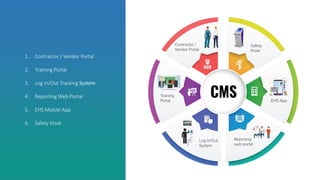
1. Contractor / Vendor Portal
2. Training Portal
3. Log In/Out Tracking System
4. Reporting Web Portal
5. EHS Mobile App
6. Safety Kiosk
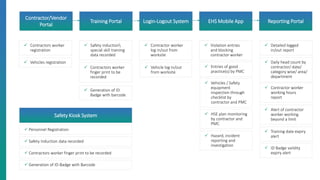
✓ Contractors worker
registration
Contractor/Vendor
Portal
Training Portal Login-Logout System EHS Mobile App Reporting Portal
✓ Safety induction
special skill training
data recorded
✓ Vehicles registration
✓ Vehicles / Safety
equipment
inspection through
checklist by
contractor and PMC
✓ Contractors worker
finger print to be
recorded
✓ Generation of ID
Badge with barcode
✓ Contractor worker
log in/out from
worksite
✓ Vehicle log in/out
from worksite
✓ Violation entries
and blocking
contractor worker
✓ Detailed logged
in/out report
✓ Daily head count by
contractor/ date/
category wise/ area/
department
✓ Contractor worker
working hours
report
✓ Alert of contractor
worker working
beyond a limit
✓ Training date expiry
alert
✓ Entries of good
practice(s) by PMC
✓ HSE plan monitoring
by contractor and
PMC
✓ Hazard, incident
reporting and
investigation
Safety Kiosk System
✓ Personnel Registration
✓ Safety Induction data recorded
✓ Contractors worker finger print to be recorded
✓ Generation of ID-Badge with Barcode
✓ ID Badge validity
expiry alert
CONTRACTORS’ WORKER REGISTRATION:
✓ Maintain of employees records with photographs, fingerprints
✓ Ensure and store Contractors worker medical fitness
✓ Category Manager/Engineer/Supervisor/workmen
✓ Prior Registration to be done for safety induction and ID Badge generation
✓ Type of ID Badge
✓ Permanent / temporary
✓ Supervisor / worker
✓ Visitor
VEHICLE REGISTRATION:
✓ Detailed vehicle checklist
✓ Document scanning for future reference
✓ Keep track of drivers & helpers details for future reference
✓ Vehicle inspection report
✓ Trainer will have detailed list of contractors’
supervisors, workers
✓ Trainer can review all the attached medical
certificates and government IDs.
✓ After completion of the safety induction, ID
Badge can be generated
✓ Critical activity training for the particular
candidates can also be configured
✓ Trainer will print the ID Badges for workers
and vehicles after review the training data
✓ Hassle-free login-logout operation while entering/exit from worksite
✓ Detailed timestamp record maintained for each and every entry / exit from
worksite
✓ Daily head count by:
✓ contractor
✓ date
✓ category wise
✓ area
✓ department
✓ Contractor workers’ working hours report
Different types of alerts like:
✓ working beyond specified working hours
✓ training due date expiry
✓ ID Badge validity expiry
Valid Valid Invalid
✓ Personal data entry
✓ Finger print scanning
✓ Safety Training with Audio & Video
✓ Customized Assessment
✓ Quick Assessment to check preparedness and issue ID Badge for a
specific periods.
✓ Status Pass/Fail
✓ ID Badge Printing
Play Training
Program
Quiz &
Evaluation
Pass
Or
Fail ?
Issue a ID Badge
With Photograph
& Validity Date
Fail
Take the test again
Pass
Watch Induction Movie
Ready for Assessment
Induction Assessment
Question - 1: In case of fire, visitors should not:
Activate the fire alarm Notify the supervisor
Gather at assembly point Create panic & run
Question - 2: Which activity is safe at the plant area ?
Walking and talking with the cellphone at plant area
Walking any where in the road Using electronic gadget any where at the plant premises
Using “Zebra-Crossing” while Crossing the road
Question - 3: Speed limit for office road in TATA premises ?
60 km/h
16 km/h 30 km/h
40 km/h
Submit Assessment
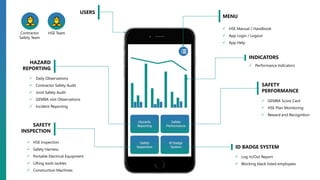
Contractor
Safety Team
HSE Team
USERS
MENU
✓ HSE Manual / Handbook
✓ App Login / Logout
✓ App Help
INDICATORS
✓ Performance Indicators
SAFETY
PERFORMANCE
✓ GEMBA Score Card
✓ HSE Plan Monitoring
✓ Reward and Recognition
ID BADGE SYSTEM
✓ Log In/Out Report
✓ Blocking black listed employees
HAZARD
REPORTING
✓ Daily Observations
✓ Contractor Safety Audit
✓ Joint Safety Audit
✓ GEMBA visit Observations
✓ Incident Reporting
SAFETY
INSPECTION
✓ HSE Inspection
✓ Safety Harness
✓ Portable Electrical Equipment
✓ Lifting tools tackles
✓ Construction Machines
✓ Highly intuitive software application, that helps in storing and tracking employee’s information along with their
photographs (employee ID Badge)
✓ Extract all the information at a single click, useful reports and graphs for analysis
✓ Can be customized as per client requirements / environment, easy integration with other systems / software’s
✓ Facilitates batch processing: employee registration can be done in bulk and employee photo ID Badges can
be printed at one go, whenever needed
✓ Store, search and track employee’s complete information, using different available options
✓ Enables to manage employee’s offence and award information too
✓ Different color code on ID Badge can be applied as per the contractors
✓ Advanced search engine
✓ Integration of barcode / RFID / fingerprint technologies
✓ Contractor/Sub-contractor wise head count and work hour calculation
✓ Employee induction / re-induction / training / medical history
✓ Block black listed employees, get employee details using SMS
✓ Construction and Project Site
✓ Power Plant and Operational Plant
✓ Oil and Gas Refinery and Mining
✓ Medium or large size factories or any organization having more than 100 employees
ADVANTAGES
KEY FEATURES
ADDED ADVANTAGES
AREA OF APPLICATION
https://www.ask-ehs.com/software/contractor-management-software.html
http://www.ask-ehs.com
ASK-EHS Engineering & Consultants Pvt. Ltd.

Cms contractor management system

  • 1.
  • 2.
    1. Contractor /Vendor Portal 2. Training Portal 3. Log In/Out Tracking System 4. Reporting Web Portal 5. EHS Mobile App 6. Safety Kiosk
  • 3.
    ✓ Contractors worker registration Contractor/Vendor Portal TrainingPortal Login-Logout System EHS Mobile App Reporting Portal ✓ Safety induction special skill training data recorded ✓ Vehicles registration ✓ Vehicles / Safety equipment inspection through checklist by contractor and PMC ✓ Contractors worker finger print to be recorded ✓ Generation of ID Badge with barcode ✓ Contractor worker log in/out from worksite ✓ Vehicle log in/out from worksite ✓ Violation entries and blocking contractor worker ✓ Detailed logged in/out report ✓ Daily head count by contractor/ date/ category wise/ area/ department ✓ Contractor worker working hours report ✓ Alert of contractor worker working beyond a limit ✓ Training date expiry alert ✓ Entries of good practice(s) by PMC ✓ HSE plan monitoring by contractor and PMC ✓ Hazard, incident reporting and investigation Safety Kiosk System ✓ Personnel Registration ✓ Safety Induction data recorded ✓ Contractors worker finger print to be recorded ✓ Generation of ID-Badge with Barcode ✓ ID Badge validity expiry alert
  • 4.
    CONTRACTORS’ WORKER REGISTRATION: ✓Maintain of employees records with photographs, fingerprints ✓ Ensure and store Contractors worker medical fitness ✓ Category Manager/Engineer/Supervisor/workmen ✓ Prior Registration to be done for safety induction and ID Badge generation ✓ Type of ID Badge ✓ Permanent / temporary ✓ Supervisor / worker ✓ Visitor VEHICLE REGISTRATION: ✓ Detailed vehicle checklist ✓ Document scanning for future reference ✓ Keep track of drivers & helpers details for future reference ✓ Vehicle inspection report
  • 5.
    ✓ Trainer willhave detailed list of contractors’ supervisors, workers ✓ Trainer can review all the attached medical certificates and government IDs. ✓ After completion of the safety induction, ID Badge can be generated ✓ Critical activity training for the particular candidates can also be configured ✓ Trainer will print the ID Badges for workers and vehicles after review the training data
  • 6.
    ✓ Hassle-free login-logoutoperation while entering/exit from worksite ✓ Detailed timestamp record maintained for each and every entry / exit from worksite ✓ Daily head count by: ✓ contractor ✓ date ✓ category wise ✓ area ✓ department ✓ Contractor workers’ working hours report Different types of alerts like: ✓ working beyond specified working hours ✓ training due date expiry ✓ ID Badge validity expiry Valid Valid Invalid
  • 7.
    ✓ Personal dataentry ✓ Finger print scanning ✓ Safety Training with Audio & Video ✓ Customized Assessment ✓ Quick Assessment to check preparedness and issue ID Badge for a specific periods. ✓ Status Pass/Fail ✓ ID Badge Printing Play Training Program Quiz & Evaluation Pass Or Fail ? Issue a ID Badge With Photograph & Validity Date Fail Take the test again Pass Watch Induction Movie Ready for Assessment Induction Assessment Question - 1: In case of fire, visitors should not: Activate the fire alarm Notify the supervisor Gather at assembly point Create panic & run Question - 2: Which activity is safe at the plant area ? Walking and talking with the cellphone at plant area Walking any where in the road Using electronic gadget any where at the plant premises Using “Zebra-Crossing” while Crossing the road Question - 3: Speed limit for office road in TATA premises ? 60 km/h 16 km/h 30 km/h 40 km/h Submit Assessment
  • 8.
    Contractor Safety Team HSE Team USERS MENU ✓HSE Manual / Handbook ✓ App Login / Logout ✓ App Help INDICATORS ✓ Performance Indicators SAFETY PERFORMANCE ✓ GEMBA Score Card ✓ HSE Plan Monitoring ✓ Reward and Recognition ID BADGE SYSTEM ✓ Log In/Out Report ✓ Blocking black listed employees HAZARD REPORTING ✓ Daily Observations ✓ Contractor Safety Audit ✓ Joint Safety Audit ✓ GEMBA visit Observations ✓ Incident Reporting SAFETY INSPECTION ✓ HSE Inspection ✓ Safety Harness ✓ Portable Electrical Equipment ✓ Lifting tools tackles ✓ Construction Machines
  • 9.
    ✓ Highly intuitivesoftware application, that helps in storing and tracking employee’s information along with their photographs (employee ID Badge) ✓ Extract all the information at a single click, useful reports and graphs for analysis ✓ Can be customized as per client requirements / environment, easy integration with other systems / software’s ✓ Facilitates batch processing: employee registration can be done in bulk and employee photo ID Badges can be printed at one go, whenever needed ✓ Store, search and track employee’s complete information, using different available options ✓ Enables to manage employee’s offence and award information too ✓ Different color code on ID Badge can be applied as per the contractors ✓ Advanced search engine ✓ Integration of barcode / RFID / fingerprint technologies ✓ Contractor/Sub-contractor wise head count and work hour calculation ✓ Employee induction / re-induction / training / medical history ✓ Block black listed employees, get employee details using SMS ✓ Construction and Project Site ✓ Power Plant and Operational Plant ✓ Oil and Gas Refinery and Mining ✓ Medium or large size factories or any organization having more than 100 employees ADVANTAGES KEY FEATURES ADDED ADVANTAGES AREA OF APPLICATION
  • 10.