DML	Syntax	&	Invocation
Nakul	Jindal
Spark	Technology	Center,	San	Francisco
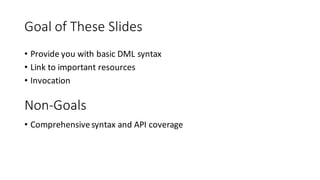
Goal	of	These	Slides
• Provide	you	with	basic	DML	syntax
• Link	to	important	resources
• Invocation	
Non-Goals
• Comprehensive	syntax	and	API	coverage
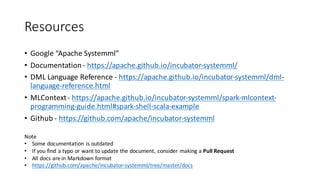
Resources
• Google	“Apache	Systemml”
• Documentation	- https://apache.github.io/incubator-systemml/
• DML	Language	Reference	- https://apache.github.io/incubator-systemml/dml-
language-reference.html
• MLContext- https://apache.github.io/incubator-systemml/spark-mlcontext-
programming-guide.html#spark-shell-scala-example
• Github - https://github.com/apache/incubator-systemml
Note
• Some	documentation	 is	outdated
• If	you	find	a	typo	or	want	to	update	the	document,	consider	making	a	Pull	Request
• All	docs	are	in	Markdown	format
• https://github.com/apache/incubator-systemml/tree/master/docs
About	DML	Briefly	
• DML	=	Declarative	Machine	Learning
• R-like	syntax,	some	subtle	differences	from	R
• Dynamically	typed
• Data	Structures
• Scalars	– Boolean,	Integers,	Strings,	Double	Precision
• Cacheable	– Matrices,	DataFrames
• Data	Structure	Terminology	in	DML
• Value	Type	- Boolean,	Integers,	Strings,	Double	Precision
• Data	Type	– Scalar,	Matrices,	DataFrames*
• You	can	have	a	DataType[ValueType],	not	all	combinations	are	supported
• For	instance	– matrix[double]
• Scoping
• One	global	scope,	except	inside	functions
*	Coming	soon
About	DML	Briefly	
• Control	Flow
• Sequential	imperative	control	flow	(like	most	other	languages)
• Looping	–
• while (<condition>)	{	…	}
• for (var in <for_predicate>)	{	…	}
• parfor (var in <for_predicate>)	{	…	} //	Iterations	in	parallel
• Guards	–
• if (<condition>)	{	...	}	[ else if (<condition>)	{	...	}	...	else {	…	}	]
• Functions
• Built-in	– List	available	in	language	reference
• User	Defined	– (multiple	return	parameters)
• functionName =	function (<formal_parameters>…)	return (<formal_parameters>)	{	...	}
• Can	only	access	variables	defined	in	the	formal_parameters in	the	body	of	the	function	
• External	Function	– same	as	user	defined,	can	call	external	Java	Package
About	DML	Briefly
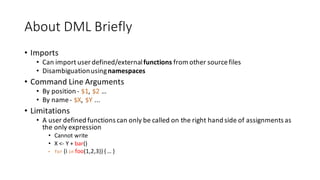
• Imports
• Can	import	user	defined/external	functions from	other	source	files
• Disambiguation	using	namespaces
• Command	Line	Arguments
• By	position	- $1,	$2 …
• By	name	- $X,	$Y ...
• Limitations
• A	user	defined	functions	can	only	be	called	on	the	right	hand	side	of	assignments	as	
the	only	expression
• Cannot	write
• X	<- Y	+	bar()
• for (i in foo(1,2,3))	{	…	}
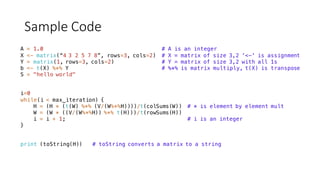
Sample	Code
A = 1.0 # A is an integer
X <- matrix(“4 3 2 5 7 8”, rows=3, cols=2) # X = matrix of size 3,2 '<-' is assignment
Y = matrix(1, rows=3, cols=2) # Y = matrix of size 3,2 with all 1s
b <- t(X) %*% Y # %*% is matrix multiply, t(X) is transpose
S = "hello world"
i=0
while(i < max_iteration) {
H = (H * (t(W) %*% (V/(W%*%H))))/t(colSums(W)) # * is element by element mult
W = (W * ((V/(W%*%H)) %*% t(H)))/t(rowSums(H))
i = i + 1; # i is an integer
}
print (toString(H)) # toString converts a matrix to a string
Sample	Code
source("nn/layers/affine.dml") as affine # import a file in the “affine“ namespace
[W, b] = affine::init(D, M) # calls the init function, multiple return
parfor (i in 1:nrow(X)) { # i iterates over 1 through num rows in X in parallel
for (j in 1:ncol(X)) { # j iterates over 1 through num cols in X
# Computation ...
}
}
write (M, fileM, format=“text”) # M=matrix, fileM=file, also writes to HDFS
X = read (fileX) # fileX=file, also reads from HDFS
if (ncol (A) > 1) {
# Matrix A is being sliced by a given range of columns
A[,1:(ncol (A) - 1)] = A[,1:(ncol (A) - 1)] - A[,2:ncol (A)];
}
Sample	Code
interpSpline = function(
double x, matrix[double] X, matrix[double] Y, matrix[double] K) return (double q) {
i = as.integer(nrow(X) - sum(ppred(X, x, ">=")) + 1)
# misc computation …
q = as.scalar(qm)
}
eigen = externalFunction(Matrix[Double] A)
return(Matrix[Double] eval, Matrix[Double] evec)
implemented in (classname="org.apache.sysml.udf.lib.EigenWrapper", exectype="mem")
Sample	Code	(From	LinearRegDS.dml*)
A = t(X) %*% X
b = t(X) %*% y
if (intercept_status == 2) {
A = t(diag (scale_X) %*% A + shift_X %*% A [m_ext, ])
A = diag (scale_X) %*% A + shift_X %*% A [m_ext, ]
b = diag (scale_X) %*% b + shift_X %*% b [m_ext, ]
}
A = A + diag (lambda)
print ("Calling the Direct Solver...")
beta_unscaled = solve (A, b)
*https://github.com/apache/incubator-systemml/blob/master/scripts/algorithms/LinearRegDS.dml#L133
MLContext API
• You	can	invoke	SystemML from	the	
• Command	line	or	a	
• Spark	Program
• The	MLContext API	lets	you	invoke	it	from	a	Spark	Program
• Command	line	invocation	described	later
• Available	as	a	Scala	API	and	a	Python	API
• These	slides	will	only	talk	about	the	Scala	API
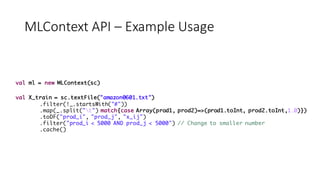
MLContext API	– Example	Usage
val ml = new MLContext(sc)
val X_train = sc.textFile("amazon0601.txt")
.filter(!_.startsWith("#"))
.map(_.split("t") match{case Array(prod1, prod2)=>(prod1.toInt, prod2.toInt,1.0)})
.toDF("prod_i", "prod_j", "x_ij")
.filter("prod_i < 5000 AND prod_j < 5000") // Change to smaller number
.cache()
MLContext API	– Example	Usage
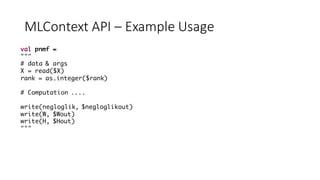
val pnmf =
"""
# data & args
X = read($X)
rank = as.integer($rank)
# Computation ....
write(negloglik, $negloglikout)
write(W, $Wout)
write(H, $Hout)
"""
MLContext API	– Example	Usage
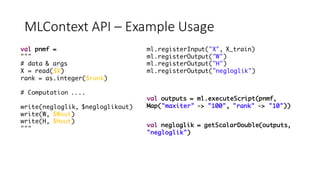
val pnmf =
"""
# data & args
X = read($X)
rank = as.integer($rank)
# Computation ....
write(negloglik, $negloglikout)
write(W, $Wout)
write(H, $Hout)
"""
ml.registerInput("X", X_train)
ml.registerOutput("W")
ml.registerOutput("H")
ml.registerOutput("negloglik")
val outputs = ml.executeScript(pnmf,
Map("maxiter" -> "100", "rank" -> "10"))
val negloglik = getScalarDouble(outputs,
"negloglik")
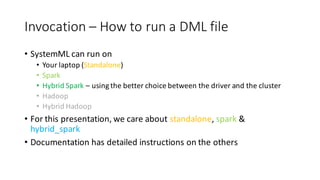
Invocation	– How	to	run	a	DML	file
• SystemML can	run	on
• Your	laptop	(Standalone)
• Spark
• Hybrid	Spark	– using	the	better	choice	between	the	driver	and	the	cluster
• Hadoop
• Hybrid	Hadoop	
• For	this	presentation,	we	care	about	standalone,	spark &	
hybrid_spark
• Documentation	has	detailed	instructions	on	the	others
Invocation	– How	to	run	a	DML	file
Standalone	
In	the	systemml directory
bin/systemml <dml-filename>	[arguments]
Example	invocations:
bin/systemml LinearRegCG.dml –nvargs X=X.mtx Y=Y.mtx B=B.mtx
bin/systemml oddsRatio.dml –args X.mtx 50	B.mtx
Named	arguments
Position	arguments
Invocation	– How	to	run	a	DML	file
Spark/ Hybrid	Spark	
Define	SPARK_HOME	to	point	to	your	Apache	Spark	Installation
Define	SYSTEMML_HOME	to	point	to	your	Apache	SystemML installation
In	the	systemml directory
scripts/sparkDML.sh<dml-filename>	[systemmlarguments]
Example	invocations:
scripts/sparkDML.sh LinearRegCG.dml --nvargs X=X.mtx Y=Y.mtxB=B.mtx
scripts/sparkDML.sh oddsRatio.dml --args X.mtx 50	B.mtx
Named	arguments
Position	arguments
Invocation	– How	to	run	a	DML	file
Spark/ Hybrid	Spark	
Define	SPARK_HOME	to	point	to	your	Apache	Spark	Installation
Define	SYSTEMML_HOME	to	point	to	your	Apache	SystemML installation
Using	the	spark-submit	script
$SPARK_HOME/bin/spark-submit
--master	<master-url>		
--class	org.apache.sysml.api.DMLScript
${SYSTEMML_HOME}/SystemML.jar -f	<dml-filename>	 <systemml arguments>	-exec	{hybrid_spark,spark}
Example	invocation:
$SPARK_HOME/bin/spark-submit	
--master	local[*]	
--class	org.apache.sysml.api.DMLScript
${SYSTEMML_HOME}/SystemML.jar -f	LinearRegCG.dml --nvargs X=X.mtx Y=Y.mtx B=B.mtx
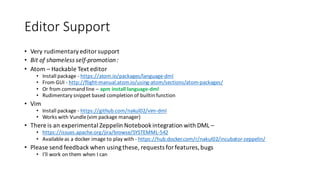
Editor	Support
• Very	rudimentary	editor	support
• Bit	of	shameless	self-promotion	:	
• Atom	– Hackable	Text	editor
• Install	package	- https://atom.io/packages/language-dml
• From	GUI	- http://flight-manual.atom.io/using-atom/sections/atom-packages/
• Or	from	command	line	– apm install	language-dml
• Rudimentary	snippet	based	completion	of	builtin function
• Vim
• Install	package	- https://github.com/nakul02/vim-dml
• Works	with	Vundle(vim	package	manager)
• There	is	an	experimental	Zeppelin	Notebook	integration	with	DML	–
• https://issues.apache.org/jira/browse/SYSTEMML-542
• Available	as	a	docker image	to	play	with	- https://hub.docker.com/r/nakul02/incubator-zeppelin/
• Please	send	feedback	when	using	these,	requests	for	features,	bugs
• I’ll	work	on	them	when	I	can
Other	Information
• All	scripts	are	in	- https://github.com/apache/incubator-
systemml/tree/master/scripts
• Algorithm	Scripts	- https://github.com/apache/incubator-
systemml/tree/master/scripts/algorithms
• Test	Scripts	- https://github.com/apache/incubator-
systemml/tree/master/src/test/scripts
• Look	inside	the	test	folder	for	programs	that	run	the	tests,	play	
around	with	some	of	them	- https://github.com/apache/incubator-
systemml/tree/master/src/test/java/org/apache/sysml/test
Thanks!
• The	documentation	might	be	outdated	and	have	typos
• Please	submit	fixes
• If	a	language	feature	does	not	make	sense	or	is	missing,	ask	a	
SystemML team	member
• Have	Fun!
BACKUP	SLIDES
• There	was	an	attempt	at	an	Eclipse	Plugin	late	last	year	-
• https://www.mail-
archive.com/dev%40systemml.incubator.apache.org/msg00147.html
• The	project	is	largely	dead
Editor	Support

S1 DML Syntax and Invocation

  • 1.
  • 2.
    Goal of These Slides • Provide you with basic DML syntax • Link to important resources •Invocation Non-Goals • Comprehensive syntax and API coverage
  • 3.
    Resources • Google “Apache Systemml” • Documentation -https://apache.github.io/incubator-systemml/ • DML Language Reference - https://apache.github.io/incubator-systemml/dml- language-reference.html • MLContext- https://apache.github.io/incubator-systemml/spark-mlcontext- programming-guide.html#spark-shell-scala-example • Github - https://github.com/apache/incubator-systemml Note • Some documentation is outdated • If you find a typo or want to update the document, consider making a Pull Request • All docs are in Markdown format • https://github.com/apache/incubator-systemml/tree/master/docs
  • 4.
    About DML Briefly • DML = Declarative Machine Learning • R-like syntax, some subtle differences from R •Dynamically typed • Data Structures • Scalars – Boolean, Integers, Strings, Double Precision • Cacheable – Matrices, DataFrames • Data Structure Terminology in DML • Value Type - Boolean, Integers, Strings, Double Precision • Data Type – Scalar, Matrices, DataFrames* • You can have a DataType[ValueType], not all combinations are supported • For instance – matrix[double] • Scoping • One global scope, except inside functions * Coming soon
  • 5.
    About DML Briefly • Control Flow • Sequential imperative control flow (like most other languages) •Looping – • while (<condition>) { … } • for (var in <for_predicate>) { … } • parfor (var in <for_predicate>) { … } // Iterations in parallel • Guards – • if (<condition>) { ... } [ else if (<condition>) { ... } ... else { … } ] • Functions • Built-in – List available in language reference • User Defined – (multiple return parameters) • functionName = function (<formal_parameters>…) return (<formal_parameters>) { ... } • Can only access variables defined in the formal_parameters in the body of the function • External Function – same as user defined, can call external Java Package
  • 6.
    About DML Briefly • Imports • Can import user defined/external functionsfrom other source files • Disambiguation using namespaces • Command Line Arguments • By position - $1, $2 … • By name - $X, $Y ... • Limitations • A user defined functions can only be called on the right hand side of assignments as the only expression • Cannot write • X <- Y + bar() • for (i in foo(1,2,3)) { … }
  • 7.
    Sample Code A = 1.0# A is an integer X <- matrix(“4 3 2 5 7 8”, rows=3, cols=2) # X = matrix of size 3,2 '<-' is assignment Y = matrix(1, rows=3, cols=2) # Y = matrix of size 3,2 with all 1s b <- t(X) %*% Y # %*% is matrix multiply, t(X) is transpose S = "hello world" i=0 while(i < max_iteration) { H = (H * (t(W) %*% (V/(W%*%H))))/t(colSums(W)) # * is element by element mult W = (W * ((V/(W%*%H)) %*% t(H)))/t(rowSums(H)) i = i + 1; # i is an integer } print (toString(H)) # toString converts a matrix to a string
  • 8.
    Sample Code source("nn/layers/affine.dml") as affine# import a file in the “affine“ namespace [W, b] = affine::init(D, M) # calls the init function, multiple return parfor (i in 1:nrow(X)) { # i iterates over 1 through num rows in X in parallel for (j in 1:ncol(X)) { # j iterates over 1 through num cols in X # Computation ... } } write (M, fileM, format=“text”) # M=matrix, fileM=file, also writes to HDFS X = read (fileX) # fileX=file, also reads from HDFS if (ncol (A) > 1) { # Matrix A is being sliced by a given range of columns A[,1:(ncol (A) - 1)] = A[,1:(ncol (A) - 1)] - A[,2:ncol (A)]; }
  • 9.
    Sample Code interpSpline = function( doublex, matrix[double] X, matrix[double] Y, matrix[double] K) return (double q) { i = as.integer(nrow(X) - sum(ppred(X, x, ">=")) + 1) # misc computation … q = as.scalar(qm) } eigen = externalFunction(Matrix[Double] A) return(Matrix[Double] eval, Matrix[Double] evec) implemented in (classname="org.apache.sysml.udf.lib.EigenWrapper", exectype="mem")
  • 10.
    Sample Code (From LinearRegDS.dml*) A = t(X)%*% X b = t(X) %*% y if (intercept_status == 2) { A = t(diag (scale_X) %*% A + shift_X %*% A [m_ext, ]) A = diag (scale_X) %*% A + shift_X %*% A [m_ext, ] b = diag (scale_X) %*% b + shift_X %*% b [m_ext, ] } A = A + diag (lambda) print ("Calling the Direct Solver...") beta_unscaled = solve (A, b) *https://github.com/apache/incubator-systemml/blob/master/scripts/algorithms/LinearRegDS.dml#L133
  • 11.
    MLContext API • You can invoke SystemMLfrom the • Command line or a • Spark Program • The MLContext API lets you invoke it from a Spark Program • Command line invocation described later • Available as a Scala API and a Python API • These slides will only talk about the Scala API
  • 12.
    MLContext API – Example Usage valml = new MLContext(sc) val X_train = sc.textFile("amazon0601.txt") .filter(!_.startsWith("#")) .map(_.split("t") match{case Array(prod1, prod2)=>(prod1.toInt, prod2.toInt,1.0)}) .toDF("prod_i", "prod_j", "x_ij") .filter("prod_i < 5000 AND prod_j < 5000") // Change to smaller number .cache()
  • 13.
    MLContext API – Example Usage valpnmf = """ # data & args X = read($X) rank = as.integer($rank) # Computation .... write(negloglik, $negloglikout) write(W, $Wout) write(H, $Hout) """
  • 14.
    MLContext API – Example Usage valpnmf = """ # data & args X = read($X) rank = as.integer($rank) # Computation .... write(negloglik, $negloglikout) write(W, $Wout) write(H, $Hout) """ ml.registerInput("X", X_train) ml.registerOutput("W") ml.registerOutput("H") ml.registerOutput("negloglik") val outputs = ml.executeScript(pnmf, Map("maxiter" -> "100", "rank" -> "10")) val negloglik = getScalarDouble(outputs, "negloglik")
  • 15.
    Invocation – How to run a DML file • SystemMLcan run on • Your laptop (Standalone) • Spark • Hybrid Spark – using the better choice between the driver and the cluster • Hadoop • Hybrid Hadoop • For this presentation, we care about standalone, spark & hybrid_spark • Documentation has detailed instructions on the others
  • 16.
    Invocation – How to run a DML file Standalone In the systemml directory bin/systemml<dml-filename> [arguments] Example invocations: bin/systemml LinearRegCG.dml –nvargs X=X.mtx Y=Y.mtx B=B.mtx bin/systemml oddsRatio.dml –args X.mtx 50 B.mtx Named arguments Position arguments
  • 17.
    Invocation – How to run a DML file Spark/ Hybrid Spark Define SPARK_HOME to point to your Apache Spark Installation Define SYSTEMML_HOME to point to your Apache SystemMLinstallation In the systemml directory scripts/sparkDML.sh<dml-filename> [systemmlarguments] Example invocations: scripts/sparkDML.sh LinearRegCG.dml --nvargs X=X.mtx Y=Y.mtxB=B.mtx scripts/sparkDML.sh oddsRatio.dml --args X.mtx 50 B.mtx Named arguments Position arguments
  • 18.
    Invocation – How to run a DML file Spark/ Hybrid Spark Define SPARK_HOME to point to your Apache Spark Installation Define SYSTEMML_HOME to point to your Apache SystemMLinstallation Using the spark-submit script $SPARK_HOME/bin/spark-submit --master <master-url> --class org.apache.sysml.api.DMLScript ${SYSTEMML_HOME}/SystemML.jar -f <dml-filename> <systemml arguments> -exec {hybrid_spark,spark} Example invocation: $SPARK_HOME/bin/spark-submit --master local[*] --class org.apache.sysml.api.DMLScript ${SYSTEMML_HOME}/SystemML.jar -f LinearRegCG.dml --nvargs X=X.mtx Y=Y.mtx B=B.mtx
  • 19.
    Editor Support • Very rudimentary editor support • Bit of shameless self-promotion : •Atom – Hackable Text editor • Install package - https://atom.io/packages/language-dml • From GUI - http://flight-manual.atom.io/using-atom/sections/atom-packages/ • Or from command line – apm install language-dml • Rudimentary snippet based completion of builtin function • Vim • Install package - https://github.com/nakul02/vim-dml • Works with Vundle(vim package manager) • There is an experimental Zeppelin Notebook integration with DML – • https://issues.apache.org/jira/browse/SYSTEMML-542 • Available as a docker image to play with - https://hub.docker.com/r/nakul02/incubator-zeppelin/ • Please send feedback when using these, requests for features, bugs • I’ll work on them when I can
  • 20.
    Other Information • All scripts are in - https://github.com/apache/incubator- systemml/tree/master/scripts •Algorithm Scripts - https://github.com/apache/incubator- systemml/tree/master/scripts/algorithms • Test Scripts - https://github.com/apache/incubator- systemml/tree/master/src/test/scripts • Look inside the test folder for programs that run the tests, play around with some of them - https://github.com/apache/incubator- systemml/tree/master/src/test/java/org/apache/sysml/test
  • 21.
    Thanks! • The documentation might be outdated and have typos • Please submit fixes •If a language feature does not make sense or is missing, ask a SystemML team member • Have Fun!
  • 22.
  • 23.