RSS Technology: A Tool to Expedite Up-to-date Information For Library UsersPresented byAnil Kumar MishraLib. Information OfficerE-mail: anilmlis@gmail.comNational Institute of Health and Family WelfareDelhi-1100673/24/20111
IntroductionThe Information and Communication Technology (ICT) revolution and the advent of the Internet has had drastic and far-reaching impacts on the knowledge and information sector and added a new dimension to information retrieval platforms.
ICT has not only brought a change in the library and information services, but also on the roles of librarians and information professionals in the electronic environment, where users are more focus on e-resources as compare to print resources.
Librarians need tools to:	- To find the relevant, pin-pointed and up-to-date information quickly.	- To provide the relevant information quickly.	- To save the time of the user, who regularly use the web.RSS technology is one of the tools that libraries can use to simplify the process of finding and providing information. 3/24/20112
ConceptRSS: RSS is an acronym with several popular meanings: Rich Site Summary, Really Simple Syndication or RDF Site Summary. It is a piece of XML coding that allows users to set a preference, by subscribing, to automatically receive content from a web feed (RSS feed) on a periodic basis, such as hourly, daily, or weekly, as well as allowing users to create web feeds to which others may subscribe. Various version of RSS:	(i) 	RSS 0.90	(ii)	RSS 0.91	(iii) 	RSS 0.92	(iv)	RSS 0.93	(v) 	RSS 0.94	(vi)	RSS 1.0	(vii)	RSS 2.03/24/20113
Contd...RSS Feeds: It is an XML document that contains some kind of content, such as summaries of new stories, current weather data, weblog posts, or images. It can also be used to exchange machine readable data such as numerical data sets. Many sites display a small icon in an orange button with the acronyms RSS, XML, ATOM or RDF (Resource Description Framework) to let you know a feed is available.
RSS Reader: RSS Readers or Feed Readers or Aggregators display a list of subscriptions, with highlighting or another indicator of RSS feeds that have added content since the user last logged in. Without having to go to all of the individual websites, users can quickly and easily access new materials from sites that interest them through RSS readers. There are two types of aggregators:	(i) Desktop Aggregators: AmphetaDesk, FeedReader, FeedDemon, NewsGator,     	RSSOWL, NetNewsWire, Omea Reader, etc.	(ii) Web based Aggregators: Google Reader, My Yahoo, Bloglines, NetVibes, 	Pageflakes, FeedScout, NewsIsFree, etc.3/24/20114
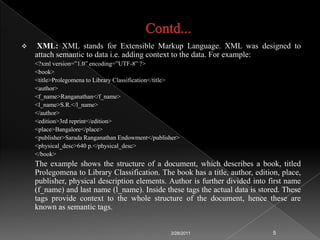
Contd...XML: XML stands for Extensible Markup Language. XML was designed to attach semantic to data i.e. adding context to the data. For example:	<?xml version=”1.0” encoding=”UTF-8” ?>	<book>	<title>Prolegomena to Library Classification</title>	<author>	<f_name>Ranganathan</f_name>	<l_name>S.R.</l_name>	</author> 	<edition>3rd reprint</edition>	<place>Bangalore</place>	<publisher>Sarada Ranganathan Endowment</publisher>	<physical_desc>640 p.</physical_desc>	</book> 	The example shows the structure of a document, which describes a book, titled Prolegomena to Library Classification. The book has a title, author, edition, place, publisher, physical description elements. Author is further divided into first name (f_name) and last name (l_name). Inside these tags the actual data is stored. These tags provide context to the whole structure of the document, hence these are known as semantic tags.3/24/20115
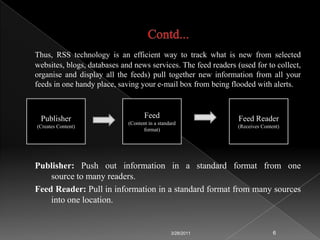
Contd...Thus, RSS technology is an efficient way to track what is new from selected websites, blogs, databases and news services. The feed readers (used for to collect, organise and display all the feeds) pull together new information from all your feeds in one handy place, saving your e-mail box from being flooded with alerts.Publisher: Push out information in a standard format from one           	source to many readers.FeedReader: Pull in information in a standard format from many sources 	into one location.3/24/20116Publisher(Creates Content)Feed(Content in a standard format)Feed Reader(Receives Content)
What does RSS do?Publisher can send to many readers from just one source.3/24/20117Blog NewsPost Title
Contd...	Reader can receive from many sources.3/24/20118Feeds
Old Days (Before RSS Technology)3/24/20119ReaderFeedLess number of Mouse (Feed) to eat (Read)
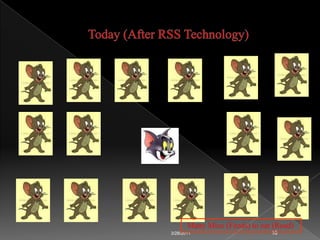
Today (After RSS Technology)3/24/201110    Many Mice (Feeds) to eat (Read)
Components of RSSThe item information includes item title, item description and URL link to item. There are two important tags, i.e. <Channel> and <Items> used to describe a feed and its items.
Channel Tag: Required elements for channel tag are title, link, description and item. Typical optional channel elements are language, rights, publisher, creator, source, type, updatePeriod, updateFrequency, updateBase.
Item Tag: Required elements for item tag are title, link and description. Typical Optional elements for item tags are language, source, rights, date, type and issued. 3/24/201111
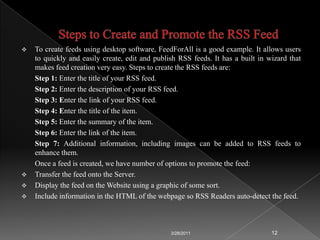
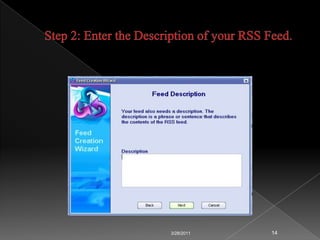
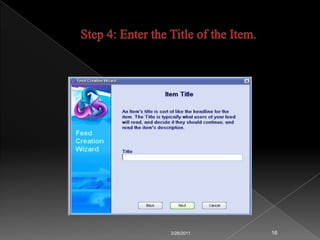
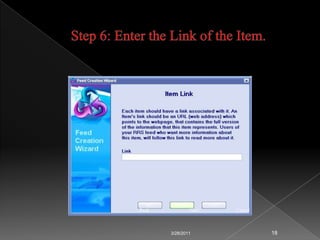
Steps to Create and Promote the RSS FeedTo create feeds using desktop software, FeedForAll is a good example. It allows users to quickly and easily create, edit and publish RSS feeds. It has a built in wizard that makes feed creation very easy. Steps to create the RSS feeds are:	Step 1: Enter the title of your RSS feed.	Step 2: Enter the description of your RSS feed.	Step 3: Enter the link of your RSS feed.	Step 4: Enter the title of the item.	Step 5: Enter the summary of the item.	Step 6: Enter the link of the item.	Step 7: Additional information, including images can be added to RSS feeds to enhance them.Once a feed is created, we have number of options to promote the feed:Transfer the feed onto the Server.
Display the feed on the Website using a graphic of some sort.
Include information in the HTML of the webpage so RSS Readers auto-detect the feed. 3/24/201112
Step 1: Enter the Title of your RSS Feed.3/24/201113
Step 2: Enter the Description of your RSS Feed.3/24/201114
Step 3: Enter the Link of Your RSS Feed.3/24/201115
Step 4: Enter the Title of the Item.3/24/201116
Step 5: Enter the Summary of the Item.3/24/201117
Step 6: Enter the Link of the Item.3/24/201118Back  Next   Cancel
Step 7: Additional Information3/24/201119
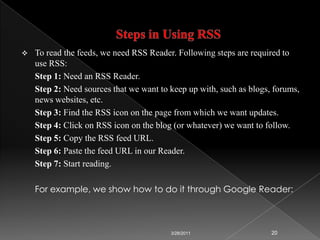
Steps in Using RSSTo read the feeds, we need RSS Reader. Following steps are required to use RSS:Step 1: Need an RSS Reader.Step 2: Need sources that we want to keep up with, such as blogs, forums, news websites, etc.Step 3: Find the RSS icon on the page from which we want updates.Step 4: Click on RSS icon on the blog (or whatever) we want to follow.Step 5: Copy the RSS feed URL.Step 6: Paste the feed URL in our Reader.Step 7: Start reading.	For example, we show how to do it through Google Reader:3/24/201120
Step 1: Open the Google Reader.3/24/201121
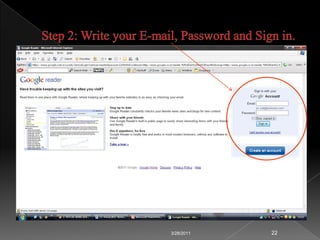
Step 2: Write your E-mail, Password and Sign in.3/24/201122
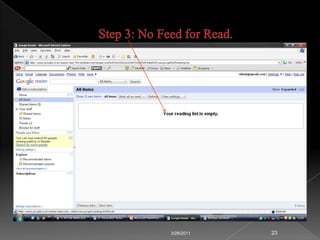
Step 3: No Feed for Read.3/24/201123
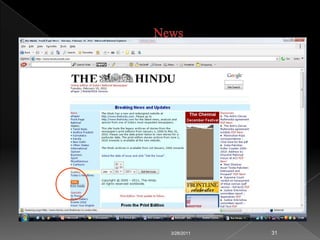
Step 4: Open the Site and Click the RSS Button3/24/201124
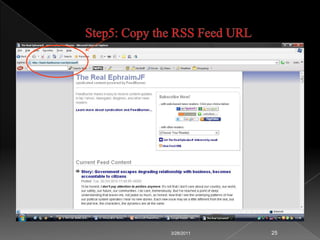
Step5: Copy the RSS Feed URL3/24/201125
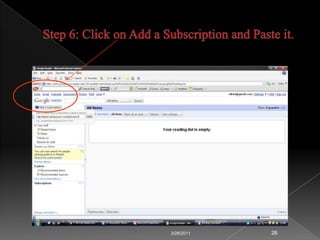
Step 6: Click on Add a Subscription and Paste it.3/24/201126
Step 7: This is the Feed of Recent Post.3/24/201127Title of the FeedManage Subscriptions
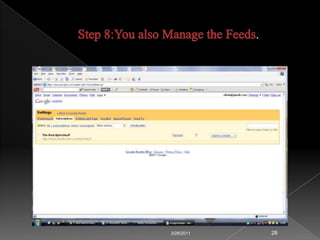
Step 8:You also Manage the Feeds.3/24/201128
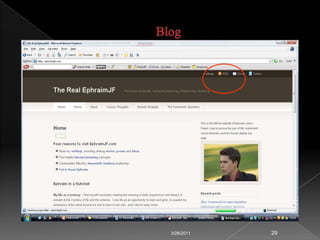
Blog3/24/201129

Rss technology -a_tool_to_expedite_up-to-date_information_for_library_users - anil mishra

  • 1.
    RSS Technology: ATool to Expedite Up-to-date Information For Library UsersPresented byAnil Kumar MishraLib. Information OfficerE-mail: anilmlis@gmail.comNational Institute of Health and Family WelfareDelhi-1100673/24/20111
  • 2.
    IntroductionThe Information andCommunication Technology (ICT) revolution and the advent of the Internet has had drastic and far-reaching impacts on the knowledge and information sector and added a new dimension to information retrieval platforms.
  • 3.
    ICT has notonly brought a change in the library and information services, but also on the roles of librarians and information professionals in the electronic environment, where users are more focus on e-resources as compare to print resources.
  • 4.
    Librarians need toolsto: - To find the relevant, pin-pointed and up-to-date information quickly. - To provide the relevant information quickly. - To save the time of the user, who regularly use the web.RSS technology is one of the tools that libraries can use to simplify the process of finding and providing information. 3/24/20112
  • 5.
    ConceptRSS: RSS isan acronym with several popular meanings: Rich Site Summary, Really Simple Syndication or RDF Site Summary. It is a piece of XML coding that allows users to set a preference, by subscribing, to automatically receive content from a web feed (RSS feed) on a periodic basis, such as hourly, daily, or weekly, as well as allowing users to create web feeds to which others may subscribe. Various version of RSS: (i) RSS 0.90 (ii) RSS 0.91 (iii) RSS 0.92 (iv) RSS 0.93 (v) RSS 0.94 (vi) RSS 1.0 (vii) RSS 2.03/24/20113
  • 6.
    Contd...RSS Feeds: Itis an XML document that contains some kind of content, such as summaries of new stories, current weather data, weblog posts, or images. It can also be used to exchange machine readable data such as numerical data sets. Many sites display a small icon in an orange button with the acronyms RSS, XML, ATOM or RDF (Resource Description Framework) to let you know a feed is available.
  • 7.
    RSS Reader: RSSReaders or Feed Readers or Aggregators display a list of subscriptions, with highlighting or another indicator of RSS feeds that have added content since the user last logged in. Without having to go to all of the individual websites, users can quickly and easily access new materials from sites that interest them through RSS readers. There are two types of aggregators: (i) Desktop Aggregators: AmphetaDesk, FeedReader, FeedDemon, NewsGator, RSSOWL, NetNewsWire, Omea Reader, etc. (ii) Web based Aggregators: Google Reader, My Yahoo, Bloglines, NetVibes, Pageflakes, FeedScout, NewsIsFree, etc.3/24/20114
  • 8.
    Contd...XML: XML standsfor Extensible Markup Language. XML was designed to attach semantic to data i.e. adding context to the data. For example: <?xml version=”1.0” encoding=”UTF-8” ?> <book> <title>Prolegomena to Library Classification</title> <author> <f_name>Ranganathan</f_name> <l_name>S.R.</l_name> </author> <edition>3rd reprint</edition> <place>Bangalore</place> <publisher>Sarada Ranganathan Endowment</publisher> <physical_desc>640 p.</physical_desc> </book>  The example shows the structure of a document, which describes a book, titled Prolegomena to Library Classification. The book has a title, author, edition, place, publisher, physical description elements. Author is further divided into first name (f_name) and last name (l_name). Inside these tags the actual data is stored. These tags provide context to the whole structure of the document, hence these are known as semantic tags.3/24/20115
  • 9.
    Contd...Thus, RSS technologyis an efficient way to track what is new from selected websites, blogs, databases and news services. The feed readers (used for to collect, organise and display all the feeds) pull together new information from all your feeds in one handy place, saving your e-mail box from being flooded with alerts.Publisher: Push out information in a standard format from one source to many readers.FeedReader: Pull in information in a standard format from many sources into one location.3/24/20116Publisher(Creates Content)Feed(Content in a standard format)Feed Reader(Receives Content)
  • 10.
    What does RSSdo?Publisher can send to many readers from just one source.3/24/20117Blog NewsPost Title
  • 11.
    Contd... Reader can receivefrom many sources.3/24/20118Feeds
  • 12.
    Old Days (BeforeRSS Technology)3/24/20119ReaderFeedLess number of Mouse (Feed) to eat (Read)
  • 13.
    Today (After RSSTechnology)3/24/201110 Many Mice (Feeds) to eat (Read)
  • 14.
    Components of RSSTheitem information includes item title, item description and URL link to item. There are two important tags, i.e. <Channel> and <Items> used to describe a feed and its items.
  • 15.
    Channel Tag: Requiredelements for channel tag are title, link, description and item. Typical optional channel elements are language, rights, publisher, creator, source, type, updatePeriod, updateFrequency, updateBase.
  • 16.
    Item Tag: Requiredelements for item tag are title, link and description. Typical Optional elements for item tags are language, source, rights, date, type and issued. 3/24/201111
  • 17.
    Steps to Createand Promote the RSS FeedTo create feeds using desktop software, FeedForAll is a good example. It allows users to quickly and easily create, edit and publish RSS feeds. It has a built in wizard that makes feed creation very easy. Steps to create the RSS feeds are: Step 1: Enter the title of your RSS feed. Step 2: Enter the description of your RSS feed. Step 3: Enter the link of your RSS feed. Step 4: Enter the title of the item. Step 5: Enter the summary of the item. Step 6: Enter the link of the item. Step 7: Additional information, including images can be added to RSS feeds to enhance them.Once a feed is created, we have number of options to promote the feed:Transfer the feed onto the Server.
  • 18.
    Display the feedon the Website using a graphic of some sort.
  • 19.
    Include information inthe HTML of the webpage so RSS Readers auto-detect the feed. 3/24/201112
  • 20.
    Step 1: Enterthe Title of your RSS Feed.3/24/201113
  • 21.
    Step 2: Enterthe Description of your RSS Feed.3/24/201114
  • 22.
    Step 3: Enterthe Link of Your RSS Feed.3/24/201115
  • 23.
    Step 4: Enterthe Title of the Item.3/24/201116
  • 24.
    Step 5: Enterthe Summary of the Item.3/24/201117
  • 25.
    Step 6: Enterthe Link of the Item.3/24/201118Back Next Cancel
  • 26.
    Step 7: AdditionalInformation3/24/201119
  • 27.
    Steps in UsingRSSTo read the feeds, we need RSS Reader. Following steps are required to use RSS:Step 1: Need an RSS Reader.Step 2: Need sources that we want to keep up with, such as blogs, forums, news websites, etc.Step 3: Find the RSS icon on the page from which we want updates.Step 4: Click on RSS icon on the blog (or whatever) we want to follow.Step 5: Copy the RSS feed URL.Step 6: Paste the feed URL in our Reader.Step 7: Start reading. For example, we show how to do it through Google Reader:3/24/201120
  • 28.
    Step 1: Openthe Google Reader.3/24/201121
  • 29.
    Step 2: Writeyour E-mail, Password and Sign in.3/24/201122
  • 30.
    Step 3: NoFeed for Read.3/24/201123
  • 31.
    Step 4: Openthe Site and Click the RSS Button3/24/201124
  • 32.
    Step5: Copy theRSS Feed URL3/24/201125
  • 33.
    Step 6: Clickon Add a Subscription and Paste it.3/24/201126
  • 34.
    Step 7: Thisis the Feed of Recent Post.3/24/201127Title of the FeedManage Subscriptions
  • 35.
    Step 8:You alsoManage the Feeds.3/24/201128
  • 36.
  • 37.
  • 38.
  • 39.
    Application of RSSIn Library ServicesSelective Dissemination of Information (SDI)
  • 40.
  • 41.
  • 42.
  • 43.
    Pros of RSSRSSfeeds are timely because subscribers get updates and breaking news as soon as they are available.
  • 44.
    RSS feeds arecost effective because distribution and delivery costs are very low.
  • 45.
    RSS works wellwithin an e-mail. An e-mail client is not only view the feeds but they can also be received and categorized automatically.
  • 46.
    There is noneed to send one’s e-mail address anywhere to subscribe to an RSS feed, therefore, privacy is assured.
  • 47.
    Spam like publishingis not impossible.
  • 48.
    Annoying feeds canbe cancelled with only a few keystrokes. No ‘unsubscribe’ e-mail needs to be sent.
  • 49.
    RSS feeds helpyou save time by scoping the content that you receive to your specific interests and ensuring that the information is always up-to-date.3/24/201133
  • 50.
    Cons of RSSRSSfeeds provide no history, which means that you always get the newest information; you can easily miss an article of interest to you, if you don’t check the feeds for a few days.
  • 51.
    RSS feeds area bandwidth waster because they automatically download RSS files (usually hourly) to check for updates and changes.
  • 52.
    RSS feeds arecomplicated to set up. As people hear about RSS and understand its value, they also become disappointed by the fact that it is not an easy as surfing the web.
  • 53.
    RSS content doesn’tlend itself to search. Many search engines include RSS feeds but they struggle to identity which information is new and hence, greatly limit the value of search operations on this type of content.
  • 54.
    RSS feeds usuallyonly show an abridged version of the contents, which can be cryptic and may require you to open your web browser to see the full title.3/24/201134
  • 55.
    ConclusionNew technologies arecreating new opportunities for libraries. CD-ROM databases-which not so long ago were the latest thing-have now transitioned into growing online databases. Even as the Internet creates new opportunities for the library, it may also become a rival to library systems.
  • 56.
    Libraries must follownew technologies very closely and the advantages of the newest innovations, such as RSS feeds, must be reflected in library services. If this is not done voluntarily, this integration will be forced overtime.
  • 57.
    Thus, librarians andlibraries should exploit this technology to effectively promote the content they produce and help their users to select appropriate feeds. And also use this technology to keep them up-to-date in this era of information explosion.3/24/201135
  • 58.