The Library: Keeping up to
date with Research
What we will cover:
• What does keeping up to date mean?
• Alerting services:
– Discover and other databases
– Journal alerts (TOCs)
– Citation alerts
– Book alerts
– News alerts
• Networking tools
What does it mean?
• Instead of visiting websites to check for new
content, we can set up tools to periodically harvest
new information for us
• Alerts, news, updates and social networking can be
used to channel that information to one place
This session will help you to decide what tools you
might wish to use
To get started, all you need is an email address –
but you can also use bookmarking tools.
What is an alert?
“A service which a user can subscribe to which
delivers electronic news on a regular basis, or
whenever an event of interest to the user occurs.”
Ince, D. (2013) Alerting service. In: A dictionary of the internet, 3rd ed. [Online].
Oxford: Oxford University Press. Available from: <http://www.oxfordreference.com>
[Accessed 14 November 2017].
Alerting options
• New book: for new books
• Table of contents: for new issues of journals and
magazines
• Search/subject: whenever specified search/subject terms
appear
• Citation: whenever an item is added to a database citing a
specified article or author
• Specialised: New patents, standards, etc.
• Blogs, groups, etc: For new posts
At Leeds Beckett…
• The Library subscribes to information sources which
are not freely available online*
• New resources are added to the collection all the
time: new books, new editions, new journal articles,
news, updated statistics, etc.
• The challenge is to manage this flow of information
* Although you can now set up to access
Library resources on and off campus
Creating search alerts
If you create a profile in a database or search tool, you
can save your searches, enabling you to:
• Access them from any internet-connected device
• Easily re-run searches
• Be alerted by email to any updates matching your
search criteria
How to get started:
1) Choose an information service. For example,
Discover, Science Direct or PubMed
2) Look on the site for “alerts” and use your email
address to sign-up
Creating search alerts: Discover
We will use Discover as an example, but most databases
offer similar features and operate in a similar way:
• Create an EBSCOhost (EBSCO = Discover) account
to:
– save searches and create email alerts
or
– use the RSS option
Create search alerts:
Google Scholar also offers email alerts
• Run a search, then look for the Create alert icon to
send results to your email account.
External options
• You can also set up professional accounts to create
search alerts and aggregate information feeds
• Mainly free, but a growing number offer ‘premium’
options
• Popular examples include:
Tool Commonly used for
Academia.edu Sharing research and following other
academics
Wordpress Blogging and following blogs of
professionals & researchers
Diigo Bookmarking, organising and sharing
useful sites
Netvibes Following news, social media and
relevant sites
Journal Table of Contents (TOCs) alerts
• ZETOC
– British Library’s electronic table of contents
– One of the world’s most comprehensive research databases
– You can set up personalised email Zetoc Alerts or RSS feeds
to track the latest articles or journal titles related to your
interests
• Journal TOCs
– Free service (but registration required)
– Allows you to save your Table of Contents in your MyTOCs
account or export them to your feed reader
Citation alerts
You can also set up an email alert or RSS feed to find
out when someone cites research
• Scopus is our main tool for this at Leeds Beckett
– Use your university log-in to register and set up alerts with
the buttons to the right of an article you have open
Citation alerts in
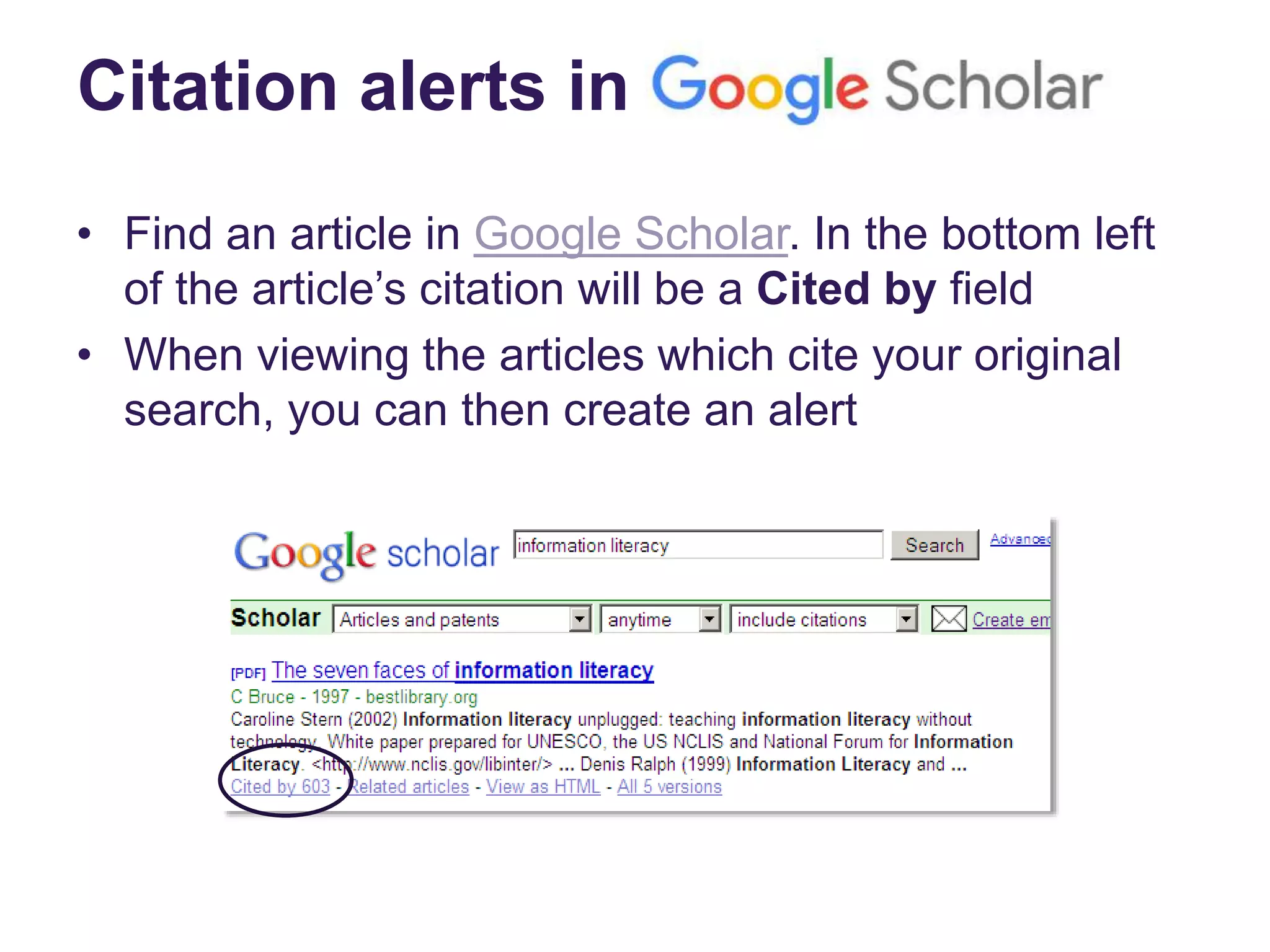
• Find an article in Google Scholar. In the bottom left
of the article’s citation will be a Cited by field
• When viewing the articles which cite your original
search, you can then create an alert
Useful tools to identify new books published on your topic:
• Google Book Alerts
• ACQWEB Directory of Publishers: Directory which will
help you check individual publishers’ websites for new
book alerts. For example:
• Cambridge University Press
• Oxford University Press
• Springer
• Wiley Blackwell
Book alerts
News alerts
General news sources:
• PressReader
• Infotrac Newsstand
• LexisNexis (UK newspapers)
Professional / trade news sources:
• Economia
• Nursing Times
• Times Higher Education Supplement
Tip: Ask your Academic Librarian for subject-specific suggestions
RSS
• RSS (Rich Site Summary) readers are now less
common, as other tools are generally preferred
• Anywhere you see the RSS logo (top right) you will
usually now see other tools as well
• Popular tools which can be used on PC, Android
and Apple devices are Google+, Feedly, LinkedIn,
Pinterest, Flipboard
• Blogger can also be used to remember the
professional resources you use
Networking tools 1
Communicate with colleagues and other professionals
using, for example:
• JiscMail UK (and some international) academic email
discussion lists
• Leeds Beckett’s Institutional Repository: To expose
your research to a global audience
• Leeds Beckett Google account tools
• Academia.edu, a research sharing platform
• LinkedIn, a business-orientated social networking site
• A research blog on a platform like Blogger, Tumblr or
WordPress
Networking tools 2
• Referencing software: Some systems also allow you
to collect, organise, cite, sync and collaborate. For
example: EndNote Online, Mendeley, Zotero
• ResearcherID is a global, multi-disciplinary scholarly
research community, offering access to author’s
publication lists and citation metrics
All of these services can be powerful communities of
practice, linking people far and wide, and enabling
collaboration, support and even job opportunities
Tip: Further information on referencing software is available on the
Library website and also from your Academic Librarian
We have covered:
• What does keeping up to date mean?
• Alerting services:
– Discover and other databases
– Journal alerts (TOCs)
– Citation alerts
– Book alerts
– News alerts
• Networking tools

Keeping up to date with Research

  • 1.
    The Library: Keepingup to date with Research
  • 2.
    What we willcover: • What does keeping up to date mean? • Alerting services: – Discover and other databases – Journal alerts (TOCs) – Citation alerts – Book alerts – News alerts • Networking tools
  • 3.
    What does itmean? • Instead of visiting websites to check for new content, we can set up tools to periodically harvest new information for us • Alerts, news, updates and social networking can be used to channel that information to one place This session will help you to decide what tools you might wish to use To get started, all you need is an email address – but you can also use bookmarking tools.
  • 4.
    What is analert? “A service which a user can subscribe to which delivers electronic news on a regular basis, or whenever an event of interest to the user occurs.” Ince, D. (2013) Alerting service. In: A dictionary of the internet, 3rd ed. [Online]. Oxford: Oxford University Press. Available from: <http://www.oxfordreference.com> [Accessed 14 November 2017].
  • 5.
    Alerting options • Newbook: for new books • Table of contents: for new issues of journals and magazines • Search/subject: whenever specified search/subject terms appear • Citation: whenever an item is added to a database citing a specified article or author • Specialised: New patents, standards, etc. • Blogs, groups, etc: For new posts
  • 6.
    At Leeds Beckett… •The Library subscribes to information sources which are not freely available online* • New resources are added to the collection all the time: new books, new editions, new journal articles, news, updated statistics, etc. • The challenge is to manage this flow of information * Although you can now set up to access Library resources on and off campus
  • 7.
    Creating search alerts Ifyou create a profile in a database or search tool, you can save your searches, enabling you to: • Access them from any internet-connected device • Easily re-run searches • Be alerted by email to any updates matching your search criteria How to get started: 1) Choose an information service. For example, Discover, Science Direct or PubMed 2) Look on the site for “alerts” and use your email address to sign-up
  • 8.
    Creating search alerts:Discover We will use Discover as an example, but most databases offer similar features and operate in a similar way: • Create an EBSCOhost (EBSCO = Discover) account to: – save searches and create email alerts or – use the RSS option
  • 9.
    Create search alerts: GoogleScholar also offers email alerts • Run a search, then look for the Create alert icon to send results to your email account.
  • 10.
    External options • Youcan also set up professional accounts to create search alerts and aggregate information feeds • Mainly free, but a growing number offer ‘premium’ options • Popular examples include: Tool Commonly used for Academia.edu Sharing research and following other academics Wordpress Blogging and following blogs of professionals & researchers Diigo Bookmarking, organising and sharing useful sites Netvibes Following news, social media and relevant sites
  • 11.
    Journal Table ofContents (TOCs) alerts • ZETOC – British Library’s electronic table of contents – One of the world’s most comprehensive research databases – You can set up personalised email Zetoc Alerts or RSS feeds to track the latest articles or journal titles related to your interests • Journal TOCs – Free service (but registration required) – Allows you to save your Table of Contents in your MyTOCs account or export them to your feed reader
  • 12.
    Citation alerts You canalso set up an email alert or RSS feed to find out when someone cites research • Scopus is our main tool for this at Leeds Beckett – Use your university log-in to register and set up alerts with the buttons to the right of an article you have open
  • 13.
    Citation alerts in •Find an article in Google Scholar. In the bottom left of the article’s citation will be a Cited by field • When viewing the articles which cite your original search, you can then create an alert
  • 14.
    Useful tools toidentify new books published on your topic: • Google Book Alerts • ACQWEB Directory of Publishers: Directory which will help you check individual publishers’ websites for new book alerts. For example: • Cambridge University Press • Oxford University Press • Springer • Wiley Blackwell Book alerts
  • 15.
    News alerts General newssources: • PressReader • Infotrac Newsstand • LexisNexis (UK newspapers) Professional / trade news sources: • Economia • Nursing Times • Times Higher Education Supplement Tip: Ask your Academic Librarian for subject-specific suggestions
  • 16.
    RSS • RSS (RichSite Summary) readers are now less common, as other tools are generally preferred • Anywhere you see the RSS logo (top right) you will usually now see other tools as well • Popular tools which can be used on PC, Android and Apple devices are Google+, Feedly, LinkedIn, Pinterest, Flipboard • Blogger can also be used to remember the professional resources you use
  • 17.
    Networking tools 1 Communicatewith colleagues and other professionals using, for example: • JiscMail UK (and some international) academic email discussion lists • Leeds Beckett’s Institutional Repository: To expose your research to a global audience • Leeds Beckett Google account tools • Academia.edu, a research sharing platform • LinkedIn, a business-orientated social networking site • A research blog on a platform like Blogger, Tumblr or WordPress
  • 18.
    Networking tools 2 •Referencing software: Some systems also allow you to collect, organise, cite, sync and collaborate. For example: EndNote Online, Mendeley, Zotero • ResearcherID is a global, multi-disciplinary scholarly research community, offering access to author’s publication lists and citation metrics All of these services can be powerful communities of practice, linking people far and wide, and enabling collaboration, support and even job opportunities Tip: Further information on referencing software is available on the Library website and also from your Academic Librarian
  • 19.
    We have covered: •What does keeping up to date mean? • Alerting services: – Discover and other databases – Journal alerts (TOCs) – Citation alerts – Book alerts – News alerts • Networking tools

Editor's Notes

  • #8 For point 2, mention that some people use a separate email address for alerts (to avoid clutter in standard email)
  • #9 Log into personal EBSCO account Run search and then click on Search History Click Save Searches / Alerts Fill in Alert options
  • #15 Google Book Alerts: To create an alert for books, go to Google Alerts, type in the keywords you are interested in about a book, (whether it’s title, author name, or topic) and choose “Books” from the Type drop-down button, and create. You can also preview the email you'll be sent on the right side panel. Once you create the alert, you will automatically begin receiving notification emails about new, recently published books in Google Books.
  • #16 Search Google for these: e.g. “Accounting Blog” “Business blog” Specific or professional/trade news sources, examples: Accountancy Economia (Chartered Accountants Trade Journals) Education http://education.gov.uk/ Insider HE http://www.insidehighered.com/ Teacher Development Agency http://www.tda.co.uk/ The Teacher Times Higher Education Supplement Health Nursing Times Librarian Cilip Updates
  • #17 RSS now more complex option, so not keen to cover it any longer.
  • #18 Worth mentioning that a blog can include documents, images, hyperlinks, audio and video as well as plain text. It can also be kept private or shared with a community.