
Eladio Rincón
Mission-critical performance
with Microsoft SQL Server 2016
Row-Level Security overview
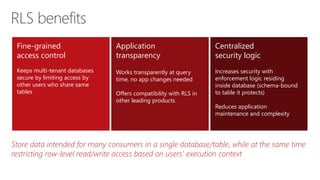
Row-Level Security benefits
Row-Level Security concepts
Row-Level Security walkthrough
Row-Level Security use cases
Dynamic Data Masking overview
Dynamic Data Masking benefits
Dynamic Data Masking walkthrough
Dynamic Data Masking limitations and restrictions
Dynamic Data Masking use cases
Learning
objectives
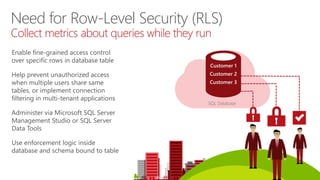
Enable fine-grained access control
over specific rows in database table
Help prevent unauthorized access
when multiple users share same
tables, or implement connection
filtering in multi-tenant applications
Administer via Microsoft SQL Server
Management Studio or SQL Server
Data Tools
Use enforcement logic inside
database and schema bound to table
SQL Database
Customer 1
Customer 2
Customer 3
Need for Row-Level Security (RLS)
Collect metrics about queries while they run
… … … 3
… … … 3
… … … 2
… … … 4
RLS introduction
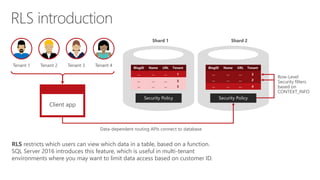
Client app
Tenant 1 Tenant 2 Tenant 3 Tenant 4
Data-dependent routing APIs connect to database
Row-Level
Security filters
based on
CONTEXT_INFO
Shard 2Shard 1
RLS restricts which users can view which data in a table, based on a function.
SQL Server 2016 introduces this feature, which is useful in multi-tenant
environments where you may want to limit data access based on customer ID.
Store data intended for many consumers in a single database/table, while at the same time
restricting row-level read/write access based on users’ execution context
RLS benefits
Fine-grained
access control
Keeps multi-tenant databases
secure by limiting access by
other users who share same
tables
Centralized
security logic
Increases security with
enforcement logic residing
inside database (schema-bound
to table it protects)
Reduces application
maintenance and complexity
Application
transparency
Works transparently at query
time, no app changes needed
Offers compatibility with RLS in
other leading products
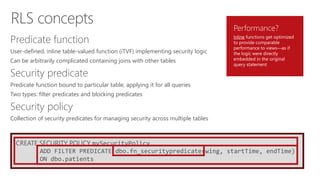
CREATE SECURITY POLICY mySecurityPolicy
ADD FILTER PREDICATE dbo.fn_securitypredicate(wing, startTime, endTime)
ON dbo.patients
Predicate function
User-defined, inline table-valued function (iTVF) implementing security logic
Can be arbitrarily complicated containing joins with other tables
Security predicate
Predicate function bound to particular table, applying it for all queries
Two types: filter predicates and blocking predicates
Security policy
Collection of security predicates for managing security across multiple tables
Performance?
Inline functions get optimized
to provide comparable
performance to views—as if
the logic were directly
embedded in the original
query statement
RLS concepts
One
Policy manager creates filter predicate and security policy in T-SQL, binding predicate to patient’s table
Two
App user (nurse) selects from patient’s table
Three
Security policy transparently rewrites query to apply filter predicate
Database
CREATE FUNCTION dbo.fn_securitypredicate(@wing int)
RETURNS TABLE WITH SCHEMABINDING AS
return SELECT 1 as [fn_securitypredicate_result] FROM
StaffDuties d INNER JOIN Employees e
ON (d.EmpId = e.EmpId)
WHERE e.UserSID = SUSER_SID() AND @wing = d.Wing;
CREATE SECURITY POLICY dbo.SecPol
ADD FILTER PREDICATE dbo.fn_securitypredicate(Wing) ON Patients
WITH (STATE = ON)
Filter
predicate:
INNER
JOIN…
Security
policy
Application Patients
SELECT * FROM Patients SELECT * FROM Patients
SEMIJOIN APPLY dbo.fn_securitypredicate(patients.Wing);
SELECT Patients.* FROM Patients,
StaffDuties d INNER JOIN Employees e ON (d.EmpId = e.EmpId)
WHERE e.UserSID = SUSER_SID() AND Patients.wing = d.Wing;
RLS in three steps
Nurse Policy manager
Create security policy
-- The following syntax creates a security policy with a filter predicate for
the Customer table, and leaves the security policy disabled
CREATE SECURITY POLICY [FederatedSecurityPolicy]
ADD FILTER PREDICATE [rls].[fn_securitypredicate]([CustomerId])
ON [dbo].[Customer];
-- Create a new schema and predicate function, which will use the application
user ID stored in CONTEXT_INFO to filter rows.
CREATE FUNCTION rls.fn_securitypredicate (@AppUserId int)
RETURNS TABLE
WITH SCHEMABINDING
AS
RETURN (
SELECT 1 AS fn_securitypredicate_result
WHERE
DATABASE_PRINCIPAL_ID() = DATABASE_PRINCIPAL_ID('dbo') --
application context
AND CONTEXT_INFO() = CONVERT(VARBINARY(128), @AppUserId);
GO
Creates security policy for
Row-Level Security
Examples demonstrate use of
CREATE SECURITY POLICY
syntax
* At this time, block predicates are only available as a preview in SQL Database V12
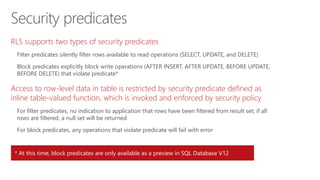
Security predicates
RLS supports two types of security predicates
Filter predicates silently filter rows available to read operations (SELECT, UPDATE, and DELETE)
Block predicates explicitly block write operations (AFTER INSERT, AFTER UPDATE, BEFORE UPDATE,
BEFORE DELETE) that violate predicate*
Access to row-level data in table is restricted by security predicate defined as
inline table-valued function, which is invoked and enforced by security policy
For filter predicates, no indication to application that rows have been filtered from result set; if all
rows are filtered, a null set will be returned
For block predicates, any operations that violate predicate will fail with error
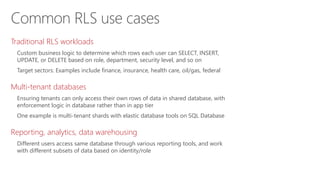
Common RLS use cases
Traditional RLS workloads
Custom business logic to determine which rows each user can SELECT, INSERT,
UPDATE, or DELETE based on role, department, security level, and so on
Target sectors: Examples include finance, insurance, health care, oil/gas, federal
Multi-tenant databases
Ensuring tenants can only access their own rows of data in shared database, with
enforcement logic in database rather than in app tier
One example is multi-tenant shards with elastic database tools on SQL Database
Reporting, analytics, data warehousing
Different users access same database through various reporting tools, and work
with different subsets of data based on identity/role
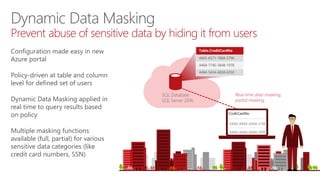
SQL Database
SQL Server 2016
Table.CreditCardNo
4465-6571-7868-5796
4468-7746-3848-1978
4484-5434-6858-6550
Real-time data masking;
partial masking
Dynamic Data Masking
Prevent abuse of sensitive data by hiding it from users
Configuration made easy in new
Azure portal
Policy-driven at table and column
level for defined set of users
Dynamic Data Masking applied in
real time to query results based
on policy
Multiple masking functions
available (full, partial) for various
sensitive data categories (like
credit card numbers, SSN)
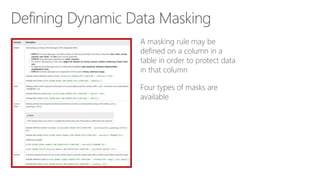
Defining Dynamic Data Masking
A masking rule may be
defined on a column in a
table in order to protect data
in that column
Four types of masks are
available
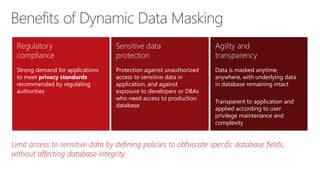
Limit access to sensitive data by defining policies to obfuscate specific database fields,
without affecting database integrity
Benefits of Dynamic Data Masking
Regulatory
compliance
Strong demand for applications
to meet privacy standards
recommended by regulating
authorities
Sensitive data
protection
Protection against unauthorized
access to sensitive data in
application, and against
exposure to developers or DBAs
who need access to production
database
Agility and
transparency
Data is masked anytime,
anywhere, with underlying data
in database remaining intact
Transparent to application and
applied according to user
privilege maintenance and
complexity
3 ) Dynamic data-masking policy obfuscates sensitive data in query results2 ) App user selects from employee table1 ) Security officer defines dynamic data-masking policy in T-SQL over sensitive data in employee table
SELECT [Name],
[SocialSecurityNumber],
[Email],
[Salary]
FROM [Employee]
admin1 loginother login
BUSINESS
APP
BUSINESS
APP
Dynamic Data Masking walkthrough
ALTER TABLE [Employee] ALTER COLUMN
[SocialSecurityNumber]
ADD MASKED WITH (FUNCTION = ‘SSN()’)
ALTER TABLE [Employee] ALTER COLUMN [Email]
ADD MASKED WITH (FUNCTION = ‘EMAIL()’)
ALTER TABLE [Employee] ALTER COLUMN [Salary]
ADD MASKED WITH (FUNCTION = ‘RANDOM(1,20000)’)
GRANT UNMASK to admin1
Security
Officer
SELECT c.name, tbl.name as table_name, c.is_masked,
c.masking_function
FROM sys.masked_columns AS c
JOIN sys.tables AS tbl
ON c.[object_id] = tbl.[object_id]
WHERE is_masked = 1;
Use sys.masked_columns view to query for table columns that have a
masking function applied to them
This view inherits from sys.columns view, returning all columns in
sys.columns view, plus is_masked and masking_function columns—
indicating if a column is masked, and if so, what masking function is defined
This view only shows columns on which there is a masking function applied
Querying for masked columns
Limitations and restrictions
A masking rule cannot be defined for the following column types:
Encrypted columns (Always Encrypted)
FILESTREAM
COLUMN_SET
For users without UNMASK permission, deprecated READTEXT, UPDATETEXT, and WRITETEXT
statements do not function properly on a column configured for Dynamic Data Masking
© 2015 Microsoft Corporation. All rights reserved. Microsoft, Windows, Microsoft Azure, and other product names are or may be registered trademarks and/or trademarks in the U.S. and/or other countries. The
information herein is for informational purposes only and represents the current view of Microsoft Corporation as of the date of this presentation. Because Microsoft must respond to changing market conditions,
it should not be interpreted to be a commitment on the part of Microsoft, and Microsoft cannot guarantee the accuracy of any information provided after the date of this presentation. MICROSOFT MAKES NO
WARRANTIES, EXPRESS, IMPLIED OR STATUTORY, AS TO THE INFORMATION IN THIS PRESENTATION

Row-level security and Dynamic Data Masking

  • 1.
  • 2.
    Row-Level Security overview Row-LevelSecurity benefits Row-Level Security concepts Row-Level Security walkthrough Row-Level Security use cases Dynamic Data Masking overview Dynamic Data Masking benefits Dynamic Data Masking walkthrough Dynamic Data Masking limitations and restrictions Dynamic Data Masking use cases Learning objectives
  • 4.
    Enable fine-grained accesscontrol over specific rows in database table Help prevent unauthorized access when multiple users share same tables, or implement connection filtering in multi-tenant applications Administer via Microsoft SQL Server Management Studio or SQL Server Data Tools Use enforcement logic inside database and schema bound to table SQL Database Customer 1 Customer 2 Customer 3 Need for Row-Level Security (RLS) Collect metrics about queries while they run
  • 5.
    … … …3 … … … 3 … … … 2 … … … 4 RLS introduction Client app Tenant 1 Tenant 2 Tenant 3 Tenant 4 Data-dependent routing APIs connect to database Row-Level Security filters based on CONTEXT_INFO Shard 2Shard 1 RLS restricts which users can view which data in a table, based on a function. SQL Server 2016 introduces this feature, which is useful in multi-tenant environments where you may want to limit data access based on customer ID.
  • 7.
    Store data intendedfor many consumers in a single database/table, while at the same time restricting row-level read/write access based on users’ execution context RLS benefits Fine-grained access control Keeps multi-tenant databases secure by limiting access by other users who share same tables Centralized security logic Increases security with enforcement logic residing inside database (schema-bound to table it protects) Reduces application maintenance and complexity Application transparency Works transparently at query time, no app changes needed Offers compatibility with RLS in other leading products
  • 9.
    CREATE SECURITY POLICYmySecurityPolicy ADD FILTER PREDICATE dbo.fn_securitypredicate(wing, startTime, endTime) ON dbo.patients Predicate function User-defined, inline table-valued function (iTVF) implementing security logic Can be arbitrarily complicated containing joins with other tables Security predicate Predicate function bound to particular table, applying it for all queries Two types: filter predicates and blocking predicates Security policy Collection of security predicates for managing security across multiple tables Performance? Inline functions get optimized to provide comparable performance to views—as if the logic were directly embedded in the original query statement RLS concepts
  • 11.
    One Policy manager createsfilter predicate and security policy in T-SQL, binding predicate to patient’s table Two App user (nurse) selects from patient’s table Three Security policy transparently rewrites query to apply filter predicate Database CREATE FUNCTION dbo.fn_securitypredicate(@wing int) RETURNS TABLE WITH SCHEMABINDING AS return SELECT 1 as [fn_securitypredicate_result] FROM StaffDuties d INNER JOIN Employees e ON (d.EmpId = e.EmpId) WHERE e.UserSID = SUSER_SID() AND @wing = d.Wing; CREATE SECURITY POLICY dbo.SecPol ADD FILTER PREDICATE dbo.fn_securitypredicate(Wing) ON Patients WITH (STATE = ON) Filter predicate: INNER JOIN… Security policy Application Patients SELECT * FROM Patients SELECT * FROM Patients SEMIJOIN APPLY dbo.fn_securitypredicate(patients.Wing); SELECT Patients.* FROM Patients, StaffDuties d INNER JOIN Employees e ON (d.EmpId = e.EmpId) WHERE e.UserSID = SUSER_SID() AND Patients.wing = d.Wing; RLS in three steps Nurse Policy manager
  • 12.
    Create security policy --The following syntax creates a security policy with a filter predicate for the Customer table, and leaves the security policy disabled CREATE SECURITY POLICY [FederatedSecurityPolicy] ADD FILTER PREDICATE [rls].[fn_securitypredicate]([CustomerId]) ON [dbo].[Customer]; -- Create a new schema and predicate function, which will use the application user ID stored in CONTEXT_INFO to filter rows. CREATE FUNCTION rls.fn_securitypredicate (@AppUserId int) RETURNS TABLE WITH SCHEMABINDING AS RETURN ( SELECT 1 AS fn_securitypredicate_result WHERE DATABASE_PRINCIPAL_ID() = DATABASE_PRINCIPAL_ID('dbo') -- application context AND CONTEXT_INFO() = CONVERT(VARBINARY(128), @AppUserId); GO Creates security policy for Row-Level Security Examples demonstrate use of CREATE SECURITY POLICY syntax
  • 13.
    * At thistime, block predicates are only available as a preview in SQL Database V12 Security predicates RLS supports two types of security predicates Filter predicates silently filter rows available to read operations (SELECT, UPDATE, and DELETE) Block predicates explicitly block write operations (AFTER INSERT, AFTER UPDATE, BEFORE UPDATE, BEFORE DELETE) that violate predicate* Access to row-level data in table is restricted by security predicate defined as inline table-valued function, which is invoked and enforced by security policy For filter predicates, no indication to application that rows have been filtered from result set; if all rows are filtered, a null set will be returned For block predicates, any operations that violate predicate will fail with error
  • 15.
    Common RLS usecases Traditional RLS workloads Custom business logic to determine which rows each user can SELECT, INSERT, UPDATE, or DELETE based on role, department, security level, and so on Target sectors: Examples include finance, insurance, health care, oil/gas, federal Multi-tenant databases Ensuring tenants can only access their own rows of data in shared database, with enforcement logic in database rather than in app tier One example is multi-tenant shards with elastic database tools on SQL Database Reporting, analytics, data warehousing Different users access same database through various reporting tools, and work with different subsets of data based on identity/role
  • 17.
    SQL Database SQL Server2016 Table.CreditCardNo 4465-6571-7868-5796 4468-7746-3848-1978 4484-5434-6858-6550 Real-time data masking; partial masking Dynamic Data Masking Prevent abuse of sensitive data by hiding it from users Configuration made easy in new Azure portal Policy-driven at table and column level for defined set of users Dynamic Data Masking applied in real time to query results based on policy Multiple masking functions available (full, partial) for various sensitive data categories (like credit card numbers, SSN)
  • 18.
    Defining Dynamic DataMasking A masking rule may be defined on a column in a table in order to protect data in that column Four types of masks are available
  • 20.
    Limit access tosensitive data by defining policies to obfuscate specific database fields, without affecting database integrity Benefits of Dynamic Data Masking Regulatory compliance Strong demand for applications to meet privacy standards recommended by regulating authorities Sensitive data protection Protection against unauthorized access to sensitive data in application, and against exposure to developers or DBAs who need access to production database Agility and transparency Data is masked anytime, anywhere, with underlying data in database remaining intact Transparent to application and applied according to user privilege maintenance and complexity
  • 22.
    3 ) Dynamicdata-masking policy obfuscates sensitive data in query results2 ) App user selects from employee table1 ) Security officer defines dynamic data-masking policy in T-SQL over sensitive data in employee table SELECT [Name], [SocialSecurityNumber], [Email], [Salary] FROM [Employee] admin1 loginother login BUSINESS APP BUSINESS APP Dynamic Data Masking walkthrough ALTER TABLE [Employee] ALTER COLUMN [SocialSecurityNumber] ADD MASKED WITH (FUNCTION = ‘SSN()’) ALTER TABLE [Employee] ALTER COLUMN [Email] ADD MASKED WITH (FUNCTION = ‘EMAIL()’) ALTER TABLE [Employee] ALTER COLUMN [Salary] ADD MASKED WITH (FUNCTION = ‘RANDOM(1,20000)’) GRANT UNMASK to admin1 Security Officer
  • 23.
    SELECT c.name, tbl.nameas table_name, c.is_masked, c.masking_function FROM sys.masked_columns AS c JOIN sys.tables AS tbl ON c.[object_id] = tbl.[object_id] WHERE is_masked = 1; Use sys.masked_columns view to query for table columns that have a masking function applied to them This view inherits from sys.columns view, returning all columns in sys.columns view, plus is_masked and masking_function columns— indicating if a column is masked, and if so, what masking function is defined This view only shows columns on which there is a masking function applied Querying for masked columns
  • 25.
    Limitations and restrictions Amasking rule cannot be defined for the following column types: Encrypted columns (Always Encrypted) FILESTREAM COLUMN_SET For users without UNMASK permission, deprecated READTEXT, UPDATETEXT, and WRITETEXT statements do not function properly on a column configured for Dynamic Data Masking
  • 26.
    © 2015 MicrosoftCorporation. All rights reserved. Microsoft, Windows, Microsoft Azure, and other product names are or may be registered trademarks and/or trademarks in the U.S. and/or other countries. The information herein is for informational purposes only and represents the current view of Microsoft Corporation as of the date of this presentation. Because Microsoft must respond to changing market conditions, it should not be interpreted to be a commitment on the part of Microsoft, and Microsoft cannot guarantee the accuracy of any information provided after the date of this presentation. MICROSOFT MAKES NO WARRANTIES, EXPRESS, IMPLIED OR STATUTORY, AS TO THE INFORMATION IN THIS PRESENTATION

Editor's Notes

  • #5 Objective: This slide talks about the need for high-level security and access control features in today’s multi-tenant environment, and how SQL Server 2016 Row-Level Security can help provide this. Talking points: Today, it’s common to have multi-tenant software-as-a-service architecture. This means we have to store data for multiple customers and protect their data from each other, even if it is in the same table. For this, we need to build our own access control system within the database and application, and spend time implementing, maintaining, and troubleshooting the systems and logics. In this situation, it would be great if there were some sort of high-level security feature in SQL Server that could help implement row granularity access control without having to write and debug all of that code. SQL Server is in the clear leadership position when it comes to security for mission-critical applications. In this regard, SQL Server 2016 Row-Level Security (RLS) enables developers and DBAs to implement fine-grained access control over rows in a table. Using RLS, you can store data for different customers, departments, or tenants in the same table, while restricting access to rows based on a query’s execution context. For example, you could filter rows returned by “SELECT * FROM myTable” according to the identity of the logged-on user or the value of a session-scoped variable like CONTEXT_INFO. Administrators or DBAs can easily access and manage RLS through SQL Server Management Studio or SQL Server Data Tools. RLS works transparently at query time, with no application changes required. It uses a centralized security logic that resides inside the database and is schema-bound to the table it protects, providing greater security. The database system applies the access restrictions every time data access is attempted from any tier. This makes the security system more reliable and robust by reducing its surface area.
  • #6 Objective: This slide introduces the Row-Level Security feature and how it is implemented to ensure fine-grained control over access to rows in a table. Talking points: SQL Server 2016 has introduced Row-Level Security (RLS), which is a feature that enables fine-grained control over access to rows in a table. RLS allows you to easily control which users can access which data with complete transparency to the application. This enables you to easily restrict data based on user identity or security context in multi-tenant environments, where you may want to limit data access based on customer ID. RLS simplifies the design and coding of security in your application. It enables you to implement restrictions on data row access. For example, you can ensure that workers can access only those data rows that are pertinent to their department, or you can restrict a customer’s data access to only the data relevant to his or her company. With this feature, rows are filtered based on the execution context of the query from the client application rather than the current user-access rights. You can set the CONTEXT_INFO value to the user’s application-specific user ID whenever a connection is opened. The CONTEXT_INFO value can then be referenced in the security function. A secure logic can be created to determine which user can see which rows and restrict any kind of data (rows) by designing a flexible and robust security policy for a table. (For more on the CONTEXT_INFO value, visit https://msdn.microsoft.com/en-us/library/ms187768.aspx.)   For example, imagine a function that allows hospital staff to access rows in a patient table only when there is a match between the staff member’s assigned hospital wings and the dates she was assigned to each wing. RLS will allow the hospital to create a security policy that binds the search function to one or more tables. Once bound to the table, all access is routed through the security policy. So a staff member who queries patients would only see those patients who were in her wing during the time she was assigned to that location.
  • #8 Objective: This slide summarizes the benefits of Row-Level Security (RLS). Talking points: RLS provides fine-grained access control over rows in a table based on conditions you set. Using RLS, you can store data for different customers, departments, or tenants in the same table, while restricting access to rows based on a query’s execution context. RLS works transparently at query time, with no application changes required. The access restriction logic is located in the database tier rather than away from the data in another application tier. The database system applies the access restrictions every time data access is attempted from any tier. Therefore, it uses a centralized security logic that resides inside the database and is schema-bound to the table it protects, providing greater security. Implementing RLS in the database can greatly reduce client application maintenance and complexity. Also, compatibility is offered with RLS in other leading products. RLS implements an underlying mechanism that relies on an arbitrary condition to evaluate whether requests to perform specific actions on individual rows of a database table should be granted or denied. Therefore, you can store data intended for many consumers in a single database/table, while at the same time restricting row-level read and write access based on users’ execution context.
  • #10 Objective: This slide shows the concepts and components required for implementing RLS. Talking points: Three core concepts are used in Row-Level Security: predicate function, security predicate, and security policy. Predicate function: Row-level filtering of data selected from a table is enacted through a security predicate filter defined as a user-defined, inline table-valued function (iTVF) implementing security logic (for example, returning a row or not, depending on the principal name, role, or other attributes of the calling user). Security predicate: Binds a predicate function to a particular table, applying it for all queries (for example, applying a function that checks for the rep name or rep manager role to an Accounts table). RLS supports two types of security predicates: filter predicates and block predicates. Filter predicates silently filter the rows available to read operations (SELECT, UPDATE, and DELETE). Block predicates explicitly block write operations (AFTER INSERT, AFTER UPDATE, BEFORE UPDATE, BEFORE DELETE) that violate the predicate. Security policy: This is a collection of security predicates for managing security across multiple tables. (For example, you might have an Account policy that applies multiple security predicates to Account-related tables, and an HR policy that applies several security predicates to various HR tables.) Access to row-level data in a table is restricted by a security predicate defined as an inline table-valued function. The function is then invoked and enforced by a security policy. For filter predicates, there is no indication to the application that rows have been filtered from the result set; if all rows are filtered, a null set will be returned. For block predicates, any operations that violate the predicate will fail with an error. Filter predicates are applied while reading data from the base table, and this affects all get operations: SELECT, DELETE (that is, user cannot delete rows that are filtered), and UPDATE (that is, user cannot update rows that are filtered, although it is possible to update rows in such a way that they will be subsequently filtered). Block predicates affect all write operations. AFTER INSERT and AFTER UPDATE predicates can prevent users from updating rows to values that violate the predicate. BEFORE UPDATE predicates can prevent users from updating rows that currently violate the predicate. BEFORE DELETE predicates can block delete operations. The function is then invoked and enforced by a security policy. The policy can restrict the rows that may be viewed (a filter predicate), but does not restrict the rows that can be inserted or updated from a table (a blocking predicate). There is no indication to the application that rows have been filtered from the result set; if all rows are filtered, a null set will be returned. Animation <<first click>> dbo.fn_securitypredicate Animation <<second click>> ADD FILTER PREDICATE dbo.fn@securitypredicate(wing, startTime, endTime) ON dbo.patients Animation <<third click>> CREATE SECURITY POLICY mySecurityPolicy ADD FILTER PREDICATE dbo.fn@securitypredicate(wing, startTime, endTime) ON dbo.patients Animation <<third click>> Performance?
  • #12 Objective: This slide walks through the three simple steps of how RLS works. Talking points: This example scenario illustrates the three steps to understanding how RLS works. Policy manager creates a filter predicate and security policy. App user (for example, a nurse) selects from the Patients table. The query is transparently rewritten to apply the filter predicate. Note: No app changes are required for RLS to work. Now let’s see each step in detail: Animation<<First Click>> Policy manager creates a filter predicate and security policy. In RLS, the policy manager creates a filter predicate function that encapsulates the access logic and security policy. In this example, he creates a function that allows staff to access rows in a patient table only where there is a match between the staff member’s assigned hospital wings and the duties IDs that were assigned to each wing with the patient’s wing and user ID: CREATE FUNCTION dbo.fn_securitypredicate(@wing int) RETURNS TABLE WITH SCHEMABINDING AS return SELECT 1 as [fn_securitypredicate_result] FROM StaffDuties d INNER JOIN Employees e ON (d.EmpId = e.EmpId) WHERE e.UserSID = SUSER_SID() AND @wing = d.Wing;  The policy manager then creates a security policy that binds the predicate function to one or more tables. Once bound to the table, all access is routed through the security policy: CREATE SECURITY POLICY dbo.SecPol ADD FILTER PREDICATE dbo.fn_securitypredicate(Wing) ON Patients WITH (STATE = ON) Animation<<Second Click>> App user (for example, a nurse) selects from the Patients table. In the second step, a staff member (such as a nurse) who runs SELECT * FROM patients would only see those patients who were in her wing during the time she was assigned to that location. In this example, the predicate function might use the logged-on user’s SUSER_ID to identify the rights of that user. In the context of middle-tier apps, where application users share the same SQL logon (for instance, via connection pooling), the application could specify the currently logged-on user using CONTEXT_INFO upon opening the database connection. Animation<<Third Click>> The query is transparently rewritten to apply the filter predicate. Finally, in the third step, RLS is implemented through the query optimizer. Once the security policy has been created, all queries on the table are automatically rewritten by the optimizer to apply the predicate function. For example, “SELECT * FROM myTable” might be rewritten as “SELECT * FROM myTable WHERE StaffId = SUSER_SID”.
  • #13 Objective: Using examples, this slide shows how you can create a security policy for RLS. Talking points: You can implement RLS by using the CREATE SECURITY POLICY Transact-SQL statement and predicates created as inline table-valued functions. Row-level filtering of data selected from a table is enacted through a security predicate filter defined as an inline table-valued function. The function is then invoked and enforced by a security policy. The policy can restrict the rows that may be viewed (a filter predicate), but does not restrict the rows that can be inserted or updated from a table (a blocking predicate). There is no indication to the application that rows have been filtered from the result set; if all rows are filtered, a null set will be returned. For more on the CREATE SECURITY POLICY Transact-SQL statement, visit https://msdn.microsoft.com/en-us/library/dn765135.aspx. For more on inline table-valued functions, visit https://msdn.microsoft.com/en-us/library/ms191320.aspx. Filter predicates are applied while reading data from the base table, and this affects all get operations: SELECT, DELETE (that is, user cannot delete rows that are filtered), and UPDATE (that is, user cannot update rows that are filtered, although it is possible to update rows in such way that they will be subsequently filtered). In this example, we create a security policy with a filter predicate for the Customer table, and we leave the security policy disabled. Once bound to the table, all access is routed through the security policy. CREATE SECURITY POLICY [FederatedSecurityPolicy] ADD FILTER PREDICATE [rls].[fn_securitypredicate]([CustomerId]) ON [dbo].[Customer];   In this example, the predicate function might use the logged-on user’s DATABASE_PRINCIPAL_ID to identify the rights of that user. CREATE FUNCTION rls.fn_securitypredicate (@AppUserId int)      RETURNS TABLE      WITH SCHEMABINDING AS      RETURN ( SELECT 1 AS fn_securitypredicate_result      WHERE          DATABASE_PRINCIPAL_ID() = DATABASE_PRINCIPAL_ID('dbo') -- application context          AND CONTEXT_INFO() = CONVERT(VARBINARY(128), @AppUserId); GO Note: In the context of middle-tier apps, where application users share the same SQL logon (for instance, via connection pooling), the application could specify the currently logged-on user using CONTEXT_INFO upon opening the database connection.  
  • #14 Objective: This slide describes the two types of security predicates that RLS supports.   Talking points: Access to row-level data in a table is restricted by a security predicate defined as an inline table-valued function. The function is then invoked and enforced by a security policy. RLS supports two types of security predicates: filter predicates and block predicates. Filter predicates silently filter the rows available to read operations (SELECT, UPDATE, and DELETE). Block predicates explicitly block write operations (AFTER INSERT, AFTER UPDATE, BEFORE UPDATE, BEFORE DELETE) that violate the predicate. For filter predicates, there is no indication to the application that rows have been filtered from the result set; if all rows are filtered, a null set will be returned. For block predicates, any operations that violate the predicate will fail with an error. Filter predicates are applied while reading data from the base table, and this affects all get operations: SELECT, DELETE (that is, user cannot delete rows that are filtered), and UPDATE (that is, user cannot update rows that are filtered, although it is possible to update rows in such a way that they will be subsequently filtered). Block predicates affect all write operations. AFTER INSERT and AFTER UPDATE predicates can prevent users from updating rows to values that violate the predicate. BEFORE UPDATE predicates can prevent users from updating rows that currently violate the predicate. BEFORE DELETE predicates can block delete operations.  
  • #16 Objective: This slide shows three high-level use cases in which RLS can be used. Talking points: Three RLS use cases include: Traditional RLS workloads: Using custom business logic to determine which rows each user can SELECT, INSERT, UPDATE, or DELETE based on role, department, security level, and the like. Multi-tenant databases: Ensuring tenants can only access their own rows of data in a shared database, with enforcement logic in the database rather than in the app tier (for example, multi-tenant shards with elastic database tools on SQL Database). Reporting, analytics, data warehousing: Enabling different users to access the same database through various reporting tools and work with different subsets of data based on their identity/role.
  • #18 Objective: This slide shows what Dynamic Data Masking is and what its high-level capabilities are. Talking points: SQL Database Dynamic Data Masking limits sensitive data exposure by masking it from non-privileged users, thereby preventing abuse of data by hiding it. Dynamic Data Masking is also supported for the V12 version of Azure SQL Database. You can easily configure a Dynamic Data Masking policy in the Azure portal by selecting the Dynamic Data Masking operation in your SQL Database configuration blade or settings blade. Dynamic Data Masking helps prevent unauthorized access to sensitive data by enabling you to designate how much of the data to reveal, with minimal impact on the application layer. It’s a policy-based security feature applied in real time to hide sensitive data in the result set of a query over designated database fields, while the data in the database is not changed. There are multiple masking functions and methods that control the exposure of data for different scenarios. For example, a service representative at a call center may identify callers by several digits of their Social Security number or credit card number, but those data items should not be fully exposed to the representative. A masking rule can be defined that masks all but the last four digits of any Social Security number or credit card number in the result set of any query. As another example, an appropriate data mask can be defined to protect personally identifiable information (PII) data, so that a developer can query production environments for troubleshooting purposes without violating compliance regulations. Dynamic Data Masking does not aim to prevent database users from connecting directly to the database and running exhaustive queries that expose pieces of sensitive data. Dynamic Data Masking is complementary to other SQL Server security features (including auditing, encryption, and Row-Level Security), and it is highly recommended that you use this feature in conjunction with them in order to better protect sensitive data in the database.
  • #19 Objective: This slide shows the various masking rules that you can define on a column in a table. Talking points: The purpose of Dynamic Data Masking is to limit the exposure of sensitive data, preventing users who should not have access to this data from viewing it. A masking rule may be defined on a column in a table in order to protect the data in that column. Four types of masks are available: Default: Full masking according to the data types of the designated field (for example, string will result in “XXXX”). Email: Masking will expose the first letter of an email address and will end in “.com” (for example, aXXX@XXXX.com). Custom String: Masking will expose the first and last letters and add a custom padding string in the middle (for example, KXXXa). Random: For use only with numeric. Masking will replace the original value within a specified range.
  • #21 Objective: This slide summarizes the benefits of Dynamic Data Masking. Talking points: An appropriate data mask can be defined to protect personally identifiable information (PII) data, so that a developer can query production environments for troubleshooting purposes without violating compliance regulations. This feature can be applied depending on the organization’s existing security protocols, as well as regulatory compliance (such as HIPPA and other laws). Dynamic Data Masking helps prevent unauthorized access to sensitive data by enabling you to designate how much of the data to reveal, with minimal impact on the application layer. It’s a policy-based security feature applied in real time to hide sensitive data in the result set of a query over designated database fields, while the data in the database is not changed. Dynamic Data Masking is easy to use with existing applications because masking rules are applied in the query results. Data is masked on-the-fly, and underlying data in the database remains intact. Many applications can mask sensitive data without modifying existing queries. Therefore, it is transparent to the application and applied according to user privilege.
  • #23 Objective: This slide walks through the three simple steps of how Dynamic Data Masking works. Talking points: This feature enables you to set up policies at the table and column level that provide multiple masking functions, such as obfuscating the first eight digits and displaying the last four digits of an ID or credit card number. Once the policies have been set up, these masks are applied in queries. You can allow certain privileged logons to see the data unmasked. Animation<<first click>> This example depicts how a security officer can define a Dynamic Data Masking policy in T-SQL for sensitive employee data in a table. The security officer alters the Employee table with three different types of dynamic data masks (rules) on the columns Social Security Number, Email, and Salary. He also set “admin1” as the privileged logon to see the data unmasked. Animation<<second click>> An app user selects data from the Employee table. This could be any user who queries the table and tries to read the masked data. Animation<<third click>> The Dynamic Data Masking policy obfuscates the sensitive data in the query results. Note that the app user who queried the table received the masked data (by changing the data from original to masked). The same query, when requested by the privileged logon “admin1,” can see the unmasked data.
  • #24 Objective: This slide shows how you can query for masked columns. Talking points: Use the sys.masked_columns view to query for table columns that have a masking function applied to them. This view inherits from the sys.columns view. It returns all columns in the sys.columns view, plus the is_masked and masking_function columns—indicating if the column is masked, and if so, what masking function is defined. This view only shows the columns on which there is a masking function applied.
  • #26 Objective: This slide shows the limitations and restrictions of the Dynamic Data Masking feature. Talking points: A masking rule cannot be defined for the following column types: Encrypted columns (Always Encrypted) FILESTREAM COLUMN_SET For users without the UNMASK permission, the deprecated READTEXT, UPDATETEXT, and WRITETEXT statements do not function properly on a column configured for Dynamic Data Masking.