Dynamic Data
Masking
in SQL Server 2016
SQLschool.gr
Team
Antonios Chatzipavlis
SQL Server Evangelist • Trainer
Vassilis Ioannidis
SQL Server Expert • Trainer
Fivi Panopoulou
System Engineer • Speaker
Sotiris Karras
System Engineer • Speaker
Followus
insocialmedia
@sqlschool / @panfivi
fb/sqlschoolgr
yt/c/SqlschoolGr
SQL School Greece group
Helpneeded?
help@sqlschool.gr
DynamicDataMasking
Presentation
Content
 Introducing Dynamic Data Masking
 Using Dynamic Data Masking
 DDM on Azure
 Some points to keep
Introducing Dynamic Data Masking
• Protect sensitive data and personally identifiable
information
• Regulatory Compliance
• Expose sensitive data only on a need-to-know basis
• Custom obfuscation in application, views or third party
solutions are used to address this need
The Need
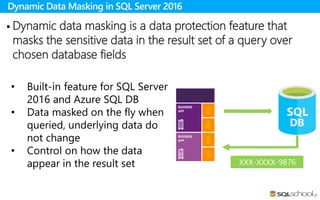
Dynamic Data Masking in SQL Server 2016
• Built-in feature for SQL Server
2016 and Azure SQL DB
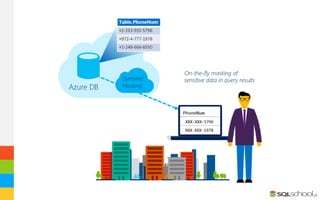
• Data masked on the fly when
queried, underlying data do
not change
• Control on how the data
appear in the result set
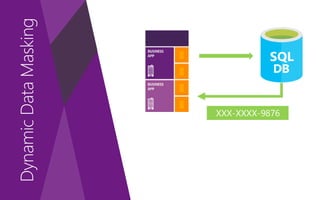
 Dynamic data masking is a data protection feature that
masks the sensitive data in the result set of a query over
chosen database fields
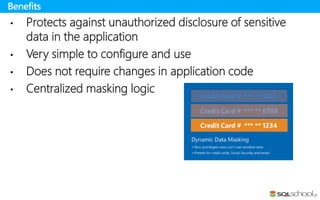
• Protects against unauthorized disclosure of sensitive
data in the application
• Very simple to configure and use
• Does not require changes in application code
• Centralized masking logic
Benefits
• “Dynamic data masking does not aim to prevent
database users from connecting directly to the database
and running exhaustive queries that expose pieces of
the sensitive data”
• It is not a method for physical data encryption
• It is complementary to other SQL Server security
features
Keep in mind
Using Dynamic Data Masking
 Steps
 Masking Functions
 Permissions
 System view information
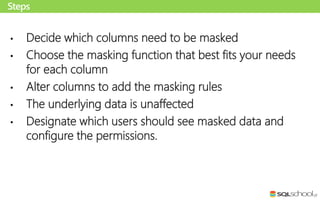
• Decide which columns need to be masked
• Choose the masking function that best fits your needs
for each column
• Alter columns to add the masking rules
• The underlying data is unaffected
• Designate which users should see masked data and
configure the permissions.
Steps
Default
Masking Functions
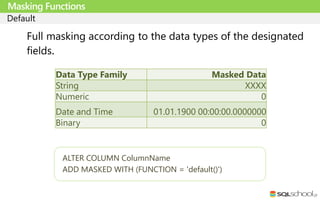
Data Type Family Masked Data
String XXXX
Numeric 0
Date and Time 01.01.1900 00:00:00.0000000
Binary 0
ALTER COLUMN ColumnName
ADD MASKED WITH (FUNCTION = 'default()')
Full masking according to the data types of the designated
fields.
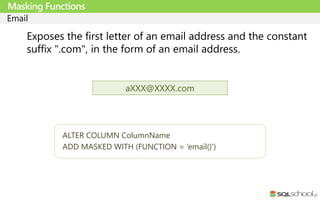
Email
Masking Functions
ALTER COLUMN ColumnName
ADD MASKED WITH (FUNCTION = ‘email()')
Exposes the first letter of an email address and the constant
suffix ".com", in the form of an email address.
aXXX@XXXX.com
Random
Masking Functions
ALTER COLUMN ColumnName
ADD MASKED WITH (FUNCTION = 'random([start range], [end range])')
A random masking function for use on any numeric type to
mask the original value with a random value within a
specified range.
Custom String (Partial)
Masking Functions
ALTER COLUMN ColumnName
ADD MASKED WITH (FUNCTION = ‘partial(prefix,[padding],suffix)’
Exposes the first and last letters and adds a custom padding
string in the middle
• Phone: partial(4,”XXXXXXXXXXX”,0)
• Credit Card: partial(0,”XXXX-XXXX-XXXX-”,4)
• Email: partial(1,”xxxx@xxxx.”,2)
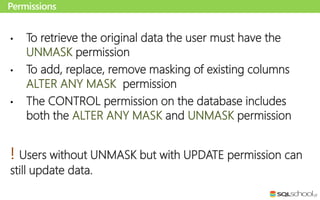
• To retrieve the original data the user must have the
UNMASK permission
• To add, replace, remove masking of existing columns
ALTER ANY MASK permission
• The CONTROL permission on the database includes
both the ALTER ANY MASK and UNMASK permission
! Users without UNMASK but with UPDATE permission can
still update data.
Permissions
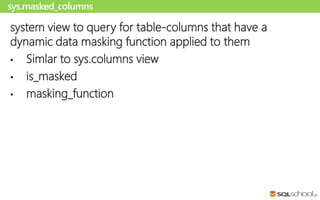
system view to query for table-columns that have a
dynamic data masking function applied to them
• Simlar to sys.columns view
• is_masked
• masking_function
sys.masked_columns
Dynamic Data Masking in
Action
DDM on Azure
Azure
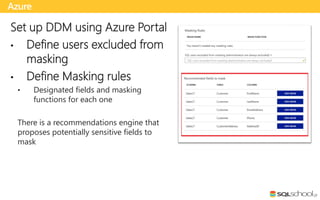
Set up DDM using Azure Portal
• Define users excluded from
masking
• Define Masking rules
• Designated fields and masking
functions for each one
There is a recommendations engine that
proposes potentially sensitive fields to
mask
Azure
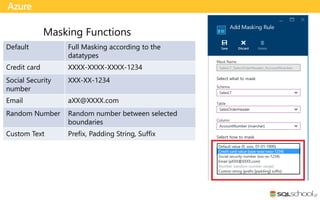
Default Full Masking according to the
datatypes
Credit card XXXX-XXXX-XXXX-1234
Social Security
number
XXX-XX-1234
Email aXX@XXXX.com
Random Number Random number between selected
boundaries
Custom Text Prefix, Padding String, Suffix
Some points to keep
 Limitations and Restrictions
 Considerations
 Performance
• Not compatible with Always Encrypted columns
• Not compatible with File Stream
• Not compatible with Column set
• A column with data masking cannot be a key for a
FULLTEXT index.
• Masking rule cannot be defined on a computed column
Limitations and Restrictions
• Dynamic Data Masking is applied when running SQL
Server Import and Export
• Dynamic Data Masking is applied when using SELECT
INTO or INSERT INTO to copy data from a masked
column
• Be careful with updates
Considerations
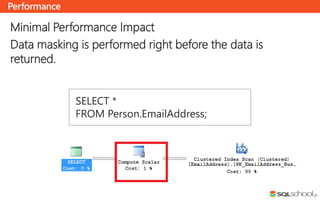
Minimal Performance Impact
Data masking is performed right before the data is
returned.
Performance
SELECT *
FROM Person.EmailAddress;
S E L E C T K N O W L E D G E F R O M S Q L S E R V E R
Copyright © 2015 SQLschool.gr. All right reserved.
PRESENTER MAKES NO WARRANTIES, EXPRESS, IMPLIED OR STATUTORY, AS TO THE INFORMATION IN THIS PRESENTATION

Dynamic data masking sql server 2016

  • 2.
  • 3.
    SQLschool.gr Team Antonios Chatzipavlis SQL ServerEvangelist • Trainer Vassilis Ioannidis SQL Server Expert • Trainer Fivi Panopoulou System Engineer • Speaker Sotiris Karras System Engineer • Speaker
  • 4.
  • 5.
  • 6.
  • 7.
    Presentation Content  Introducing DynamicData Masking  Using Dynamic Data Masking  DDM on Azure  Some points to keep
  • 8.
  • 9.
    • Protect sensitivedata and personally identifiable information • Regulatory Compliance • Expose sensitive data only on a need-to-know basis • Custom obfuscation in application, views or third party solutions are used to address this need The Need
  • 10.
    Dynamic Data Maskingin SQL Server 2016 • Built-in feature for SQL Server 2016 and Azure SQL DB • Data masked on the fly when queried, underlying data do not change • Control on how the data appear in the result set  Dynamic data masking is a data protection feature that masks the sensitive data in the result set of a query over chosen database fields
  • 11.
    • Protects againstunauthorized disclosure of sensitive data in the application • Very simple to configure and use • Does not require changes in application code • Centralized masking logic Benefits
  • 12.
    • “Dynamic datamasking does not aim to prevent database users from connecting directly to the database and running exhaustive queries that expose pieces of the sensitive data” • It is not a method for physical data encryption • It is complementary to other SQL Server security features Keep in mind
  • 13.
    Using Dynamic DataMasking  Steps  Masking Functions  Permissions  System view information
  • 15.
    • Decide whichcolumns need to be masked • Choose the masking function that best fits your needs for each column • Alter columns to add the masking rules • The underlying data is unaffected • Designate which users should see masked data and configure the permissions. Steps
  • 16.
    Default Masking Functions Data TypeFamily Masked Data String XXXX Numeric 0 Date and Time 01.01.1900 00:00:00.0000000 Binary 0 ALTER COLUMN ColumnName ADD MASKED WITH (FUNCTION = 'default()') Full masking according to the data types of the designated fields.
  • 17.
    Email Masking Functions ALTER COLUMNColumnName ADD MASKED WITH (FUNCTION = ‘email()') Exposes the first letter of an email address and the constant suffix ".com", in the form of an email address. aXXX@XXXX.com
  • 18.
    Random Masking Functions ALTER COLUMNColumnName ADD MASKED WITH (FUNCTION = 'random([start range], [end range])') A random masking function for use on any numeric type to mask the original value with a random value within a specified range.
  • 19.
    Custom String (Partial) MaskingFunctions ALTER COLUMN ColumnName ADD MASKED WITH (FUNCTION = ‘partial(prefix,[padding],suffix)’ Exposes the first and last letters and adds a custom padding string in the middle • Phone: partial(4,”XXXXXXXXXXX”,0) • Credit Card: partial(0,”XXXX-XXXX-XXXX-”,4) • Email: partial(1,”xxxx@xxxx.”,2)
  • 20.
    • To retrievethe original data the user must have the UNMASK permission • To add, replace, remove masking of existing columns ALTER ANY MASK permission • The CONTROL permission on the database includes both the ALTER ANY MASK and UNMASK permission ! Users without UNMASK but with UPDATE permission can still update data. Permissions
  • 21.
    system view toquery for table-columns that have a dynamic data masking function applied to them • Simlar to sys.columns view • is_masked • masking_function sys.masked_columns
  • 22.
  • 23.
  • 24.
    Azure Set up DDMusing Azure Portal • Define users excluded from masking • Define Masking rules • Designated fields and masking functions for each one There is a recommendations engine that proposes potentially sensitive fields to mask
  • 25.
    Azure Default Full Maskingaccording to the datatypes Credit card XXXX-XXXX-XXXX-1234 Social Security number XXX-XX-1234 Email aXX@XXXX.com Random Number Random number between selected boundaries Custom Text Prefix, Padding String, Suffix
  • 26.
    Some points tokeep  Limitations and Restrictions  Considerations  Performance
  • 27.
    • Not compatiblewith Always Encrypted columns • Not compatible with File Stream • Not compatible with Column set • A column with data masking cannot be a key for a FULLTEXT index. • Masking rule cannot be defined on a computed column Limitations and Restrictions
  • 28.
    • Dynamic DataMasking is applied when running SQL Server Import and Export • Dynamic Data Masking is applied when using SELECT INTO or INSERT INTO to copy data from a masked column • Be careful with updates Considerations
  • 29.
    Minimal Performance Impact Datamasking is performed right before the data is returned. Performance SELECT * FROM Person.EmailAddress;
  • 32.
    S E LE C T K N O W L E D G E F R O M S Q L S E R V E R Copyright © 2015 SQLschool.gr. All right reserved. PRESENTER MAKES NO WARRANTIES, EXPRESS, IMPLIED OR STATUTORY, AS TO THE INFORMATION IN THIS PRESENTATION