Nathan Gerber
Director, Web Development Services
Utah Valley University
Nathan Gerber
Director, Web Development Services
Utah Valley University
Nathan Gerber         @nathangerber
  16 years Web IA experience
  Director, Web Development Services
  Noel-Levitz Associate Consultant,
   Web Strategy Services Team


Utah Valley University
  Largest state university in Utah
   (almost…one more student)
  32,000+ students
  28,000+ public pages
   Why mobile is important
     If you are still wondering after this conference, we need to talk.


   The questions we answered and why
     You’ve heard most of these already.


   Tools we found to be keys to success
     This, you might find interesting


   New mobile concepts…make you think…
     Possible shifts in the way we approach design, development
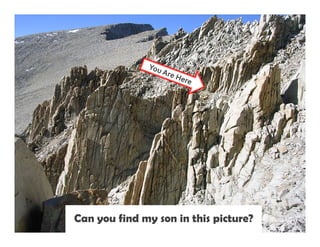
Can you find my son in this picture?
   Blah, Blah, Blah

   Yeah, we all know (now that we attended eduWeb 2011)
    mobile is sky rocketing!

   But how big of a “shift” is it?
Dial-up 
Mainframe  PC
 Broadband


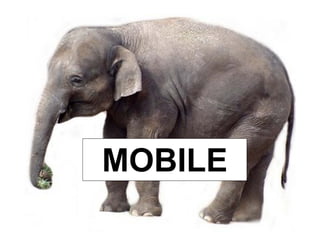
MOBILE
1.37 Billion
          mobile phones sold in 2010


In context:
 1.2 Billion total PC in world
 1.6 Billion televisions
42%
Percentage of teens in the U.S. can send a text
            message blindfolded.

 (They can type faster on a phone than a QUERTY keyboard)
“What is your favorite way to communicate?”

  ▪ Text Messaging – 68%
  ▪ Voice (mobile call) – 9.2%
  ▪ Facebook – 8.8%
  ▪ Instant Messaging – 2.8%
  ▪ E-mail – 0.2%
Mobile is huge!


     It is coming like a tsunami!


It will impact us beyond just building
           another website!
“Mobilize, don’t miniaturize”… anon.
          - Anonymous


“… the mobile context is so different from the
  desktop one it deserves direct consideration
  vs. just mangling down a full-size site.”
          - Drew Stevenson, University of Minnesota, 2010


“The user IS mobile, not just holding one.”
          - Justin Gatewood, Victor Valley Community College
“It is not about making our site work on a
  mobile device, it is about what our users
  need when they’re mobile”
     - Mobile Web Team, Utah Valley University
Know the problem you are
     trying to solve

“If you don’t know where you are going,
         any old ticket will do”
AUDIENCE?
  Who are we building for?
Current Students
      PURPOSE?
To provide top for?
 What are we doing it info

   and services
   It is a matter of available skill sets
    and/or resources for your mobile project

   Recommendation: Do what you can to
    get resources and skill sets to do both

   To be mobile, you will eventually
    do both!
Web team resources


                     Mobile web project
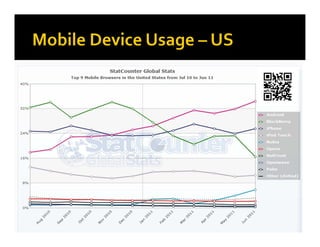
What devices do we build              iPhone
for and support?                      +126%
   iPhone
   Android                          Android
   iPad                             +349%

Why?                                   iPad
   Because our users have them       +332%
    (and so do our Administrators)
   Resources
                                      Windows
                                     Blackberry
Use campus-wide web team
  Input/buy-in


Present a strategy to Admin
  Information item


Use current campus resources
  IT, marketing, tech. students
1.       Mobile Web Site for key content/services
         Resources and time
2.       Make your current site presentable
         Clean up CSS and layout
3.       Mobile Apps – where needed
         Use frameworks for ROI
     


4.       Responsive/Adaptive design restructure
         Learn and implement

5.       Bring it all together
         One system, one site
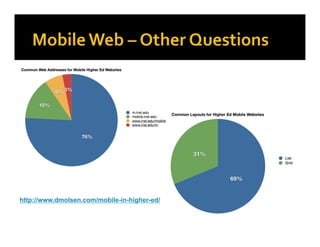
http://www.dmolsen.com/mobile-in-higher-ed/
How big do we make our first attempt?
   Start with info for students
   Choose top content
   Don’t try to publish everything*   Baby steps, Bob,
   Be willing to make mistakes*         baby steps
   Be flexible*
   Design and redesign*
   Add apps where needed


*from TAMUmobile – HighEd Web 2010
   One code set – multiple mobile platforms

   Research ERP Vendor solutions
     Banner, PeopleSoft, Datatel


   Focus on mobile web, apps only where
    needed

   Many different frameworks available
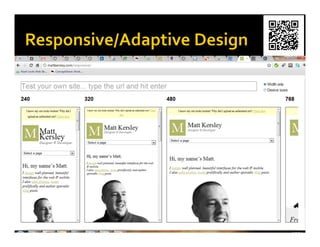
   http://colly.com/ - simple movement of
    columns

   http://garretkeizer.com/ - fluid layout,
    flexible images and text

   http://citycrawlers.eu/berlin/ - slideshow
    drops out at small resolution
   W3C Mobile Initiave
     http://www.w3.org/Mobile/


   Several Mobile Approaches
     http://www.smashingmagazine.com/2011/07/11/
     picking-a-mobile-support-strategy-for-your-
     website/

   HTML 5 Boilerplate
     http://html5boilerplate.com/
   One of our most important mobile tools
   OmniUpdate
   Evaluate your CMS for mobile
     Content reuse?
     Mobile templates?
     Multi-format publish?
     Mobile tagging?
     Republish RSS feeds from other systems?
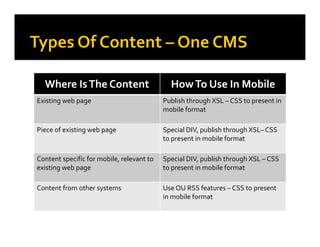
Where Is The Content                        How To Use In Mobile
Existing web page                           Publish through XSL – CSS to present in 
                                            mobile format

Piece of existing web page                  Special DIV, publish through XSL– CSS  
                                            to present in mobile format

Content specific for mobile, relevant to    Special DIV, publish through XSL – CSS 
existing web page                           to present in mobile format

Content from other systems                  Use OU RSS features – CSS to present 
                                            in mobile format
   Remember, it is about the content
    contributors – ownership

   Do not split out mobile CMS unless
    necessary

   If needed, look for ways to migrate to
    appropriate CMS tools over time
Mobile Web


Source: http://xkcd.com
   OmniUpdate
   QR codes
   Browser sniffer
   Analytics
   HTML 5
   Lots of devices
   Some Emulators *
   Other High Ed
    mobile sites
    * http://mobiforge.com/emulators/page/mobile-emulators
4,449%
How much the use of QR codes has risen
          in the past year.

   For mobile use only
   Use a QR service with a URL shortener
   Consider QR codes an asset
   Creating a launch panel for other UVU
    apps
   Create app functionality where needed
   Integration of OmniUpdate and other
    systems data sets
   Continual migration of public site and
    mobile together
     Responsive/Adaptive design
   Mobile is changing the way we
    view/consume content and services
   Research, decide, modify as you go
   Choose what works for your institution
   Keep Administration informed
   CMS is a key tool – XML, RSS
 Get on board! Higher Ed is already
  behind
 Be a mobile user yourself, best evaluator
- Mobile Web Team, Utah Valley University
Nathan Gerber
Nathan.Gerber@uvu.edu
@nathangerber
Going mobile   edu web presentation - 2011

Going mobile edu web presentation - 2011

  • 1.
    Nathan Gerber Director, WebDevelopment Services Utah Valley University
  • 2.
    Nathan Gerber Director, WebDevelopment Services Utah Valley University
  • 3.
    Nathan Gerber @nathangerber  16 years Web IA experience  Director, Web Development Services  Noel-Levitz Associate Consultant, Web Strategy Services Team Utah Valley University  Largest state university in Utah (almost…one more student)  32,000+ students  28,000+ public pages
  • 4.
    Why mobile is important  If you are still wondering after this conference, we need to talk.  The questions we answered and why  You’ve heard most of these already.  Tools we found to be keys to success  This, you might find interesting  New mobile concepts…make you think…  Possible shifts in the way we approach design, development
  • 5.
    Can you findmy son in this picture?
  • 7.
    Blah, Blah, Blah  Yeah, we all know (now that we attended eduWeb 2011) mobile is sky rocketing!  But how big of a “shift” is it?
  • 8.
    Dial-up  Mainframe PC Broadband MOBILE
  • 9.
    1.37 Billion mobile phones sold in 2010 In context:  1.2 Billion total PC in world  1.6 Billion televisions
  • 10.
    42% Percentage of teensin the U.S. can send a text message blindfolded. (They can type faster on a phone than a QUERTY keyboard)
  • 11.
    “What is yourfavorite way to communicate?” ▪ Text Messaging – 68% ▪ Voice (mobile call) – 9.2% ▪ Facebook – 8.8% ▪ Instant Messaging – 2.8% ▪ E-mail – 0.2%
  • 12.
    Mobile is huge! It is coming like a tsunami! It will impact us beyond just building another website!
  • 13.
    “Mobilize, don’t miniaturize”…anon. - Anonymous “… the mobile context is so different from the desktop one it deserves direct consideration vs. just mangling down a full-size site.” - Drew Stevenson, University of Minnesota, 2010 “The user IS mobile, not just holding one.” - Justin Gatewood, Victor Valley Community College
  • 14.
    “It is notabout making our site work on a mobile device, it is about what our users need when they’re mobile” - Mobile Web Team, Utah Valley University
  • 16.
    Know the problemyou are trying to solve “If you don’t know where you are going, any old ticket will do”
  • 17.
    AUDIENCE? Whoare we building for? Current Students PURPOSE? To provide top for? What are we doing it info and services
  • 19.
    It is a matter of available skill sets and/or resources for your mobile project  Recommendation: Do what you can to get resources and skill sets to do both  To be mobile, you will eventually do both!
  • 20.
    Web team resources Mobile web project
  • 21.
    What devices dowe build iPhone for and support? +126%  iPhone  Android Android  iPad +349% Why? iPad  Because our users have them +332% (and so do our Administrators)  Resources Windows Blackberry
  • 23.
    Use campus-wide webteam  Input/buy-in Present a strategy to Admin  Information item Use current campus resources  IT, marketing, tech. students
  • 24.
    1. Mobile Web Site for key content/services  Resources and time 2. Make your current site presentable  Clean up CSS and layout 3. Mobile Apps – where needed  Use frameworks for ROI  4. Responsive/Adaptive design restructure  Learn and implement 5. Bring it all together  One system, one site
  • 25.
  • 28.
    How big dowe make our first attempt?  Start with info for students  Choose top content  Don’t try to publish everything* Baby steps, Bob,  Be willing to make mistakes* baby steps  Be flexible*  Design and redesign*  Add apps where needed *from TAMUmobile – HighEd Web 2010
  • 29.
    One code set – multiple mobile platforms  Research ERP Vendor solutions  Banner, PeopleSoft, Datatel  Focus on mobile web, apps only where needed  Many different frameworks available
  • 31.
    http://colly.com/ - simple movement of columns  http://garretkeizer.com/ - fluid layout, flexible images and text  http://citycrawlers.eu/berlin/ - slideshow drops out at small resolution
  • 33.
    W3C Mobile Initiave  http://www.w3.org/Mobile/  Several Mobile Approaches  http://www.smashingmagazine.com/2011/07/11/ picking-a-mobile-support-strategy-for-your- website/  HTML 5 Boilerplate  http://html5boilerplate.com/
  • 34.
    One of our most important mobile tools  OmniUpdate  Evaluate your CMS for mobile  Content reuse?  Mobile templates?  Multi-format publish?  Mobile tagging?  Republish RSS feeds from other systems?
  • 35.
    Where Is The Content How To Use In Mobile Existing web page Publish through XSL – CSS to present in  mobile format Piece of existing web page Special DIV, publish through XSL– CSS   to present in mobile format Content specific for mobile, relevant to  Special DIV, publish through XSL – CSS  existing web page to present in mobile format Content from other systems Use OU RSS features – CSS to present  in mobile format
  • 36.
    Remember, it is about the content contributors – ownership  Do not split out mobile CMS unless necessary  If needed, look for ways to migrate to appropriate CMS tools over time
  • 38.
  • 39.
    OmniUpdate  QR codes  Browser sniffer  Analytics  HTML 5  Lots of devices  Some Emulators *  Other High Ed mobile sites * http://mobiforge.com/emulators/page/mobile-emulators
  • 40.
    4,449% How much theuse of QR codes has risen in the past year.  For mobile use only  Use a QR service with a URL shortener  Consider QR codes an asset
  • 41.
    Creating a launch panel for other UVU apps  Create app functionality where needed  Integration of OmniUpdate and other systems data sets  Continual migration of public site and mobile together  Responsive/Adaptive design
  • 42.
    Mobile is changing the way we view/consume content and services  Research, decide, modify as you go  Choose what works for your institution  Keep Administration informed  CMS is a key tool – XML, RSS  Get on board! Higher Ed is already behind  Be a mobile user yourself, best evaluator
  • 43.
    - Mobile WebTeam, Utah Valley University
  • 44.