REST
Representational State Transfer

Tricode Professional Services
www.tricode.nl

11-06-2010
Marcel Blok
Why?
"The motivation for developing REST was to create an
architectural model for how the Web should work, such that
it could serve as the guiding framework for the Web
protocol standards.
REST has been applied to describe the desired Web
architecture, help identify existing problems, compare
alternative solutions, and ensure that protocol extensions
would not violate the core constraints that make the Web
successful."

- Roy Fielding
Background

• REST can be seen as a post hoc description of the
  features of the World Wide Web.

• The original description was used to develop the
  HTTP/1.1 standard.
Rationale

  “Why should I care?”

• The beauty of the web is it’s simple structure.
• We may want to learn from this so we may
  choose to implement this design in our own web
  applications.
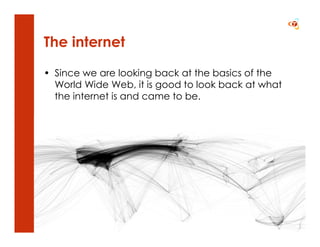
The internet

• Since we are looking back at the basics of the
  World Wide Web, it is good to look back at what
  the internet is and came to be.
WWW vs. internet

• The internet includes all connected networks.

• The World Wide Web is the part of the internet
  that uses the HTTP protocol.
REST

• Representational State Transfer is a software
  architecture style.

• REST was developed along the HTTP/1.1 protocol.
  And HTTP/1.1 adheres to it.
REST concept (1)

• The architecture consists of clients and servers;
  requests and responses.
• Requests and responses are built around the
  transfer of representations of resources.
• Clients contain representations, servers the
  resources (concepts) themselves.
REST client and server
     Client(s)                           Server
                   request


                             response


 Representations                        Resource
REST concept (2)

• A client can be either transitioning between
  states or be at rest.
• A client is considered to be transitioning between
  states while one or more requests are
  outstanding.
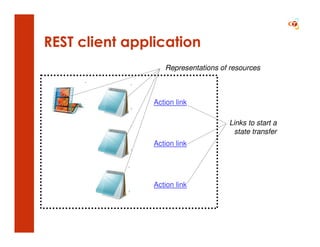
• The representation of the client state contains
  links that can be used to initiate new state
  transitions.
REST client application
                   Representations of resources


                Action link

                                     Links to start a
                                       state transfer
                Action link


                Action link
REST concept (3)

• A client in a rest state is able to interact with its
  user.
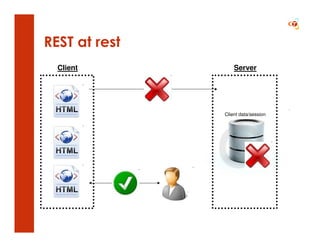
• A client at rest creates no load on the servers or
  the network.
• A client at rest consumes no per-client storage on
  the servers.
REST at rest
  Client           Server


               Client data/session
REST constraints
The REST architecture describes the following six
constraints to implement this concept:

•   Client-server
•   Stateless
•   Cacheable
•   Uniform interface
•   Layered system
•   Code on demand [optional]
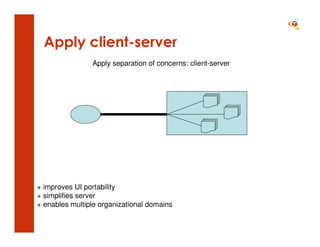
Client-server

• Clients are separated from servers by a uniform
  interface. So we have a separation of concerns:

   – Clients are concerned with the presentation to the user
     and the application state
   – Servers are concerned with data storage, domain
     model logic etc.
Apply client-server
                Apply separation of concerns: client-server


+ improves UI portability
+ simplifies server
+ enables multiple organizational domains
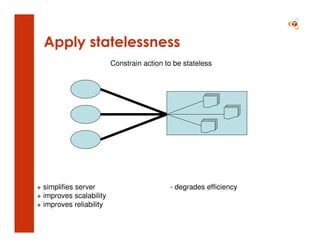
Stateless
• No client context is stored on the server between requests.

• Each request from any client contains all of the information
  necessary to service the request, and any state is held in the
  client.

• The server can be stateful, this constraint merely requires
  that server-side state be addressable by URL as a resource.
Apply statelessness
                         Constrain action to be stateless


+ simplifies server                        - degrades efficiency
+ improves scalability
+ improves reliability
Cacheable

• Clients are able to cache responses.

• Responses must, implicitly or explicitly, define
  themselves as cacheable or not.
Apply cacheability
                     Add optional non-shared caching


                 $


                 $


+ reduces average latency              - degrades reliability
+ improves efficiency
+ improves scalability
Uniform interface

• A uniform interface between clients and servers
  simplifies and decouples the architecture.

  This enables each part to evolve independently.
Guiding principles of the interface

Identification of resources
   Individual resources are identified in requests. The resources themselves are
   separate from the representations that are returned to the client.

Manipulation of resources through representations
  The representation of a resource, including any metadata attached, has
  enough information to modify or delete the resource on the server.

Self-descriptive messages
    Each message includes enough information to describe how to process the
    message.

Hypermedia as the engine of application state
   If it is likely that the client will want to access related resources, these should
   be identified in the representation returned.
Apply uniform interface
             Apply generality: the uniform interface constraint


               $


                                         $

               $


+ improves visibility                   - degrades efficiency
+ independent evolvability
+ decouples implementation
Layered system

• A client cannot ordinarily tell whether it is
  connected directly to the end server, or to an
  intermediary along the way.

  Layers providing load balancing, security or
  shared caching can be added or removed very
  easily this way.
Apply layered system
               Apply info hiding: layered system constraints


                     $                    $


     $


                 $                                       $

    $

                                               $
+ simplifies clients
+ shared caching
+ improves scalability
+ legacy encapsulation
+ load balancing                        - adds latency
ROA

• REST is only an architectural style.

• One of the architectures that adheres to this style
  is ROA: Resource Orientated Architecture.

• But multiple architectures can apply this style!
ROA examples
• URLs point to resources (nouns)

• Universal methods for handling resources: GET,
  POST, PUT and DELETE (verbs)

• No state on the server!

• Make use of caching…
ROA vs. SOA

“Is REST/ROA better than SOA?”

•   Often the easiest solution is the best.
•   REST has proved itself.
•   SOA is not SOAP!
•   But decide what architecture
    suits best.

REST - Representational state transfer

  • 1.
    REST Representational State Transfer TricodeProfessional Services www.tricode.nl 11-06-2010 Marcel Blok
  • 2.
    Why? "The motivation fordeveloping REST was to create an architectural model for how the Web should work, such that it could serve as the guiding framework for the Web protocol standards. REST has been applied to describe the desired Web architecture, help identify existing problems, compare alternative solutions, and ensure that protocol extensions would not violate the core constraints that make the Web successful." - Roy Fielding
  • 3.
    Background • REST canbe seen as a post hoc description of the features of the World Wide Web. • The original description was used to develop the HTTP/1.1 standard.
  • 4.
    Rationale “Whyshould I care?” • The beauty of the web is it’s simple structure. • We may want to learn from this so we may choose to implement this design in our own web applications.
  • 5.
    The internet • Sincewe are looking back at the basics of the World Wide Web, it is good to look back at what the internet is and came to be.
  • 6.
    WWW vs. internet •The internet includes all connected networks. • The World Wide Web is the part of the internet that uses the HTTP protocol.
  • 7.
    REST • Representational StateTransfer is a software architecture style. • REST was developed along the HTTP/1.1 protocol. And HTTP/1.1 adheres to it.
  • 8.
    REST concept (1) •The architecture consists of clients and servers; requests and responses. • Requests and responses are built around the transfer of representations of resources. • Clients contain representations, servers the resources (concepts) themselves.
  • 9.
    REST client andserver Client(s) Server request response Representations Resource
  • 10.
    REST concept (2) •A client can be either transitioning between states or be at rest. • A client is considered to be transitioning between states while one or more requests are outstanding. • The representation of the client state contains links that can be used to initiate new state transitions.
  • 11.
    REST client application Representations of resources Action link Links to start a state transfer Action link Action link
  • 12.
    REST concept (3) •A client in a rest state is able to interact with its user. • A client at rest creates no load on the servers or the network. • A client at rest consumes no per-client storage on the servers.
  • 13.
    REST at rest Client Server Client data/session
  • 14.
    REST constraints The RESTarchitecture describes the following six constraints to implement this concept: • Client-server • Stateless • Cacheable • Uniform interface • Layered system • Code on demand [optional]
  • 15.
    Client-server • Clients areseparated from servers by a uniform interface. So we have a separation of concerns: – Clients are concerned with the presentation to the user and the application state – Servers are concerned with data storage, domain model logic etc.
  • 16.
    Apply client-server Apply separation of concerns: client-server + improves UI portability + simplifies server + enables multiple organizational domains
  • 17.
    Stateless • No clientcontext is stored on the server between requests. • Each request from any client contains all of the information necessary to service the request, and any state is held in the client. • The server can be stateful, this constraint merely requires that server-side state be addressable by URL as a resource.
  • 18.
    Apply statelessness Constrain action to be stateless + simplifies server - degrades efficiency + improves scalability + improves reliability
  • 19.
    Cacheable • Clients areable to cache responses. • Responses must, implicitly or explicitly, define themselves as cacheable or not.
  • 20.
    Apply cacheability Add optional non-shared caching $ $ + reduces average latency - degrades reliability + improves efficiency + improves scalability
  • 21.
    Uniform interface • Auniform interface between clients and servers simplifies and decouples the architecture. This enables each part to evolve independently.
  • 22.
    Guiding principles ofthe interface Identification of resources Individual resources are identified in requests. The resources themselves are separate from the representations that are returned to the client. Manipulation of resources through representations The representation of a resource, including any metadata attached, has enough information to modify or delete the resource on the server. Self-descriptive messages Each message includes enough information to describe how to process the message. Hypermedia as the engine of application state If it is likely that the client will want to access related resources, these should be identified in the representation returned.
  • 23.
    Apply uniform interface Apply generality: the uniform interface constraint $ $ $ + improves visibility - degrades efficiency + independent evolvability + decouples implementation
  • 24.
    Layered system • Aclient cannot ordinarily tell whether it is connected directly to the end server, or to an intermediary along the way. Layers providing load balancing, security or shared caching can be added or removed very easily this way.
  • 25.
    Apply layered system Apply info hiding: layered system constraints $ $ $ $ $ $ $ + simplifies clients + shared caching + improves scalability + legacy encapsulation + load balancing - adds latency
  • 26.
    ROA • REST isonly an architectural style. • One of the architectures that adheres to this style is ROA: Resource Orientated Architecture. • But multiple architectures can apply this style!
  • 27.
    ROA examples • URLspoint to resources (nouns) • Universal methods for handling resources: GET, POST, PUT and DELETE (verbs) • No state on the server! • Make use of caching…
  • 28.
    ROA vs. SOA “IsREST/ROA better than SOA?” • Often the easiest solution is the best. • REST has proved itself. • SOA is not SOAP! • But decide what architecture suits best.