REST API
Representational state transfer (REST)
Application programming interfaces – or APIs
• APIs represent a set of definitions and protocols.
• need them for app development and integration as they facilitate data
exchange between two pieces of software, like an information supplier (a
server) and a user.
• Programs use an API to communicate, retrieve information, or perform a
function.
• APIs allow users to work with the system to return their desired result.
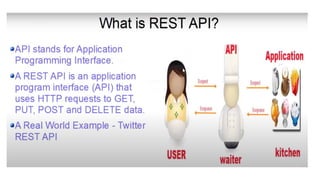
• API acts as a mediator between users (clients) and resources (servers).
• defines a set of constraints to be used for creating web services.
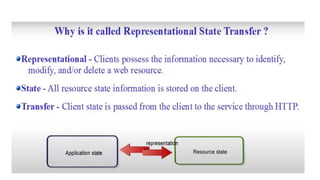
What is REST?
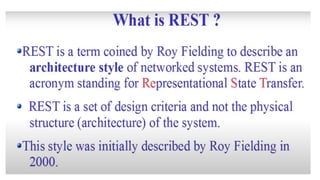
• The REST stands for REpresentational State Transfer.
• State means data
• REpresentational means formats (such as XML, JSON, YAML, HTML,
etc)
• Transfer means carrying data between consumer and provider using
the HTTP protocol
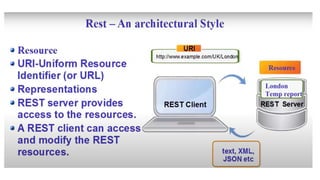
Resource
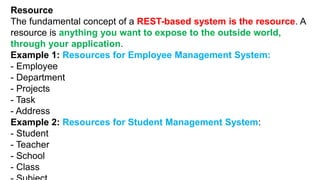
The fundamental concept of a REST-based system is the resource. A
resource is anything you want to expose to the outside world,
through your application.
Example 1: Resources for Employee Management System:
- Employee
- Department
- Projects
- Task
- Address
Example 2: Resources for Student Management System:
- Student
- Teacher
- School
- Class
URI - Uniform Resource Identifier
• The resource can be identified by a Uniform Resource Identifier (URI). For
web-based systems, HTTP is the most commonly used protocol for
communicating with external systems. You can identify a unique resource
using a URI.
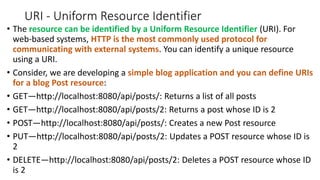
• Consider, we are developing a simple blog application and you can define URIs
for a blog Post resource:
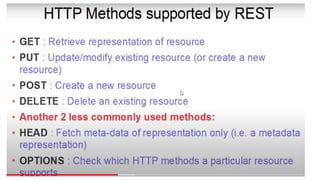
• GET—http://localhost:8080/api/posts/: Returns a list of all posts
• GET—http://localhost:8080/api/posts/2: Returns a post whose ID is 2
• POST—http://localhost:8080/api/posts/: Creates a new Post resource
• PUT—http://localhost:8080/api/posts/2: Updates a POST resource whose ID is
2
• DELETE—http://localhost:8080/api/posts/2: Deletes a POST resource whose ID
is 2
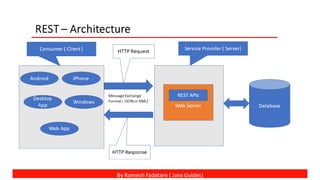
REST Architecture
• Request and Response: Request is the input to a web service,
and the response is the output from a web service.
• Message Exchange Format: It is the format of the request and
response. There are two popular message exchange formats:
XML and JSON.
• Service Provider or Server: The service provider is one that
hosts the web service.
• Service Consumer or Client: A service consumer is one who is
using a web service.
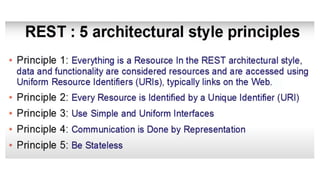
REST Architectural Constraints
• Client-server architecture: The client is the front-end and the server is the back-end
of the service.
• Stateless: No data should be stored on the server during the processing of the
request transfer. The state of the session should be saved at the client’s end.
• Cacheable: The client should have the ability to store responses in a cache. This
greatly improves the performance of the API.
• Uniform Interface: This constraint indicates a generic interface to manage all the
interactions between the client and server in a unified way, which simplifies and
decouples the architecture.
• Layered System: The server can have multiple layers for implementation. This
layered architecture helps to improve scalability by enabling load balancing.
• Code on Demand: This constraint is optional. This constraint indicates that the
functionality of the client applications can be extended at runtime by allowing a
code download from the server and executing the code.
import java.io.IOException;
import java.net.URI;
import java.net.http.HttpRequest;
import java.net.http.HttpResponse;
import java.net.http.HttpClient;
public class ExampleAPI
{
public static void main(String[] aa) throws IOException , InterruptedException
{
var url="https://text-translator2.p.rapidapi.com/translate";
var request=HttpRequest.newBuilder().GET().uri(URI.create(url)).build();
var client=HttpClient.newBuilder().build();
var response=client.send(request,HttpResponse.BodyHandlers.ofString());
System.out.println(response.statusCode());
System.out.println(response.body());
}
}
References
• https://rapidapi.com/collection/geocoding-location-apis
• https://www.javaguides.net/p/rest-api-tutorial.html

A REST API (also called a RESTful API or RESTful web API) is an application programming interface (API)

  • 1.
  • 2.
    Application programming interfaces– or APIs • APIs represent a set of definitions and protocols. • need them for app development and integration as they facilitate data exchange between two pieces of software, like an information supplier (a server) and a user. • Programs use an API to communicate, retrieve information, or perform a function. • APIs allow users to work with the system to return their desired result. • API acts as a mediator between users (clients) and resources (servers). • defines a set of constraints to be used for creating web services.
  • 3.
    What is REST? •The REST stands for REpresentational State Transfer. • State means data • REpresentational means formats (such as XML, JSON, YAML, HTML, etc) • Transfer means carrying data between consumer and provider using the HTTP protocol
  • 6.
    Resource The fundamental conceptof a REST-based system is the resource. A resource is anything you want to expose to the outside world, through your application. Example 1: Resources for Employee Management System: - Employee - Department - Projects - Task - Address Example 2: Resources for Student Management System: - Student - Teacher - School - Class
  • 7.
    URI - UniformResource Identifier • The resource can be identified by a Uniform Resource Identifier (URI). For web-based systems, HTTP is the most commonly used protocol for communicating with external systems. You can identify a unique resource using a URI. • Consider, we are developing a simple blog application and you can define URIs for a blog Post resource: • GET—http://localhost:8080/api/posts/: Returns a list of all posts • GET—http://localhost:8080/api/posts/2: Returns a post whose ID is 2 • POST—http://localhost:8080/api/posts/: Creates a new Post resource • PUT—http://localhost:8080/api/posts/2: Updates a POST resource whose ID is 2 • DELETE—http://localhost:8080/api/posts/2: Deletes a POST resource whose ID is 2
  • 9.
    REST Architecture • Requestand Response: Request is the input to a web service, and the response is the output from a web service. • Message Exchange Format: It is the format of the request and response. There are two popular message exchange formats: XML and JSON. • Service Provider or Server: The service provider is one that hosts the web service. • Service Consumer or Client: A service consumer is one who is using a web service.
  • 11.
    REST Architectural Constraints •Client-server architecture: The client is the front-end and the server is the back-end of the service. • Stateless: No data should be stored on the server during the processing of the request transfer. The state of the session should be saved at the client’s end. • Cacheable: The client should have the ability to store responses in a cache. This greatly improves the performance of the API. • Uniform Interface: This constraint indicates a generic interface to manage all the interactions between the client and server in a unified way, which simplifies and decouples the architecture. • Layered System: The server can have multiple layers for implementation. This layered architecture helps to improve scalability by enabling load balancing. • Code on Demand: This constraint is optional. This constraint indicates that the functionality of the client applications can be extended at runtime by allowing a code download from the server and executing the code.
  • 15.
    import java.io.IOException; import java.net.URI; importjava.net.http.HttpRequest; import java.net.http.HttpResponse; import java.net.http.HttpClient; public class ExampleAPI { public static void main(String[] aa) throws IOException , InterruptedException { var url="https://text-translator2.p.rapidapi.com/translate"; var request=HttpRequest.newBuilder().GET().uri(URI.create(url)).build(); var client=HttpClient.newBuilder().build(); var response=client.send(request,HttpResponse.BodyHandlers.ofString()); System.out.println(response.statusCode()); System.out.println(response.body()); } }
  • 16.