•REST Api using Grails
Agenda
✔ What is REST service
✔ Guidelines to create REST Api
✔ Domain class as REST resource
✔ Implementing REST Controller
✔ Customizing Response Rendering
✔ Versioning REST Resources
What is REST service
✔ Service:- App that is hosted in backend and ready to
serve data
✔ REST is stand for (Representational State Transfer)
Guidelines to create REST Api
✔ Use HTTP methods (Client will request data with
http)
✔ Expose directory structure like URIs
✔ Transfer XML or JSON (Javascript Object Notation)
or both
✔ Be stateless. (server does not store any state about
the client session on the server side.)
REST is very simple and involves
• XML, JSON as a communication medium
• Combined with URL parameters
• Use HTTP methods GET, POST, PUT, DELETE
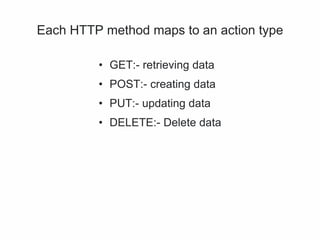
Each HTTP method maps to an action type
• GET:- retrieving data
• POST:- creating data
• PUT:- updating data
• DELETE:- Delete data
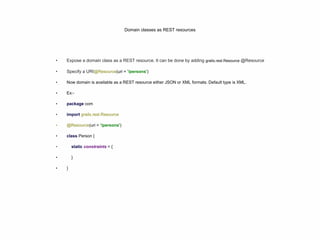
Domain classes as REST resources
• Expose a domain class as a REST resource. It can be done by adding grails.rest.Resource @Resource
• Specify a URI@Resource(uri = '/persons')
• Now domain is available as a REST resource either JSON or XML formats. Default type is XML.
• Ex:-
• package com
• import grails.rest.Resource
• @Resource(uri = '/persons')
• class Person {
• static constraints = {
• }
• }
Header Information
● Content Type
● Accept
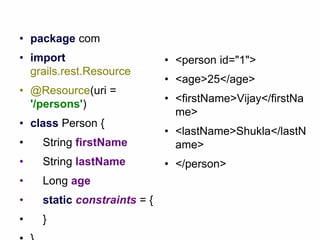
• package com
• import
grails.rest.Resource
• @Resource(uri =
'/persons')
• class Person {
• String firstName
• String lastName
• Long age
• static constraints = {
• }
• <person id="1">
• <age>25</age>
• <firstName>Vijay</firstNa
me>
• <lastName>Shukla</lastN
ame>
• </person>
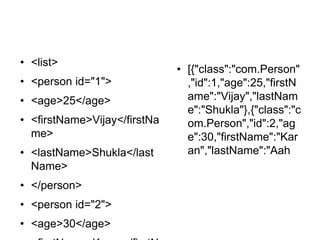
• <list>
• <person id="1">
• <age>25</age>
• <firstName>Vijay</firstNa
me>
• <lastName>Shukla</last
Name>
• </person>
• <person id="2">
• <age>30</age>
• [{"class":"com.Person"
,"id":1,"age":25,"firstN
ame":"Vijay","lastNam
e":"Shukla"},{"class":"c
om.Person","id":2,"ag
e":30,"firstName":"Kar
an","lastName":"Aah
•If you want to change the defult representation from
XML to JSON then
•add formats option like:-
•@Resource(uri = '/persons', formats = ['json', 'xml'])
• [{"class":"com.Person","i
d":1,"age":25,"firstName
":"Vijay","lastName":"Sh
ukla"},{"class":"com.Per
son","id":2,"age":30,"first
Name":"Karan","lastNa
me":"Aahuja"}]
• Instead of using the file
extension in the URI,
you can also obtain a
JSON response using
the ACCEPT header.
• curl -i -H "Accept:
application/json"
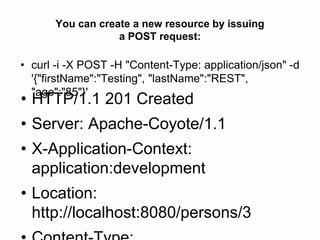
You can create a new resource by issuing
a POST request:
• curl -i -X POST -H "Content-Type: application/json" -d
'{"firstName":"Testing", "lastName":"REST",
"age":"85"}'
• HTTP/1.1 201 Created
• Server: Apache-Coyote/1.1
• X-Application-Context:
application:development
• Location:
http://localhost:8080/persons/3
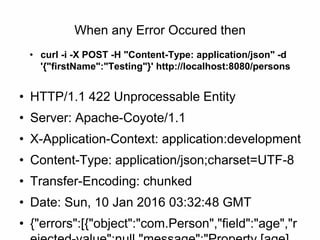
When any Error Occured then
• curl -i -X POST -H "Content-Type: application/json" -d
'{"firstName":"Testing"}' http://localhost:8080/persons
• HTTP/1.1 422 Unprocessable Entity
• Server: Apache-Coyote/1.1
• X-Application-Context: application:development
• Content-Type: application/json;charset=UTF-8
• Transfer-Encoding: chunked
• Date: Sun, 10 Jan 2016 03:32:48 GMT
• {"errors":[{"object":"com.Person","field":"age","r
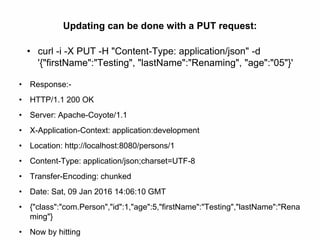
Updating can be done with a PUT request:
• curl -i -X PUT -H "Content-Type: application/json" -d
'{"firstName":"Testing", "lastName":"Renaming", "age":"05"}'
• Response:-
• HTTP/1.1 200 OK
• Server: Apache-Coyote/1.1
• X-Application-Context: application:development
• Location: http://localhost:8080/persons/1
• Content-Type: application/json;charset=UTF-8
• Transfer-Encoding: chunked
• Date: Sat, 09 Jan 2016 14:06:10 GMT
• {"class":"com.Person","id":1,"age":5,"firstName":"Testing","lastName":"Rena
ming"}
• Now by hitting
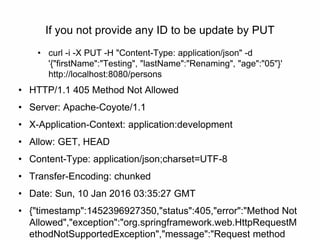
If you not provide any ID to be update by PUT
• curl -i -X PUT -H "Content-Type: application/json" -d
'{"firstName":"Testing", "lastName":"Renaming", "age":"05"}'
http://localhost:8080/persons
• HTTP/1.1 405 Method Not Allowed
• Server: Apache-Coyote/1.1
• X-Application-Context: application:development
• Allow: GET, HEAD
• Content-Type: application/json;charset=UTF-8
• Transfer-Encoding: chunked
• Date: Sun, 10 Jan 2016 03:35:27 GMT
• {"timestamp":1452396927350,"status":405,"error":"Method Not
Allowed","exception":"org.springframework.web.HttpRequestM
ethodNotSupportedException","message":"Request method
a resource can be deleted with DELETE request:
• curl -i -X DELETE -H "Content-Type: application/json"
• Response:- HTTP/1.1 204 No Content
• Server: Apache-Coyote/1.1
• X-Application-Context: application:development
• Date: Sat, 09 Jan 2016 14:08:35 GMT
• Now, by hitting
• [{"class":"com.Person","id":2,"age":30,"firstName":"Karan","lastName
":"Aahuja"},{"class":"com.Person","id":3,"age":85,"firstName":"Testing
","lastName":"REST"}]
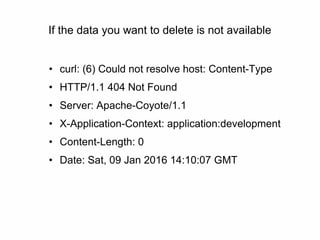
If the data you want to delete is not available
• curl: (6) Could not resolve host: Content-Type
• HTTP/1.1 404 Not Found
• Server: Apache-Coyote/1.1
• X-Application-Context: application:development
• Content-Length: 0
• Date: Sat, 09 Jan 2016 14:10:07 GMT
Update only one field:-
• curl -X PATCH -H "Content-Type: application/json" -d
'{"firstName":"REST API TESTING"}'
http://localhost:8080/persons/2• {"class":"com.Person","id":2,"age":30,"firstName":"REST API
TESTING","lastName":"Aahuja"}
• Now hitting
• [{"class":"com.Person","id":1,"age":25,"firstName":"Vijay","lastN
ame":"Shukla"},{"class":"com.Person","id":2,"age":30,"firstNam
e":"REST API TESTING","lastName":"Aahuja"}]
•We can enable read-only capabilities ny setting reaadOnly attribute to
true:-
•@Resource(uri='/books', readOnly=true)
•In this case POST, PUT and DELETE requests will be forbidden.
•package com
•import grails.rest.Resource
•@Resource(uri = '/persons', formats = ['json', 'xml'], readOnly = true)
•class Person {
• String firstName
• String lastName
• Long age
• static constraints = {
• }
•}
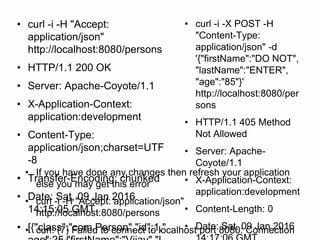
• curl -i -H "Accept:
application/json"
http://localhost:8080/persons
• HTTP/1.1 200 OK
• Server: Apache-Coyote/1.1
• X-Application-Context:
application:development
• Content-Type:
application/json;charset=UTF
-8
• Transfer-Encoding: chunked
• Date: Sat, 09 Jan 2016
14:15:05 GMT
• [{"class":"com.Person","id":1,"
• curl -i -X POST -H
"Content-Type:
application/json" -d
'{"firstName":"DO NOT",
"lastName":"ENTER",
"age":"85"}'
http://localhost:8080/per
sons
• HTTP/1.1 405 Method
Not Allowed
• Server: Apache-
Coyote/1.1
• X-Application-Context:
application:development
• Content-Length: 0
• Date: Sat, 09 Jan 2016
• If you have done any changes then refresh your application
else you may get this error
• curl -i -H "Accept: application/json"
http://localhost:8080/persons
• curl: (7) Failed to connect to localhost port 8080: Connection
•If you prefer to keep all url part in UrlMapping then simply
remove uri part from domain and below line in UrlMapping.groovy
•"/persons"(resources:"person")
•Ex:-
•import grails.rest.Resource
•@Resource(formats = ['json', 'xml'], readOnly = true)
•class Person {
• String firstName
• String lastName
• Long age
• static constraints = {
• }
•}
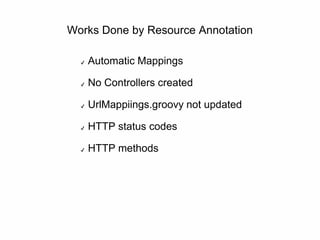
Works Done by Resource Annotation
✔ Automatic Mappings
✔ No Controllers created
✔ UrlMappiings.groovy not updated
✔ HTTP status codes
✔ HTTP methods
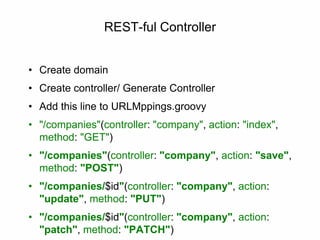
REST-ful Controller
• Create domain
• Create controller/ Generate Controller
• Add this line to URLMppings.groovy
• "/companies"(controller: "company", action: "index",
method: "GET")
• "/companies"(controller: "company", action: "save",
method: "POST")
• "/companies/$id"(controller: "company", action:
"update", method: "PUT")
• "/companies/$id"(controller: "company", action:
"patch", method: "PATCH")
✔ Controller Class must extends RestfulController
✔ Add static response formats
✔ class CompanyController extends RestfulController {
✔ static responseFormats = ["json", "xml"]
✔ CompanyController() {
✔ super(Company)
✔ }
✔ }
URL MAPPING REPORTS
✔ HTTP Methods
✔via mappings
✔“/custom”(controller=”custom”, action=”index”,
method=”GET”)
✔via controllers
✔static allowedMethods = [sav:”POST”,
update:”PUT”]
✔ Either use allowedMethod way or mapping ways
Default Media Types
✔ xml if nothing specified
✔ on mappings and controllers
✔formats = [“json”,”xml”]
✔ Extension
✔/countries.xml
✔/countries.json
✔ Requesting a format not included returns 406 Not Acceptable
Custom Response Renderer
• Register custom JSON or XML renderers bean in
resources.groovy
• beans = {
• countryJsonRenderer(JsonCollectionRenderer,
Country) {
• excludes = ['abreviation']
• }
• personJsonRenderer(XmlCollectionRenderer,
Person){
• excludes = ["age"]
• }
Custom Response Renderer
• Registeriing Custome Renderer in Bootstrap.grroovy
• JSON.registerObjectMarshaller(Country) {
• return [
• id : it.id,
• countryName : it.countryName,
• abbreviation: it.abbreviation,
• continent : it.continent
• ]
• }
References

REST

  • 1.
  • 2.
    Agenda ✔ What isREST service ✔ Guidelines to create REST Api ✔ Domain class as REST resource ✔ Implementing REST Controller ✔ Customizing Response Rendering ✔ Versioning REST Resources
  • 3.
    What is RESTservice ✔ Service:- App that is hosted in backend and ready to serve data ✔ REST is stand for (Representational State Transfer)
  • 4.
    Guidelines to createREST Api ✔ Use HTTP methods (Client will request data with http) ✔ Expose directory structure like URIs ✔ Transfer XML or JSON (Javascript Object Notation) or both ✔ Be stateless. (server does not store any state about the client session on the server side.)
  • 5.
    REST is verysimple and involves • XML, JSON as a communication medium • Combined with URL parameters • Use HTTP methods GET, POST, PUT, DELETE
  • 6.
    Each HTTP methodmaps to an action type • GET:- retrieving data • POST:- creating data • PUT:- updating data • DELETE:- Delete data
  • 7.
    Domain classes asREST resources • Expose a domain class as a REST resource. It can be done by adding grails.rest.Resource @Resource • Specify a URI@Resource(uri = '/persons') • Now domain is available as a REST resource either JSON or XML formats. Default type is XML. • Ex:- • package com • import grails.rest.Resource • @Resource(uri = '/persons') • class Person { • static constraints = { • } • }
  • 8.
  • 9.
    • package com •import grails.rest.Resource • @Resource(uri = '/persons') • class Person { • String firstName • String lastName • Long age • static constraints = { • } • <person id="1"> • <age>25</age> • <firstName>Vijay</firstNa me> • <lastName>Shukla</lastN ame> • </person>
  • 10.
    • <list> • <personid="1"> • <age>25</age> • <firstName>Vijay</firstNa me> • <lastName>Shukla</last Name> • </person> • <person id="2"> • <age>30</age> • [{"class":"com.Person" ,"id":1,"age":25,"firstN ame":"Vijay","lastNam e":"Shukla"},{"class":"c om.Person","id":2,"ag e":30,"firstName":"Kar an","lastName":"Aah
  • 11.
    •If you wantto change the defult representation from XML to JSON then •add formats option like:- •@Resource(uri = '/persons', formats = ['json', 'xml'])
  • 12.
    • [{"class":"com.Person","i d":1,"age":25,"firstName ":"Vijay","lastName":"Sh ukla"},{"class":"com.Per son","id":2,"age":30,"first Name":"Karan","lastNa me":"Aahuja"}] • Insteadof using the file extension in the URI, you can also obtain a JSON response using the ACCEPT header. • curl -i -H "Accept: application/json"
  • 13.
    You can createa new resource by issuing a POST request: • curl -i -X POST -H "Content-Type: application/json" -d '{"firstName":"Testing", "lastName":"REST", "age":"85"}' • HTTP/1.1 201 Created • Server: Apache-Coyote/1.1 • X-Application-Context: application:development • Location: http://localhost:8080/persons/3
  • 14.
    When any ErrorOccured then • curl -i -X POST -H "Content-Type: application/json" -d '{"firstName":"Testing"}' http://localhost:8080/persons • HTTP/1.1 422 Unprocessable Entity • Server: Apache-Coyote/1.1 • X-Application-Context: application:development • Content-Type: application/json;charset=UTF-8 • Transfer-Encoding: chunked • Date: Sun, 10 Jan 2016 03:32:48 GMT • {"errors":[{"object":"com.Person","field":"age","r
  • 15.
    Updating can bedone with a PUT request: • curl -i -X PUT -H "Content-Type: application/json" -d '{"firstName":"Testing", "lastName":"Renaming", "age":"05"}' • Response:- • HTTP/1.1 200 OK • Server: Apache-Coyote/1.1 • X-Application-Context: application:development • Location: http://localhost:8080/persons/1 • Content-Type: application/json;charset=UTF-8 • Transfer-Encoding: chunked • Date: Sat, 09 Jan 2016 14:06:10 GMT • {"class":"com.Person","id":1,"age":5,"firstName":"Testing","lastName":"Rena ming"} • Now by hitting
  • 16.
    If you notprovide any ID to be update by PUT • curl -i -X PUT -H "Content-Type: application/json" -d '{"firstName":"Testing", "lastName":"Renaming", "age":"05"}' http://localhost:8080/persons • HTTP/1.1 405 Method Not Allowed • Server: Apache-Coyote/1.1 • X-Application-Context: application:development • Allow: GET, HEAD • Content-Type: application/json;charset=UTF-8 • Transfer-Encoding: chunked • Date: Sun, 10 Jan 2016 03:35:27 GMT • {"timestamp":1452396927350,"status":405,"error":"Method Not Allowed","exception":"org.springframework.web.HttpRequestM ethodNotSupportedException","message":"Request method
  • 17.
    a resource canbe deleted with DELETE request: • curl -i -X DELETE -H "Content-Type: application/json" • Response:- HTTP/1.1 204 No Content • Server: Apache-Coyote/1.1 • X-Application-Context: application:development • Date: Sat, 09 Jan 2016 14:08:35 GMT • Now, by hitting • [{"class":"com.Person","id":2,"age":30,"firstName":"Karan","lastName ":"Aahuja"},{"class":"com.Person","id":3,"age":85,"firstName":"Testing ","lastName":"REST"}]
  • 18.
    If the datayou want to delete is not available • curl: (6) Could not resolve host: Content-Type • HTTP/1.1 404 Not Found • Server: Apache-Coyote/1.1 • X-Application-Context: application:development • Content-Length: 0 • Date: Sat, 09 Jan 2016 14:10:07 GMT
  • 19.
    Update only onefield:- • curl -X PATCH -H "Content-Type: application/json" -d '{"firstName":"REST API TESTING"}' http://localhost:8080/persons/2• {"class":"com.Person","id":2,"age":30,"firstName":"REST API TESTING","lastName":"Aahuja"} • Now hitting • [{"class":"com.Person","id":1,"age":25,"firstName":"Vijay","lastN ame":"Shukla"},{"class":"com.Person","id":2,"age":30,"firstNam e":"REST API TESTING","lastName":"Aahuja"}]
  • 20.
    •We can enableread-only capabilities ny setting reaadOnly attribute to true:- •@Resource(uri='/books', readOnly=true) •In this case POST, PUT and DELETE requests will be forbidden. •package com •import grails.rest.Resource •@Resource(uri = '/persons', formats = ['json', 'xml'], readOnly = true) •class Person { • String firstName • String lastName • Long age • static constraints = { • } •}
  • 21.
    • curl -i-H "Accept: application/json" http://localhost:8080/persons • HTTP/1.1 200 OK • Server: Apache-Coyote/1.1 • X-Application-Context: application:development • Content-Type: application/json;charset=UTF -8 • Transfer-Encoding: chunked • Date: Sat, 09 Jan 2016 14:15:05 GMT • [{"class":"com.Person","id":1," • curl -i -X POST -H "Content-Type: application/json" -d '{"firstName":"DO NOT", "lastName":"ENTER", "age":"85"}' http://localhost:8080/per sons • HTTP/1.1 405 Method Not Allowed • Server: Apache- Coyote/1.1 • X-Application-Context: application:development • Content-Length: 0 • Date: Sat, 09 Jan 2016 • If you have done any changes then refresh your application else you may get this error • curl -i -H "Accept: application/json" http://localhost:8080/persons • curl: (7) Failed to connect to localhost port 8080: Connection
  • 22.
    •If you preferto keep all url part in UrlMapping then simply remove uri part from domain and below line in UrlMapping.groovy •"/persons"(resources:"person") •Ex:- •import grails.rest.Resource •@Resource(formats = ['json', 'xml'], readOnly = true) •class Person { • String firstName • String lastName • Long age • static constraints = { • } •}
  • 23.
    Works Done byResource Annotation ✔ Automatic Mappings ✔ No Controllers created ✔ UrlMappiings.groovy not updated ✔ HTTP status codes ✔ HTTP methods
  • 24.
    REST-ful Controller • Createdomain • Create controller/ Generate Controller • Add this line to URLMppings.groovy • "/companies"(controller: "company", action: "index", method: "GET") • "/companies"(controller: "company", action: "save", method: "POST") • "/companies/$id"(controller: "company", action: "update", method: "PUT") • "/companies/$id"(controller: "company", action: "patch", method: "PATCH")
  • 25.
    ✔ Controller Classmust extends RestfulController ✔ Add static response formats ✔ class CompanyController extends RestfulController { ✔ static responseFormats = ["json", "xml"] ✔ CompanyController() { ✔ super(Company) ✔ } ✔ }
  • 26.
    URL MAPPING REPORTS ✔HTTP Methods ✔via mappings ✔“/custom”(controller=”custom”, action=”index”, method=”GET”) ✔via controllers ✔static allowedMethods = [sav:”POST”, update:”PUT”] ✔ Either use allowedMethod way or mapping ways
  • 27.
    Default Media Types ✔xml if nothing specified ✔ on mappings and controllers ✔formats = [“json”,”xml”] ✔ Extension ✔/countries.xml ✔/countries.json ✔ Requesting a format not included returns 406 Not Acceptable
  • 28.
    Custom Response Renderer •Register custom JSON or XML renderers bean in resources.groovy • beans = { • countryJsonRenderer(JsonCollectionRenderer, Country) { • excludes = ['abreviation'] • } • personJsonRenderer(XmlCollectionRenderer, Person){ • excludes = ["age"] • }
  • 29.
    Custom Response Renderer •Registeriing Custome Renderer in Bootstrap.grroovy • JSON.registerObjectMarshaller(Country) { • return [ • id : it.id, • countryName : it.countryName, • abbreviation: it.abbreviation, • continent : it.continent • ] • }
  • 30.