Grails Controller...
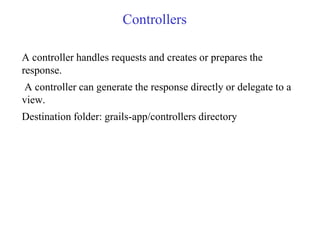
Controllers
A controller handles requests and creates or prepares the
response.
A controller can generate the response directly or delegate to a
view.
Destination folder: grails-app/controllers directory
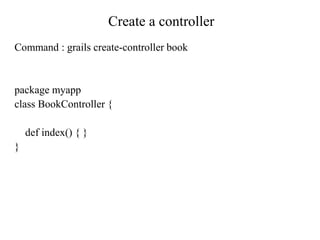
Create a controller
Command : grails create-controller book
package myapp
class BookController {
def index() { }
}
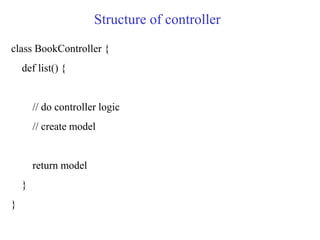
Structure of controller
class BookController {
def list() {
// do controller logic
// create model
return model
}
}
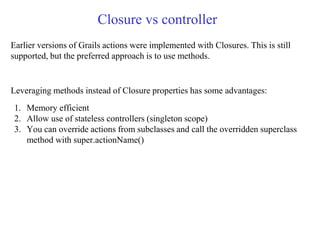
Closure vs controller
Earlier versions of Grails actions were implemented with Closures. This is still
supported, but the preferred approach is to use methods.
Leveraging methods instead of Closure properties has some advantages:
1. Memory efficient
2. Allow use of stateless controllers (singleton scope)
3. You can override actions from subclasses and call the overridden superclass
method with super.actionName()
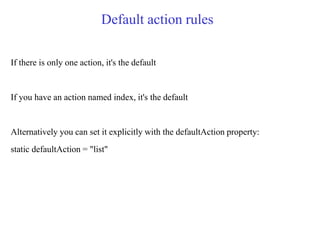
Default action rules
If there is only one action, it's the default
If you have an action named index, it's the default
Alternatively you can set it explicitly with the defaultAction property:
static defaultAction = "list"
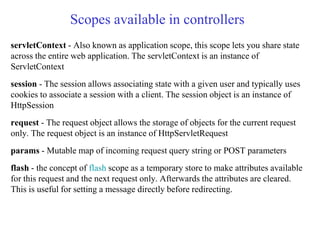
Scopes available in controllers
servletContext - Also known as application scope, this scope lets you share state
across the entire web application. The servletContext is an instance of
ServletContext
session - The session allows associating state with a given user and typically uses
cookies to associate a session with a client. The session object is an instance of
HttpSession
request - The request object allows the storage of objects for the current request
only. The request object is an instance of HttpServletRequest
params - Mutable map of incoming request query string or POST parameters
flash - the concept of flash scope as a temporary store to make attributes available
for this request and the next request only. Afterwards the attributes are cleared.
This is useful for setting a message directly before redirecting.
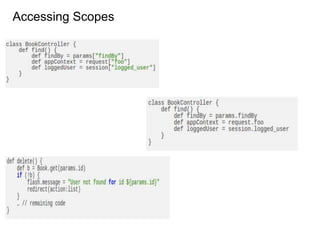
Accessing Scopes
Scoped Controller
prototype (default) - A new controller will be created for each request
(recommended for actions as Closure properties)
session - One controller is created for the scope of a user session
singleton - Only one instance of the controller ever exists (recommended for
actions as methods)
To enable one of the scopes, add a static scope property to your class with one
of the valid scope values listed above, for example
static scope = "singleton"
You can define the default strategy under in Config.groovy with the
grails.controllers.defaultScope key, for example:
grails.controllers.defaultScope = "singleton"
Redirect with controller
// Call the login action within the same class
redirect(action: login)
// Also redirects to the index action in the home controller
redirect(controller: 'home', action: 'index')
// Redirect to an explicit URI
redirect(uri: "/login.html")
// Redirect to a URL
redirect(url: "http://grails.org")
redirect(action: 'myaction', params: [myparam: "myvalue"])
Render with controller
Object for example:
def theShining = new Book(title: 'The Shining', author: 'Stephen King')
render(view: "viewName", model: [book: theShining])
render(template: "book", model: [book: theShining])
@ annotation with controller
package sample
import grails.plugins.springsecurity.Secured
class ScreenController {
def publicPage() {
render "This is a public page"
}
@Secured(['ROLE_COMMON'])
def commonPage() {
render "This is a common role page"
}
}
commonPage - only user with ROLE_COMMON role can access this page.
URLs
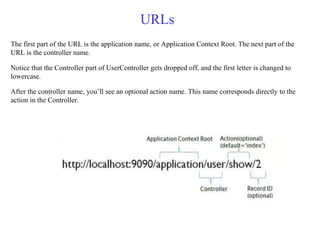
The first part of the URL is the application name, or Application Context Root. The next part of the
URL is the controller name.
Notice that the Controller part of UserController gets dropped off, and the first letter is changed to
lowercase.
After the controller name, you’ll see an optional action name. This name corresponds directly to the
action in the Controller.
Controller Interceptors
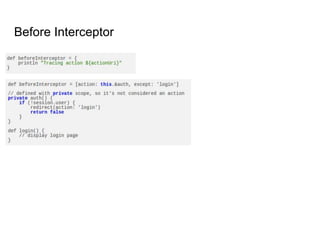
Before Interception
The beforeInterceptor intercepts processing before the action is executed. If it
returns false then the intercepted action will not be executed.
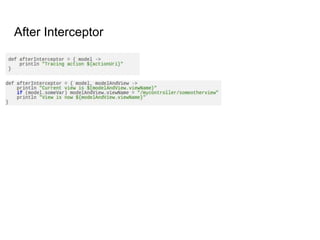
After Interception
Use the afterInterceptor property to define an interceptor that is executed after an
action
Before Interceptor
After Interceptor
References
http://docs.grails.org/2.1.1/guide/single.html#controllers
http://grails.asia/grails-tutorial-for-beginners-starting-with-controllers/
https://tutorials.techmytalk.com/2014/07/19/grails-scaffolding-controllers-and-views/
Thanks for listening...

Controller

  • 1.
  • 2.
    Controllers A controller handlesrequests and creates or prepares the response. A controller can generate the response directly or delegate to a view. Destination folder: grails-app/controllers directory
  • 3.
    Create a controller Command: grails create-controller book package myapp class BookController { def index() { } }
  • 4.
    Structure of controller classBookController { def list() { // do controller logic // create model return model } }
  • 5.
    Closure vs controller Earlierversions of Grails actions were implemented with Closures. This is still supported, but the preferred approach is to use methods. Leveraging methods instead of Closure properties has some advantages: 1. Memory efficient 2. Allow use of stateless controllers (singleton scope) 3. You can override actions from subclasses and call the overridden superclass method with super.actionName()
  • 6.
    Default action rules Ifthere is only one action, it's the default If you have an action named index, it's the default Alternatively you can set it explicitly with the defaultAction property: static defaultAction = "list"
  • 7.
    Scopes available incontrollers servletContext - Also known as application scope, this scope lets you share state across the entire web application. The servletContext is an instance of ServletContext session - The session allows associating state with a given user and typically uses cookies to associate a session with a client. The session object is an instance of HttpSession request - The request object allows the storage of objects for the current request only. The request object is an instance of HttpServletRequest params - Mutable map of incoming request query string or POST parameters flash - the concept of flash scope as a temporary store to make attributes available for this request and the next request only. Afterwards the attributes are cleared. This is useful for setting a message directly before redirecting.
  • 8.
  • 9.
    Scoped Controller prototype (default)- A new controller will be created for each request (recommended for actions as Closure properties) session - One controller is created for the scope of a user session singleton - Only one instance of the controller ever exists (recommended for actions as methods) To enable one of the scopes, add a static scope property to your class with one of the valid scope values listed above, for example static scope = "singleton" You can define the default strategy under in Config.groovy with the grails.controllers.defaultScope key, for example: grails.controllers.defaultScope = "singleton"
  • 10.
    Redirect with controller //Call the login action within the same class redirect(action: login) // Also redirects to the index action in the home controller redirect(controller: 'home', action: 'index') // Redirect to an explicit URI redirect(uri: "/login.html") // Redirect to a URL redirect(url: "http://grails.org") redirect(action: 'myaction', params: [myparam: "myvalue"])
  • 11.
    Render with controller Objectfor example: def theShining = new Book(title: 'The Shining', author: 'Stephen King') render(view: "viewName", model: [book: theShining]) render(template: "book", model: [book: theShining])
  • 12.
    @ annotation withcontroller package sample import grails.plugins.springsecurity.Secured class ScreenController { def publicPage() { render "This is a public page" } @Secured(['ROLE_COMMON']) def commonPage() { render "This is a common role page" } } commonPage - only user with ROLE_COMMON role can access this page.
  • 13.
    URLs The first partof the URL is the application name, or Application Context Root. The next part of the URL is the controller name. Notice that the Controller part of UserController gets dropped off, and the first letter is changed to lowercase. After the controller name, you’ll see an optional action name. This name corresponds directly to the action in the Controller.
  • 14.
    Controller Interceptors Before Interception ThebeforeInterceptor intercepts processing before the action is executed. If it returns false then the intercepted action will not be executed. After Interception Use the afterInterceptor property to define an interceptor that is executed after an action
  • 15.
  • 16.
  • 17.
  • 18.