Introducing Vertx
By: Vijay Shukla & Vishal
Sahu
Agenda
1. Introduction
2. Main Component
3. Threading and Programming Model
4. Installation
5. Event Bus
6. Verticle
7. Services
8. Templates
Introduction
● Vert.x is a toolkit or platform for implementing reactive applications on the
JVM.
● Vert.x is an open-source project at the Eclipse Foundation. Vert.x was
initiated in 2012 by Tim Fox.
● General Purpose Application Framework
● Polyglot (Java, Groovy, Scala, Kotlin, JavaScript, Ruby and Ceylon)
● Event Driven, non-blocking
● Lightweight & fast
● Reusable modules.
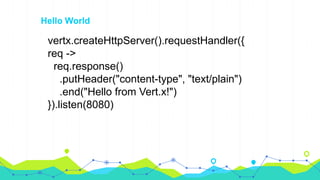
vertx.createHttpServer().requestHandler({
req ->
req.response()
.putHeader("content-type", "text/plain")
.end("Hello from Vert.x!")
}).listen(8080)
Hello World
Main Components
1. Verticles - the building blocks
2. Event Bus & Event Loop
3. Future
4. Routes
Threading and Programming Model
1. The synchronous I/O threading model are simple to understand, but it hurts
scalability with too many concurrent connections.
2. Operating System spends significant time just on thread scheduling
management.
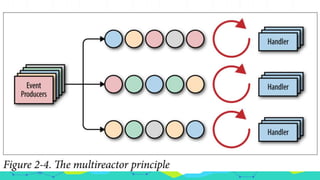
3. The unit of deployment in Vert.x is called a Verticle. A verticle processes
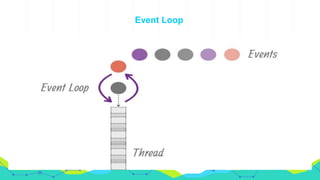
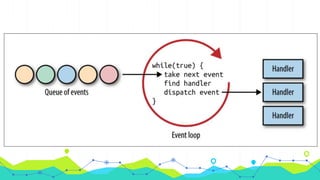
incoming events over an event-loop.
4. Event-loops are typical in asynchronous programming models.
5. Every loop is attached to a thread. By default Vert.x attaches 2 event loops
per CPU core thread.
6. The direct consequence is that a regular verticle always processes events on
the same thread, so there is no need to use thread coordination mechanisms
to manipulate a verticle state
7. Verticles run in single thread mode.
8. A verticle is only ever executed by a single thread, and always by the
same thread.
9. It is capable of using all the CPUs in machine, or cores in CPU.
10.It does this by creating one thread per CPU.
11.Each thread can send message to multiple verticles.
12.Verticles are event driven and are only running when receiving message,
so a verticles does not need to have its own exclusive thread.
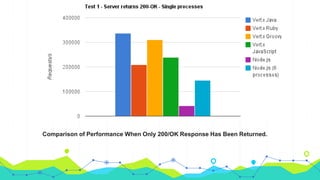
Comparison of Performance When Only 200/OK Response Has Been Returned.
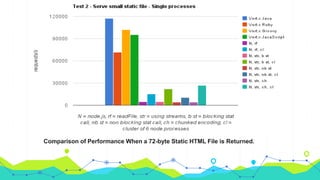
Comparison of Performance When a 72-byte Static HTML File is Returned.
Event Loop
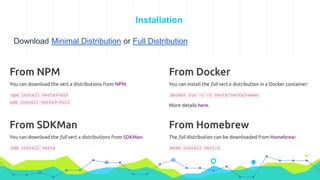
Installation
Download Minimal Distribution or Full Distribution
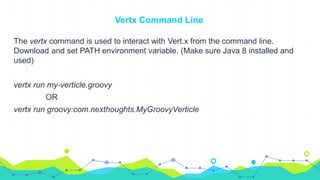
Vertx Command Line
The vertx command is used to interact with Vert.x from the command line.
Download and set PATH environment variable. (Make sure Java 8 installed and
used)
vertx run my-verticle.groovy
OR
vertx run groovy:com.nexthoughts.MyGroovyVerticle
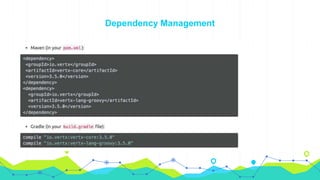
Dependency Management
Create Vertx Instance
You can create a Vertx instance by calling Vertx.vertx().
1. The Vertx instance creates a number of threads internally to handle the
exchange of messages between verticles.
2. These threads are not daemon threads, so they prevent the JVM from
shutting down, event of the main thread creating the Vertx instance
terminates.
3. When creating the Vertx Object you can also provide options if the default
is not right for you.
4. The VertxOptions object has many settings and allows you to configure
things like clustering, high availability, pool sizes etc.
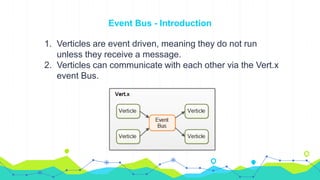
Event Bus - Introduction
1. Verticles are event driven, meaning they do not run
unless they receive a message.
2. Verticles can communicate with each other via the Vert.x
event Bus.
3. Message can be simple objects (e.g. Java Objects), Strings, CSV, JSON,
binary data or whatever else you need.
4. Verticles can send and listen to addresses.
5. An address is like a named channel.
6. When a message is sent to a given address, all verticles that listen on
that address receive the message.
7. Verticles can subscribe and unsubscribe to address without the ender
knowing.
8. This results in a very loose coupling between message senders and
message receivers.
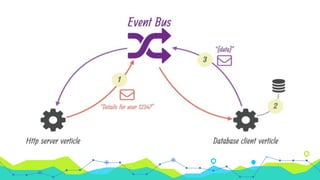
Using The Event Bus
Is is very common for verticles to either listen for incoming messages from the
event bus, or to write messages to other verticles via the event bus.
Listening for Message
1. When a verticle wants to listen for message from the bus, it listen on certain
address. An address is just a name.
2. Multiple verticles can listen for messages on the same address and multiple
verticles can send messages to an address.
3. A verticle can obtain a reference to the event bus via the vertx instance
inherited from AbstractVerticle
Registering Handlers
1. When a message arrives for your handler, you handler will be called, passing
in the message.
2. The object returned from call to consumer() is an instance of
MessageConsumer.
3. When registering a handler on a clustered event bus, it can take some time
for the registration to reach all nodes of the cluster. You can
register/unregister a completion handler to be notified.
Publishing/Sending Message
eventBus.publish(“address”,”Send Some message here”)
eventBus.send(“address”,”Send Some message here”)
Sending a message will result in only one handler registered at the address
receiving the message. You can also send message on event bus with headers.
def options=[headers:[“some-header-key”:”some-header-value”]]
vertx.eventBus().send(“address”,”Some Message to be sent”,options)
To acknowledge that the message has been processed the consumer can reply
to the message by calling reply.
Verticles
1. Introduction
2. Create Verticle
3. Start and Stop Verticle Asynchronous
4. Accessing Vert.x instance from Verticle
5. Vert.x type
a. Standard
b. Worker
c. Multi-Threaded
6. Deployment Verticle Programmatically
7. Rules for mapping verticle instance to Verticle Factory.
Introduction
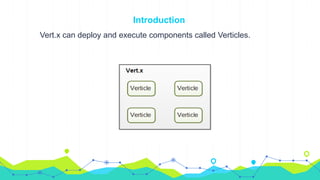
Vert.x can deploy and execute components called Verticles.
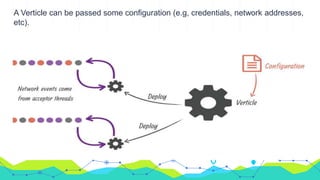
A Verticle can be passed some configuration (e.g, credentials, network addresses,
etc).
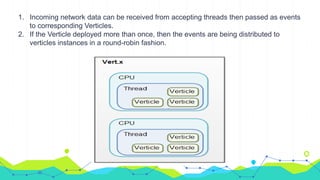
1. Incoming network data can be received from accepting threads then passed as events
to corresponding Verticles.
2. If the Verticle deployed more than once, then the events are being distributed to
verticles instances in a round-robin fashion.
1. The Vertx instance by itself doesn’t do much except all thread management, creating
an event bus etc.
2. In order to get the application to do something useful, you need to deploy one or
more verticles (component) inside the Vertx instance.
3. Before you can deploy a verticles you need to create it.
4. You can create a verticle by extending a class AbstractVerticle.
5. A verticle has a start() and a stop() method which are called when the verticles is
deployed and undeployed respectively.
6. Perform any necessary initialization work inside the start() and necessary cleanup in
stop().
Create Verticle
An application would typically be composed of many verticle instances running in the
same Vert.x instance at same time.
The different Verticle Instance communicate with each other by sending message
on the event bus.
Two alternatives to create verticles:
1. A plain groovy script
2. A groovy class implementing the Verticle interface or extending the
AbstractVerticle class.
Asynchronous Verticle Start and Stop
1. Sometimes we want to do some task in the start-up which takes some time
and you don’t want considered that verticle to be deployed until that happens.
2. There is an asynchronous start method, it takes Future as parameter. When
method return verticle will not be considered deployed.
3. When you finish your work then you have to call either complete or fail to
signal that you’re done.
Accessing Vert.x instance from verticle
You can access by using vertx variable/field.
◉ Access to Vert.x instance in Groovy Class
Verticle Types
◉ Standard Verticle
➢ They always executed using an event loop thread.
◉ Worker Verticle
➢ These run using a thread from worker pool. An instance is never
executed concurrent by more than one thread.
◉ Multi-Threaded Worker Verticle
➢ These run using a thread from the worker pool. An instance can be
executed concurrently by more than one thread.
Standard Verticles
◉ Standard Verticles are assigned and event loop thread when they are created
and the start method is called with that event loop.
◉ Vert.x will guarantee that all our code on Verticle instance is always executed
on the same event loop.
◉ Vert.x take care of:-
➢ Threading
➢ Scaling
➢ Synchronized
➢ Volatile
➢ Race Condition
➢ Deadlock
Worker Verticle
1. A worker verticle is just like Standard Verticle but it’s executed not using the
an event loop, but using a thread from the Vert.x worker thread pool.
2. It has been designed for calling blocking code, as they won’t block any
event’s loop.
3. You can also run inline blocking code directly while on an event loop.
4. It never executed concurrently by Vert.x by more than one thread, but can be
by different threads at different times.
5. To deploy Verticle as a worker you do that with setWorker.
Deploying Verticle programmatically
You can deploy a verticle using one of the method deployVerticle, specifying a
verticle name or you can pass in a verticle instance.
def myVerticle = new com.nexthoughts.MyVerticle()
vertx.deployVerticle(myVerticle)
You can also deploy by specifying verticle fully qualified name.
vertx.deployVerticle(‘com.nexthoughts.MyVerticle’)
The verticle name is used to look up specific VerticleFactory that will be used to
instantiate the actual verticle instances.
Rules for mapping a verticle name to a Verticle Factory
When deploying verticle using a name, the name is used to select the actual
verticle factory that will instantiate the verticle.
Verticle can have prefix which is a string followed by colon, which if present will
be used to look-up the factory.
js:foo.js //Use the JavaScript Verticle Factory.
groovy:com.nexthoughts.MyVerticle //Use the Groovy Verticle Factory
If no prefix present, Vert.x will look for a suffix and use that to lookup the factory.
Foo.js //Will also use the JavaScript verticle factory
MyVerticle.groovy //Will also use the Groovy verticle factory
If no prefix or suffix present then it by default Java fully qualified class name.
Most Verticles factories are loaded from the classpath and registered at Vert.x
startup.
We can programmatically register and unregister verticles factories using
registerVerticleFactory and unregisterVerticleFactory respectively.
The Context Object
1. When Vert.x provides an event to a handler or calls the start and stop method
of Verticle, the execution is associated with a Context.
2. A context is an event-loop context and is tied to a specific event loop thread.
3. To retrieve the context use the getOrCreateContext method.
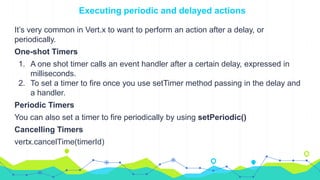
Executing periodic and delayed actions
It’s very common in Vert.x to want to perform an action after a delay, or
periodically.
One-shot Timers
1. A one shot timer calls an event handler after a certain delay, expressed in
milliseconds.
2. To set a timer to fire once you use setTimer method passing in the delay and
a handler.
Periodic Timers
You can also set a timer to fire periodically by using setPeriodic()
Cancelling Timers
vertx.cancelTime(timerId)
Vert.x Services
i. Handling files
ii. Http Server
iii. JDBC Connector
iv. Mongo Client
v. SMTP Mail
vi. REST APIs
File Handling
1. The Vert.x FileSystem object provides many operations for manipulating the
file system.
2. There is one file system instance object per Vert.x instance, fileSystem.
3. Blocking and Non-Blocking version of each operations is provided. Non-
blocking version takes a handler which is called when operations completes
or fails.
4. Vert.x provides an asynchronous file abstraction that allows you to manipulate
a file on the file system.
5. AsyncFile implements ReadStream and WriteStream so you can pump files
to and from other stream objects such as net sockets, http requests and
responses and WebSockets.
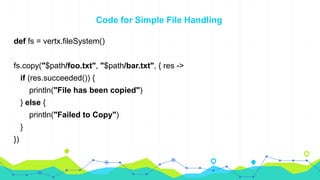
Code for Simple File Handling
def fs = vertx.fileSystem()
fs.copy("$path/foo.txt", "$path/bar.txt", { res ->
if (res.succeeded()) {
println("File has been copied")
} else {
println("Failed to Copy")
}
})
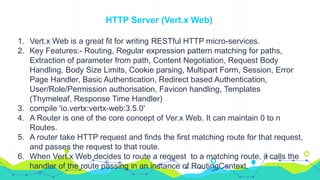
HTTP Server (Vert.x Web)
1. Vert.x Web is a great fit for writing RESTful HTTP micro-services.
2. Key Features:- Routing, Regular expression pattern matching for paths,
Extraction of parameter from path, Content Negotiation, Request Body
Handling, Body Size Limits, Cookie parsing, Multipart Form, Session, Error
Page Handler, Basic Authentication, Redirect based Authentication,
User/Role/Permission authorisation, Favicon handling, Templates
(Thymeleaf, Response Time Handler)
3. compile 'io.vertx:vertx-web:3.5.0'
4. A Router is one of the core concept of Ver.x Web. It can maintain 0 to n
Routes.
5. A router take HTTP request and finds the first matching route for that request,
and passes the request to that route.
6. When Vert.x Web decides to route a request to a matching route, it calls the
handler of the route passing in an instance of RoutingContext.
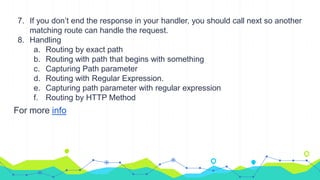
7. If you don’t end the response in your handler, you should call next so another
matching route can handle the request.
8. Handling
a. Routing by exact path
b. Routing with path that begins with something
c. Capturing Path parameter
d. Routing with Regular Expression.
e. Capturing path parameter with regular expression
f. Routing by HTTP Method
For more info
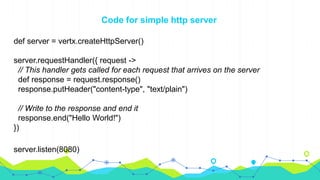
Code for simple http server
def server = vertx.createHttpServer()
server.requestHandler({ request ->
// This handler gets called for each request that arrives on the server
def response = request.response()
response.putHeader("content-type", "text/plain")
// Write to the response and end it
response.end("Hello World!")
})
server.listen(8080)
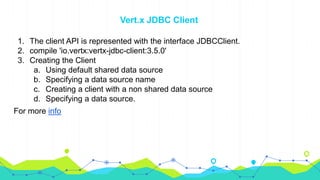
Vert.x JDBC Client
1. The client API is represented with the interface JDBCClient.
2. compile 'io.vertx:vertx-jdbc-client:3.5.0'
3. Creating the Client
a. Using default shared data source
b. Specifying a data source name
c. Creating a client with a non shared data source
d. Specifying a data source.
For more info
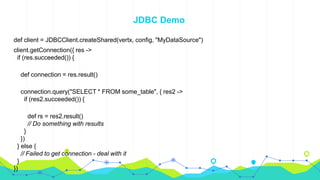
JDBC Demo
def client = JDBCClient.createShared(vertx, config, "MyDataSource")
client.getConnection({ res ->
if (res.succeeded()) {
def connection = res.result()
connection.query("SELECT * FROM some_table", { res2 ->
if (res2.succeeded()) {
def rs = res2.result()
// Do something with results
}
})
} else {
// Failed to get connection - deal with it
}
})
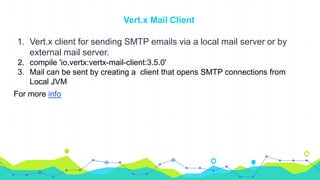
Vert.x Mail Client
1. Vert.x client for sending SMTP emails via a local mail server or by
external mail server.
2. compile 'io.vertx:vertx-mail-client:3.5.0'
3. Mail can be sent by creating a client that opens SMTP connections from
Local JVM
For more info
Mail Client Demo
def config = [:]
def mailClient = MailClient.createShared(vertx, config, "exampleclient")
def message = [:]
message.from = "user@example.com (Example User)"
message.to = "recipient@example.org"
message.cc = "Another User <another@example.net>"
message.text = "this is the plain message text"
message.html = "this is html text <a href="http://vertx.io">vertx.io</a>"
mailClient.sendMail(message, { result ->
if (result.succeeded()) {
println(result.result())
} else {
result.cause().printStackTrace()
}
})
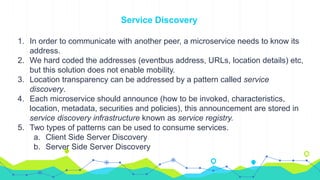
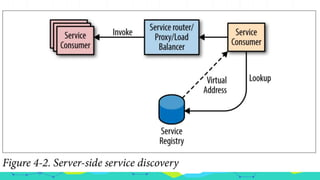
Service Discovery
1. In order to communicate with another peer, a microservice needs to know its
address.
2. We hard coded the addresses (eventbus address, URLs, location details) etc,
but this solution does not enable mobility.
3. Location transparency can be addressed by a pattern called service
discovery.
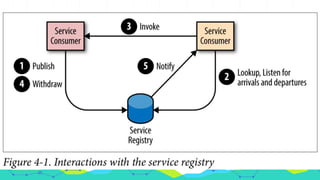
4. Each microservice should announce (how to be invoked, characteristics,
location, metadata, securities and policies), this announcement are stored in
service discovery infrastructure known as service registry.
5. Two types of patterns can be used to consume services.
a. Client Side Server Discovery
b. Server Side Server Discovery
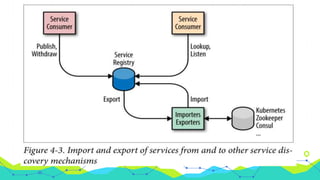
Vert.x Service Discovery
1. Vert.x provides an extensible service discovery mechanism, we can use
client-side or server-side service discovery using the same API.
2. It uses a distributed data structure shared on the Vert.x cluster.
Vertx in action
References
1. Guide for Java Devs
2. Groovy Doc
3. Node.js vs Vert.x
4. Vert.x Simple Tutorial
5. Vert.x Implementation
6. Vert.x Study Materials

Vertx

  • 1.
    Introducing Vertx By: VijayShukla & Vishal Sahu
  • 2.
    Agenda 1. Introduction 2. MainComponent 3. Threading and Programming Model 4. Installation 5. Event Bus 6. Verticle 7. Services 8. Templates
  • 3.
    Introduction ● Vert.x isa toolkit or platform for implementing reactive applications on the JVM. ● Vert.x is an open-source project at the Eclipse Foundation. Vert.x was initiated in 2012 by Tim Fox. ● General Purpose Application Framework ● Polyglot (Java, Groovy, Scala, Kotlin, JavaScript, Ruby and Ceylon) ● Event Driven, non-blocking ● Lightweight & fast ● Reusable modules.
  • 4.
  • 5.
    Main Components 1. Verticles- the building blocks 2. Event Bus & Event Loop 3. Future 4. Routes
  • 6.
    Threading and ProgrammingModel 1. The synchronous I/O threading model are simple to understand, but it hurts scalability with too many concurrent connections. 2. Operating System spends significant time just on thread scheduling management. 3. The unit of deployment in Vert.x is called a Verticle. A verticle processes incoming events over an event-loop. 4. Event-loops are typical in asynchronous programming models. 5. Every loop is attached to a thread. By default Vert.x attaches 2 event loops per CPU core thread. 6. The direct consequence is that a regular verticle always processes events on the same thread, so there is no need to use thread coordination mechanisms to manipulate a verticle state
  • 7.
    7. Verticles runin single thread mode. 8. A verticle is only ever executed by a single thread, and always by the same thread. 9. It is capable of using all the CPUs in machine, or cores in CPU. 10.It does this by creating one thread per CPU. 11.Each thread can send message to multiple verticles. 12.Verticles are event driven and are only running when receiving message, so a verticles does not need to have its own exclusive thread.
  • 8.
    Comparison of PerformanceWhen Only 200/OK Response Has Been Returned.
  • 9.
    Comparison of PerformanceWhen a 72-byte Static HTML File is Returned.
  • 10.
  • 14.
  • 15.
    Vertx Command Line Thevertx command is used to interact with Vert.x from the command line. Download and set PATH environment variable. (Make sure Java 8 installed and used) vertx run my-verticle.groovy OR vertx run groovy:com.nexthoughts.MyGroovyVerticle
  • 16.
  • 17.
    Create Vertx Instance Youcan create a Vertx instance by calling Vertx.vertx(). 1. The Vertx instance creates a number of threads internally to handle the exchange of messages between verticles. 2. These threads are not daemon threads, so they prevent the JVM from shutting down, event of the main thread creating the Vertx instance terminates. 3. When creating the Vertx Object you can also provide options if the default is not right for you. 4. The VertxOptions object has many settings and allows you to configure things like clustering, high availability, pool sizes etc.
  • 18.
    Event Bus -Introduction 1. Verticles are event driven, meaning they do not run unless they receive a message. 2. Verticles can communicate with each other via the Vert.x event Bus.
  • 19.
    3. Message canbe simple objects (e.g. Java Objects), Strings, CSV, JSON, binary data or whatever else you need. 4. Verticles can send and listen to addresses. 5. An address is like a named channel. 6. When a message is sent to a given address, all verticles that listen on that address receive the message. 7. Verticles can subscribe and unsubscribe to address without the ender knowing. 8. This results in a very loose coupling between message senders and message receivers.
  • 21.
    Using The EventBus Is is very common for verticles to either listen for incoming messages from the event bus, or to write messages to other verticles via the event bus. Listening for Message 1. When a verticle wants to listen for message from the bus, it listen on certain address. An address is just a name. 2. Multiple verticles can listen for messages on the same address and multiple verticles can send messages to an address. 3. A verticle can obtain a reference to the event bus via the vertx instance inherited from AbstractVerticle
  • 22.
    Registering Handlers 1. Whena message arrives for your handler, you handler will be called, passing in the message. 2. The object returned from call to consumer() is an instance of MessageConsumer. 3. When registering a handler on a clustered event bus, it can take some time for the registration to reach all nodes of the cluster. You can register/unregister a completion handler to be notified.
  • 23.
    Publishing/Sending Message eventBus.publish(“address”,”Send Somemessage here”) eventBus.send(“address”,”Send Some message here”) Sending a message will result in only one handler registered at the address receiving the message. You can also send message on event bus with headers. def options=[headers:[“some-header-key”:”some-header-value”]] vertx.eventBus().send(“address”,”Some Message to be sent”,options) To acknowledge that the message has been processed the consumer can reply to the message by calling reply.
  • 24.
    Verticles 1. Introduction 2. CreateVerticle 3. Start and Stop Verticle Asynchronous 4. Accessing Vert.x instance from Verticle 5. Vert.x type a. Standard b. Worker c. Multi-Threaded 6. Deployment Verticle Programmatically 7. Rules for mapping verticle instance to Verticle Factory.
  • 25.
    Introduction Vert.x can deployand execute components called Verticles.
  • 26.
    A Verticle canbe passed some configuration (e.g, credentials, network addresses, etc).
  • 27.
    1. Incoming networkdata can be received from accepting threads then passed as events to corresponding Verticles. 2. If the Verticle deployed more than once, then the events are being distributed to verticles instances in a round-robin fashion.
  • 28.
    1. The Vertxinstance by itself doesn’t do much except all thread management, creating an event bus etc. 2. In order to get the application to do something useful, you need to deploy one or more verticles (component) inside the Vertx instance. 3. Before you can deploy a verticles you need to create it. 4. You can create a verticle by extending a class AbstractVerticle. 5. A verticle has a start() and a stop() method which are called when the verticles is deployed and undeployed respectively. 6. Perform any necessary initialization work inside the start() and necessary cleanup in stop(). Create Verticle
  • 29.
    An application wouldtypically be composed of many verticle instances running in the same Vert.x instance at same time. The different Verticle Instance communicate with each other by sending message on the event bus. Two alternatives to create verticles: 1. A plain groovy script 2. A groovy class implementing the Verticle interface or extending the AbstractVerticle class.
  • 30.
    Asynchronous Verticle Startand Stop 1. Sometimes we want to do some task in the start-up which takes some time and you don’t want considered that verticle to be deployed until that happens. 2. There is an asynchronous start method, it takes Future as parameter. When method return verticle will not be considered deployed. 3. When you finish your work then you have to call either complete or fail to signal that you’re done.
  • 31.
    Accessing Vert.x instancefrom verticle You can access by using vertx variable/field. ◉ Access to Vert.x instance in Groovy Class Verticle Types ◉ Standard Verticle ➢ They always executed using an event loop thread. ◉ Worker Verticle ➢ These run using a thread from worker pool. An instance is never executed concurrent by more than one thread. ◉ Multi-Threaded Worker Verticle ➢ These run using a thread from the worker pool. An instance can be executed concurrently by more than one thread.
  • 32.
    Standard Verticles ◉ StandardVerticles are assigned and event loop thread when they are created and the start method is called with that event loop. ◉ Vert.x will guarantee that all our code on Verticle instance is always executed on the same event loop. ◉ Vert.x take care of:- ➢ Threading ➢ Scaling ➢ Synchronized ➢ Volatile ➢ Race Condition ➢ Deadlock
  • 33.
    Worker Verticle 1. Aworker verticle is just like Standard Verticle but it’s executed not using the an event loop, but using a thread from the Vert.x worker thread pool. 2. It has been designed for calling blocking code, as they won’t block any event’s loop. 3. You can also run inline blocking code directly while on an event loop. 4. It never executed concurrently by Vert.x by more than one thread, but can be by different threads at different times. 5. To deploy Verticle as a worker you do that with setWorker.
  • 34.
    Deploying Verticle programmatically Youcan deploy a verticle using one of the method deployVerticle, specifying a verticle name or you can pass in a verticle instance. def myVerticle = new com.nexthoughts.MyVerticle() vertx.deployVerticle(myVerticle) You can also deploy by specifying verticle fully qualified name. vertx.deployVerticle(‘com.nexthoughts.MyVerticle’) The verticle name is used to look up specific VerticleFactory that will be used to instantiate the actual verticle instances.
  • 35.
    Rules for mappinga verticle name to a Verticle Factory When deploying verticle using a name, the name is used to select the actual verticle factory that will instantiate the verticle. Verticle can have prefix which is a string followed by colon, which if present will be used to look-up the factory. js:foo.js //Use the JavaScript Verticle Factory. groovy:com.nexthoughts.MyVerticle //Use the Groovy Verticle Factory
  • 36.
    If no prefixpresent, Vert.x will look for a suffix and use that to lookup the factory. Foo.js //Will also use the JavaScript verticle factory MyVerticle.groovy //Will also use the Groovy verticle factory If no prefix or suffix present then it by default Java fully qualified class name. Most Verticles factories are loaded from the classpath and registered at Vert.x startup. We can programmatically register and unregister verticles factories using registerVerticleFactory and unregisterVerticleFactory respectively.
  • 37.
    The Context Object 1.When Vert.x provides an event to a handler or calls the start and stop method of Verticle, the execution is associated with a Context. 2. A context is an event-loop context and is tied to a specific event loop thread. 3. To retrieve the context use the getOrCreateContext method.
  • 38.
    Executing periodic anddelayed actions It’s very common in Vert.x to want to perform an action after a delay, or periodically. One-shot Timers 1. A one shot timer calls an event handler after a certain delay, expressed in milliseconds. 2. To set a timer to fire once you use setTimer method passing in the delay and a handler. Periodic Timers You can also set a timer to fire periodically by using setPeriodic() Cancelling Timers vertx.cancelTime(timerId)
  • 39.
    Vert.x Services i. Handlingfiles ii. Http Server iii. JDBC Connector iv. Mongo Client v. SMTP Mail vi. REST APIs
  • 40.
    File Handling 1. TheVert.x FileSystem object provides many operations for manipulating the file system. 2. There is one file system instance object per Vert.x instance, fileSystem. 3. Blocking and Non-Blocking version of each operations is provided. Non- blocking version takes a handler which is called when operations completes or fails. 4. Vert.x provides an asynchronous file abstraction that allows you to manipulate a file on the file system. 5. AsyncFile implements ReadStream and WriteStream so you can pump files to and from other stream objects such as net sockets, http requests and responses and WebSockets.
  • 41.
    Code for SimpleFile Handling def fs = vertx.fileSystem() fs.copy("$path/foo.txt", "$path/bar.txt", { res -> if (res.succeeded()) { println("File has been copied") } else { println("Failed to Copy") } })
  • 42.
    HTTP Server (Vert.xWeb) 1. Vert.x Web is a great fit for writing RESTful HTTP micro-services. 2. Key Features:- Routing, Regular expression pattern matching for paths, Extraction of parameter from path, Content Negotiation, Request Body Handling, Body Size Limits, Cookie parsing, Multipart Form, Session, Error Page Handler, Basic Authentication, Redirect based Authentication, User/Role/Permission authorisation, Favicon handling, Templates (Thymeleaf, Response Time Handler) 3. compile 'io.vertx:vertx-web:3.5.0' 4. A Router is one of the core concept of Ver.x Web. It can maintain 0 to n Routes. 5. A router take HTTP request and finds the first matching route for that request, and passes the request to that route. 6. When Vert.x Web decides to route a request to a matching route, it calls the handler of the route passing in an instance of RoutingContext.
  • 43.
    7. If youdon’t end the response in your handler, you should call next so another matching route can handle the request. 8. Handling a. Routing by exact path b. Routing with path that begins with something c. Capturing Path parameter d. Routing with Regular Expression. e. Capturing path parameter with regular expression f. Routing by HTTP Method For more info
  • 44.
    Code for simplehttp server def server = vertx.createHttpServer() server.requestHandler({ request -> // This handler gets called for each request that arrives on the server def response = request.response() response.putHeader("content-type", "text/plain") // Write to the response and end it response.end("Hello World!") }) server.listen(8080)
  • 45.
    Vert.x JDBC Client 1.The client API is represented with the interface JDBCClient. 2. compile 'io.vertx:vertx-jdbc-client:3.5.0' 3. Creating the Client a. Using default shared data source b. Specifying a data source name c. Creating a client with a non shared data source d. Specifying a data source. For more info
  • 46.
    JDBC Demo def client= JDBCClient.createShared(vertx, config, "MyDataSource") client.getConnection({ res -> if (res.succeeded()) { def connection = res.result() connection.query("SELECT * FROM some_table", { res2 -> if (res2.succeeded()) { def rs = res2.result() // Do something with results } }) } else { // Failed to get connection - deal with it } })
  • 47.
    Vert.x Mail Client 1.Vert.x client for sending SMTP emails via a local mail server or by external mail server. 2. compile 'io.vertx:vertx-mail-client:3.5.0' 3. Mail can be sent by creating a client that opens SMTP connections from Local JVM For more info
  • 48.
    Mail Client Demo defconfig = [:] def mailClient = MailClient.createShared(vertx, config, "exampleclient") def message = [:] message.from = "user@example.com (Example User)" message.to = "recipient@example.org" message.cc = "Another User <another@example.net>" message.text = "this is the plain message text" message.html = "this is html text <a href="http://vertx.io">vertx.io</a>" mailClient.sendMail(message, { result -> if (result.succeeded()) { println(result.result()) } else { result.cause().printStackTrace() } })
  • 49.
    Service Discovery 1. Inorder to communicate with another peer, a microservice needs to know its address. 2. We hard coded the addresses (eventbus address, URLs, location details) etc, but this solution does not enable mobility. 3. Location transparency can be addressed by a pattern called service discovery. 4. Each microservice should announce (how to be invoked, characteristics, location, metadata, securities and policies), this announcement are stored in service discovery infrastructure known as service registry. 5. Two types of patterns can be used to consume services. a. Client Side Server Discovery b. Server Side Server Discovery
  • 52.
    Vert.x Service Discovery 1.Vert.x provides an extensible service discovery mechanism, we can use client-side or server-side service discovery using the same API. 2. It uses a distributed data structure shared on the Vert.x cluster.
  • 54.
  • 57.
    References 1. Guide forJava Devs 2. Groovy Doc 3. Node.js vs Vert.x 4. Vert.x Simple Tutorial 5. Vert.x Implementation 6. Vert.x Study Materials

Editor's Notes

  • #22 An address is not unique to a single Verticle.
  • #33 A race condition is an undesirable situation that occurs when a device or system attempts to perform two or more operations at the same time, but because of the nature of the device or system, the operations must be done in the proper sequence to be done correctly.
  • #35 Different verticle factories are available for instantiating verticles in different languages and for various other reasons such as loading services and getting verticles from Maven at run-time. This allows you to deploy verticles written in any language from any other language that Vert.x supports.