Relational Databases
The Logical view of data
2
Objectives
In this chapter, students will learn:
• That the relational database model offers a
logical view of data
• About the relational model’s basic component:
relations
• That relations are logical constructs composed
of rows (tuples) and columns (attributes)
• That relations are implemented as tables in a
relational DBMS
3
Objectives (cont’d.)
• About relational database operators, the data
dictionary, and the system catalog
• How data redundancy is handled in the
relational database model
• Why indexing is important
4
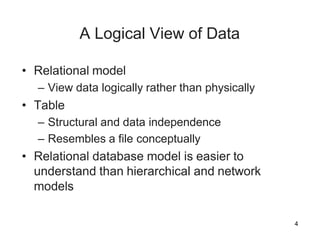
A Logical View of Data
• Relational model
– View data logically rather than physically
• Table
– Structural and data independence
– Resembles a file conceptually
• Relational database model is easier to
understand than hierarchical and network
models
5
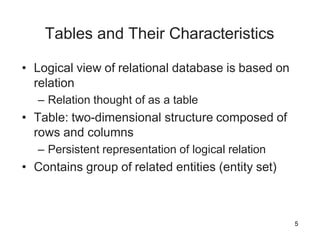
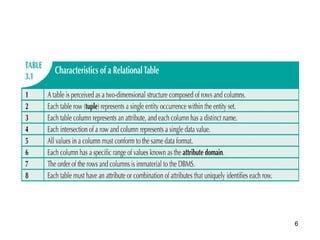
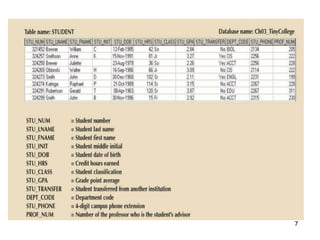
Tables and Their Characteristics
• Logical view of relational database is based on
relation
– Relation thought of as a table
• Table: two-dimensional structure composed of
rows and columns
– Persistent representation of logical relation
• Contains group of related entities (entity set)
6
7
8
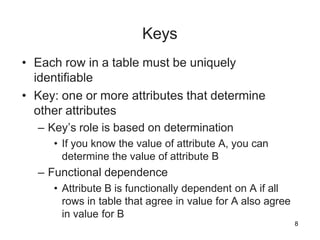
Keys
• Each row in a table must be uniquely
identifiable
• Key: one or more attributes that determine
other attributes
– Key’s role is based on determination
• If you know the value of attribute A, you can
determine the value of attribute B
– Functional dependence
• Attribute B is functionally dependent on A if all
rows in table that agree in value for A also agree
in value for B
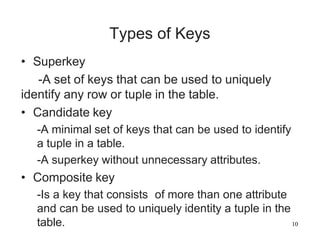
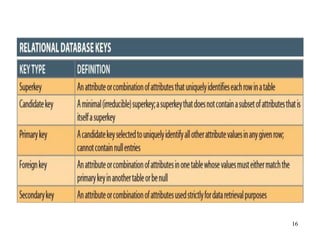
Types of Keys
• Superkey
-A set of keys that can be used to uniquely
identify any row or tuple in the table.
• Candidate key
-A minimal set of keys that can be used to identify
a tuple in a table.
-A superkey without unnecessary attributes.
• Composite key
-Is a key that consists of more than one attribute
and can be used to uniquely identity a tuple in the
table. 10
10
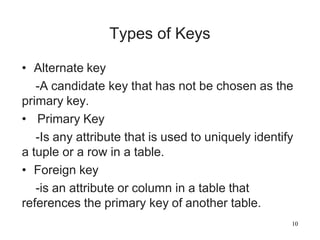
Types of Keys
• Alternate key
-A candidate key that has not be chosen as the
primary key.
• Primary Key
-Is any attribute that is used to uniquely identify
a tuple or a row in a table.
• Foreign key
-is an attribute or column in a table that
references the primary key of another table.
11
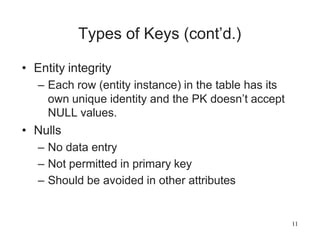
Types of Keys (cont’d.)
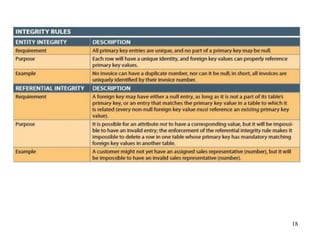
• Entity integrity
– Each row (entity instance) in the table has its
own unique identity and the PK doesn’t accept
NULL values.
• Nulls
– No data entry
– Not permitted in primary key
– Should be avoided in other attributes
12
Types of Keys (cont’d.)
– Can represent:
• An unknown attribute value
• A known, but missing, attribute value
• A “not applicable” condition
– Can create problems when functions such as
COUNT, AVERAGE, and SUM are used
– Can create logical problems when relational
tables are linked
13
Types of Keys (cont’d.)
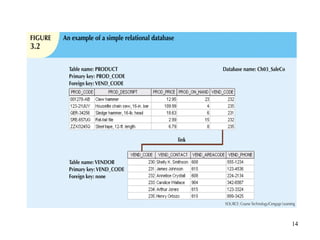
• Controlled redundancy
– Makes the relational database work
– Tables within the database share common
attributes
• Enables tables to be linked together
– Multiple occurrences of values not redundant
when required to make the relationship work
– Redundancy exists only when there is
unnecessary duplication of attribute values
14
15
Types of Keys (cont’d.)
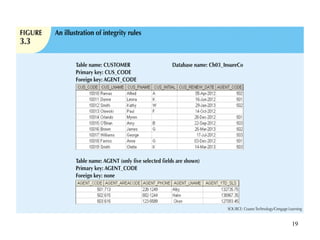
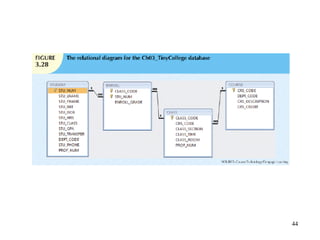
• Foreign key (FK)
– An attribute whose values match primary key
values in the related table
• Referential integrity
– FK contains a value that refers to an existing
valid tuple (row) in another relation
• Secondary key
– Key used strictly for data retrieval purposes
16
17
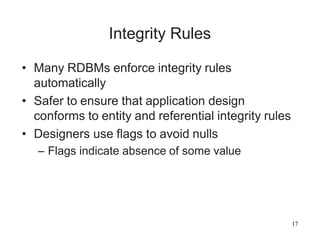
Integrity Rules
• Many RDBMs enforce integrity rules
automatically
• Safer to ensure that application design
conforms to entity and referential integrity rules
• Designers use flags to avoid nulls
– Flags indicate absence of some value
18
19
20
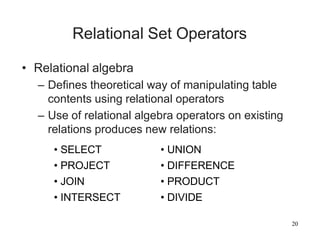
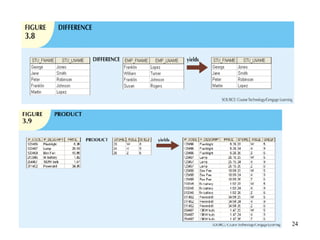
Relational Set Operators
• Relational algebra
– Defines theoretical way of manipulating table
contents using relational operators
– Use of relational algebra operators on existing
relations produces new relations:
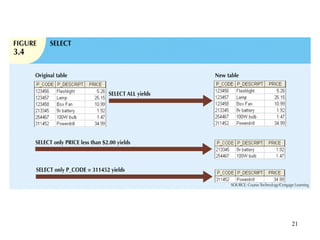
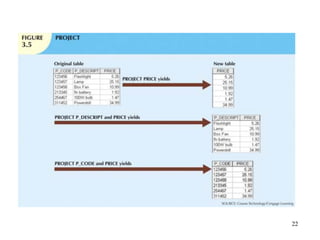
• SELECT
• PROJECT
• JOIN
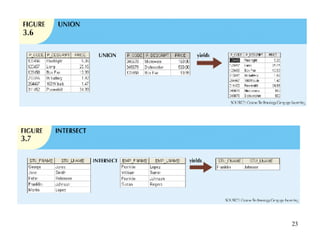
• INTERSECT
• UNION
• DIFFERENCE
• PRODUCT
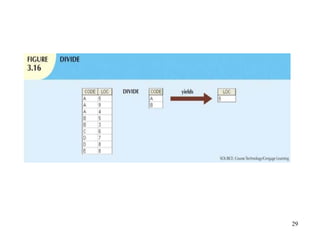
• DIVIDE
21
22
23
24
25
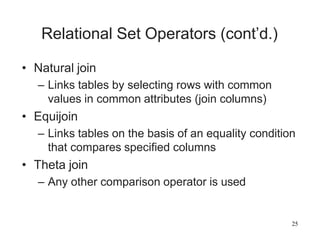
Relational Set Operators (cont’d.)
• Natural join
– Links tables by selecting rows with common
values in common attributes (join columns)
• Equijoin
– Links tables on the basis of an equality condition
that compares specified columns
• Theta join
– Any other comparison operator is used
26
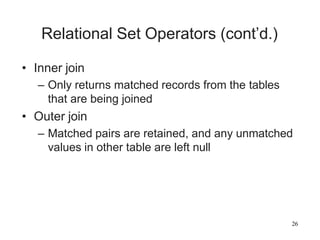
Relational Set Operators (cont’d.)
• Inner join
– Only returns matched records from the tables
that are being joined
• Outer join
– Matched pairs are retained, and any unmatched
values in other table are left null
27
28
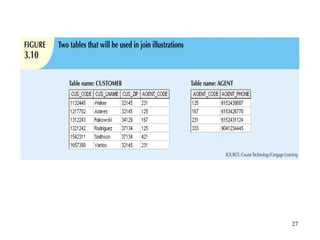
Relational Set Operators (cont’d.)
• Left outer join
– Yields all of the rows in the CUSTOMER table
– Including those that do not have a matching
value in the AGENT table
• Right outer join
– Yields all of the rows in the AGENT table
– Including those that do not have matching
values in the CUSTOMER table
29
30
The Data Dictionary
and System Catalog
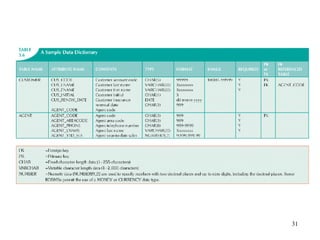
• Data dictionary
– Provides detailed accounting of all tables found
within the user/designer-created database
– Contains (at least) all the attribute names and
characteristics for each table in the system
– Contains metadata: data about data
• System catalog
– Contains metadata
– Detailed system data dictionary that describes
all objects within the database
31
32
The Data Dictionary
and System Catalog (cont’d.)
• Homonym
– Indicates the use of the same name to label
different attributes
• Synonym
– Opposite of a homonym
– Indicates the use of different names to describe
the same attribute
33
Relationships within the Relational
Database
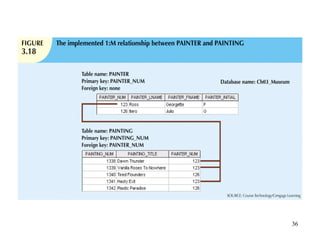
• 1:M relationship
– Relational modeling ideal
– Should be the norm in any relational database
design
• 1:1 relationship
– Should be rare in any relational database design
34
Relationships within the Relational
Database (cont’d.)
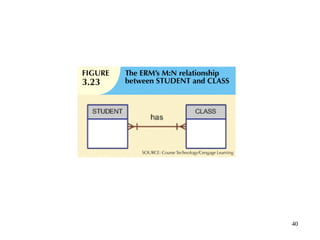
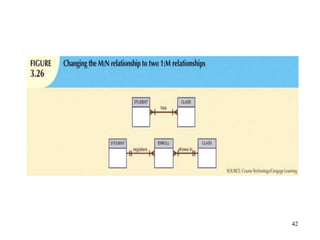
• M:N relationships
– Cannot be implemented as such in the relational
model
– M:N relationships can be changed into 1:M
relationships
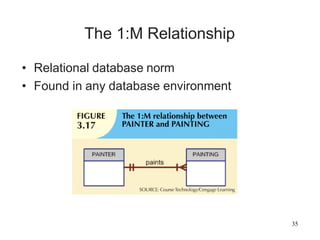
The 1:M Relationship
• Relational database norm
• Found in any database environment
35
36
37
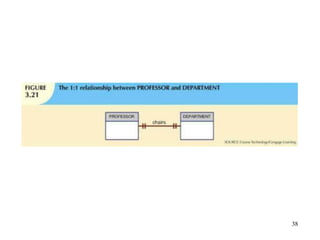
The 1:1 Relationship
• One entity related to only one other entity, and
vice versa
• Sometimes means that entity components were
not defined properly
• Could indicate that two entities actually belong
in the same table
• Certain conditions absolutely require their use
38
39
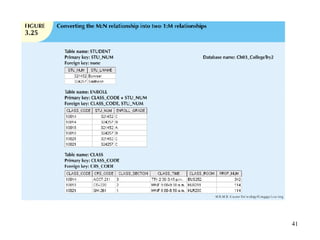
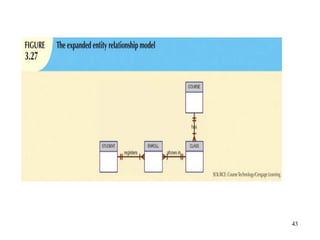
The M:N Relationship
• Implemented by breaking it up to produce a set
of 1:M relationships
• Avoid problems inherent to M:N relationship by
creating a composite entity
– Includes as foreign keys the primary keys of
tables to be linked
40
41
42
43
44
45
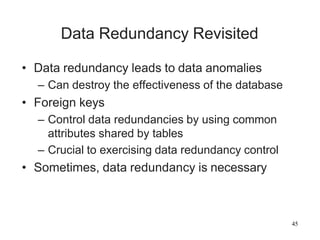
Data Redundancy Revisited
• Data redundancy leads to data anomalies
– Can destroy the effectiveness of the database
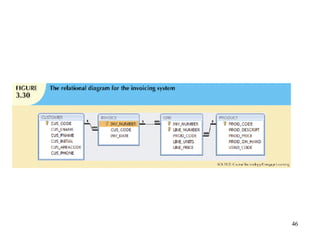
• Foreign keys
– Control data redundancies by using common
attributes shared by tables
– Crucial to exercising data redundancy control
• Sometimes, data redundancy is necessary
46
47
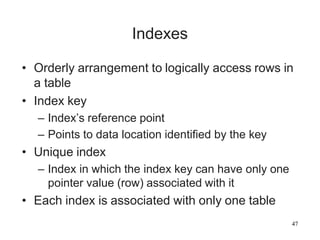
Indexes
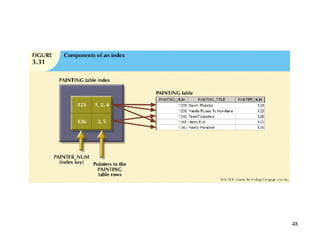
• Orderly arrangement to logically access rows in
a table
• Index key
– Index’s reference point
– Points to data location identified by the key
• Unique index
– Index in which the index key can have only one
pointer value (row) associated with it
• Each index is associated with only one table
48
49
Codd’s Relational Database Rules
• In 1985, Codd published a list of 12 rules to
define a relational database system
– Products marketed as “relational” that did not
meet minimum relational standards
• Even dominant database vendors do not fully
support all 12 rules
50
Summary
• Tables are basic building blocks of a
relational database
• Keys are central to the use of relational tables
• Keys define functional dependencies
– Superkey
– Candidate key
– Primary key
– Secondary key
– Foreign key
51
Summary (cont’d.)
• Each table row must have a primary key that
uniquely identifies all attributes
• Tables are linked by common attributes
• The relational model supports relational algebra
functions
– SELECT, PROJECT, JOIN, INTERSECT
UNION, DIFFERENCE, PRODUCT, DIVIDE
• Good design begins by identifying entities,
attributes, and relationships
– 1:1, 1:M, M:N

Relational databases.pdf

  • 1.
  • 2.
    2 Objectives In this chapter,students will learn: • That the relational database model offers a logical view of data • About the relational model’s basic component: relations • That relations are logical constructs composed of rows (tuples) and columns (attributes) • That relations are implemented as tables in a relational DBMS
  • 3.
    3 Objectives (cont’d.) • Aboutrelational database operators, the data dictionary, and the system catalog • How data redundancy is handled in the relational database model • Why indexing is important
  • 4.
    4 A Logical Viewof Data • Relational model – View data logically rather than physically • Table – Structural and data independence – Resembles a file conceptually • Relational database model is easier to understand than hierarchical and network models
  • 5.
    5 Tables and TheirCharacteristics • Logical view of relational database is based on relation – Relation thought of as a table • Table: two-dimensional structure composed of rows and columns – Persistent representation of logical relation • Contains group of related entities (entity set)
  • 6.
  • 7.
  • 8.
    8 Keys • Each rowin a table must be uniquely identifiable • Key: one or more attributes that determine other attributes – Key’s role is based on determination • If you know the value of attribute A, you can determine the value of attribute B – Functional dependence • Attribute B is functionally dependent on A if all rows in table that agree in value for A also agree in value for B
  • 9.
    Types of Keys •Superkey -A set of keys that can be used to uniquely identify any row or tuple in the table. • Candidate key -A minimal set of keys that can be used to identify a tuple in a table. -A superkey without unnecessary attributes. • Composite key -Is a key that consists of more than one attribute and can be used to uniquely identity a tuple in the table. 10
  • 10.
    10 Types of Keys •Alternate key -A candidate key that has not be chosen as the primary key. • Primary Key -Is any attribute that is used to uniquely identify a tuple or a row in a table. • Foreign key -is an attribute or column in a table that references the primary key of another table.
  • 11.
    11 Types of Keys(cont’d.) • Entity integrity – Each row (entity instance) in the table has its own unique identity and the PK doesn’t accept NULL values. • Nulls – No data entry – Not permitted in primary key – Should be avoided in other attributes
  • 12.
    12 Types of Keys(cont’d.) – Can represent: • An unknown attribute value • A known, but missing, attribute value • A “not applicable” condition – Can create problems when functions such as COUNT, AVERAGE, and SUM are used – Can create logical problems when relational tables are linked
  • 13.
    13 Types of Keys(cont’d.) • Controlled redundancy – Makes the relational database work – Tables within the database share common attributes • Enables tables to be linked together – Multiple occurrences of values not redundant when required to make the relationship work – Redundancy exists only when there is unnecessary duplication of attribute values
  • 14.
  • 15.
    15 Types of Keys(cont’d.) • Foreign key (FK) – An attribute whose values match primary key values in the related table • Referential integrity – FK contains a value that refers to an existing valid tuple (row) in another relation • Secondary key – Key used strictly for data retrieval purposes
  • 16.
  • 17.
    17 Integrity Rules • ManyRDBMs enforce integrity rules automatically • Safer to ensure that application design conforms to entity and referential integrity rules • Designers use flags to avoid nulls – Flags indicate absence of some value
  • 18.
  • 19.
  • 20.
    20 Relational Set Operators •Relational algebra – Defines theoretical way of manipulating table contents using relational operators – Use of relational algebra operators on existing relations produces new relations: • SELECT • PROJECT • JOIN • INTERSECT • UNION • DIFFERENCE • PRODUCT • DIVIDE
  • 21.
  • 22.
  • 23.
  • 24.
  • 25.
    25 Relational Set Operators(cont’d.) • Natural join – Links tables by selecting rows with common values in common attributes (join columns) • Equijoin – Links tables on the basis of an equality condition that compares specified columns • Theta join – Any other comparison operator is used
  • 26.
    26 Relational Set Operators(cont’d.) • Inner join – Only returns matched records from the tables that are being joined • Outer join – Matched pairs are retained, and any unmatched values in other table are left null
  • 27.
  • 28.
    28 Relational Set Operators(cont’d.) • Left outer join – Yields all of the rows in the CUSTOMER table – Including those that do not have a matching value in the AGENT table • Right outer join – Yields all of the rows in the AGENT table – Including those that do not have matching values in the CUSTOMER table
  • 29.
  • 30.
    30 The Data Dictionary andSystem Catalog • Data dictionary – Provides detailed accounting of all tables found within the user/designer-created database – Contains (at least) all the attribute names and characteristics for each table in the system – Contains metadata: data about data • System catalog – Contains metadata – Detailed system data dictionary that describes all objects within the database
  • 31.
  • 32.
    32 The Data Dictionary andSystem Catalog (cont’d.) • Homonym – Indicates the use of the same name to label different attributes • Synonym – Opposite of a homonym – Indicates the use of different names to describe the same attribute
  • 33.
    33 Relationships within theRelational Database • 1:M relationship – Relational modeling ideal – Should be the norm in any relational database design • 1:1 relationship – Should be rare in any relational database design
  • 34.
    34 Relationships within theRelational Database (cont’d.) • M:N relationships – Cannot be implemented as such in the relational model – M:N relationships can be changed into 1:M relationships
  • 35.
    The 1:M Relationship •Relational database norm • Found in any database environment 35
  • 36.
  • 37.
    37 The 1:1 Relationship •One entity related to only one other entity, and vice versa • Sometimes means that entity components were not defined properly • Could indicate that two entities actually belong in the same table • Certain conditions absolutely require their use
  • 38.
  • 39.
    39 The M:N Relationship •Implemented by breaking it up to produce a set of 1:M relationships • Avoid problems inherent to M:N relationship by creating a composite entity – Includes as foreign keys the primary keys of tables to be linked
  • 40.
  • 41.
  • 42.
  • 43.
  • 44.
  • 45.
    45 Data Redundancy Revisited •Data redundancy leads to data anomalies – Can destroy the effectiveness of the database • Foreign keys – Control data redundancies by using common attributes shared by tables – Crucial to exercising data redundancy control • Sometimes, data redundancy is necessary
  • 46.
  • 47.
    47 Indexes • Orderly arrangementto logically access rows in a table • Index key – Index’s reference point – Points to data location identified by the key • Unique index – Index in which the index key can have only one pointer value (row) associated with it • Each index is associated with only one table
  • 48.
  • 49.
    49 Codd’s Relational DatabaseRules • In 1985, Codd published a list of 12 rules to define a relational database system – Products marketed as “relational” that did not meet minimum relational standards • Even dominant database vendors do not fully support all 12 rules
  • 50.
    50 Summary • Tables arebasic building blocks of a relational database • Keys are central to the use of relational tables • Keys define functional dependencies – Superkey – Candidate key – Primary key – Secondary key – Foreign key
  • 51.
    51 Summary (cont’d.) • Eachtable row must have a primary key that uniquely identifies all attributes • Tables are linked by common attributes • The relational model supports relational algebra functions – SELECT, PROJECT, JOIN, INTERSECT UNION, DIFFERENCE, PRODUCT, DIVIDE • Good design begins by identifying entities, attributes, and relationships – 1:1, 1:M, M:N