CSC271 Database Systems
Lecture # 1
Chapter 1 - Objectives
 Some common uses of database systems
 Characteristics of file-based systems
 Problems with file-based approach
 Meaning of the term database (DB)
 Meaning of the term Database
Management System (DBMS)
Chapter 1 - Objectives
 Typical functions of a DBMS.
 Major components of the DBMS
environment.
 Personnel involved in the DBMS
environment.
 History of the development of DBMSs.
 Advantages and disadvantages of DBMSs.
Examples of Database
Applications
 Purchases from the supermarket
 Purchases using your credit card
 Booking a holiday at the travel agents
 Using the local library
 Taking out insurance
 Renting a video
 Using the Internet
 Studying at university
File-Based Systems
 Early attempt to Computerize the manual
filing system
 Collection of application programs that
perform services for the end users (e.g.
reports).
 Each program defines and manages its
own data.
Manual Filing Systems
 Works well
while number of items to be stored is small
For only storage or retrieval functionality of
large number of items
File-Based Systems
 Consider DreamHome example for file-
based systems
Sales Department : responsible for selling
and renting of properties
Contract Department: responsible for
handling lease agreements
Sales Department
 PropertyForRent
(propertyNo, street, city, postcode, type, rooms, rent,
ownerNo)
 Client
(clientNo, fName, lName, telNo, preftype, maxRent)
 PrivateOwner
(ownerNo, fName, lName, address, telNo)
ownerNo fName lName address telNo
CO46 Joe Keogh … 01224-861212
CO87 Carol Farrel … 0141-357-7419
CO40 … … … …
CO93 … … … …
propertyNo street city postcode type rooms rent ownerNo
PA14 … Aberdeen … House 6 650 CO46
PL94 … London … Flat 4 400 CO87
PG4 … Glasgow … Flat 3 350 CO40
PG36 … Glasgow … Flat 3 375 CO93
PG21 … Glasgow … House 5 600 CO87
PG16 … Glasgow … Flat 4 450 CO93
PrivateOwner
PropertyForRent
clientNo fName lName telNo prefType maxRent
CR76 John Kay 0207-774-5632 Flat 425
CR56 Aline Stewart 0141-848-1825 Flat 350
CR74 Mike Ritchie 01475-392178 House 750
CR62 Mary Tregear 01224-196720 Flat 600
Client
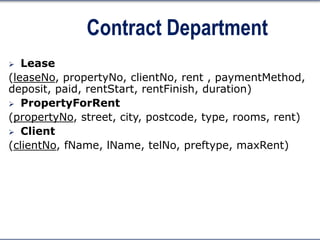
Contract Department
 Lease
(leaseNo, propertyNo, clientNo, rent , paymentMethod,
deposit, paid, rentStart, rentFinish, duration)
 PropertyForRent
(propertyNo, street, city, postcode, type, rooms, rent)
 Client
(clientNo, fName, lName, telNo, preftype, maxRent)
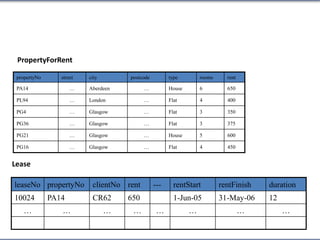
Lease
leaseNo propertyNo clientNo rent --- rentStart rentFinish duration
10024 PA14 CR62 650 1-Jun-05 31-May-06 12
… … … … … … … …
propertyNo street city postcode type rooms rent
PA14 … Aberdeen … House 6 650
PL94 … London … Flat 4 400
PG4 … Glasgow … Flat 3 350
PG36 … Glasgow … Flat 3 375
PG21 … Glasgow … House 5 600
PG16 … Glasgow … Flat 4 450
PropertyForRent
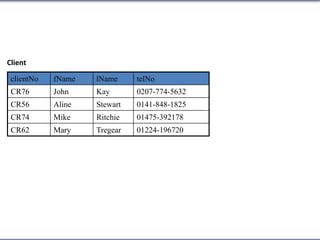
clientNo fName lName telNo
CR76 John Kay 0207-774-5632
CR56 Aline Stewart 0141-848-1825
CR74 Mike Ritchie 01475-392178
CR62 Mary Tregear 01224-196720
Client
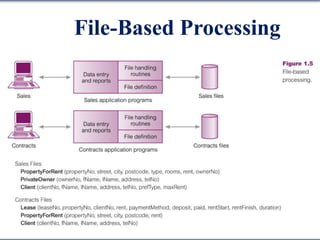
File-Based Processing
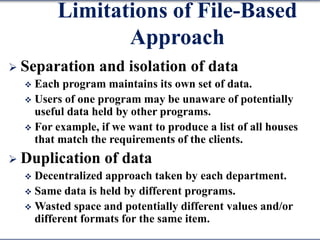
Limitations of File-Based
Approach
 Separation and isolation of data
 Each program maintains its own set of data.
 Users of one program may be unaware of potentially
useful data held by other programs.
 For example, if we want to produce a list of all houses
that match the requirements of the clients.
 Duplication of data
 Decentralized approach taken by each department.
 Same data is held by different programs.
 Wasted space and potentially different values and/or
different formats for the same item.
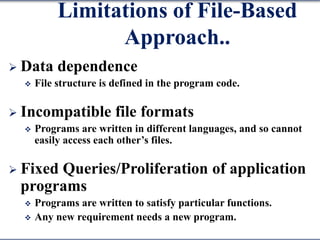
Limitations of File-Based
Approach..
 Data dependence
 File structure is defined in the program code.
 Incompatible file formats
 Programs are written in different languages, and so cannot
easily access each other’s files.
 Fixed Queries/Proliferation of application
programs
 Programs are written to satisfy particular functions.
 Any new requirement needs a new program.
Database Approach
 Arose because:
 Definition of data was embedded in application programs,
rather than being stored separately and independently.
 No control over access and manipulation of data beyond
that imposed by application programs.
 Result:
 the database and Database Management System (DBMS).
Database
 Shared collection of logically related data,
and a description of this data, designed to
meet the information needs of an
organization.
 System catalog (metadata) provides
description of data to enable program-
data independence.
 Logically related data comprises entities,
attributes, and relationships of an
organization’s information.
Database Management
System (DBMS)
 A software system that enables users to
define, create, maintain, and control
access to the database.
 (Database) application program: a
computer program that interacts with
database by issuing an appropriate
request (SQL statement) to the DBMS.
Database Management
System (DBMS)..
Database Approach
 Data definition language (DDL).
 Permits specification of data types, structures and any data
constraints.
 All specifications are stored in the database.
 Data manipulation language (DML).
 General enquiry facility (query language) of the data.
Database Approach..
 Controlled access to database may include
 A security system
 Which prevents unauthorized users accessing the database
 An integrity system
 Which maintains the consistency of stored data
 A concurrency control system
 Which allows shared access of the database
 A recovery control system
 Which restores the database to a previous consistent state in case of
hardware or software failure
 A user-accessible catalog
 Which contains description of the data in the database
Views
 Allows each user to have his or her own
view of the database.
 A view is essentially some subset of the
database.
Views - Benefits
 Reduce complexity
 Provide a level of security
 Provide a mechanism to customize the
appearance of the database
 Present a consistent, unchanging picture
of the structure of the database, even if
the underlying database is changed
Summary
 Introduction to DB and DBMS
 File-based systems and their limitations
 Database approach
Components of DBMS
Environment
Components of DBMS
Environment..
 Hardware
 Can range from a PC to a network of computers.
 Software
 DBMS, operating system, network software (if
necessary) and also the application programs.
 Data
Used by the organization and a description
of this data called the schema.
Components of DBMS
Environment..
 Procedures
 Instructions and rules that should be applied to the
design and use of the database and DBMS.
 People
Roles in the Database
Environment
 Data Administrator (DA)
 Database planning
 Development and maintenance of standards, policies and procedures
 Database Administrator (DBA)
 Physical realization of the database
 Physical database design and implementation
 Security and integrity control
 Maintenance of the operational system
 Ensuring satisfactory performance of the applications for users
 Database Designers (Logical and Physical)
 Application Programmers
 End Users (naive and sophisticated)
History of Database
Systems
 Roots of the DBMS
Apollo moon-landing project, 1960s
NAA (North American Aviation), prime
contractor for the project
Developed a software GUAM (Generalized
Update Access Method), hierarchical
In mid – 1960s IBM joined NAA, result was
IMS(Information Management System)
History of Database
Systems..
 IDS ( Integrated Data Store)
By General Electric, network, mid-1960
 CODASYL ( Conference on Data Systems
Languages)
 DBTG (Data Base Task Group)
History of Database
Systems..
 DBTG proposal in 1971, components
The network schema: the logical
organization of the entire database as seen
by the DBA – which includes a definition of
the database name, the type of each record,
and the components of each record type.
The subschema: the part of the database as
seen by the user or application program;
A data management language to define the
data characteristics and the data structure,
and to manipulate the data.
History of Database
Systems..
 DBTG specified three languages
A schema Data Definition Language (DDL),
which enables the DBA to define the schema.
A subschema DDL, which allows the
application programs to define the parts of
the database they require.
A Data Manipulation Language (DML), to
manipulate the data.
History of Database
Systems..
 E. F. Codd, 1970
IBM Research Laboratory
Relational model
System R project by IBM’S San Jose
Research Laboratory California
Result of this project
 Development of SQL
 Commercial relational DBMS products e.g. DB2,
SQL/DS from IBM, Oracle from Oracle Corp.
DBMS Generations
 First-generation
 Hierarchical and Network
 Second generation
 Relational
 Third generation
 Object-Relational
 Object-Oriented
Advantages of DBMSs
 Control of data redundancy
 Data consistency
 More information from the same amount of
data
 Sharing of data
 Improved data integrity (constraints)
 Improved security (authentication, rights)
 Enforcement of standards (data formats,
naming conventions, documentation etc.)
Advantages of DBMSs..
 Economy of scale (economical cost)
 Balance conflicting requirements
 Improved data accessibility and
responsiveness (ad hoc queries)
 Increased productivity (developer)
 Improved maintenance through data
independence
 Increased concurrency
Advantages of DBMSs..
 Improved backup and recovery services
Disadvantages of DBMSs
 Complexity
 Size (disk space for DBMS)
 Cost of DBMS
 Additional hardware costs
 Cost of conversion
 Performance
 Higher impact of a failure
Summary
 Introduction to DB and DBMS
 File-based systems and their limitations
 Database approach
 Components of the DBMS environment
 Roles in the DB environment
 History of DBMS
 Advantages/Disadvantages of DBMSs

Database systems - Chapter 1

  • 1.
  • 2.
    Chapter 1 -Objectives  Some common uses of database systems  Characteristics of file-based systems  Problems with file-based approach  Meaning of the term database (DB)  Meaning of the term Database Management System (DBMS)
  • 3.
    Chapter 1 -Objectives  Typical functions of a DBMS.  Major components of the DBMS environment.  Personnel involved in the DBMS environment.  History of the development of DBMSs.  Advantages and disadvantages of DBMSs.
  • 4.
    Examples of Database Applications Purchases from the supermarket  Purchases using your credit card  Booking a holiday at the travel agents  Using the local library  Taking out insurance  Renting a video  Using the Internet  Studying at university
  • 5.
    File-Based Systems  Earlyattempt to Computerize the manual filing system  Collection of application programs that perform services for the end users (e.g. reports).  Each program defines and manages its own data.
  • 6.
    Manual Filing Systems Works well while number of items to be stored is small For only storage or retrieval functionality of large number of items
  • 7.
    File-Based Systems  ConsiderDreamHome example for file- based systems Sales Department : responsible for selling and renting of properties Contract Department: responsible for handling lease agreements
  • 8.
    Sales Department  PropertyForRent (propertyNo,street, city, postcode, type, rooms, rent, ownerNo)  Client (clientNo, fName, lName, telNo, preftype, maxRent)  PrivateOwner (ownerNo, fName, lName, address, telNo)
  • 9.
    ownerNo fName lNameaddress telNo CO46 Joe Keogh … 01224-861212 CO87 Carol Farrel … 0141-357-7419 CO40 … … … … CO93 … … … … propertyNo street city postcode type rooms rent ownerNo PA14 … Aberdeen … House 6 650 CO46 PL94 … London … Flat 4 400 CO87 PG4 … Glasgow … Flat 3 350 CO40 PG36 … Glasgow … Flat 3 375 CO93 PG21 … Glasgow … House 5 600 CO87 PG16 … Glasgow … Flat 4 450 CO93 PrivateOwner PropertyForRent
  • 10.
    clientNo fName lNametelNo prefType maxRent CR76 John Kay 0207-774-5632 Flat 425 CR56 Aline Stewart 0141-848-1825 Flat 350 CR74 Mike Ritchie 01475-392178 House 750 CR62 Mary Tregear 01224-196720 Flat 600 Client
  • 11.
    Contract Department  Lease (leaseNo,propertyNo, clientNo, rent , paymentMethod, deposit, paid, rentStart, rentFinish, duration)  PropertyForRent (propertyNo, street, city, postcode, type, rooms, rent)  Client (clientNo, fName, lName, telNo, preftype, maxRent)
  • 12.
    Lease leaseNo propertyNo clientNorent --- rentStart rentFinish duration 10024 PA14 CR62 650 1-Jun-05 31-May-06 12 … … … … … … … … propertyNo street city postcode type rooms rent PA14 … Aberdeen … House 6 650 PL94 … London … Flat 4 400 PG4 … Glasgow … Flat 3 350 PG36 … Glasgow … Flat 3 375 PG21 … Glasgow … House 5 600 PG16 … Glasgow … Flat 4 450 PropertyForRent
  • 13.
    clientNo fName lNametelNo CR76 John Kay 0207-774-5632 CR56 Aline Stewart 0141-848-1825 CR74 Mike Ritchie 01475-392178 CR62 Mary Tregear 01224-196720 Client
  • 14.
  • 15.
    Limitations of File-Based Approach Separation and isolation of data  Each program maintains its own set of data.  Users of one program may be unaware of potentially useful data held by other programs.  For example, if we want to produce a list of all houses that match the requirements of the clients.  Duplication of data  Decentralized approach taken by each department.  Same data is held by different programs.  Wasted space and potentially different values and/or different formats for the same item.
  • 16.
    Limitations of File-Based Approach.. Data dependence  File structure is defined in the program code.  Incompatible file formats  Programs are written in different languages, and so cannot easily access each other’s files.  Fixed Queries/Proliferation of application programs  Programs are written to satisfy particular functions.  Any new requirement needs a new program.
  • 17.
    Database Approach  Arosebecause:  Definition of data was embedded in application programs, rather than being stored separately and independently.  No control over access and manipulation of data beyond that imposed by application programs.  Result:  the database and Database Management System (DBMS).
  • 18.
    Database  Shared collectionof logically related data, and a description of this data, designed to meet the information needs of an organization.  System catalog (metadata) provides description of data to enable program- data independence.  Logically related data comprises entities, attributes, and relationships of an organization’s information.
  • 19.
    Database Management System (DBMS) A software system that enables users to define, create, maintain, and control access to the database.  (Database) application program: a computer program that interacts with database by issuing an appropriate request (SQL statement) to the DBMS.
  • 20.
  • 21.
    Database Approach  Datadefinition language (DDL).  Permits specification of data types, structures and any data constraints.  All specifications are stored in the database.  Data manipulation language (DML).  General enquiry facility (query language) of the data.
  • 22.
    Database Approach..  Controlledaccess to database may include  A security system  Which prevents unauthorized users accessing the database  An integrity system  Which maintains the consistency of stored data  A concurrency control system  Which allows shared access of the database  A recovery control system  Which restores the database to a previous consistent state in case of hardware or software failure  A user-accessible catalog  Which contains description of the data in the database
  • 23.
    Views  Allows eachuser to have his or her own view of the database.  A view is essentially some subset of the database.
  • 24.
    Views - Benefits Reduce complexity  Provide a level of security  Provide a mechanism to customize the appearance of the database  Present a consistent, unchanging picture of the structure of the database, even if the underlying database is changed
  • 25.
    Summary  Introduction toDB and DBMS  File-based systems and their limitations  Database approach
  • 26.
  • 27.
    Components of DBMS Environment.. Hardware  Can range from a PC to a network of computers.  Software  DBMS, operating system, network software (if necessary) and also the application programs.  Data Used by the organization and a description of this data called the schema.
  • 28.
    Components of DBMS Environment.. Procedures  Instructions and rules that should be applied to the design and use of the database and DBMS.  People
  • 29.
    Roles in theDatabase Environment  Data Administrator (DA)  Database planning  Development and maintenance of standards, policies and procedures  Database Administrator (DBA)  Physical realization of the database  Physical database design and implementation  Security and integrity control  Maintenance of the operational system  Ensuring satisfactory performance of the applications for users  Database Designers (Logical and Physical)  Application Programmers  End Users (naive and sophisticated)
  • 30.
    History of Database Systems Roots of the DBMS Apollo moon-landing project, 1960s NAA (North American Aviation), prime contractor for the project Developed a software GUAM (Generalized Update Access Method), hierarchical In mid – 1960s IBM joined NAA, result was IMS(Information Management System)
  • 31.
    History of Database Systems.. IDS ( Integrated Data Store) By General Electric, network, mid-1960  CODASYL ( Conference on Data Systems Languages)  DBTG (Data Base Task Group)
  • 32.
    History of Database Systems.. DBTG proposal in 1971, components The network schema: the logical organization of the entire database as seen by the DBA – which includes a definition of the database name, the type of each record, and the components of each record type. The subschema: the part of the database as seen by the user or application program; A data management language to define the data characteristics and the data structure, and to manipulate the data.
  • 33.
    History of Database Systems.. DBTG specified three languages A schema Data Definition Language (DDL), which enables the DBA to define the schema. A subschema DDL, which allows the application programs to define the parts of the database they require. A Data Manipulation Language (DML), to manipulate the data.
  • 34.
    History of Database Systems.. E. F. Codd, 1970 IBM Research Laboratory Relational model System R project by IBM’S San Jose Research Laboratory California Result of this project  Development of SQL  Commercial relational DBMS products e.g. DB2, SQL/DS from IBM, Oracle from Oracle Corp.
  • 35.
    DBMS Generations  First-generation Hierarchical and Network  Second generation  Relational  Third generation  Object-Relational  Object-Oriented
  • 36.
    Advantages of DBMSs Control of data redundancy  Data consistency  More information from the same amount of data  Sharing of data  Improved data integrity (constraints)  Improved security (authentication, rights)  Enforcement of standards (data formats, naming conventions, documentation etc.)
  • 37.
    Advantages of DBMSs.. Economy of scale (economical cost)  Balance conflicting requirements  Improved data accessibility and responsiveness (ad hoc queries)  Increased productivity (developer)  Improved maintenance through data independence  Increased concurrency
  • 38.
    Advantages of DBMSs.. Improved backup and recovery services
  • 39.
    Disadvantages of DBMSs Complexity  Size (disk space for DBMS)  Cost of DBMS  Additional hardware costs  Cost of conversion  Performance  Higher impact of a failure
  • 40.
    Summary  Introduction toDB and DBMS  File-based systems and their limitations  Database approach  Components of the DBMS environment  Roles in the DB environment  History of DBMS  Advantages/Disadvantages of DBMSs