M.Rabbani
Course Objectives
1) Basic Concepts
2) Tools
3) Database architecture and design
4) Flow of data (DFDs)
5) Mappings (ERDs)
6) Formulating queries (Relational algebra)
7) Implementing Schema
8) Built-in Functions
9) Extracting data
10) Working with Joins
11) Normalization
12) Improving performance
13) Advanced topics
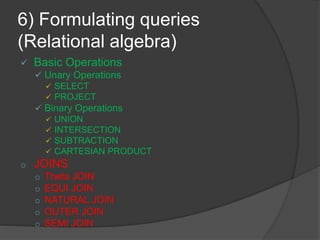
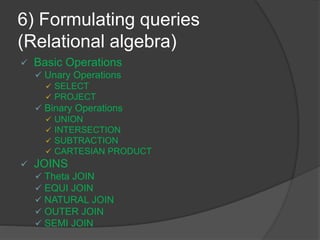
6) Formulating queries
(Relational algebra)
 Basic Operations
 Unary Operations
 SELECT
 PROJECT
 Binary Operations
 UNION
 INTERSECTION
 SUBTRACTION
 CARTESIAN PRODUCT
o JOINS
o Theta JOIN
o EQUI JOIN
o NATURAL JOIN
o OUTER JOIN
o SEMI JOIN
Lecture overview
o JOINS
o Theta JOIN
o EQUI JOIN
o NATURAL JOIN
o OUTER JOIN
o SEMI JOIN
6) Formulating queries
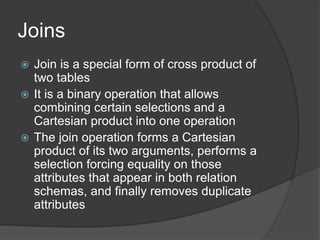
Joins
 Join is a special form of cross product of
two tables
 It is a binary operation that allows
combining certain selections and a
Cartesian product into one operation
 The join operation forms a Cartesian
product of its two arguments, performs a
selection forcing equality on those
attributes that appear in both relation
schemas, and finally removes duplicate
attributes
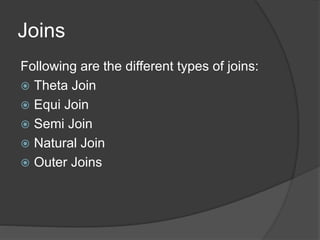
Joins
Following are the different types of joins:
 Theta Join
 Equi Join
 Semi Join
 Natural Join
 Outer Joins
Theta join
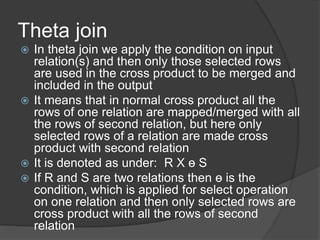
 In theta join we apply the condition on input
relation(s) and then only those selected rows
are used in the cross product to be merged and
included in the output
 It means that in normal cross product all the
rows of one relation are mapped/merged with all
the rows of second relation, but here only
selected rows of a relation are made cross
product with second relation
 It is denoted as under: R X ɵ S
 If R and S are two relations then ɵ is the
condition, which is applied for select operation
on one relation and then only selected rows are
cross product with all the rows of second
relation
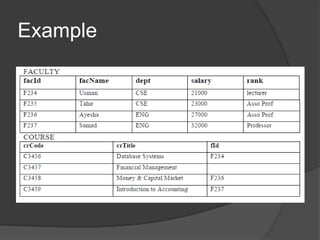
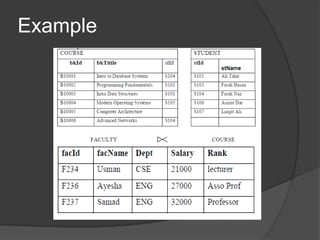
Example
Equi Join
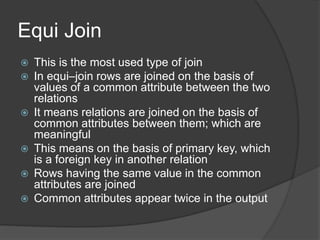
 This is the most used type of join
 In equi–join rows are joined on the basis of
values of a common attribute between the two
relations
 It means relations are joined on the basis of
common attributes between them; which are
meaningful
 This means on the basis of primary key, which
is a foreign key in another relation
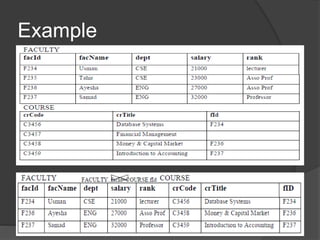
 Rows having the same value in the common
attributes are joined
 Common attributes appear twice in the output
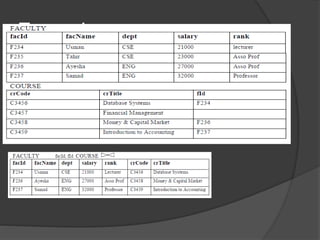
Example
Natural Join
 This is the most common and general
form of join. If we simply say join, it
means the natural join
 It is same as equi–join but the difference
is that in natural join, the common
attribute appears only once.
Example
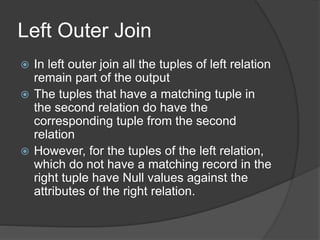
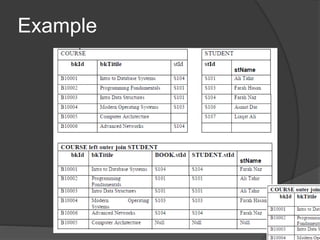
Left Outer Join
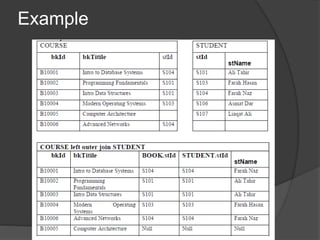
 In left outer join all the tuples of left relation
remain part of the output
 The tuples that have a matching tuple in
the second relation do have the
corresponding tuple from the second
relation
 However, for the tuples of the left relation,
which do not have a matching record in the
right tuple have Null values against the
attributes of the right relation.
Example
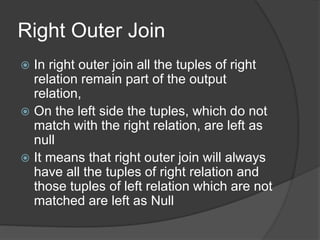
Right Outer Join
 In right outer join all the tuples of right
relation remain part of the output
relation,
 On the left side the tuples, which do not
match with the right relation, are left as
null
 It means that right outer join will always
have all the tuples of right relation and
those tuples of left relation which are not
matched are left as Null
Example
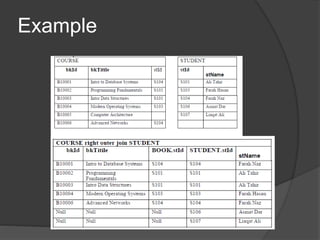
Outer Join
 In outer join all the tuples of left and right
relations are part of the output
 It means that all those tuples of left
relation which are not matched with right
relation are left as Null
 Similarly all those tuples of right relation
which are not matched with left relation
are left as Null
Example
Semi Join
 In semi join, first we take the natural join
of two relations then we project the
attributes of first table only
 So after join and matching the common
attribute of both relations only attributes
of first relation are projected
Example
6) Formulating queries
(Relational algebra)
 Basic Operations
 Unary Operations
 SELECT
 PROJECT
 Binary Operations
 UNION
 INTERSECTION
 SUBTRACTION
 CARTESIAN PRODUCT
 JOINS
 Theta JOIN
 EQUI JOIN
 NATURAL JOIN
 OUTER JOIN
 SEMI JOIN
Lab Activity-11
 MS Access Queries
 Open tables or queries in design view
 Display all records and all fields
 Change datasheet view
 Retrieve a single column
 Retrieve multiple columns
Next Lecture
 SELECT commands

relational algebra (joins)

  • 1.
  • 2.
    Course Objectives 1) BasicConcepts 2) Tools 3) Database architecture and design 4) Flow of data (DFDs) 5) Mappings (ERDs) 6) Formulating queries (Relational algebra) 7) Implementing Schema 8) Built-in Functions 9) Extracting data 10) Working with Joins 11) Normalization 12) Improving performance 13) Advanced topics
  • 3.
    6) Formulating queries (Relationalalgebra)  Basic Operations  Unary Operations  SELECT  PROJECT  Binary Operations  UNION  INTERSECTION  SUBTRACTION  CARTESIAN PRODUCT o JOINS o Theta JOIN o EQUI JOIN o NATURAL JOIN o OUTER JOIN o SEMI JOIN
  • 4.
    Lecture overview o JOINS oTheta JOIN o EQUI JOIN o NATURAL JOIN o OUTER JOIN o SEMI JOIN 6) Formulating queries
  • 5.
    Joins  Join isa special form of cross product of two tables  It is a binary operation that allows combining certain selections and a Cartesian product into one operation  The join operation forms a Cartesian product of its two arguments, performs a selection forcing equality on those attributes that appear in both relation schemas, and finally removes duplicate attributes
  • 6.
    Joins Following are thedifferent types of joins:  Theta Join  Equi Join  Semi Join  Natural Join  Outer Joins
  • 7.
    Theta join  Intheta join we apply the condition on input relation(s) and then only those selected rows are used in the cross product to be merged and included in the output  It means that in normal cross product all the rows of one relation are mapped/merged with all the rows of second relation, but here only selected rows of a relation are made cross product with second relation  It is denoted as under: R X ɵ S  If R and S are two relations then ɵ is the condition, which is applied for select operation on one relation and then only selected rows are cross product with all the rows of second relation
  • 8.
  • 10.
    Equi Join  Thisis the most used type of join  In equi–join rows are joined on the basis of values of a common attribute between the two relations  It means relations are joined on the basis of common attributes between them; which are meaningful  This means on the basis of primary key, which is a foreign key in another relation  Rows having the same value in the common attributes are joined  Common attributes appear twice in the output
  • 11.
  • 12.
    Natural Join  Thisis the most common and general form of join. If we simply say join, it means the natural join  It is same as equi–join but the difference is that in natural join, the common attribute appears only once.
  • 13.
  • 14.
    Left Outer Join In left outer join all the tuples of left relation remain part of the output  The tuples that have a matching tuple in the second relation do have the corresponding tuple from the second relation  However, for the tuples of the left relation, which do not have a matching record in the right tuple have Null values against the attributes of the right relation.
  • 15.
  • 16.
    Right Outer Join In right outer join all the tuples of right relation remain part of the output relation,  On the left side the tuples, which do not match with the right relation, are left as null  It means that right outer join will always have all the tuples of right relation and those tuples of left relation which are not matched are left as Null
  • 17.
  • 18.
    Outer Join  Inouter join all the tuples of left and right relations are part of the output  It means that all those tuples of left relation which are not matched with right relation are left as Null  Similarly all those tuples of right relation which are not matched with left relation are left as Null
  • 19.
  • 20.
    Semi Join  Insemi join, first we take the natural join of two relations then we project the attributes of first table only  So after join and matching the common attribute of both relations only attributes of first relation are projected
  • 21.
  • 22.
    6) Formulating queries (Relationalalgebra)  Basic Operations  Unary Operations  SELECT  PROJECT  Binary Operations  UNION  INTERSECTION  SUBTRACTION  CARTESIAN PRODUCT  JOINS  Theta JOIN  EQUI JOIN  NATURAL JOIN  OUTER JOIN  SEMI JOIN
  • 23.
    Lab Activity-11  MSAccess Queries  Open tables or queries in design view  Display all records and all fields  Change datasheet view  Retrieve a single column  Retrieve multiple columns
  • 24.